Welcome Guest ( Log In | Register )

Outline · [ Standard ] · Linear+

Tech Support Mesh wifi, Confused ?_?

views
     
TSgekizan
post Apr 26 2019, 06:29 PM, updated 7y ago

Getting Started
**
Junior Member
110 posts

Joined: Jan 2012
From: myth


Hi.

What is the different between connect the 'mesh to router' and 'mesh to modem'?

Because some of them, advice to connect to the router:
Modem - Router - Mesh Wifi

Another side, straightly connect the modem to mesh:
Modem - Mesh Wifi


Right now using Archer C7 at living room, but my bedroom far from it and separated 3 walls (single storey house).
So, the wifi inconsistent. Thinking to change to Deco M5.
lamusiqa
post Apr 26 2019, 06:55 PM

Casual
***
Junior Member
397 posts

Joined: Feb 2007
The wifi mesh system that Maxis is pushing out seems to be a good one. RM300 per unit for a AC2000 mesh wifi is pretty affordable (AirTies 4830).
heidarren
post Apr 26 2019, 07:04 PM

Getting Started
**
Junior Member
248 posts

Joined: Aug 2018
QUOTE(lamusiqa @ Apr 26 2019, 06:55 PM)
The wifi mesh system that Maxis is pushing out seems to be a good one. RM300 per unit for a AC2000 mesh wifi is pretty affordable (AirTies 4830).
*
It's Quantenna chipset, I would avoid it due to the bad reputation of this brand
SilentVampire
post Apr 26 2019, 07:37 PM

Networking Enthusiast
*******
Senior Member
5,714 posts

Joined: Mar 2007


QUOTE(gekizan @ Apr 26 2019, 06:29 PM)
Hi.

What is the different between connect the 'mesh to router' and 'mesh to modem'?

Because some of them, advice to connect to the router:
Modem - Router - Mesh Wifi

Another side, straightly connect the modem to mesh:
Modem - Mesh Wifi
Right now using Archer C7 at living room, but my bedroom far from it and separated 3 walls (single storey house).
So, the wifi inconsistent. Thinking to change to Deco M5.
*
Mesh to router is when you want to use the mesh as an AP only, and mesh to modem is when you want to use mesh as your router and AP. You can use mesh or change to the C2300 or C3150. That would be enough if you only have a single storey house.
hnr2802
post Apr 26 2019, 08:16 PM

On my way
****
Senior Member
627 posts

Joined: May 2009


QUOTE(gekizan @ Apr 26 2019, 06:29 PM)
Hi.

What is the different between connect the 'mesh to router' and 'mesh to modem'?

Because some of them, advice to connect to the router:
Modem - Router - Mesh Wifi

Another side, straightly connect the modem to mesh:
Modem - Mesh Wifi
Right now using Archer C7 at living room, but my bedroom far from it and separated 3 walls (single storey house).
So, the wifi inconsistent. Thinking to change to Deco M5.
*
Option Modem -> Router -> Mesh (Access Point Mode)
1) If you have a good existing router with a good processor. Like in my case im using asus ac86u because of good routing capabilities, features and up to date firmware. Unlike my Deco M9 from tplink which are known to abandon firmware update for old models. i use the decos specifically for wifi devices.

2) using unifitv set-top box and have other devices connected using ethernet cable. Because of deco have only ethernet 2 ports. 1 for modem and 1 for set-top box. No option to have an ethernet switch if you have set-top box.

Option Modem -> Mesh

1) With none of the above requirements, you can have a simple and clean setup. Tp link deco also easily to setup using only mobile phone.

This post has been edited by hnr2802: Apr 26 2019, 08:27 PM
blacktubi
post Apr 27 2019, 05:30 PM

-
Group Icon
Elite
8,416 posts

Joined: Jul 2008

QUOTE(gekizan @ Apr 26 2019, 06:29 PM)
Hi.

What is the different between connect the 'mesh to router' and 'mesh to modem'?

Because some of them, advice to connect to the router:
Modem - Router - Mesh Wifi

Another side, straightly connect the modem to mesh:
Modem - Mesh Wifi
Right now using Archer C7 at living room, but my bedroom far from it and separated 3 walls (single storey house).
So, the wifi inconsistent. Thinking to change to Deco M5.
*
It's either you replacing your router with a Mesh WiFi system or use a mesh WiFi system as an WiFi access point for your existing router.

I generally recommend a direct replacement unless you need to maintain certain feature on existing router due to simplicity and performance benefits.

Newer router/mesh wifi system usually comes with faster CPU resulting in better performance.
veron4best
post Apr 27 2019, 05:36 PM

Regular
******
Senior Member
1,146 posts

Joined: Sep 2005
From: Kuala Lumpur


may i know is Tenda MW3 can used on a double storey 2000 sqf house?
heidarren
post Apr 27 2019, 05:40 PM

Getting Started
**
Junior Member
248 posts

Joined: Aug 2018
QUOTE(veron4best @ Apr 27 2019, 05:36 PM)
may i know is Tenda MW3 can used on a double storey 2000 sqf house?
*
Get an TP-Link Deco M4 better, Tenda has totally no after sales service, unless you think you are the lucky one
veron4best
post Apr 29 2019, 10:50 AM

Regular
******
Senior Member
1,146 posts

Joined: Sep 2005
From: Kuala Lumpur


QUOTE(heidarren @ Apr 27 2019, 05:40 PM)
Get an TP-Link Deco M4 better, Tenda has totally no after sales service, unless you think you are the lucky one
*
noted. tq
DecaPix
post Apr 29 2019, 03:50 PM

5 star monkey
*******
Senior Member
3,000 posts

Joined: Aug 2008
From: PeeJay
you have single storey house?
i would go for few AP anytime without thinking yo.
Dont bother with Mesh. so expensive
pl95077
post Apr 30 2019, 07:56 AM

Getting Started
**
Junior Member
245 posts

Joined: Feb 2010
QUOTE(SilentVampire @ Apr 26 2019, 08:37 PM)
Mesh to router is when you want to use the mesh as an AP only, and mesh to modem is when you want to use mesh as your router and AP. You can use mesh or change to the C2300 or C3150. That would be enough if you only have a single storey house.
*
How sure C2300 or C3150 have better coverage than C7? Show your test result please, otherwise please be responsible on what you recommend.
taqu
post Apr 30 2019, 08:18 AM

Enthusiast
*****
Junior Member
864 posts

Joined: May 2005
QUOTE(DecaPix @ Apr 29 2019, 03:50 PM)
you have single storey house?
i would go for few AP anytime without thinking yo.
Dont bother with Mesh. so expensive
*
Multiple (I assume wired) APs are best when you have the necessary network points (like my house). If not, Mesh is a good option nowadays. They're not that expensive when instead you need to buy an expensive Wifi router to cover the entire house.
SilentVampire
post Apr 30 2019, 08:26 AM

Networking Enthusiast
*******
Senior Member
5,714 posts

Joined: Mar 2007


QUOTE(pl95077 @ Apr 30 2019, 07:56 AM)
How sure C2300 or C3150 have better coverage than C7? Show your test result please, otherwise please be responsible on what you recommend.
*
That’s my own personal recommendation. I used to have the C7 and I am currently using the C3150, with the C2300 in my in-laws house. Both C2300 and C3150 definitely have better coverage than the C7. I do not just recommend things that I do not believe in. Please do not accuse me of being bias. blacktubi and Jjuggler who both have their own tech blogs and often test routers can back my claims.

This is a website that compares router coverage and you can see for yourself: https://analiti.com/compare/tp-link-archer-...link-archer-c7/

IccyAsd
post Apr 30 2019, 08:45 AM

Enthusiast
Group Icon
Staff
845 posts

Joined: Apr 2005
QUOTE(pl95077 @ Apr 30 2019, 07:56 AM)
How sure C2300 or C3150 have better coverage than C7? Show your test result please, otherwise please be responsible on what you recommend.
*
i use a D-Link dir-890L (AC3200) for single storey house, about 18XX sqf. Router placed at 1/3 front of the house, wifi is still strong at the backlane of the house & front of my house even in the car parked outsite.
theeastdevil
post Apr 30 2019, 09:15 AM

Casual
***
Junior Member
300 posts

Joined: Jan 2003


im wondering whether using powerline will solve his problem? im not sure about the practicality but concept wise is alright isn't it? enlighten me please.
SilentVampire
post Apr 30 2019, 09:29 AM

Networking Enthusiast
*******
Senior Member
5,714 posts

Joined: Mar 2007


QUOTE(theeastdevil @ Apr 30 2019, 09:15 AM)
im wondering whether using powerline will solve his problem? im not sure about the practicality but concept wise is alright isn't it? enlighten me please.
*
Concept-wise, it sounds feasible. However, powerline is notoriously unreliable, as it can be affected by any fluctuations in the electrical lines. I wouldn't recommend it when there are better options such as mesh wifi, or a decent router with good wireless coverage.
pl95077
post Apr 30 2019, 09:30 AM

Getting Started
**
Junior Member
245 posts

Joined: Feb 2010
QUOTE(SilentVampire @ Apr 30 2019, 09:26 AM)
That’s my own personal recommendation. I used to have the C7 and I am currently using the C3150, with the C2300 in my in-laws house. Both C2300 and C3150 definitely have better coverage than the C7. I do not just recommend things that I do not believe in. Please do not accuse me of being bias. blacktubi and Jjuggler who both have their own tech blogs and often test routers can back my claims.

This is a website that compares router coverage and you can see for yourself: https://analiti.com/compare/tp-link-archer-...link-archer-c7/
*
I'm sorry if I offended you.
Keep in mind that we are dealing with wifi, different environment may have different result. No doubt higher end router produced better coverage, but then it don't mean that just replace C2300 or C3150 can solve wifi problem.
SilentVampire
post Apr 30 2019, 11:40 AM

Networking Enthusiast
*******
Senior Member
5,714 posts

Joined: Mar 2007


QUOTE(pl95077 @ Apr 30 2019, 09:30 AM)
I'm sorry if I offended you.
Keep in mind that we are dealing with wifi, different environment may have different result. No doubt higher end router produced better coverage, but then it don't mean that just replace C2300 or C3150 can solve wifi problem.
*
Nah, I’m good, bro. I understand what you are saying. I am just suggesting a cheaper alternative to mesh WiFi which can get pricey, if you need to get more nodes. I am definitely not implying that C2300 or C3150 can solve all the problems of WiFi. It will take more than that, for sure.
theeastdevil
post May 1 2019, 03:30 PM

Casual
***
Junior Member
300 posts

Joined: Jan 2003


QUOTE(SilentVampire @ Apr 30 2019, 09:29 AM)
Concept-wise, it sounds feasible. However, powerline is notoriously unreliable, as it can be affected by any fluctuations in the electrical lines. I wouldn't recommend it when there are better options such as mesh wifi, or a decent router with good wireless coverage.
*
acknowledged. thanks mate! will do more reading.
kevyeoh
post Jun 27 2019, 08:24 AM

Look at all my stars!!
*******
Senior Member
4,720 posts

Joined: Jan 2003


Anyone here uses TP link M4 and confirm can use for unifi TV too?
Is there a LAN port for unifi TV?

QUOTE(heidarren @ Apr 27 2019, 05:40 PM)
Get an TP-Link Deco M4 better, Tenda has totally no after sales service, unless you think you are the lucky one
*
kino318
post Jun 27 2019, 02:01 PM

On my way
****
Junior Member
671 posts

Joined: Dec 2011
somebody recommend this mesh router to me. Ntegear orbi
https://www.techradar.com/sg/reviews/netgear-orbi
dopp
post Apr 27 2020, 12:32 PM

Regular
******
Senior Member
1,733 posts

Joined: Jan 2003
From: Penang


I'm on unifi, currently using C1200, i need the gigabits ports.
my C1200 is next to my pc. My printer and pc and uplink to living room 8 ports switch are connected to C1200.

Q: Can I connect mesh router at living room 8 ports switch and act as repeater? Or just buy a repeater
achong09
post Apr 28 2020, 11:06 AM

Regular
******
Senior Member
1,280 posts

Joined: Nov 2016
QUOTE(dopp @ Apr 27 2020, 12:32 PM)
I'm on unifi, currently using C1200, i need the gigabits ports.
my C1200 is next to my pc. My printer and pc and uplink to living room 8 ports switch are connected to C1200.

Q: Can I connect mesh router at living room 8 ports switch and act as repeater? Or just buy a repeater
*
mesh router... subscribe to TM MESH.. .they will ship to you 2 units of DECO M4. I just received mine and configured already.. now is working and every room in the hse able to use and connect wifi... no problem unlike previously
DecaPix
post Apr 28 2020, 11:44 AM

5 star monkey
*******
Senior Member
3,000 posts

Joined: Aug 2008
From: PeeJay
QUOTE(dopp @ Apr 27 2020, 12:32 PM)
I'm on unifi, currently using C1200, i need the gigabits ports.
my C1200 is next to my pc. My printer and pc and uplink to living room 8 ports switch are connected to C1200.

Q: Can I connect mesh router at living room 8 ports switch and act as repeater? Or just buy a repeater
*
It's not called a repeater if connected by LAN
it will be called Access Point (AP).
This will be the best way to use as Mesh system.
With a LAN as back haul you wont bottle neck the wifi transmission.
slec
post Jun 1 2020, 04:15 PM

New Member
*
Junior Member
43 posts

Joined: May 2012
Hi guys for a 4000 sqft double storey house, a few questions to ask:

1. just use back original modem and router from TM and get a mesh either ASUS Zenwifi CT8/ TP-Link Deco P9 would solve the consistent connection around whole house?

2. The mesh is to be connected to the modem or the router?

3. any benefit or requirement to change the original modem and router from TM?
cannavaro
post Jun 1 2020, 05:04 PM

CATTENACIO
*******
Senior Member
3,008 posts

Joined: Sep 2005
From: T.T.D.I, Bukit Damansara


Anyone tried using low end tplink routers in a onemesh set up? like 2 units of Archer A6
Thinking of adding 1 at my mom's house which is using the Archer A6 placed downstair.
Upstairs coverage is about 2-3 bars, I reckon with 1 more unit it will be full bars.
squall0833
post Jun 2 2020, 03:25 PM

Regular
******
Senior Member
1,473 posts

Joined: Oct 2006
From: Jupiter


if you got pretty good router alreadym use mesh wifi as ap, then mesh wifi connect each other with ethernet cable around the house

problem solved
TSEyeCare
post Jun 3 2020, 12:48 PM

Getting Started
**
Junior Member
131 posts

Joined: Feb 2012
From: Sitiawan, Perak
Need advice on choosing a tri-band AC2200 mesh wifi router(Deco M9 Plus) or dual-band AX1800 mesh wifi router(Deco X20). Wonder how the performance can differ?
I am using a D-link DIR-882 on a 1Gbps connection, my current speed on my computer wifi can only reach around 300Mbps. Plan to upgrade to wifi 6 adapter.

This post has been edited by TSEyeCare: Jun 3 2020, 12:48 PM
AlfredKoh
post Jun 6 2020, 10:33 PM

Getting Started
**
Junior Member
154 posts

Joined: Jan 2008
I am using the default Maxis router. I need to extend my Wifi signal but I don't want to use the traditional repeater and hence I am thinking of Mesh. Do I need to replace the original maxis tp link router to get mesh system?

Or I can buy Mesh Router and use it to extend to my maxis router without complex configuration?
blacktubi
post Jun 6 2020, 10:45 PM

-
Group Icon
Elite
8,416 posts

Joined: Jul 2008

QUOTE(AlfredKoh @ Jun 6 2020, 10:33 PM)
I am using the default Maxis router. I need to extend my Wifi signal but I don't want to use the traditional repeater and hence I am thinking of Mesh. Do I need to replace the original maxis tp link router to get mesh system?

Or I can buy Mesh Router and use it to extend to my maxis router without complex configuration?
*
You can do both.

For Maxis, it's best that you just add a mesh WiFi system to the existing router especially if you need VOIP function.
AlfredKoh
post Jun 6 2020, 10:49 PM

Getting Started
**
Junior Member
154 posts

Joined: Jan 2008
QUOTE(blacktubi @ Jun 6 2020, 10:45 PM)
You can do both.

For Maxis, it's best that you just add a mesh WiFi system to the existing router especially if you need VOIP function.
*
Thanks for the reply. Yes i want my Maxis VOIP. If i buy TP-Link E4, based on my limited knowledge, it has a primary deco which is served as a primary router while the other 1/2 Deco is act as the mesh repeater. In this case, if i were to use maxis default router, which E4 deco should i use to extend my wifi? Do we have such a guide in lowyat forum or anywhere? I would love to see it for myself.
eclectice
post Jun 7 2020, 06:53 AM

Look at all my stars!!
*******
Senior Member
2,734 posts

Joined: Mar 2008
I have just installed the new ASUS ZenWIFI AX in my neighbor's 2800sf three-story house.

Previously, it uses ASUS RT-AC67U router 2-pack but the dead spots are too much. It has quite a challenging layout due to many rooms with thick walls and my neighbor's bad decision on putting the Unifi 500 Mbps fiber point together with 16-channels CCTV system, cables, and DVR in one of the wardrobe's space at the far end of the house on the first floor.

It takes a few configurations to find the best places for the ZenWIFI nodes which in the end it works quite well to cover almost all the areas in the house, except bad connection on the far sides and the 2nd floor for 5Ghz WIFI connections since the main node is on the first floor and the second node is on the ground floor. At least less dead spots than before.

I will return today to recover the remote settings for CCTV system and to make use of the existing ASUS RT-AC67U routers and turn them into AiMesh nodes to improve the bad areas especially for the 5GHz WIFI network.

My neighbor has suggested buying another set of ZenWIFI AX but I feel it is too much for the mesh router that can cover 5500sf even though he has no issue with money. It is better to invest in proper network cabling which will help increase the overall speed of the WIFI network.

This post has been edited by eclectice: Jun 7 2020, 07:13 AM
Aseef07 P
post Aug 12 2020, 02:30 PM

New Member
*
Probation
2 posts

Joined: Aug 2020


You can try google nest. I have been using this router for couple of months now for my 3200 sqft house. It's working fine.


firdausbhari
post Aug 12 2020, 03:20 PM

Look at all my stars!!
*******
Senior Member
2,281 posts

Joined: Feb 2012


QUOTE(eclectice @ Jun 7 2020, 06:53 AM)
I have just installed the new ASUS ZenWIFI AX in my neighbor's 2800sf three-story house.

Previously, it uses ASUS RT-AC67U router 2-pack but the dead spots are too much. It has quite a challenging layout due to many rooms with thick walls and my neighbor's bad decision on putting the Unifi 500 Mbps fiber point together with 16-channels CCTV system, cables, and DVR in one of the wardrobe's space at the far end of the house on the first floor.

It takes a few configurations to find the best places for the ZenWIFI nodes which in the end it works quite well to cover almost all the areas in the house, except bad connection on the far sides and the 2nd floor for 5Ghz WIFI connections since the main node is on the first floor and the second node is on the ground floor. At least less dead spots than before.

I will return today to recover the remote settings for CCTV system and to make use of the existing ASUS RT-AC67U routers and turn them into AiMesh nodes to improve the bad areas especially for the 5GHz WIFI network.

My neighbor has suggested buying another set of ZenWIFI AX but I feel it is too much for the mesh router that can cover 5500sf even though he has no issue with money. It is better to invest in proper network cabling which will help increase the overall speed of the WIFI network.
*
Network cabling is always the best solution. Can deploy AP or mesh via LAN without losing bandwith. Full speed in each floor.
acbc
post Oct 8 2020, 10:40 AM

Look at all my stars!!
*******
Senior Member
9,048 posts

Joined: Jan 2003
I have the Asus Lyra AC2200 mesh and only 1 thing, it sucks!

Primary unit can use as AP after flashing the latest firmware. Secondary units lost connection all the time between 2 levels. Ended up pulling a LAN cable for each mesh units which defeats the purpose.

End of the day, I went back to my usual set up of multiple APs with LAN cable. More stable and cheap.

Primary is the Mikrotik RB751 as router only. APs are Apple Airport Express 2 units for 3rd and 2nd floors. All connected via LAN cables.

For ground floor, I used an old Airport Extreme. Each APs have different names.

Very stable for years.

Bought the Lyra used to test and it was useless if not line of sight. Which means the mesh APs need to be at the staircase to work properly. Staircase no power sockets la.

Conclusion, don't waste money on crap products. Multiple APs per floor is good enough. Can even use out APs for this purpose. I have a bunch of Linksys and TP-Link wireless router APs around.
cannavaro
post Oct 9 2020, 10:33 AM

CATTENACIO
*******
Senior Member
3,008 posts

Joined: Sep 2005
From: T.T.D.I, Bukit Damansara


QUOTE(acbc @ Oct 8 2020, 10:40 AM)
I have the Asus Lyra AC2200 mesh and only 1 thing, it sucks!

Primary unit can use as AP after flashing the latest firmware. Secondary units lost connection all the time between 2 levels. Ended up pulling a LAN cable for each mesh units which defeats the purpose.

End of the day, I went back to my usual set up of multiple APs with LAN cable. More stable and cheap.

Primary is the Mikrotik RB751 as router only. APs are Apple Airport Express 2 units for 3rd and 2nd floors. All connected via LAN cables.

For ground floor, I used an old Airport Extreme. Each APs have different names.

Very stable for years.

Bought the Lyra used to test and it was useless if not line of sight. Which means the mesh APs need to be at the staircase to work properly. Staircase no power sockets la.

Conclusion, don't waste money on crap products. Multiple APs per floor is good enough. Can even use out APs for this purpose. I have a bunch of Linksys and TP-Link wireless router APs around.
*
Someone else experienced the same thing with Asus Lyra
https://forum.lowyat.net/topic/5034217


Eithanius

This post has been edited by cannavaro: Oct 9 2020, 10:34 AM
bosol
post Oct 26 2020, 09:54 PM

New Member
*
Junior Member
47 posts

Joined: Jan 2003
Hi, im new user maxis fibre..for mesh i got tp link m4
myroy
post Jan 5 2021, 04:30 PM

BIG BOSS
******
Senior Member
1,202 posts

Joined: Dec 2010
From: HELL


Anyone got link how to setup my tp link deco m5?

Yes i found in youtube but does not show properly how to setup with unifi (modem - mesh) and when do i need to put my unifi username & password


shahie
post Jan 5 2021, 05:48 PM

On my way
****
Junior Member
506 posts

Joined: Feb 2005
QUOTE(theeastdevil @ Apr 30 2019, 09:15 AM)
im wondering whether using powerline will solve his problem? im not sure about the practicality but concept wise is alright isn't it? enlighten me please.
*
if you just need the 'internet' connection, doesn't care much what speed you get at the other end, than you can use powerline, otherwise don't waste your money.
blacktubi
post Jan 5 2021, 07:15 PM

-
Group Icon
Elite
8,416 posts

Joined: Jul 2008

QUOTE(myroy @ Jan 5 2021, 04:30 PM)
Anyone got link how to setup my tp link deco m5?

Yes i found in youtube but does not show properly how to setup with unifi (modem - mesh) and when do i need to put my unifi username & password
*
https://www.youtube.com/watch?v=TOFEVnjbBDc

I suppose this is what you're looking for.
shahie
post Jan 5 2021, 09:38 PM

On my way
****
Junior Member
506 posts

Joined: Feb 2005
QUOTE(slec @ Jun 1 2020, 04:15 PM)
Hi guys for a 4000 sqft double storey house, a few questions to ask:

1. just use back original modem and router from TM and get a mesh either ASUS Zenwifi CT8/ TP-Link Deco P9 would solve the consistent connection around whole house?

2. The mesh is to be connected to the modem or the router?

3. any benefit or requirement to change the original modem and router from TM?
*
1. if you just need the internet connection, don't care what speed you get on wifi, than just use it. otherwise you need at least 3 pack of mesh X60 or higher spec for your home. mine just 1600sq ft but 2 storey, i use mikrotik RB4011igs, 2 pack mesh X60 and 2 pack Mesh M9 plus with wired connection.

2. Mesh must be connected to modem (BTU/ONU) or main router (wifi or wired router or 2 in 1)

3. More reliable and consistent performance especially those quad core chipset with higher RAM wifi router, to cater for the higher demand of speed and the number of connections.

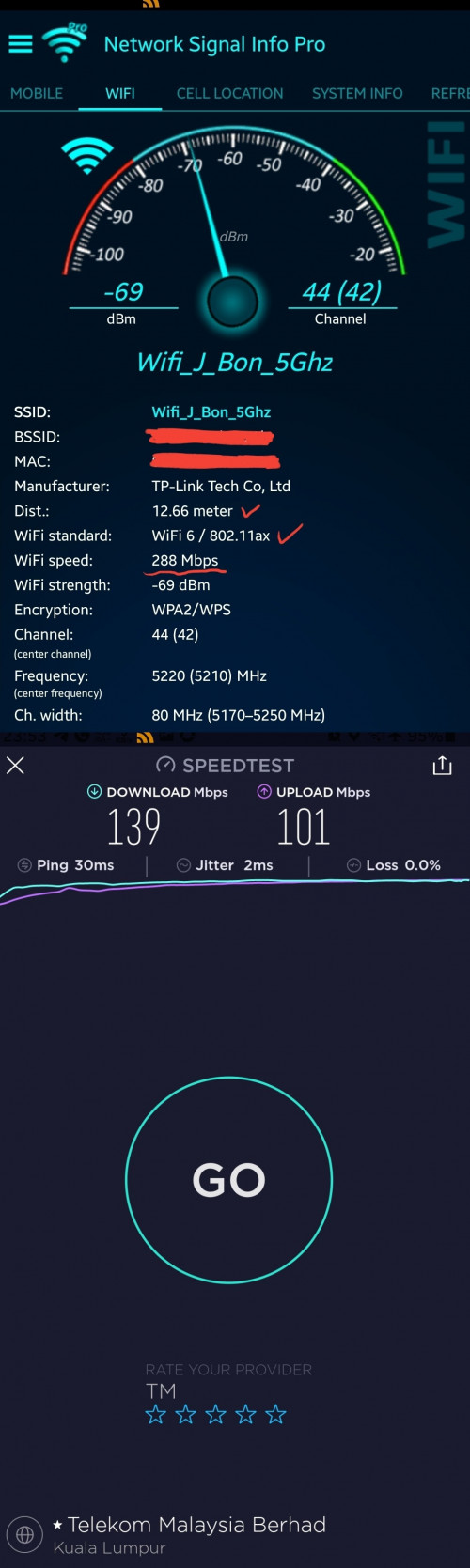
just to show you, if i switch off both M9+ at my first floor and rely on the nearest X60 at ground floor living room, i'm at first floor master bedroom and here only what speed i get. (wifi link speed left 288mbps thus only can carry 140mbps of unifi speed)

user posted image

This post has been edited by shahie: Jan 6 2021, 12:00 AM
myroy
post Jan 6 2021, 05:33 PM

BIG BOSS
******
Senior Member
1,202 posts

Joined: Dec 2010
From: HELL


QUOTE(blacktubi @ Jan 5 2021, 07:15 PM)
https://www.youtube.com/watch?v=TOFEVnjbBDc

I suppose this is what you're looking for.
*
Thank you for the link
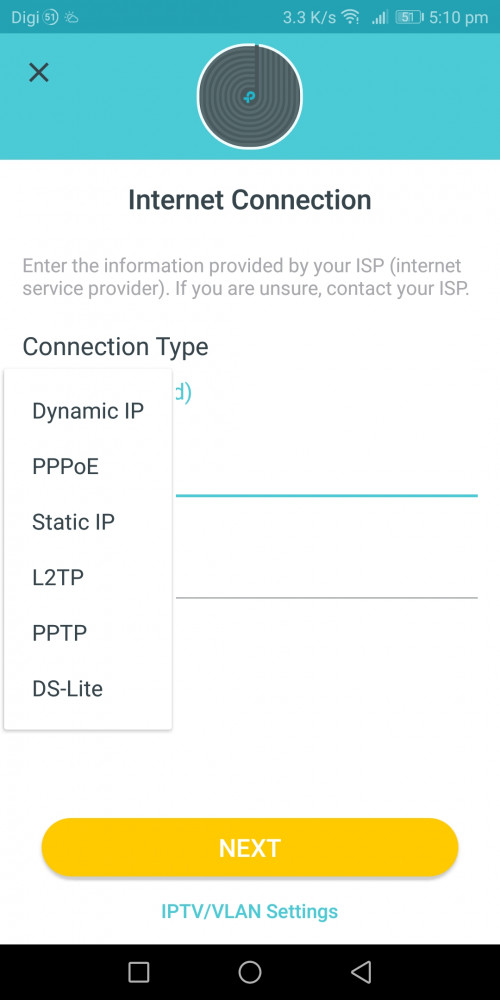
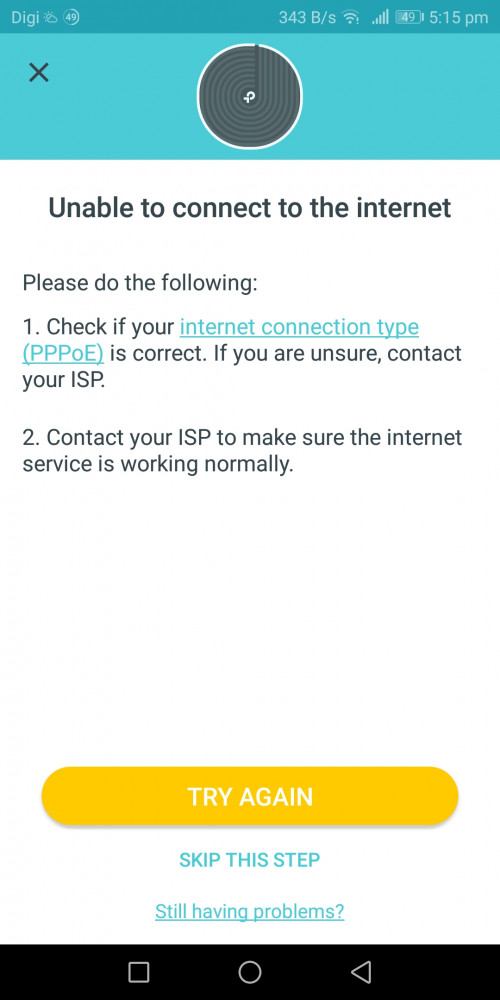
But now after i select pppoe enter my username and password still got error
*I just reset my pppoe password from tm and now have new password

user posted image

user posted image


blacktubi
post Jan 6 2021, 06:18 PM

-
Group Icon
Elite
8,416 posts

Joined: Jul 2008

QUOTE(myroy @ Jan 6 2021, 05:33 PM)
Thank you for the link
But now after i select pppoe enter my username and password still got error
*I just reset my pppoe password from tm and now have new password

user posted image

user posted image
*
Make sure it's a direct connection from LAN1 of modem to any port of main Deco.

Select Unifi profile at IPTV/VLAN settings on the app.
myroy
post Jan 6 2021, 07:23 PM

BIG BOSS
******
Senior Member
1,202 posts

Joined: Dec 2010
From: HELL


QUOTE(blacktubi @ Jan 6 2021, 06:18 PM)
Make sure it's a direct connection from LAN1 of modem to any port of main Deco.

Select Unifi profile at IPTV/VLAN settings on the app.
*
Wow so i miss this IPTV/VLAN settings
Thanks alot...
In video i tot it NEXT, but instead IPTV/VLAN settings
myroy
post Jan 12 2021, 01:21 PM

BIG BOSS
******
Senior Member
1,202 posts

Joined: Dec 2010
From: HELL


I have another issue with Tp-link Deco M4
the past week I only use one unit (living room)


1) yesterday when I set up the second unit at 1st floor (main bedroom)
it couldn't found any my main deco (ground floor - living room)

Attached Image
Attached Image


2) after following the suggestion from tp guide, I put the second deco at my main deco (ground floor - living room)
The connection was successful and manage to add my second deco.
Attached Image
Attached Image


So i plug out my second deco and put it back at 1st floor (main bedroom), now my led turn into BLINKING RED. As per TP-link deco suggestion, they ask me to reset. But then it loops back to my point number 1.
Attached Image


Before this, by only using main deco (living room) - I still manage to get internet connection if I'm staying at 1st floor (main bedroom)


Any suggestion?

This post has been edited by myroy: Jan 12 2021, 01:21 PM
shahie
post Jan 12 2021, 02:21 PM

On my way
****
Junior Member
506 posts

Joined: Feb 2005
QUOTE(myroy @ Jan 12 2021, 01:21 PM)
I have another issue with Tp-link Deco M4
the past week I only use one unit (living room)
1) yesterday when I set up the second unit at 1st floor (main bedroom)
it couldn't found any my main deco (ground floor - living room)

Attached Image
Attached Image
2) after following the suggestion from tp guide, I put the second deco at  my main deco (ground floor - living room)
The connection was successful and manage to add my second deco.
Attached Image
Attached Image
So i plug out my second deco and put it back at 1st floor (main bedroom), now my led turn into BLINKING RED. As per TP-link deco suggestion, they ask me to reset. But then it loops back to my point number 1.
Attached Image
Before this, by only using main deco (living room) -  I still manage to get internet connection if I'm staying at 1st floor (main bedroom)
Any suggestion?
*
use the network apps tool, check the wifi strength & link speed at the first floor, near place you plan to put your 2nd deco. worry the signal there is too weak until second deco can't detect the signal.

myroy
post Jan 12 2021, 09:55 PM

BIG BOSS
******
Senior Member
1,202 posts

Joined: Dec 2010
From: HELL


QUOTE(shahie @ Jan 12 2021, 02:21 PM)
use the network apps tool, check the wifi strength & link speed at the first floor, near place you plan to put your 2nd deco. worry the signal there is too weak until second deco can't detect the signal.
*
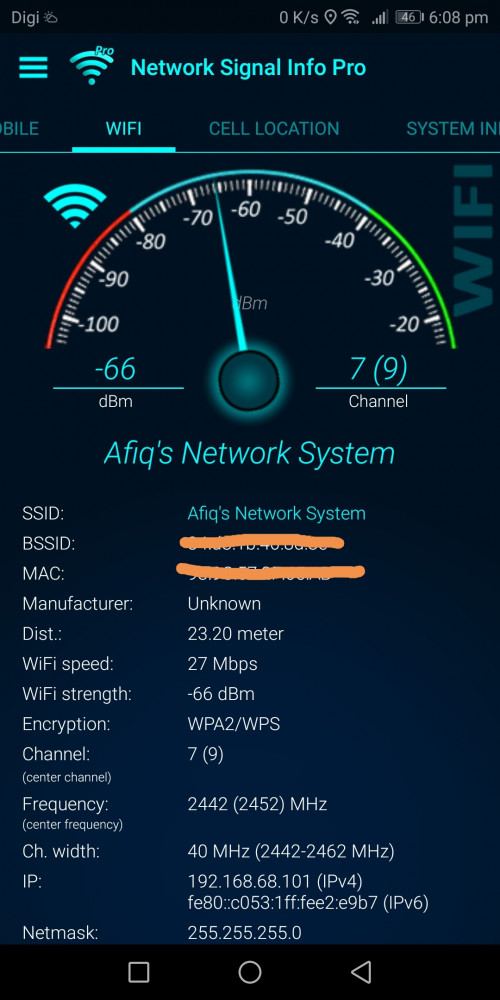
My wifi strength at 1st floor quite good

user posted image
taqu
post Jan 13 2021, 12:13 AM

Enthusiast
*****
Junior Member
864 posts

Joined: May 2005
If you put the second Deco next to the first one & reboot, is is still red?
shahie
post Jan 13 2021, 06:16 AM

On my way
****
Junior Member
506 posts

Joined: Feb 2005
QUOTE(myroy @ Jan 12 2021, 09:55 PM)
My wifi strength at 1st floor quite good

user posted image
*
As you can see, mostly wifi 5 max is 866mbps link speed, and now left at 27mbps, no wonder your second deco half die to work with. maybe ethernet backhaul or place to the other location where you can get at least 200mbps link speed for your second deco to performed.

This post has been edited by shahie: Jan 13 2021, 06:16 AM
myroy
post Jan 13 2021, 12:32 PM

BIG BOSS
******
Senior Member
1,202 posts

Joined: Dec 2010
From: HELL


QUOTE(shahie @ Jan 13 2021, 06:16 AM)
As you can see, mostly wifi 5 max is 866mbps link speed, and now left at 27mbps, no wonder your second deco half die to work with. maybe ethernet backhaul or place to the other location where you can get at least 200mbps link speed for your second deco to performed.
*
When I sit next to my main deco i can only get 150Mbps
Attached Image


Here is my house diagram, may I know how do I get my WIFI up to the 1st floor?

Attached Image

shahie
post Jan 13 2021, 03:04 PM

On my way
****
Junior Member
506 posts

Joined: Feb 2005
QUOTE(myroy @ Jan 13 2021, 12:32 PM)
When I sit next to my main deco i can only get 150Mbps
Attached Image
Here is my house diagram, may I know how do I get my WIFI up to the 1st floor?

Attached Image
*
are you working with 5Ghz band? seem like you on 2.4Ghz band. the best way is try to off 2.4ghz band first.
myroy
post Jan 16 2021, 06:22 PM

BIG BOSS
******
Senior Member
1,202 posts

Joined: Dec 2010
From: HELL


QUOTE(shahie @ Jan 13 2021, 03:04 PM)
are you working with 5Ghz band? seem like you on 2.4Ghz band. the best  way is try to off 2.4ghz band first.
*
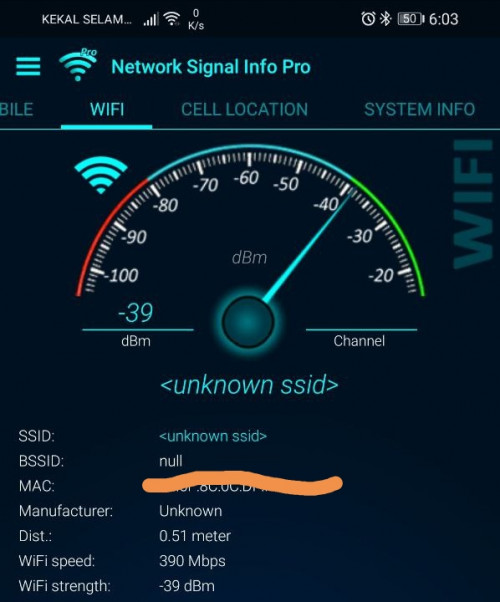
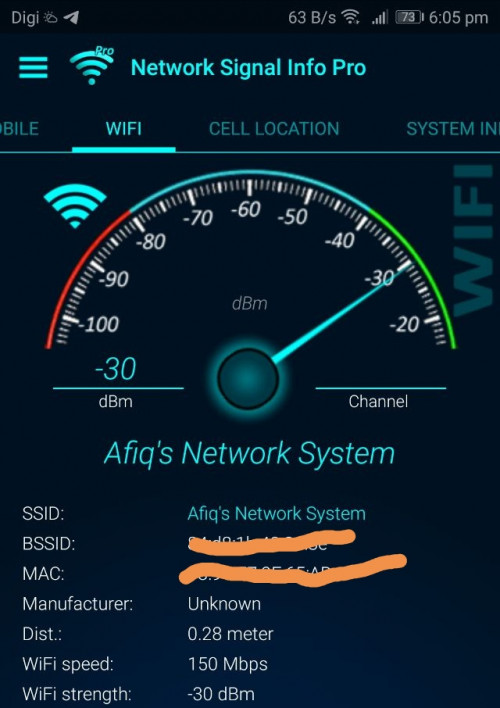
I have both 2.4 & 5 device right now
May i know why my wifi speed for 2.4G = 150Mbps
And
Wifi speed for 5G = 390Mbps


Please note that both device is just 0.5meter from main deco

user posted image
user posted image


shahie
post Jan 16 2021, 06:32 PM

On my way
****
Junior Member
506 posts

Joined: Feb 2005
QUOTE(myroy @ Jan 16 2021, 06:22 PM)
I have both 2.4 & 5 device right now
May i know why my wifi speed for 2.4G = 150Mbps
And
Wifi speed for 5G = 390Mbps
Please note that both device is just 0.5meter from main deco

user posted image
user posted image
*
that is why, can't fully 100% base on advertised speed. All subjected to the nearby interference. i'm not sure how wifi backhaul works since i'm using ethernet backhaul but just to tell you that i did try to pull my lan cable on my x60 second deco and let they switch to wifi backhaul, with wifi link speed of 520mbps coming to the second deco, i only get unifi speed of 200mbps at most and i put it back my lan cable, let they switch back to ethernet backhaul, than i can get back unifi speed 460 - 500mbps. my conclusion, and i always mentioned, use ethernet backhaul if you concern on what speed you get but just use wifi backhaul if you just need the internet connection.

This post has been edited by shahie: Jan 16 2021, 06:43 PM
afif92
post Jan 17 2021, 02:20 AM

Casual
***
Junior Member
374 posts

Joined: Mar 2010
QUOTE(shahie @ Jan 16 2021, 06:32 PM)
that is why, can't fully 100% base on advertised speed. All subjected to the nearby interference. i'm not sure how wifi backhaul works since i'm using ethernet backhaul but just to tell you that i did try to pull my lan cable on my x60 second deco and let they switch to wifi backhaul, with wifi link speed of 520mbps coming to the second deco, i only get unifi speed of 200mbps at most and i put it back my lan cable, let they switch back to ethernet backhaul, than i can get back unifi speed 460 - 500mbps. my conclusion, and i always mentioned, use ethernet backhaul if you concern on what speed you get but just use wifi backhaul if you just need the internet connection.
*
I'm using XT8 can get more than 500Mbps with wifi backhaul because it is dedicated and not shared with device. So, if want speed plus coverage, find mesh with dedicated backhaul.
shahie
post Jan 17 2021, 06:09 AM

On my way
****
Junior Member
506 posts

Joined: Feb 2005
QUOTE(afif92 @ Jan 17 2021, 02:20 AM)
I'm using XT8 can get more than 500Mbps with wifi backhaul because it is dedicated and not shared with device. So, if want speed plus coverage, find mesh with dedicated backhaul.
*
may i know what is your plan package? the way i can see on below review, impossible you can get 1:1 on wifi backhaul.

https://youtu.be/_0qTxbb_zMc

This post has been edited by shahie: Jan 17 2021, 06:10 AM
afif92
post Jan 17 2021, 07:31 AM

Casual
***
Junior Member
374 posts

Joined: Mar 2010
QUOTE(shahie @ Jan 17 2021, 06:09 AM)
may i know what is your plan package? the way i can see on below review, impossible you can get 1:1 on wifi backhaul.

https://youtu.be/_0qTxbb_zMc
*
My package is 800Mbps.

It is not 1:1 on wireless speed as we know mesh is same like repeater that only can serve half speed from main router.

Although it is half speed at node but it is half from full speed 4804Mbps when enable 160MHz as it is Wifi 6 4x4..

The node connect to main router roughly about 1700Mbps to 2300Mbps based on the distance. (1 wall blocking and different floor from main)

If put more distance, maybe can only get 800 to 1200Mbps but still can receive more than 300Mbps. (2 wall blocking and different floor from main)
shahie
post Jan 17 2021, 11:31 AM

On my way
****
Junior Member
506 posts

Joined: Feb 2005
QUOTE(afif92 @ Jan 17 2021, 07:31 AM)
My package is 800Mbps.

It is not 1:1 on wireless speed as we know mesh is same like repeater that only can serve half speed from main router.

Although it is half speed at node but it is half from full speed 4804Mbps when enable 160MHz as it is Wifi 6 4x4..

The node connect to main router roughly about 1700Mbps to 2300Mbps based on the distance. (1 wall blocking and different floor from main)

If put more distance, maybe can only get 800 to 1200Mbps but still can receive more than 300Mbps. (2 wall blocking and different floor from main)
*
oh...800mbps package than justified enough lah as long as you happy by not getting your full subscription speed of 800mbps wirelessly (unless you seat next to your router all the times) after using wifi backhaul.
afif92
post Jan 17 2021, 05:05 PM

Casual
***
Junior Member
374 posts

Joined: Mar 2010
QUOTE(shahie @ Jan 17 2021, 11:31 AM)
oh...800mbps package than justified enough lah as long as you happy by not getting your full subscription speed of 800mbps wirelessly (unless you seat next to your router all the times) after using wifi backhaul.
*
I can not brain your statement.. I'm happy not getting full subs speed?

This post has been edited by afif92: Jan 17 2021, 05:07 PM
shahie
post Jan 17 2021, 08:20 PM

On my way
****
Junior Member
506 posts

Joined: Feb 2005
QUOTE(afif92 @ Jan 17 2021, 05:05 PM)
I can not brain your statement.. I'm happy not getting full subs speed?
*
what i mean you get 500 over 800 on wifi is ok for you right?. but mine i still need full 100% of my subscription speed on wifi that is why i opt for ethernet backhaul.
Alan Yee
post Feb 19 2021, 03:25 PM

Regular
******
Senior Member
1,031 posts

Joined: May 2008


QUOTE(afif92 @ Jan 17 2021, 07:31 AM)
My package is 800Mbps.

It is not 1:1 on wireless speed as we know mesh is same like repeater that only can serve half speed from main router.

Although it is half speed at node but it is half from full speed 4804Mbps when enable 160MHz as it is Wifi 6 4x4..

The node connect to main router roughly about 1700Mbps to 2300Mbps based on the distance. (1 wall blocking and different floor from main)

If put more distance, maybe can only get 800 to 1200Mbps but still can receive more than 300Mbps. (2 wall blocking and different floor from main)
*
How about I use 2 units of Tenda AC23, which is AC2100 router, WiFi AC can goes up to 866 Mbps + 866 Mbps = 1733 Mbps, should I able to get at least 250 Mbps of speed at second floor if I set 1 unit Tenda AC23 as main router, and another one set as repeater at second floor?
Will the WiFi AC signal repeating in between 2 Tenda AC23 router utilize the 866 + 866?

I ask Tenda Malaysia technical, and they cannot commit me the speed, they say normally upstairs, the internet speed will cut at least 30%, meaning if now I got a 300 Mbps plan, I max can only get 200 Mbps, and may become much slower, even though this Tenda AC23 have 4x4 MIMO on WiFi AC for the speed of 1733 Mbps.

I think I should bought another unit of Tenda AC23 to test ya? Then this will be among the cheapest mesh/extender system that operate at 1733 Mbps for Wifi 5Ghz?

afif92
post Feb 19 2021, 06:41 PM

Casual
***
Junior Member
374 posts

Joined: Mar 2010
QUOTE(Alan Yee @ Feb 19 2021, 03:25 PM)
How about I use 2 units of Tenda AC23, which is AC2100 router, WiFi AC can goes up to 866 Mbps + 866 Mbps = 1733 Mbps, should I able to get at least 250 Mbps of speed at second floor if I set 1 unit Tenda AC23 as main router, and another one set as repeater at second floor?
Will the WiFi AC signal repeating in between 2 Tenda AC23 router utilize the 866 + 866?

I ask Tenda Malaysia technical, and they cannot commit me the speed, they say normally upstairs, the internet speed will cut at least 30%, meaning if now I got a 300 Mbps plan, I max can only get 200 Mbps, and may become much slower, even though this Tenda AC23 have 4x4 MIMO on WiFi AC for the speed of 1733 Mbps.

I think I should bought another unit of Tenda AC23 to test ya? Then this will be among the cheapest mesh/extender system that operate at 1733 Mbps for Wifi 5Ghz?
*
If 300Mbps, I think it maybe can go full speed if only your device connected at node and for main router, only the node is connected. Multiple devices connected to both and node surely will give drop in terms of speed but I don't know how much because it depends on the location, number of walls and shape of the house.
Alan Yee
post Feb 20 2021, 12:32 PM

Regular
******
Senior Member
1,031 posts

Joined: May 2008


QUOTE(afif92 @ Feb 19 2021, 06:41 PM)
If 300Mbps, I think it maybe can go full speed if only your device connected at node and for main router, only the node is connected. Multiple devices connected to both and node surely will give drop in terms of speed but I don't know how much because it depends on the location, number of walls and shape of the house.
*
I understand, speed will not be at full if not connect to the main router.
Still, these networking equipment guy and some internet video keep saying mesh WiFi will maintain the internet speed.
Well, I guess if ISP speed is below 100Mbps, then their claim is true, but not true for ISP plan that is 300Mbps or 500Mbps.
Or it is only true when connect to the first main node of the mesh WiFi, and speed drop if connect to the pairing node, second node or third node.
I think I either accept what I have now with the repeater solution, or try to test with another Tenda AC23.
Alan Yee
post Feb 22 2021, 11:44 AM

Regular
******
Senior Member
1,031 posts

Joined: May 2008


Got anyone tried the D-Link DIR-2150 AC2100 Mesh router + D-Link DRA-2060 Mesh enabled extender?
Suppose the performance is better than TP-Link Deco M4?
Because Deco M4 is only AC1200, the D-Link combination are at least AC2100 + AC2000 setup?
thomas2
post Apr 4 2021, 07:16 PM

New Member
*
Junior Member
30 posts

Joined: Aug 2005


for maxis fiber, do u buy mesh from other or do u add on with their AIRTIES Air4830 Mesh WiFi??

any thought?

iZuDeeN
post Apr 4 2021, 07:49 PM

Look at all my stars!!
*******
Senior Member
3,466 posts

Joined: Jan 2003
From: PJ, Malaysia
I'm using Deco P9 which has ac1200 and PLC

So far all around the house.. 2 1/2 stories can get good coverage on a 3 unit

Bit pricier because of the PLC but worth it as mesh doesn't work well if the WiFi signal is poor to begin with
cloudstrifes
post Apr 9 2021, 03:47 PM

Casual
***
Junior Member
464 posts

Joined: Jan 2010
Sorry I’m new the mesh. I would like to understand how does mesh work.

What’s the difference between range extender and mesh WiFi?

Correct me if I’m wrong. Basically mesh WiFi gets connection from the main node and rebroadcast the WiFi?
sitescope
post Apr 10 2021, 08:20 AM

Look at all my stars!!
*******
Senior Member
4,494 posts

Joined: Oct 2013
QUOTE(Alan Yee @ Feb 19 2021, 03:25 PM)
How about I use 2 units of Tenda AC23, which is AC2100 router, WiFi AC can goes up to 866 Mbps + 866 Mbps = 1733 Mbps, should I able to get at least 250 Mbps of speed at second floor if I set 1 unit Tenda AC23 as main router, and another one set as repeater at second floor?
Will the WiFi AC signal repeating in between 2 Tenda AC23 router utilize the 866 + 866?

I ask Tenda Malaysia technical, and they cannot commit me the speed, they say normally upstairs, the internet speed will cut at least 30%, meaning if now I got a 300 Mbps plan, I max can only get 200 Mbps, and may become much slower, even though this Tenda AC23 have 4x4 MIMO on WiFi AC for the speed of 1733 Mbps.

I think I should bought another unit of Tenda AC23 to test ya? Then this will be among the cheapest mesh/extender system that operate at 1733 Mbps for Wifi 5Ghz?
*
If not mistaken, repeater will cut 50% frm your main spd.
To get 100% spd on 2nd router u need to use LAN cable n configure ur 2nd router as another AP

Even using deco m5/m9, wifi backhaul spd also affected if too many blockage
captainwifi
post May 22 2021, 12:33 PM

Getting Started
**
Junior Member
72 posts

Joined: Apr 2011
Does the Deco M4's ethernet backhaul works?

taqu
post May 24 2021, 10:15 PM

Enthusiast
*****
Junior Member
864 posts

Joined: May 2005
QUOTE(captainwifi @ May 22 2021, 12:33 PM)
Does the Deco M4's ethernet backhaul works?
*
Yes, using 1 M5 & 2 M4s
spreeeee
post Jun 3 2021, 05:16 PM

♠ . ♥ . ♣ . ♦
*******
Senior Member
3,812 posts

Joined: Apr 2009
From: West Malaysia

QUOTE(taqu @ May 24 2021, 10:15 PM)
Yes, using 1 M5 & 2 M4s
*
trying to understand how to setup/install the deco m4, from the video link guide below:

https://unifi.com.my/unifi-experience

does the main node remain plugged-in to the LAN2 wifi router?
PRSXFENG
post Jun 3 2021, 06:30 PM

Look at all my stars!!
*******
Senior Member
2,611 posts

Joined: Nov 2020


QUOTE(spreeeee @ Jun 3 2021, 05:16 PM)
trying to understand how to setup/install the deco m4, from the video link guide below:

https://unifi.com.my/unifi-experience

does the main node remain plugged-in to the LAN2 wifi router?
*
Their setup guide is not great.
Try one that sets it up in PPPoE mode
spreeeee
post Jun 3 2021, 08:43 PM

♠ . ♥ . ♣ . ♦
*******
Senior Member
3,812 posts

Joined: Apr 2009
From: West Malaysia

QUOTE(PRSXFENG @ Jun 3 2021, 06:30 PM)
Their setup guide is not great.
Try one that sets it up in PPPoE mode
*
Appreciate to further guide.. thanks !
radiohead
post Jul 8 2021, 10:53 AM

18 + 5
******
Senior Member
1,484 posts

Joined: Jan 2003
From: radioteque
Hi. Want to upgrade my old router wifi4 to wifi6
Archer ax73. Need 4 wired to tv, astro, pc, reserve 1.
Next mesh node to cover the back of my home.
Do i need to connect the mesh with ethernet or wifi to router?

Recommend me mesh 1/2 node with wifi6
radiohead
post Jul 8 2021, 12:12 PM

18 + 5
******
Senior Member
1,484 posts

Joined: Jan 2003
From: radioteque
https://community.tp-link.com/en/home/stories/detail/1322

OneMeshâ„¢ and Deco Mesh are two whole home mesh Wi-Fi solutions provided by TP-Link. Though both support mesh networks, they are used by different products and are not compatible with each other.
***

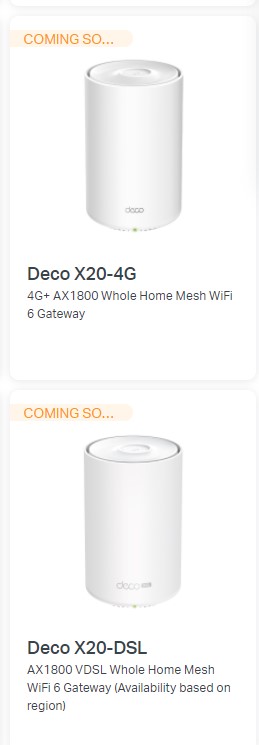
SO better i find mesh router with 4 lan . for tplink all are coming soon

user posted image
hammerjit
post Jul 8 2021, 05:20 PM

Getting Started
**
Junior Member
217 posts

Joined: Aug 2007
From: Melaka, Malaysia


so basically come back to first post, its ok to use any router that you have (like im using tenda-ac18), and then i put another mesh unit at upstairs connected with LAN?
- The ssid shared the same with the ac18 router?
- Then In future if i feel need to install another unit mesh, but i dont have wired, can i connect the second unit by wifi alone?
XweienX
post Sep 29 2021, 05:38 PM

Casual
***
Junior Member
455 posts

Joined: Aug 2012


Hi everyone, when I check maxis fibre plan they give their "next-gen wifi 6 router", under the highlights it says there is built-in "Easy Mesh" technology.

Does this mean when I want to use 3rd party mesh units (e.g. Deco), I don't have to connect the first AP to the router by LAN? Can straight away put the router and Decos in the same "mesh" with same ID & password?

Or either way still need LAN connection to router (if lets say I want to keep the router and use both Decos as AP)? Thanks sifus
PRSXFENG
post Sep 29 2021, 05:49 PM

Look at all my stars!!
*******
Senior Member
2,611 posts

Joined: Nov 2020


QUOTE(XweienX @ Sep 29 2021, 05:38 PM)
Hi everyone, when I check maxis fibre plan they give their "next-gen wifi 6 router", under the highlights it says there is built-in "Easy Mesh" technology.

Does this mean when I want to use 3rd party mesh units (e.g. Deco), I don't have to connect the first AP to the router by LAN? Can straight away put the router and Decos in the same "mesh" with same ID & password?

Or either way still need LAN connection to router (if lets say I want to keep the router and use both Decos as AP)? Thanks sifus
*
Yes, but it will NOT work with Deco, only other mesh units compatible with Easy Mesh

TP-Link OneMesh and Deco mesh is proprietary, same goes with Asus AiMesh

Only mesh nodes so far I found locally that support Easy Mesh is D-Link COVR
PRSXFENG
post Sep 29 2021, 05:51 PM

Look at all my stars!!
*******
Senior Member
2,611 posts

Joined: Nov 2020


QUOTE(hammerjit @ Jul 8 2021, 05:20 PM)
so basically come back to first post, its ok to use any router that you have (like im using tenda-ac18), and then i put another mesh unit at upstairs connected with LAN?
- The ssid shared the same with the ac18 router?
- Then In future if i feel need to install another unit mesh, but i dont have wired, can i connect the second unit by wifi alone?
*
it's best to only use a mesh

so pick either
modem - router (tenda)
or
modem - mesh

as for the 2nd yes but the 2nd unit will have less peformance since itself uses wifi to connect back to the main unit, reducing speeds
XweienX
post Sep 29 2021, 05:57 PM

Casual
***
Junior Member
455 posts

Joined: Aug 2012


QUOTE(PRSXFENG @ Sep 29 2021, 05:49 PM)
Yes, but it will NOT work with Deco, only other mesh units compatible with Easy Mesh

TP-Link OneMesh and Deco mesh is proprietary, same goes with Asus AiMesh

Only mesh nodes so far I found locally that support Easy Mesh is D-Link COVR
*
ooooo, thanks for letting me know about this!
hammerjit
post Sep 30 2021, 09:12 AM

Getting Started
**
Junior Member
217 posts

Joined: Aug 2007
From: Melaka, Malaysia


QUOTE(PRSXFENG @ Sep 29 2021, 05:49 PM)
Yes, but it will NOT work with Deco, only other mesh units compatible with Easy Mesh

TP-Link OneMesh and Deco mesh is proprietary, same goes with Asus AiMesh

Only mesh nodes so far I found locally that support Easy Mesh is D-Link COVR
*
thank you for replying and clearing my situation.

Anyone can recommend 2 pack mesh devices which support 500Mbps

modem - lan cable -> mesh 1 (also as router) - lan cable -> mesh 2

so means mesh 1 should have 2 rj45 ports? one from modem another to mesh 2
jagadis
post Sep 30 2021, 09:20 AM

Aspire to Inspire before we expire
******
Senior Member
1,107 posts

Joined: Jul 2007
From: 192.0.0.1


what's the best setup for maxis 300mbps. Do I need a Mesh setup?

I live in a condo and don't really have signal issues with my current, 2-year-old maxis router. Just looking to get a more stable and secure connection after upgrading to 300mbps.
cklove96
post Oct 8 2021, 12:10 AM

hehe
*****
Junior Member
706 posts

Joined: Feb 2017

QUOTE(blacktubi @ Jan 5 2021, 08:15 PM)
https://www.youtube.com/watch?v=TOFEVnjbBDc

I suppose this is what you're looking for.
*
can i plug lan from pc to the mesh (just like pc lan to router), i saw unifi tv need to configure in app, do i need to configure anything if i plug pc to the mesh? thanks.

PS: mesh ppoE mode

This post has been edited by cklove96: Oct 8 2021, 12:10 AM
blacktubi
post Oct 8 2021, 12:14 AM

-
Group Icon
Elite
8,416 posts

Joined: Jul 2008

QUOTE(cklove96 @ Oct 8 2021, 12:10 AM)
can i plug lan from pc to the mesh (just like pc lan to router), i saw unifi tv need to configure in app, do i need to configure anything if i plug pc to the mesh? thanks.

PS: mesh ppoE mode
*
Should be plug n play
cklove96
post Oct 8 2021, 12:17 AM

hehe
*****
Junior Member
706 posts

Joined: Feb 2017

QUOTE(blacktubi @ Oct 8 2021, 01:14 AM)
Should be plug n play
*
yes find answer from tplink QnA section, thanks for quick replied also.
DDSFan8
post Oct 9 2021, 02:45 PM

Regular
******
Senior Member
1,278 posts

Joined: May 2005


Is setting a new wireless router easy ? Because I plan to change to a new wireless router after 3 years plus.

Someone please advice.


Change to:
| Lo-Fi Version
0.0534sec    0.41    6 queries    GZIP Disabled
Time is now: 14th December 2025 - 10:37 PM