

Anyone got link how to setup my tp link deco m5?
Yes i found in youtube but does not show properly how to setup with unifi (modem - mesh) and when do i need to put my unifi username & password
Tech Support Mesh wifi, Confused ?_?
Tech Support Mesh wifi, Confused ?_?
|
|
 Jan 5 2021, 04:30 PM Jan 5 2021, 04:30 PM
Return to original view | Post
#1
|
 
Senior Member
1,202 posts Joined: Dec 2010 From: HELL  
|
Anyone got link how to setup my tp link deco m5?
Yes i found in youtube but does not show properly how to setup with unifi (modem - mesh) and when do i need to put my unifi username & password |
|
|
|
|
|
Jan 6 2021, 05:33 PM
Return to original view | IPv6 | Post
#2
|
|
Senior Member
1,202 posts Joined: Dec 2010 From: HELL
|
QUOTE(blacktubi @ Jan 5 2021, 07:15 PM) Thank you for the link But now after i select pppoe enter my username and password still got error *I just reset my pppoe password from tm and now have new password 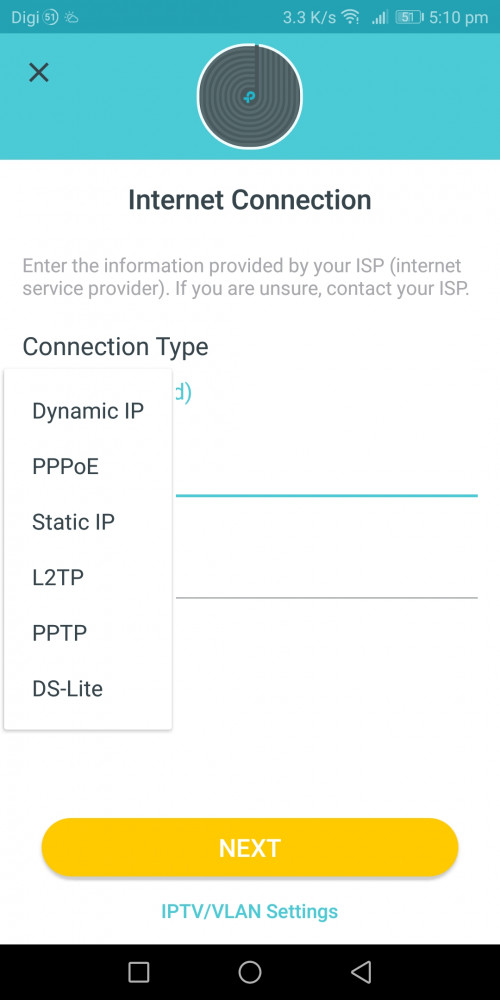 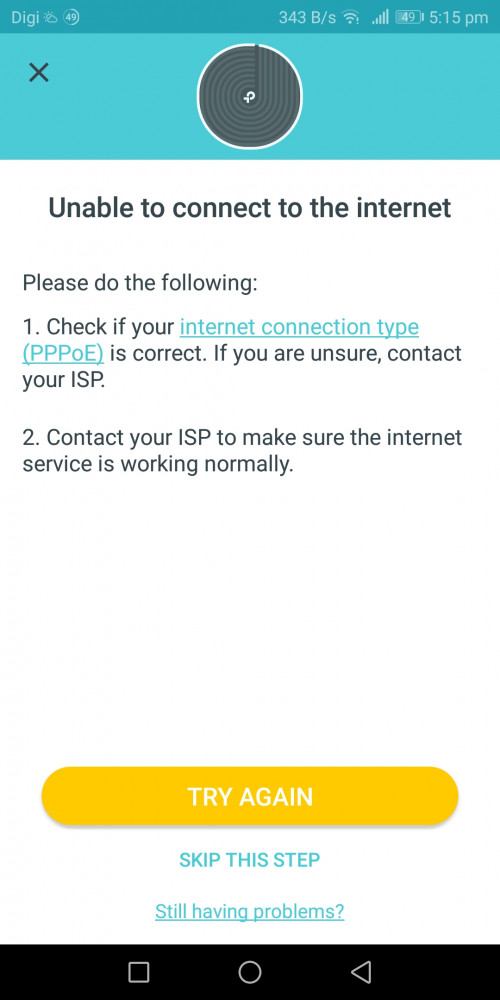 |
|
|
Jan 6 2021, 07:23 PM
Return to original view | Post
#3
|
|
Senior Member
1,202 posts Joined: Dec 2010 From: HELL
|
QUOTE(blacktubi @ Jan 6 2021, 06:18 PM) Make sure it's a direct connection from LAN1 of modem to any port of main Deco. Wow so i miss this IPTV/VLAN settingsSelect Unifi profile at IPTV/VLAN settings on the app.  Thanks alot... In video i tot it NEXT, but instead IPTV/VLAN settings |
|
|
Jan 12 2021, 01:21 PM
Return to original view | Post
#4
|
|
Senior Member
1,202 posts Joined: Dec 2010 From: HELL
|
I have another issue with Tp-link Deco M4
the past week I only use one unit (living room) 1) yesterday when I set up the second unit at 1st floor (main bedroom) it couldn't found any my main deco (ground floor - living room) 

2) after following the suggestion from tp guide, I put the second deco at my main deco (ground floor - living room) The connection was successful and manage to add my second deco. 

So i plug out my second deco and put it back at 1st floor (main bedroom), now my led turn into BLINKING RED. As per TP-link deco suggestion, they ask me to reset. But then it loops back to my point number 1. 
Before this, by only using main deco (living room) - I still manage to get internet connection if I'm staying at 1st floor (main bedroom) Any suggestion? This post has been edited by myroy: Jan 12 2021, 01:21 PM |
|
|
Jan 12 2021, 09:55 PM
Return to original view | Post
#5
|
|
Senior Member
1,202 posts Joined: Dec 2010 From: HELL
|
QUOTE(shahie @ Jan 12 2021, 02:21 PM) use the network apps tool, check the wifi strength & link speed at the first floor, near place you plan to put your 2nd deco. worry the signal there is too weak until second deco can't detect the signal. My wifi strength at 1st floor quite good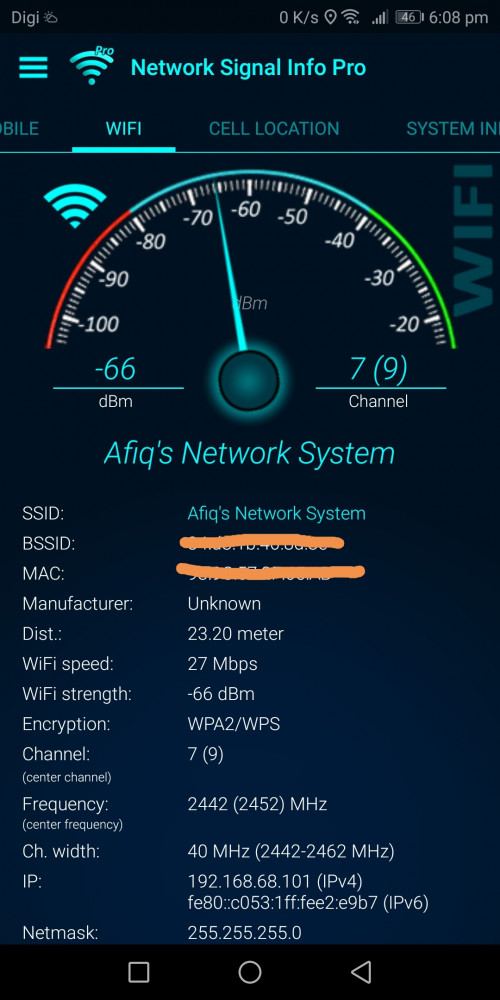 |
|
|
Jan 13 2021, 12:32 PM
Return to original view | Post
#6
|
|
Senior Member
1,202 posts Joined: Dec 2010 From: HELL
|
QUOTE(shahie @ Jan 13 2021, 06:16 AM) As you can see, mostly wifi 5 max is 866mbps link speed, and now left at 27mbps, no wonder your second deco half die to work with. maybe ethernet backhaul or place to the other location where you can get at least 200mbps link speed for your second deco to performed. When I sit next to my main deco i can only get 150Mbps
Here is my house diagram, may I know how do I get my WIFI up to the 1st floor? 
|
|
|
Jan 16 2021, 06:22 PM
Return to original view | Post
#7
|
|
Senior Member
1,202 posts Joined: Dec 2010 From: HELL
|
QUOTE(shahie @ Jan 13 2021, 03:04 PM) are you working with 5Ghz band? seem like you on 2.4Ghz band. the best way is try to off 2.4ghz band first. I have both 2.4 & 5 device right nowMay i know why my wifi speed for 2.4G = 150Mbps And Wifi speed for 5G = 390Mbps Please note that both device is just 0.5meter from main deco 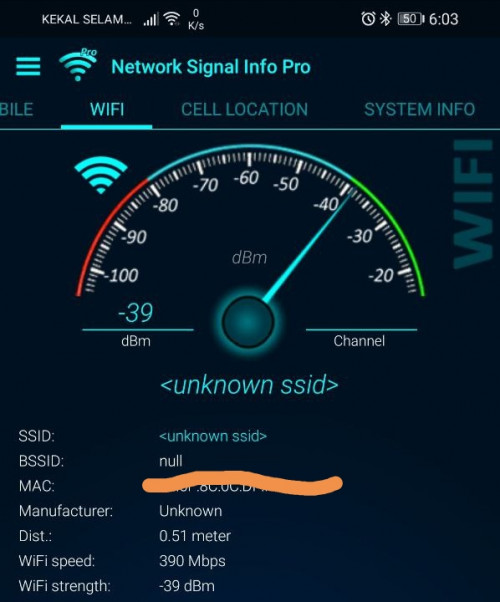 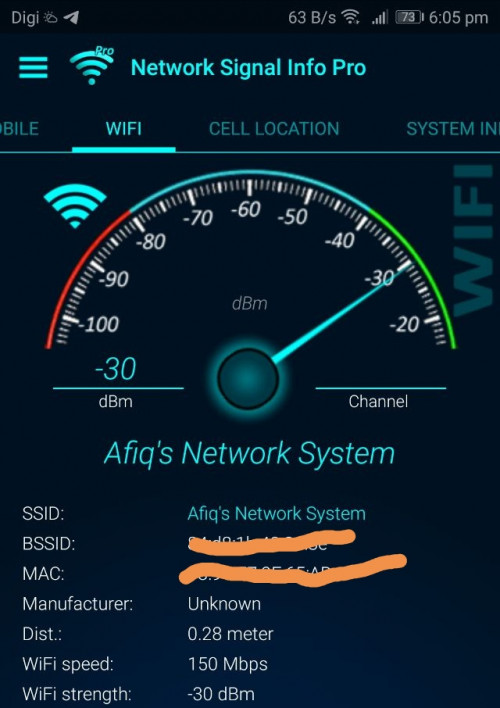 |
| Change to: |  0.0300sec 0.0300sec
 0.79 0.79
 7 queries 7 queries
 GZIP Disabled GZIP Disabled
Time is now: 15th December 2025 - 11:38 PM |
 Quote
Quote