Welcome Guest ( Log In | Register )

5 Pages < 1 2 3 4 5 >Bottom

Outline · [ Standard ] · Linear+

Tech Support Mesh wifi, Confused ?_?

views
     
shahie
post Jan 5 2021, 09:38 PM

On my way
****
Junior Member
506 posts

Joined: Feb 2005
QUOTE(slec @ Jun 1 2020, 04:15 PM)
Hi guys for a 4000 sqft double storey house, a few questions to ask:

1. just use back original modem and router from TM and get a mesh either ASUS Zenwifi CT8/ TP-Link Deco P9 would solve the consistent connection around whole house?

2. The mesh is to be connected to the modem or the router?

3. any benefit or requirement to change the original modem and router from TM?
*
1. if you just need the internet connection, don't care what speed you get on wifi, than just use it. otherwise you need at least 3 pack of mesh X60 or higher spec for your home. mine just 1600sq ft but 2 storey, i use mikrotik RB4011igs, 2 pack mesh X60 and 2 pack Mesh M9 plus with wired connection.

2. Mesh must be connected to modem (BTU/ONU) or main router (wifi or wired router or 2 in 1)

3. More reliable and consistent performance especially those quad core chipset with higher RAM wifi router, to cater for the higher demand of speed and the number of connections.

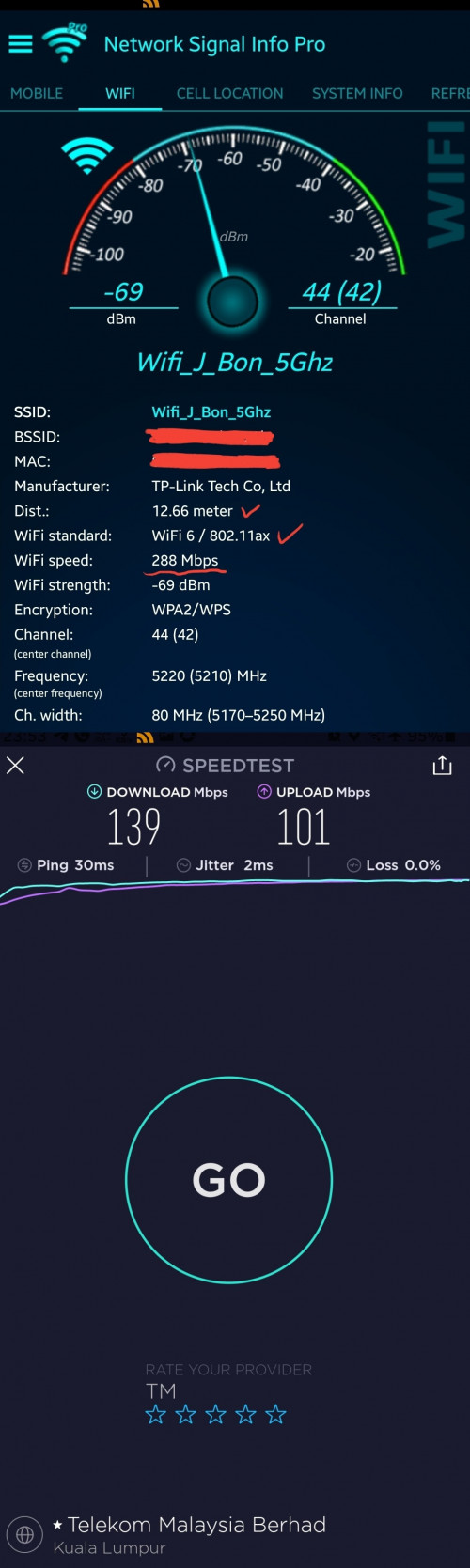
just to show you, if i switch off both M9+ at my first floor and rely on the nearest X60 at ground floor living room, i'm at first floor master bedroom and here only what speed i get. (wifi link speed left 288mbps thus only can carry 140mbps of unifi speed)
user posted image

This post has been edited by shahie: Jan 6 2021, 12:00 AM
myroy
post Jan 6 2021, 05:33 PM

BIG BOSS
******
Senior Member
1,202 posts

Joined: Dec 2010
From: HELL


QUOTE(blacktubi @ Jan 5 2021, 07:15 PM)
https://www.youtube.com/watch?v=TOFEVnjbBDc

I suppose this is what you're looking for.
*
Thank you for the link
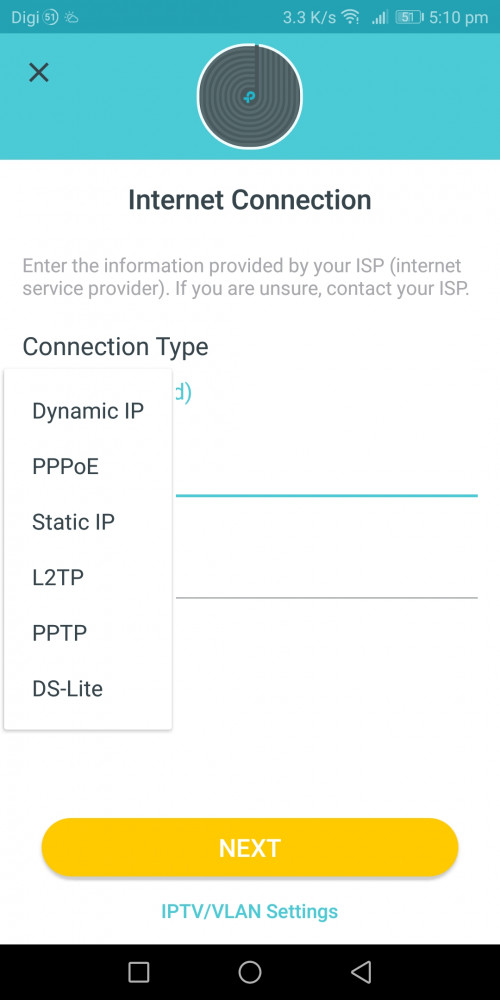
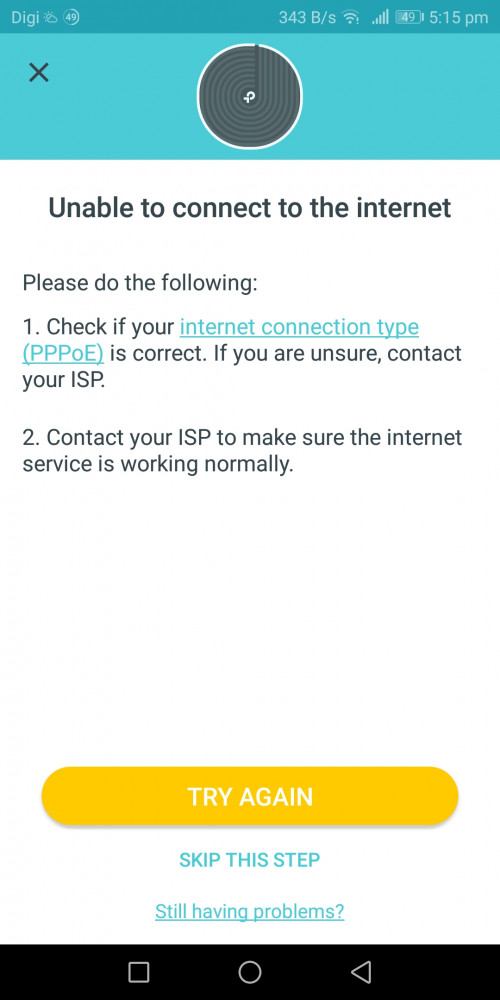
But now after i select pppoe enter my username and password still got error
*I just reset my pppoe password from tm and now have new password

user posted image

user posted image


blacktubi
post Jan 6 2021, 06:18 PM

-
Group Icon
Elite
8,421 posts

Joined: Jul 2008

QUOTE(myroy @ Jan 6 2021, 05:33 PM)
Thank you for the link
But now after i select pppoe enter my username and password still got error
*I just reset my pppoe password from tm and now have new password

user posted image

user posted image
*
Make sure it's a direct connection from LAN1 of modem to any port of main Deco.

Select Unifi profile at IPTV/VLAN settings on the app.
myroy
post Jan 6 2021, 07:23 PM

BIG BOSS
******
Senior Member
1,202 posts

Joined: Dec 2010
From: HELL


QUOTE(blacktubi @ Jan 6 2021, 06:18 PM)
Make sure it's a direct connection from LAN1 of modem to any port of main Deco.

Select Unifi profile at IPTV/VLAN settings on the app.
*
Wow so i miss this IPTV/VLAN settings
Thanks alot...
In video i tot it NEXT, but instead IPTV/VLAN settings
myroy
post Jan 12 2021, 01:21 PM

BIG BOSS
******
Senior Member
1,202 posts

Joined: Dec 2010
From: HELL


I have another issue with Tp-link Deco M4
the past week I only use one unit (living room)


1) yesterday when I set up the second unit at 1st floor (main bedroom)
it couldn't found any my main deco (ground floor - living room)

Attached Image
Attached Image


2) after following the suggestion from tp guide, I put the second deco at my main deco (ground floor - living room)
The connection was successful and manage to add my second deco.
Attached Image
Attached Image


So i plug out my second deco and put it back at 1st floor (main bedroom), now my led turn into BLINKING RED. As per TP-link deco suggestion, they ask me to reset. But then it loops back to my point number 1.
Attached Image


Before this, by only using main deco (living room) - I still manage to get internet connection if I'm staying at 1st floor (main bedroom)


Any suggestion?

This post has been edited by myroy: Jan 12 2021, 01:21 PM
shahie
post Jan 12 2021, 02:21 PM

On my way
****
Junior Member
506 posts

Joined: Feb 2005
QUOTE(myroy @ Jan 12 2021, 01:21 PM)
I have another issue with Tp-link Deco M4
the past week I only use one unit (living room)
1) yesterday when I set up the second unit at 1st floor (main bedroom)
it couldn't found any my main deco (ground floor - living room)

Attached Image
Attached Image
2) after following the suggestion from tp guide, I put the second deco at  my main deco (ground floor - living room)
The connection was successful and manage to add my second deco.
Attached Image
Attached Image
So i plug out my second deco and put it back at 1st floor (main bedroom), now my led turn into BLINKING RED. As per TP-link deco suggestion, they ask me to reset. But then it loops back to my point number 1.
Attached Image
Before this, by only using main deco (living room) -  I still manage to get internet connection if I'm staying at 1st floor (main bedroom)
Any suggestion?
*
use the network apps tool, check the wifi strength & link speed at the first floor, near place you plan to put your 2nd deco. worry the signal there is too weak until second deco can't detect the signal.

myroy
post Jan 12 2021, 09:55 PM

BIG BOSS
******
Senior Member
1,202 posts

Joined: Dec 2010
From: HELL


QUOTE(shahie @ Jan 12 2021, 02:21 PM)
use the network apps tool, check the wifi strength & link speed at the first floor, near place you plan to put your 2nd deco. worry the signal there is too weak until second deco can't detect the signal.
*
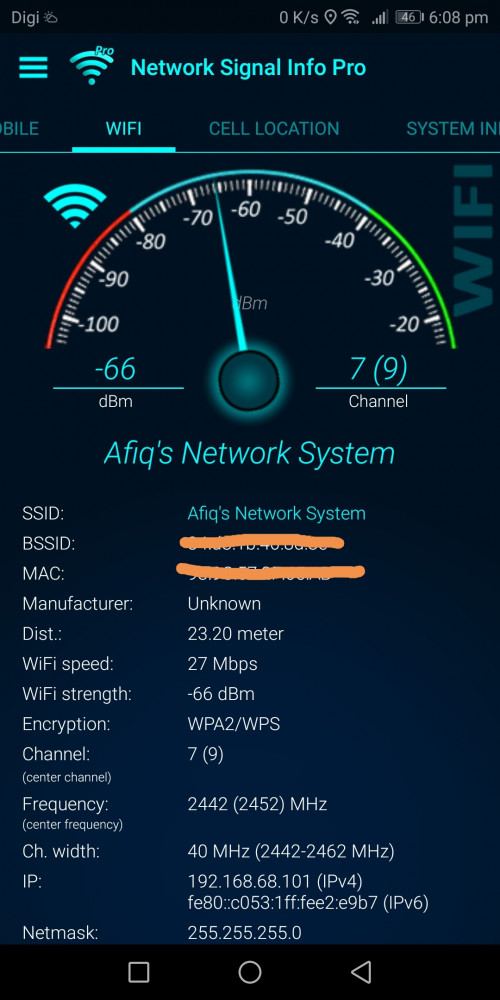
My wifi strength at 1st floor quite good

user posted image
taqu
post Jan 13 2021, 12:13 AM

Enthusiast
*****
Junior Member
864 posts

Joined: May 2005
If you put the second Deco next to the first one & reboot, is is still red?
shahie
post Jan 13 2021, 06:16 AM

On my way
****
Junior Member
506 posts

Joined: Feb 2005
QUOTE(myroy @ Jan 12 2021, 09:55 PM)
My wifi strength at 1st floor quite good

user posted image
*
As you can see, mostly wifi 5 max is 866mbps link speed, and now left at 27mbps, no wonder your second deco half die to work with. maybe ethernet backhaul or place to the other location where you can get at least 200mbps link speed for your second deco to performed.

This post has been edited by shahie: Jan 13 2021, 06:16 AM
myroy
post Jan 13 2021, 12:32 PM

BIG BOSS
******
Senior Member
1,202 posts

Joined: Dec 2010
From: HELL


QUOTE(shahie @ Jan 13 2021, 06:16 AM)
As you can see, mostly wifi 5 max is 866mbps link speed, and now left at 27mbps, no wonder your second deco half die to work with. maybe ethernet backhaul or place to the other location where you can get at least 200mbps link speed for your second deco to performed.
*
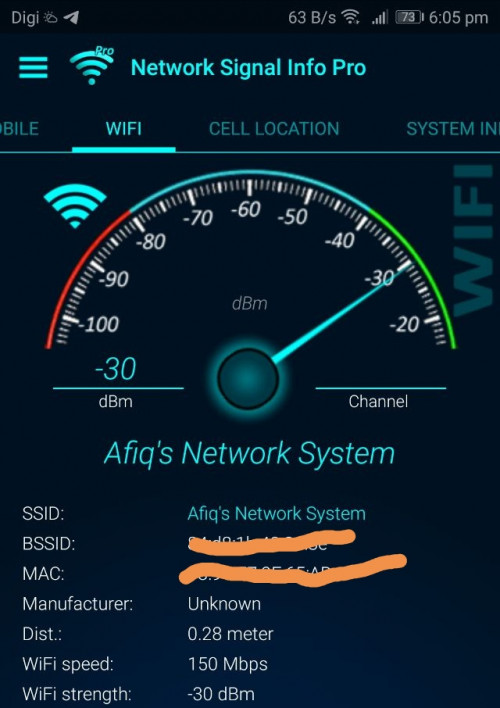
When I sit next to my main deco i can only get 150Mbps
Attached Image


Here is my house diagram, may I know how do I get my WIFI up to the 1st floor?

Attached Image

shahie
post Jan 13 2021, 03:04 PM

On my way
****
Junior Member
506 posts

Joined: Feb 2005
QUOTE(myroy @ Jan 13 2021, 12:32 PM)
When I sit next to my main deco i can only get 150Mbps
Attached Image
Here is my house diagram, may I know how do I get my WIFI up to the 1st floor?

Attached Image
*
are you working with 5Ghz band? seem like you on 2.4Ghz band. the best way is try to off 2.4ghz band first.
myroy
post Jan 16 2021, 06:22 PM

BIG BOSS
******
Senior Member
1,202 posts

Joined: Dec 2010
From: HELL


QUOTE(shahie @ Jan 13 2021, 03:04 PM)
are you working with 5Ghz band? seem like you on 2.4Ghz band. the best  way is try to off 2.4ghz band first.
*
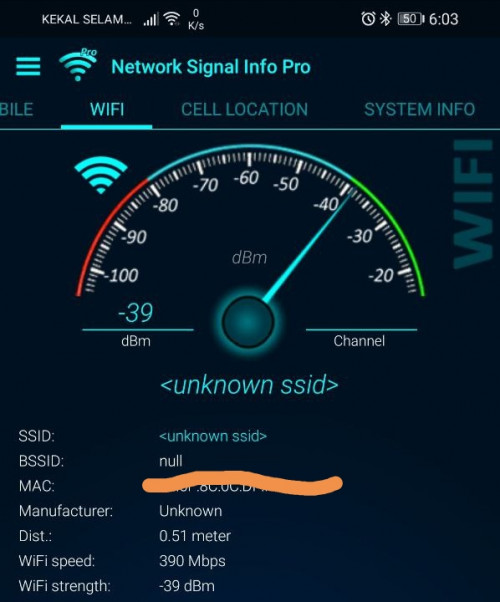
I have both 2.4 & 5 device right now
May i know why my wifi speed for 2.4G = 150Mbps
And
Wifi speed for 5G = 390Mbps


Please note that both device is just 0.5meter from main deco

user posted image
user posted image


shahie
post Jan 16 2021, 06:32 PM

On my way
****
Junior Member
506 posts

Joined: Feb 2005
QUOTE(myroy @ Jan 16 2021, 06:22 PM)
I have both 2.4 & 5 device right now
May i know why my wifi speed for 2.4G = 150Mbps
And
Wifi speed for 5G = 390Mbps
Please note that both device is just 0.5meter from main deco

user posted image
user posted image
*
that is why, can't fully 100% base on advertised speed. All subjected to the nearby interference. i'm not sure how wifi backhaul works since i'm using ethernet backhaul but just to tell you that i did try to pull my lan cable on my x60 second deco and let they switch to wifi backhaul, with wifi link speed of 520mbps coming to the second deco, i only get unifi speed of 200mbps at most and i put it back my lan cable, let they switch back to ethernet backhaul, than i can get back unifi speed 460 - 500mbps. my conclusion, and i always mentioned, use ethernet backhaul if you concern on what speed you get but just use wifi backhaul if you just need the internet connection.

This post has been edited by shahie: Jan 16 2021, 06:43 PM
afif92
post Jan 17 2021, 02:20 AM

Casual
***
Junior Member
374 posts

Joined: Mar 2010
QUOTE(shahie @ Jan 16 2021, 06:32 PM)
that is why, can't fully 100% base on advertised speed. All subjected to the nearby interference. i'm not sure how wifi backhaul works since i'm using ethernet backhaul but just to tell you that i did try to pull my lan cable on my x60 second deco and let they switch to wifi backhaul, with wifi link speed of 520mbps coming to the second deco, i only get unifi speed of 200mbps at most and i put it back my lan cable, let they switch back to ethernet backhaul, than i can get back unifi speed 460 - 500mbps. my conclusion, and i always mentioned, use ethernet backhaul if you concern on what speed you get but just use wifi backhaul if you just need the internet connection.
*
I'm using XT8 can get more than 500Mbps with wifi backhaul because it is dedicated and not shared with device. So, if want speed plus coverage, find mesh with dedicated backhaul.
shahie
post Jan 17 2021, 06:09 AM

On my way
****
Junior Member
506 posts

Joined: Feb 2005
QUOTE(afif92 @ Jan 17 2021, 02:20 AM)
I'm using XT8 can get more than 500Mbps with wifi backhaul because it is dedicated and not shared with device. So, if want speed plus coverage, find mesh with dedicated backhaul.
*
may i know what is your plan package? the way i can see on below review, impossible you can get 1:1 on wifi backhaul.

https://youtu.be/_0qTxbb_zMc

This post has been edited by shahie: Jan 17 2021, 06:10 AM
afif92
post Jan 17 2021, 07:31 AM

Casual
***
Junior Member
374 posts

Joined: Mar 2010
QUOTE(shahie @ Jan 17 2021, 06:09 AM)
may i know what is your plan package? the way i can see on below review, impossible you can get 1:1 on wifi backhaul.

https://youtu.be/_0qTxbb_zMc
*
My package is 800Mbps.

It is not 1:1 on wireless speed as we know mesh is same like repeater that only can serve half speed from main router.

Although it is half speed at node but it is half from full speed 4804Mbps when enable 160MHz as it is Wifi 6 4x4..

The node connect to main router roughly about 1700Mbps to 2300Mbps based on the distance. (1 wall blocking and different floor from main)

If put more distance, maybe can only get 800 to 1200Mbps but still can receive more than 300Mbps. (2 wall blocking and different floor from main)
shahie
post Jan 17 2021, 11:31 AM

On my way
****
Junior Member
506 posts

Joined: Feb 2005
QUOTE(afif92 @ Jan 17 2021, 07:31 AM)
My package is 800Mbps.

It is not 1:1 on wireless speed as we know mesh is same like repeater that only can serve half speed from main router.

Although it is half speed at node but it is half from full speed 4804Mbps when enable 160MHz as it is Wifi 6 4x4..

The node connect to main router roughly about 1700Mbps to 2300Mbps based on the distance. (1 wall blocking and different floor from main)

If put more distance, maybe can only get 800 to 1200Mbps but still can receive more than 300Mbps. (2 wall blocking and different floor from main)
*
oh...800mbps package than justified enough lah as long as you happy by not getting your full subscription speed of 800mbps wirelessly (unless you seat next to your router all the times) after using wifi backhaul.
afif92
post Jan 17 2021, 05:05 PM

Casual
***
Junior Member
374 posts

Joined: Mar 2010
QUOTE(shahie @ Jan 17 2021, 11:31 AM)
oh...800mbps package than justified enough lah as long as you happy by not getting your full subscription speed of 800mbps wirelessly (unless you seat next to your router all the times) after using wifi backhaul.
*
I can not brain your statement.. I'm happy not getting full subs speed?

This post has been edited by afif92: Jan 17 2021, 05:07 PM
shahie
post Jan 17 2021, 08:20 PM

On my way
****
Junior Member
506 posts

Joined: Feb 2005
QUOTE(afif92 @ Jan 17 2021, 05:05 PM)
I can not brain your statement.. I'm happy not getting full subs speed?
*
what i mean you get 500 over 800 on wifi is ok for you right?. but mine i still need full 100% of my subscription speed on wifi that is why i opt for ethernet backhaul.
Alan Yee
post Feb 19 2021, 03:25 PM

Regular
******
Senior Member
1,031 posts

Joined: May 2008


QUOTE(afif92 @ Jan 17 2021, 07:31 AM)
My package is 800Mbps.

It is not 1:1 on wireless speed as we know mesh is same like repeater that only can serve half speed from main router.

Although it is half speed at node but it is half from full speed 4804Mbps when enable 160MHz as it is Wifi 6 4x4..

The node connect to main router roughly about 1700Mbps to 2300Mbps based on the distance. (1 wall blocking and different floor from main)

If put more distance, maybe can only get 800 to 1200Mbps but still can receive more than 300Mbps. (2 wall blocking and different floor from main)
*
How about I use 2 units of Tenda AC23, which is AC2100 router, WiFi AC can goes up to 866 Mbps + 866 Mbps = 1733 Mbps, should I able to get at least 250 Mbps of speed at second floor if I set 1 unit Tenda AC23 as main router, and another one set as repeater at second floor?
Will the WiFi AC signal repeating in between 2 Tenda AC23 router utilize the 866 + 866?

I ask Tenda Malaysia technical, and they cannot commit me the speed, they say normally upstairs, the internet speed will cut at least 30%, meaning if now I got a 300 Mbps plan, I max can only get 200 Mbps, and may become much slower, even though this Tenda AC23 have 4x4 MIMO on WiFi AC for the speed of 1733 Mbps.

I think I should bought another unit of Tenda AC23 to test ya? Then this will be among the cheapest mesh/extender system that operate at 1733 Mbps for Wifi 5Ghz?

5 Pages < 1 2 3 4 5 >Top
 

Change to:
| Lo-Fi Version
0.0285sec    0.69    6 queries    GZIP Disabled
Time is now: 19th December 2025 - 08:00 AM