Welcome Guest ( Log In | Register )

5 Pages « < 2 3 4 5 >Bottom

Outline · [ Standard ] · Linear+

Tech Support Mesh wifi, Confused ?_?

views
     
afif92
post Feb 19 2021, 06:41 PM

Casual
***
Junior Member
374 posts

Joined: Mar 2010
QUOTE(Alan Yee @ Feb 19 2021, 03:25 PM)
How about I use 2 units of Tenda AC23, which is AC2100 router, WiFi AC can goes up to 866 Mbps + 866 Mbps = 1733 Mbps, should I able to get at least 250 Mbps of speed at second floor if I set 1 unit Tenda AC23 as main router, and another one set as repeater at second floor?
Will the WiFi AC signal repeating in between 2 Tenda AC23 router utilize the 866 + 866?

I ask Tenda Malaysia technical, and they cannot commit me the speed, they say normally upstairs, the internet speed will cut at least 30%, meaning if now I got a 300 Mbps plan, I max can only get 200 Mbps, and may become much slower, even though this Tenda AC23 have 4x4 MIMO on WiFi AC for the speed of 1733 Mbps.

I think I should bought another unit of Tenda AC23 to test ya? Then this will be among the cheapest mesh/extender system that operate at 1733 Mbps for Wifi 5Ghz?
*
If 300Mbps, I think it maybe can go full speed if only your device connected at node and for main router, only the node is connected. Multiple devices connected to both and node surely will give drop in terms of speed but I don't know how much because it depends on the location, number of walls and shape of the house.
Alan Yee
post Feb 20 2021, 12:32 PM

Regular
******
Senior Member
1,031 posts

Joined: May 2008


QUOTE(afif92 @ Feb 19 2021, 06:41 PM)
If 300Mbps, I think it maybe can go full speed if only your device connected at node and for main router, only the node is connected. Multiple devices connected to both and node surely will give drop in terms of speed but I don't know how much because it depends on the location, number of walls and shape of the house.
*
I understand, speed will not be at full if not connect to the main router.
Still, these networking equipment guy and some internet video keep saying mesh WiFi will maintain the internet speed.
Well, I guess if ISP speed is below 100Mbps, then their claim is true, but not true for ISP plan that is 300Mbps or 500Mbps.
Or it is only true when connect to the first main node of the mesh WiFi, and speed drop if connect to the pairing node, second node or third node.
I think I either accept what I have now with the repeater solution, or try to test with another Tenda AC23.
Alan Yee
post Feb 22 2021, 11:44 AM

Regular
******
Senior Member
1,031 posts

Joined: May 2008


Got anyone tried the D-Link DIR-2150 AC2100 Mesh router + D-Link DRA-2060 Mesh enabled extender?
Suppose the performance is better than TP-Link Deco M4?
Because Deco M4 is only AC1200, the D-Link combination are at least AC2100 + AC2000 setup?
thomas2
post Apr 4 2021, 07:16 PM

New Member
*
Junior Member
30 posts

Joined: Aug 2005


for maxis fiber, do u buy mesh from other or do u add on with their AIRTIES Air4830 Mesh WiFi??

any thought?

iZuDeeN
post Apr 4 2021, 07:49 PM

Look at all my stars!!
*******
Senior Member
3,466 posts

Joined: Jan 2003
From: PJ, Malaysia
I'm using Deco P9 which has ac1200 and PLC

So far all around the house.. 2 1/2 stories can get good coverage on a 3 unit

Bit pricier because of the PLC but worth it as mesh doesn't work well if the WiFi signal is poor to begin with
cloudstrifes
post Apr 9 2021, 03:47 PM

Casual
***
Junior Member
464 posts

Joined: Jan 2010
Sorry I’m new the mesh. I would like to understand how does mesh work.

What’s the difference between range extender and mesh WiFi?

Correct me if I’m wrong. Basically mesh WiFi gets connection from the main node and rebroadcast the WiFi?
sitescope
post Apr 10 2021, 08:20 AM

Look at all my stars!!
*******
Senior Member
4,494 posts

Joined: Oct 2013
QUOTE(Alan Yee @ Feb 19 2021, 03:25 PM)
How about I use 2 units of Tenda AC23, which is AC2100 router, WiFi AC can goes up to 866 Mbps + 866 Mbps = 1733 Mbps, should I able to get at least 250 Mbps of speed at second floor if I set 1 unit Tenda AC23 as main router, and another one set as repeater at second floor?
Will the WiFi AC signal repeating in between 2 Tenda AC23 router utilize the 866 + 866?

I ask Tenda Malaysia technical, and they cannot commit me the speed, they say normally upstairs, the internet speed will cut at least 30%, meaning if now I got a 300 Mbps plan, I max can only get 200 Mbps, and may become much slower, even though this Tenda AC23 have 4x4 MIMO on WiFi AC for the speed of 1733 Mbps.

I think I should bought another unit of Tenda AC23 to test ya? Then this will be among the cheapest mesh/extender system that operate at 1733 Mbps for Wifi 5Ghz?
*
If not mistaken, repeater will cut 50% frm your main spd.
To get 100% spd on 2nd router u need to use LAN cable n configure ur 2nd router as another AP

Even using deco m5/m9, wifi backhaul spd also affected if too many blockage
captainwifi
post May 22 2021, 12:33 PM

Getting Started
**
Junior Member
72 posts

Joined: Apr 2011
Does the Deco M4's ethernet backhaul works?

taqu
post May 24 2021, 10:15 PM

Enthusiast
*****
Junior Member
864 posts

Joined: May 2005
QUOTE(captainwifi @ May 22 2021, 12:33 PM)
Does the Deco M4's ethernet backhaul works?
*
Yes, using 1 M5 & 2 M4s
spreeeee
post Jun 3 2021, 05:16 PM

♠ . ♥ . ♣ . ♦
*******
Senior Member
3,812 posts

Joined: Apr 2009
From: West Malaysia

QUOTE(taqu @ May 24 2021, 10:15 PM)
Yes, using 1 M5 & 2 M4s
*
trying to understand how to setup/install the deco m4, from the video link guide below:

https://unifi.com.my/unifi-experience

does the main node remain plugged-in to the LAN2 wifi router?
PRSXFENG
post Jun 3 2021, 06:30 PM

Look at all my stars!!
*******
Senior Member
2,611 posts

Joined: Nov 2020


QUOTE(spreeeee @ Jun 3 2021, 05:16 PM)
trying to understand how to setup/install the deco m4, from the video link guide below:

https://unifi.com.my/unifi-experience

does the main node remain plugged-in to the LAN2 wifi router?
*
Their setup guide is not great.
Try one that sets it up in PPPoE mode
spreeeee
post Jun 3 2021, 08:43 PM

♠ . ♥ . ♣ . ♦
*******
Senior Member
3,812 posts

Joined: Apr 2009
From: West Malaysia

QUOTE(PRSXFENG @ Jun 3 2021, 06:30 PM)
Their setup guide is not great.
Try one that sets it up in PPPoE mode
*
Appreciate to further guide.. thanks !
radiohead
post Jul 8 2021, 10:53 AM

18 + 5
******
Senior Member
1,484 posts

Joined: Jan 2003
From: radioteque
Hi. Want to upgrade my old router wifi4 to wifi6
Archer ax73. Need 4 wired to tv, astro, pc, reserve 1.
Next mesh node to cover the back of my home.
Do i need to connect the mesh with ethernet or wifi to router?

Recommend me mesh 1/2 node with wifi6
radiohead
post Jul 8 2021, 12:12 PM

18 + 5
******
Senior Member
1,484 posts

Joined: Jan 2003
From: radioteque
https://community.tp-link.com/en/home/stories/detail/1322

OneMesh™ and Deco Mesh are two whole home mesh Wi-Fi solutions provided by TP-Link. Though both support mesh networks, they are used by different products and are not compatible with each other.
***

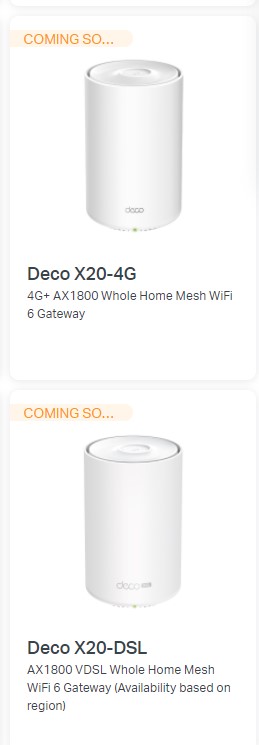
SO better i find mesh router with 4 lan . for tplink all are coming soon

user posted image
hammerjit
post Jul 8 2021, 05:20 PM

Getting Started
**
Junior Member
217 posts

Joined: Aug 2007
From: Melaka, Malaysia


so basically come back to first post, its ok to use any router that you have (like im using tenda-ac18), and then i put another mesh unit at upstairs connected with LAN?
- The ssid shared the same with the ac18 router?
- Then In future if i feel need to install another unit mesh, but i dont have wired, can i connect the second unit by wifi alone?
XweienX
post Sep 29 2021, 05:38 PM

Casual
***
Junior Member
455 posts

Joined: Aug 2012


Hi everyone, when I check maxis fibre plan they give their "next-gen wifi 6 router", under the highlights it says there is built-in "Easy Mesh" technology.

Does this mean when I want to use 3rd party mesh units (e.g. Deco), I don't have to connect the first AP to the router by LAN? Can straight away put the router and Decos in the same "mesh" with same ID & password?

Or either way still need LAN connection to router (if lets say I want to keep the router and use both Decos as AP)? Thanks sifus
PRSXFENG
post Sep 29 2021, 05:49 PM

Look at all my stars!!
*******
Senior Member
2,611 posts

Joined: Nov 2020


QUOTE(XweienX @ Sep 29 2021, 05:38 PM)
Hi everyone, when I check maxis fibre plan they give their "next-gen wifi 6 router", under the highlights it says there is built-in "Easy Mesh" technology.

Does this mean when I want to use 3rd party mesh units (e.g. Deco), I don't have to connect the first AP to the router by LAN? Can straight away put the router and Decos in the same "mesh" with same ID & password?

Or either way still need LAN connection to router (if lets say I want to keep the router and use both Decos as AP)? Thanks sifus
*
Yes, but it will NOT work with Deco, only other mesh units compatible with Easy Mesh

TP-Link OneMesh and Deco mesh is proprietary, same goes with Asus AiMesh

Only mesh nodes so far I found locally that support Easy Mesh is D-Link COVR
PRSXFENG
post Sep 29 2021, 05:51 PM

Look at all my stars!!
*******
Senior Member
2,611 posts

Joined: Nov 2020


QUOTE(hammerjit @ Jul 8 2021, 05:20 PM)
so basically come back to first post, its ok to use any router that you have (like im using tenda-ac18), and then i put another mesh unit at upstairs connected with LAN?
- The ssid shared the same with the ac18 router?
- Then In future if i feel need to install another unit mesh, but i dont have wired, can i connect the second unit by wifi alone?
*
it's best to only use a mesh

so pick either
modem - router (tenda)
or
modem - mesh

as for the 2nd yes but the 2nd unit will have less peformance since itself uses wifi to connect back to the main unit, reducing speeds
XweienX
post Sep 29 2021, 05:57 PM

Casual
***
Junior Member
455 posts

Joined: Aug 2012


QUOTE(PRSXFENG @ Sep 29 2021, 05:49 PM)
Yes, but it will NOT work with Deco, only other mesh units compatible with Easy Mesh

TP-Link OneMesh and Deco mesh is proprietary, same goes with Asus AiMesh

Only mesh nodes so far I found locally that support Easy Mesh is D-Link COVR
*
ooooo, thanks for letting me know about this!
hammerjit
post Sep 30 2021, 09:12 AM

Getting Started
**
Junior Member
217 posts

Joined: Aug 2007
From: Melaka, Malaysia


QUOTE(PRSXFENG @ Sep 29 2021, 05:49 PM)
Yes, but it will NOT work with Deco, only other mesh units compatible with Easy Mesh

TP-Link OneMesh and Deco mesh is proprietary, same goes with Asus AiMesh

Only mesh nodes so far I found locally that support Easy Mesh is D-Link COVR
*
thank you for replying and clearing my situation.

Anyone can recommend 2 pack mesh devices which support 500Mbps

modem - lan cable -> mesh 1 (also as router) - lan cable -> mesh 2

so means mesh 1 should have 2 rj45 ports? one from modem another to mesh 2

5 Pages « < 2 3 4 5 >Top
 

Change to:
| Lo-Fi Version
0.0333sec    0.37    6 queries    GZIP Disabled
Time is now: 16th December 2025 - 08:25 PM