Outline ·
[ Standard ] ·
Linear+
ILLEGEAR Custom Performance Laptops v.4, AMD RYZEN 4800H with FREE AC Valhalla
|
yongchin89
|
 May 27 2020, 01:10 PM May 27 2020, 01:10 PM
|
Getting Started


|
QUOTE(ghostcommand @ May 27 2020, 01:06 PM) I don't think you can undervolt any new Illegear laptop. By default, the factory already undervolt by -50mv and they lock the BIOS to prevent users from configuring the voltage. Maybe they scared people undervolt too much and then the system not stable. For gaming, you definitely need to plug in. The battery is not strong enough to provide more than 50W for the CPU/GPU which needs the power. That is why you have a charging brick rated at least 120W. err, got some question, if plugged in is enough, why my battery percentage will drop when plugged in while gaming? and it will trigger to charge the battery again This post has been edited by yongchin89: May 27 2020, 01:10 PM |
|
|
|
|
|
yongchin89
|
May 27 2020, 09:52 PM
|
Getting Started
|
QUOTE(chittyserv @ May 27 2020, 09:45 PM) Whats ur battery capacity and ur chargers specs? Maybe u can clarify with illegear if they gave u the wrong charger? oh, got different type charger? mine is normal battery, no upgrade to larger one, and the chargers is as per photo 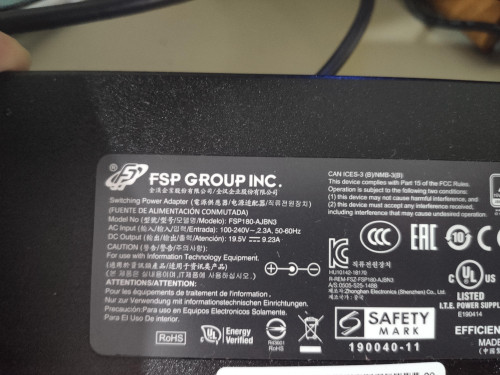 |
|
|
|
|
|
yongchin89
|
May 27 2020, 09:59 PM
|
Getting Started
|
QUOTE(arslow @ May 27 2020, 08:49 PM) Above taken from Selenite thread yongchin89damm, thats why got a forumer here got a swollen battery even just plugged in all the time..... |
|
|
|
|
|
yongchin89
|
May 27 2020, 10:16 PM
|
Getting Started
|
QUOTE(SaiyanGoku @ May 27 2020, 10:08 PM) That's a 180W charger, mine is 230W charger. Yeah, I monitor the systems so I do know that even at max GPU use of 115W (which is very rare), average hovers around 90W and CPU at 25W ( its in office mode mostly), there is no possibility that 230W charger wasn't able to supply even 185W at around 80% efficiency. whats your laptop model and battery capacity got upgrade? i guess they give 180W charger for raven SE-R This post has been edited by yongchin89: May 27 2020, 10:18 PM |
|
|
|
|
|
yongchin89
|
May 27 2020, 10:48 PM
|
Getting Started
|
QUOTE(SaiyanGoku @ May 27 2020, 10:40 PM) Selenite 9750H, 2060 model. 3 Cell 47 Wh battery which I wanted to upgrade to 63Wh but the ones which they had in stock "didn't meet Illegear's standards". Current one has swollen in 10-11 months which should not be acceptable anywhere. It shouldn't give problems within the warranty duration. checked their website, indeed written there raven se-r is 180w and selenite is 230w, but did you face the charging when gaming also? so fast battery swollen......warranty got cover? |
|
|
|
|
|
yongchin89
|
May 27 2020, 10:49 PM
|
Getting Started
|
QUOTE(Prince J @ May 27 2020, 10:48 PM) This is the correct charger, send me your BIOS and EC versions. how to check that? |
|
|
|
|
|
yongchin89
|
May 27 2020, 10:57 PM
|
Getting Started
|
QUOTE(chittyserv @ May 27 2020, 10:52 PM) mine Raven SE with GTX1650, provided 120W charger... never go down battery when charging if normal office usage yeah, it will cut off and wont go down when using, but just when gaming only, i guess max usage of cpu and gpu draw alot of power |
|
|
|
|
|
yongchin89
|
May 28 2020, 07:48 AM
|
Getting Started
|
QUOTE(chittyserv @ May 27 2020, 11:40 PM) maybe my games not so high end, i play dota2 most of the time only haha.. nope, dota 2 same also |
|
|
|
|
|
yongchin89
|
May 28 2020, 11:09 AM
|
Getting Started
|
QUOTE(Prince J @ May 27 2020, 10:48 PM) This is the correct charger, send me your BIOS and EC versions. PM-ed |
|
|
|
|
|
yongchin89
|
May 28 2020, 02:04 PM
|
Getting Started
|
QUOTE(SaiyanGoku @ May 28 2020, 12:47 PM) I'll rather use my laptop as it is than risk it getting severely damaged in international shipping. No charging issue during gaming. Yes, I have >1 year warranty left. Is there a way to limit max battery %? i guess 180W is not enough for raven SE-R.....it draw my battery power as well any other raven SE-R with 10750h/2060 owner facing this issues as well here? |
|
|
|
|
|
yongchin89
|
May 29 2020, 10:04 AM
|
Getting Started
|
QUOTE(lsl640 @ May 29 2020, 09:22 AM) Is it normal that i need to turn on the keyboard light everytime i reboot or turn on? Quute annoying i think got something to do with the command center, my fan boost sometimes will auto on also when boot up, and keyboard is like yours too, i just turn it off, and on it when i need it |
|
|
|
|
|
yongchin89
|
Jun 1 2020, 01:54 PM
|
Getting Started
|
QUOTE(laksamana @ Jun 1 2020, 01:34 PM) Ordered on 23 April, GDex SMS says delivering today, am at home waiting .... GDex service is very bad, i dunno why.....even they say shipped with GDexprime, still.....slow Citilink better, from perak to selangor no need 24 hour reach |
|
|
|
|
|
yongchin89
|
Jun 1 2020, 04:02 PM
|
Getting Started
|
QUOTE(eurayle @ Jun 1 2020, 03:56 PM) Raven SE-R 2060 here, with the same problem. The battery charge will reduce when playing games even while plugged in. what game you played? still hoping to get bios and EC update from them as they say it is not power supply problem i dont think battery is located at the top area as you mentioned there, but you mean the casing shape is not flat right between keyboard and monitor, mine also it kinda stress the battery keep on charging all the time until game stopped! This post has been edited by yongchin89: Jun 1 2020, 04:07 PM |
|
|
|
|
|
yongchin89
|
Jun 1 2020, 04:10 PM
|
Getting Started
|
QUOTE(eurayle @ Jun 1 2020, 04:05 PM) L4D2 > I notice the issue Another 2 games AC Odyssey & EU4 I don't remember whether have the same problem or not. Civ 6 doesn't seem to have issue What's EC? embedded controller if im right, and the battery swollen thing, i dont think battery is there |
|
|
|
|
|
yongchin89
|
Jun 1 2020, 04:16 PM
|
Getting Started
|
QUOTE(eurayle @ Jun 1 2020, 04:13 PM) Is the battery not there? The area to the left of the power button and above the function keys. That's the area that usually get hot when playing games. battery is at bottom part, there area there i notice it is bump out abit also on my raven se, i think it is design or manufacturing flaw, i just tutup one eye and yeap, it is hot as i really can fry egg there This post has been edited by yongchin89: Jun 1 2020, 04:18 PM |
|
|
|
|
|
yongchin89
|
Jun 1 2020, 04:22 PM
|
Getting Started
|
QUOTE(eurayle @ Jun 1 2020, 04:13 PM) Edited after your edit Yes, that area. It's not flat. But that area gets hot when playing games. I thought battery swollen. picture get from raven se-r youtube review 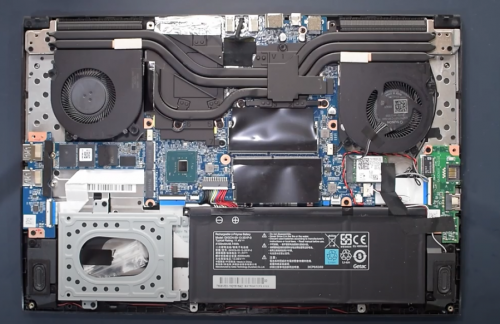 |
|
|
|
|
|
yongchin89
|
Jun 1 2020, 04:28 PM
|
Getting Started
|
QUOTE(eurayle @ Jun 1 2020, 04:23 PM) ohh thanks for the info at least it's not battery swollen. hopefully something that can fix via software so I don't have to bring my laptop in for repair i'll also tutup my eyes at the small bump... that bump ah, u got try when you hold your laptop and open your screen? haha, when i hold and open it, it will hit the monitor bottom hinge abit but didnt happen when i put on table i guess it really flimsy with plastic material |
|
|
|
|
|
yongchin89
|
Jun 1 2020, 04:29 PM
|
Getting Started
|
QUOTE(Prince J @ Jun 1 2020, 04:26 PM) If your battery is swollen, the area that bumps up is the touchpad / palmrest area, not the Fx keys area. You may send in to check to see if the screws are loosen up or not. Shouldn't have bump on RAVEN SE, kindly check if you screw back your bottom chassis nicely. As for the top part of the laptop, it's normal to be hot as that's the area where we place the heatsink. i didnt open my chassis before, it come as it is |
|
|
|
|
|
yongchin89
|
Jun 1 2020, 05:49 PM
|
Getting Started
|
QUOTE(Prince J @ Jun 1 2020, 05:38 PM) If you are talking about the plastic elasticity, yes it does bent while you open your laptop with your hand holding the middle part of the laptop. Actually not just plastic, even if the laptop is made out of aluminium alloy it also tends to bent if you hold this position, that's normal. 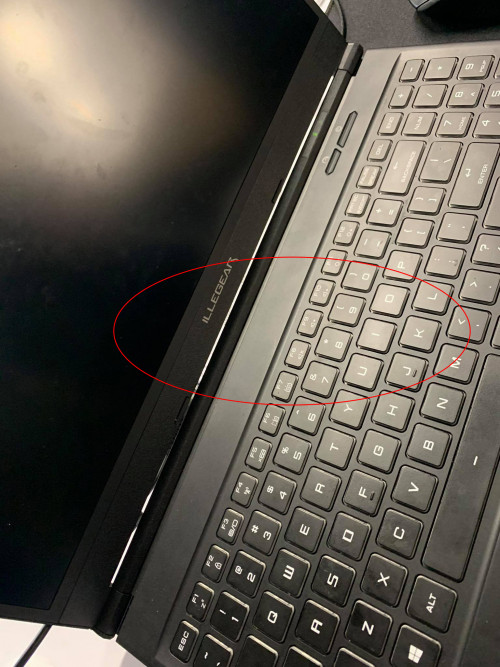 The RAVEN SE has a gap between the hinge cover and the top A cover, it won't touch the hinge cover unless there is an external force to close the gap in between. Hope clarify. yup, there is a gap in the hinge but it will touch/rub over when holding it to open, just notice it when i first hold and open my laptop that time |
|
|
|
|
|
yongchin89
|
Jun 1 2020, 08:19 PM
|
Getting Started
|
QUOTE(eurayle @ Jun 1 2020, 07:01 PM) same problem the gap is wider on left & right side, very small in the middle. If the laptop is not on flat surface then the part below Illegear logo will scrap the hinge cover (?). I put my laptop on a stand, so I can notice this behaviour when closing/opening screen. I don't see this behaviour with old illegear S4. Damm, same spot! |
|
|
|
|



 Quote
Quote
 0.0215sec
 0.74
0.74
 7 queries
 GZIP Disabled