Welcome Guest ( Log In | Register )

Bump Topic Topic Closed RSS Feed
4 Pages < 1 2 3 4 >Bottom

Outline · [ Standard ] · Linear+

 ILLEGEAR Custom Performance Laptops v.4, AMD RYZEN 4800H with FREE AC Valhalla

views
     
yongchin89
post Jun 1 2020, 09:28 PM

Getting Started
**
Junior Member
187 posts

Joined: Jul 2009


QUOTE(Prince J @ Jun 1 2020, 08:20 PM)
Hi eurayle,

May i know how do you place your laptop, how do you open? We will try to see if we can replicate on our end, thanks!
*
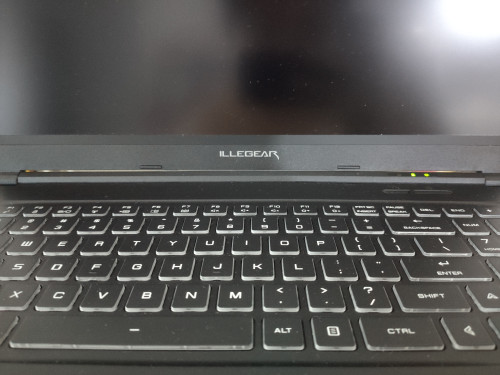
hope this picture can be a reference too, tight gap on middle

user posted image
yongchin89
post Jun 1 2020, 09:38 PM

Getting Started
**
Junior Member
187 posts

Joined: Jul 2009


QUOTE(Prince J @ Jun 1 2020, 09:33 PM)
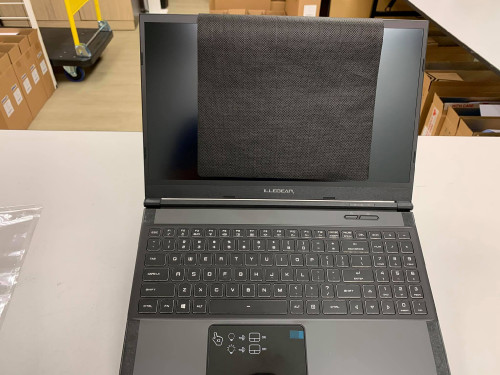
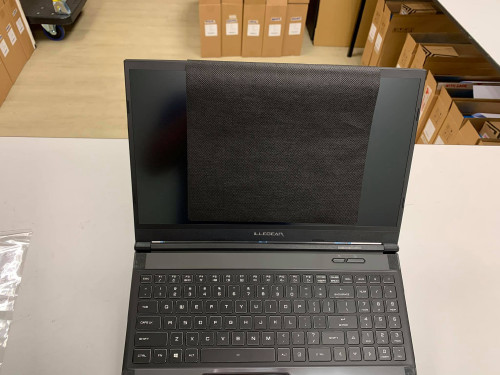
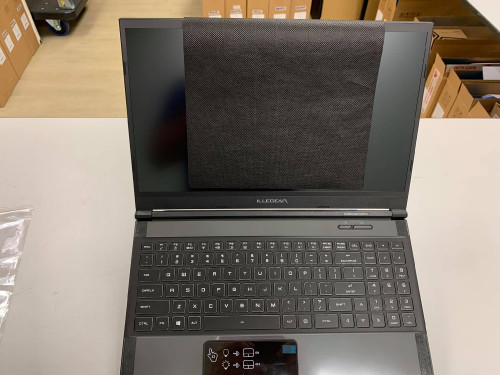
Hi we have tried to lift two different units of RAVEN SE up and cannot see the gap. Closing/opening the lid doesn't touch the hinge bar too.

Can we have your systems to check physically?

user posted image
user posted image
user posted image
*
sure, will send in for you guys to check as soon as i have available time
yongchin89
post Jun 4 2020, 12:00 PM

Getting Started
**
Junior Member
187 posts

Joined: Jul 2009


QUOTE(Prince J @ Jun 4 2020, 11:56 AM)
Yes I am requesting the exe file from FAE, so our customers can flash it under windows environment without going through all the DOS / coding. Will update here.
Fn+F2 is Windows key (btw Fn and Alt) lock.
*
is this bios update applicable to all raven SE-R? and any update on the battery issue for bios and EC as well?
yongchin89
post Jun 4 2020, 05:16 PM

Getting Started
**
Junior Member
187 posts

Joined: Jul 2009


QUOTE(dylan_chng @ Jun 4 2020, 05:02 PM)
My Raven (not Raven SE) is slightly more than a year old. Had hinge problem. Resolved under warranty. Battery and keyboard no problem
*
can i know what problem with your raven hinge?
yongchin89
post Jun 4 2020, 09:04 PM

Getting Started
**
Junior Member
187 posts

Joined: Jul 2009


QUOTE(laksamana @ Jun 4 2020, 08:30 PM)
Received my Raven SE i7-10750H on Monday. No problems and am happy with it

Only thing was, due to my own mistake, was a minor fault in setting up Windows during first login. Had to go back to factory version, and reinstall all drivers from support page. This was easy and it's all good now ...
*
thats good! received mine and faced dead pixel when i boot up that time, it is very sad to see it but illegear solved it asap for me! now just my hinge part, have to allocate time for them to have a look....
yongchin89
post Jun 4 2020, 09:21 PM

Getting Started
**
Junior Member
187 posts

Joined: Jul 2009


QUOTE(Prince J @ Jun 4 2020, 08:25 PM)
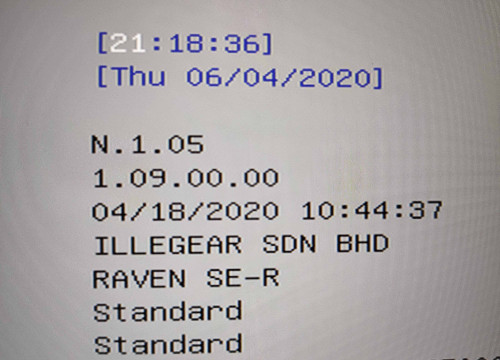
Can you snapshot from F2 BIOS Menu? If the ec is successfully updated, it will show 1.10.00.
*
updated as per instruction give. err, it is not 1.10.00

user posted image

This post has been edited by yongchin89: Jun 4 2020, 09:23 PM
yongchin89
post Jun 5 2020, 05:21 PM

Getting Started
**
Junior Member
187 posts

Joined: Jul 2009


QUOTE(SpoILeR @ Jun 5 2020, 04:56 PM)
Ok so after waiting for around 1 month , I finally got my Selenite G.

FYI , I'm satisfied with GDex Express Prime Service. They pickup the parcel on Monday and delivered to me on Wednesday
Basically you need to be patient if you order laptops from ILLEGEAR , since they have tons of order to deal with. After that , the delivery process will run smoothly

TechSupport is a little bit slow to reply but once they are on your case , they settle it pretty fast. Good experience dealing with ILLEGEAR TechSupport
Just a little bit sad since TechSupport can't help with tweaking my laptop  cry.gif

Just a little bit curious , is it normal for the processor maintain at approximate 60°C just with Google Chrome running ?
When I run After Effect , the temperature rise to approximate 87°C ( Not even start import the files / render )
GPU maintain at 50°C without anything on
Both temperature checked with ILLEGEAR Command Center

*
More or less same temperature with my raven se-r
yongchin89
post Jun 6 2020, 10:01 PM

Getting Started
**
Junior Member
187 posts

Joined: Jul 2009


QUOTE(scy7he @ Jun 6 2020, 09:15 PM)
I have to turn on the fan boost manually in order to get the fans running at higher rpms. Using the Game Mode or Turbo Mode in the Command Center is actually quite silent.

I guess the Command Center is not adjusting the fans as it should right now.
*
same here, waiting for their update for bios and EC
yongchin89
post Jun 7 2020, 07:41 AM

Getting Started
**
Junior Member
187 posts

Joined: Jul 2009


QUOTE(Prince J @ Jun 7 2020, 03:36 AM)
Yes the BIOS issue affects all RTX2060 models (ONYX V, PRODIGY, RAVEN SE-R). Kindly wait for our update on next week smile.gif
We will offer 2933MHz RAM in a week or two (some existing orders will get free upgrade). It's the same 3200MHz RAM we use in ONYX V Ryzen, however Intel systems only able to detect 2933MHz.
*
aww...new RAM pulak, wish i didnt order so fast lol
yongchin89
post Jun 8 2020, 03:45 PM

Getting Started
**
Junior Member
187 posts

Joined: Jul 2009


QUOTE(Prince J @ Jun 8 2020, 02:11 PM)
BIOS Update

Rogue_10thGen_RTX2060_Bios1.07_Ec1.15.X0_FlashUtil
https://support.illegear.com/Drivers/Laptop...0_FlashUtil.zip

RavenSE_R_10thGen_Bios1.07_Ec1.15.X0_FlashUtil
https://support.illegear.com/Drivers/Laptop...0_FlashUtil.zip

Prodigy_10thGen_RTX2060_Bios1.07_Ec1.15.X0_FlashUtil
https://support.illegear.com/Drivers/Laptop...0_FlashUtil.zip

Onyx_V_10thGen_RTX2060_Bios1.07_Ec1.15.X0_FlashUtil
https://support.illegear.com/Drivers/Laptop...0_FlashUtil.zip

Do note that during the flashing process be sure you are not working on anything. MAKE SURE YOU ARE PLUGGED IN / ON CHARGER source.

Open the F.bat in the Afuwin64 folder to process flashing the Bios
it will restart and enter bios few time

After successfully flashed and entered to Desktop
Open the F.bat in the Afuwin64cap folder to proceed flashing and updating the EC.

Do note that during the flashing process the laptop will reboot few times.
Besure to plug in the charger during the flashing process
*
It this include the battery charging problem when gaming on Raven SE-R?

edit: after updated i finally hear the fan noise increase and decrease, NICE!, will update after using more

This post has been edited by yongchin89: Jun 8 2020, 08:20 PM
yongchin89
post Jun 8 2020, 08:21 PM

Getting Started
**
Junior Member
187 posts

Joined: Jul 2009


QUOTE(Santau_GO @ Jun 8 2020, 08:13 PM)
Okay can finally hear the fans. But can u update the illegear command centre so that the last chosen setting will be save upon boot? Because everytime i restart it goes into game mode. Even after i chose office mode . Have to manually adjust everytime the laptop restarts
*
yup, same happen also, it will like auto reset do default
yongchin89
post Jun 8 2020, 10:21 PM

Getting Started
**
Junior Member
187 posts

Joined: Jul 2009


QUOTE(arslow @ Jun 8 2020, 09:09 PM)
Does your battery still drop while plugged in gaming?
*
currently havent fully test like last time for 1 hour, just played around 20 minutes so far so good for battery, but temperature wise is hotter this time, last time with fan boost on max temp is 85-89, now it hike up to 94 all the time even on fan boost. hmm
yongchin89
post Jun 9 2020, 01:44 PM

Getting Started
**
Junior Member
187 posts

Joined: Jul 2009


QUOTE(Santau_GO @ Jun 9 2020, 12:58 PM)
Quick question for Raven SE-R owners or people who had experience the same issue as me. Have u guys had random freezes while ingame or while doing something? Once i was editing a video and the screen went blank and i cant do anything. Other occsasions is when im playing games and it freezes while showing a still image. No BSOD came up. No distorted sound coming out of the speakers as usually crashes will produce a glitched noise.

What's the issue? Could it be the SSD or RAM? Or even CPU/ GPU  cry.gif  mega_shok.gif . I have to hold down the power button and boot up back again. I'm always worried/ expecting crashes every now and then. The recent one just last night while playng red dead 2. Just a few mins playing. Undervolt was -50mV through the bios. Windows formatted the other day.

And these crashes happens even before the bios update came out and im always worried that it might crash when im doing my work.

Any thought?
*
got install correct driver for gpu?
yongchin89
post Jun 9 2020, 08:52 PM

Getting Started
**
Junior Member
187 posts

Joined: Jul 2009


QUOTE(Prince J @ Jun 9 2020, 06:46 PM)
Kindly try on the newly updated ILLEGEAR Command Center

https://support.illegear.com/Drivers/Laptop...32_ILLEGEAR.zip

This should memorize the mode saving.
*
thanks for the fast response! will try it!
yongchin89
post Jun 10 2020, 02:13 PM

Getting Started
**
Junior Member
187 posts

Joined: Jul 2009


QUOTE(ybtan @ Jun 10 2020, 01:32 PM)
Hello. I have an Onyx unit with I7-9750H and RTX 2070 Max-Q. Is it ok to fully utilize a 2k 144hz external monitor?
*
im using 10750h/2060 on my 2k monitor too, works great, should be better on 2070
yongchin89
post Jun 11 2020, 08:25 AM

Getting Started
**
Junior Member
187 posts

Joined: Jul 2009


QUOTE(Santau_GO @ Jun 11 2020, 12:25 AM)
Is ur illegear command centre launching in during startup/ boot? It should automatically run in the background when u boot & apply the color preset u chose. If not then i guess illegear need to update the command centre for ur device
By my experience using my old laptop connected to an external monitor, the cpu & gpu heat is higher when the lid is closed. I think the heat dissipates some heat from the keyboard area. When the lid is clossed, the warmth from the keyboard is trapped (no passive cooling from room ambience). But u should do ur own testing for ur particular device and see if it makes any difference in terms of temperature. Other than that i think i should be okay. smile.gif
*
the heat wont damage the screen? temperature confirm very hot on keyboard area when gaming
yongchin89
post Jun 16 2020, 12:19 PM

Getting Started
**
Junior Member
187 posts

Joined: Jul 2009


QUOTE(static_365 @ Jun 16 2020, 08:23 AM)
Hi everyone,

Good Morning, after 3 week of waiting finally Selenite G RTX 2070 Super with I7 10th Gen arrived yesterday!

First thing I did is try to play the game I like which is Command and Conquer Tiberium War, a 2007 game on Steam and the FPS i get is only 31 MAX. Sometimes will drop to 20 and 10 and the game will become lagging.

I do not expect this kind of issue on 2070 Super, can anyone teach me what should I do and why is this happening? I have tweak all the setting to performance and in Nvidia Control panel I choose to use RTX 2070 GPU instead of Intel® UHD Graphic.

Before I tweak it, game is running on Intel® UHD and the game is so lagging.
[attachmentid=10517170]

Pardon me, re-edit the post. The laptop is plugged in.
*
try tweak setting at GeForce Experience program
yongchin89
post Jun 25 2020, 10:07 AM

Getting Started
**
Junior Member
187 posts

Joined: Jul 2009


QUOTE(Prince J @ Jun 25 2020, 12:56 AM)
ONYX V Ryzen can be customized on http://store.illegear.com/onyx-series/226-...yx-v-ryzen.html
Yes demo is available at JB showroom.
*
can i know illegear @ oval damansara weekend got open? wanna bring my laptop for support to check on the hinge....weekday busy no time....
yongchin89
post Jul 6 2020, 06:38 PM

Getting Started
**
Junior Member
187 posts

Joined: Jul 2009


any Raven SE-R user that last time got battery charging issue when gaming? notice my battery drop to 98% again while i was plugged in all the time, hmm
yongchin89
post Jul 13 2020, 12:50 PM

Getting Started
**
Junior Member
187 posts

Joined: Jul 2009


QUOTE(Aiden19 @ Jul 12 2020, 12:24 AM)
Any Onyx Pro or any other Illegear model user noticed that the laptop's screen wobble quite abit?
I've been using the onyx pro for a month now and it is perfect perfomance wise and design also looks very nice just the magnesium alloy body get quite hot under heavy gaming load.
But just quite recently I noticed that the screen wobble (not that bad but its very often) especially when i'm typing fast on an external keyboard and also when i'm jotting down notes on paper. Typing on the laptop keyboard however cause only minimum wobble.
I'm quite consent that it can damage the hinge in long term. Is it possible to tighten the hinge or is this normal for laptops with thin bezel and also thin lid? hmm.gif  hmm.gif
*
your table wobble alot is it? mine did wobble too but im sure it is because of my table

4 Pages < 1 2 3 4 >Top
Topic ClosedOptions
 

Change to:
| Lo-Fi Version
0.0850sec    0.82    7 queries    GZIP Disabled
Time is now: 17th December 2025 - 08:27 AM