

guys. I remember previously someone posted hmanager with Malaysia telco setting. got option for digi, celcom, maxis, umobile, etc. can someone point me to the apk file. tks
Huawei B618 Router V2, We are back!
Huawei B618 Router V2, We are back!
|
|
 Jul 31 2020, 08:53 PM Jul 31 2020, 08:53 PM
|
 
Junior Member
592 posts Joined: Dec 2016 From: johor  
|
guys. I remember previously someone posted hmanager with Malaysia telco setting. got option for digi, celcom, maxis, umobile, etc. can someone point me to the apk file. tks
|
|
|
|
|
|
Jul 31 2020, 11:47 PM
Show posts by this member only | IPv6 | Post
#1142
|

Newbie
8 posts Joined: Dec 2009
|
Hello. Just received my huawei b818 this evening, so blazing fast compared to my old xiaomi mifi. Just need some help to setup the dns on this router so I can use Google dns instead of the default one. Tried the developer mode on console with chrome but not working
|
|
|
Aug 1 2020, 11:53 AM
Show posts by this member only | IPv6 | Post
#1143
|
|
Senior Member
5,713 posts Joined: Jan 2003
|
QUOTE(keby7mhm @ Jul 31 2020, 11:47 PM) Hello. Just received my huawei b818 this evening, so blazing fast compared to my old xiaomi mifi. Just need some help to setup the dns on this router so I can use Google dns instead of the default one. Tried the developer mode on console with chrome but not working use 198.xxx.xxx.xx admin admin if use LANCable go to Ethernet Setting There is a DNS Setting there... |
|
|
Aug 1 2020, 09:50 PM
|
|
Junior Member
116 posts Joined: Jul 2005
|
QUOTE(keby7mhm @ Jul 31 2020, 11:47 PM) Hello. Just received my huawei b818 this evening, so blazing fast compared to my old xiaomi mifi. Just need some help to setup the dns on this router so I can use Google dns instead of the default one. Tried the developer mode on console with chrome but not working You should type the following script under console mode to allow DNS setting to appear:$("#dhcp_mask").show(); $("#dhcp_dns").show(); keby7mhm liked this post
|
|
|
Aug 1 2020, 11:27 PM
|
|
Newbie
8 posts Joined: Dec 2009
|
QUOTE(joeyrm @ Aug 1 2020, 09:50 PM) You should type the following script under console mode to allow DNS setting to appear: This one really helps, thanks. Another question is can someone suggest a good wifi repeater/extender for the b818? The speed is great but the signal strength sucks lol.$("#dhcp_mask").show(); $("#dhcp_dns").show(); |
|
|
Aug 2 2020, 12:02 AM
|

Junior Member
374 posts Joined: Mar 2010
|
QUOTE(keby7mhm @ Aug 1 2020, 11:27 PM) This one really helps, thanks. Another question is can someone suggest a good wifi repeater/extender for the b818? The speed is great but the signal strength sucks lol. I think better invest on router or mesh and set up them as AP |
|
|
|
|
|
Aug 2 2020, 07:18 AM
|
|
Newbie
8 posts Joined: Dec 2009
|
QUOTE(afif92 @ Aug 2 2020, 12:02 AM) I think better invest on router or mesh and set up them as AP I'm pretty noob in networking tech. So I can just turn my old house router into this AP then? Reading up on the how-to. Thanks a bunch man |
|
|
Aug 11 2020, 01:12 PM
|

Junior Member
166 posts Joined: Feb 2006
|
Currently using D-Link 4G USB modem DWM-222 + DWR-118 Wifi Router.
so far with Digi sim can get very good speed 28-30mbps in my area. but everyday night time 8pm-11pm, the network is very poor, any video streaming (youtube/fb/astrogo/netflix) is almost unwatchable. do u guys think upgrade to B818 can solve this problem? This post has been edited by kangyoon20: Aug 11 2020, 01:13 PM |
|
|
Aug 11 2020, 02:15 PM
|
 
Staff
72,808 posts Joined: Sep 2005 From: KUL 
|
QUOTE(kangyoon20 @ Aug 11 2020, 01:12 PM) Currently using D-Link 4G USB modem DWM-222 + DWR-118 Wifi Router. This seems to be a congestion issue and not related to device's limitation. So, it won't likely help. Report to CS on the issue.so far with Digi sim can get very good speed 28-30mbps in my area. but everyday night time 8pm-11pm, the network is very poor, any video streaming (youtube/fb/astrogo/netflix) is almost unwatchable. do u guys think upgrade to B818 can solve this problem? This post has been edited by fruitie: Aug 11 2020, 02:16 PM |
|
|
Aug 11 2020, 09:18 PM
Show posts by this member only | IPv6 | Post
#1150
|

Senior Member
1,132 posts Joined: Jun 2011 From: Perak.
|
QUOTE(kangyoon20 @ Aug 11 2020, 02:12 PM) Currently using D-Link 4G USB modem DWM-222 + DWR-118 Wifi Router. There’s no router could solve congestion issue. So, don’t waste your money.so far with Digi sim can get very good speed 28-30mbps in my area. but everyday night time 8pm-11pm, the network is very poor, any video streaming (youtube/fb/astrogo/netflix) is almost unwatchable. do u guys think upgrade to B818 can solve this problem? QUOTE(fruitie @ Aug 11 2020, 03:15 PM) This seems to be a congestion issue and not related to device's limitation. So, it won't likely help. Report to CS on the issue. Digi will ignore congestion issues, and uses lame excuses like DiGi proposed to upgrade the network/capacity at your area, or building a new tower. All are empty promises only to trick customers to stay.Till today, Digi CSs are doing the same thing https://forum.lowyat.net/index.php?act=ST&f...post&p=97758766 This post has been edited by ckimsem: Aug 11 2020, 09:46 PM |
|
|
Aug 15 2020, 07:12 PM
Show posts by this member only | IPv6 | Post
#1151
|

Senior Member
1,262 posts Joined: Apr 2007
|
Can i ask how to access b618-65d router config page?. password not same as shown bottom. Need to disable wireless. Want to use other router
|
|
|
Aug 15 2020, 09:02 PM
Show posts by this member only | IPv6 | Post
#1152
|
|
Senior Member
1,132 posts Joined: Jun 2011 From: Perak.
|
QUOTE(CHIP CN @ Aug 15 2020, 08:12 PM) Can i ask how to access b618-65d router config page?. password not same as shown bottom. Need to disable wireless. Want to use other router Use a pin to click on the reset button. Everything should revert back to default settings as well as the password. |
|
|
Aug 17 2020, 10:56 AM
|
|
Senior Member
1,262 posts Joined: Apr 2007
|
QUOTE(ckimsem @ Aug 15 2020, 09:02 PM) Use a pin to click on the reset button. Everything should revert back to default settings as well as the password. setting untuk unifi kena buat balik? |
|
|
|
|
|
Aug 17 2020, 07:18 PM
Show posts by this member only | IPv6 | Post
#1154
|
|
Senior Member
1,132 posts Joined: Jun 2011 From: Perak.
|
QUOTE(CHIP CN @ Aug 15 2020, 08:12 PM) Can i ask how to access b618-65d router config page?. password not same as shown bottom. Need to disable wireless. Want to use other router Aren’t you saying you want to access the router webpage? Everything will revert back to default settings.It’ll be the same just plug n play. This post has been edited by ckimsem: Aug 17 2020, 07:21 PM |
|
|
Aug 19 2020, 01:00 PM
|
|
Staff
72,808 posts Joined: Sep 2005 From: KUL
|
Discussion about unlocking this router is strictly prohibited here.
|
|
|
Aug 19 2020, 02:31 PM
|

Senior Member
8,025 posts Joined: Feb 2005 From: Planet Boleland
|
QUOTE(fruitie @ Aug 19 2020, 01:00 PM) Discussion about unlocking this router is strictly prohibited here. haha dai kar cheah have sounded liao |
|
|
Aug 22 2020, 05:35 PM
|
|
Junior Member
119 posts Joined: Sep 2016
|
My old modem died so thinking of getting a new one. Found a seller in Shopee selling B618s-65d for rm755. Good price for this modem?
Also, how many access points can the B618 create? Max 4? |
|
|
Aug 23 2020, 10:13 PM
Show posts by this member only | IPv6 | Post
#1158
|

Newbie
34 posts Joined: Mar 2018
|
Hello people i just wanna ask comparing b818 and b618 which one shud i buy because both looks the same
|
|
|
Aug 25 2020, 11:37 AM
Show posts by this member only | IPv6 | Post
#1159
|

Senior Member
2,234 posts Joined: Feb 2012
|
QUOTE(stealyourcookies @ Aug 23 2020, 10:13 PM) Hello people i just wanna ask comparing b818 and b618 which one shud i buy because both looks the same B818 cheaper rite?Last time saw pipul post 500++ only Performance wise b818 wins lah But wifi range kinda weak compared to 618 |
|
|
Aug 30 2020, 04:29 AM
Show posts by this member only | IPv6 | Post
#1160
|

Junior Member
364 posts Joined: Jan 2018 From: Tim Apple
|
Hi everyone, noobie here got 1 or 2 questions. Currently im using unifi air and modem is b618s-65d. If i buy indoor antenna like this one at shopee (Indoor Antenna) , got any chance can slightly increase my signal coverage and also help increase a bit of download speed? I understand that my 4g bar is full but the signal is still on average. My current download speed at peak time is average around 25-30mbps and late night is around 40-50mbps. If not, any sifu here got any indoor antenna recommendation for me? I can't install outdoor antenna cuz the modem is place at my room which have the best speed all around the house. Thanks in advance
 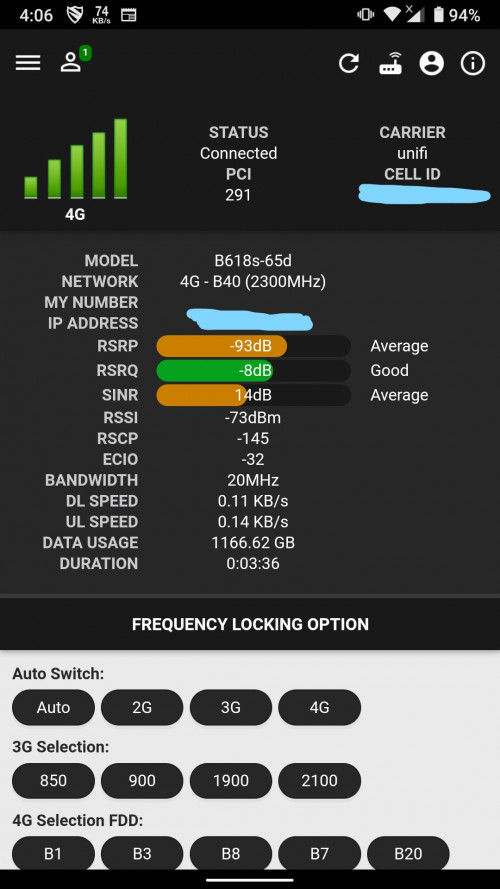 This post has been edited by HumanExtinction: Aug 30 2020, 04:33 AM |
| Change to: |  0.0340sec 0.0340sec
 0.42 0.42
 6 queries 6 queries
 GZIP Disabled GZIP Disabled
Time is now: 7th December 2025 - 08:21 PM |
 Quote
Quote