Welcome Guest ( Log In | Register )

Outline · [ Standard ] · Linear+

 RTX 2060 temps very high on full load, 45c on idle, 85c full load

views
     
TSflagstar
post Mar 18 2019, 04:01 PM, updated 7y ago

Getting Started
**
Junior Member
236 posts

Joined: Mar 2015


Hi, I've just upgraded my GPU from GTX 1060 3GB to GALAX RTX 2060 and I really like the upgrade I've been wanting for.

But the issue is that this card runs very hot to the point its fan is quite audible. I had to adjusr my fan curve so that it's not really loud but I'm quite concerned with the gpu temp. My cpu temp (Ryzen 5 2600 with stock cooler) usually hover around 65~75c on load.

On idle alone, gpu temp hover on 45c @ 300MHz clock while on load, it boost to 1800MHz @ 85c. I get this number from playing MHW.

Say is it normal for the RTX 2060 to be this hot? It certainly not with the previous gpu

Edit: Mistake were made on clock value, changed from 300Hz and 1.8MHz to 300Mhz and 1800MHz.

This post has been edited by flagstar: Mar 18 2019, 09:36 PM
Dothan
post Mar 18 2019, 04:11 PM

Dingle Berries
******
Senior Member
1,053 posts

Joined: Jan 2003


I bought Zotac RTX2060 AMP edition, i don't hear fan sound even under full load.


empire23
post Mar 18 2019, 04:42 PM

Team Island Hopper
Group Icon
Staff
9,417 posts

Joined: Jan 2003
From: Bladin Point, Northern Territory
GPUs usually have no issues going up to 100 degrees Celsius.

If you really want to make sure things run cool I suggest taking software control of the GC fan and forcing it to a certain value.
TSflagstar
post Mar 18 2019, 05:11 PM

Getting Started
**
Junior Member
236 posts

Joined: Mar 2015


QUOTE(empire23 @ Mar 18 2019, 04:42 PM)
GPUs usually have no issues going up to 100 degrees Celsius.

If you really want to make sure things run cool I suggest taking software control of the GC fan and forcing it to a certain value.
*
That's what I'm doing though, with MSI Afterburner and manually adjust the fan curve so it won't go as loud but I'm still concern with the temp.

By default, max temp were set to 83c
1024kbps
post Mar 18 2019, 06:29 PM

李素裳
*******
Senior Member
6,013 posts

Joined: Feb 2007


QUOTE(flagstar @ Mar 18 2019, 05:11 PM)
That's what I'm doing though, with MSI Afterburner and manually adjust the fan curve so it won't go as loud but I'm still concern with the temp.

By default, max temp were set to 83c
*
improve your case ventilation, if your gpu use blower type, it's a bit better, the heat exit directly but it's ventilation still needed.
custom cooler require side panel fans, so the heat wont be going back to case.
teelim
post Mar 18 2019, 06:48 PM

On my way
****
Senior Member
588 posts

Joined: Jan 2003


http://www.galax.com/en/graphics-card/20-s...060-1click.html

This one?

from the looks of it, it might be that the cooling solution use is not that good. Improving airflow in you PC case may help
TSflagstar
post Mar 18 2019, 07:05 PM

Getting Started
**
Junior Member
236 posts

Joined: Mar 2015


QUOTE(1024kbps @ Mar 18 2019, 06:29 PM)
improve your case ventilation, if your gpu use blower type, it's a bit better, the heat exit directly but it's ventilation still needed.
custom cooler require side panel fans, so the heat wont be going back to case.
*
I'm using air cooling solution for my case, 2 intake fan and 2 exhaust fan. Case I'm using is Thermaltake V17 iirc (at work atm). Not sure how I should improve my ventilation better aside from opening the side panel itself

QUOTE(teelim @ Mar 18 2019, 06:48 PM)
http://www.galax.com/en/graphics-card/20-s...060-1click.html

This one?

from the looks of it, it might be that the cooling solution use is not that good. Improving airflow in you PC case may help
*
Yes, that's the GPU i'm using.

1024kbps
post Mar 18 2019, 07:24 PM

李素裳
*******
Senior Member
6,013 posts

Joined: Feb 2007


QUOTE(flagstar @ Mar 18 2019, 07:05 PM)
I'm using air cooling solution for my case, 2 intake fan and 2 exhaust fan. Case I'm using is Thermaltake V17 iirc (at work atm). Not sure how I should improve my ventilation better aside from opening the side panel itself
Yes, that's the GPU i'm using.
*
The hardcore way, use one big hole saw on the side panel and install 1 or 2 120mm fans sweat.gif

Seriously, adding more fans will always help.
xxboxx
post Mar 18 2019, 08:59 PM

The mind is for having ideas, not holding them
*******
Senior Member
5,261 posts

Joined: Oct 2004
From: J@Y B33


QUOTE(flagstar @ Mar 18 2019, 07:05 PM)
I'm using air cooling solution for my case, 2 intake fan and 2 exhaust fan. Case I'm using is Thermaltake V17 iirc (at work atm). Not sure how I should improve my ventilation better aside from opening the side panel itself
Yes, that's the GPU i'm using.
*

Try opening the side panel and see how much the temp can drop. Then you can have target (near the open side panel temp, but not exactly same lower temp) how much you can lower down the temp with better fan or airflow.

It's H17 or V71? Can't find V17.
If H17, got ways to open front panel for better airflow?

This post has been edited by xxboxx: Mar 18 2019, 09:02 PM
TSflagstar
post Mar 18 2019, 09:29 PM

Getting Started
**
Junior Member
236 posts

Joined: Mar 2015


QUOTE(xxboxx @ Mar 18 2019, 08:59 PM)
Try opening the side panel and see how much the temp can drop. Then you can have target (near the open side panel temp, but not exactly same lower temp) how much you can lower down the temp with better fan or airflow.

It's H17 or V71? Can't find V17.
If H17, got ways to open front panel for better airflow?
*
H17 (been a while so I didn't remember the case model laugh.gif)
Yes the front panel can be open. I do realized the intake vent were very small for this model though.

I'll test the temp again later and post the result here if it have any difference at all

P/s: GPU fan is annoyingly audible from 75% fan speed onwards
teelim
post Mar 18 2019, 10:02 PM

On my way
****
Senior Member
588 posts

Joined: Jan 2003


QUOTE(flagstar @ Mar 18 2019, 09:29 PM)
H17 (been a while so I didn't remember the case model laugh.gif)
Yes the front panel can be open. I do realized the intake vent were very small for this model though.

I'll test the temp again later and post the result here if it have any difference at all

P/s: GPU fan is annoyingly audible from 75% fan speed onwards
*
I would suggest trying with one or more panels open. If this solves your issue of GPU getting too hot, then you may want to consider getting a case that has less restrictive airflow
xxboxx
post Mar 18 2019, 10:07 PM

The mind is for having ideas, not holding them
*******
Senior Member
5,261 posts

Joined: Oct 2004
From: J@Y B33


QUOTE(flagstar @ Mar 18 2019, 09:29 PM)
H17 (been a while so I didn't remember the case model laugh.gif)
Yes the front panel can be open. I do realized the intake vent were very small for this model though.

I'll test the temp again later and post the result here if it have any difference at all

P/s: GPU fan is annoyingly audible from 75% fan speed onwards
*

If front panel remove there's no filter to stop dust from being suck in?
My casing with front acrylic cover to showcase the fans light, but at the side have small duck which is poor in airflow.
I removed the acrylic cover and put filter at it's place, the airflow improve tremendously. Dropped more than 10 Celsius during CPU full load.
TSflagstar
post Mar 18 2019, 11:14 PM

Getting Started
**
Junior Member
236 posts

Joined: Mar 2015


QUOTE(teelim @ Mar 18 2019, 10:02 PM)
I would suggest trying with one or more panels open. If this solves your issue of GPU getting too hot, then you may want to consider getting a case that has less restrictive airflow
*
If I had to resort for better case, which case would you suggest though? Furthermore I'd spend most of my budget to the gpu already so I could only afford to buy a new case after several months

QUOTE(xxboxx @ Mar 18 2019, 10:07 PM)
If front panel remove there's no filter to stop dust from being suck in?
My casing with front acrylic cover to showcase the fans light, but at the side have small duck which is poor in airflow.
I removed the acrylic cover and put filter at it's place, the airflow improve tremendously. Dropped more than 10 Celsius during CPU full load.
*
Thing is, even if the front panel are removable, it can't be removed completely because the power button panel is on the front panel, those are permanently wired
kurangak
post Mar 18 2019, 11:17 PM

certified /k addict
******
Senior Member
1,170 posts

Joined: Apr 2011
From: Deus Vult


QUOTE(flagstar @ Mar 18 2019, 04:01 PM)
Hi, I've just upgraded my GPU from GTX 1060 3GB to GALAX RTX 2060 and I really like the upgrade I've been wanting for.

But the issue is that this card runs very hot to the point its fan is quite audible. I had to adjusr my fan curve so that it's not really loud but I'm quite concerned with the gpu temp. My cpu temp (Ryzen 5 2600 with stock cooler) usually hover around 65~75c on load.

On idle alone, gpu temp hover on 45c @ 300MHz clock while on load, it boost to 1800MHz @ 85c. I get this number from playing MHW.

Say is it normal for the RTX 2060 to be this hot? It certainly not with the previous gpu

Edit: Mistake were made on clock value, changed from 300Hz and 1.8MHz to 300Mhz and 1800MHz.
*
open ur side panel, and see if the problem persist.

if it doesnt, u got ventilation issue
TSflagstar
post Mar 19 2019, 12:18 AM

Getting Started
**
Junior Member
236 posts

Joined: Mar 2015


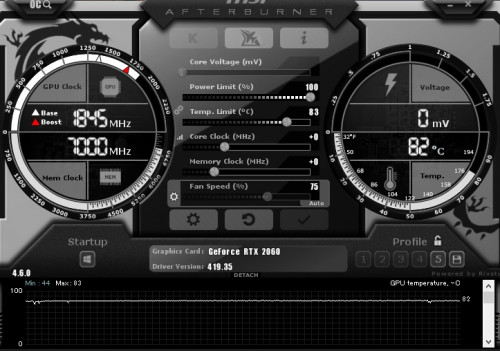
Just got back to test with side panel open, looks like it's still persist, maintaining 83c full load. Just 2c difference with no side panel open sadly

Test this with Monster Hunter World on ultra setting at 1080p. GPU usage at 98~100%

user posted image


QUOTE(kurangak @ Mar 18 2019, 11:17 PM)
open ur side panel, and see if the problem persist.

if it doesnt, u got ventilation issue
*
As above, I don't think this is case issue. I test it with side panel open, not much difference
1024kbps
post Mar 19 2019, 01:13 AM

李素裳
*******
Senior Member
6,013 posts

Joined: Feb 2007


QUOTE(flagstar @ Mar 19 2019, 12:18 AM)
Just got back to test with side panel open, looks like it's still persist, maintaining 83c full load. Just 2c difference with no side panel open sadly

Test this with Monster Hunter World on ultra setting at 1080p. GPU usage at 98~100%

user posted image
As above, I don't think this is case issue. I test it with side panel open, not much difference
*
You need to tame the GPU in different way, like enable VSync for single player game, where input lag is not an issue, limiting the FPS will reduce the gpu utilization.
Or lower the gpu voltage, reduce temp limit/power limit. The later are safer than changing voltage.

Those are the steps i do to keep the pc internal temp in check.
TSflagstar
post Mar 19 2019, 01:51 AM

Getting Started
**
Junior Member
236 posts

Joined: Mar 2015


QUOTE(1024kbps @ Mar 19 2019, 01:13 AM)
You need to tame the GPU in different way, like enable VSync for single player game, where input lag is not an issue, limiting the FPS will reduce the gpu utilization.
Or lower the gpu voltage, reduce temp limit/power limit. The later are safer than changing voltage.

Those are the steps i do to keep the pc internal temp in check.
*
Could I just underclock the GPU without affecting much of the performance? I mean, a 10% reduction in fps is negligible and not going to hurt the quality because from the benchmark I saw with this card, it's already quite overkill for 1080p.

I tried to reduce the power/temp limit to 91%/75c thru MSI Afterburner but it still kicking to 82~83c while it down clock itself from 1840MHz to 1700MHz when it hit the 83c limit
kurangak
post Mar 19 2019, 02:09 AM

certified /k addict
******
Senior Member
1,170 posts

Joined: Apr 2011
From: Deus Vult


QUOTE(flagstar @ Mar 19 2019, 01:51 AM)
Could I just underclock the GPU without affecting much of the performance? I mean, a 10% reduction in fps is negligible and not going to hurt the quality because from the benchmark I saw with this card, it's already quite overkill for 1080p.

I tried to reduce the power/temp limit to 91%/75c thru MSI Afterburner but it still kicking to 82~83c while it down clock itself from 1840MHz to 1700MHz when it hit the 83c limit
*
any idea whats ur ambient temp is?
TSflagstar
post Mar 19 2019, 02:29 AM

Getting Started
**
Junior Member
236 posts

Joined: Mar 2015


QUOTE(kurangak @ Mar 19 2019, 02:09 AM)
any idea whats ur ambient temp is?
*
Room temperature at 35c while ambient temp in the case was 45c
kurangak
post Mar 19 2019, 02:57 AM

certified /k addict
******
Senior Member
1,170 posts

Joined: Apr 2011
From: Deus Vult


QUOTE(flagstar @ Mar 19 2019, 02:29 AM)
Room temperature at 35c while ambient temp in the case was 45c
*
ur temp is normal i think. how hot ur card depends on how low ur ambient temp is.
jetblast
post Mar 19 2019, 03:16 AM

Regular
******
Senior Member
1,039 posts

Joined: Oct 2006


I think you need to check your card thermal paste and pads. Also you case airflow is quite bad. Why don't you upload a picture of your set-up so we can see
TSflagstar
post Mar 19 2019, 06:29 AM

Getting Started
**
Junior Member
236 posts

Joined: Mar 2015


QUOTE(kurangak @ Mar 19 2019, 02:57 AM)
ur temp is normal i think. how hot ur  card depends on how low ur ambient temp is.
*
That was what I'm thinking earlier but when the card down clock itself after it hit the temp limit, I think otherwise and start worry about it


QUOTE(jetblast @ Mar 19 2019, 03:16 AM)
I think you need to check your card thermal paste and pads. Also you case airflow is quite bad. Why don't you upload a picture of your set-up so we can see
*
It's a brand new card though, like less than a week when I bought it. Sure I'll share my set up later this evening or tonight.
1024kbps
post Mar 19 2019, 03:02 PM

李素裳
*******
Senior Member
6,013 posts

Joined: Feb 2007


QUOTE(flagstar @ Mar 19 2019, 01:51 AM)
Could I just underclock the GPU without affecting much of the performance? I mean, a 10% reduction in fps is negligible and not going to hurt the quality because from the benchmark I saw with this card, it's already quite overkill for 1080p.

I tried to reduce the power/temp limit to 91%/75c thru MSI Afterburner but it still kicking to 82~83c while it down clock itself from 1840MHz to 1700MHz when it hit the 83c limit
*
no harm trying, just remember sometimes Afterburner will have issues with driver, and the thermal or power limit might not work, thus need to try to underclock.

Your gpu is overkill for 1080p gaming, hence the high thermal output.
TSflagstar
post Mar 19 2019, 05:16 PM

Getting Started
**
Junior Member
236 posts

Joined: Mar 2015


QUOTE(1024kbps @ Mar 19 2019, 03:02 PM)
no harm trying, just remember sometimes Afterburner will have issues with driver, and the thermal or power limit might not work, thus need to try to underclock.

Your gpu is overkill for 1080p gaming, hence the high thermal output.
*
Hmm.. the only thing I can adjust with Afterburner is the fan curve, power limit didn't stop it from reaching peak 83c before it down clock itself. I'll consider the under clock later if I had enough with the hot temp

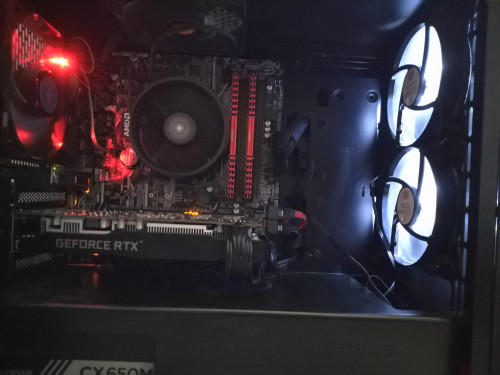
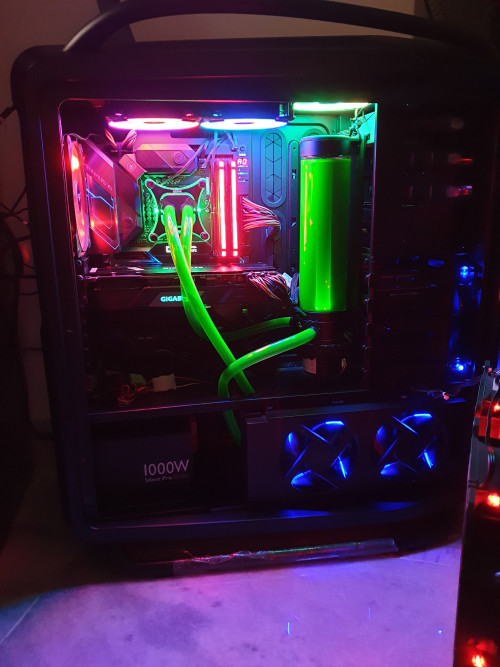
@jetblast here's my pc case layout for your reference

user posted image
N1ck
post Mar 19 2019, 05:59 PM

On my way
****
Junior Member
572 posts

Joined: Jun 2007
QUOTE(flagstar @ Mar 19 2019, 12:18 AM)
Just got back to test with side panel open, looks like it's still persist, maintaining 83c full load. Just 2c difference with no side panel open sadly

Test this with Monster Hunter World on ultra setting at 1080p. GPU usage at 98~100%

user posted image
As above, I don't think this is case issue. I test it with side panel open, not much difference
*
From the picture, Your card is clocked way above boost clock. I don't see any issue with your setup and suggest you just use it as it is intended.

The card is maintaining its set power target hence the raised clocks

To lower temps you would have to lower the clocks or power limits but you would sacrifice performance. Best would be to set the temp limit to your ideal temperature, but why change since the card is made to be set at 83C...

This post has been edited by N1ck: Mar 19 2019, 06:01 PM
stevelum7
post Mar 19 2019, 06:05 PM

New Member
*
Newbie
2 posts

Joined: Sep 2010


QUOTE(flagstar @ Mar 19 2019, 06:16 PM)
Hmm.. the only thing I can adjust with Afterburner is the fan curve, power limit didn't stop it from reaching peak 83c before it down clock itself. I'll consider the under clock later if I had enough with the hot temp

@jetblast here's my pc case layout for your reference

user posted image
*
The ventilation of the case does seems pretty bad though, it seems like a large volume of heat are trapped in the case,with those weak fans that you're using, which i assume is a sickleflow and CM stock fans. And the narrow space between the graphics card and the floor of your case, is comparable to my dual card build, temp will go up to 80s from 73 degrees(single card setup) as there'll be restrictions with the amount of direct air the fans of the card can suck in. I'm having Gigabyte 2080ti myself and oh boy, these rtx cards do get hot. But upgrading/adding your fans will definitely help
1024kbps
post Mar 19 2019, 06:06 PM

李素裳
*******
Senior Member
6,013 posts

Joined: Feb 2007


QUOTE(N1ck @ Mar 19 2019, 05:59 PM)
From the picture, Your card is clocked way above boost clock. I don't see any issue with your setup and suggest you just use it as it is intended.

The card is maintaining its set power target hence the raised clocks

To lower temps you would have to lower the clocks or power limits but you would sacrifice performance. Best would be to set the temp limit to your ideal temperature, but why change since the card is made to be set at 83C...
*
GPU temp is okay, but the heat is going back to case, which will increase the internal ambient temp if ventilation is not good, this is second issue.
First issue is over-performing GPU, without FPS limiter the game will render like over hundreds of FPS unnecessarily/
ave666
post Mar 19 2019, 06:15 PM

Beginner
******
Senior Member
1,515 posts

Joined: Jul 2012
From: Here


psu shroud too close imo. try remove those stupid cover
1024kbps
post Mar 19 2019, 06:34 PM

李素裳
*******
Senior Member
6,013 posts

Joined: Feb 2007


QUOTE(ave666 @ Mar 19 2019, 06:15 PM)
psu shroud too close imo. try remove those stupid cover
*
that would spoil the airflow direction, also the clearance is enough.
Unless the cover beneath can install another fans.
TSflagstar
post Mar 19 2019, 11:08 PM

Getting Started
**
Junior Member
236 posts

Joined: Mar 2015


QUOTE(stevelum7 @ Mar 19 2019, 06:05 PM)
The ventilation of the case does seems pretty bad though, it seems like a large volume of heat are trapped in the case,with those weak fans that you're using, which i assume is a sickleflow and CM stock fans.  And the narrow space between the graphics card and the floor of your case, is comparable to my dual card build, temp will go up to 80s from 73 degrees(single card setup) as there'll be restrictions with the amount of direct air the fans of the card can suck in. I'm having Gigabyte 2080ti myself and oh boy, these rtx cards do get hot. But upgrading/adding your fans will definitely help
*
Yeah, exactly point on my fan model. Unfortunately i can only install 1 more extra fan which is below the front intake fan but I don't think it'll improve the air flow anyway since below there are where the extra cable resides.


QUOTE(1024kbps @ Mar 19 2019, 06:06 PM)
GPU temp is okay, but the heat is going back to case, which will increase the internal ambient temp if ventilation is not good, this is second issue.
First issue is over-performing GPU, without FPS limiter the game will render like over hundreds of FPS unnecessarily/
*
QUOTE(1024kbps @ Mar 19 2019, 06:34 PM)
that would spoil the airflow direction, also the clearance is enough.
Unless the cover beneath can install another fans.
*
I know that card is overkill but people from reddir (I asked) recommend to get it anyway for future proofing instead of getting 1660ti. Does this mean I have to forge another budget for better case?
lolzcalvin
post Mar 19 2019, 11:24 PM

shibe in predicament
******
Senior Member
1,591 posts

Joined: Mar 2014
From: 75°26'11.6"S, 136°16'16.0"E


matx/itx case? one of the problems. tight airflow.

i don't recognise the GPU brand too. msi? gigabyte? zotac perhaps? but all of them have backplates though.

it looks like the thermal solution of the card is another issue as well.

This post has been edited by lolzcalvin: Mar 19 2019, 11:26 PM
Steve Lum
post Mar 19 2019, 11:29 PM

Ayyyyy
*****
Senior Member
709 posts

Joined: Apr 2012
From: Damansara


QUOTE(flagstar @ Mar 19 2019, 11:08 PM)
Yeah, exactly point on my fan model. Unfortunately i can only install 1 more extra fan which is below the front intake fan but I don't think it'll improve the air flow anyway since below there are where the extra cable resides.
I know that card is overkill but people from reddir (I asked) recommend to get it anyway for future proofing instead of getting 1660ti. Does this mean I have to forge another budget for better case?
*
The only way to at least improve it is by upgrading those fans. Noctua A12 or S12A and Corsair AF120 are the few good ones out there that you can look into. Though, I reckon the best solution is to get a better case. There's a list of case's temperature and airflow comparison online that you can take a look at before you make a purchasing decision, such as this https://www.gamersnexus.net/guides/3120-bes...c-cases-of-2017 . You can see how much of a difference in temp a case can make smile.gif

This post has been edited by Steve Lum: Mar 19 2019, 11:35 PM
TSflagstar
post Mar 19 2019, 11:30 PM

Getting Started
**
Junior Member
236 posts

Joined: Mar 2015


QUOTE(lolzcalvin @ Mar 19 2019, 11:24 PM)
matx/itx case? one of the problems. tight airflow.

i don't recognise the GPU brand too. msi? gigabyte? zotac perhaps? but all of them have backplates though.

it looks like the thermal solution of the card is another issue as well.
*
If you missed the first post, I've put the details of my gc. It's galax and i think the only model without backplate

I chose mAtx because of the suitable form factor. I did consider about the air flow but I didn't knew it would be this bad though
lolzcalvin
post Mar 19 2019, 11:48 PM

shibe in predicament
******
Senior Member
1,591 posts

Joined: Mar 2014
From: 75°26'11.6"S, 136°16'16.0"E


QUOTE(flagstar @ Mar 19 2019, 11:30 PM)
If you missed the first post, I've put the details of my gc. It's galax and i think the only model without backplate

I chose mAtx because of the suitable form factor. I did consider about the air flow but I didn't knew it would be this bad though
*
my mistake.

I'd still think the thermal solution of this galax card is posing a problem as well. one could argue that rtx 2060 needs only 2 fans but when i was running 1060 i've had 3 and it ran ~70++ ℃ under air-conditioning room. and 1060 would've ran way cooler than 2060.
TSflagstar
post Mar 20 2019, 12:11 AM

Getting Started
**
Junior Member
236 posts

Joined: Mar 2015


QUOTE(Steve Lum @ Mar 19 2019, 11:29 PM)
The only way to at least improve it is by upgrading those fans. Noctua A12 or S12A and Corsair AF120 are the few good ones out there that you can look into. Though, I reckon the best solution is to get a better case. There's a list of case's temperature and airflow comparison online that you can take a look at before you make a purchasing decision, such as this https://www.gamersnexus.net/guides/3120-bes...c-cases-of-2017 . You can see how much of a difference in temp a case can make smile.gif
*
Upgrading those fans would really hurt my budget right now for 4 of them. Case is no different here and that means I'd to save up more that what I had in mind initially. I've seen that ATX has better airflow mostly so is it better to just upgrade current case to ATX?

Oh, i need to add more fan too for ATX :sad:

QUOTE(lolzcalvin @ Mar 19 2019, 11:48 PM)
my mistake.

I'd still think the thermal solution of this galax card is posing a problem as well. one could argue that rtx 2060 needs only 2 fans but when i was running 1060 i've had 3 and it ran ~70++ ℃ under air-conditioning room. and 1060 would've ran way cooler than 2060.
*
Not when I asked about the product before. They said galax is a good card for both performance and cooling. If it run undee 80c, I would not worry at all but here I am, when the case itself was the problem

My 1060 run at 80c before upgraded but I didn't pay much attention to it because its fan wasn't as loud as this galax card
1024kbps
post Mar 20 2019, 12:24 AM

李素裳
*******
Senior Member
6,013 posts

Joined: Feb 2007


QUOTE(flagstar @ Mar 19 2019, 11:08 PM)
Yeah, exactly point on my fan model. Unfortunately i can only install 1 more extra fan which is below the front intake fan but I don't think it'll improve the air flow anyway since below there are where the extra cable resides.
I know that card is overkill but people from reddir (I asked) recommend to get it anyway for future proofing instead of getting 1660ti. Does this mean I have to forge another budget for better case?
*
you need some good fans, for intake you need stronger fans due to filtered fans have reduced airflow.
at least 2500rpm with PWM is preferred.

I can't recommend any fans though as I'm using some weird OEM fans (NMB/Sony), their life span is too long to wait them to die before I can try out new fans.

Remove the filter from top panel and change it to exhaust if possible, also another problem with the back panel exhaust, the fan grill is too restrictive.

Tip for your next case in case you want to improve the thermal performance, for exhaust fan grill, choose the one with less restrictive grill, the bigger the holes the better, it create less noise and improve airflow.
My Lianli case top and back panel exhaust fan grill is customizable / removable, it was the best case i had but too expensive lol (500 sgd...)

I have another wip case which is Fractal design R6, you can try to check other model as well or wait for other forumer suggestion as well.
Look for case with good ventilation option, your current case is only good for aio cooler/htpc.
TSflagstar
post Mar 20 2019, 12:54 AM

Getting Started
**
Junior Member
236 posts

Joined: Mar 2015


QUOTE(1024kbps @ Mar 20 2019, 12:24 AM)
you need some good fans, for intake you need stronger fans due to filtered fans have reduced airflow.
at least 2500rpm with PWM is preferred.

I can't recommend any fans though as I'm using some weird OEM fans (NMB/Sony), their life span is too long to wait them to die before I can try out new fans.

Remove the filter from top panel and change it to exhaust if possible, also another problem with the back panel exhaust, the fan grill is too restrictive.

Tip for your next case in case you want to improve the thermal performance, for exhaust fan grill, choose the one with less restrictive grill, the bigger the holes the better, it create less noise and improve airflow.
My Lianli case top and back panel exhaust fan grill is customizable / removable, it was the best case i had but too expensive lol (500 sgd...)

I have another wip case which is Fractal design R6, you can try to check other model as well or wait for other forumer suggestion as well.
Look for case with good ventilation option, your current case is only good for aio cooler/htpc.
*
Guess I don't have much of a choice now but to wait for several month till I had budget to upgrade both fan and case.

The top panel is already setup as exhaust fan (stock case fan). At first, I setup that way because my cpu started to get really hot under load, now I'm starting to see the airflow problem after you point it out.

For the back panel though, I thought it was wide enough for air to pass through and it has no filter. Top panel filter can be removed. Front panel however, I'd afraid it will pull more dust if I open the that panel for unrestrictive air flow.
Steve Lum
post Mar 20 2019, 03:04 AM

Ayyyyy
*****
Senior Member
709 posts

Joined: Apr 2012
From: Damansara


QUOTE(flagstar @ Mar 20 2019, 12:11 AM)
Upgrading those fans would really hurt my budget right now for 4 of them. Case is no different here and that means I'd to save up more that what I had in mind initially. I've seen that ATX has better airflow mostly so is it better to just upgrade current case to ATX?

Oh, i need to add more fan too for ATX :sad:
Not when I asked about the product before. They said galax is a good card for both performance and cooling. If it run undee 80c, I would not worry at all but here I am, when the case itself was the problem

My 1060 run at 80c before upgraded but I didn't pay much attention to it because its fan wasn't as loud as this galax card
*
Yeap! It's defo better to upgrade your current case to ATX cases. Full-sized towers are usually better for future proof as well, for upgradability in the future. I'm still using CM Cosmos 2 case from 7 yrs ago, and i've upgraded the hardware three times now without any hurdles, looks sparkling brand new too wink.gif. And you don't have to buy extra fans yet, considering those cases do come with 2-3 fans, which totals up to 7 fans with ur current case wink.gif Then perhaps you could upgrade those fans after
goldfries
post Mar 20 2019, 04:00 AM

40K Club
Group Icon
Forum Admin
44,415 posts

Joined: Jan 2003


QUOTE(flagstar @ Mar 19 2019, 02:29 AM)
Room temperature at 35c while ambient temp in the case was 45c
*
Room temperature at 35c is abnormal laaaa.
goldfries
post Mar 20 2019, 04:06 AM

40K Club
Group Icon
Forum Admin
44,415 posts

Joined: Jan 2003


QUOTE(1024kbps @ Mar 19 2019, 03:02 PM)
Your gpu is overkill for 1080p gaming, hence the high thermal output.
Erm dude, this is absolute BS.

Whether or not it's overkill for 1080P is not going to affect your temperature, in fact for 1080P it's far from being an overkill.

Also the RTX 2060 - is just nice for 144Hz refresh, in some cases still not enough to maintain full 144 fps.

goldfries
post Mar 20 2019, 04:08 AM

40K Club
Group Icon
Forum Admin
44,415 posts

Joined: Jan 2003


QUOTE(flagstar @ Mar 20 2019, 12:11 AM)
Not when I asked about the product before. They said galax is a good card for both performance and cooling. If it run undee 80c, I would not worry at all but here I am, when the case itself was the problem
I'm using the exact same card as you. (I've also replied you on your comment on my video, thank you very much for commenting!)

Try running Superposition benchmark at 1080P Extreme settings and see what's the maxed out temperature you get.

Mine tops at 76c and still remain silent, if I set the fan to run at 100% the temperature maxed out at just 64c.
goldfries
post Mar 20 2019, 04:16 AM

40K Club
Group Icon
Forum Admin
44,415 posts

Joined: Jan 2003


Galax RTX 2060 actual recording with MSI Afterburner OSD showing the load, temps and FPS.

smile.gif
TSflagstar
post Mar 20 2019, 04:39 AM

Getting Started
**
Junior Member
236 posts

Joined: Mar 2015


QUOTE(goldfries @ Mar 20 2019, 04:00 AM)
Room temperature at 35c is abnormal laaaa.
*
QUOTE(goldfries @ Mar 20 2019, 04:08 AM)
I'm using the exact same card as you. (I've also replied you on your comment on my video, thank you very much for commenting!)

Try running Superposition benchmark at 1080P Extreme settings and see what's the maxed out temperature you get.

Mine tops at 76c and still remain silent, if I set the fan to run at 100% the temperature maxed out at just 64c.
*
You're welcome. I saw your video while trying to find out why my card runs so hot and start to worry about it.

I'll try to run the benchmark later today and share the result here. I've tried two heavy title games earlier, MH World and Metro Exodus and both card manage to reach 83c thermal limit before it down clock to 1700MHz

As others have pointed out, the problem lies with my weak fan and tight airflow case so my card temp went as hot as it gets.

For the room temperature, I refer to my thermometer in my room at 3pm so yeah, it's quite hot here, without any A/C
Vigilant
post Mar 20 2019, 05:28 AM

Be ever vigilant, but never suspicious
******
Senior Member
1,288 posts

Joined: Apr 2009
How is the temperature when the ambient is cooler? Like 5-7am in the morning?

Just FYI, new out of the box graphics card sometimes suffer from bad heatsink thermal contact for the GPU and VRM. You can always try to re-apply thermal paste or thermal pad if applicable. Or try to re-mount the heatsink and tighten the screw. That's if it doesn't void the warranty.

Anyhow it's best to rule out ambient temperature and casing airflow are the culprit and you can send the card back to the vendor stating that it's overheating.

This post has been edited by Vigilant: Mar 20 2019, 01:52 PM
TSflagstar
post Mar 20 2019, 08:08 AM

Getting Started
**
Junior Member
236 posts

Joined: Mar 2015


QUOTE(Vigilant @ Mar 20 2019, 05:28 AM)
How is the temperature when the ambient is cooler? Like 5-7am in the morning?

Just FYI, new out of the box graphics card sometimes suffer from bad heatsink thermal contact for the GPU and VRM. You can always try to re-apply thermal paste or thermal pad if applicable. Or try to re-mount the heatsink and tighten the screw. That's if it doesn't avoid the warranty.

Anyhow it's best to rule out ambient temperature and casing airflow are the culprit and you can send the card back to the vendor stating that it's overheating.
*
Lowest ambient temp in the case for said time was 42c at best, at least from this morning while it was idling.

I rather not void or do anything on the gpu while it is still brand new out of box so if it is faulty gpu, I would rather sent it back for RMA.
TSflagstar
post Mar 20 2019, 05:12 PM

Getting Started
**
Junior Member
236 posts

Joined: Mar 2015


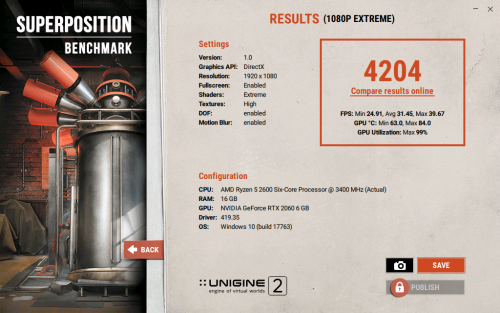
@goldfries I've tested the gpu with the superposition benchmark and the max temp I get was 85c (1st test: 82c, 2nd: 84c). Last test on game benchmark it tops 85c

I've provide the results of the 2nd benchmark here. I can't attach the text result of the benchmark though

user posted image


Acid_RuleZz
post Mar 21 2019, 12:00 AM

ミウ ❤
*******
Senior Member
6,612 posts

Joined: Jan 2003
From: Tomorrow


QUOTE(flagstar @ Mar 20 2019, 05:12 PM)
@goldfries I've tested the gpu with the superposition benchmark and the max temp I get was 85c (1st test: 82c, 2nd: 84c). Last test on game benchmark it tops 85c

I've provide the results of the 2nd benchmark here. I can't attach the text result of the benchmark though
*
Your card probably have bad thermal paste application. Try touch the exposed heatsink with your hand to confirm if it actually imba hot. If you have one of those infrared thermometer, use that instead.

You can try undervolting instead of underclocking it, press Ctrl+F to open frequency curve graph in Msi Afterburner and lower the peak curve little by little.

This post has been edited by Acid_RuleZz: Mar 21 2019, 12:02 AM
TSflagstar
post Mar 22 2019, 05:56 PM

Getting Started
**
Junior Member
236 posts

Joined: Mar 2015


QUOTE(Acid_RuleZz @ Mar 21 2019, 12:00 AM)
Your card probably have bad thermal paste application. Try touch the exposed heatsink with your hand to confirm if it actually imba hot. If you have one of those infrared thermometer, use that instead.

You can try undervolting instead of underclocking it, press Ctrl+F to open frequency curve graph in Msi Afterburner and lower the peak curve little by little.
*
Well it is hot when touch (at 85c obviously it's hot). I didn't check the card if it would void the warranty or not if I were to remove the fan to apply thermal paste.

I don't reallt have much experience in undervolting a gpu more so if it's a brand new card. Unless it is an out of warranty card, i would do it
Acid_RuleZz
post Mar 22 2019, 06:54 PM

ミウ ❤
*******
Senior Member
6,612 posts

Joined: Jan 2003
From: Tomorrow


QUOTE(flagstar @ Mar 22 2019, 05:56 PM)
I don't reallt have much experience in undervolting a gpu more so if it's a brand new card. Unless it is an out of warranty card, i would do it
*
What, undervolting is just like underclocking. It doesn't void warranty.
goldfries
post Mar 23 2019, 05:21 PM

40K Club
Group Icon
Forum Admin
44,415 posts

Joined: Jan 2003


QUOTE(flagstar @ Mar 20 2019, 05:12 PM)
@goldfries I've tested the gpu with the superposition benchmark and the max temp I get was 85c (1st test: 82c, 2nd: 84c). Last test on game benchmark it tops 85c
How was the fan when you run the test? Was it screaming away?

TSflagstar
post Mar 23 2019, 05:31 PM

Getting Started
**
Junior Member
236 posts

Joined: Mar 2015


After some thorough testing (not undervolt the card yet) with just the front panel open and fan filter above the case removed(I now had time to test this seriously), it seems @stevelum7 and @1024kbps were right after all, it is my problematic case and case fans itself. With those front panel open, my gc clock speed maintain at 1755MHz max 80c temp. If it were temp throttling, it would just sit below 1700MHz. Fan speed is set to auto at this point.

When I set the fan speed to 100% (front panel open), it would drop the temp further to sweet 73c 1770MHz, with quite audible fan noise from gc.

Afterwards, I tried to undervolt with the help from Afterburner to 1818MHz @ 950mV. It didn't change much however, sitting well averaging 78~80c at 1755~1770MHz. I would try to undervolt further if I could later on.


QUOTE(goldfries @ Mar 23 2019, 05:21 PM)
How was the fan when you run the test? Was it screaming away?
*
It was on auto, when I run it with closed case.. fan spin around 82% when temp limit were hit. It's audible but not that loud.
xxboxx
post Mar 23 2019, 09:56 PM

The mind is for having ideas, not holding them
*******
Senior Member
5,261 posts

Joined: Oct 2004
From: J@Y B33


QUOTE(flagstar @ Mar 23 2019, 05:31 PM)
After some thorough testing (not undervolt the card yet) with just the front panel open and fan filter above the case removed(I now had time to test this seriously), it seems @stevelum7 and @1024kbps were right after all, it is my problematic case and case fans itself. With those front panel open, my gc clock speed maintain at 1755MHz max 80c temp. If it were temp throttling, it would just sit below 1700MHz. Fan speed is set to auto at this point.

When I set the fan speed to 100% (front panel open), it would drop the temp further to sweet 73c 1770MHz, with quite audible fan noise from gc.

Afterwards, I tried to undervolt with the help from Afterburner to 1818MHz @ 950mV. It didn't change much however, sitting well averaging 78~80c at 1755~1770MHz. I would try to undervolt further if I could later on.
It was on auto, when I run it with closed case.. fan spin around 82% when temp limit were hit. It's audible but not that loud.
*

But since the front panel can't be completely removed you have to put the front panel at the side every time you play game? That will make inside your casing full of dust.
Have you tried remove side panel (without removing front panel) and see if the temp drop?

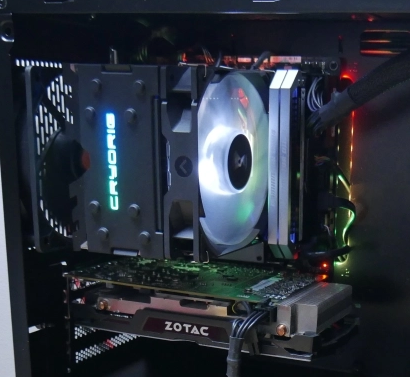
The main problem with your setup are that AMD fan blowing air into heatsink, which afterward the hot air is spread out on the whole casing. The front fan blowing to motherboard while AMD fan blowing out of motherboard, it create resistance. The RTX also making it worse by spreading the hot air everywhere. One way is to change the heatsink to the type that have the fan blowing to the back of case like this:
user posted image
But you still need to remove the front panel to have better airflow.

If the temp drop when side panel removed, I have an idea how to improve the airflow without spending any money. Can the side panel transparent acrylic be removed? If can (Or you willing to remove it by force), install a filter (pantyhose work like magic) after remove the transparent acrylic and reverse the front panel fans so that it suck out air. Now the hot air that's being blown everywhere will be suck out on the 3 sides of the case while the side panel letting cold air in.

Letting the GPU fan spin faster is not a good idea, it shorten the fan lifespan. It would be better to have the case fans spin faster instead to have better airflow as it would be cheaper and easier to replace. Can all the 4 fans speed be controlled? Because it can get very loud when all 4 fans spin at max speed so it would be better to have it spin at max speed only when gaming.
TSflagstar
post Mar 24 2019, 11:20 PM

Getting Started
**
Junior Member
236 posts

Joined: Mar 2015


QUOTE(xxboxx @ Mar 23 2019, 09:56 PM)
But since the front panel can't be completely removed you have to put the front panel at the side every time you play game? That will make inside your casing full of dust.
Have you tried remove side panel (without removing front panel) and see if the temp drop?

The main problem with your setup are that AMD fan blowing air into heatsink, which afterward the hot air is spread out on the whole casing. The front fan blowing to motherboard while AMD fan blowing out of motherboard, it create resistance. The RTX also making it worse by spreading the hot air everywhere. One way is to change the heatsink to the type that have the fan blowing to the back of case like this:
user posted image
But you still need to remove the front panel to have better airflow.

If the temp drop when side panel removed, I have an idea how to improve the airflow without spending any money. Can the side panel transparent acrylic be removed? If can (Or you willing to remove it by force), install a filter (pantyhose work like magic) after remove the transparent acrylic and reverse the front panel fans so that it suck out air. Now the hot air that's being blown everywhere will be suck out on the 3 sides of the case while the side panel letting cold air in.

Letting the GPU fan spin faster is not a good idea, it shorten the fan lifespan. It would be better to have the case fans spin faster instead to have better airflow as it would be cheaper and easier to replace. Can all the 4 fans speed be controlled? Because it can get very loud when all 4 fans spin at max speed so it would be better to have it spin at max speed only when gaming.
*
I didn't test the temp yet when the side panel is removed but i'll do the test later on when I return as I'm currently outstation.

I'm aware the amd stock cooler do blowing hot air everywhere in the case hence the way I setup the current fan layout to combat it but not much. For cpu alone, sometimes if I ran a very heavy task, it tops 80c. What I didn't aware that gpu also contribute to the heat.

For the gpu fan, I agree with you. 100% running fan speed would reduce the lifespan of those fan more, that's why I would always opt for auto or at least 80% fan speed at max. For the case fan, only the rear exhaust fan can be control, the rest are connected to PSU thru dedicated fan controller (the simple low off high controller) but all of them were set to max anyway except the rear one, that sickle flow fan can get really loud when set to max

Good idea on the idea for DIY case, I might do it when I have the time (of course after the test with side panel open)


goldfries
post Mar 25 2019, 12:25 AM

40K Club
Group Icon
Forum Admin
44,415 posts

Joined: Jan 2003


In the end everything boils down to your room temperature.
TSflagstar
post Apr 3 2019, 02:41 PM

Getting Started
**
Junior Member
236 posts

Joined: Mar 2015


QUOTE(goldfries @ Mar 25 2019, 12:25 AM)
In the end everything boils down to your room temperature.
*
In the end, I opted for new case now. I bought Thermaltake Versa H27 TG ATX Case (same brand but eh, I like its build for the price), reuse all the case fans from previous case with 3 front intake, 1 rear exhaust and 1 top exhaust.

Tested case under idle
CPU: 40c (3.2GHz)
GPU: 42c (400MHz)
GPU Fan speed: 50%

Tested on load (MHW Very high preset)
CPU: 65c (3.7GHz)
GPU: 80c (1825MHz)
GPU Fan Speed: 80%

Test on load (Supersition Benchmark Extreme Preset)
CPU: 46c
GPU: 79c (1825MHz)
GPU Fan Speed: 79%

It seems by opting for new ATX case, I was able to shave off 3c on load but at least this time, it can run on boost clock without it downclock itself on thermal limit. I hope this would be enough until I bought better case fans later on down the road

P/s: thanks everyone for helping and provide suggestion for my problem. Really appreciate it.

This post has been edited by flagstar: Apr 3 2019, 02:43 PM
Steve Lum
post Apr 3 2019, 04:01 PM

Ayyyyy
*****
Senior Member
709 posts

Joined: Apr 2012
From: Damansara


QUOTE(flagstar @ Apr 3 2019, 02:41 PM)
In the end, I opted for new case now. I bought Thermaltake Versa H27 TG ATX Case (same brand but eh, I like its build for the price), reuse all the case fans from previous case with 3 front intake, 1 rear exhaust and 1 top exhaust.

Tested case under idle
CPU: 40c (3.2GHz)
GPU: 42c (400MHz)
GPU Fan speed: 50%

Tested on load (MHW Very high preset)
CPU: 65c (3.7GHz)
GPU: 80c (1825MHz)
GPU Fan Speed: 80%

Test on load (Supersition Benchmark Extreme Preset)
CPU: 46c
GPU: 79c (1825MHz)
GPU Fan Speed: 79%

It seems by opting for new ATX case, I was able to shave off 3c on load but at least this time, it can run on boost clock without it downclock itself on thermal limit. I hope this would be enough until I bought better case fans later on down the road

P/s: thanks everyone for helping and provide suggestion for my problem. Really appreciate it.
*
That's a pretty good case smile.gif When you do upgrade those fans, those frontal intake fans should be your primary target. And if your current front intake fans are powered directly by your motherboard, it would be better to adjust the min speed higher (I have mine set at 80% mid temp speed,as long as it doesn't get too noisy) through bios for the meantime till you've upgraded those fans. Congrats on your new case btw tongue.gif
TSflagstar
post Apr 3 2019, 11:23 PM

Getting Started
**
Junior Member
236 posts

Joined: Mar 2015


QUOTE(Steve Lum @ Apr 3 2019, 04:01 PM)
That's a pretty good case smile.gif When you do upgrade those fans, those frontal intake fans should be your primary target. And if your current front intake fans are powered directly by your motherboard, it would be better to adjust the min speed higher (I have mine set at 80% mid temp speed,as long as it doesn't get too noisy) through bios for the meantime till you've upgraded those fans. Congrats on your new case btw tongue.gif
*
The seller I go when I bought those case do recommend me to get the TT pure fan pack for like rm239 and he said it's a good fan to opt for but I still hold on from buying it yet. Need more advice for better case fans. Also can't find noctua fans at lowyat, probably need to survey more shops later.

All those front intake fan and top exhaust fan were wired to a 3-pin splitter to molex so can't really control much but low and high switch which I assume is 5v/12v switch
1024kbps
post Apr 3 2019, 11:55 PM

李素裳
*******
Senior Member
6,013 posts

Joined: Feb 2007


QUOTE(flagstar @ Apr 3 2019, 11:23 PM)
The seller I go when I bought those case do recommend me to get the TT pure fan pack for like rm239 and he said it's a good fan to opt for but I still hold on from buying it yet. Need more advice for better case fans. Also can't find noctua fans at lowyat, probably need to survey more shops later.

All those front intake fan and top exhaust fan were wired to a 3-pin splitter to molex so can't really control much but low and high switch which I assume is 5v/12v switch
*
Real man only use Delta/San Ace, minimum 4 ampere cool2.gif
The fan will cool the whole the whole room and including you rclxms.gif

Jokes aside, My favorite definitely is Nidec Servo Gentle Typhoon 1850/2150 version.
It wont scream even if running at max speed, low start up voltage if i recall correctly, almost behaves like a PWM fan.
Try or grab one if you can.

2. NoiseBlocker M12p
3. San Ace, but all these fans are difficult to acquire.

You can get an idea from here http://www.silentpcreview.com/section12.html

As for noctua, most of them are silent oriented pc fans, you will want the IndustrialPPC version as they run much faster.
Get a high speed fan with pwm support if possible, most 3 pins high speed fan will drive you crazy.
Steve Lum
post Apr 4 2019, 02:08 AM

Ayyyyy
*****
Senior Member
709 posts

Joined: Apr 2012
From: Damansara


QUOTE(flagstar @ Apr 3 2019, 11:23 PM)
The seller I go when I bought those case do recommend me to get the TT pure fan pack for like rm239 and he said it's a good fan to opt for but I still hold on from buying it yet. Need more advice for better case fans. Also can't find noctua fans at lowyat, probably need to survey more shops later.

All those front intake fan and top exhaust fan were wired to a 3-pin splitter to molex so can't really control much but low and high switch which I assume is 5v/12v switch
*
I've bought my noctua fans from lelong website. Noctuas are well known for their performance and 6 years warranty. And I use them for my watercooling radiators since they're really quiet at full speed and has high static pressure. But like what 1024kbps mentioned, Noctua Industrial PPC would be a beast for airflow. Found one here . Only found out they existed after I bought my current Noctua fans sad.gif And for that TT fans, they're more priced towards aesthetic than performance for it's RGB lighting. Which you could rather go for Corsair LL fans and place them at the top
Steve Lum
post Apr 4 2019, 02:56 AM

Ayyyyy
*****
Senior Member
709 posts

Joined: Apr 2012
From: Damansara


An example of my setup just for reference. It's not great but it will do laugh.gif It's a pretty old case so it has no side glass but the size of it is really good for upgrades and airflow.
Front: CM Megaflow 200mm& Sickleflow (Air-In)
Side Upper: Corsair SP120 x 2 for GPU airflow (Air-In)
Side Lower: CM sickleflow x2 (bottom) (Air-In) from outside of case into Noctua NF-F12 x2 into radiator (air-push) and out through radiator by CM Xtraflo x2 (air-pull& Air-Out)
Top: Corsair LL120 x3 (Air-Out)
Rear: Corsair AF140 (Air-Out)
» Click to show Spoiler - click again to hide... «


» Click to show Spoiler - click again to hide... «

Don't judge sad.gif I have weird fans obsession and having empty fan slots looks weird haha

A recommended fans setup for your case could be
Front: 3x Noctua Industrial PPC 120
Top: 3x Corsair LL120
Rear: 1x Noctua Industrial PPC (for performance) or 1x Corsair AF120 (performance with fixed LED light and on budget) or 1x Corsair LL120 (to complete ur RGB sweat.gif )

I'm not a pro however, so looking for certain comparison or reviews online would be great. Hope I helped


This post has been edited by Steve Lum: Apr 4 2019, 03:04 AM
TSflagstar
post Apr 4 2019, 01:59 PM

Getting Started
**
Junior Member
236 posts

Joined: Mar 2015


QUOTE(1024kbps @ Apr 3 2019, 11:55 PM)
Real man only use Delta/San Ace, minimum 4 ampere  cool2.gif
The fan will cool the whole the whole room and including you  rclxms.gif

Jokes aside, My favorite definitely is Nidec Servo Gentle Typhoon 1850/2150 version.
It wont scream even if running at max speed, low start up voltage if i recall correctly, almost behaves like a PWM fan.
Try or grab one if you can.

2. NoiseBlocker M12p
3. San Ace, but all these fans are difficult to acquire.

You can get an idea from here http://www.silentpcreview.com/section12.html

As for noctua, most of them are silent oriented pc fans, you will want the IndustrialPPC version as they run much faster.
Get a high speed fan with pwm support if possible, most 3 pins high speed fan will drive you crazy.
*
Huh, that's new for me, I didn't knew there was industrial ppc until you guys brought it up, definitely will look for it to assist with my air cooling setup build. Another thing that I learnt from the link you gave me, putting sleeve bearing fan (which is all of my current case fans) other than vertical position would have higher failure rate.

For PWM, I do need to get at least a controller right? My new case do not have built-in PWM support


QUOTE(Steve Lum @ Apr 4 2019, 02:56 AM)
An example of my setup just for reference. It's not great but it will do  laugh.gif It's a pretty old case so it has no side glass but the size of it is really good for upgrades and airflow.
Front: CM Megaflow 200mm& Sickleflow (Air-In)
Side Upper: Corsair SP120 x 2 for GPU airflow (Air-In)
Side Lower: CM sickleflow x2 (bottom) (Air-In) from outside of case into Noctua NF-F12 x2 into radiator (air-push) and out through radiator by CM Xtraflo x2 (air-pull& Air-Out)
Top: Corsair LL120 x3 (Air-Out)
Rear: Corsair AF140 (Air-Out)
» Click to show Spoiler - click again to hide... «


» Click to show Spoiler - click again to hide... «

Don't judge sad.gif I have weird fans obsession and having empty fan slots looks weird haha

A recommended fans setup for your case could be
Front: 3x Noctua Industrial PPC 120
Top: 3x Corsair LL120
Rear: 1x Noctua Industrial PPC (for performance) or 1x Corsair AF120 (performance with fixed LED light and on budget) or 1x Corsair LL120 (to complete ur RGB sweat.gif )

I'm not a pro however, so looking for certain comparison or reviews online would be great. Hope I helped
*
My new case can support up to 7 120mm fans or 4 120mm x 2 140mm fans as the front panel can only support 120mm fan. I find this as no issue, as long there's 3 slot. I'm planning to replace those front panel fans as your suggestion with 2 or 3 industrial ppc fans while moving the current one to top intake. It would wear out the current fan but it's cheap to replace anyway. Later in the road, swapping those top intake fan to better fan or aio. Only concern with this setup is the type of airflow in the case.

Does the corsair LL 120 really good? I'm having doubt looking at the fan spec, about 40 CFM each which is like my sickleflow fan(?) Lets just say I'm ignoring all the fancy rgb and prefer performance.


1024kbps
post Apr 4 2019, 06:45 PM

李素裳
*******
Senior Member
6,013 posts

Joined: Feb 2007


QUOTE(flagstar @ Apr 4 2019, 01:59 PM)
Huh, that's new for me, I didn't knew there was industrial ppc until you guys brought it up, definitely will look for it to assist with my air cooling setup build. Another thing that I learnt from the link you gave me, putting sleeve bearing fan (which is all of my current case fans) other than vertical position would have higher failure rate.

For PWM, I do need to get at least a controller right? My new case do not have built-in PWM support
My new case can support up to 7 120mm fans or 4 120mm x 2 140mm fans as the front panel can only support 120mm fan. I find this as no issue, as long there's 3 slot. I'm planning to replace those front panel fans as your suggestion with 2 or 3 industrial ppc fans while moving the current one to top intake. It would wear out the current fan but it's cheap to replace anyway. Later in the road, swapping those top intake fan to better fan or aio. Only concern with this setup is the type of airflow in the case.

Does the corsair LL 120 really good? I'm having doubt looking at the fan spec, about 40 CFM each which is like my sickleflow fan(?) Lets just say I'm ignoring all the fancy rgb and prefer performance.
*
High Temperature will increase the vaporization rate of the oil beatween the bearing and and shaft,
early sign of dying sleeve bearing fan is leaking oil, when it's almost dying it will rattle, and eventually stuck, some wont spinning unless you move it with your finger sweat.gif

Fluid bearing is almost "maintenance free", but expensive, while ball bearing will have hissing noise, and might increase over time.
Other rare bearing is maglev type.

For passive type Pwm support get this https://gelidsolutions.com/thermal-solution...-to-4-splitter/
But passive type has limitation, the cpu/mobo pwm header can only control 4 pwm fans, more than 4 the pwm will not working(100% speed).
also can't support more than 1 ampere total, you can contact mobo maker for the actual spec.
Steve Lum
post Apr 5 2019, 02:37 AM

Ayyyyy
*****
Senior Member
709 posts

Joined: Apr 2012
From: Damansara


QUOTE(flagstar @ Apr 4 2019, 01:59 PM)
Huh, that's new for me, I didn't knew there was industrial ppc until you guys brought it up, definitely will look for it to assist with my air cooling setup build. Another thing that I learnt from the link you gave me, putting sleeve bearing fan (which is all of my current case fans) other than vertical position would have higher failure rate.

For PWM, I do need to get at least a controller right? My new case do not have built-in PWM support
My new case can support up to 7 120mm fans or 4 120mm x 2 140mm fans as the front panel can only support 120mm fan. I find this as no issue, as long there's 3 slot. I'm planning to replace those front panel fans as your suggestion with 2 or 3 industrial ppc fans while moving the current one to top intake. It would wear out the current fan but it's cheap to replace anyway. Later in the road, swapping those top intake fan to better fan or aio. Only concern with this setup is the type of airflow in the case.

Does the corsair LL 120 really good? I'm having doubt looking at the fan spec, about 40 CFM each which is like my sickleflow fan(?) Lets just say I'm ignoring all the fancy rgb and prefer performance.
*
Noctua NF-F12 does come with a pwm Y-splitter like this that you can connect 2 fans to a single fan header. Though, it's industrial counterpart probably doesn't come with it. But like what kbps said, there will be limitation on how much power those headers can give out, having a 12W and 1A power limit (each NF-F12 Industrial V. takes up 3.6W and 0.3A). However, there's certain motherboards such as Asus that has H_Amp headers which supports up to 3Amps.
And for those LL120, it should be suffice considering heat rises, and those fans are enough to boost and push those heat out from your case. They're really quiet too, which is a total plus to me. I used to have CM xtraflo fans at the top which has 83CFM, it does it's job really well but it's noise turns me off with what sounds like a heli next to me due to its high RPM. Bear in mind that top fans will produce the most noise considering it doesn't have much obstruction above it rather than just the filter itself. Unlike frontal fans which have slight obstruction in front (cover) and behind (into ur case) which would have its noise kept to its minimum.

This post has been edited by Steve Lum: Apr 5 2019, 02:38 AM
SUSshidie6990
post Apr 9 2019, 07:56 PM

New Member
*
Newbie
13 posts

Joined: Aug 2016
I have exactly same problem like TS, same card, galax rtx 2060. If graphic set to ultra for games like pubg and apex legends, temperature max out 84c. If I lower graphic to low/very low, temperature get lower a bit to 82c.

I have only one table fan in my room 😭

I tweak fan curved using msi afterburner to kick at 70-80% after 70c and lower my fps to 144 to get 74-77c (very low/low graphic setting).

My cpu (ryzen 2600) temperature max around 71-72c.

Maybe will try to change case after this, maybe fractal meshify c mini, hope can solve this problem.


Acid_RuleZz
post Apr 9 2019, 10:50 PM

ミウ ❤
*******
Senior Member
6,612 posts

Joined: Jan 2003
From: Tomorrow


Honestly, the heatsink on this card should belong to sub 120w GPU.
1024kbps
post Apr 10 2019, 01:23 AM

李素裳
*******
Senior Member
6,013 posts

Joined: Feb 2007


QUOTE(Acid_RuleZz @ Apr 9 2019, 10:50 PM)
Honestly, the heatsink on this card should belong to sub 120w GPU.
*
Turing is a hot chip isn't it?
badly designed heat sink + hot chip combo sounds like a receipt for disaster.
SUSshidie6990
post Apr 11 2019, 09:31 AM

New Member
*
Newbie
13 posts

Joined: Aug 2016
I'm thinking 2 option, sell this gpu and get another card like zotac amp or buy new case that have a lot of airflow like fractal meshify C. What do you guys suggest?
TSflagstar
post Apr 11 2019, 01:32 PM

Getting Started
**
Junior Member
236 posts

Joined: Mar 2015


QUOTE(1024kbps @ Apr 4 2019, 06:45 PM)
High Temperature will increase the vaporization rate of the oil beatween the bearing and and shaft,
early sign of dying sleeve bearing fan is leaking oil, when it's almost dying it will rattle, and eventually stuck, some wont spinning unless you move it with your finger  sweat.gif

Fluid bearing is almost "maintenance free", but expensive, while ball bearing will have hissing noise, and might increase over time.
Other rare bearing is maglev type.

For passive type Pwm support get this https://gelidsolutions.com/thermal-solution...-to-4-splitter/
But passive type has limitation, the cpu/mobo pwm header can only control 4 pwm fans, more than 4 the pwm will not working(100% speed).
also can't support more than 1 ampere total, you can contact mobo maker for the actual spec.
*
QUOTE(Steve Lum @ Apr 5 2019, 02:37 AM)
Noctua NF-F12 does come with a pwm Y-splitter like this that you can connect 2 fans to a single fan header. Though, it's industrial counterpart probably doesn't come with it. But like what kbps said, there will be limitation on how much power those headers can give out, having a 12W and 1A power limit (each NF-F12 Industrial V. takes up 3.6W and 0.3A). However, there's certain motherboards such as Asus that has H_Amp headers which supports up to 3Amps.
And for those LL120, it should be suffice considering heat rises, and those fans are enough to boost and push those heat out from your case. They're really quiet too, which is a total plus to me. I used to have CM xtraflo fans at the top which has 83CFM, it does it's job really well but it's noise turns me off with what sounds like a heli next to me due to its high RPM. Bear in mind that top fans will produce the most noise considering it doesn't have much obstruction above it rather than just the filter itself. Unlike frontal fans which have slight obstruction in front (cover) and behind (into ur case) which would have its noise kept to its minimum.
*
Noted. Aside from Noctua and it's ippc counterpart which can be bought at nearest czone shop (or lowyat if I have too much free time), other industrial fan are harder to find in stores except online. Well I'm not getting one very soon, already splurge a lot on case tongue.gif

QUOTE(shidie6990 @ Apr 11 2019, 09:31 AM)
I'm thinking 2 option, sell this gpu and get another card like zotac amp or buy new case that have a lot of airflow like fractal meshify C. What do you guys suggest?
*
Dunno about other cards that have better cooling solution but if you've already bought it, just use it. I had same problem until I swap to a new case and now it's much bearable to run (fan still hit 80% on 80c max). What's your current case?

SUSshidie6990
post Apr 11 2019, 07:17 PM

New Member
*
Newbie
13 posts

Joined: Aug 2016
QUOTE(flagstar @ Apr 11 2019, 01:32 PM)
Noted. Aside from Noctua and it's ippc counterpart which can be bought at nearest czone shop (or lowyat if I have too much free time), other industrial fan are harder to find in stores except online. Well I'm not getting one very soon, already splurge a lot on case  tongue.gif
Dunno about other cards that have better cooling solution but if you've already bought it, just use it. I had same problem until I swap to a new case and now it's much bearable to run (fan still hit 80% on 80c max). What's your current case?
*
Current case aigo black tech mini case. Maybe I'll try change case first.
TSflagstar
post Apr 11 2019, 08:41 PM

Getting Started
**
Junior Member
236 posts

Joined: Mar 2015


QUOTE(shidie6990 @ Apr 11 2019, 07:17 PM)
Current case aigo black tech mini case. Maybe I'll try change case first.
*
mATX, almost the same layout as my previous case but yours can install more fan. Upgrade to at least ATX case for better airflow in my opinion or add more fans (to better one at least). That card really need airflow to cool it down.


dunhill1410
post Apr 11 2019, 08:51 PM

Getting Started
**
Junior Member
110 posts

Joined: Jul 2009


QUOTE(1024kbps @ Apr 10 2019, 01:23 AM)
Turing is a hot chip isn't it?
badly designed heat sink + hot chip combo sounds like a receipt for disaster.
*
My 2060 temps are just fine in an old mid-tower casing. It's a MSI XS card. I think it's just Galax.
SUSshidie6990
post Apr 12 2019, 05:10 PM

New Member
*
Newbie
13 posts

Joined: Aug 2016
QUOTE(flagstar @ Apr 11 2019, 08:41 PM)
mATX, almost the same layout as my previous case but yours can install more fan. Upgrade to at least ATX case for better airflow in my opinion or add more fans (to better one at least). That card really need airflow to cool it down.
*
Happy to report, after change my case to fractal design meshify ATX case. Pubg ultra setting max temp before change case was 84c, after change case 76c (temp stabilize at 74-75c). Apex legend (mixed setting, high and low) before change case, max temp was 83c, after change case 73c.

I'm so relieved now 😆

This post has been edited by shidie6990: Apr 12 2019, 11:35 PM
kurtkob78
post Apr 12 2019, 11:01 PM

Do your best
*******
Senior Member
3,833 posts

Joined: Oct 2006
From: Shah Alam


after about 2 minutes, my zotac 2060 twin fan gets to 83C depends on game and settings. if old games and set vsync on, it can run below 70C
SUSpundi
post Apr 13 2019, 05:28 AM

Enthusiast
*****
Junior Member
789 posts

Joined: Mar 2019


my gtx 1060 6gb also constently at 84-85 at 74-75% fan speed in a Q300L matx casing la...i think its our ambient temp cause this...anyway still working great...it may sound hot but chip memang can withstand this kind of heat.
wongtheboy92
post Apr 13 2019, 01:44 PM

Enthusiast
*****
Senior Member
809 posts

Joined: Dec 2008


So how did you resolve your high-temp issue? Underclock or undervolt can be one method. Aside from that, reapply the thermal paste of your card.
TSflagstar
post Apr 13 2019, 11:07 PM

Getting Started
**
Junior Member
236 posts

Joined: Mar 2015


QUOTE(pundi @ Apr 13 2019, 05:28 AM)
my gtx 1060 6gb also constently at 84-85 at 74-75% fan speed in a Q300L matx casing la...i think its our ambient temp cause this...anyway still working great...it may sound hot but chip memang can withstand this kind of heat.
*
Pascal card can still perform well under those temperature because my old 1060 3gb always operate under those temp and it has higher temp limit iirc. Turing card however (rtx series) has default max temp limit to 83c and this card of mine reach those in no time.

QUOTE(wongtheboy92 @ Apr 13 2019, 01:44 PM)
So how did you resolve your high-temp issue? Underclock or undervolt can be one method. Aside from that, reapply the thermal paste of your card.
*
Switching to new casing with better airflow solved it along with undervolting the card. Now I get around 70~77c when gaming (max 80c) while maintaining 1890MHz boost clock. I didn't reapply thermal paste yet, as mentioned in previous post, this card is still brand new and I don't really want to risk the warranty

Champinidan
post Apr 27 2019, 06:50 PM

Getting Started
**
Junior Member
135 posts

Joined: Jan 2019
I am not sure if that is so big temperature for this video card from what I know. My old Radeon 6950 works damn fine and I just looked at it and it's around the same, okay, maybe a bit lower, like 75 in full at least it was. Do you have few inner coolers in your case just to be sure ?


Change to:
| Lo-Fi Version
0.0349sec    0.39    5 queries    GZIP Disabled
Time is now: 6th December 2025 - 07:23 AM