Welcome Guest ( Log In | Register )

Outline · [ Standard ] · Linear+

 RTX 2060 temps very high on full load, 45c on idle, 85c full load

views
     
TSflagstar
post Mar 18 2019, 04:01 PM, updated 7y ago

Getting Started
**
Junior Member
236 posts

Joined: Mar 2015


Hi, I've just upgraded my GPU from GTX 1060 3GB to GALAX RTX 2060 and I really like the upgrade I've been wanting for.

But the issue is that this card runs very hot to the point its fan is quite audible. I had to adjusr my fan curve so that it's not really loud but I'm quite concerned with the gpu temp. My cpu temp (Ryzen 5 2600 with stock cooler) usually hover around 65~75c on load.

On idle alone, gpu temp hover on 45c @ 300MHz clock while on load, it boost to 1800MHz @ 85c. I get this number from playing MHW.

Say is it normal for the RTX 2060 to be this hot? It certainly not with the previous gpu

Edit: Mistake were made on clock value, changed from 300Hz and 1.8MHz to 300Mhz and 1800MHz.

This post has been edited by flagstar: Mar 18 2019, 09:36 PM
TSflagstar
post Mar 18 2019, 05:11 PM

Getting Started
**
Junior Member
236 posts

Joined: Mar 2015


QUOTE(empire23 @ Mar 18 2019, 04:42 PM)
GPUs usually have no issues going up to 100 degrees Celsius.

If you really want to make sure things run cool I suggest taking software control of the GC fan and forcing it to a certain value.
*
That's what I'm doing though, with MSI Afterburner and manually adjust the fan curve so it won't go as loud but I'm still concern with the temp.

By default, max temp were set to 83c
TSflagstar
post Mar 18 2019, 07:05 PM

Getting Started
**
Junior Member
236 posts

Joined: Mar 2015


QUOTE(1024kbps @ Mar 18 2019, 06:29 PM)
improve your case ventilation, if your gpu use blower type, it's a bit better, the heat exit directly but it's ventilation still needed.
custom cooler require side panel fans, so the heat wont be going back to case.
*
I'm using air cooling solution for my case, 2 intake fan and 2 exhaust fan. Case I'm using is Thermaltake V17 iirc (at work atm). Not sure how I should improve my ventilation better aside from opening the side panel itself

QUOTE(teelim @ Mar 18 2019, 06:48 PM)
http://www.galax.com/en/graphics-card/20-s...060-1click.html

This one?

from the looks of it, it might be that the cooling solution use is not that good. Improving airflow in you PC case may help
*
Yes, that's the GPU i'm using.

TSflagstar
post Mar 18 2019, 09:29 PM

Getting Started
**
Junior Member
236 posts

Joined: Mar 2015


QUOTE(xxboxx @ Mar 18 2019, 08:59 PM)
Try opening the side panel and see how much the temp can drop. Then you can have target (near the open side panel temp, but not exactly same lower temp) how much you can lower down the temp with better fan or airflow.

It's H17 or V71? Can't find V17.
If H17, got ways to open front panel for better airflow?
*
H17 (been a while so I didn't remember the case model laugh.gif)
Yes the front panel can be open. I do realized the intake vent were very small for this model though.

I'll test the temp again later and post the result here if it have any difference at all

P/s: GPU fan is annoyingly audible from 75% fan speed onwards
TSflagstar
post Mar 18 2019, 11:14 PM

Getting Started
**
Junior Member
236 posts

Joined: Mar 2015


QUOTE(teelim @ Mar 18 2019, 10:02 PM)
I would suggest trying with one or more panels open. If this solves your issue of GPU getting too hot, then you may want to consider getting a case that has less restrictive airflow
*
If I had to resort for better case, which case would you suggest though? Furthermore I'd spend most of my budget to the gpu already so I could only afford to buy a new case after several months

QUOTE(xxboxx @ Mar 18 2019, 10:07 PM)
If front panel remove there's no filter to stop dust from being suck in?
My casing with front acrylic cover to showcase the fans light, but at the side have small duck which is poor in airflow.
I removed the acrylic cover and put filter at it's place, the airflow improve tremendously. Dropped more than 10 Celsius during CPU full load.
*
Thing is, even if the front panel are removable, it can't be removed completely because the power button panel is on the front panel, those are permanently wired
TSflagstar
post Mar 19 2019, 12:18 AM

Getting Started
**
Junior Member
236 posts

Joined: Mar 2015


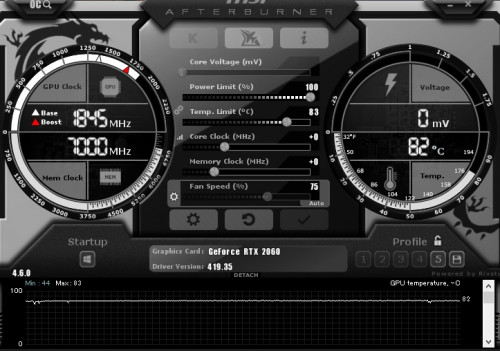
Just got back to test with side panel open, looks like it's still persist, maintaining 83c full load. Just 2c difference with no side panel open sadly

Test this with Monster Hunter World on ultra setting at 1080p. GPU usage at 98~100%

user posted image


QUOTE(kurangak @ Mar 18 2019, 11:17 PM)
open ur side panel, and see if the problem persist.

if it doesnt, u got ventilation issue
*
As above, I don't think this is case issue. I test it with side panel open, not much difference
TSflagstar
post Mar 19 2019, 01:51 AM

Getting Started
**
Junior Member
236 posts

Joined: Mar 2015


QUOTE(1024kbps @ Mar 19 2019, 01:13 AM)
You need to tame the GPU in different way, like enable VSync for single player game, where input lag is not an issue, limiting the FPS will reduce the gpu utilization.
Or lower the gpu voltage, reduce temp limit/power limit. The later are safer than changing voltage.

Those are the steps i do to keep the pc internal temp in check.
*
Could I just underclock the GPU without affecting much of the performance? I mean, a 10% reduction in fps is negligible and not going to hurt the quality because from the benchmark I saw with this card, it's already quite overkill for 1080p.

I tried to reduce the power/temp limit to 91%/75c thru MSI Afterburner but it still kicking to 82~83c while it down clock itself from 1840MHz to 1700MHz when it hit the 83c limit
TSflagstar
post Mar 19 2019, 02:29 AM

Getting Started
**
Junior Member
236 posts

Joined: Mar 2015


QUOTE(kurangak @ Mar 19 2019, 02:09 AM)
any idea whats ur ambient temp is?
*
Room temperature at 35c while ambient temp in the case was 45c
TSflagstar
post Mar 19 2019, 06:29 AM

Getting Started
**
Junior Member
236 posts

Joined: Mar 2015


QUOTE(kurangak @ Mar 19 2019, 02:57 AM)
ur temp is normal i think. how hot ur  card depends on how low ur ambient temp is.
*
That was what I'm thinking earlier but when the card down clock itself after it hit the temp limit, I think otherwise and start worry about it


QUOTE(jetblast @ Mar 19 2019, 03:16 AM)
I think you need to check your card thermal paste and pads. Also you case airflow is quite bad. Why don't you upload a picture of your set-up so we can see
*
It's a brand new card though, like less than a week when I bought it. Sure I'll share my set up later this evening or tonight.
TSflagstar
post Mar 19 2019, 05:16 PM

Getting Started
**
Junior Member
236 posts

Joined: Mar 2015


QUOTE(1024kbps @ Mar 19 2019, 03:02 PM)
no harm trying, just remember sometimes Afterburner will have issues with driver, and the thermal or power limit might not work, thus need to try to underclock.

Your gpu is overkill for 1080p gaming, hence the high thermal output.
*
Hmm.. the only thing I can adjust with Afterburner is the fan curve, power limit didn't stop it from reaching peak 83c before it down clock itself. I'll consider the under clock later if I had enough with the hot temp

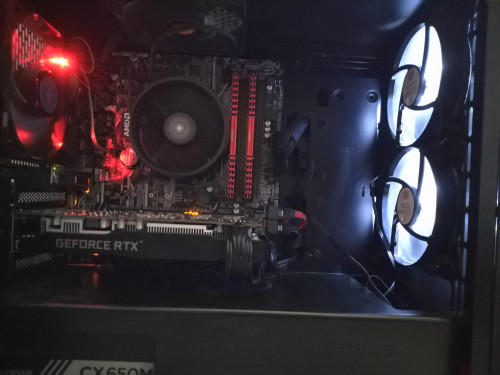
@jetblast here's my pc case layout for your reference

user posted image
TSflagstar
post Mar 19 2019, 11:08 PM

Getting Started
**
Junior Member
236 posts

Joined: Mar 2015


QUOTE(stevelum7 @ Mar 19 2019, 06:05 PM)
The ventilation of the case does seems pretty bad though, it seems like a large volume of heat are trapped in the case,with those weak fans that you're using, which i assume is a sickleflow and CM stock fans.  And the narrow space between the graphics card and the floor of your case, is comparable to my dual card build, temp will go up to 80s from 73 degrees(single card setup) as there'll be restrictions with the amount of direct air the fans of the card can suck in. I'm having Gigabyte 2080ti myself and oh boy, these rtx cards do get hot. But upgrading/adding your fans will definitely help
*
Yeah, exactly point on my fan model. Unfortunately i can only install 1 more extra fan which is below the front intake fan but I don't think it'll improve the air flow anyway since below there are where the extra cable resides.


QUOTE(1024kbps @ Mar 19 2019, 06:06 PM)
GPU temp is okay, but the heat is going back to case, which will increase the internal ambient temp if ventilation is not good, this is second issue.
First issue is over-performing GPU, without FPS limiter the game will render like over hundreds of FPS unnecessarily/
*
QUOTE(1024kbps @ Mar 19 2019, 06:34 PM)
that would spoil the airflow direction, also the clearance is enough.
Unless the cover beneath can install another fans.
*
I know that card is overkill but people from reddir (I asked) recommend to get it anyway for future proofing instead of getting 1660ti. Does this mean I have to forge another budget for better case?
TSflagstar
post Mar 19 2019, 11:30 PM

Getting Started
**
Junior Member
236 posts

Joined: Mar 2015


QUOTE(lolzcalvin @ Mar 19 2019, 11:24 PM)
matx/itx case? one of the problems. tight airflow.

i don't recognise the GPU brand too. msi? gigabyte? zotac perhaps? but all of them have backplates though.

it looks like the thermal solution of the card is another issue as well.
*
If you missed the first post, I've put the details of my gc. It's galax and i think the only model without backplate

I chose mAtx because of the suitable form factor. I did consider about the air flow but I didn't knew it would be this bad though
TSflagstar
post Mar 20 2019, 12:11 AM

Getting Started
**
Junior Member
236 posts

Joined: Mar 2015


QUOTE(Steve Lum @ Mar 19 2019, 11:29 PM)
The only way to at least improve it is by upgrading those fans. Noctua A12 or S12A and Corsair AF120 are the few good ones out there that you can look into. Though, I reckon the best solution is to get a better case. There's a list of case's temperature and airflow comparison online that you can take a look at before you make a purchasing decision, such as this https://www.gamersnexus.net/guides/3120-bes...c-cases-of-2017 . You can see how much of a difference in temp a case can make smile.gif
*
Upgrading those fans would really hurt my budget right now for 4 of them. Case is no different here and that means I'd to save up more that what I had in mind initially. I've seen that ATX has better airflow mostly so is it better to just upgrade current case to ATX?

Oh, i need to add more fan too for ATX :sad:

QUOTE(lolzcalvin @ Mar 19 2019, 11:48 PM)
my mistake.

I'd still think the thermal solution of this galax card is posing a problem as well. one could argue that rtx 2060 needs only 2 fans but when i was running 1060 i've had 3 and it ran ~70++ ℃ under air-conditioning room. and 1060 would've ran way cooler than 2060.
*
Not when I asked about the product before. They said galax is a good card for both performance and cooling. If it run undee 80c, I would not worry at all but here I am, when the case itself was the problem

My 1060 run at 80c before upgraded but I didn't pay much attention to it because its fan wasn't as loud as this galax card
TSflagstar
post Mar 20 2019, 12:54 AM

Getting Started
**
Junior Member
236 posts

Joined: Mar 2015


QUOTE(1024kbps @ Mar 20 2019, 12:24 AM)
you need some good fans, for intake you need stronger fans due to filtered fans have reduced airflow.
at least 2500rpm with PWM is preferred.

I can't recommend any fans though as I'm using some weird OEM fans (NMB/Sony), their life span is too long to wait them to die before I can try out new fans.

Remove the filter from top panel and change it to exhaust if possible, also another problem with the back panel exhaust, the fan grill is too restrictive.

Tip for your next case in case you want to improve the thermal performance, for exhaust fan grill, choose the one with less restrictive grill, the bigger the holes the better, it create less noise and improve airflow.
My Lianli case top and back panel exhaust fan grill is customizable / removable, it was the best case i had but too expensive lol (500 sgd...)

I have another wip case which is Fractal design R6, you can try to check other model as well or wait for other forumer suggestion as well.
Look for case with good ventilation option, your current case is only good for aio cooler/htpc.
*
Guess I don't have much of a choice now but to wait for several month till I had budget to upgrade both fan and case.

The top panel is already setup as exhaust fan (stock case fan). At first, I setup that way because my cpu started to get really hot under load, now I'm starting to see the airflow problem after you point it out.

For the back panel though, I thought it was wide enough for air to pass through and it has no filter. Top panel filter can be removed. Front panel however, I'd afraid it will pull more dust if I open the that panel for unrestrictive air flow.
TSflagstar
post Mar 20 2019, 04:39 AM

Getting Started
**
Junior Member
236 posts

Joined: Mar 2015


QUOTE(goldfries @ Mar 20 2019, 04:00 AM)
Room temperature at 35c is abnormal laaaa.
*
QUOTE(goldfries @ Mar 20 2019, 04:08 AM)
I'm using the exact same card as you. (I've also replied you on your comment on my video, thank you very much for commenting!)

Try running Superposition benchmark at 1080P Extreme settings and see what's the maxed out temperature you get.

Mine tops at 76c and still remain silent, if I set the fan to run at 100% the temperature maxed out at just 64c.
*
You're welcome. I saw your video while trying to find out why my card runs so hot and start to worry about it.

I'll try to run the benchmark later today and share the result here. I've tried two heavy title games earlier, MH World and Metro Exodus and both card manage to reach 83c thermal limit before it down clock to 1700MHz

As others have pointed out, the problem lies with my weak fan and tight airflow case so my card temp went as hot as it gets.

For the room temperature, I refer to my thermometer in my room at 3pm so yeah, it's quite hot here, without any A/C
TSflagstar
post Mar 20 2019, 08:08 AM

Getting Started
**
Junior Member
236 posts

Joined: Mar 2015


QUOTE(Vigilant @ Mar 20 2019, 05:28 AM)
How is the temperature when the ambient is cooler? Like 5-7am in the morning?

Just FYI, new out of the box graphics card sometimes suffer from bad heatsink thermal contact for the GPU and VRM. You can always try to re-apply thermal paste or thermal pad if applicable. Or try to re-mount the heatsink and tighten the screw. That's if it doesn't avoid the warranty.

Anyhow it's best to rule out ambient temperature and casing airflow are the culprit and you can send the card back to the vendor stating that it's overheating.
*
Lowest ambient temp in the case for said time was 42c at best, at least from this morning while it was idling.

I rather not void or do anything on the gpu while it is still brand new out of box so if it is faulty gpu, I would rather sent it back for RMA.
TSflagstar
post Mar 20 2019, 05:12 PM

Getting Started
**
Junior Member
236 posts

Joined: Mar 2015


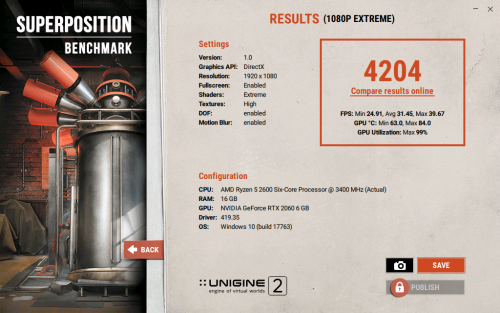
@goldfries I've tested the gpu with the superposition benchmark and the max temp I get was 85c (1st test: 82c, 2nd: 84c). Last test on game benchmark it tops 85c

I've provide the results of the 2nd benchmark here. I can't attach the text result of the benchmark though

user posted image


TSflagstar
post Mar 22 2019, 05:56 PM

Getting Started
**
Junior Member
236 posts

Joined: Mar 2015


QUOTE(Acid_RuleZz @ Mar 21 2019, 12:00 AM)
Your card probably have bad thermal paste application. Try touch the exposed heatsink with your hand to confirm if it actually imba hot. If you have one of those infrared thermometer, use that instead.

You can try undervolting instead of underclocking it, press Ctrl+F to open frequency curve graph in Msi Afterburner and lower the peak curve little by little.
*
Well it is hot when touch (at 85c obviously it's hot). I didn't check the card if it would void the warranty or not if I were to remove the fan to apply thermal paste.

I don't reallt have much experience in undervolting a gpu more so if it's a brand new card. Unless it is an out of warranty card, i would do it
TSflagstar
post Mar 23 2019, 05:31 PM

Getting Started
**
Junior Member
236 posts

Joined: Mar 2015


After some thorough testing (not undervolt the card yet) with just the front panel open and fan filter above the case removed(I now had time to test this seriously), it seems @stevelum7 and @1024kbps were right after all, it is my problematic case and case fans itself. With those front panel open, my gc clock speed maintain at 1755MHz max 80c temp. If it were temp throttling, it would just sit below 1700MHz. Fan speed is set to auto at this point.

When I set the fan speed to 100% (front panel open), it would drop the temp further to sweet 73c 1770MHz, with quite audible fan noise from gc.

Afterwards, I tried to undervolt with the help from Afterburner to 1818MHz @ 950mV. It didn't change much however, sitting well averaging 78~80c at 1755~1770MHz. I would try to undervolt further if I could later on.


QUOTE(goldfries @ Mar 23 2019, 05:21 PM)
How was the fan when you run the test? Was it screaming away?
*
It was on auto, when I run it with closed case.. fan spin around 82% when temp limit were hit. It's audible but not that loud.
TSflagstar
post Mar 24 2019, 11:20 PM

Getting Started
**
Junior Member
236 posts

Joined: Mar 2015


QUOTE(xxboxx @ Mar 23 2019, 09:56 PM)
But since the front panel can't be completely removed you have to put the front panel at the side every time you play game? That will make inside your casing full of dust.
Have you tried remove side panel (without removing front panel) and see if the temp drop?

The main problem with your setup are that AMD fan blowing air into heatsink, which afterward the hot air is spread out on the whole casing. The front fan blowing to motherboard while AMD fan blowing out of motherboard, it create resistance. The RTX also making it worse by spreading the hot air everywhere. One way is to change the heatsink to the type that have the fan blowing to the back of case like this:
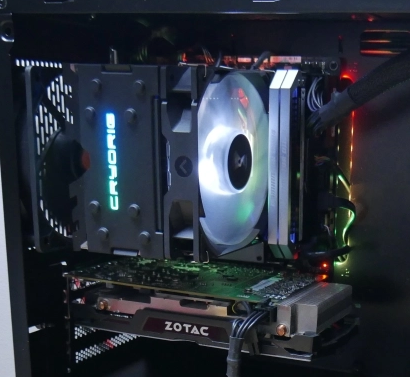
user posted image
But you still need to remove the front panel to have better airflow.

If the temp drop when side panel removed, I have an idea how to improve the airflow without spending any money. Can the side panel transparent acrylic be removed? If can (Or you willing to remove it by force), install a filter (pantyhose work like magic) after remove the transparent acrylic and reverse the front panel fans so that it suck out air. Now the hot air that's being blown everywhere will be suck out on the 3 sides of the case while the side panel letting cold air in.

Letting the GPU fan spin faster is not a good idea, it shorten the fan lifespan. It would be better to have the case fans spin faster instead to have better airflow as it would be cheaper and easier to replace. Can all the 4 fans speed be controlled? Because it can get very loud when all 4 fans spin at max speed so it would be better to have it spin at max speed only when gaming.
*
I didn't test the temp yet when the side panel is removed but i'll do the test later on when I return as I'm currently outstation.

I'm aware the amd stock cooler do blowing hot air everywhere in the case hence the way I setup the current fan layout to combat it but not much. For cpu alone, sometimes if I ran a very heavy task, it tops 80c. What I didn't aware that gpu also contribute to the heat.

For the gpu fan, I agree with you. 100% running fan speed would reduce the lifespan of those fan more, that's why I would always opt for auto or at least 80% fan speed at max. For the case fan, only the rear exhaust fan can be control, the rest are connected to PSU thru dedicated fan controller (the simple low off high controller) but all of them were set to max anyway except the rear one, that sickle flow fan can get really loud when set to max

Good idea on the idea for DIY case, I might do it when I have the time (of course after the test with side panel open)



2 Pages  1 2 >Top
 

Change to:
| Lo-Fi Version
0.0196sec    0.25    6 queries    GZIP Disabled
Time is now: 6th December 2025 - 12:48 PM