Welcome Guest ( Log In | Register )

Outline · [ Standard ] · Linear+

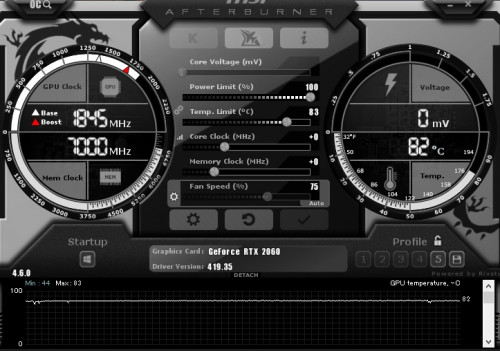
 RTX 2060 temps very high on full load, 45c on idle, 85c full load

views
     
1024kbps
post Mar 18 2019, 06:29 PM

李素裳
*******
Senior Member
6,014 posts

Joined: Feb 2007


QUOTE(flagstar @ Mar 18 2019, 05:11 PM)
That's what I'm doing though, with MSI Afterburner and manually adjust the fan curve so it won't go as loud but I'm still concern with the temp.

By default, max temp were set to 83c
*
improve your case ventilation, if your gpu use blower type, it's a bit better, the heat exit directly but it's ventilation still needed.
custom cooler require side panel fans, so the heat wont be going back to case.
1024kbps
post Mar 18 2019, 07:24 PM

李素裳
*******
Senior Member
6,014 posts

Joined: Feb 2007


QUOTE(flagstar @ Mar 18 2019, 07:05 PM)
I'm using air cooling solution for my case, 2 intake fan and 2 exhaust fan. Case I'm using is Thermaltake V17 iirc (at work atm). Not sure how I should improve my ventilation better aside from opening the side panel itself
Yes, that's the GPU i'm using.
*
The hardcore way, use one big hole saw on the side panel and install 1 or 2 120mm fans sweat.gif

Seriously, adding more fans will always help.
1024kbps
post Mar 19 2019, 01:13 AM

李素裳
*******
Senior Member
6,014 posts

Joined: Feb 2007


QUOTE(flagstar @ Mar 19 2019, 12:18 AM)
Just got back to test with side panel open, looks like it's still persist, maintaining 83c full load. Just 2c difference with no side panel open sadly

Test this with Monster Hunter World on ultra setting at 1080p. GPU usage at 98~100%

user posted image
As above, I don't think this is case issue. I test it with side panel open, not much difference
*
You need to tame the GPU in different way, like enable VSync for single player game, where input lag is not an issue, limiting the FPS will reduce the gpu utilization.
Or lower the gpu voltage, reduce temp limit/power limit. The later are safer than changing voltage.

Those are the steps i do to keep the pc internal temp in check.
1024kbps
post Mar 19 2019, 03:02 PM

李素裳
*******
Senior Member
6,014 posts

Joined: Feb 2007


QUOTE(flagstar @ Mar 19 2019, 01:51 AM)
Could I just underclock the GPU without affecting much of the performance? I mean, a 10% reduction in fps is negligible and not going to hurt the quality because from the benchmark I saw with this card, it's already quite overkill for 1080p.

I tried to reduce the power/temp limit to 91%/75c thru MSI Afterburner but it still kicking to 82~83c while it down clock itself from 1840MHz to 1700MHz when it hit the 83c limit
*
no harm trying, just remember sometimes Afterburner will have issues with driver, and the thermal or power limit might not work, thus need to try to underclock.

Your gpu is overkill for 1080p gaming, hence the high thermal output.
1024kbps
post Mar 19 2019, 06:06 PM

李素裳
*******
Senior Member
6,014 posts

Joined: Feb 2007


QUOTE(N1ck @ Mar 19 2019, 05:59 PM)
From the picture, Your card is clocked way above boost clock. I don't see any issue with your setup and suggest you just use it as it is intended.

The card is maintaining its set power target hence the raised clocks

To lower temps you would have to lower the clocks or power limits but you would sacrifice performance. Best would be to set the temp limit to your ideal temperature, but why change since the card is made to be set at 83C...
*
GPU temp is okay, but the heat is going back to case, which will increase the internal ambient temp if ventilation is not good, this is second issue.
First issue is over-performing GPU, without FPS limiter the game will render like over hundreds of FPS unnecessarily/
1024kbps
post Mar 19 2019, 06:34 PM

李素裳
*******
Senior Member
6,014 posts

Joined: Feb 2007


QUOTE(ave666 @ Mar 19 2019, 06:15 PM)
psu shroud too close imo. try remove those stupid cover
*
that would spoil the airflow direction, also the clearance is enough.
Unless the cover beneath can install another fans.
1024kbps
post Mar 20 2019, 12:24 AM

李素裳
*******
Senior Member
6,014 posts

Joined: Feb 2007


QUOTE(flagstar @ Mar 19 2019, 11:08 PM)
Yeah, exactly point on my fan model. Unfortunately i can only install 1 more extra fan which is below the front intake fan but I don't think it'll improve the air flow anyway since below there are where the extra cable resides.
I know that card is overkill but people from reddir (I asked) recommend to get it anyway for future proofing instead of getting 1660ti. Does this mean I have to forge another budget for better case?
*
you need some good fans, for intake you need stronger fans due to filtered fans have reduced airflow.
at least 2500rpm with PWM is preferred.

I can't recommend any fans though as I'm using some weird OEM fans (NMB/Sony), their life span is too long to wait them to die before I can try out new fans.

Remove the filter from top panel and change it to exhaust if possible, also another problem with the back panel exhaust, the fan grill is too restrictive.

Tip for your next case in case you want to improve the thermal performance, for exhaust fan grill, choose the one with less restrictive grill, the bigger the holes the better, it create less noise and improve airflow.
My Lianli case top and back panel exhaust fan grill is customizable / removable, it was the best case i had but too expensive lol (500 sgd...)

I have another wip case which is Fractal design R6, you can try to check other model as well or wait for other forumer suggestion as well.
Look for case with good ventilation option, your current case is only good for aio cooler/htpc.

1024kbps
post Apr 3 2019, 11:55 PM

李素裳
*******
Senior Member
6,014 posts

Joined: Feb 2007


QUOTE(flagstar @ Apr 3 2019, 11:23 PM)
The seller I go when I bought those case do recommend me to get the TT pure fan pack for like rm239 and he said it's a good fan to opt for but I still hold on from buying it yet. Need more advice for better case fans. Also can't find noctua fans at lowyat, probably need to survey more shops later.

All those front intake fan and top exhaust fan were wired to a 3-pin splitter to molex so can't really control much but low and high switch which I assume is 5v/12v switch
*
Real man only use Delta/San Ace, minimum 4 ampere cool2.gif
The fan will cool the whole the whole room and including you rclxms.gif

Jokes aside, My favorite definitely is Nidec Servo Gentle Typhoon 1850/2150 version.
It wont scream even if running at max speed, low start up voltage if i recall correctly, almost behaves like a PWM fan.
Try or grab one if you can.

2. NoiseBlocker M12p
3. San Ace, but all these fans are difficult to acquire.

You can get an idea from here http://www.silentpcreview.com/section12.html

As for noctua, most of them are silent oriented pc fans, you will want the IndustrialPPC version as they run much faster.
Get a high speed fan with pwm support if possible, most 3 pins high speed fan will drive you crazy.
1024kbps
post Apr 4 2019, 06:45 PM

李素裳
*******
Senior Member
6,014 posts

Joined: Feb 2007


QUOTE(flagstar @ Apr 4 2019, 01:59 PM)
Huh, that's new for me, I didn't knew there was industrial ppc until you guys brought it up, definitely will look for it to assist with my air cooling setup build. Another thing that I learnt from the link you gave me, putting sleeve bearing fan (which is all of my current case fans) other than vertical position would have higher failure rate.

For PWM, I do need to get at least a controller right? My new case do not have built-in PWM support
My new case can support up to 7 120mm fans or 4 120mm x 2 140mm fans as the front panel can only support 120mm fan. I find this as no issue, as long there's 3 slot. I'm planning to replace those front panel fans as your suggestion with 2 or 3 industrial ppc fans while moving the current one to top intake. It would wear out the current fan but it's cheap to replace anyway. Later in the road, swapping those top intake fan to better fan or aio. Only concern with this setup is the type of airflow in the case.

Does the corsair LL 120 really good? I'm having doubt looking at the fan spec, about 40 CFM each which is like my sickleflow fan(?) Lets just say I'm ignoring all the fancy rgb and prefer performance.
*
High Temperature will increase the vaporization rate of the oil beatween the bearing and and shaft,
early sign of dying sleeve bearing fan is leaking oil, when it's almost dying it will rattle, and eventually stuck, some wont spinning unless you move it with your finger sweat.gif

Fluid bearing is almost "maintenance free", but expensive, while ball bearing will have hissing noise, and might increase over time.
Other rare bearing is maglev type.

For passive type Pwm support get this https://gelidsolutions.com/thermal-solution...-to-4-splitter/
But passive type has limitation, the cpu/mobo pwm header can only control 4 pwm fans, more than 4 the pwm will not working(100% speed).
also can't support more than 1 ampere total, you can contact mobo maker for the actual spec.
1024kbps
post Apr 10 2019, 01:23 AM

李素裳
*******
Senior Member
6,014 posts

Joined: Feb 2007


QUOTE(Acid_RuleZz @ Apr 9 2019, 10:50 PM)
Honestly, the heatsink on this card should belong to sub 120w GPU.
*
Turing is a hot chip isn't it?
badly designed heat sink + hot chip combo sounds like a receipt for disaster.


Change to:
| Lo-Fi Version
0.0175sec    0.48    6 queries    GZIP Disabled
Time is now: 9th December 2025 - 02:21 AM