

QUOTE(lyrilmaki @ Mar 8 2019, 07:08 PM)
That is the freebies ticket

Yup, if no more tickets, meaning nobody can purchase anymore. Have to buy at store, which is without gifts.This post has been edited by exeon: Mar 8 2019, 07:10 PM
Samsung Samsung Galaxy S10e / S10 / S10+ discussion V3, the 10th Anniversary Galaxy
|
|
 Mar 8 2019, 07:09 PM Mar 8 2019, 07:09 PM
Return to original view | Post
#21
|
 
Junior Member
202 posts Joined: Mar 2015 
|
QUOTE(lyrilmaki @ Mar 8 2019, 07:08 PM) That is the freebies ticket Yup, if no more tickets, meaning nobody can purchase anymore. Have to buy at store, which is without gifts.This post has been edited by exeon: Mar 8 2019, 07:10 PM |
|
|
|
|
|
Mar 8 2019, 07:09 PM
Return to original view | Post
#22
|
|
Junior Member
202 posts Joined: Mar 2015
|
QUOTE(brianlow @ Mar 8 2019, 07:08 PM) Plan to get s10+ and galaxy buds now. Still need to queue huh?? Yeah, about 40 something ppl queuing. |
|
|
Mar 8 2019, 07:12 PM
Return to original view | Post
#23
|
|
Junior Member
202 posts Joined: Mar 2015
|
QUOTE(brianlow @ Mar 8 2019, 07:11 PM) May I know, still left how many freebies tickets there? The staff told me still got quite many hmm.Come come come This post has been edited by exeon: Mar 8 2019, 07:13 PM |
|
|
Mar 8 2019, 07:36 PM
Return to original view | Post
#24
|
|
Junior Member
202 posts Joined: Mar 2015
|
QUOTE(gunnerstkd @ Mar 8 2019, 07:17 PM) I thought 512 no more? Can help to ask? 😬 Yup got, but just white color available.QUOTE(attw @ Mar 8 2019, 07:24 PM) Maybe you can ask them if we'll ever a yellow S10e in Malaysia? Nope here don't have lol. |
|
|
Mar 8 2019, 08:53 PM
Return to original view | Post
#25
|
|
Junior Member
202 posts Joined: Mar 2015
|
QUOTE(facktura @ Mar 8 2019, 08:48 PM) Guys for roadshow continuing on day 2 dan 3 over this weekend, will there be free galaxy buds still or every free gifts all sailang already today?? Wondering lah, if yes better buy at normal shop then no need come MV maa... Once the golden tickets finished, meaning no more stock for the roadshow. |
|
|
Mar 8 2019, 08:56 PM
Return to original view | Post
#26
|
|
Junior Member
202 posts Joined: Mar 2015
|
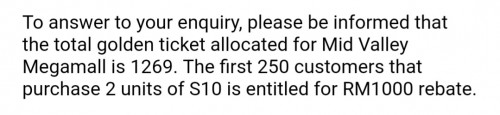 This is for MV. This post has been edited by exeon: Mar 8 2019, 08:56 PM |
|
|
|
|
|
Mar 11 2019, 11:11 AM
Return to original view | Post
#27
|
|
Junior Member
202 posts Joined: Mar 2015
|
QUOTE(1likegadg3t @ Mar 11 2019, 07:57 AM) Yeah maybe but at the moment Im using 3rd party app Always on Edge as a notification light around camera. But I realized after I off the screen, when receive messages, notification will popup on top of the screen, with message preview and notch lighting, while below it all remain black. I found it annoying *NOTE: Those who are using Always On Edge app theres a currently new updates [attachmentid=10200822]  |
|
|
Mar 11 2019, 02:04 PM
Return to original view | Post
#28
|
|
Junior Member
202 posts Joined: Mar 2015
|
QUOTE(Melon @ Mar 11 2019, 12:36 PM) my notch is not around the front camera? It became the teardrop notch. Yup after today updates, previous version ok. S10 here. S10 here. |
|
|
Mar 11 2019, 03:11 PM
Return to original view | Post
#29
|
|
Junior Member
202 posts Joined: Mar 2015
|
QUOTE(1likegadg3t @ Mar 11 2019, 02:06 PM) mine dont have problem still around the camera That's weird, I saw some recent reviews of the app having the same problem too. |
|
|
Mar 12 2019, 01:53 PM
Return to original view | Post
#30
|
|
Junior Member
202 posts Joined: Mar 2015
|
Hmm feeling my s10e gets hot easily when using. Will wait and see for few more days.
|
|
|
Mar 12 2019, 02:55 PM
Return to original view | Post
#31
|
|
Junior Member
202 posts Joined: Mar 2015
|
QUOTE(hanny562 @ Mar 12 2019, 02:50 PM) my s10+ suddenly hang and black screen, now not able to turn on. lol Lemon unit? Omg. |
|
|
Mar 12 2019, 05:14 PM
Return to original view | Post
#32
|
|
Junior Member
202 posts Joined: Mar 2015
|
S10e, got it last Friday night.
All day mobile data, adaptive power saving on. Spotify plays on Bluetooth speaker. Auto brightness around 40%. AOD display on tap. 
|
|
|
Mar 13 2019, 11:28 AM
Return to original view | Post
#33
|
|
Junior Member
202 posts Joined: Mar 2015
|
QUOTE(marcyeo @ Mar 13 2019, 10:07 AM) it is either one UI has better optimization or it is becuase of snapdragon chipset. s10e and plus totally crushed iphone xs max and xr in battery test. too bad s8, s9 and note 9 only will get one UI 1.0 instead of the new 1.1 The samsung devices that used in the video I believe is snapdragon version.https://www.youtube.com/watch?v=Na5m0_HDpV8 |
|
|
|
|
|
Mar 13 2019, 11:31 AM
Return to original view | Post
#34
|
|
Junior Member
202 posts Joined: Mar 2015
|
QUOTE(marcyeo @ Mar 13 2019, 11:28 AM) Too bad... But exynos one I'm using also great.. Just stand by a bit vary Yeahh so far so good, hope future updates can optimize the system further more  |
|
|
Mar 13 2019, 11:54 AM
Return to original view | Post
#35
|
|
Junior Member
202 posts Joined: Mar 2015
|
QUOTE(berrycoo~ @ Mar 13 2019, 11:51 AM) Tried flight mode before. Doesnt work. Under battery usage Android OS has consistently high battery usage, as high as Device Idle. Not sure what is causing this Another method is factory reset lol, probably system level having issues? Or still under learning usage stage? |
|
|
Mar 13 2019, 12:05 PM
Return to original view | Post
#36
|
|
Junior Member
202 posts Joined: Mar 2015
|
QUOTE(berrycoo~ @ Mar 13 2019, 12:03 PM) [attachmentid=10202904] From my experience, Android OS shouldn't be that high in the list, must be something wrong..This one gone through overnight from 93% to 85% this morning. Wifi, data, location, auto sync all off. Try clear cache partition in recovery mode? Turn off ur phone then press and hold volume up, bixby and power button at the same time until ur device is turned on, and u will be in recovery mode. Volumn up and down for navigation, power button for selection. This post has been edited by exeon: Mar 13 2019, 12:09 PM |
|
|
Mar 13 2019, 12:11 PM
Return to original view | Post
#37
|
|
Junior Member
202 posts Joined: Mar 2015
|
|
|
|
Mar 13 2019, 01:34 PM
Return to original view | Post
#38
|
|
Junior Member
202 posts Joined: Mar 2015
|
QUOTE(shamsulaswad @ Mar 13 2019, 12:28 PM) Anybody got issue where AOD suddenly changed to landscape mode? Need to go back into setting to change back to potrait Double tap on ur AOD clock and click on the screen rotation icon. |
|
|
Mar 13 2019, 01:39 PM
Return to original view | Post
#39
|
|
Junior Member
202 posts Joined: Mar 2015
|
QUOTE(berrycoo~ @ Mar 13 2019, 01:34 PM) Will try clearing cache partition if still not able to lower it. Just baffled that new phone also need to clear partition I should have factory reset mine once I get it to ensure everything ok but I forgotten hahaha. |
|
|
Mar 13 2019, 01:54 PM
Return to original view | Post
#40
|
|
Junior Member
202 posts Joined: Mar 2015
|
QUOTE(vincent168 @ Mar 13 2019, 01:35 PM) Anyone get the time with second when you take your phone out your pocket? U mean in lock screen? If u tap on the clock widget, it will zoom into clock screen with second, tap "back" again to go back to lock screen.Can i know how to disable it? |
|
Topic ClosedOptions
|
| Change to: |  0.0814sec 0.0814sec
 0.52 0.52
 7 queries 7 queries
 GZIP Disabled GZIP Disabled
Time is now: 24th December 2025 - 11:14 AM |
 Quote
Quote