Welcome Guest ( Log In | Register )

Outline · [ Standard ] · Linear+

 ILLEGEAR Selenite Discussion Thread V1, world’s first 17.3” bezel-less laptop

views
     
alexnvidia
post Jan 5 2020, 08:43 AM

Casual
***
Junior Member
351 posts

Joined: Oct 2006
QUOTE(Jared21 @ Jan 4 2020, 06:29 PM)
Theres a fix for it. I'll edit my post with the link once i find it. Ihave it on my laptop and it is running perfectly fine with none of the issue. You also get the original sound control panel back

Edit: http://forum.notebookreview.com/threads/to...815943/page-462

Link to download the driver: http://asrock.pc.cdn.bitgravity.com/Driver...v8619_FF00).zip

Make sure to completely uninstall your current realtek and soundblaster drivers before doing this
*
yes i've seen that but correct me if i'm wrong, with that method, you loose SB cinema function also? and that driver also need to disable power management to stop the popping and crackling so i think the issue is with audio power control on the hardware itself

This post has been edited by alexnvidia: Jan 5 2020, 08:46 AM
alexnvidia
post Jan 8 2020, 12:13 PM

Casual
***
Junior Member
351 posts

Joined: Oct 2006
QUOTE(Prince J @ Jan 8 2020, 04:24 AM)
All our other models do not have this issue, it only happened on the previous SELENITE (non pro) and the factory FAE told us that other market users have never complaint about this. Therefore it will take us sometime to send back the system to have them check on it. We did send once few months back and the FAE couldn't find out anything.

Anything we will keep you guys updated.
*
before you send the unit back to factory, did you guys test it out and verified the issue exist on your end?
alexnvidia
post Jan 29 2020, 01:57 PM

Casual
***
Junior Member
351 posts

Joined: Oct 2006
is it just me or is the area above the keyboard F5-F11 keys extremely hot? i dont recall any power delivery circuits underneath that area. why is it so hot? will it cause long term problems?
alexnvidia
post Jan 29 2020, 03:51 PM

Casual
***
Junior Member
351 posts

Joined: Oct 2006
QUOTE(Prince J @ Jan 29 2020, 07:28 AM)
The heatsink is placed underneath the F5 to F11 buttons (keyboard top), it's normal.
*
I've checked at the back, the heatsink is not directly underneath the area above F5 to F11 keys. That area is around the HDMI and two Display ports and there's nothing there which is hot. Besides, the heatsink has no direct contact with that area and it's isolated by the motherboard.

The area above F5-F11 is crazy hot. I cant even place my fingers there for 3 seconds without being burnt. That cant be good for the longevity of the motherboard components and PCB.
alexnvidia
post Jan 30 2020, 09:08 AM

Casual
***
Junior Member
351 posts

Joined: Oct 2006
QUOTE(Prince J @ Jan 29 2020, 10:01 AM)
Hi alexnvidia,

We never had any Selenite user burnt his motherboard components and PCB due to the thermal design / heat dissipation since the 1st generation SELENITE i7-8750H and GTX1060 model, and in fact selenite is one of our best cooled laptops we have released.

If you are worry about the longevity or something, you can always send to us for servicing / checking.

Thank you.
*
Thanks for the feedback. Is there an update to the popping and crackling issue for the highly problematic selenite realtek driver from the manufacturer?
alexnvidia
post Jan 30 2020, 12:26 PM

Casual
***
Junior Member
351 posts

Joined: Oct 2006
QUOTE(Prince J @ Jan 30 2020, 05:21 AM)
They are asking us to send an unit back again for inspection after they are back from holiday.

To resolve the problem effectively, can we request for your laptop with the particular song generating the most crackles stored inside your storage drive so we can pinpoint to them what are the crackles you wish to solve?

We tried to send our Selenite stock back last year but they said there was no crackles found on their end. Moreover, there are no other customers from other regions (US, Europe, Korea etc) complaining the crackles on this GK-S (selenite) model according to them.
*

the popping and crackling issue does not depend on the song. It just happens randomly appearing out of no where when there's audio playing, or when the audio is about to play. it can be music, can be movie, can be youtube stuff, can be gaming. it's really difficult to replicate it consistently, but it is there. have you tried testing this out on your end and can you hear the popping and crackling on your end?
alexnvidia
post Jan 30 2020, 08:32 PM

Casual
***
Junior Member
351 posts

Joined: Oct 2006
QUOTE(Prince J @ Jan 30 2020, 01:04 PM)
I will ask my tech manager next week when he has back to work.

Can we request for your physical machine for a test?
*
will you replace my unit with another unit if i send it in? otherwise i will have no laptop to use
alexnvidia
post May 27 2020, 08:25 PM

Casual
***
Junior Member
351 posts

Joined: Oct 2006
QUOTE(SaiyanGoku @ May 25 2020, 09:19 AM)
So, are you saying a 230W power adapter is unable to supply full power to laptop but a 4100 mAh battery does? Why does the issue gets temporarily fixed after re-installing driver but comes back after restart?
What am I missing here?
As for the battery replacement, if I could send it, I would've already instead of asking for your support. :|
*
this is the problem with companies like illegear. their support is basically limited to send in ONLY. No matter how much evidence you provided over the phone, email, whatsapp, even video, they will not entertain you other than you sending in your laptop. They will give you a bunch of reasons like they need to check the laptop, they dont want you to damage the laptop etc. But basically what what they meant were you don't know what you are doing, you are not qualified to service their laptop and they dont trust you at all. Which is why i really hate support from companies like this. sending in your laptop means you are without a laptop to use for days or weeks and there is no guarantee you'll get your laptop back problem free. Trust goes both ways and unfortunately, not all their support staff knows what they are doing. In the end, if the issues are not serious and you need to use your laptop, you'll have NO choice but to live with the problems.
alexnvidia
post May 27 2020, 08:36 PM

Casual
***
Junior Member
351 posts

Joined: Oct 2006
QUOTE(SaiyanGoku @ May 25 2020, 01:09 PM)
Could you check this with ODM? That's not how it should work. Battery should be treated as a backup option and not primary power source for the GPU.
*
Unfortunately, illegear support staff is right about this. most ODM use this trick to save money on PSU. Rather than supplying us with a bigger PSU, they reduced the PSU size and use the battery instead to provide the extra juice when the PSU is not supplying enough power. In your case, you laptop could be drawing 240W-250W during gaming but the PSU is only rated for 230W, so the extra power is provided by the battery. This is why sometimes after a gaming session you will notice your battery discharged and depending on how long you game, it can discharge 10-15% or more. They have a fancy name for it like "hybrid power source" but it's just a marketing term to reduce cost.

You can read more about it here
https://www.asus.com/me-en/support/FAQ/1039026/

So you might not realize it, but if you game a lot, your battery is also under a lot of stress. Example, if your battery is only lightly discharged to 95% after a gaming session, it will charge back that 5% after that. and we all know that battery is under a lot of stress when it's trickle charging at the last 10-20% which explains why your battery got swollen up. in fact, if you take note, a lot of times after you shut down the laptop and go to sleep with battery at 100% charged, the next day when you power on, the laptop will start to trickle charge again (lost 1-2% charge doing nothing) even though it was completely shut down the night before. This is just one of the several annoyances we have to live with this particular laptop.
alexnvidia
post May 28 2020, 06:43 PM

Casual
***
Junior Member
351 posts

Joined: Oct 2006
QUOTE(Prince J @ May 27 2020, 04:38 PM)
Hi there,

SaiyanGoku is living in India and his warranty is a 2 year carry-in warranty. Moreover, we are unable to arrange the air shipping for battery only because it's considered as a dangerous goods. DHL and FedEX are more opened when we ship the battery inside the laptop, that's why we requested SaiyanGoku to send in their laptop for servicing.
If India DHL allows you to ship the battery only, we would recommend you to arrange a pickup with your local DHL, we will have the new battery to be prepared for your courier to pickup.

As per pm message I sent to you, DHL Malaysia hasn't gotten back to us on shipping the battery after we submitted the battery MSDS documents.
*
Hi there,

Thanks for the explaination. unfortunately, i had bad experience with your support before. I provided video proof of the issue with one of the USB 3 ports on my laptop and requested your side to send the daughterboard and flex cable for replacement which i'm happy to do it myself. however my request was denied citing i need to return the faulty item first in order for your side to "confirm" it's faulty even though i have done all the troubleshooting and given video proof of the issue. so it's obvious there is trust issue. sending in the USB board will basically cripple my laptop as the only other USB A port is a slow USB 2.0. I'm living in Brunei and this all happened long before covid. i have 3 years on site pickup warranty. Also, the issue with audio popping and crackling has not been resolved till this day. These are just some of the issues i had to live with. I do understand your warranty policy is limited to send in only especially in malaysia but perhaps you all need to come up with solution to support international customers other than sending which involves expensive shipping for a heavy laptop.
alexnvidia
post May 28 2020, 10:27 PM

Casual
***
Junior Member
351 posts

Joined: Oct 2006
QUOTE(Prince J @ May 28 2020, 12:51 PM)
Hi alex,

It's not related to trust but the warranty SOP. For warranty part exchange, we have to receive the bad parts first to exchange a new one for two reasons:

1. ODM can do back-to-back RMA with their component suppliers.
2. ODM and their vendors can analyse the problem and prevent the same problem in the future.

If we do not receive the bad part / bad laptop from you, we are unable to arrange the RMA with the ODM, and ODM is unable to arrange the RMA with their vendors as well.

Our onsite warranty only limits to Malaysia at the moment.

We hope the above clarify.

Thank you.
*
Yes it's clear and I appreciate you guys work with ODM to prevent future problems but it does not solve anything on the user side, does it? Owners are still faced with lengthy RMA process leaving us with no laptop to use.

What you do with the defective parts and how you deal with ODM is your back end process. What i'm suggesting is you should come up with solutions to better serve customers, putting customers first instead and reduce customer downtime. Your customers paid a lot of money and expect equally good experience within the warranty period. Speaking of experience, the software (apps, drivers, bios and firmware) support side of thing leaves a lot to be desired too.

And from the looks of it, illegear has international customers as well but has no support to service those customers. This is something you guys might want to explore or expand into.
alexnvidia
post May 29 2020, 10:35 AM

Casual
***
Junior Member
351 posts

Joined: Oct 2006
QUOTE(Jared21 @ May 28 2020, 09:07 PM)
Has anyone found out why this issue happens? Every single cold boot always sees my battery charging. 230w of power from the brick is plenty for my config even when running GPU boost (and should be for every config) so there is no reason as to why it should be drained. First time i've seen any laptop have this issue. Not even their older models based on Clevo units did this
*
Happened to me too as i described in my earlier posts and i believe this happened to everyone, the only difference is does anyone notice it? and if the battery continues to trickle charge this way, sooner or later our battery will end up swollen too
alexnvidia
post May 29 2020, 10:41 AM

Casual
***
Junior Member
351 posts

Joined: Oct 2006
QUOTE(Jared21 @ May 28 2020, 09:16 PM)
I'm using Eluktronics support page for their Mech G1R and XMG's Neo 17 for chassis specific drivers now. Other than that its all OEM drivers direct from Intel, Nvidia with NVcleaninstall etc. Hardly see any updates on their dirver page
*
I'm doing the same as you guys too. sadly they never update anything on their driver/app support page. but to their credit, if you find issues with the software and report it to them, they will work with ODM and post the new one after that. then again, it's not proactive, more like reactive. if nobody said anything, nothing gets updated or changed.
alexnvidia
post May 29 2020, 10:48 AM

Casual
***
Junior Member
351 posts

Joined: Oct 2006
QUOTE(Prince J @ May 28 2020, 04:56 PM)
Thank you for your feedback and comments and we definitely look forward to expand our service centre & showroom to international level (but not now).

We always try our best to do more than what we committed in the warranty and that's why we offered a new battery for Saiyangoku without having him to send back to faulty one.
*
Looking forward to you guys improving your aftersales support and warranty policy (to international level). there's a reason you guys are the no.1 custom laptop brand in malaysia. You have some good products with very impressive performance, don't let poor aftersales warranty and support ruin customer experience.
alexnvidia
post May 30 2020, 08:30 AM

Casual
***
Junior Member
351 posts

Joined: Oct 2006
QUOTE(Prince J @ May 29 2020, 06:22 PM)
Hi Jared

Can share your EC / BIOS versions and serial numbers to me? I will send together to ODM to have them look at it.
*
My BIOS is v1.53 and EC firmware v2.09.09 with command center v1.0.0.50. Happened not just to him, i'm pretty sure every selenite owners, mine included.

This post has been edited by alexnvidia: May 30 2020, 08:47 AM
alexnvidia
post Jun 1 2020, 10:11 AM

Casual
***
Junior Member
351 posts

Joined: Oct 2006
QUOTE(Shadowhunt94 @ May 31 2020, 10:16 AM)
Hi guys, just got my Selenite G on 14th May. Wanna share some of my usage review and questions after two weeks.

i7 10875H 8 cores, 16gb ddr4 ram, RTX 2070 max-p

If you find it long you can skip it, just sharing my honest review about the laptop.

Goods:
1. Built quality seem good. Screen also not much problem. Keyboard experience is weird initially, but after a while already got used to it.

2. Considered portable enough as my previous laptop Lenovo Y50 GTX860M is 15.6 inch but this 17.3 inch beauty is just unbeatable, having the almost same dimensions and weight.

3. Gaming is great on RTX2070 although it's a mobile version, FYI this is refreshed version (factory undervolted by Nvidia) having higher clock speed and reduced total bandwidth. Power consumption maintain the same 115W.

4. Windows Hello Camera, one of the reason to buy this laptop, save time on typing password  thumbup.gif

5. Sound wise, i salute the power of THX spatial audio software, but not the speaker itself hehe, overall listening feel is alright. Still prefer the JBL speakers+sub and Dolby software on my Lenovo Y50.

6. Price is unbeatable, been surveyed many brands of laptops with similar specs, but others just overpriced for the 2070 performance.
PROBLEMS:
1. At first i though Kryonaut will work on this laptop like a charm since it's considered a premium grade thermal paste for me. Somehow after some time of the usage, i've been experiencing a serious issue. The game framerate would drastically drop to unplayable frame rate for a while, then it become normal again. Using Afterburner monitoring during gameplay, can notice the cpu and gpu clock dropped to slowest speed too at the moment of stuttering frame rates. This problem happens intermittent one, not always. Not much background process which can interfere the game, just gaming no stream or others.

Used HWiNFO to monitor the status, found that cpu always more than 85c while gaming and all cores experiencing thermal throttling. To solve the issue i undervolted cpu more than -80mV to aid thermal reduction. Now the cpu mostly max up averagely 80c which won't have throttling on it.

OK, initially i thought thermal throttling could be the issue of the game stuttering, but somwhow yesterday the stuttering is coming back again with all undervolt, limit turbo boost, set dGPU at bios, max performance in Nvidia control panel, and no whisper mode at GeForce Experience, you name it. Can't figure out what else i can do to solve this frustrating problem. Maybe it's due to the 14nm++++++ process? sweat.gif  sweat.gif  sweat.gif

Another reason could be high ambient temp while gaming la, not at 25c air con room, so this issue could be subjective. Unfortunately didn't check for the power draw though at the moment.

2. The turbo and gaming fan mode is a bit problematic also before start using ThrottleStop. The temps are still good when in office mode, but when switching to Turbo from the AB i can see the CPU temp increased few degrees, turned off turbo it'll drop to normal again. Maybe it's the power delivery mode set by the command center there. After undervolting using TS it seem like dont have this issue already.

3. Keyboard RGB is kinda a joke, since i own Corsair mech KB i thought Selenite would be the same having function of import other user lighting effects/having smoother animations, turned out only those presets available. I'm not sure about other luxury laptop brands, or it's only Illegear doing so?

Command center is buggy, sometimes not detecting the hardware or the software can't be used properly, had to restart laptop or restart the process then only can work nicely. The fan button sometimes can't control the fan speed too due to buggy software. Having the feel of being trolled, but can't blame since i didn't perform thorough research enough about keyboard side, hunting for laptops and my friend (who using Laguna SE) to "poison" me to buy this brand, although i already know Illegear beforehand.

4. Rubberize palm rest. Okay thismay be my own preference but i prefer metal surface than this cuz rubberized is damn hard to take care of. When it ages it'll be sticky if you don't take care of it right.

Reviews aside, have some questions for gamers and enthusiasts here.

1. Cooling pad or vacuum cooler for you guys? I searched online and it's really dependent on laptops models, so you can't decide straightly which is better. Or you guys never use these at all?

2. Anyone owning 2070 variant mind to share their thermal performance? Would like to know whether it's me the unlucky one or everyone facing the same issue.

3. How to take care the rubberized surface? Researched online few methods, microfibre + alcohol OR microfibre + wash soap, then wipe with dry cloth. Would like to maximize the lifespan to prevent it become sticky since my previous Y50 also rubberized and unfortunately that moment i didn't realize the importance of taking care it.
That should be all about my review and concern about Selenite G. Any further issues or questions will be discussed in future. Thanks guys for spending time reading this and am happy to join the high end gaming for the first time!
*
I have the RTX 2070 variant. The GPU performance has been great if not stellar. Never had any issues with stuttering or overheating. I've played games during afternoons in a non air con room before. the temps of the laptop surface does get crazy hot (the strip above the keyboard in between the selenite logo and boost & power button). It's so hot you cant even touch it for more than 2 seconds so gaming in non air con room is HIGHLY not recommended. that being said, i still did not face any stuttering issue during gaming.

While GPU performance is stellar, the same cannot be said about the CPU. The mounting pressure of the tripod design heatsink is not balanced and you can expect high difference in core temperature difference. we are talking about 10-15C difference or more between the coolest core and hottest core during gaming. Their support staff will tell you it's completely normal but we all know that's BS. Yes there are control mechanism in place to stop the CPU from overheating but this also mean the CPU core will be heavily throttled and performance suffers greatly.

You can try to minimize this issue by repasting on your own and adjusting the heatsink cold plate slightly to ensure a more balanced contact. this however is a highly skilled process and extremely difficult to get right. and also, after repasting, temps will be great with minimal difference in temperature between cores. however, after a few weeks, everything will be back to hell again with massive core temperature difference. I've tried both cooler master gel maker, kryonaut. they behave the same. master gel maker degrades (pump out) a lot faster though for my case.

I would suggest you open GPU-Z and let it run in the background while you game. after a stuttering gaming session, check the graph and perfcap reason to see what's going on with the GPU during stuttering. CPU overheating and thermal throttling dont generally cause such severe stuttering. from my past experience, such stuttering during gaming was caused by GPU power delivery circuitry overheating (VRM, inductors). If those components dont make good contact with the thermal pads, you are in for a nasty stuttering surprise.

not sure if this is useful or related but you can refer this thread i created entirely dedicated to this issue. http://forum.notebookreview.com/threads/al...-freeze.804499/

alexnvidia
post Jun 5 2020, 11:41 AM

Casual
***
Junior Member
351 posts

Joined: Oct 2006
QUOTE(Prince J @ Jun 4 2020, 12:41 PM)
Will try to get the logo for you.

We tried but the selenite battery just doesn't fit the screw holes.
FAE told me there is a new EC / BIOS for alexnvidia ID-S machine to fix the power draw. Can you pm me your SN to see if yours is the same as alexnvidia??
*
Does this mean potential lower GPU performance? cos from time to time i can see the GPU draw up to 120W, which is 5W higher than the intended GPU power.
alexnvidia
post Jun 7 2020, 08:27 PM

Casual
***
Junior Member
351 posts

Joined: Oct 2006
QUOTE(Shadowhunt94 @ Jun 7 2020, 10:13 AM)
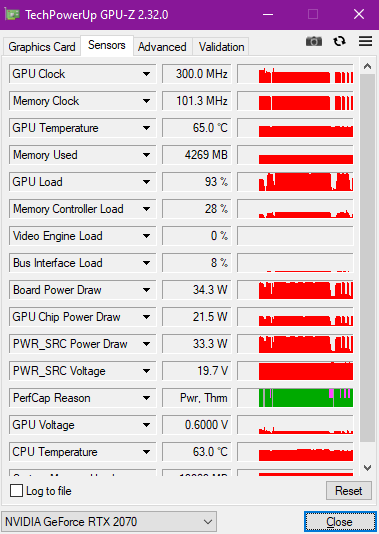
Hi alexnvidia, for the gpu-z usage i manage to get the issue happen (stuttering)  sweat.gif

user posted image

The PerCap there states besides Pwr, there's Thrm also, could be the one you're mentioning? Just need to make sure the thermal pads have a good contact on ICs besides the cpu and gpu?
*
ah yes, gpu z shows very clearly your stuttering issue. GPU clock tanked to bottom due to thermals i assume? look at the pink region and check what does the perfcap reason say. your gpu temperature is good, so it's not the gpu overheating for sure. that means u need to check other stuff, like GDDR6 memory or the VRM that feeds the GPU. you can use my alienware thread as a rough guide, the steps are pretty much the same.
alexnvidia
post Jun 16 2020, 12:43 PM

Casual
***
Junior Member
351 posts

Joined: Oct 2006
QUOTE(static_365 @ Jun 16 2020, 03:24 AM)
Hi everyone,

Good Morning, after 3 week of waiting finally Selenite G RTX 2070 Super with I7 10th Gen arrived yesterday!

First thing I did is try to play the game I like which is Command and Conquer Tiberium War, a 2007 game on Steam and the FPS i get is only 31 MAX. The laptop is plugged in. Sometimes will drop to 20 and 10 and the game will become lagging.

I do not expect this kind of issue on 2070 Super, can anyone teach me what should I do and why is this happening? I have tweak all the setting to performance and in Nvidia Control panel I choose to use RTX 2070 GPU instead of Intel® UHD Graphic. I have disable Whisper mode.

Before I tweak it, game is running on Intel® UHD and the game is so lagging.
[attachmentid=10517170]

Anyone with Selenite G have similiar issue?
*
They have some major performance issue with selenite G now. you are not the first to experience fps tanked and game stuttering. refer to the previous page. there's another victim with the exact same issue as you.

also, their rtx 2070 super performs well below what it should be for 115W max P. if you paid extra for RTX 2070 super, you will be in for a nasty surprise. long story short, expect same performance as a regular rtx 2070 or lower.

people should hold off buying this laptop until they figure out what's going on. and not sure if this issue is also present on selenite pro series.

This post has been edited by alexnvidia: Jun 16 2020, 12:46 PM
alexnvidia
post Jun 17 2020, 11:19 AM

Casual
***
Junior Member
351 posts

Joined: Oct 2006
QUOTE(Prince J @ Jun 16 2020, 06:02 PM)
We are sending the BIOS update guide to all the affected RAVEN SE-R / 2060 80w users since last week. As for SELENITE G BIOS, the FAE is still studying, I will post here if there is any update from them.

In our experience, the first batch of new products usually would suffer from buggy BIOS and it requires a few patches to become more stable. However, SELENITE (TF ID-S) and RAVEN SE-R (TF ID-0V) are mature IDs and they shouldn't have buggy BIOS, I guess it's related to the recent pandemic because TF shipped our first batch of goods in early of April. Glad that they can still work with us to resolve the BIOS issue in few days time.
*
Hi Prince, you seemed active in this forum and willing to work with consumers and even provide us with insight to what you are doing with tong fang to provide better customer support experience. I hope you can study this post because i've tried going through your whatsapp sales channel and support channel and got empty results.

Just to be clear, there are two issues with your selenite series now. i'm not sure about selenite pro, but selenite G is definitely problematic. I will list the two main issues here so everyone especially illegear support can be crystal clear about it.

1. During gaming, the laptop will randomly start to stutter. This issue can be seen clearly using GPUZ, when you take a look at the frequency graph of the GPU, when the game stutters, the GPU frequency will drop to a very low state, then it will go back up and drop all the way down repeatedly. this effect can be felt in game as stuttering. this cycle will repeat itself and it happens randomly. two owners have already come forward to complain about this exact same issue and i'm sure there are more victims out there.

2. For those paying RM1399 to upgrade to RTX 2070 Super, you should run fire strike test and take a closer look at the graphics score. Dont look at the overall score, look at just the graphics score because that excludes the CPU score. The graphics score for illegear selenite G rtx 2070 super max P is about 20k. For those keeping track, 20k is the baseline score for regular RTX 2070 max P running at 115W.

For RTX 2070 SUPER Max P 115W, the baseline graphics score should be 22k. Anything lower is considered lackluster, meaning either there's thermal throttling/overheating, power delivery VRM cannot supply enough power, or there is something causing it to run much lower than expected (buggy vbios or something), or even max Q.

I have a 9th gen selenite with rtx 2070 115W max P and the baseline fire strike graphics score is about 20k, in line with what your salesperson showed me prior to buying this laptop. The selenite G with a higher priced rtx 2070 SUPER however, delivered the same 20k graphics score in fire strike and according to illegear team, this is completely normal??? shakehead.gif rclxub.gif sweat.gif

This is basically telling consumers to pay a lot more for the exact same or lower performance compared to previous gen selenite with a lower grade GPU. does this sound right to you guys? mega_shok.gif Let me stress this again. we are talking about RTX 2070 SUPER MAX P 115W, not max q, not regular rtx 2070 max p.
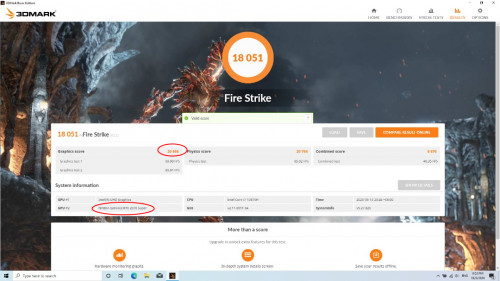
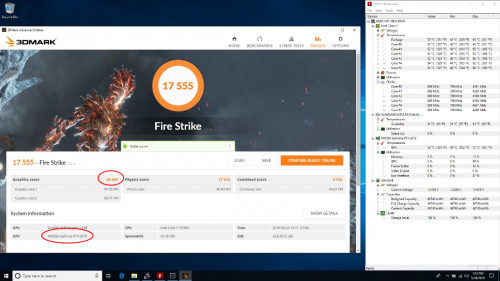
user posted image
user posted image

If you take a look at the youtube video links i posted below, other brands with the same tong fang chasis as your selenite pro performed way better with their rtx 2070 super max P. In fact, their elektroboost beast mode (same as your gpu boost) is working sooo well it allows their laptop to pull more than 115W power to provide extra 10-15% boost in performance compared to their baseline rtx 2070 super! This is the kind of performance illegear selenite series should be delivering to WOW customers.

References for you guys to look at
https://www.youtube.com/watch?v=wXrPUgWlVoA

https://www.youtube.com/watch?v=tPP1XXIn1w0&t=139s

https://www.youtube.com/watch?v=XYrItQZJpXc&t=573s

https://www.notebookcheck.net/Exclusive-fir...Q.459731.0.html

Please investigate this with your tong fang FAE and hopefully you can get back to us with some good results.

This post has been edited by alexnvidia: Jun 17 2020, 12:17 PM

3 Pages < 1 2 3 >Top
 

Change to:
| Lo-Fi Version
0.0681sec    0.65    7 queries    GZIP Disabled
Time is now: 4th December 2025 - 09:16 PM