Welcome Guest ( Log In | Register )

Outline · [ Standard ] · Linear+

 ILLEGEAR Selenite Discussion Thread V1, world’s first 17.3” bezel-less laptop

views
     
alexnvidia
post Jun 19 2020, 03:10 PM

Casual
***
Junior Member
351 posts

Joined: Oct 2006
QUOTE(Prince J @ Jun 19 2020, 07:16 AM)
Tongfang FAE has taken a look of your GPU-Z pink area and here's their response:

"We checked RTX 2070 Super & 2060, they all showed 300MHZ in GPUZ.The GPU is in the power-saving P8 state and the corresponding frequency is at the lowest 300MHZ under Idle State, this is control by NVIDIA."

"Yes, 300MHZ is normal."
*
seriously?.... sweat.gif halfway gaming and the the entire game stutter and crawl to a halt is normal?.... doh.gif

Did you ask them about their 2070 super 115W performing the same as regular 2070 115W? did they say this is normal too?
alexnvidia
post Jun 19 2020, 06:15 PM

Casual
***
Junior Member
351 posts

Joined: Oct 2006
QUOTE(Prince J @ Jun 19 2020, 10:06 AM)
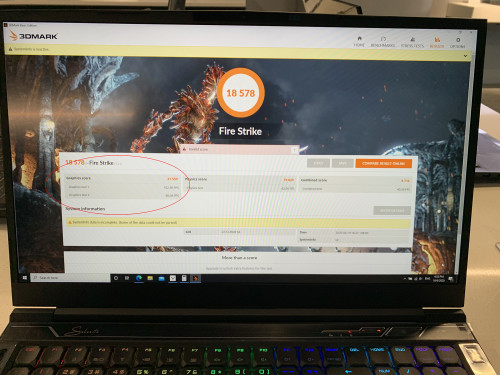
We have just run a firestrike test on our SELENITE G demo with 2070 Super and i got 21559 in graphics score.

user posted image

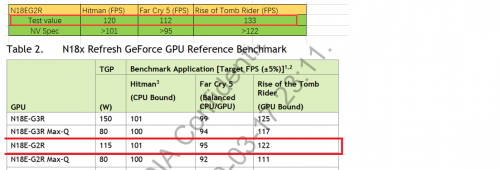
Below is the documentation of SELENITE G's 2070 Super out-performing the official benchmark score from Nvidia.

user posted image

In regards to your claim that the SELENITE G having stuttering issue, please refer to my comment above, and we will provide you the screenshot of the GPU-Z on our demo later.
*
21.5k is much more acceptable, at least it's closer to 22k now even though it did not reach there. Please note that the RTX 2070 Super 115W Max P firestrike screenshot i posted earlier was give by YOUR side, i only highlighted it and posted it here because i tried checking it with your sales and support team and they feedback to me that 20k is normal which is totally unacceptable given how good reputation tong fang chasis perform. Maybe you need to have a good talk with your sales and service team about this.

Also, can i check with you, is your selenite G capable of gpu boost like i showed you in the youtube videos? the same tong fang chasis from eluktronics with their elektroboost (same as your gpu boost) is able to take advantage of gpu boost and increase GPU power to nearly 150W for a 15% performance improvement. does your selenite G do that?

also, with regards to the in game stuttering, i did not make this claim, rather TWO actual real owners of your selenite G posted here asking for help because during gaming they experienced stuttering. the GPUz shot was provided by them showing GPU frequency dropped to 300MHz during gaming, not loading. please refer to their posts.

EDIT: is your screenshot selenite using rtx 2070 super? cause it's not shown there.

This post has been edited by alexnvidia: Jun 19 2020, 06:39 PM
alexnvidia
post Jun 19 2020, 07:38 PM

Casual
***
Junior Member
351 posts

Joined: Oct 2006
QUOTE(Prince J @ Jun 19 2020, 12:21 PM)
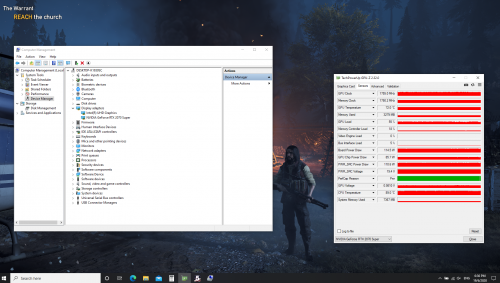
Please refer to our SELENTE G RTX2070 Super's GPU-Z result in Farcry 5, there is no stuttering, lagging nor any issue. FYI We didn't tab-out in the recording process.

user posted image

As mentioned previously, boosting above 115W increases the risk of damaging GPU MOS.
*
then this stuttering issue is considered isolated cases for those two selenite G owners? or it's a batch issue? i have no reason to believe they are making this up. and the probability of two different owners facing the same issue is very slim unless that batch of selenite G is problematic? have your support side resolved their gaming stuttering issue?

based on the youtube reviewer BOB of all trades, eluktronics work closely with tong fang to allow their RTX 2070 super to boost above 115W without any damage. he explicitly said it is PERFECTLY safe and their laptop is DESIGNED around this power envelope. obviously eluktronics dont do any design or manufacturing, it is all done by tong fang and if tong fang allows this, it means they have designed the GPU VRM to withstand the added power boost. maybe you can check with tong fang about this? being able to perform higher than standard rtx 2070 super can be a huge selling point for you guys too, just like how you guys advertise your rtx 2060 to being able to boost above nvidia spec 80W.
alexnvidia
post Jun 20 2020, 12:15 PM

Casual
***
Junior Member
351 posts

Joined: Oct 2006
QUOTE(sengf @ Jun 19 2020, 04:27 PM)
anybody can help me ?is it original onxy pro 9th is it include  Sound Blaster Cinema 5 software?after i reformat gone already, can i know where can i download it back?
*
illegear website, go to support and download
alexnvidia
post Jun 21 2020, 06:09 PM

Casual
***
Junior Member
351 posts

Joined: Oct 2006
QUOTE(Prince J @ Jun 21 2020, 06:36 AM)
So far we only had one complain on the stuttering issue from forumer shadowhunt94. Static_365 issue is another FPS drop in game issue which is related to driver/game settings.
As per our test using our showroom SELENITE G demo and stock there is no stuttering / lag shown.

For the stuttering, it could be related to BIOS/EC version, driver, gameplay, background software or the hardware itself, it would be very helpful if we can receive the units back from shadowhunt94 to determine the root cause of the issue.

All tongfang OEM are having the same version of BIOS. As for the boosting above 115W on RTX2060, RTX2070, RTX2070 Super, ODM / Nvidia have made clear statement that boosting above 115W increases the chance of failing the GPU power MOS, we have the responsibility to inform you regarding this in the first place.

Perhaps you should consider buying your SELENITE G (ID-S) from Eluktronics rather than from Illegear? We do not have a service center in Brunei (you complained a few times in this thread that you need to ship the part to our KL center for RMA) so that makes no difference for you to buy from Eluktronics because you are going to import anyway. They also can provide you the guarantee of boosting above 115W, I believe they have the warranty in place if you failed the GPU.
*
I dont think eluktronics is able to write their own firmware to make them special. Just like illegear, everything from them is provided by tong fang. However, (this is just a speculation) i believe there might be two variants of the same ID-S motherboard from tong fang. one that is just designed to run a regular 115W GPU, and another that can boost past 115W. This is true in the previous models where for the same tong fang chasis from different companies, some companies offer GPU boost for rtx 2060 and some dont even though it is the exact same chasis ID-S. it does not matter if you on or off the gpu boost button, as long as you hardware ID-S do not allow for this, you will not get GPU boost. and this is not something that can be enabled by simply flashing the firmware. the hardware needs to be designed to take the extra power load. as a tong fang reseller, i'm sure you know more about this than me.

GPU boost from Eluktronics is done by pressing the GPU boost button (they call it elektroboost) next to the power button. To boost above 115W for their 2070 Super GPU, Tong fang will need to allow this to happen, meaning tong fang is the one who designed it to boost that high with the necessary power delivery VRM and firmware to do so. It is totally impossible for any selenite ID-S to boost past 115W as stated very clearly in the video unless tong fang allows it, so there is no risk of damage. Since you are so sure all tong fang OEM have the same BIOS, then your selenite G should be capable of boosting above 115W too without compromising the power delivery circuit.

which is why i wanted you guys to test if your variant can boost past 115W by pressing on the GPU boost button. perhaps it will cost more to bring in the variant that can boost past 115W? or perhaps your Selenite ID-S is already capable of this and you marketing/technical team overlooked this unique feature? Either way, it would be great if you could test this out (a simple comparison using firestrike with GPU boost on and off will do) or find out from from tong fang if your ID-S is capable of gpu boost past 115W. Again, there is no risk no damage because if tong fand does not allow it, you will not get gpu boost no matter what you do.

I have considered buying from eluktronics. As you said, it makes no difference for me buying from illegear or eluktronics because i'm basically getting no good aftersales support for being an international buyer. However, US is a lot further away than Malaysia and it will be a lot more expensive to ship the laptop to Brunei. Also, i was hoping illegear can be different when it comes to dealing with international customers. Since you guys are No.1 in malaysia now, the next step worth looking into is expanding to international waters, at least the nearby countries.

I hope you do understand why i'm being extra careful, persistent and asking so many questions most average buyers wont even bother. If anything went wrong with my purchase, the aftersales support for hardware will be non existence unless i ship back the laptop which can be very costly.

The support and info you provided in this forum really do help a lot to regain buyer's confidence and i thank you for that.

This post has been edited by alexnvidia: Jun 22 2020, 08:22 AM

alexnvidia
post Jun 23 2020, 06:45 PM

Casual
***
Junior Member
351 posts

Joined: Oct 2006
QUOTE(Prince J @ Jun 23 2020, 11:30 AM)
Let me reiterate that Tongfang TDP for 2060 / 2070 / 2070 Super is 115W maximum, this has been re-confirmed by the FAE contact window as well as the RD head in Tongfang who is also the one approved the design of these models.

Should you wish to boost your laptop GPU TDP to above 115W, you may purchase the ID-S from Eluktronics directly.
*
Thanks for the clarification. much appreciated.

@Shadowhunt94 have u tried the new BIOS and EC firmware? did it fix your in game stuttering?

This post has been edited by alexnvidia: Jun 23 2020, 06:48 PM
alexnvidia
post Jul 1 2020, 12:16 PM

Casual
***
Junior Member
351 posts

Joined: Oct 2006
QUOTE(clivengu @ Jun 30 2020, 06:29 PM)
Few months ago my selenite's keyboard started cannot use, and battery seems to give issue until my windows corrupt. Send in for warranty service, and they said they have changed my Keyboard + Battery.

2 months later, i notice the underside of laptop start to kembang. I open inside and see the battery already kembang like going to explode anytime. Illegear technician asked me to remove the battery, as I couldnt send in my laptop due to in the middle of important work. So I use it without battery.. until today.. The keyboard starts to give way again. No lighting no input.

Both items that claim to have replaced , but now having similar issues again.. I am really starting to doubt the quality of the servicing. Maybe I look too highly on the brand .. sad.gif I still recommended a lot of ppl to buy this, but my laptop only entering 2nd year, and already meet with such issues.. aiks..
*
ouch.. that's bad...which model did u get?

3 Pages < 1 2 3Top
 

Change to:
| Lo-Fi Version
0.0469sec    0.24    7 queries    GZIP Disabled
Time is now: 3rd December 2025 - 07:36 AM