

QUOTE(myromance123 @ Jan 31 2019, 09:19 PM)
Anyone experiencing severe download speed issues with TM Unifi right now?
Seems fine in PJ...

Unifi Official TM UniFi High Speed Broadband Thread V37, READ 1ST PAGE FOR TURBO SPEED INFO!
|
|
 Jan 31 2019, 09:40 PM Jan 31 2019, 09:40 PM
Return to original view | IPv6 | Post
#1
|
 
Senior Member
561 posts Joined: Jul 2015 
|
QUOTE(myromance123 @ Jan 31 2019, 09:19 PM) Anyone experiencing severe download speed issues with TM Unifi right now? Seems fine in PJ... |
|
|
|
|
|
Jan 31 2019, 11:17 PM
Return to original view | IPv6 | Post
#2
|
|
Senior Member
561 posts Joined: Jul 2015
|
QUOTE(JoBigShow @ Jan 31 2019, 10:33 PM) So I've been Turbo'd to 800Mbps, from Unifi 50. Is your PC's network adapter connected ar 1Gigabit? Check...My setup: BTU: Huawei-HG8240W ROUTER: TP-Link Archer C5, firmware updated just now to most recent. CABLE: CAT5e between BTU and router. CONNECTION: Wired directly to PC using CAT5e cable. Shouldn't the router be at least more capable than that? Expecting under 300mbps or whatever this router is capable of. Anything I am missing? 
I use the same Huawei-HG8240W, so assuming it is working properly at 1 Gigabit speeds, I reckon the problem lies with either one or both of your ethernet cables... |
|
|
Feb 1 2019, 01:14 AM
Return to original view | IPv6 | Post
#3
|
|
Senior Member
561 posts Joined: Jul 2015
|
QUOTE(JoBigShow @ Feb 1 2019, 12:43 AM) Thanks! Use that same cable. And connect it to your Huawei BTU on one end and the other end to your PC and check if its 100Mbps or 1Gbps...My Ethernet network is 1.0Gbps. Will troubleshoot the cables next. It just strange though, a CAT5e cable performs like a CAT5 (100Mbps and below). Is this common? Surely a number of people who has been upgraded still using cat5e provided by TM, meaning some of us should have reported similar issues that has become aware of?  |
|
|
Feb 1 2019, 10:05 PM
Return to original view | IPv6 | Post
#4
|
|
Senior Member
561 posts Joined: Jul 2015
|
QUOTE(afroboy @ Feb 1 2019, 08:20 PM) holy shit imgur is so slow as fuck True that...
|
|
|
Feb 2 2019, 08:55 PM
Return to original view | IPv6 | Post
#5
|
|
Senior Member
561 posts Joined: Jul 2015
|
QUOTE(yoongjun @ Feb 2 2019, 07:32 PM) I tried installing the firmware and it seems to help and I did not touch any settings. Do let me know if I need to configure anything but managed to get constant 550mbps now, although package is 800mbps. Also tried checking router cpu core, it hits about 75-80% when I am running the speed test.  https://www.blacktubi.com/guide/performance...or-asus-router/ |
|
|
Feb 17 2019, 10:23 AM
Return to original view | IPv6 | Post
#6
|
|
Senior Member
561 posts Joined: Jul 2015
|
QUOTE(zangief @ Feb 17 2019, 09:46 AM) yesterday bought 30m of cat6 cable to test wired speed but only manage to get around 250Mbps. What about the cable between BTU and Router?Try a wired LAN file transfer between 2 PCs? |
|
|
|
|
|
Feb 17 2019, 11:20 AM
Return to original view | IPv6 | Post
#7
|
|
Senior Member
561 posts Joined: Jul 2015
|
QUOTE(zangief @ Feb 17 2019, 10:41 AM) yes, it's only a n750 router. on paper its max wifi speed: 5GHz: 450Mbps; 2.4GHz: 300Mbps, hence 750 but those are irrelevant because i am on wired connection. it has 4 gigabit LAN ports. Is Hardware NAT enabled or disabled in NAT Settings? |
|
|
Feb 22 2019, 12:04 AM
Return to original view | IPv6 | Post
#8
|
|
Senior Member
561 posts Joined: Jul 2015
|
QUOTE(SilentVampire @ Feb 21 2019, 11:18 PM) I know la. You don't really need a powerful and expensive router, but even on wired, and if you have a cheap router with gigabit ports, the speed will still be throttled by the hardware of the router i.e. you won't get full gigabit speed. WTF are you on about?If you are working for a router distributor and provide tech support for their products, I suggest you stick to those forums instead of giving lame excuses to justify and promote unnecessary/exorbitant router purchases here! |
|
|
Mar 13 2019, 04:19 PM
Return to original view | IPv6 | Post
#9
|
|
Senior Member
561 posts Joined: Jul 2015
|
QUOTE(DecaPix @ Mar 13 2019, 11:18 AM) Why is it odd? Try turning off your Wi-Fi Assist...yes i am on 500. I am using Archer C5 as Access Point. managed to reach that speed with iPhone 7. Same speed with wired.  I have never seen my 6S, 8, XS exceed 400Mbps when testing with a 2x2 antenna WiFi Router/AP. |
|
|
Mar 13 2019, 09:26 PM
Return to original view | IPv6 | Post
#10
|
|
Senior Member
561 posts Joined: Jul 2015
|
QUOTE(Jeremy_John @ Mar 13 2019, 09:07 PM) Can try around 8pm+? Maybe it's my area congestion at that timing? 
|
|
|
Mar 13 2019, 11:18 PM
Return to original view | IPv6 | Post
#11
|
|
Senior Member
561 posts Joined: Jul 2015
|
QUOTE(Jeremy_John @ Mar 13 2019, 10:33 PM) What area? Petaling Jaya.I think either my area Kota Kemuning, Shah Alam got some throttling going on or my account being throttled. GG I have experienced significant throttling a few times as well but it wasn't prolonged. I'm pretty sure I got faster speeds last year than what I'm getting now... |
|
|
Mar 25 2019, 11:21 PM
Return to original view | IPv6 | Post
#12
|
|
Senior Member
561 posts Joined: Jul 2015
|
QUOTE(taqu @ Mar 25 2019, 10:36 PM) One local guy already did this: https://nasilemaktech.com/wifi-6-speed-test/ In summary: 720 mbps download. AX on laptops should be even higher. Smallnetbuilder tested Intel 9260 card, which is an AC card that supports 160 MHz channels (similar to AX) and managed to exceed 800 mbps on Asus AX router.  What kind of testing is this... 1 large file (1.6GB) vs 2 large files (2.8GB), all other WIFI stds have similar results except for 5GHz AX? 9.06 vs 9.04, 32.18 vs 31.37, 17.39 vs 17.02, but 5GHz AX 90.32 vs 66.67 The fastest 5GHz AC result is a paltry 36.36MB/s or 290.88Mbit/s. Come on. I can get 300Mbit/s at the very least 1 floor down with a cheap TP-Link and iPhone 8 all day everyday. Reading data from the phone vs Writing data from the phone, all other results have changes except for 5GHz AX @ 90.32MB/s? This post has been edited by biloxee: Mar 25 2019, 11:34 PM |
|
|
Mar 26 2019, 08:58 PM
Return to original view | IPv6 | Post
#13
|
|
Senior Member
561 posts Joined: Jul 2015
|
QUOTE(MinusGear @ Mar 26 2019, 07:42 PM) Thank you! That's what I'm looking for. 1) Call TIME and check/confirm if they are able to service your home and what plans they are able to offer.2) Go to TM Point and clarify if TM is really unable to offer you 100Mbps unlimited. What about 30Mbps or 50Mbps unlimited? Depending on #1, if TIME can offer you 100Mbps unlimited, ask why TM is unable to? 3) Escalate to MCMC. Tell them 30Mbps 60GB does not match your usage and TM is unable to offer you 30/50/100Mbps unlimited whreas TIME is able to (Subject to #1) Add that you would like to remain TM's customer but since TM is unable to offer you the package you want and TIME is able to, you are forced to switch to TIME and would like the early termination fees reduced/quashed. |
|
|
|
|
|
Mar 28 2019, 09:08 PM
Return to original view | IPv6 | Post
#14
|
|
Senior Member
561 posts Joined: Jul 2015
|
QUOTE(MGM @ Mar 28 2019, 07:53 PM) Not aware of AUTH is normally on or off. I have the HG8240W. AUTH is UNLIT. TEL1, VOIP & LINK is LIT. LAN# BLINKS. |
|
|
Mar 28 2019, 09:36 PM
Return to original view | IPv6 | Post
#15
|
|
Senior Member
561 posts Joined: Jul 2015
|
QUOTE(MGM @ Mar 28 2019, 09:19 PM) The LAN# that blinks is the one with the LAN cable connected to the modem? U using LAN1? My LAN1 Blinks. It is connects from BTU (HG8240W) to my Router.Non of my LAN# blinks including LAN1 which is connected to the modem. |
|
|
Apr 2 2019, 06:27 PM
Return to original view | IPv6 | Post
#16
|
|
Senior Member
561 posts Joined: Jul 2015
|
QUOTE(kingkong22 @ Apr 2 2019, 06:06 PM) Anyone found that your "turbo" package has been downgrade to 100Mbps and you cannot find any package faster than 100mbps in TM website. No problem...It's ridiculous that TM has cheat people that your speed has been upgraded only for couple of month.   |
|
|
Apr 10 2019, 09:25 PM
Return to original view | IPv6 | Post
#17
|
|
Senior Member
561 posts Joined: Jul 2015
|
QUOTE(EUPH0RIA @ Apr 10 2019, 09:22 PM) i cannot access reddit and twitch. Where are you all located? East MY? |
|
|
Apr 10 2019, 09:34 PM
Return to original view | IPv6 | Post
#18
|
|
Senior Member
561 posts Joined: Jul 2015
|
QUOTE(EUPH0RIA @ Apr 10 2019, 09:27 PM) yup Kuching Sgor can access Reddit but slow. The pics hosted on reddit take forever to load esp the large ones. |
|
|
Apr 11 2019, 04:58 PM
Return to original view | IPv6 | Post
#19
|
|
Senior Member
561 posts Joined: Jul 2015
|
QUOTE(Acher13 @ Apr 11 2019, 04:19 PM) great, down again. Those results are as expected using the Tracert command in Windows. Use an alternative tool.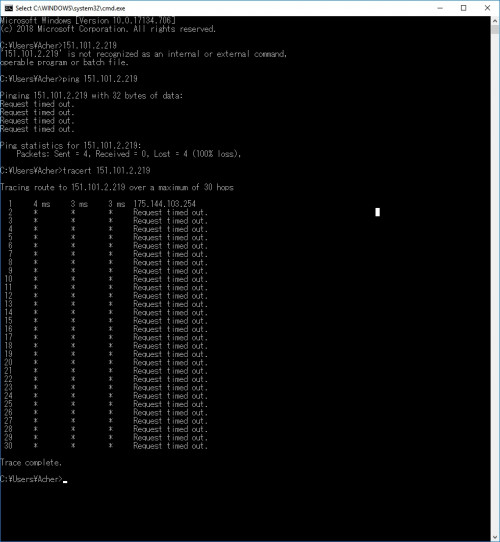 |
|
|
Apr 13 2019, 07:22 PM
Return to original view | IPv6 | Post
#20
|
|
Senior Member
561 posts Joined: Jul 2015
|
QUOTE(solarmystic @ Apr 13 2019, 06:51 PM) Anyone facing intermittent packet loss issues right now? It's quite bad to any site. Nope...[attachmentid=10226326]  |
|
Topic ClosedOptions
|
| Change to: |  0.2150sec 0.2150sec
 0.60 0.60
 7 queries 7 queries
 GZIP Disabled GZIP Disabled
Time is now: 4th December 2025 - 11:48 AM |
 Quote
Quote