Welcome Guest ( Log In | Register )

33 Pages « < 24 25 26 27 28 > » Bottom

Outline · [ Standard ] · Linear+

Asus Asus Zenfone MAX Pro [M2] Discussion Thread, SD660 with a freakin 5000MAH! Powaaa!!!

views
     
Uncle Ron
post Jun 1 2019, 10:07 AM

Casual
***
Junior Member
477 posts

Joined: Feb 2012
From: Kuala Selangor - Shah Alam


QUOTE(OzzyOzz @ Jun 1 2019, 10:02 AM)
Copy (all) pics,vids and whatsapp 'Backups' , 'Databases' & 'Media' folder to OTG/pc. Reset phone from the setting in case you doesn't remember current gmail password.

As to restore whatsapp chat/settings, you know what to do or simply googling it.
*
Owh, basic backup i thought backup something like twrp thingy... Reset phone is do factory reset am i right?

OzzyOzz
post Jun 1 2019, 10:23 AM

Casual
***
Junior Member
405 posts

Joined: Feb 2017


Yes,.and if you're restoring your phone from gdrive, i suggest untick all except for the contacts, call history and sms. Else start fresh.
nexona88
post Jun 1 2019, 10:24 AM

The Royal Club Member
*********
All Stars
48,551 posts

Joined: Sep 2014
From: REality
QUOTE(Uncle Ron @ Jun 1 2019, 09:02 AM)
How to backup n hard reset yea? Sorry nubies here... 😅
*
Wahhh...
Google is your good friend 😁🤪🤗
Don't be lazy 😂🤣
OzzyOzz
post Jun 1 2019, 10:33 AM

Casual
***
Junior Member
405 posts

Joined: Feb 2017


One thing i do not like about this pie is this..


Prefer vertical recent apps stack more..


Attached thumbnail(s)
Attached Image
azhar75
post Jun 1 2019, 10:44 AM

10k Club
********
All Stars
17,226 posts

Joined: Dec 2015


QUOTE(Uncle Ron @ Jun 1 2019, 08:08 AM)
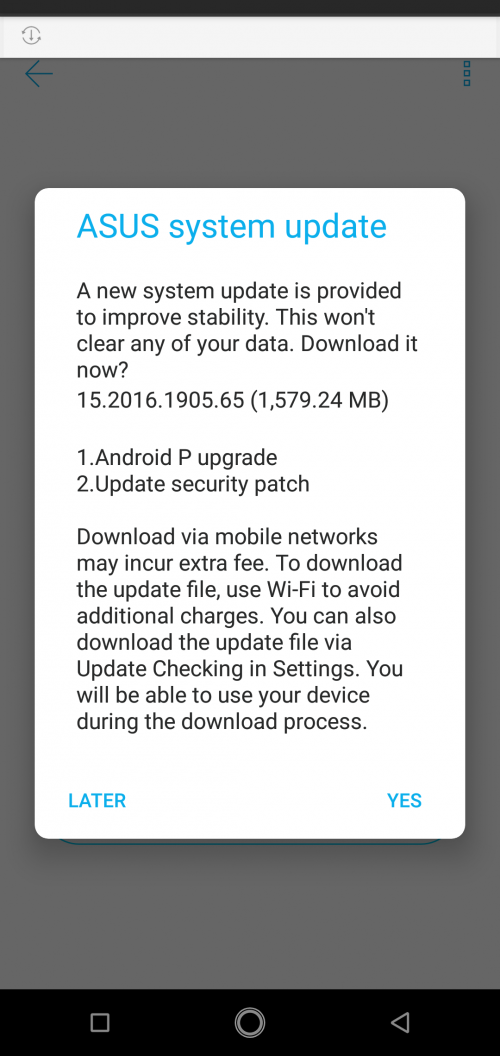
user posted image

Finally i got Androip P update... Should i update or not? Scared so many complaining at zentalk forum... 😅
*
Make sure full backup before OTA...

How to full backup?
» Click to show Spoiler - click again to hide... «


By right, the only thing to backup is game data (if it is not having cloud saving capability). Most apps like WhatsApp, music player/library, Photo Editor, etc. should have their own manual backup and restore method.

Whereas contacts and bookmarks are automatically backup if we use Google native services...

But for lazy users, just use Helium to perform "full backup" and "full restore" for all data in one platform/method...

After upgraded:

1) Log-out from Google account in the M2P. Meaning, we delete the Google account altogether. Just ensure we still remember our Google account password before deleting it.

2) HARD RESET is compulsory and don't restore from backup... Start as brand new device...

How to HARD RESET?
» Click to show Spoiler - click again to hide... «


3) If possible, install only important apps like email client, WhatsApp and Telegram ... Don't install FB, WeChat & others... Use the browser version for the next 72 hours... This is to investigate and confirm that the firmware is "virgin" and free from external "debris" that leads to instability & battery drain...

4) Monitor over-night deep sleep / idle battery drain... Should be between 2% to 4% drain for 8 hours deep sleep...

5) After 72 hours monitoring, it'll take lots of time/effort to gain back the apps and data in placed.... but it's worth it in order to have reliable and "delicious" Android "P"opcorn....

This post has been edited by azhar75: Jun 1 2019, 11:52 AM

Uncle Ron
post Jun 1 2019, 10:52 AM

Casual
***
Junior Member
477 posts

Joined: Feb 2012
From: Kuala Selangor - Shah Alam


QUOTE(nexona88 @ Jun 1 2019, 10:24 AM)
Wahhh...
Google is your good friend 😁🤪🤗
Don't be lazy 😂🤣
*
Sorry about my laziness... 🤣🤣🤣🤣🤣
Kcee
post Jun 1 2019, 10:53 AM

On my way
****
Junior Member
598 posts

Joined: Apr 2009
» Click to show Spoiler - click again to hide... «

For future reference. Good information. Thanks.
Uncle Ron
post Jun 1 2019, 10:55 AM

Casual
***
Junior Member
477 posts

Joined: Feb 2012
From: Kuala Selangor - Shah Alam


QUOTE(azhar75 @ Jun 1 2019, 10:44 AM)
Make sure full backup before OTA...

How to full backup?
» Click to show Spoiler - click again to hide... «


By right, the only thing to backup is game data (if it is not having cloud saving capability). Most apps like WhatsApp, music player/library, Photo Editor, etc. should have their own manual backup and restore method.

Whereas contacts and bookmarks are automatically backup if we use Google native services...

But for lazy users, just use Helium to perform "full backup" and "full restore" for all data in one platform/method...

After upgraded:

1) Log-out from Google account in the M2P. Meaning, we delete the Google account altogether. Just ensure we still remember our Google account password before deleting it.

2) HARD RESET is compulsory and don't restore from backup... Start as brand new device...

How to HARD RESET?
» Click to show Spoiler - click again to hide... «


3) If possible, install only important apps like WhatsApp... Don't install FB, WeChat & others... Use the browser version for the next 72 hours... This is to investigate and confirm that the firmware is "virgin" and free from external "debris" that leads to instability & battery drain...

4) Monitor over-night deep sleep / idle battery drain... Should be between 2% to 4% drain for 8 hours deep sleep...

5) After 72 hours monitoring, it'll take lots of time/effory to gain back the apps and data in placed.... but it's worth it in order to have reliable and "delicious" Android "P"opcorn....
*
Wahhh!!! Really awesomeness explanation! Thank you so much bro! Really appreciate it! 😍🙏
nexona88
post Jun 1 2019, 10:55 AM

The Royal Club Member
*********
All Stars
48,551 posts

Joined: Sep 2014
From: REality
QUOTE(azhar75 @ Jun 1 2019, 10:44 AM)
Make sure full backup before OTA...

How to full backup?
» Click to show Spoiler - click again to hide... «


By right, the only thing to backup is game data (if it is not having cloud saving capability). Most apps like WhatsApp, music player/library, Photo Editor, etc. should have their own manual backup and restore method.

Whereas contacts and bookmarks are automatically backup if we use Google native services...

But for lazy users, just use Helium to perform "full backup" and "full restore" for all data in one platform/method...

After upgraded:

1) Log-out from Google account in the M2P. Meaning, we delete the Google account altogether. Just ensure we still remember our Google account password before deleting it.

2) HARD RESET is compulsory and don't restore from backup... Start as brand new device...

How to HARD RESET?
» Click to show Spoiler - click again to hide... «


3) If possible, install only important apps like WhatsApp... Don't install FB, WeChat & others... Use the browser version for the next 72 hours... This is to investigate and confirm that the firmware is "virgin" and free from external "debris" that leads to instability & battery drain...

4) Monitor over-night deep sleep / idle battery drain... Should be between 2% to 4% drain for 8 hours deep sleep...

5) After 72 hours monitoring, it'll take lots of time/effory to gain back the apps and data in placed.... but it's worth it in order to have reliable and "delicious" Android "P"opcorn....
*
QUOTE(Uncle Ron @ Jun 1 2019, 10:52 AM)
Sorry about my laziness... 🤣🤣🤣🤣🤣
*
Lucky for u.
Have others give detailed explanation on how to do..
Uncle Ron
post Jun 1 2019, 11:09 AM

Casual
***
Junior Member
477 posts

Joined: Feb 2012
From: Kuala Selangor - Shah Alam


QUOTE(nexona88 @ Jun 1 2019, 10:55 AM)
Lucky for u.
Have others give detailed explanation on how to do..
*
Yeah, i'm so superduper lucky! I'm glad i come to this thread by an accident... 😍💕

This post has been edited by Uncle Ron: Jun 1 2019, 11:11 AM
coolguy99
post Jun 2 2019, 11:58 PM

Look at all my stars!!
*******
Senior Member
7,356 posts

Joined: Aug 2015


Guys have you encountered an issue where your phone does not show up in your computer while connected?

I have enabled USB debugging but it still does not help. Any advice please?
azhar75
post Jun 3 2019, 09:12 AM

10k Club
********
All Stars
17,226 posts

Joined: Dec 2015


QUOTE(coolguy99 @ Jun 2 2019, 11:58 PM)
Guys have you encountered an issue where your phone does not show up in your computer while connected?

I have enabled USB debugging but it still does not help. Any advice please?
*
When we plug in the cable to PC, there should be a sound on the PC telling us successful connection. Immediately after this sound, there is a prompt on M2P screen to ask us to allow connection. Activate the check box "Always allow from this computer" & hit OK.

If still not working, try different port on the PC. Still not working, try at different PC.
coolguy99
post Jun 3 2019, 10:29 AM

Look at all my stars!!
*******
Senior Member
7,356 posts

Joined: Aug 2015


QUOTE(azhar75 @ Jun 3 2019, 09:12 AM)
When we plug in the cable to PC, there should be a sound on the PC telling us successful connection. Immediately after this sound, there is a prompt on M2P screen to ask us to allow connection. Activate the check box "Always allow from this computer" & hit OK.

If still not working, try different port on the PC. Still not working, try at different PC.
*
Thank you. Got it working after selecting File Transfer under USB.
nexona88
post Jun 3 2019, 10:44 AM

The Royal Club Member
*********
All Stars
48,551 posts

Joined: Sep 2014
From: REality
QUOTE(coolguy99 @ Jun 3 2019, 10:29 AM)
Thank you. Got it working after selecting File Transfer under USB.
*
Hmm...
U mean click on the phone screen?
There's long list, which including file transfer & charge phone? That's the one right?
nexona88
post Jun 3 2019, 04:39 PM

The Royal Club Member
*********
All Stars
48,551 posts

Joined: Sep 2014
From: REality
Malaysia Set also effected? dry.gif
(assuming the person is using India Set)

user posted image
abubin
post Jun 3 2019, 04:59 PM

10k Club
********
All Stars
10,429 posts

Joined: Jan 2003


If I get 1 bucks for every time someone complain about battery drain after ROM update, I become millionaire already...
nexona88
post Jun 3 2019, 05:49 PM

The Royal Club Member
*********
All Stars
48,551 posts

Joined: Sep 2014
From: REality
QUOTE(abubin @ Jun 3 2019, 04:59 PM)
If I get 1 bucks for every time someone complain about battery drain after ROM update, I become millionaire already...
*
laugh.gif laugh.gif laugh.gif

guess needed time for battery to stabilized first..
Kato888
post Jun 3 2019, 07:58 PM

Getting Started
**
Junior Member
193 posts

Joined: Aug 2009
QUOTE(OzzyOzz @ May 31 2019, 02:22 PM)
I think split screen is missing in this pie, or its just me(bug)..can anyone confirm?
*
Just updated to Pie. My night mode does not work. Had to find this option in developer mode as it's not available under the shortcuts section. I've selected off and then on but nothing changes. Have also restarted my phone. Is yours working?

And i can confirm that split screen option like in Oreo is no longer available, not sure if there's a different method to using split screen.

Btw, after update, when the phone was booting up, there was a two-option prompt that appeared over the swipe-to-unlock screen. Usually the normal order would be : Zenfone logo->swipe-to-unlock->Zenfone logo again. I accidentally tapped the screen too quickly when the prompt appeared and didn't manage to catch it, and the screen went away.. do you remember what it was? I'm not sure if that's the reason why my night mode is not working

Edit: that was not a two-option prompt; it was an error message that said 'phone keeps stopping'.. lol

Also, I've changed the display theme to 'dark' but that doesn't activate the full dark mode..

This post has been edited by Kato888: Jun 3 2019, 08:25 PM
OzzyOzz
post Jun 3 2019, 08:54 PM

Casual
***
Junior Member
405 posts

Joined: Feb 2017


QUOTE(Kato888 @ Jun 3 2019, 07:58 PM)
Just updated to Pie. My night mode does not work. Had to find this option in developer mode as it's not available under the shortcuts section. I've selected off and then on but nothing changes. Have also restarted my phone. Is yours working?

And i can confirm that split screen option like in Oreo is no longer available, not sure if there's a different method to using split screen.

Btw, after update, when the phone was booting up, there was a two-option prompt that appeared over the swipe-to-unlock screen. Usually the normal order would be : Zenfone logo->swipe-to-unlock->Zenfone logo again. I accidentally tapped the screen too quickly when the prompt appeared and didn't manage to catch it, and the screen went away.. do you remember what it was? I'm not sure if that's the reason why my night mode is not working

Edit: that was not a two-option prompt; it was an error message that said 'phone keeps stopping'.. lol

Also, I've changed the display theme to 'dark' but that doesn't activate the full dark mode..
*
different method for split screen, must be access through recent apps. Last time just hold the the rectangular for 2 seconds.
Uncle Ron
post Jun 4 2019, 07:55 PM

Casual
***
Junior Member
477 posts

Joined: Feb 2012
From: Kuala Selangor - Shah Alam


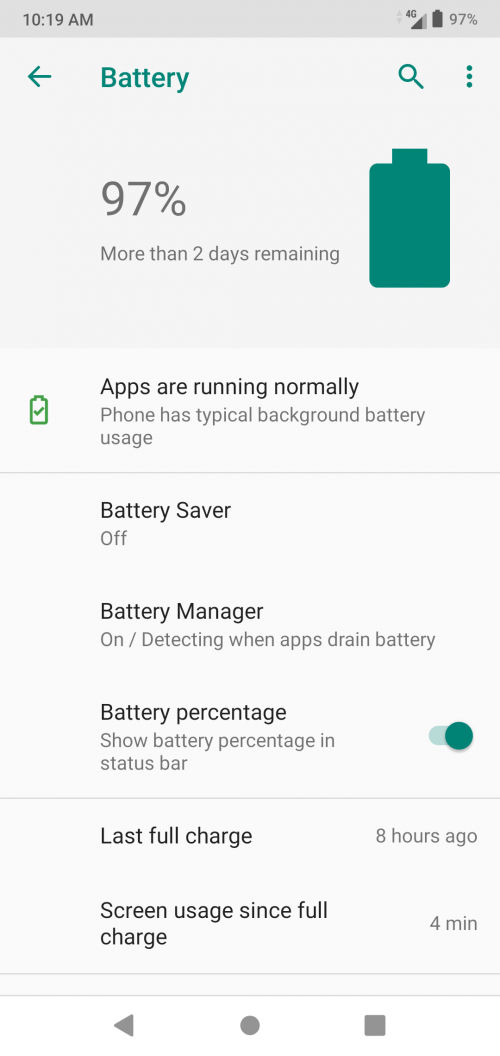
user posted image

Now i can eat P'opcorn after upgrade my android thanks guys for the tips n info! 🥰

33 Pages « < 24 25 26 27 28 > » Top
 

Change to:
| Lo-Fi Version
0.0248sec    0.92    6 queries    GZIP Disabled
Time is now: 18th December 2025 - 05:43 AM