Welcome Guest ( Log In | Register )

Outline · [ Standard ] · Linear+

 Adata XPG SX8200 Pro 512GB NVME SSD, Affordable alternative for high speed

views
     
TSxxboxx
post May 8 2019, 03:00 PM

The mind is for having ideas, not holding them
*******
Senior Member
5,261 posts

Joined: Oct 2004
From: J@Y B33


QUOTE(BigSaver @ May 8 2019, 09:58 AM)
Thanks for the driver! will try when reach at home.

Bios, i haven't change anything except XMP profile. Will try to play other setting. Any setting that i can refer? im using Giga B450 pro

Ive try with sleep and w/o sleep, still blue screen (forgot the code error but if not mistaken "system service exemption" need to check again). Best to do is not to leave my pc at all or just shutdown if afk.  sad.gif

Why i suspect the problem come from my SX8200, 1st problem appear when bios said missing boot. i try startup repair, usb repair, cmd repair all wont work. Last choice fresh format

Then 2nd time appear when not detect bootable device even though i already set priory boot. Need to restart then can see the boot again. Also ive notice all my old windows (i keep my old windows when fresh format) files are missing. Supposedly it will remain.
*

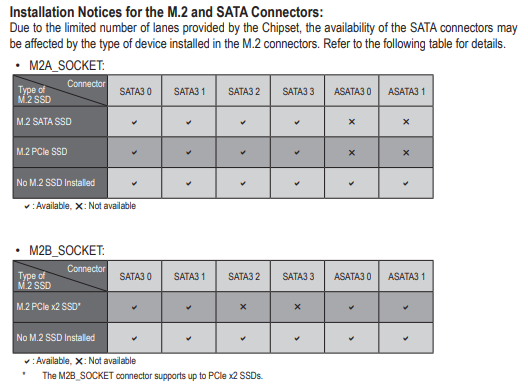
I assume no conflict with your M.2 and SATA port that being used on the motherboard?
user posted image

Last time I remember reading about RAID setting for M.2 need to be enable/disable (can't remember which one tongue.gif ), this is because of Windows issue.

There's also possibility you got a lemon unit. Can try using it on other PC to confirm it's really the SX8200 problem.

Old windows file missing I don't think SX8200 problem, maybe you got enable auto clean storage or when do disk cleanup you might also have selected the old windows file.
TSxxboxx
post May 8 2019, 03:05 PM

The mind is for having ideas, not holding them
*******
Senior Member
5,261 posts

Joined: Oct 2004
From: J@Y B33


QUOTE(caloyness @ May 8 2019, 10:08 AM)
doesn't happen all the time, but issue still persist.
maybe once a week it happens.
*

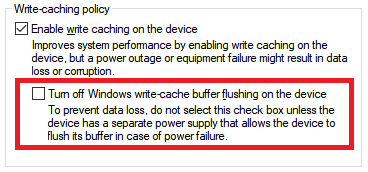
Do you have this setting on your SX8200 properties?
If got then make sure the red colour that I highlight is not selected

user posted image
TSxxboxx
post May 9 2019, 05:17 PM

The mind is for having ideas, not holding them
*******
Senior Member
5,261 posts

Joined: Oct 2004
From: J@Y B33


QUOTE(1024kbps @ May 8 2019, 10:32 PM)
If you overclock, especially RAM, reset to default, don't troubleshooting with OC, you will going nowhere.

Post the BSOD and see which service or driver causing problem, check if it's the same driver causing bluescreen.

Recent Windows update is the problem i think, it's more sensitive to overclocking now, I had to revert the RAM overclock to make Win 10 usable.
*

I overlooked that he got overclock the RAM. Yeah OC RAM definitely will cause stability issue.


QUOTE(sHawTY @ May 9 2019, 12:38 PM)
Just received another unit of the 512GB today
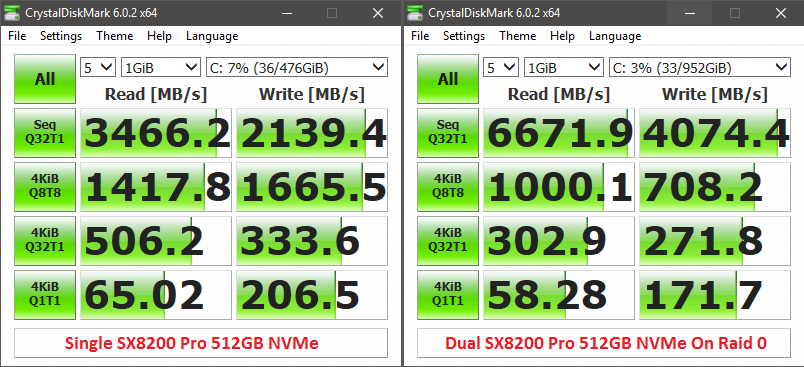
Can't wait to get back home and format my PC later tonight then see what kind of speed can I get with 2 units of ADATA SX8200 Pro 512GB on RAID 0 biggrin.gif

user posted image
*

Wah buy another one, is it cheap now? biggrin.gif

This post has been edited by xxboxx: May 9 2019, 05:18 PM
TSxxboxx
post May 10 2019, 10:56 AM

The mind is for having ideas, not holding them
*******
Senior Member
5,261 posts

Joined: Oct 2004
From: J@Y B33


QUOTE(sHawTY @ May 9 2019, 09:49 PM)
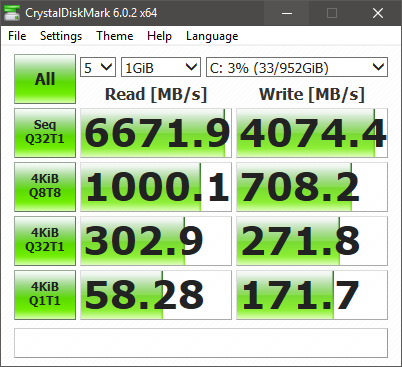
Something wrong. The 4KB speed is wayyyyyy too low
It's even slower than a single SX8200 Pro. Must be my RAID configuration. Or I should move the 2nd SX8200 Pro to another slot on my X399 board since Threadripper is dual die on a single processor unlike most processors

user posted image
*

Could it be because of the access time?
https://www.tomshardware.com/reviews/ssd-ra...ark,3485-6.html

Also setting the block size too big will have adverse impact when reading/writing small size file.

But I feel as long as you use and feel there's improvement compared when you using single SSD then it's good enough. Your seq result so high. biggrin.gif
TSxxboxx
post May 10 2019, 12:10 PM

The mind is for having ideas, not holding them
*******
Senior Member
5,261 posts

Joined: Oct 2004
From: J@Y B33


QUOTE(sHawTY @ May 10 2019, 11:20 AM)
Not quite sure what's causing these result
Sequential speed is not the whole story

The difference is too much sweat.gif

user posted image
*

Only the random 4KB big drop. In actual usage the difference is only in nanoseconds biggrin.gif

Is it both benchmark on the same CPU? I ask because Threadripper know for it's latency issue.
TSxxboxx
post May 10 2019, 12:57 PM

The mind is for having ideas, not holding them
*******
Senior Member
5,261 posts

Joined: Oct 2004
From: J@Y B33


QUOTE(sHawTY @ May 10 2019, 12:22 PM)
Yeap. 2950x
*

Then maybe because of the CPU. Anyways it's very small and plenty of random files, so it does not affect much.
TSxxboxx
post May 30 2019, 10:10 PM

The mind is for having ideas, not holding them
*******
Senior Member
5,261 posts

Joined: Oct 2004
From: J@Y B33


QUOTE(Donchay @ May 29 2019, 09:22 PM)
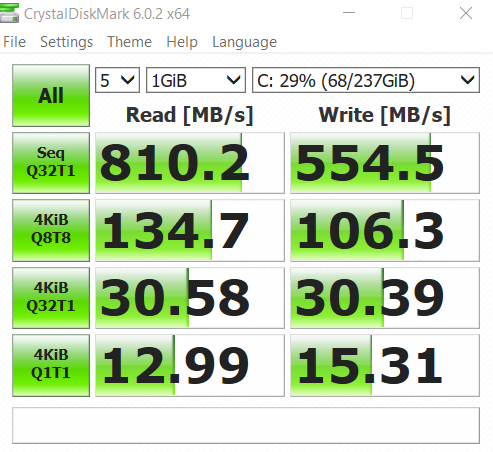
Hi all, overall I'm new to PC and SSD.

So I bought the 256GB 3 weeks ago from lazada. Works perfectly fine until last weekend , which I find it to my horror after I came back from holiday.
All applications, boot up , browsers, even start windows button shows signs of delaying / lag.
Worst still, windows 10 automatic upgrade mine to 1903 version.

Format windows over 10 times to troubleshoot what could be the cause of the slow down.
until it hit my mind it could be the SSD...

user posted image

Screenshot above, I'm thinking it could be the symptop of my SSD failing, although its just 3 weeks. What you guys think?

After typing this, I'm replacing my old SSD to check and compare.
*

That is super slow.

Install CrystalDiskMark and check for any SMART warning for the drive.
TSxxboxx
post May 31 2019, 08:51 PM

The mind is for having ideas, not holding them
*******
Senior Member
5,261 posts

Joined: Oct 2004
From: J@Y B33


QUOTE(Donchay @ May 31 2019, 05:45 PM)
That is done as well. No warnings no nothing. Health is at 100percent.

Could it be just bad luck I got a defective product?

One strange phenomenon, is that I take the ssd out and put it back , it went back straight to 3400 read speed, only to slow down to 800 after 15 to 20 minutes...
*

Weird, it can perform at full speed but then later on it looks like throttled. Have you check the temp? Maybe overheat?

Since the changes that you done recently is upgrading to 1903, got possibility of incompatibility? Maybe try reinstall 1809 windows and see if it's the same.
TSxxboxx
post Jun 5 2019, 02:56 PM

The mind is for having ideas, not holding them
*******
Senior Member
5,261 posts

Joined: Oct 2004
From: J@Y B33


QUOTE(Donchay @ Jun 5 2019, 12:13 PM)
1 to 1 replacement is done, same situation..

Guess it could be the drivers sad.gif
*

Try install this driver and hopefully can fix it.

QUOTE(xxboxx @ Mar 15 2019, 07:33 PM)

"pure" 32bit OFA NVMe driver v1.5.0.0 for Win10 x86 mod+signed
https://www.win-unattended.de/Benutzer/Fern...%20Fernando.rar

"pure" 64bit OFA NVMe driver v1.5.0.0 for Win10 x64 mod+signed
https://www.win-unattended.de/Benutzer/Fern...%20Fernando.rar

The driver I got it from here
https://www.win-raid.com/t29f25-Recommended...vers.html#msg61
It was signed by the website owner
*
TSxxboxx
post Jun 6 2019, 09:44 AM

The mind is for having ideas, not holding them
*******
Senior Member
5,261 posts

Joined: Oct 2004
From: J@Y B33


QUOTE(Donchay @ Jun 6 2019, 01:38 AM)
Hi Thanks for the links and information.

I tried to follow the steps on installing the drivers via the 3rd link but I couldn't follow and lost.
Can you explain how do I do and what should I select?
*

First you need to install the certificate that come together in the zip file. Double click it is enough to install it if not mistaken.

Then go find your NVME SSD in Device Manager, check it's properties and click update driver. Select have disk and browse to the extracted inf file.

Take note that SSD driver is very important file for Windows, make sure you really understand how to install it properly. If wrong file or something is wrong you'll end up with Windows cannot boot and have to clean install Windows. Backup your file before attempting to do install this.
TSxxboxx
post Jun 26 2019, 12:35 AM

The mind is for having ideas, not holding them
*******
Senior Member
5,261 posts

Joined: Oct 2004
From: J@Y B33


QUOTE(warlove3 @ Jun 25 2019, 09:25 PM)
did anyone managed to upgrade the firmware using SSD Toolbox? It keeps bringing me back to the website itself
*

The firmware need to upgrade?

When I first got this SSD I install SSD Toolbox but after seeing how clumsy the software look like I uninstall it.
TSxxboxx
post Jan 11 2020, 12:36 PM

The mind is for having ideas, not holding them
*******
Senior Member
5,261 posts

Joined: Oct 2004
From: J@Y B33


QUOTE(Mushwashan @ Jan 11 2020, 11:11 AM)
now it only rm300 will considering to buy for my hackintosh project
btw. brand nvme ape yg value for money utk 512GB
*
That's cheap.
TSxxboxx
post Jun 13 2020, 09:05 AM

The mind is for having ideas, not holding them
*******
Senior Member
5,261 posts

Joined: Oct 2004
From: J@Y B33


QUOTE(amco @ Jun 12 2020, 10:46 PM)
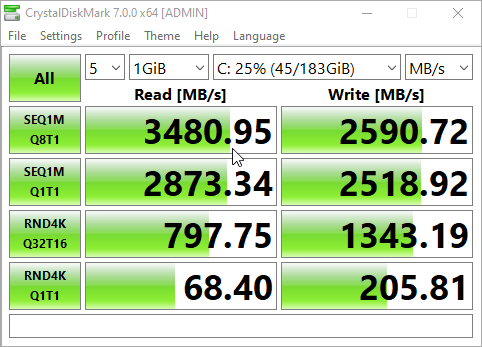
This is 512GB formatted into Drive C&D

user posted image
*
Similar with my 2 years old 512GB.
TSxxboxx
post Jul 11 2020, 08:06 PM

The mind is for having ideas, not holding them
*******
Senior Member
5,261 posts

Joined: Oct 2004
From: J@Y B33


QUOTE(kevin23 @ Jul 11 2020, 03:01 PM)
How is this ssd? Thinking of getting one

Still got BSOD?

Saw on shopee RM373 for 512GB
*
For me didn't get any BSOD
TSxxboxx
post Jul 12 2020, 03:21 AM

The mind is for having ideas, not holding them
*******
Senior Member
5,261 posts

Joined: Oct 2004
From: J@Y B33


QUOTE(kevin23 @ Jul 11 2020, 08:09 PM)
Running latest windows 10 version?
*
Now on build 1909
TSxxboxx
post Sep 1 2020, 12:27 AM

The mind is for having ideas, not holding them
*******
Senior Member
5,261 posts

Joined: Oct 2004
From: J@Y B33


QUOTE(zaire103 @ Aug 31 2020, 11:52 PM)
Hi guys, need help,

Just wondering if this  XPG SX8200 Pro 1tb x 2 can be used on Gigabyte B550M DS3H as a RAID 0, since there are 2 slots on board given.

i have failed to find QVL for this to be pair with as a RAID.
(the support list is oudated how can search for new/ updated one)

can sifu out there help please..
*
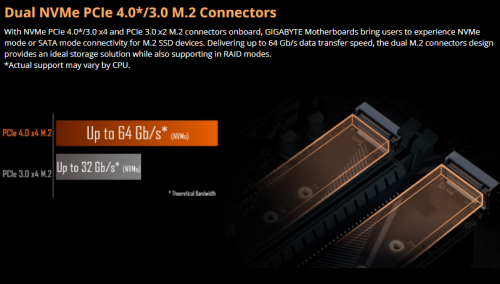
If follow on this listing your mobo should be able to support RAID
user posted image
https://www.newegg.com/gigabyte-b550m-ds3h/p/N82E16813145210

But one slot is PCIE 4/3 x4 while another slot is PCIE 3 x2, the second slot the fastest is half slower. Another drawback is random 4k read will be slower.
TSxxboxx
post Jan 16 2021, 01:44 PM

The mind is for having ideas, not holding them
*******
Senior Member
5,261 posts

Joined: Oct 2004
From: J@Y B33


QUOTE(soonwai @ Jan 16 2021, 01:24 PM)
Yes, Shopee. Got it for RM973.50 less 3000 coins = RM943.50.
If I take into account the 3300 coins from a voucher, it's effectively: RM910.50

m.online.store
skytech188
etechpc
techcat.it.supply
jwgametech
sambalking
bananaitstore
M-dotatech

I don't have the link handy now but I bought from the first seller. Depending on the vouchers and coins available, the other stores can be cheaper.
*
https://www.tomshardware.com/news/adata-xpg...ntroller-change

They changed to slower controller. It's still fast, but not as fast as previously.
TSxxboxx
post Jan 19 2021, 09:57 AM

The mind is for having ideas, not holding them
*******
Senior Member
5,261 posts

Joined: Oct 2004
From: J@Y B33


QUOTE(soonwai @ Jan 18 2021, 05:59 PM)
Received the 2TB SSD. It's the slower SM2262ENG.

Will give it a test run tonight on my PC.
*
How's the result? I think the slower 2TB is still faster than the old 512GB
TSxxboxx
post Jan 26 2021, 03:47 PM

The mind is for having ideas, not holding them
*******
Senior Member
5,261 posts

Joined: Oct 2004
From: J@Y B33


Maybe the SSD incompatible with Thunderbolt 3 Controller. Looks like only running 20Gbps speed, or only 2 lanes of PCIE.
TSxxboxx
post Jan 26 2021, 04:24 PM

The mind is for having ideas, not holding them
*******
Senior Member
5,261 posts

Joined: Oct 2004
From: J@Y B33


QUOTE(soonwai @ Jan 26 2021, 03:56 PM)
I think you're right on the dot. Mac reports "Current Link Width: 0x2" Looks like only 2 lanes being used. I have another enclosure coming in with the JHL7440 controller. Will test that one later. The enclosure I tested with is a JHL6340. Might also borrow a different brand of SSD, maybe something with a Phison or Samsung controller, to test out.

Do you use any external Thunderbolt SSDs?

Mac System Info
Thunderbolt Bus 1:
  Vendor Name: Apple Inc.
  Device Name: Mac mini
  Port:
  Status: Device connected
  Link Status: 0x0
  Speed: Up to 40Gb/s x1
  Current Link Width: 0x2
  Receptacle: 1

Ash Creek:
  Vendor Name: Intel
  Device Name: Ash Creek
  Vendor ID: 0x8086
  Device ID: 0x2
  Device Revision: 0x1
  Route String: 1
  Firmware Version: 41.1
  Port (Upstream):
  Status: Device connected
  Link Status: 0x2
  Speed: Up to 40Gb/s x1
  Current Link Width: 0x2
  Link Controller Firmware Version: 0.39.0
*
I don't have external Thunderbolt SSD.
You need it to run full 40Gbps?

3 Pages < 1 2 3 >Top
 

Change to:
| Lo-Fi Version
0.0295sec    0.40    7 queries    GZIP Disabled
Time is now: 21st December 2025 - 05:22 AM