Welcome Guest ( Log In | Register )

Outline · [ Standard ] · Linear+

Hardware RESOLVED - PC just restarts during 4k Gaming

views
     
TSnkdin_rulez
post Dec 2 2018, 09:41 PM, updated 7y ago

***********
******
Senior Member
1,506 posts

Joined: Jan 2003
From: KL


hi guys need some help... got a brand new i7 with rtx2080ti inside.. but the pc just will suddenly restart while playing hitman 2 at 4k... not sure if its the graphic card over heating or the psu problem. the highest i have seen the graphic card record 68-70degC while gaming.. if the pc restarts then i dont get the data from HWMonitor.

the pc will suddenly restart about after 1hr+ of playing hitman 2... was playing Shadow of the Tomb Raider yesterday on 4k no issue...

details of pc as follows:
i7-8700 with IDC Frostflow Plus 240
ASUS TUF B360 PLUS
ZOTAC RTX2080TI
PSU Thermal Take ToughPower Grand RGB 750W
2x8gb corsair vengeance
SSD PCI E
3x SSD on Sata
1x HDD
1x PCI WIFI Card

how do i rule out which is which? is it the CPU or the Graphics or lack of power?

This post has been edited by nkdin_rulez: Mar 27 2019, 02:49 PM
loki
post Dec 2 2018, 09:52 PM

Look at all my stars!!
*******
Senior Member
2,109 posts

Joined: Jan 2003
From: Damansara Damai, PJ


open the cover and try. at least u know if its the heat.
TSnkdin_rulez
post Dec 2 2018, 09:54 PM

***********
******
Senior Member
1,506 posts

Joined: Jan 2003
From: KL


QUOTE(loki @ Dec 2 2018, 09:52 PM)
open the cover and try. at least u know if its the heat.
*
tried d.. reduces the card temp by abt 3degC still restarted..
1024kbps
post Dec 2 2018, 11:32 PM

李素裳
*******
Senior Member
6,015 posts

Joined: Feb 2007


Try to limit the FPS, like enable vsync or in game FPS limiter, or under clock your GPU so it does not run at full speed, to isolate whether it was game, driver or the gpu overheated caused pc to restarted.
hotwebs
post Dec 3 2018, 01:59 AM

On my way
****
Senior Member
659 posts

Joined: Jan 2003
From: JB


may be you can try copy the "MEMORY.DMP" from "C:\Windows\Minidump", while having BSOD and then upload the file to "http://www.osronline.com/page.cfm?name=Analyze".

*Please note that you need to grant full administrator right in order to copy the file and upload it.

another alternative way, open event viewer and check on system log.
TSnkdin_rulez
post Dec 3 2018, 08:05 AM

***********
******
Senior Member
1,506 posts

Joined: Jan 2003
From: KL


QUOTE(hotwebs @ Dec 3 2018, 01:59 AM)
may be you can try copy the "MEMORY.DMP" from "C:\Windows\Minidump", while having BSOD and then upload the file to "http://www.osronline.com/page.cfm?name=Analyze".

*Please note that you need to grant full administrator right in order to copy the file and upload it.

another alternative way, open event viewer and check on system log.
*
thats the problem no bsod ... it just powers off and back on again.... i tried looking for the minidump couldnt find it probably coz there is no BSOD... ill try the event viewer later
TSnkdin_rulez
post Dec 3 2018, 08:06 AM

***********
******
Senior Member
1,506 posts

Joined: Jan 2003
From: KL


QUOTE(1024kbps @ Dec 2 2018, 11:32 PM)
Try to limit the FPS, like enable vsync or in game FPS limiter, or under clock your GPU so it does not run at full speed, to isolate whether it was game, driver or the gpu overheated caused pc to restarted.
*
ok will switch vsync back on... not sure how do i limit the FPS in hitman 2... cant seem to find the settings.... ill try underclock the GPU ... also is there something i can run to display the fps while gaming?

This post has been edited by nkdin_rulez: Dec 3 2018, 08:09 AM
squall0833
post Dec 3 2018, 11:58 AM

Regular
******
Senior Member
1,473 posts

Joined: Oct 2006
From: Jupiter


QUOTE(nkdin_rulez @ Dec 3 2018, 08:05 AM)
thats the problem no bsod ... it just powers off and back on again.... i tried looking for the minidump couldnt find it probably coz there is no BSOD... ill try the event viewer later
*
No bluescreen shows doesnt mean it's not

Check minidump, if there are files with date and time around when ur pc shuts,. Thats BSOD , because ir happened too quick without bluescreen

Also check ur cpu temp during gaming, not just gpu


I think it could be:
Cpu heat or somewhere onboard
Rams
Unstable PSU ( high likely, by ur pc symptons)
Driver issue

The real reason need the info from the bsod dump files

This post has been edited by squall0833: Dec 3 2018, 12:04 PM
hotwebs
post Dec 3 2018, 02:28 PM

On my way
****
Senior Member
659 posts

Joined: Jan 2003
From: JB


anyway i hope you are not fall under this.

https://hothardware.com/news/nvidia-confirm...-rtx-2080-ti-fe

https://linustechtips.com/main/topic/987638...ling-too-early/

https://forums.geforce.com/default/topic/10...ed-responding-/

This post has been edited by hotwebs: Dec 3 2018, 02:40 PM
unitron
post Dec 3 2018, 03:27 PM

W1(R)3d
*******
Senior Member
2,730 posts

Joined: Jan 2003
From: In the shadows behind you


If you suspect heat is causing it then have you tried opening the cover and use a table fan to blow cooling air ? or reduce to FHD instead of 4K for the graphics to see if the reduced temp and workload stop the restarting issue.
TSnkdin_rulez
post Dec 3 2018, 04:04 PM

***********
******
Senior Member
1,506 posts

Joined: Jan 2003
From: KL


QUOTE(unitron @ Dec 3 2018, 03:27 PM)
If you suspect heat is causing it then have you tried opening the cover and use a table fan to blow cooling air ? or reduce to FHD instead of 4K for the graphics to see if the reduced temp and workload stop the restarting issue.
*
already opened the cover switched on the aircond... still restarted...gonna test will 2k Resolution tonite....
TSnkdin_rulez
post Dec 3 2018, 04:12 PM

***********
******
Senior Member
1,506 posts

Joined: Jan 2003
From: KL


QUOTE(hotwebs @ Dec 3 2018, 02:28 PM)
i hope not ... ill test with a few other games and see if the see if i have similiar issues
abu.shofwan
post Dec 3 2018, 04:56 PM

Regular
******
Senior Member
1,455 posts

Joined: Jan 2015
From: Qatar


Could it be the cpu heatsink not in full contact with the cpu? Have you ruled out this possibility?
This wouldn't be affected by cold air blowing, I think.
TSnkdin_rulez
post Dec 3 2018, 07:58 PM

***********
******
Senior Member
1,506 posts

Joined: Jan 2003
From: KL


QUOTE(hotwebs @ Dec 3 2018, 01:59 AM)
may be you can try copy the "MEMORY.DMP" from "C:\Windows\Minidump", while having BSOD and then upload the file to "http://www.osronline.com/page.cfm?name=Analyze".

*Please note that you need to grant full administrator right in order to copy the file and upload it.

another alternative way, open event viewer and check on system log.
*
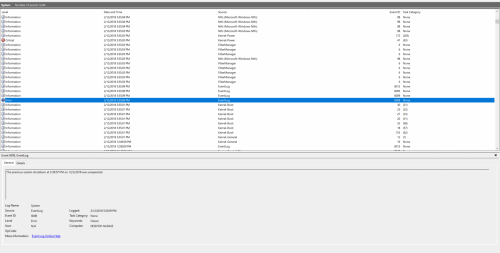
confirm no BSOD... no minidump directory in the windows folder... got this error from the event viewer... doesnt say why just unexpected shut down.. pointing towards PSU?

user posted image
TSnkdin_rulez
post Dec 3 2018, 08:03 PM

***********
******
Senior Member
1,506 posts

Joined: Jan 2003
From: KL


QUOTE(abu.shofwan @ Dec 3 2018, 04:56 PM)
Could it be the cpu heatsink not in full contact with the cpu? Have you ruled out this possibility?
This wouldn't be affected by cold air blowing, I think.
*
but then the idle temp also should be high right? plus why didnt i have this issue with tomb raider... only when hitman 2 kena
cheenon
post Dec 3 2018, 08:28 PM

New Member
*
Junior Member
42 posts

Joined: Nov 2007


iirc..i've used to get similar symtom back in core 2 duo era.. if you have another backup cpu..try change to it if produce similar symtoms..back then my temp are in normal temp without any overheat issue...change to another cpu..voila..gone

others : manage to under volt the problematic cpu curve to make it more stable..

This post has been edited by cheenon: Dec 3 2018, 08:31 PM
TSnkdin_rulez
post Dec 3 2018, 10:30 PM

***********
******
Senior Member
1,506 posts

Joined: Jan 2003
From: KL


Update: Tested on 2k, card and cpu temp were below 65degC most of the time and it didnt seem stressed at all... and the system suddenly restarted about after ~30mins of play. gonna try with another game tomorrow. ill try back in SOTTR... any other games to suggest that i can test the card with? darksiders 3 a good option?

at this point im pretty sure the graphic card is ok...

This post has been edited by nkdin_rulez: Dec 3 2018, 10:37 PM
unitron
post Dec 4 2018, 08:49 AM

W1(R)3d
*******
Senior Member
2,730 posts

Joined: Jan 2003
From: In the shadows behind you


QUOTE(nkdin_rulez @ Dec 3 2018, 10:30 PM)
Update: Tested on 2k, card and cpu temp were below 65degC most of the time and it didnt seem stressed at all... and the system suddenly restarted about after ~30mins of play. gonna try with another game tomorrow. ill try back in SOTTR... any other games to suggest that i can test the card with? darksiders 3 a good option?

at this point im pretty sure the graphic card is ok...
*
Could it just be a bug with the game ?
TSnkdin_rulez
post Dec 4 2018, 09:34 AM

***********
******
Senior Member
1,506 posts

Joined: Jan 2003
From: KL


QUOTE(unitron @ Dec 4 2018, 08:49 AM)
Could it just be a bug with the game ?
*
that might be possible too... but on working days testing time abit limited.. sweat.gif
1024kbps
post Dec 4 2018, 11:02 AM

李素裳
*******
Senior Member
6,015 posts

Joined: Feb 2007


QUOTE(unitron @ Dec 4 2018, 08:49 AM)
Could it just be a bug with the game ?
*
A bug within game will only CTD with error message, D3D bug will display DirectX error message,
Driver crashed and it will recover itself.

Forced shutdown should be something to worry about, aka hardware fault.

2 Pages  1 2 >Top
 

Change to:
| Lo-Fi Version
0.0179sec    0.71    5 queries    GZIP Disabled
Time is now: 16th December 2025 - 06:34 AM