Welcome Guest ( Log In | Register )

Bump Topic Topic Closed RSS Feed

Outline · [ Standard ] · Linear+

Unifi Official TM UniFi High Speed Broadband Thread V36, READ 1ST PAGE FOR TURBO SPEED INFO!

views
     
nyunyu
post Nov 5 2018, 02:54 PM

His Royal Highness
******
Senior Member
1,392 posts

Joined: Aug 2006
From: Sungai Petani


Little did I know C3150 don't have an option to modify DNS server for Unifi PPPoE connection. I was planning to use it as my main router for a few days to see how it perform on 800Mbps line but nah..that's a turnoff.
nyunyu
post Nov 5 2018, 07:15 PM

His Royal Highness
******
Senior Member
1,392 posts

Joined: Aug 2006
From: Sungai Petani


QUOTE(SilentVampire @ Nov 5 2018, 03:28 PM)
Read 1st page, 1st post, green text, for more info about the different terms and stuff you need to know.
There is an option to modify DNS server for Unifi PPPoE connection for the C3150 lol. I am using Google DNS as a matter of fact. Are you looking at the right place? See ‘Advanced’, then ‘Network’, then ‘Internet’, click Advanced for a dropdown menu, and then click the enable box for  ‘Use the following DNS addresses’ , and you can set whatever you want for both Primary and Secondary DNS. I suggest referring to the manual for more info on what you can do next time before stating that something can’t be done  shakehead.gif
*
lol..sorry..sorry. Missed the small tickbox.
Just curious, do you able to get ipv6 working on your c3150v2?

QUOTE(BladeRider88 @ Nov 5 2018, 04:20 PM)
Two questions i wanna ask:

1) What is your equipment setup? LAN or WIFI when you are doing speedtest
I'm using XXX modem, connected to mikrotik 750Gr3 as main router and C3150v2 for wifi.
Done with both Lan and Wifi. Lan using cat6 direct from router 750Gr3. Wifi from 3150v2.

2) When you are doing speed test, what server did you choose?
Using tm speedtest, default server. Using speedtest.net webpage, using TM KL server and also tried with fast.com.

Fasttrack counter showing speed fluctuated up to 650Mbps DL and 360Mbps UL.
*
nyunyu
post Nov 9 2018, 04:42 PM

His Royal Highness
******
Senior Member
1,392 posts

Joined: Aug 2006
From: Sungai Petani


Today tried using just C3150v2 as PPPoE router. Latest fw, using quickset unifi and even using google dns, for some reason speedtest gave me around 100Mbps-ish DL and 200+Mbps-ish UL. Restarted router and modem doesn't makes any difference.

Connect back 750Gr3 and able to get 500Mbps-ish.

tested on Unifi 800.

Anyone have any idea where I did wrong?
nyunyu
post Nov 9 2018, 05:33 PM

His Royal Highness
******
Senior Member
1,392 posts

Joined: Aug 2006
From: Sungai Petani


QUOTE(SilentVampire @ Nov 9 2018, 05:13 PM)
No issues here for me. Getting full speed on 300Mbps. Did you try using the built-in speedtest that comes with the router and see if you are getting full speed via the router?
*
Tested the built-in speedtest and that was worse, only showing 100Mbps-ish DL and UL.

On other note, anyone on Unifi using *ahem* myiptv4k *ahem* and have problem logging in?

This post has been edited by nyunyu: Nov 9 2018, 05:34 PM
nyunyu
post Nov 9 2018, 08:03 PM

His Royal Highness
******
Senior Member
1,392 posts

Joined: Aug 2006
From: Sungai Petani


QUOTE(AVFAN @ Nov 9 2018, 07:01 PM)
what device u used to test?

my exp with tests incl the unifi guys using unifi stock routers...

for ethernet 800mbps, laptops can give 820-830, other devices... 500-650 only.
*
Tested using laptop i7-8750H direct connection to router using cat6 cable.
You also using same router?
nyunyu
post Nov 13 2018, 06:45 PM

His Royal Highness
******
Senior Member
1,392 posts

Joined: Aug 2006
From: Sungai Petani


Call up TM asking why my speed won't reach beyond 500Mbps, they told me the way they upgrade customer's speed is by upgrading them incrementally i.e. from 100Mbps to 300Mbps, monitor the stability, upgrade to 500Mbps, monitor and then 800Mbps and monitor. Reason being according to the cs, if the line cannot sustain high speed then customer will only get the sustained speed but regardless will need to pay the same.

So, mine stuck at around 500-600-ish.

Any advice appreciated.

*Thanks to Rizvanrp for taking some time to look into my issues. Appreciated bro.
nyunyu
post Nov 13 2018, 07:14 PM

His Royal Highness
******
Senior Member
1,392 posts

Joined: Aug 2006
From: Sungai Petani


QUOTE(JohnLai @ Nov 13 2018, 07:11 PM)
First, does your unifi.com.my display 800Mbps package?
Cause a lot of 100Mbps subscribers were turbo-upgraded to 500Mbps instead of 800Mbps.....

Second, you might have legendary microcode issue on your laptop i7-8750H over wired......

Third, not sure if it is your router NAT acceleration not working or whatever......it may be possible for ARM Cortex A9 Dual-Core 1.4Ghz to reach 500-600Mbps without CTF, but any higher will require CTF.......
*
Yep, turbo 800 shown in my bill and the dashboard. Microcode not present on both my desktop and laptop. As for the speed test, tested using both mikrotik Gr3 and tplink C3150v2.

ARM Cortex A9 Dual-Core 1.4Ghz?
nyunyu
post Nov 13 2018, 08:03 PM

His Royal Highness
******
Senior Member
1,392 posts

Joined: Aug 2006
From: Sungai Petani


QUOTE(JohnLai @ Nov 13 2018, 07:21 PM)
Oh?
You sure?

Please run this
http://rweverything.com/downloads/RwPortableX64V1.7.zip
Go to Access ---> CPU MSR.
Post both your laptop and desktop CPU ID and PATCH ID.
*
Yeah, I think so, at least that what InSpectre software showed me.

What does this do?

desktop (i5-4690k):
» Click to show Spoiler - click again to hide... «


Laptop (i7-8750H):
» Click to show Spoiler - click again to hide... «


This post has been edited by nyunyu: Nov 13 2018, 08:06 PM
nyunyu
post Nov 13 2018, 08:13 PM

His Royal Highness
******
Senior Member
1,392 posts

Joined: Aug 2006
From: Sungai Petani


A favor to ask from you guys here who are on Unifi 100Mbps (or 800Mbps).

Any chance anyone could share with me your Unifi bill? I'm writing a complaint to mcmc and need a proof that others are paying less. Not that I'm aiming to get mine reduced as much as possible, just that enough to be in the average of others getting. I don't need any of your details or address, as long as I can show a bill with a price lot less than mine then its good.

I know I'm not the one who are paying RM329 for my Unifi and I know this is a long shot but worth a try nevertheless.

Appreciate your kind soul who could help my cause.
nyunyu
post Nov 13 2018, 08:16 PM

His Royal Highness
******
Senior Member
1,392 posts

Joined: Aug 2006
From: Sungai Petani


QUOTE(JohnLai @ Nov 13 2018, 08:09 PM)
Don't trust that inspectre tools. It is outdated.

By the way, why did you post CPU cache stuff instead of CPU ID and PATCH ID? sweat.gif

RWEverything = show cpu + memory stuff
*
Oh..here is the CPU ID and PATCH ID.

Desktop:
Attached Image

Laptop:
Attached Image
nyunyu
post Nov 13 2018, 08:24 PM

His Royal Highness
******
Senior Member
1,392 posts

Joined: Aug 2006
From: Sungai Petani


QUOTE(JohnLai @ Nov 13 2018, 08:19 PM)
desktop = yup, legendary microcode issue.

laptop = oh damn, also same legendary microcode issue.

My condolences.  console.gif
*
Really..demmit. Is it serious?
How can you tell?
nyunyu
post Nov 13 2018, 08:33 PM

His Royal Highness
******
Senior Member
1,392 posts

Joined: Aug 2006
From: Sungai Petani


QUOTE(JohnLai @ Nov 13 2018, 08:27 PM)
Oh yes......of course I can tell.

Let start with your laptop, answer these few questions:

1) Did you update the laptop bios?

2) Win10 which version? 1803 or 1809?
*
1) Latest BIOS as per released by Illegear.

2) 1803 (both on desktop too)
nyunyu
post Nov 13 2018, 08:47 PM

His Royal Highness
******
Senior Member
1,392 posts

Joined: Aug 2006
From: Sungai Petani


QUOTE(soraksan5615 @ Nov 13 2018, 08:36 PM)
Hi,

My experience with C3150 v2, to get high speed these settings are needed :

1. Advanced --> QoS --> Application Priority --> Set to Standard

2. Advanced --> QoS --> Device Priority --> All set to OFF.

3. Advanced --> Security --> Antivirus --> All set to OFF.

4. Advanced --> Security --> Settings --> Set SPI Firewall to ON.

5. Advanced --> Security --> Settings --> Set DoS Protection to OFF.

With the above settings I'm able to get wired  DL - 524 Mbps/ UL - 102 Mbps.

I'm with 500 Turbo-ed.

Hope it helps.
*
Those are mostly default option and my settings are identical with yours.

QUOTE(JohnLai @ Nov 13 2018, 08:37 PM)
Very well, download appropriate 'new' microcode update for your laptop

http://www.catalog.update.microsoft.com/se....aspx?q=4346084
2018-08 Update for Windows 10 Version 1803 for x64-based Systems (KB4346084)

and install it. Reboot.
Then run RWeverything and check if the PATCH ID changed from 84 to 96. (Technically, the latest microcode from intel is version 9A.)

If it is 96, then run TM speedtest, you should be able to reach 800Mbps via wired.
*
It returns "The update is not applicable for your computer". Tried both x64 and x86.
nyunyu
post Nov 13 2018, 11:21 PM

His Royal Highness
******
Senior Member
1,392 posts

Joined: Aug 2006
From: Sungai Petani


QUOTE(JohnLai @ Nov 13 2018, 08:55 PM)
Oh crap....
https://support.microsoft.com/en-my/help/43...crocode-updates
Probably your laptop CPU isn't listed in microsoft database.

EDIT: it had came into my attention you mentioned the laptop is i7-8750H....., 4346084 should be able to install properly....unless your win10 version isn't 1803?  hmm.gif

EDIT2: Huh, found the reason why 4346084 can't be installed in your case:
https://borncity.com/win/2018/09/24/windows...7467-kb4346084/
Quoting from the blog:
Wanna go old registry method to disable it?
KB4346084 is pretty much 'beta' by microsoft.

The other alternative is registry method.
https://support.microsoft.com/en-my/help/40...rabilities-prot
Need to disable spectre protection. Reboot is required.

Normally, I would suggest deleting mcupdate_GenuineIntel.dll from system32, but since you mentioned you had updated the bios, this is not an option.
*
Went ahead and uninstall update KB4100347 and install KB4346084. Checked PATCH ID and it changed to 00000096. I guess that means I'm all patched now right?

Can't say the same on my desktop, still showing 24

This post has been edited by nyunyu: Nov 14 2018, 12:13 AM
nyunyu
post Nov 14 2018, 03:48 AM

His Royal Highness
******
Senior Member
1,392 posts

Joined: Aug 2006
From: Sungai Petani


QUOTE(JohnLai @ Nov 14 2018, 01:24 AM)
Ignore your desktop first.
Can you get full 800Mbps on TM speedtest via your patched laptop on wired now?
hmm.gif  confused.gif
Speedtest via cable on the laptop gave me stable 550-ish. I think my speed might've capped at 500Mbps.

Test using both mikrotik 750Gr3 and C3150v2 also yield similar speed prior installing this microcode patch.
nyunyu
post Nov 14 2018, 12:52 PM

His Royal Highness
******
Senior Member
1,392 posts

Joined: Aug 2006
From: Sungai Petani


QUOTE(hashtag2016 @ Nov 14 2018, 04:50 AM)
Just plug the  LAN cable between your PC and notebook directly , and do some iperf  testing to test  the speed between 2 devices ...
maybe either one of your LAN canble is low quality or  broken...(u need to test the cable one by one for sure)
*
I actually tried 3 cables, 2 cat5e and 1x cat6. Check the cable with tester and they seems fine. Cable length from router to laptop is 0.5m. Speedtest yield around 500Mbps-ish.

QUOTE(JohnLai @ Nov 14 2018, 10:42 AM)
Oh, that picture?
Let just say microsoft catalog and changelog kinda 'unreliable'.  laugh.gif
Microsoft did updated KB4100347 to v3 due to overclocking+instability issue with broadwell-e.

According to https://portal.msrc.microsoft.com/en-us/sec...isory/adv180018 , "The required microcode is the same microcode that addresses CVE-2018-3639 and CVE-2018-3640"

The Summary of Intel microcode updates https://support.microsoft.com/en-my/help/40...crocode-updates
Microsoft should really fix the page formatting. lol.gif 
First table = Spectre Variant 2 (CVE 2017-5715 [“Branch Target Injection”])
Second table =  Spectre Variant 3a (CVE-2018-3640: "Rogue System Register Read (RSRE)"), Spectre Variant 4 (CVE-2018-3639: "Speculative Store Bypass (SSB)"), and L1TF (CVE-2018-3620, CVE-2018-3646: "L1 Terminal Fault").
Hmmm  hmm.gif , since microcode issue had been solved and you still get that same 500 Mbps to 600Mbps, you might wanna contact TM via livechat or 100 and request TM to 'refresh' your account. There were few users who got mis-capped at 450Mbps to 550Mbps (at PPPoE stage) and they got it solved after TM 'refresh' or 'reset' their unifi account status.
Hope the 'refresh' or 'reset' or whatever it is called by TM can solve your issue.

As for your haswell desktop, you can just rename mcupdate_GenuineIntel.dll at system32 and reboot. Be warned, the microcode is required for proper protection, it is not a good idea to disable it....
Agree, he mentioned he is using cat6 cable, but sometime shit happens.  console.gif
In addition to that cat6e cable which he uses to connect his laptop to router, he also has to test the cable that connect BTU to router.
*
Already called up TM about that. I think they might've capped me at 500Mbps.

https://forum.lowyat.net/index.php?act=ST&f...post&p=90909944
nyunyu
post Nov 14 2018, 04:15 PM

His Royal Highness
******
Senior Member
1,392 posts

Joined: Aug 2006
From: Sungai Petani


QUOTE(JohnLai @ Nov 14 2018, 12:58 PM)
Good, remember to update us after your account 'refresh'.
Make sure you use your laptop with updated microcode for testing via wired once your unifi account is 'refreshed'!  icon_rolleyes.gif
Moving on to your haswell CPU desktop.....
Disabling the microcode is not a good idea due to security concern.
Modding bios with latest microcode via UBU Tools is out of your league, maybe?

Perhaps a permanent pendrive stuck at your usb port?
https://www.techpowerup.com/forums/threads/...-loader.248858/
mega_shok.gif
*
Just call up TM again and this time instead of straight away says "port issue", she went on and refresh the connection step by step. End result, still around 500-ish.
So, opened a report waiting for the tech to investigate.

As for my desktop, nah, I'll live with it. It's time for an upgrade anyway ^^.
nyunyu
post Nov 14 2018, 05:29 PM

His Royal Highness
******
Senior Member
1,392 posts

Joined: Aug 2006
From: Sungai Petani


QUOTE(JohnLai @ Nov 14 2018, 04:23 PM)
Oh?
Now this is strange indeed.
Can you check if your laptop has temperature issue?

https://cpuid.com/softwares/hwmonitor.html
Run TM Speedtest and report back 'Max' value.

Cause there was a user who first only got 200-250Mbps, then after I dealt with the microcode issue, speedtest increased to 500-580Mbps.
Further testing revealed his CPU is overheating at 100'C = resulting in CPU throttling. Intel CPU will start throttling after reaching 100'C.
He blasted a table fan directly to the mainboard area and somehow able to keep CPU temp below 100'C, voila 800Mbps on speedtest.
*
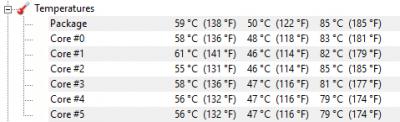
CPU peaked at 93°C DL and 33°C UL. Room temperature 26°.

Laptop normal fan:
Attached Image

laptop with fan boost on:
Attached Image

This post has been edited by nyunyu: Nov 14 2018, 05:30 PM
nyunyu
post Nov 15 2018, 02:43 AM

His Royal Highness
******
Senior Member
1,392 posts

Joined: Aug 2006
From: Sungai Petani


QUOTE(JohnLai @ Nov 14 2018, 07:07 PM)
hmm.gif
What is the peak sustained CPU frequency during DL on speedtest?

edit:
Cause laptop power management is different than desktop.
BIOS could limit your CPU frequency.
If you on battery, certain manufacturer actually set lower 'turbo boost' bins compared when power plug is connected.

edit2:
Do you ever get constant turbo frequency of 4.1Ghz during TM speedtest download?
*
On battery, speedtest startup with cpu peaked to 1.92Ghz and stable around 1.6Ghz during test.
On power, it peaked to 2.2Ghz and stable around 2.09Ghz during test.
Never once it goes more than 2.2Ghz during speedtest.
nyunyu
post Nov 15 2018, 03:30 PM

His Royal Highness
******
Senior Member
1,392 posts

Joined: Aug 2006
From: Sungai Petani


QUOTE(JohnLai @ Nov 15 2018, 10:32 AM)
Are you serious?   blink.gif
If you change the power profile to high performance, can it get at least 4.1ghz on any one of cores? (Hwmonitor)
*
Here:
deleted
new: https://youtu.be/9RSeayRGRi8

It went to 600Mbps-ish when doing this recording but usually stable around 580Mbps-ish.

This post has been edited by nyunyu: Nov 15 2018, 08:55 PM

2 Pages  1 2 >Top
Topic ClosedOptions
 

Change to:
| Lo-Fi Version
0.2209sec    0.29    7 queries    GZIP Disabled
Time is now: 1st December 2025 - 01:46 PM