Welcome Guest ( Log In | Register )

Bump Topic Topic Closed RSS Feed

Outline · [ Standard ] · Linear+

Unifi Official TM UniFi High Speed Broadband Thread V36, READ 1ST PAGE FOR TURBO SPEED INFO!

views
     
PoorMan
post Nov 21 2018, 10:54 AM

Short of Fund and Spirit
*******
Senior Member
2,664 posts

Joined: Jan 2005
From: Puchong
QUOTE(Bernard Yeo @ Nov 21 2018, 10:41 AM)
Hi everyone, I got a problem that maybe you can help. I bought a TP-Link Archer C7 to replace my official TM issued router. The C7 shows it is connected to the internet but I got the walled garden webpage as shown below:
https://forum.lowyat.net/index.php?act=Atta...post&id=9783220

And I pay my bills on time. I connect the TM router and I have internet connection. Anyone can help? Apologies if this has been answered before.
*
Perhaps wrong ID and/or password configured in new router when signing on to Unifi services? Check against the old router setup.
PoorMan
post Nov 21 2018, 03:02 PM

Short of Fund and Spirit
*******
Senior Member
2,664 posts

Joined: Jan 2005
From: Puchong
QUOTE(taqu @ Nov 21 2018, 10:42 AM)
My setup (500mbps):

1. TP-Link C1200 as router & basic file sharing. Wifi disabled. VLAN untagging & HyppTV offloaded to item 2.
2. TP-Link SG108E for VLAN untagging & port mirroring.
3. TP-Link PA4010 powerline to carry HyppTV to living area TV.
4. D-Link DIR-868L as wired AP at living area for ground floor Wifi.
5. 2 units of D-Link DIR-850L as wired APs to cover first floor. Both bought second hand.
6. All wired via in-wall CAT 5E cables.
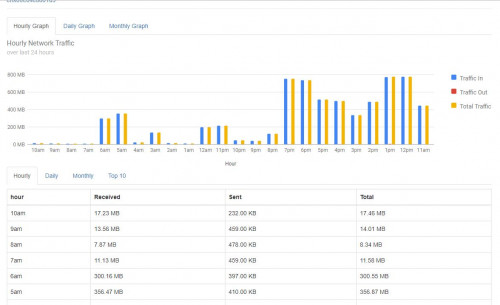
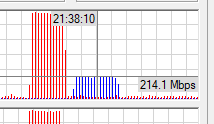
7. Re-purposed my wife's old Acer Switch 10, installed Ubuntu, connected to SG108E's mirror port, running ntopng & vnstat for traffic monitoring/DPI.

Total cost (including cables & wire strippers) : RM 380

With 3 APs, I'm getting excellent Wifi speed (300-400mbps) & great coverage (minimum 130mbps) across entire house.

ntopng & vnstat is great for traffic monitoring/DPI, much better than what most consumer routers can do biggrin.gif

user posted image

user posted image
*
From TP-Link C1200 router to SG108E, how many cables? If it is just one cable, please share how you can merge VLAN500 and VLAN600 into one port/cable to your managed switch? Can my Asus RT-AC68U also do the same thing?

Thanks for sharing your setup. Hope to learn from you.
PoorMan
post Nov 21 2018, 05:07 PM

Short of Fund and Spirit
*******
Senior Member
2,664 posts

Joined: Jan 2005
From: Puchong
QUOTE(enduser @ Nov 21 2018, 04:08 PM)
QUOTE(taqu @ Nov 21 2018, 04:34 PM)
To understand better, you can refer to blacktubi's guide first.

This is how how the ports on SG108E are used:
Port 1 - from BTU
Port 2 - untagged VLAN 500 to C1200 (WAN port)
Port 3 - untagged VLAN 600 to Powerline (another Powerline to TV)
Port 4 - mirror port 5 to Linux machine running ntopng & vnstat
Port 5 - From C1200 (port 1)
Port 6 - to DIR-868L on living room
Port 7 - to DIR-850L on upstair family area
Port 8 - to DIR-850L on master bedroom

On my C1200, it's using WAN port & port 1 going back to SG108E. This way, C1200 becomes pure router, while SG108E takes over VLAN tagging & switching, and all Wifi connections handled by the 3 D-Links. I don't setup C1200 to do any VLAN tagging at all.

By using only 1 LAN port from C1200, Internet traffic can only go through a single port from C1200, making it easy to monitor.

Hopefully it's not too technical to understand. It took weeks for me to get to this setup sweat.gif
*
Both, thank you for the info. I am getting good insights from Blacktubi's guide and from your setup.

Question:
BTU -> 1st switch port 1
1st switch port 2--> 1st floor RT-AC68U (PPPoe sign in; DHCP; wifi) --> 2nd switch --> 1st floor wired devices
1st switch port 3--> Gnd floor SG108E port 1
SG108E port 3 (VLAN600) --> Hypptv STB
SG108E port 5 (VLAN500) --> 3rd switch --> Gnd Floor wired devices

Can this work?

This post has been edited by PoorMan: Nov 21 2018, 05:12 PM
PoorMan
post Nov 21 2018, 07:11 PM

Short of Fund and Spirit
*******
Senior Member
2,664 posts

Joined: Jan 2005
From: Puchong
QUOTE(miloaisdino @ Nov 21 2018, 07:07 PM)
rm119 for 30mb is the new unifi lite 30mbps (aka non turboable new price plan with unlimited quota)

ok imo
*
In this turbo'ed times, not so ok ... but technical constraints, right?
PoorMan
post Nov 23 2018, 02:56 AM

Short of Fund and Spirit
*******
Senior Member
2,664 posts

Joined: Jan 2005
From: Puchong
QUOTE(mastermindsos @ Nov 23 2018, 12:35 AM)
Yes, idle.
However, it was during peak hour.
Singapore server was selected automatically.
Your ping during idle is very sweet, quite a different compared to mine.
*
Your unifi is 100Mbps DL/50Mbps UL, right?

In my experience, turning on QoS on your router and limit your DL/UL to ~90Mbps/45Mbps will help. Try and see if your DSLReports speedtest quality improved?
PoorMan
post Nov 23 2018, 05:23 PM

Short of Fund and Spirit
*******
Senior Member
2,664 posts

Joined: Jan 2005
From: Puchong
Puchong so far so good
PoorMan
post Nov 24 2018, 06:37 PM

Short of Fund and Spirit
*******
Senior Member
2,664 posts

Joined: Jan 2005
From: Puchong
QUOTE(touristking @ Nov 24 2018, 04:30 PM)
Hi. Got a question and appreciate answer. I understand present 100Mpbs package will be upgraded to 800 Mbps. Can I downgrade to 50 Mpbs to 500 Mpbs package?

Reason being, my Asus AC68U can only handle 500 Mpbs anyway and I don't intend to get a new router. And the lower price certainly doesn't hurt.
*
Asus AC68U can handle 800Mbps wired. But 800Mpbs vs 500Mbps you'll probably don't get to feel the difference in experience unless you have many members heavily using the connection.
PoorMan
post Nov 26 2018, 10:24 PM

Short of Fund and Spirit
*******
Senior Member
2,664 posts

Joined: Jan 2005
From: Puchong
QUOTE(coolguy99 @ Nov 26 2018, 07:02 PM)
Don’t complain so much guys. Tm just reported a huge loss for the last quarter and expect things to go from bad to worse from now onwards.
*
confused.gif How did you arrived at TM making huge loss?

TM results 3Q2018

*Edited* I see. Just for 3Q2018 period due to one-off impairment write-off. For YTD, I think TM is still ahead.

This post has been edited by PoorMan: Nov 26 2018, 10:29 PM
PoorMan
post Nov 29 2018, 12:10 AM

Short of Fund and Spirit
*******
Senior Member
2,664 posts

Joined: Jan 2005
From: Puchong
Bandar Puchong Jaya here, OK so far.

However, speedtest with Telekom server is only 500-600Mbps DL/210Mbps UL. My subscription is for 800/200Mbps
PoorMan
post Dec 1 2018, 06:14 PM

Short of Fund and Spirit
*******
Senior Member
2,664 posts

Joined: Jan 2005
From: Puchong
My Speedtest with KL/PJ servers have all gone crap. Max speed is 650+Mbps DL and that's with TM. The rest are like 300-400+Mbps DL. Time server is no longer available for speedtest.

Too many people testing their Unifi Turbo?

Or is it just me having this problem?

This post has been edited by PoorMan: Dec 1 2018, 06:15 PM
PoorMan
post Dec 11 2018, 08:48 AM

Short of Fund and Spirit
*******
Senior Member
2,664 posts

Joined: Jan 2005
From: Puchong
QUOTE(AVFAN @ Dec 10 2018, 03:02 PM)
me, coming from 10->30->50->100->800, i'll say.

agree... for MOST households, 100mbps is sufficient, can easily make do, whatever.

for some households doing heavy streaming/DL, need to cover wifi losses, 300-500 will be best.

i will say 800 is overkill for ALMOST all households.

the bad news is UNIFI does not give me a choice! it's either 100 or 800!!

one thing we must not forget - to use 800, 1000 fully, one gotta use cables, change router, change devices - whole lotta $ to spend!

i am not sure such spending is justified, for me at least.
*
In another perspective, just about 3 months ago and for a duration 6 months plus, I was paying the same money for just 100/50Mbps. Now it's 800/200Mbps. There's more reason to celebrate than to complain, methinks.

Oh, and about the WIFI speeds, the only thing I think needs improving here overall is the level of knowledge. Most people here only think of the impact of router. They think that if they get a good router, their speeds will improve dramatically. That's not true lol.
PoorMan
post Dec 11 2018, 02:36 PM

Short of Fund and Spirit
*******
Senior Member
2,664 posts

Joined: Jan 2005
From: Puchong
QUOTE(henry514 @ Dec 11 2018, 02:20 PM)
I use few speed tester like Ookla, Fast.com, U Mobile - Speedtest, TM Speed Test, TIME Speed Test. All get the same result 93-95mbps. Complain with TM but they said no server problem or something. Really weird. Thanks for help, apiezsneo :-)
*
You said that you have managed 500Mbps earlier. Did you install anything on your device/PC/laptop? From what I have learned, anti-virus; cyber security tools; vpn tools may cause slow down.

Also, did you change any config on your router? Like turn on QoS and/or security/traffic management features?

Just think back if there are any changes done to your components.
PoorMan
post Dec 15 2018, 12:34 PM

Short of Fund and Spirit
*******
Senior Member
2,664 posts

Joined: Jan 2005
From: Puchong
QUOTE(mckinsey @ Dec 15 2018, 11:12 AM)
Those that have been Turboed, what speeds are you getting for torrents?
*
On the CentOS torrent (one of the best active torrents with good seeds), can hit 650Mbps and still rising but then, it has completed DL in 4.5 min (8.4GB filesize)

QUOTE(malaysianbest @ Dec 15 2018, 11:16 AM)
Hi guys? I just wonder, does TM Unifi capped my upload speed to Youtube and Google drive. Normally i can get 6MB/s but for the last 24 hours my upload speed between 1.4MB/s to 2.4MB/s.
*
As far as I know, there is no cap. There could be other factors slowing down the upload speed.
PoorMan
post Dec 17 2018, 01:42 AM

Short of Fund and Spirit
*******
Senior Member
2,664 posts

Joined: Jan 2005
From: Puchong
QUOTE(FlamingR @ Dec 17 2018, 01:13 AM)
So.. I just got my Turbo from Unifi Pro 100Mbps RYE 2017 to 800Mbps 2 days ago, didn't receive any SMS notification but just noticed by checking my Unifi Care account.

My setup is currently:
Modem: HuaWei HG8240H
Router: Dlink DIR 880L (Gigabit on LAN and WAN port, AC1900)
Switch: TP Link TLSG108E (Gigabit Unmanaged Smart Switch)
Cables: Generic Cat5e cable

user posted image
I have a generic Cat5e cable running from Modem > Router, Router > Switch, Switch to Desktop PC
After some Googling it seemed that this router supports LAN and WAN on Gigabit speeds and I can't seem to reach the target.
What I have did:
- Ordered Cat6 cables from Ugreen and Dintek and will post another Speed Test results later.
- Speedtest in Safe Mode with Networking
- Power off modem and router for 10 mins before power up again
- Disabled QoS (on both Router and Switch)

Any advice on this?
*
You have to turn on NAT acceleration as well on the router.
PoorMan
post Dec 24 2018, 05:02 AM

Short of Fund and Spirit
*******
Senior Member
2,664 posts

Joined: Jan 2005
From: Puchong
QUOTE(dirk_diggler @ Dec 23 2018, 10:27 PM)
Okay, to recap. I speedtest to tm. Let's leave out sg first.

Speedtest.tm.com.my gives me full 800/200. But when i use ookla speedtest to tm server, it gets barred at 500. go626201's analysis says there are two TM servers on ookla, and speedtest.tm.com.my uses one of the two on ookla. So basically they are all the same servers.
*
I had a similar problem earlier.

Are you using any anti-malware or cyber sec tools by any chance?

I was using NordVPN's Cybersec and it caused all kinds of funny results on speedtest i.e. Ookla's speedtest against TM speedtest. Once disabled, the speedtest results were more or less in line with my subscription (800/200).
PoorMan
post Dec 26 2018, 07:20 PM

Short of Fund and Spirit
*******
Senior Member
2,664 posts

Joined: Jan 2005
From: Puchong
QUOTE(dirk_diggler @ Dec 26 2018, 05:10 PM)
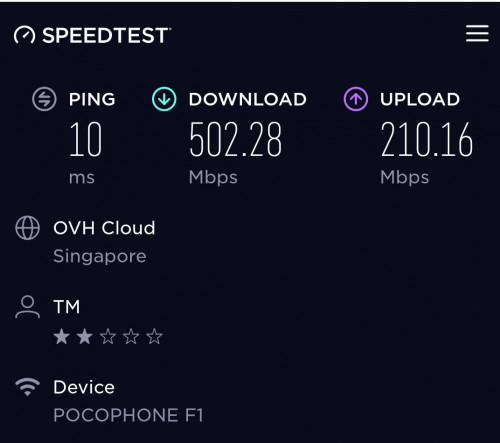
U hit it spot on. I uninstalled Avast and the ookla speedtest to SG servers are now 600mbps.

Still cant hit 800mbps like go626201 who consistently had 800+mbps to SG or TM servers via ookla.

CPU usage during the download phase is 50+%. Don't think this is a limiter. Temp looks normal, 40+C. I changed the MTU/MRU from 1492 to 1480. Didn't make a difference.

I am on Win7 64 Ultimate. Specter mitigation is still applicable? Any other stuff to tinker on Win7?

Going to update my ethernet device drivers. They look old 2012 version.

user posted image

OVH Cloud SG

user posted image

TM Server KL

http://unifi-my.speedtestcustom.com/result...78-8f63905d75b8
And as usual, speedtest.tm.com.my gives perfect 800mbps each time.
*
Are you using Ookla's PC app to speedtest or via a browser?

If you are using a browser, please note that speedtest results will differ across different browsers especially for speeds above 100Mbps. You can test it out yourself if you haven't yet.

For more than 100Mbps, Ookla recommends using their app instead of going via browser.

As mentioned by someone earlier, just take the consistent highest score you have obtained to ensure that DL/UL speed is indeed what you have subscribed for.
PoorMan
post Dec 26 2018, 09:37 PM

Short of Fund and Spirit
*******
Senior Member
2,664 posts

Joined: Jan 2005
From: Puchong
QUOTE(go626201 @ Dec 26 2018, 07:56 PM)
Actually I think Speedtest app for pc not accurate for Upload speed,it seems like more 10% than like actual speed.
*
You may be right. For the most part, we just want to verify that we can get the speeds we paid for. So, lebih kurang is good enough biggrin.gif

QUOTE(dirk_diggler @ Dec 26 2018, 08:56 PM)
Once again, you are da MAN! The moment I switched to the Ookla app, voila!

user posted image

Ookla app

user posted image

Firefox

I've been using Firefox for testing all these while and never got 800mbps. Changed to the app and got it in the first try.

Go626201, have u been using a browser all these while?

Thank you PoorMan and go626201 for your valuable inputs.
*
Just sharing experience. I've learnt a lot too from this forum.
PoorMan
post Dec 26 2018, 10:59 PM

Short of Fund and Spirit
*******
Senior Member
2,664 posts

Joined: Jan 2005
From: Puchong
QUOTE(go626201 @ Dec 26 2018, 09:41 PM)
user posted image
Ya but i just want to mention the software version upload speed is not accurate.
Download speed is okay.
*
Noted. But what do you use to determine what is the correct UL speed? Mine fluctuates between 206-230Mbps regardless of app or web browser. Unlike DL, the UL speed is consistently above 200Mbps regardless of what speed test I use.

QUOTE(dirk_diggler @ Dec 26 2018, 10:17 PM)
Next phase, testing wifi. 500mbps on 5ghz using Asus AC86U. Good? Not good? Normal?

user posted image
*
For a 2x2 antenna device, 866Mbps theoretical max speed. If you can get 500Mbps, that's pretty awesome if you are not standing next to the wireless router. But anything between 400 - 500 Mbps is quite acceptable, IMHO.
PoorMan
post Dec 26 2018, 11:09 PM

Short of Fund and Spirit
*******
Senior Member
2,664 posts

Joined: Jan 2005
From: Puchong
QUOTE(dirk_diggler @ Dec 26 2018, 11:04 PM)
Not exactly next to the router. More like it's diagonally above me. Bout 8-10 meters give or take. I place the router in the middle of the house on the 2nd floor while testing the wifi from the living room downstairs.
*
1 floor above?! Wow! I need to get me an AC86U lol
PoorMan
post Dec 27 2018, 07:23 PM

Short of Fund and Spirit
*******
Senior Member
2,664 posts

Joined: Jan 2005
From: Puchong
QUOTE(soR @ Dec 27 2018, 06:41 PM)
thanks! for letting me know, port forwarding ill have to look into it. Heard of it but never touch it.
*
Your case is a bit weird. It seems that with your old router, you don't have any problems. Did you go thru your old router settings to see if you also have the port forwarding done?

Also, can you clarify if you now game with WIFI or with wired? If WIFI, did you do any testing or encounter any problems with VOIP apps like skype?

*Edited* Bro, just saw your earlier posts. If I were you, I will just bring back the DIR-867 to the seller and ask for replacement. Just tell the seller that your unit is faulty because your still working old router don't have such intermittent problems.

This post has been edited by PoorMan: Dec 27 2018, 07:39 PM

3 Pages < 1 2 3 >Top
Topic ClosedOptions
 

Change to:
| Lo-Fi Version
0.2211sec    0.87    7 queries    GZIP Disabled
Time is now: 1st December 2025 - 04:31 PM