

QUOTE(willaw @ Nov 26 2018, 01:33 PM)
Just ported back in for Infinite 100 with RM20 rebate. Hopefully all is good.
Can watch YouTube 1080p. Not bad.

How did you get offered?Can watch YouTube 1080p. Not bad.
Digi Infinite Fan Club [V4], Infinite 150, 100, 80
|
|
 Nov 26 2018, 02:56 PM Nov 26 2018, 02:56 PM
Return to original view | IPv6 | Post
#1
|
 
Junior Member
541 posts Joined: Mar 2009 From: Technically not from Lebanon   
|
QUOTE(willaw @ Nov 26 2018, 01:33 PM) Just ported back in for Infinite 100 with RM20 rebate. Hopefully all is good. How did you get offered?Can watch YouTube 1080p. Not bad. |
|
|
|
|
|
Nov 29 2018, 09:15 PM
Return to original view | Post
#2
|
|
Junior Member
541 posts Joined: Mar 2009 From: Technically not from Lebanon
|
QUOTE(chubbyqq @ Nov 27 2018, 11:53 PM) Digi infinite 80 still available in the system to register? Any digi staff here to confirm? Not anymore, minimum is i100. |
|
|
Nov 29 2018, 09:17 PM
Return to original view | Post
#3
|
|
Junior Member
541 posts Joined: Mar 2009 From: Technically not from Lebanon
|
QUOTE(ckimsem @ Nov 29 2018, 08:44 PM) “Roam Like Home” is only free until 31 Dec 2018, anyone can confirm? Yes, it’s free until end of this year. For your mid-month billing cucle, you have to ask DiGi to clarify.If it’s true, for billing cycle starts on 16 Dec (16 Dec-15 Jan), will RLH be FREE for this billing? |
|
|
May 3 2019, 07:47 PM
Return to original view | IPv6 | Post
#4
|
|
Junior Member
541 posts Joined: Mar 2009 From: Technically not from Lebanon
|
Went to SG and subscribed Roam Like Home, I get full speed on SingTel. Currently using i80.
|
|
|
May 3 2019, 08:19 PM
Return to original view | IPv6 | Post
#5
|
|
Junior Member
541 posts Joined: Mar 2009 From: Technically not from Lebanon
|
QUOTE(tympg @ May 3 2019, 08:08 PM) I thought Starhub is Digi's roaming partner in SG. In DiGi’s website it shows StarHub/Singtel. I was first on StarHub, then I manually select to Singtel. Singtel is much faster and stable than StarHub. |
|
|
Jun 18 2019, 12:34 AM
Return to original view | IPv6 | Post
#6
|
|
Junior Member
541 posts Joined: Mar 2009 From: Technically not from Lebanon
|
QUOTE(NeoSabin @ Jun 16 2019, 04:58 AM) Hi, I made a Huawei Router Toolbox for windows. It is inspired from E5186 toolbox, but I added more stuff in my program. This is similar with the webUI. Some info and setting may not displayed if your router not supported an API. For instant, some 'firmware-update' API may be disabled in modded firmware to prevent accidental update. So if you try to disable/enable update setting and it will fail. Does it have USSD function in it? High res image : https://ibb.co/Q8VZMQs https://ibb.co/PFBsLrT https://ibb.co/zxXdfLp https://ibb.co/nRfwPFt https://ibb.co/Ycfqb9p https://ibb.co/JCbBL5Q Features : CODE - View router info - View network stat - View network performance - View and manage connected device - Change router setting - Switch to debug mode (telnet, etc) - Manage network band - View network status - Write directly to API Changelog : CODE V3 Changelog : - Added : View & manage connected device. - Added : Device setting. - Added : More APIs to API list. V2 Changelog : - Added : Reboot and shutdown option (Reported only works on certain Huawei router). - Added : Export device information. - Added : Write to API (Do at your own risk!). - Improved : Output value for Monitor Device. - Improved : Selection band option. - Improved : Speed test display a better result. - Improved : Logging output. V1 Changelog : - Initial release. Download Link : Huawei Router Tool V3 |
|
|
|
|
|
Aug 4 2019, 08:48 PM
Return to original view | IPv6 | Post
#7
|
|
Junior Member
541 posts Joined: Mar 2009 From: Technically not from Lebanon
|
QUOTE(evolutiontech88 @ Aug 3 2019, 10:02 PM) Anyone know how to contact Digi telemarketing? Just last few months I live chat in MyDigi and asked the Digi telemarketing to contact me. On the next day I received a call from them. |
|
|
Sep 1 2019, 01:28 PM
Return to original view | IPv6 | Post
#8
|
|
Junior Member
541 posts Joined: Mar 2009 From: Technically not from Lebanon
|
QUOTE(KaiHD @ Aug 29 2019, 10:40 PM) Sad that people cannot get the i100(s) offer anymore... smh. Really? Aduh, was planning to get this next month from my i80.Well, at least Digi speed is good at my house - 70Mbps when streaming video on laptop while tethered to my iPhone X using cable.  |
|
|
Mar 17 2020, 04:13 PM
Return to original view | IPv6 | Post
#9
|
|
Junior Member
541 posts Joined: Mar 2009 From: Technically not from Lebanon
|
QUOTE(QuantumEdge @ Mar 17 2020, 11:56 AM) 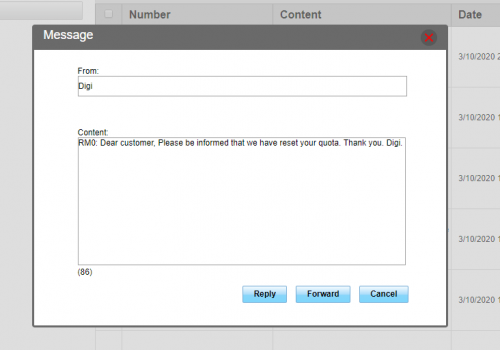 ran outta quota mid of the month, didnt expect Digi agrees to reset my quota  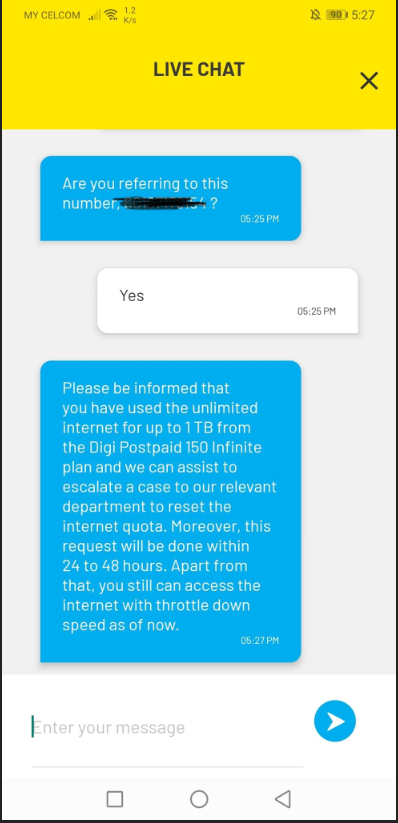 |
|
|
Apr 20 2020, 12:46 AM
Return to original view | Post
#10
|
|
Junior Member
541 posts Joined: Mar 2009 From: Technically not from Lebanon
|
QUOTE(HolySatan @ Apr 19 2020, 09:34 PM) manual set DNS in huawei modem : wifi & LAN Ah, been looking for this. Thanks!modem setting (192.168.X.X) > DHCP > press F12 (chrome) > tab console > insert command : $('#dhcp_dns_statistic').show(); $('#dhcp_primary_dns').show(); $('#dhcp_secondary_dns').show(); enter then insert custom DNS make sure telco didnt block DNS Google DNS : 8.8.8.8 & 8.8.4.4 Cloudflare DNS : 1.1.1.1 & 1.0.0.1 tested huawei router : e5186, b525, b618, b715 tested huawei mifi : e5786, e5787, e5788, e5776  |
| Change to: |  0.1357sec 0.1357sec
 0.45 0.45
 7 queries 7 queries
 GZIP Disabled GZIP Disabled
Time is now: 1st December 2025 - 06:21 PM |
 Quote
Quote