

This post has been edited by RagingCandy: Nov 16 2023, 08:11 PM
TIME [OFFICIAL] TIME Fibre Broadband™ v4, Experience the ONE TRUE 2Gbps
|
|
 Nov 16 2023, 08:08 PM Nov 16 2023, 08:08 PM
Return to original view | Post
#21
|
 
Junior Member
205 posts Joined: Sep 2014 
|
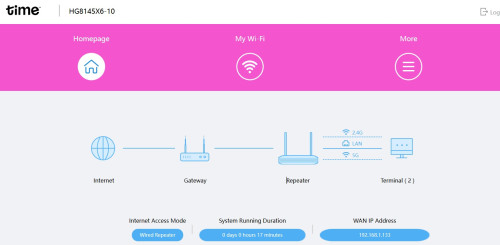
I'm trying to setup mesh on the HG8145X6 with my TPLink router. The X6 shows up on my TP-Link's EasyMesh page. However, the weird thing is the Wifi name in X6 is not the same as the TP-Link one. Any idea whether I set up the Mesh correctly?
This post has been edited by RagingCandy: Nov 16 2023, 08:11 PM |
|
|
Nov 16 2023, 08:51 PM
Return to original view | Post
#22
|
|
Junior Member
205 posts Joined: Sep 2014
|
QUOTE(ChenKaiWen @ Nov 16 2023, 08:35 PM) That is not bridge mode. Doing that will reset the settings on the unit. Then a SI will have to come and redo everything. Uh... I might misunderstood ur ask. I set the unit to AP so I can use to bridge mode to set another SSID / Mesh.Calling TIME support is a must for bridge mode unless you know the password for the real admin account  |
|
|
Nov 16 2023, 11:28 PM
Return to original view | Post
#23
|
|
Junior Member
205 posts Joined: Sep 2014
|
QUOTE(jjj2 @ Nov 16 2023, 10:57 PM) It's on repeater mode, not mesh. Ditch this X6, get a proper mesh system, Tp-Link Deco is one of the great option. What a good advice... So hard to setup due to confusing User Interface. jjj2 liked this post
|
| Change to: |  0.0325sec 0.0325sec
 1.03 1.03
 7 queries 7 queries
 GZIP Disabled GZIP Disabled
Time is now: 19th December 2025 - 09:31 AM |
 Quote
Quote