

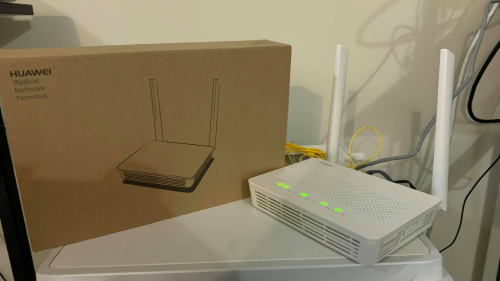
TIME's new router, OLT and router all in one
TIME [OFFICIAL] TIME Fibre Broadband™ v4, Experience the ONE TRUE 2Gbps
|
|
 May 31 2021, 09:17 PM May 31 2021, 09:17 PM
Return to original view | Post
#1
|
 
Senior Member
1,593 posts Joined: Jan 2016  
|
TIME's new router, OLT and router all in one |
|
|
|
|
|
Mar 26 2023, 06:19 PM
Return to original view | Post
#2
|
|
Senior Member
1,593 posts Joined: Jan 2016
|
Hey guys, anyway to setup bridge mode for the provided router+modem combo without contacting customer service?
Owner of the unit refused to contact CS on this matter even though I offer to install an Asus wifi 6 router for all FOC lol Need to DIY Or maybe I can change the modem too? With the Huawei HG8240H5? |
|
|
May 2 2023, 05:28 PM
Return to original view | IPv6 | Post
#3
|
|
Senior Member
1,593 posts Joined: Jan 2016
|
QUOTE(rjb123 @ May 1 2023, 12:45 PM) Time vs UniFi - any reason to change to Time? Cheaper, faster, seems to be more stableHave had UniFi for many years without issue, but TIME have now rolled out here too. Purely from a reliability perspective (have own equipment so don’t care about the router etc. provided)  Just moved from a place with unifi to one with time Amazing upload speed, and no more issues on Digi's VoWifi 500mbps might be overkill but I cant get tired of doing speed tests |
|
|
Aug 28 2023, 06:53 PM
Return to original view | IPv6 | Post
#4
|
|
Senior Member
1,593 posts Joined: Jan 2016
|
Having some weird issues with Time recently
My vowifi calls keeps dropping off, Digi and Maxis Anyone having similar issues? |
|
|
Aug 29 2023, 07:00 AM
Return to original view | IPv6 | Post
#5
|
|
Senior Member
1,593 posts Joined: Jan 2016
|
QUOTE(blacktubi @ Aug 28 2023, 10:24 PM) More to do with Wi-Fi network than ISP So...time for a new router?VoWiFi very sensitive on Wi-Fi network loaded latency Still using the stock Huawei but my house owner refused to contact time so I can't grab the pppoe credentials and change the router into bridge mod... |
|
|
Apr 15 2024, 07:14 PM
Return to original view | IPv6 | Post
#6
|
|
Senior Member
1,593 posts Joined: Jan 2016
|
Time's DNS server kaboom,
Change to 3rd party seems to fixed the issue Setapak here...running adblock DNS and everything is normal |
|
|
|
|
|
Apr 15 2024, 10:23 PM
Return to original view | IPv6 | Post
#7
|
|
Senior Member
1,593 posts Joined: Jan 2016
|
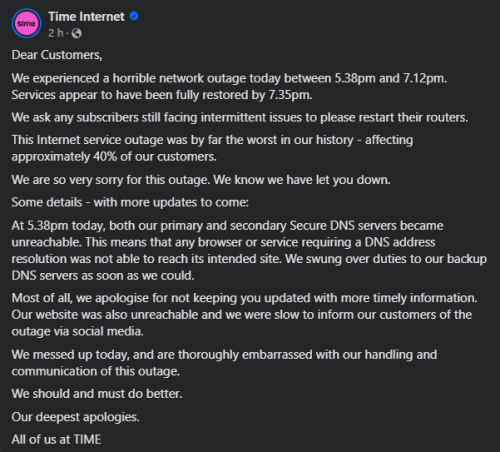 Not gonna lie, their response is the best I've seen from an ISP so far At least I wouldn't get angry reading it, the other ISP... the really problematic one should really learn a thing or two from TIME |
|
|
Apr 26 2024, 04:54 PM
Return to original view | IPv6 | Post
#8
|
|
Senior Member
1,593 posts Joined: Jan 2016
|
QUOTE(rezzorix @ Apr 25 2024, 12:01 PM) Response from TIME through MCMC: Its really bad, I ended up VPN back to my Maxis fiber at home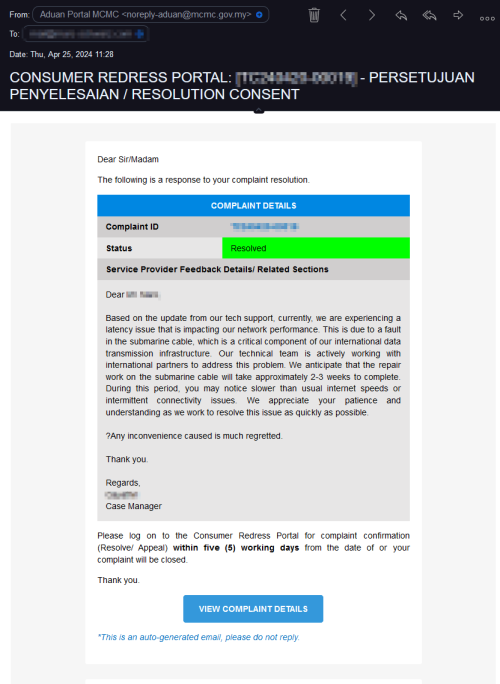 2-3 weeks. Should at least offer some kind of compensation. Anyway... lets see. Effectively cut the connection speed from 600Mbps to 100Mbps jjj2 liked this post
|
|
|
Aug 7 2024, 06:42 AM
Return to original view | IPv6 | Post
#9
|
|
Senior Member
1,593 posts Joined: Jan 2016
|
What is wrong with TIME's routing to China recently? jjj2 liked this post
|
|
|
Aug 7 2024, 10:19 AM
Return to original view | Post
#10
|
|
Senior Member
1,593 posts Joined: Jan 2016
|
QUOTE(PRSXFENG @ Aug 7 2024, 08:37 AM) It has never been good in my experience (from sign up till now) It's really bad, baidu won't even loadMaxis seems to provide a better experience for that Time's routing to China is the worst I've seen so far jjj2 liked this post
|
|
|
Aug 7 2024, 10:54 AM
Return to original view | IPv6 | Post
#11
|
|
Senior Member
1,593 posts Joined: Jan 2016
|
QUOTE(blacktubi @ Aug 7 2024, 10:37 AM) Definitely not a recent thing. It's been getting progressively worst. Yep, I need to VPN back home to Maxis in order to open those websitesSo bad till the extend that I have China friends willing to pay penalty and switch ISP. Their China version of work collaboration apps is just not working well on TIME's network. Too bad my landlord refused to grab other ISP because of the promotion price... Speaking of VPN, with the stock Time router... I couldn't VPN back because of the firewall settings, funny |
|
|
Aug 7 2024, 11:13 AM
Return to original view | IPv6 | Post
#12
|
|
Senior Member
1,593 posts Joined: Jan 2016
|
QUOTE(blacktubi @ Aug 7 2024, 11:05 AM) Which VPN protocol you are using? Wireguard, so UDP?I believe the router should let you to enable IPSec passthrough in order for IPSec VPN to work Other protocol should be fine |
|
|
Aug 7 2024, 03:13 PM
Return to original view | IPv6 | Post
#13
|
|
Senior Member
1,593 posts Joined: Jan 2016
|
QUOTE(Kadaj @ Aug 7 2024, 02:55 PM) Public IP or CGNAT? TIME 600Mbps package, should be public IP as defaultIf public IP, then maybe the stock router's problem. Many stock router build in settings that user can't modify it. No big deal, just COD an AX88u to swap that thing out |
|
|
|
|
|
Aug 12 2024, 08:52 PM
Return to original view | IPv6 | Post
#14
|
|
Senior Member
1,593 posts Joined: Jan 2016
|
QUOTE(blibala @ Aug 12 2024, 07:30 PM) Very long time i didnt subscribe to Time broadband..last time their internet is superior. And now they are available at my landed taman. Is Time still better than tm and maxxs? I'm on Unifi, Maxis and TIMEI dont think TIME is better than Unifi and Maxis on the routing side The only advantage it has is the symmetric speed, that is it |
|
|
Aug 13 2024, 07:43 PM
Return to original view | IPv6 | Post
#15
|
|
Senior Member
1,593 posts Joined: Jan 2016
|
Woooo something's wrong tonight
Most websites straightaway refused to load, others really slow Vowifi doesn't work as well Running DoT and DoH at the moment Setapak area This post has been edited by QuantumEdge: Aug 13 2024, 08:08 PM |
|
|
Aug 15 2024, 05:33 PM
Return to original view | IPv6 | Post
#16
|
|
Senior Member
1,593 posts Joined: Jan 2016
|
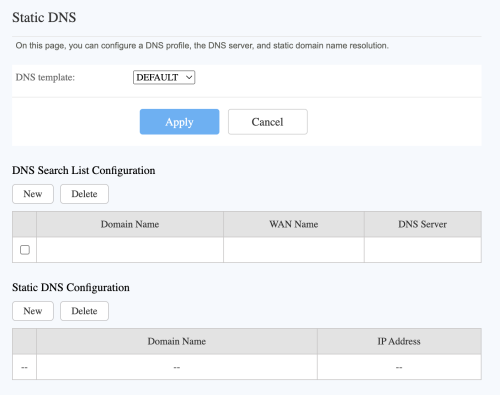 Trying to setup custom DNS on HG8145X6, can someone give me a hand? |
|
|
Sep 16 2024, 11:39 AM
Return to original view | IPv6 | Post
#17
|
|
Senior Member
1,593 posts Joined: Jan 2016
|
QUOTE(Xange @ Sep 16 2024, 10:22 AM) i won't bother with their price anymore after experiencing the network quality, especially on my astro over internet. Plus those offer i bet only limited to those who subscribe maxis postpaid with maxis fiber only, not on maxis family... i did the math if i were to get same 4 line + maxis fiber 100mbps the price is about the same, heck they even gave the flyers to my doorstep offering 100mbps at RM69 per month and even setup booth at my apartment's common area, when i approached them and ask if same offer is extended to family package, they avoid the question and instead push me to "upgrade" to maxis postpaid + maxis fiber to enjoy the offer.... i gave them the cold shoulder after that Yep, another Maxis fiber user hereThey wont give you any promo plan unless you get a new postpaid number+fibre under them Using MNP number+Maxis fibre...out of contract for months now They just refused to give me any promo Claims my current 500Mbps plan is the promo plan, meanwhile I'm paying the same as their current 500Mbps plan...lol |
|
|
Nov 1 2024, 05:17 PM
Return to original view | IPv6 | Post
#18
|
|
Senior Member
1,593 posts Joined: Jan 2016
|
QUOTE(jkfoong @ Nov 1 2024, 04:48 PM) I'm looking to replace the Wifi 7 router provided by Time, seems to be unstable even within near speed. Nope, that Huawei is a combo unitWhat do you guys think? I'm looking at TP-Link AX53. Yes I am aware that it is a Wifi 6 router, but i don't think I need Wifi 7 at 600Mbps. One more question is that can I directly connect to the ONU without the Huawei router? Current Router Model: Huawei HG8145B7N  If you want to use your own router, you’ll need to set it into bridge mode by DIY or contact time’s customer service Or you can choose the difficult way by changing the whole combo box to Huawei hg8240h5 |
|
|
Nov 3 2024, 11:37 AM
Return to original view | IPv6 | Post
#19
|
|
Senior Member
1,593 posts Joined: Jan 2016
|
QUOTE(leechunghan @ Nov 3 2024, 10:13 AM) Thank for the information. Hi, check your PMThe new WiFi 7 Router can setup to bridge mode also right? Normally how much they charge? |
|
|
Nov 30 2024, 07:03 PM
Return to original view | IPv6 | Post
#20
|
|
Senior Member
1,593 posts Joined: Jan 2016
|
QUOTE(leechunghan @ Nov 30 2024, 11:12 AM) Hi, 1st any idea why my TIME always suddenly like cannot internet? When using Speedtest to test the Speed keep loading like this Only for speedtest on iPhone right?[attachmentid=11506896] I using my own TP-Link Router 2nd Should use IPv4 or IPv6 more better? 3rd my one is Public IP or Private IP? Whick one more better? Thank all sifu to let me know🫡 [attachmentid=11506897] I'm having the same issue as you, you need to wait for it to load out the service provider before starting the actual speed test Time you can use both IPV4 and IPV6 no problem, yours are public IP They are supposed to give you public IP access, since you are on 600Mbps plan |
| Change to: |  0.0408sec 0.0408sec
 0.59 0.59
 7 queries 7 queries
 GZIP Disabled GZIP Disabled
Time is now: 1st December 2025 - 11:43 PM |
 Quote
Quote