

hi any TP-Link c1200 user can guide how to setup ipv6?
TIME [OFFICIAL] TIME Fibre Broadband™ v4, Experience the ONE TRUE 2Gbps
TIME [OFFICIAL] TIME Fibre Broadband™ v4, Experience the ONE TRUE 2Gbps
|
|
 Jan 15 2020, 12:25 AM Jan 15 2020, 12:25 AM
Return to original view | Post
#1
|
 
Senior Member
7,538 posts Joined: Jun 2007 From: Kuala Lumpur   
|
hi any TP-Link c1200 user can guide how to setup ipv6?
|
|
|
|
|
|
Jan 15 2020, 09:47 AM
Return to original view | Post
#2
|
|
Senior Member
7,538 posts Joined: Jun 2007 From: Kuala Lumpur
|
QUOTE(voncrane @ Jan 15 2020, 03:23 AM) As shared... Depends on your dates... Mine gets charged on the 13/14th of the month. Despite the due date being the next month. Also, It seems, it doesn't take into account manual payments done a few days earlier on the website. System still went ahead and charged me again yesterday.. Zzz No throttling.. However FUP applies. Yes, those sites are blocked.. Neither.. Just need to wait and see. Nope.. Not a lot at least.. Just a little dust that's swept away.. Here you go... See the attached screenshot below.. Basically, you login to the router.. Go to the Advanced tab, scroll down to IPv6. Feel free to use the default DNS server. [attachmentid=10404450]   i have the same setup, but hor , ipv6 test keep failed. issit because im connect using access point wifi ? i have the same setup, but hor , ipv6 test keep failed. issit because im connect using access point wifi ? |
|
|
Dec 20 2023, 12:18 AM
Return to original view | IPv6 | Post
#3
|
|
Senior Member
7,538 posts Joined: Jun 2007 From: Kuala Lumpur
|


done installed FTTR, performance very good every room can get 450-500mbps downside time does not allow customer to buy additional child node  |
|
|
Dec 22 2023, 05:54 PM
Return to original view | IPv6 | Post
#4
|
|
Senior Member
7,538 posts Joined: Jun 2007 From: Kuala Lumpur
|
QUOTE(trix @ Dec 22 2023, 12:37 PM) » Click to show Spoiler - click again to hide... « so the child node needs to be located where there is a power plug right? for the fiber cable, do they drill through walls and did they patch it up nicely afterwards? trix liked this post
|
|
|
Dec 29 2023, 02:19 PM
Return to original view | IPv6 | Post
#5
|
|
Senior Member
7,538 posts Joined: Jun 2007 From: Kuala Lumpur
|
dang, bought 1 additional node from time but come with time logo

|
|
|
Dec 29 2023, 04:17 PM
Return to original view | IPv6 | Post
#6
|
|
Senior Member
7,538 posts Joined: Jun 2007 From: Kuala Lumpur
|
QUOTE(westlife @ Dec 29 2023, 02:51 PM) How come I just installed time 2 weeks back my model is not the same as urs? this is not HG8145X6, i subscribed to their *fibre to the room* services to have 500mbps in my every room and every corner, but they send noob installer to do the second installation for me chip off my wall paint, installer dont know how to use adhesive tool and broke the cable, already complaint to time waiting for feed back, apply at your own risk. |
|
|
|
|
|
Dec 30 2023, 08:33 AM
Return to original view | IPv6 | Post
#7
|
|
Senior Member
7,538 posts Joined: Jun 2007 From: Kuala Lumpur
|
QUOTE(westlife @ Dec 29 2023, 07:12 PM) Icic. I first time using time, I would say that it is not exactly good as what ppl used to say when comparing to unifi. Unifi I get more consistent experience. Set ur Linksys system to bridge mode and same ssid to boost your WiFi , was using this method on my ax4200 while waiting them to get approval for me to purchase additional child node.If you don’t want to use bridge mode on Linksys you can contact them to request change your main ont/router to bridge mode but don’t ask them anything about telcomadmin login, they will answer you some other funny thing. |
|
|
Dec 30 2023, 09:25 AM
Return to original view | IPv6 | Post
#8
|
|
Senior Member
7,538 posts Joined: Jun 2007 From: Kuala Lumpur
|
QUOTE(westlife @ Dec 30 2023, 09:03 AM) If bridge mode on my Linksys I can only use one Linksys node only and cannot do mesh if I have more than one Linksys node rite? linksys in bridge mode almost all feature will be disabled and require wired connection, in my work room previously before install additional child node i can only get 50-80mbps via wifi, but after i wired and set velop ax4200 as bridge mode, than i did speed test again i can get full speed of 500mbps.Will performance drop if on bridge mode since the main node (time) is still dual band. you may try to connect multiple linksys router (bridge mode) if you able to wired it. |
|
|
Dec 30 2023, 09:49 AM
Return to original view | IPv6 | Post
#9
|
|
Senior Member
7,538 posts Joined: Jun 2007 From: Kuala Lumpur
|
QUOTE(westlife @ Dec 30 2023, 09:40 AM) I see. To wire it is not a prob Becos I can put the Linksys node next to the existing time Huawei ONT. will see if the performance is good or not. last month when im still on velop tri band + velop dual band it keep giving me problem, some of my devices connect thru velop lan port but show as no internet connection need to restart once a week and linksys app very very buggy and lag, thats the reason why i subscribe to their FTTR although is still dual band but so far no issue. i use huawei app to check wifi signal and walk around my whole house still getting 400mbps - 500mbps on every corner. currently my setup is 1 parent and 4 child node The current Huawei ONT despite now after shifting the location to corridor, it is still having latency prob every now and then. I guess the dual band limitation does play a part. becos my mesh setup in my previous house (landed) second floor with the mesh child node I dun get latency prob when playing mobile game even my speed is lower at 300Mbps max.  |
|
|
Dec 30 2023, 09:55 AM
Return to original view | IPv6 | Post
#10
|
|
Senior Member
7,538 posts Joined: Jun 2007 From: Kuala Lumpur
|
QUOTE(jjj2 @ Dec 30 2023, 09:48 AM) Is that a Network Port next to your Slave FTTR node ? Does it link to the spot where you placed your main Router ? why use lan cable when i link my slave node via fibre optic?If so, then you don't need this FTTR. |
|
|
Dec 30 2023, 10:01 AM
Return to original view | IPv6 | Post
#11
|
|
Senior Member
7,538 posts Joined: Jun 2007 From: Kuala Lumpur
|
QUOTE(blacktubi @ Dec 30 2023, 09:58 AM) What speed are you subscribed to? 500mbps |
|
|
Dec 31 2023, 11:48 PM
Return to original view | IPv6 | Post
#12
|
|
Senior Member
7,538 posts Joined: Jun 2007 From: Kuala Lumpur
|
QUOTE(westlife @ Dec 31 2023, 05:43 PM) I currently place it on the floor which is not ideal at all but no choice. Becos i am placing it outside my study room door which I could not put any table or so to block it. bo bian liao, go for fttr service  |
|
|
Jan 17 2024, 06:35 PM
Return to original view | IPv6 | Post
#13
|
|
Senior Member
7,538 posts Joined: Jun 2007 From: Kuala Lumpur
|
QUOTE(westlife @ Jan 17 2024, 03:28 PM) yes, correct. i just did it yesterday only. called the CS, 15 minutes technication called to change to bridge and do the dialing of PPPoE on my wifi router, settled. they remote change on the spot or take 1-2 working days?now i enjoy low latency internet connection with full speed in my room. for anyone who still use the stock huawei ONT + mesh node (dual-band), please throw them away for god sake.. tri-band mesh ftw... |
|
|
|
|
|
Jan 17 2024, 08:48 PM
Return to original view | IPv6 | Post
#14
|
|
Senior Member
7,538 posts Joined: Jun 2007 From: Kuala Lumpur
|
QUOTE(westlife @ Jan 17 2024, 06:43 PM) remotely change it... oh, that's fastless than 10 minutes process... |
|
|
Jan 18 2024, 03:36 PM
Return to original view | IPv6 | Post
#15
|
|
Senior Member
7,538 posts Joined: Jun 2007 From: Kuala Lumpur
|
QUOTE(westlife @ Jan 17 2024, 09:13 PM) 1. cannot. the ONT is technically useless to connect anything after switched to bridge mode. just sold my full set linksys velop, will fully stick with fttr system now 2. i love my linksys MR8300 wifi 5 mesh. low latency and good for gaming. yeah... very fast. indeed. i am glad that i had switched it becos i was not satisfied with the time broadband previously using the trash stock huawei mesh.  |
|
|
Jan 19 2024, 12:22 PM
Return to original view | IPv6 | Post
#16
|
|
Senior Member
7,538 posts Joined: Jun 2007 From: Kuala Lumpur
|
QUOTE(westlife @ Jan 19 2024, 03:13 AM) i see. nice. that's the best system already. was using ax4200 with whw02ur velop is dual-band or tri-band? urs is how many speed plan? 1Gbps? so all ur desktop/laptop device can get full speed with low latency? they really lay fibre cable to link from the parent node to all ur chid nodes inside your room? but are those chid nodes tri-band? which package did u go for? seriously latest networking wifi mesh system (wifi 6/7) good one with tri-band is not cheap also. i am glad that i got my linksys mr8300 wifi - 3 units at quite cheap price. one at sgd150++ with 1 x velop dual-band node free, the rest of 2 x mr8300 i got them at about sgd50 each second hand from carousell. at least they can meet my need for speed and coverage which i am happy. 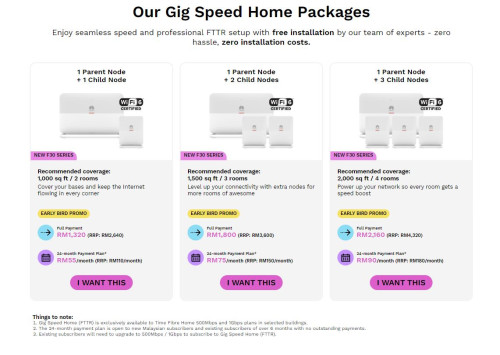 even time the trash hxxwei mesh node is selling at so expensive price. 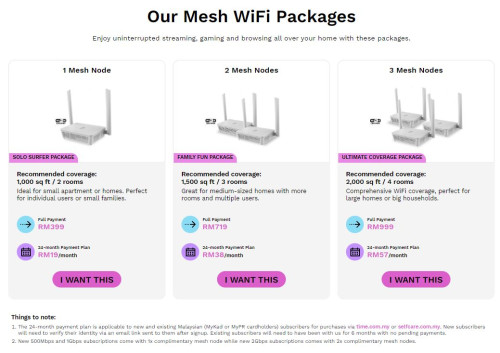 i on 500mbps plan, all my wifi devices can get 4xxmbps & 3-5ms ping on speed test, my smart home is stable now no more lag and disconnect but this fttr system only have dual-band package i using 1 + 4 bought 1 more child node unit from them |
|
|
Jan 19 2024, 12:43 PM
Return to original view | IPv6 | Post
#17
|
|
Senior Member
7,538 posts Joined: Jun 2007 From: Kuala Lumpur
|
QUOTE(westlife @ Jan 19 2024, 12:35 PM) icic. so they really lay fibre-optic cables from ur main node to all ur child nodes? like this isn't that the fibre optics will be exposed and visible within the entire house? yup but not so obvious la still ok for me, i going to paint it let's see will it look more invisible after painting or not |
|
|
Jan 19 2024, 12:50 PM
Return to original view | IPv6 | Post
#18
|
|
Senior Member
7,538 posts Joined: Jun 2007 From: Kuala Lumpur
|
QUOTE(westlife @ Jan 19 2024, 12:45 PM) Icic. Ok. the cable they use is black colour one or between the nodes they use the yellow colour fibre-optic cable? transparent cable from splitter to terminal, from terminal use patch cord and connect to child node
kylehudsons94 liked this post
|
|
|
Jan 24 2024, 10:07 AM
Return to original view | IPv6 | Post
#19
|
|
Senior Member
7,538 posts Joined: Jun 2007 From: Kuala Lumpur
|
just changed huawei router regulatory domain from malaysia to us, can get more stable speed, can give a try on your huawei router eugene66 liked this post
|
|
|
Jan 24 2024, 07:05 PM
Return to original view | IPv6 | Post
#20
|
|
Senior Member
7,538 posts Joined: Jun 2007 From: Kuala Lumpur
|
QUOTE(westlife @ Jan 24 2024, 06:04 PM) What it means by regulated domain? U mean the wifi region? on huawei name as regulatory domain, on linksys will be wifi region |
| Change to: |  0.0368sec 0.0368sec
 1.47 1.47
 7 queries 7 queries
 GZIP Disabled GZIP Disabled
Time is now: 18th December 2025 - 09:28 PM |
 Quote
Quote