Welcome Guest ( Log In | Register )

Outline · [ Standard ] · Linear+

TIME [OFFICIAL] TIME Fibre Broadband™ v4, Experience the ONE TRUE 2Gbps

views
     
SUSCandy12
post Nov 1 2019, 04:47 PM

Regular
******
Senior Member
1,878 posts

Joined: Apr 2019
QUOTE(jjj2 @ Nov 1 2019, 04:16 PM)
Hi, we chat offline.

LOL....Not really...landed property if properly designed, it's as good as high rise.
*
Wait for TNB to come in for selling wholesale passive dark fiber. Many ISPs will love to join them since they get to build their own active network with it including Time.

All ISPs on TNB open network will be allowed to supply their own brand of ONTs(fibre modem) besides their own access router.
SUSCandy12
post Nov 4 2019, 09:17 PM

Regular
******
Senior Member
1,878 posts

Joined: Apr 2019
QUOTE(WaCKy-Angel @ Nov 3 2019, 09:06 AM)
Fyi Time will rebate RM500 for switching to them so u can treat that as bonus for terminating Unifi contract.
*
No more since early this year after TM changed their early termination policy from RM500 1-time penalty to remaining months of your 24-months contract.

Now if you've just recently signed up for Unifi for a 24mths renewal of your contract, you need to pay 24 remaining months in total to terminate your line.
Just think of 24 X your current TM monthly bill as penalty.

RM500 where got enough to cover your penalty? Thus both TIME and Maxis has seized this offer to help customers make the switch over.
SUSCandy12
post Nov 5 2019, 10:01 AM

Regular
******
Senior Member
1,878 posts

Joined: Apr 2019
QUOTE(WaCKy-Angel @ Nov 4 2019, 10:51 PM)
Time has ceased RM500 offer?

yeapch01 or jjj2 can confirm this?
*
Give you the RM500 rebate over few months also won't be able to cover your months of early termination penalty right? Let's say you have 10 months left and you're subscribing to a RM150 plan.


SUSCandy12
post Nov 5 2019, 10:48 AM

Regular
******
Senior Member
1,878 posts

Joined: Apr 2019
QUOTE(WaCKy-Angel @ Nov 5 2019, 10:38 AM)
Like i've said, it depends whether Unifi changed their termination policy or not because afaik the max they charged for early termination was RM500, that is why Time is offering RM500 rebate as incentive for u to switch provider.

I was trying to live chat with Unifi to find out but i forgotten password  sweat.gif

Where did u get to know they changed their policy? Do you have official link?
*
Did you renew your contract, changed plan or replaced hardware with your Unifi account starting early 2019?

Why do you need password to initiate live chat? Just open the live chat page tell them your acocunt, they'll do verifications with you such as asking you personal quesitons for your IC no, latest payment made, location, . etc. to confirm you're the line owner then check it for you.
SUSCandy12
post Aug 3 2020, 08:52 PM

Regular
******
Senior Member
1,878 posts

Joined: Apr 2019
Time Fibre finally expanding to Ipoh?

Spotted Kinta Riverfront Service Suites for Ipoh area in Time's Home Fibre coverage map.
Hope more condos in Ipoh will be wired by Time Fibre after this.
SUSCandy12
post Oct 19 2020, 03:57 PM

Regular
******
Senior Member
1,878 posts

Joined: Apr 2019
QUOTE(voncrane @ Oct 19 2020, 06:23 AM)
If your place is a high rise building, easier to come in because, the residents and Management have the power to invite them in. No such thing as cuz TM is there they can’t. Such monopoly has now been properly made illegal, basically your place can’t have an exclusive contract with only one provider. TIME would be eager to enter if enough interest has been shown by occupants to sub/switch to them. Cuz it’s high rise, cost of installation is cheaper as they “just unroll the cables upwards & inwards”.

For landed? That’s a more difficult job... Have to apply this that, dig more all over the place to hide the cables, etc.. And all that makes it a harder entry for TIME.
*
This is no longer the case for LANDED in years to come for fibre deployment.It is more ECONOMICAL and EASIER to serve landed properties/small townhomes apartments called "mansions" in the near future because the ISP does not need to approach the building's JMB/management/developer to get things sorted out for approvals.

Japan is a good case study to look at this approach now. Their higher tiered plans and exclusive ISPs such as the country's FASTEST rated ISP, Sony NURO only serves landed and small townhomes(mansions) no more than 3-5 storeys high. If your building is HIGHER than 5 storeys, they will NOT come and UNLIKELY you will get to subscribe to the higher tiered 10G plans with less contention ratio. These kind of higher tiered plans are also catered to more richer segment of societies who can afford their own landed homes with more privacy.

Sony NURO has a dark fibre leasing agreement with NTT to rent their unused spare fibre cables which they mostly serve the Tokyo Metropolitan areas.

We have local companies such as TNB(Tenaga) now willing to do the same by building new fibre networks around the country for landed properties and renting spare cables as dark fibres for interested ISPs. The wholesale approach which TM does using layer 3 routing instead is not favored by some ISPs because they want more control over their own network/pricing.

Fibre optic cables are going to get 10X much cheaper due to manufacturing process improvements, advanced cheaper passive splitters and cable pulling methods.

When "apartments" and small mansion homes in Japan it is these kind of buildings which they're referring to:
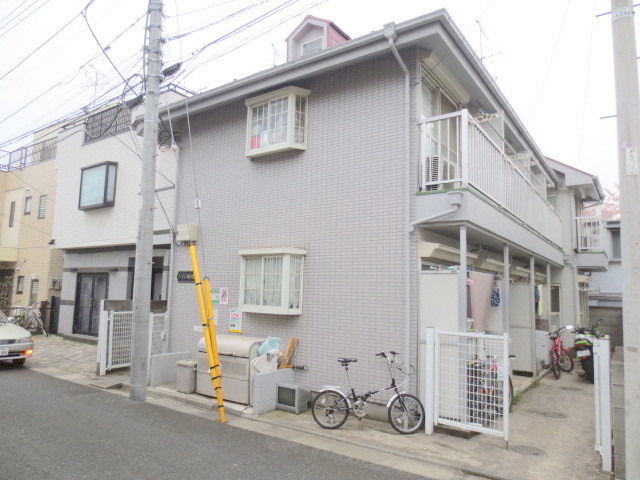
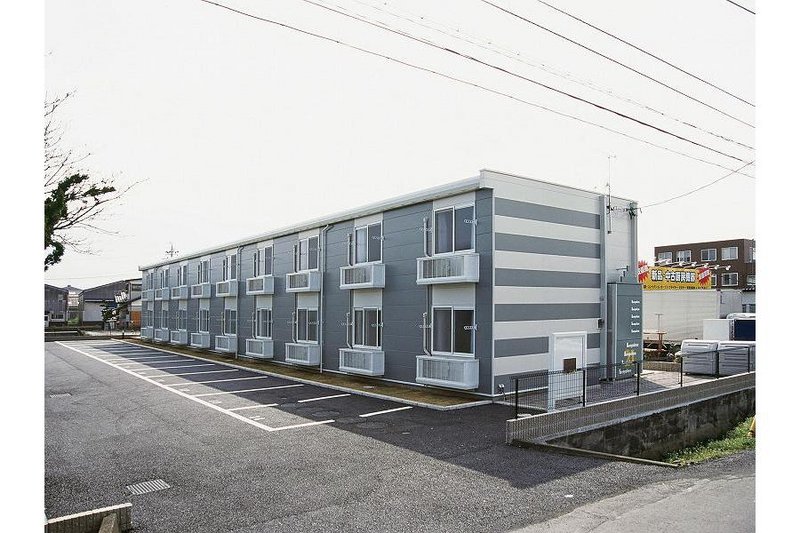
user posted image

user posted image

In Malaysia/Singapore, when we mention about apartments/condos, the general impression is a 20+ storey high rise building. These kind of buildings are much more harder to re-wire with fibre once they get old. You need to find enough of spaces for your conduits to route the fibre cables and the trouble of getting the approvals with the building management.


SUSCandy12
post Oct 19 2020, 07:52 PM

Regular
******
Senior Member
1,878 posts

Joined: Apr 2019
QUOTE(Vincent6596 @ Oct 19 2020, 07:40 PM)
possible to know that time 100mbps package average how many ping MS will get when running speedtest??
*
You must mention the destination and country.

Ping to where? Local server? SG server? Japan server? Aussie server? US server? EU server? African Server?
Where?
SUSCandy12
post Oct 19 2020, 10:13 PM

Regular
******
Senior Member
1,878 posts

Joined: Apr 2019
QUOTE(Vincent6596 @ Oct 19 2020, 09:12 PM)
i just run speedtest to time MY server only.
*
Just ask anyone here with a 100M Time user here to do a manual CLI terminal ping to:
CODE

Malaysia
speed.time.com.my

Singapore
speedtest.singnet.com.sg
www.speedtest.com.sg


No need to do it at Ookla's website.

This post has been edited by Candy12: Oct 19 2020, 10:13 PM
SUSCandy12
post Oct 20 2020, 07:19 PM

Regular
******
Senior Member
1,878 posts

Joined: Apr 2019
QUOTE(Green_lemontea @ Oct 20 2020, 04:29 PM)
Does anyone has a picture of how exposed or how the technician glue the Fibre cable inside the condo unit? Is it at the ceiling or on the floor? Pictures will be great to better understand it.

I've scheduled for next week but I'm really concern about the cable being exposed in my unit.
*
If possible I'd rather use nail in clips than hot glue. They look neater and last longer. Removal also easier and holes can be patched back easily with wall plasters.
SUSCandy12
post Oct 20 2020, 08:44 PM

Regular
******
Senior Member
1,878 posts

Joined: Apr 2019
QUOTE(Green_lemontea @ Oct 20 2020, 08:41 PM)
Is it possible to request them for nail in clips?
*
The installer who did my home used nail in clips(small ones since fibre cables were very thin) they are unnoticeable when run along cable covers.
SUSCandy12
post Oct 22 2020, 09:55 PM

Regular
******
Senior Member
1,878 posts

Joined: Apr 2019
QUOTE(Find The Way @ Oct 22 2020, 04:16 PM)
CODE

PING speed.glb.time.com.my (223.28.43.117): 56 data bytes
64 bytes from 223.28.43.117: icmp_seq=0 ttl=59 time=4.011 ms
64 bytes from 223.28.43.117: icmp_seq=1 ttl=59 time=5.258 ms
64 bytes from 223.28.43.117: icmp_seq=2 ttl=59 time=5.211 ms
64 bytes from 223.28.43.117: icmp_seq=3 ttl=59 time=5.280 ms
...

PING speedtest.singnet.com.sg (202.166.127.78): 56 data bytes
64 bytes from 202.166.127.78: icmp_seq=0 ttl=51 time=41.958 ms
64 bytes from 202.166.127.78: icmp_seq=1 ttl=51 time=45.533 ms
64 bytes from 202.166.127.78: icmp_seq=2 ttl=51 time=43.057 ms
64 bytes from 202.166.127.78: icmp_seq=3 ttl=51 time=43.145 ms
...

*
May I ask if this test was made from a Time Home Fibre line based in Northern Region/Penang or the Klang Valley?

If from Penang then it's quite impressive to get 5ms ping rates to a server based in Shah Alam all the way from Penang which is around 360km in road distance.

Disregard the Singtel results for the time being. Other Singaporean ISPs are also getting very high pings to reach them.

Try these other Singaporean ISPs instead:

QUOTE
Newmedia Express Singapore: www.speedtest.com.sg

M247 Singapore: speed.sg.m247.ro

OVH Singapore: speedtest-sgp.apac-tools.ovh


SUSCandy12
post Oct 23 2020, 10:46 PM

Regular
******
Senior Member
1,878 posts

Joined: Apr 2019
QUOTE(Find The Way @ Oct 23 2020, 10:00 AM)
From KL.

This morning's result:
speedtest.singnet.com.sg: 43ms
www.speedtest.com.sg: 11ms
speed.sg.m247.ro: 12ms
speedtest-sgp.apac-tools.ovh: 12ms
*
Hmm quite good results your're getting there. Please disregard the Singtel results, there's something wrong with their DNS as it will resolve with some other IP which works better in other regions. Even other ISPs in hosting Singapore are getting terrible speeds above 50ms.

Use this instead: cdn.aws.singtel.com but found out it's being hosted at some Amazon server??
Singtel using AWS hosting?

My physical ISP is Ipoh riding on Maxis Fibre which is around 200km north of KL.
From Ipoh to Maxis's Subang Jaya test server my pings are like 5-6ms.

www.speedtest.com.sg: 12-14ms
speed.sg.m247.ro: 16-18ms
speedtest-sgp.apac-tools.ovh: 17-19ms

I give you a range which is what I get between off peak and peak hours.

For pings to Penang, expect 2-4ms on top of what you get from Ipoh because the distance is even further from the Klang Valley.

This post has been edited by Candy12: Oct 25 2020, 04:15 PM
SUSCandy12
post Nov 4 2020, 08:28 PM

Regular
******
Senior Member
1,878 posts

Joined: Apr 2019
QUOTE(hlmilk112 @ Nov 3 2020, 10:38 PM)
Relau vista penang.
*
Which server you're testing with getting 18ms?
SUSCandy12
post Nov 12 2020, 06:21 PM

Regular
******
Senior Member
1,878 posts

Joined: Apr 2019
QUOTE(hlmilk112 @ Nov 11 2020, 06:28 PM)
with Ookla speedtest. any different?
*
You can directly ping speed.time.com.my from your command terminal.


SUSCandy12
post Jan 8 2021, 07:08 PM

Regular
******
Senior Member
1,878 posts

Joined: Apr 2019
QUOTE(Noname95 @ Jan 8 2021, 05:25 PM)
Hi Sifus over here, would like you guys to recommend me a router. Been contacting TIME internet to help me with this, told them my place bedroom areas don't have good lines, wireless speed is bad. They told me it's normal to get 250mbps-350mbps on 5Ghz network, suggested me to change channel for 2.4Ghz (which not helping much, just near to 100mbps), end up they just ask me to get new router & extender. Lol 

My laptop has Wi-Fi 6 AX201, hope new router can utilize this & cover most of the house too, if not I got a TP-Link RE200 standby  sweat.gif

Below attached is the 2 in 1 router place. It's at the kitchen inside a SoHo box.
[attachmentid=10751362]

Here attached is my unit floor plan. Red circle is where Optical Network Terminal at, green one is suppose where new router at (previously UniFi router is at here).
[attachmentid=10751363]

Thank you very much !!
*
Do you work in your bedroom most of the time or spent most of your WFH hours at your living hall?
If you can afford it, wire up all your room with CAT6/E ethernet wall outlets for future proofing.

You can further expand your network in future by using additional switches in each individual room or buy a wall mounted mini APs/mesh units via wired connections turning it on only when needed.

For me I don't like to have a powerful WiFi AP right beside my head where I sleep for health reasons. I intentionally TURN off my 2.4G WiFi and only enable 5G for strategic reasons just "ENOUGH" to cover my workstation area which is part of my living hall.

You might want to know why I intentionally restrict my WiFi coverage area just enough to cover where I work. Firstly I minimize the chances of my neighbors interfering using jammers, listening and stealing my WiFi. If you just walk away from the living hall at my house, immediately you would lose the 5G WiFi signals right away. Also I would know that if there's an intrusion in my network, I can ALMOST be certain it's my neighbor which is stealing it because it's so weak the signal it makes it not even worth STEALING.

Second, it's for health reasons. I don't want a powerful high frequency transmitter beside my head while I sleep. My bedrooms and TV rack in my living hall all have wired outlets to serve my needs.
SUSCandy12
post Jan 8 2021, 11:26 PM

Regular
******
Senior Member
1,878 posts

Joined: Apr 2019
QUOTE(Noname95 @ Jan 8 2021, 11:02 PM)
Dont have that much money and time to hack all my walls and do this now  laugh.gif

Most of the times I would be doing my work & spending my times at the living room & got a TV box. But, would be ideal if i just could cover other bedrooms with WiFi signals since other family members spend their most their time in there.

I do agree on the health reasons too.
*
You don't need much money to run direct ethernet cables concealed in cable covers along the walls just like your electrical cables.

Since you mentioned that connectivity in bedrooms are just for convenience, you don't need wiring to cover all rooms then. Stick with your original plan of relocating the router opposite the dining table as you've marked. Run just a single ethernet wire under cable covers along the wall further down the walkway leading to the bedrooms to somewhere right in the middle of all 4 rooms.Make sure you have a electrical socket nearby for convenience. Place just an AP there either wall mounted or on a small rack. Turn it on/off only when you need to access internet from your room on demand. That should be good enough to cover all 4 rooms.

The AP/mesh unit works just like a wired switch except its connects to your devices wirelessly. All routing functions will still be handled by the main router which you plan to place at the hall.

For your tv box, you might also want to run a cable across the wall to provide a port for your tv rack.

You probably need 2X 10M of CAT6E cables for both the bedroom area AP and TV box. That should leave you with 2 more spare ports on your router for other purposes maybe a closeby workstation PC.

Under RM300 should be more than enough if you can get reliable contractor or friend or DIY.
SUSCandy12
post Jan 8 2021, 11:55 PM

Regular
******
Senior Member
1,878 posts

Joined: Apr 2019
QUOTE(Noname95 @ Jan 8 2021, 11:45 PM)
Unfortunately, the walkway leading to bedrooms don't have any electrical sockets. Last time I was using a TP-Link Wifi Extender RE200 to extend the WiFi from bedroom 3, not that satisfy with the speed it provided, but serve it purpose la for my other family members who always stay in their room.

Any recommendation for the router which I plan to place at beside the TV / opposite dining table ?

Thank you
*
You can consider using a PoE adapter then. It uses half of the set of wires inside your ethernet cable to supply electricity simultaneously with data through it to your wireless AP.

The router brand I'll leave it to the sellers here to give you a suggestion. smile.gif

SUSCandy12
post Jan 9 2021, 12:12 AM

Regular
******
Senior Member
1,878 posts

Joined: Apr 2019
QUOTE(Noname95 @ Jan 9 2021, 12:04 AM)
PoE adapter ... First time hear of this .. So means Router -> PoE adapter -> AP ?
Thanks for the suggestion on AP setup & location optimization advice though. Really help alot on my plan.  thumbsup.gif
*
The PoE Injector unit has 2 inputs, one the data ethernet cable from the router and power supply port with a ethernet output port that combines both inputs to be sent to the AP device with a single cable. That's how they wire up outdoor wireless APs on roofs instead of pulling 2 separate wires all the way out there.

Make sure your wireless AP unit must also be able to support PoE ports to separate the 2 sources at the other end.
SUSCandy12
post Feb 2 2021, 05:39 PM

Regular
******
Senior Member
1,878 posts

Joined: Apr 2019
QUOTE(Noname95 @ Feb 1 2021, 09:28 PM)
I did login. But there is nothing much i can do in there. I think they patch it with their version of firmware, what I can do & see inside is very limited. There's no option for me to change anything
[attachmentid=10775569][attachmentid=10775570]
*
If you plug your PC directly into the ISP's own router and managed to get connected to the internet it's OBVIOUS that it has not been switched to BRIDGE mode yet because when you need an separate router to do PPPoE authentication to connect properly.

The reason why you can't make changes when you log into your Huawei modem is because that account you use to login is just a basic user account without privileges.

Your ISP is hiding the ROOT/administrator account from you to prevent you from tinkering its settings inside that's why you need to keep calling them and enure that they made the changes properly.

Either that or you need to "find" ways of how to gain access to the ROOT account hidden to solve things on your own without dragging time. It could void your warranty though.
SUSCandy12
post Feb 2 2021, 09:23 PM

Regular
******
Senior Member
1,878 posts

Joined: Apr 2019
QUOTE(keatliang2005 @ Feb 2 2021, 09:13 PM)
after some poking, i manage to gain shell access to the unit and dump the config

CODE

<X_HW_WebUserInfoInstance InstanceID="2" UserName="telecomadmin" Password="$2%d3}OuqMM!:P;.49.PhR{e_\LuN3;U`:ijC0NVJ._f9r+OdyKAH`L2D0JM%4*9$yJ6F3YUAY^H)GEAmM59$dLP.}aAHmP*JEHPz0$" UserLevel="0" Enable="1" ModifyPasswordFlag="0" Salt="8a927cf60d0f48bdf20c0cd6" PassMode="3" Alias="cpe-2"/>


seems like is bcrypt GG, can't do reverse hash effectively even tho we got the salt and round it stretch

sigh......
*
So the login "Root account" the ISP might be hiding from you is telecomadmin.

Maybe you need to do some social engineering skills with the technician and ask them to reveal to you? smile.gif

2 Pages  1 2 >Top
 

Change to:
| Lo-Fi Version
0.0353sec    0.71    7 queries    GZIP Disabled
Time is now: 18th December 2025 - 12:52 AM