Welcome Guest ( Log In | Register )

10 Pages < 1 2 3 4 > » Bottom

Outline · [ Standard ] · Linear+

TIME [OFFICIAL] TIME Fibre Broadband™ v4, Experience the ONE TRUE 2Gbps

views
     
kmrdeva
post Oct 29 2018, 06:09 PM

Look at all my stars!!
*******
Senior Member
4,790 posts

Joined: Jan 2003
QUOTE(andyheng @ Oct 29 2018, 05:54 PM)
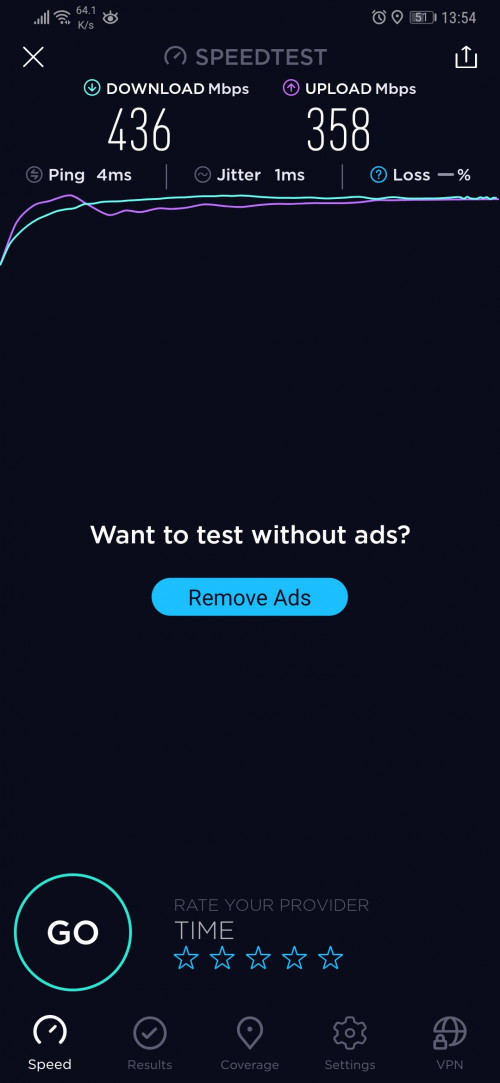
1 Gbit on Asus RT-AC88U Router!

[attachmentid=10091075][attachmentid=10091077]
*
On wifi or wired?

I could also get the same on wired connection with rm3xx edgerouter x.
kmrdeva
post Nov 23 2018, 01:04 PM

Look at all my stars!!
*******
Senior Member
4,790 posts

Joined: Jan 2003
QUOTE(raul88 @ Nov 23 2018, 01:01 PM)
No plan at all from Time to upgrade router/modem for existing 100-->500mbps customers?

Cos we cant enjoy the speed promised from the upgrade.. Presumably due to hardware limitation
We were also unable to downgrade to rm99 for 100mbps plan without changing our contract
*
You can always buy a better router. It’s not really that expensive.

Time even offers routers for sale on the selfcare portal at reasonable prices.


kmrdeva
post Dec 11 2018, 05:17 PM

Look at all my stars!!
*******
Senior Member
4,790 posts

Joined: Jan 2003
QUOTE(FusionXY @ Dec 11 2018, 03:33 PM)
Which Deco did you order?

Do test out for me ya.
Before and After ya.

One of the member here didn't give updates.
Hope you can test and stare it here.

Wanna how the speed look like from main deco and the secondary deco.

Thanks.
*
Not sure if you meant me but I have yet to pickup my Deco M9 Plus (2 pack) from yeapch. Stock just arrived, I was informed.

Gonna test how the 2 node mesh works vs my single AP (Asus AC68U) now.

WAN - 500mbps Time Fibre with UBNT Edgerouter X
Home - 12xx sf condo unit

Current setup - single dual band AP (AC1900) in the living room
Future setup - 2 node tri band mesh (AC2200), living room and study room.

This post has been edited by kmrdeva: Dec 11 2018, 05:19 PM
kmrdeva
post Dec 11 2018, 10:14 PM

Look at all my stars!!
*******
Senior Member
4,790 posts

Joined: Jan 2003
QUOTE(lyrilmaki @ Dec 11 2018, 10:05 PM)
500mbps bukit jalil.. wtf
user posted image
*
Speedtest with another server. Eg Celcom KL.
kmrdeva
post Dec 11 2018, 10:21 PM

Look at all my stars!!
*******
Senior Member
4,790 posts

Joined: Jan 2003
QUOTE(lyrilmaki @ Dec 11 2018, 10:18 PM)
laugh.gif  laugh.gif  laugh.gif

TIME server itself also 300ms.. expecting other server can be better  bangwall.gif
*
Maybe the Time server has a technical issue.
kmrdeva
post Dec 12 2018, 11:13 AM

Look at all my stars!!
*******
Senior Member
4,790 posts

Joined: Jan 2003
QUOTE(FusionXY @ Dec 11 2018, 05:58 PM)
Yes, I mean you. Been waiting for so long. I almost feel that you have forgotten.
Just arrived today only?
Do test it out ya.
*
Will need some days to monitor but straight off there are a few things I don't like about the TP-Link Deco M9 Plus:

1. No Web UI, everything is managed using Deco app on my phone. A bit too radical for me LOL.
2. Deco app has such a simple interface. Culture shock sikit after coming from AsusWRT-Merlin.
3. Can't customize the wifi config. No channel setting or ability to turn off 2.4Ghz.
4. Wifi coverage seems to be wider than my AC68U but speeds are not that impressive. More testing needed.
5. Had to setup the Deco as my main router because some of the Deco's features don't work in AP mode.

First few positive impressions:

1. Can finally retire my TP-Link AV1300 Powerline kit. Used to get below 200mbps on speedtest from my study room PC wired to the 2nd plug.
2. My study room PC connected by cable to the 2nd Deco unit is now getting 400mbps on speedtest.
3. No complaints from anyone at home so far.



kmrdeva
post Dec 12 2018, 01:40 PM

Look at all my stars!!
*******
Senior Member
4,790 posts

Joined: Jan 2003
QUOTE(FusionXY @ Dec 12 2018, 12:25 PM)
Thanks for the updates. Just need the answers highlighted in blue.


Cannot set Channel Bandwidth and Channels? Cannot Hide SSID? Like set to 40MHz?
How about 5GHz signal? Is it better than ASUS AC68U?
Can get full signal around the house over 5GHz?

*
The 2nd deco unit (satellite?) does get lower speed. I can accept up to 100mbps loss vs the main deco unit since my internet connection is so fast already, personally speaking.

I don't see any channel bandwidth or selection options in the deco app. Can hide SSID though.

Not easy to do wifi analysis on iphone. Plus I don't really have time to compare AC68U vs Deco M9+ in every area in my home with my wife's android phone.

Unfortunately, I do not know if 5GHz is reaching to all corners of my home since I can't set different SSID for 2.4 and 5.0GHz on the deco.

For now, I can get strong wifi in my drying area and storeroom at the back of my home, better than almost zero signal with the AC68U.


kmrdeva
post Dec 12 2018, 02:51 PM

Look at all my stars!!
*******
Senior Member
4,790 posts

Joined: Jan 2003
QUOTE(FusionXY @ Dec 12 2018, 02:28 PM)

*
Yes, both 2.4 and 5ghz bands have the same SSID name on the m9 deco plus.
kmrdeva
post Dec 12 2018, 03:15 PM

Look at all my stars!!
*******
Senior Member
4,790 posts

Joined: Jan 2003
QUOTE(FusionXY @ Dec 12 2018, 02:53 PM)
That's the reason it cannot change the Wi-Fi Configuration.

Try using 2.4GHz device and test and see.
I suppose it will connect to 5GHz Band if device supports 5GHz connection.
What's the link speed on 2.4GHz device only and 5GHz device.

Thanks.
*
Ha, I don't have any 2.4Ghz only devices. All my mobile and home devices support 5GHz Wifi AC or Gigabit wired LAN.

This post has been edited by kmrdeva: Dec 12 2018, 03:15 PM
kmrdeva
post Dec 13 2018, 08:15 AM

Look at all my stars!!
*******
Senior Member
4,790 posts

Joined: Jan 2003
QUOTE(louis198920 @ Dec 13 2018, 07:48 AM)
thanks for the informative post!

For the speed to be good, I think the decos need to be in each other's line of sight ?
*
Line of sight would be better but not really practical, I think.

My second deco node is in my study room, behind one wall from the main deco node in my living room. About 6-8m between them.
kmrdeva
post Dec 13 2018, 08:43 AM

Look at all my stars!!
*******
Senior Member
4,790 posts

Joined: Jan 2003
QUOTE(louis198920 @ Dec 13 2018, 08:20 AM)
my unit's layout is the long type with multiple walls in between my living room and master bedroom, really headache if want to find a good position for the node unit =/
*
Oh. May need more than 2 mesh units for your long home but won’t know until you try.
kmrdeva
post Dec 14 2018, 03:54 PM

Look at all my stars!!
*******
Senior Member
4,790 posts

Joined: Jan 2003
QUOTE(Ryutaro @ Dec 14 2018, 03:46 PM)
interesting I was planning to either buy the deco to setup the mesh network or manually pulling LAN cable, drill a hole and then setup an AP there... seems like the latter is the only choice I could go for to get high speed
p/s: currently using powerline but the performance is really bad sigh..

thanks for sharing ur setup and result  rclxms.gif
*
Can still go for a mesh wifi solution but connect the mesh nodes to each other using wired/LAN backhaul. Best of both worlds.

If I could easily cable my 2 deco units together, I would. Wireless backhaul is not preferred but it works well enough for me.
kmrdeva
post Dec 14 2018, 04:05 PM

Look at all my stars!!
*******
Senior Member
4,790 posts

Joined: Jan 2003
QUOTE(FusionXY @ Dec 14 2018, 03:59 PM)
TP-Link Deco can do such features?

Able to monitor which Apps or Website visited?
And switching off your kids Internet Access? Is it Parental Controls?
Got Antivirus?

Thanks.
*
Deco M9 Plus - AC2200 Smart Home Mesh Wi-Fi System

» Click to show Spoiler - click again to hide... «


This post has been edited by kmrdeva: Dec 14 2018, 04:06 PM
kmrdeva
post Dec 14 2018, 04:17 PM

Look at all my stars!!
*******
Senior Member
4,790 posts

Joined: Jan 2003
QUOTE(FusionXY @ Dec 14 2018, 04:12 PM)
Thanks for the info bro.

So far until today your Deco good?
No disconnection so far?
Will read it later.

Have a nice day.
*
My Deco M9 Plus kit has been good so far. No disconnects. Simple plug and play solution.
kmrdeva
post Dec 18 2018, 11:13 AM

Look at all my stars!!
*******
Senior Member
4,790 posts

Joined: Jan 2003
QUOTE(unixcorp @ Dec 18 2018, 11:02 AM)
Does it support MIMO?
*
Says it does.. MU-MIMO

https://www.tp-link.com/my/products/details...#specifications
kmrdeva
post Mar 31 2019, 02:18 PM

Look at all my stars!!
*******
Senior Member
4,790 posts

Joined: Jan 2003
QUOTE(unixcorp @ Mar 31 2019, 01:54 PM)
Bought a couple of Deco M9 Plus. The speed is very good and the router is very stable throughout the house. Decided on M9Plus after reading your website. Thank you.

» Click to show Spoiler - click again to hide... «

*
Yeah it was his review too that convinced me to get the TP-Link Deco M9 Plus. Stable, speedy and trouble free.

https://www.blacktubi.com/review/tp-link-de...m9-plus-review/
kmrdeva
post Apr 1 2019, 03:30 PM

Look at all my stars!!
*******
Senior Member
4,790 posts

Joined: Jan 2003
QUOTE(Seng89 @ Apr 1 2019, 03:17 PM)
Condo 1141 sqft ok ?
*
Depends on condo layout and size. If I were you I will test with the stock Time router first before considering other options.

I'd rather not spend if I don't have to.
kmrdeva
post Apr 3 2019, 10:18 AM

Look at all my stars!!
*******
Senior Member
4,790 posts

Joined: Jan 2003
QUOTE(chuan1961 @ Apr 3 2019, 10:09 AM)
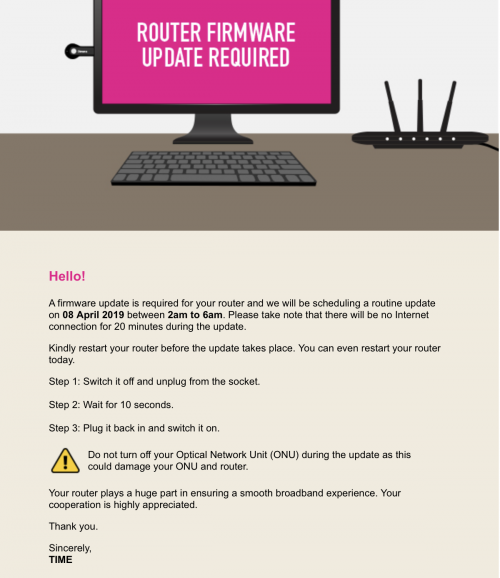
guys, Time gonna remote update firmware for their default router. What if we are using our own router?

user posted image
*
No action required on our own 3rd party routers I think.
kmrdeva
post Apr 7 2019, 11:06 PM

Look at all my stars!!
*******
Senior Member
4,790 posts

Joined: Jan 2003
QUOTE(Seng89 @ Apr 7 2019, 11:00 PM)
What I mean is actually Time advertised 500mbps and 1gbps.. but their default router can't get this speed .. so what the point . ? I can buy router myself, but this is a damn scam no ?
*
Can get this speed for sure. On wired connection to the router.

I bought my own router because I wanted better speed at range, on wireless.
kmrdeva
post Apr 10 2019, 11:53 PM

Look at all my stars!!
*******
Senior Member
4,790 posts

Joined: Jan 2003
QUOTE(chuan1961 @ Apr 10 2019, 11:41 PM)
hello Guys..

can someone tell Time to stop updating my router remotely. I'm not using their default router.
I got email saying my router failed to be updated and TIME will do the update again soon.
Im sure everyone who's changed their router got that email.
So how ?
*
Didn't receive email like this. I'm using my own router.

10 Pages < 1 2 3 4 > » Top
 

Change to:
| Lo-Fi Version
0.0345sec    0.23    7 queries    GZIP Disabled
Time is now: 22nd December 2025 - 04:12 AM