

*edited
This post has been edited by Metallics: May 19 2019, 11:32 AM
Notebook Recommendation Thread v.31, Need To Buy Laptop... Please Come In
Notebook Recommendation Thread v.31, Need To Buy Laptop... Please Come In
|
|
 May 19 2019, 11:31 AM May 19 2019, 11:31 AM
|
 
Junior Member
100 posts Joined: Nov 2007  
|
*edited
This post has been edited by Metallics: May 19 2019, 11:32 AM |
|
|
|
|
|
May 19 2019, 12:22 PM
|

Senior Member
992 posts Joined: May 2009
|
QUOTE(ZM Fong @ May 19 2019, 12:06 AM) Well said weight wise, I'm not looking forward for super slim (i understand tht too slim have bad ventilation) yet not too bulky coz is for travel..Preferred max weight and min battery life? Can accept gaming laptop?  battery is ok, I will find my way for plug in. hope not to have gaming laptop coz is expensive but if have good offer why not la. sigh, kiasu buyer with tight budget. |
|
|
May 19 2019, 02:56 PM
Show posts by this member only | IPv6 | Post
#2823
|

Senior Member
8,240 posts Joined: Apr 2017
|
QUOTE(skydrake @ May 19 2019, 12:22 PM) weight wise, I'm not looking forward for super slim (i understand tht too slim have bad ventilation) yet not too bulky coz is for travel.. I think regular laptop more suit you, here are some options with dGPU:battery is ok, I will find my way for plug in. hope not to have gaming laptop coz is expensive but if have good offer why not la. sigh, kiasu buyer with tight budget. Acer Swift 3 SF314-54G-52L8 / 59WJ +RAM Lenovo Yoga 520 81C80016MJ / 17MJ +RAM (1 slot only) HP Pavilion 15-CS2010TX +RAM - high sRGB IPS according to NBC, small battery HP Pavilion 15-CS0033TX +RAM+SSD - small battery HP Pavilion 14-CE0082TX / CE0083TX +RAM - small battery If you want gaming laptop, can consider Illegear Raven Lite with 100% sRGB (wait for sale) |
|
|
May 19 2019, 04:25 PM
|

Junior Member
47 posts Joined: Dec 2009
|
Hi, can recommend to me one laptop:
Budget: Below 4k Usage: normal usage (browsing, watch video, office), no heavy gaming Spec : 15 inch and above, weight below 1.7kg, windows os, at least 8gb ram, at least 512gb Thank you. This post has been edited by firedragon0074: May 19 2019, 04:42 PM |
|
|
May 19 2019, 04:44 PM
Show posts by this member only | IPv6 | Post
#2825
|
|
Senior Member
8,240 posts Joined: Apr 2017
|
QUOTE(firedragon0074 @ May 19 2019, 04:25 PM) Hi, can recommend to me one laptop: 15 inch below 1.7kg? Very hard to find...Budget: Below 4k Usage: normal usage (browsing, watch video, office), no heavy gaming Spec : 15 inch and above, weight below 1.7kg, windows os, at least 8gb ram, at least 512gb Thank you. Preferred min battery life? Mind low sRGB display and non-upgradable RAM? |
|
|
May 19 2019, 04:47 PM
|
|
Junior Member
47 posts Joined: Dec 2009
|
QUOTE(ZM Fong @ May 19 2019, 04:44 PM) 15 inch below 1.7kg? Very hard to find... Min battery life 5 hours. Ok with non upgradable ram but at least need 8gb. Ok with low sRGB display. Preferred min battery life? Mind low sRGB display and non-upgradable RAM? Can up to 2.1kg |
|
|
|
|
|
May 19 2019, 04:48 PM
Show posts by this member only | IPv6 | Post
#2827
|

Senior Member
4,082 posts Joined: Apr 2006
|
Hi, is anyone using Dell Inspiron 7380, i7, 16gb & 512 SSD? Thinking of getting this model at Rm4399.
I was wondering if there are any shops that i can view the exact model? I went to pyramid yesterday (dell authorised dealers) but they do not have the display of the models i want to see. This post has been edited by silverwave: May 19 2019, 04:50 PM |
|
|
May 19 2019, 05:19 PM
Show posts by this member only | IPv6 | Post
#2828
|
|
Senior Member
8,240 posts Joined: Apr 2017
|
QUOTE(firedragon0074 @ May 19 2019, 04:47 PM) Min battery life 5 hours. Ok with non upgradable ram but at least need 8gb. Ok with low sRGB display. Lenovo Thinkpad L580, E590/E580, E595Can up to 2.1kg Lenovo Ideapad S340 15 81N80079MJ Acer Swift 3 SF315-51-520J / 54ZB - non-upgradable RAM Suggest upgrading RAM/storage by yourself for cheaper cost |
|
|
May 19 2019, 05:19 PM
Show posts by this member only | IPv6 | Post
#2829
|
|
Senior Member
8,240 posts Joined: Apr 2017
|
QUOTE(silverwave @ May 19 2019, 04:48 PM) Hi, is anyone using Dell Inspiron 7380, i7, 16gb & 512 SSD? Thinking of getting this model at Rm4399 Why this model? Overpriced IMO |
|
|
May 19 2019, 08:47 PM
Show posts by this member only | IPv6 | Post
#2830
|
|
Senior Member
4,082 posts Joined: Apr 2006
|
QUOTE(ZM Fong @ May 19 2019, 05:19 PM) Why this model? Overpriced IMO My company's laptop is Latitude E7470 with similar specs and since i'm leaving the company, i've decided to get one with similar specs. This is the closest i could find actually. What would you recommend? |
|
|
May 19 2019, 10:25 PM
|
|
All Stars
12,089 posts Joined: Jun 2014 From: Kuchai Lama
|
QUOTE(silverwave @ May 19 2019, 08:47 PM) My company's laptop is Latitude E7470 with similar specs and since i'm leaving the company, i've decided to get one with similar specs. This is the closest i could find actually. What would you recommend? hello.. this model got DFO.. price below RM3599 de |
|
|
May 20 2019, 12:24 AM
Show posts by this member only | IPv6 | Post
#2832
|
|
Senior Member
8,240 posts Joined: Apr 2017
|
QUOTE(silverwave @ May 19 2019, 08:47 PM) My company's laptop is Latitude E7470 with similar specs and since i'm leaving the company, i've decided to get one with similar specs. This is the closest i could find actually. What would you recommend? Latitude and Inspiron...one is business another is consumer grade...cannot compareWhy Dell only? |
|
|
May 20 2019, 02:53 PM
Show posts by this member only | IPv6 | Post
#2833
|
|
Senior Member
4,082 posts Joined: Apr 2006
|
QUOTE(ZM Fong @ May 20 2019, 12:24 AM) Latitude and Inspiron...one is business another is consumer grade...cannot compare Quite reliable i feelWhy Dell only? |
|
|
|
|
|
May 20 2019, 03:05 PM
Show posts by this member only | IPv6 | Post
#2834
|
|
Senior Member
8,240 posts Joined: Apr 2017
|
QUOTE(silverwave @ May 20 2019, 02:53 PM) Quite reliable i feel No one can guarantee on reliability FYI, if you want better reliability then go for premium business laptop |
|
|
May 20 2019, 06:54 PM
|

Senior Member
5,631 posts Joined: Aug 2011 From: ☆ Kuching ☆
|
So, I just want to thanks everyone in this forum who helped me in deciding my laptop. Bought myself a Thinkpad T480 without the dGPU and I hope this machine will serve me for a very long time. However there are few thinks that I disappointed with:
1) The external finishing feels rubberized and a fingerprint magnet, both top and bottom cover case. I prefer the case cover finishing. 2) The placement of Fn and Ctrl. But I'll get used to this. 3) My unit came with SSD installed at the HDD bay and connected by an adapter. I wonder how to add another HDD for storage and backup purpose. 4) I received non backlit unit although their representative replied my email confirming that my unit came with backlit keyboard. Misunderstanding. What I regret the most is I try to dissemble my laptop by referring to Youtube without the proper tool. Well, I do have experience dissembling laptop and build my own PC but maybe it's bad luck this time. Since I don't have spudger, I use my small flat head screwdriver to unlock the bottom cover clip, ended up I broke one of the clip and left ugly screwdriver mark at another clip, only 2 days after I received the laptop. The good news; found the replacement part at Aliexpress. The bad news; it cost about RM160.00 and of course it's not covered by warranty. My RM3.4k lesson, or RM160.00 to be accurate are: 1) Get a spudger. Worst case, DIY. 2) Be patient and make sure you done your homework regarding tutorials and tools. Anyway, thank you again to this forum. This laptop might not have dGPU, boring design, and poor screen but how can I hate "Thinkpad", >8 hours battery, replaceable parts, and to my these eyes; this display is way better than my old laptop. This post has been edited by diaBoliQu3: May 20 2019, 06:54 PM |
|
|
May 20 2019, 07:34 PM
Show posts by this member only | IPv6 | Post
#2836
|
|
Senior Member
8,240 posts Joined: Apr 2017
|
QUOTE(diaBoliQu3 @ May 20 2019, 06:54 PM) snip. 1. Thinkpad finishing is like that2. You can swap FN and Ctrl via Vantage I think 3. M.2 SSD and 2.5 inch shares the same slot. If you wish to do future storage upgrade, the only way is via M.2 2242 (WWAN slot) Sad to hear that you broke a clip (I broke a few in my lappy haha). How long it takes for it to arrive? |
|
|
May 20 2019, 08:21 PM
Show posts by this member only | IPv6 | Post
#2837
|
 
VIP
12,925 posts Joined: Mar 2005 From: Kuala Lumpur
|
QUOTE(diaBoliQu3 @ May 20 2019, 06:54 PM) So, I just want to thanks everyone in this forum who helped me in deciding my laptop. Bought myself a Thinkpad T480 without the dGPU and I hope this machine will serve me for a very long time. However there are few thinks that I disappointed with: 1) Typical of Thinkpad. I have tons of fingerprint magnet + oil. But it's easy to remove them also...so not an issue , yes it looks ugly but that's typical of all Thinkpad 1) The external finishing feels rubberized and a fingerprint magnet, both top and bottom cover case. I prefer the case cover finishing. 2) The placement of Fn and Ctrl. But I'll get used to this. 3) My unit came with SSD installed at the HDD bay and connected by an adapter. I wonder how to add another HDD for storage and backup purpose. 4) I received non backlit unit although their representative replied my email confirming that my unit came with backlit keyboard. Misunderstanding. What I regret the most is I try to dissemble my laptop by referring to Youtube without the proper tool. Well, I do have experience dissembling laptop and build my own PC but maybe it's bad luck this time. Since I don't have spudger, I use my small flat head screwdriver to unlock the bottom cover clip, ended up I broke one of the clip and left ugly screwdriver mark at another clip, only 2 days after I received the laptop. The good news; found the replacement part at Aliexpress. The bad news; it cost about RM160.00 and of course it's not covered by warranty. My RM3.4k lesson, or RM160.00 to be accurate are: 1) Get a spudger. Worst case, DIY. 2) Be patient and make sure you done your homework regarding tutorials and tools. Anyway, thank you again to this forum. This laptop might not have dGPU, boring design, and poor screen but how can I hate "Thinkpad", >8 hours battery, replaceable parts, and to my these eyes; this display is way better than my old laptop. 2) Look at the picture below. It's in Vantage , go to Input and just swap it. Don't have vantage ? Do it in BIOS. It's that simple ! 3) umm can use WWAN slot if you want to get another SSD. But you got TB3/USB3.1 - so you can buy an external 2.5" + SSD for backup...take advantage of that ... 4) You can cal support , do you have the SKU details/receipt and do you see the backlit keyboard button , it's Fn + spacebar. If it doesn't work , you can get it replaced. You are paying PREMIUM ON-SITE BUSINESS WARRANTY 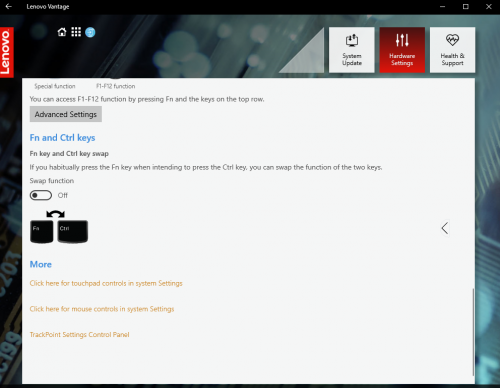 |
|
|
May 20 2019, 09:06 PM
Show posts by this member only | IPv6 | Post
#2838
|
|
VIP
12,925 posts Joined: Mar 2005 From: Kuala Lumpur
|
QUOTE(silverwave @ May 20 2019, 02:53 PM) Quite reliable i feel Don't compare consumer grade vs enterprise gradeLook at lenovo ideapad or whatever they call vs thinkpad. Business laptop are built to last longer and for abuses...today i dropped my X1 extreme , still works...no issue |
|
|
May 20 2019, 10:03 PM
|
|
Senior Member
5,631 posts Joined: Aug 2011 From: ☆ Kuching ☆
|
QUOTE(ZM Fong @ May 20 2019, 07:34 PM) 1. Thinkpad finishing is like that Yeap, that's the reason I dissembled the laptop, to figure out mine came with WWAN slot just like some of the owner reported. Turned out it's easier to just email them and they will send you full detail of parts and hardware, with photo and parts number. 2. You can swap FN and Ctrl via Vantage I think 3. M.2 SSD and 2.5 inch shares the same slot. If you wish to do future storage upgrade, the only way is via M.2 2242 (WWAN slot) Sad to hear that you broke a clip (I broke a few in my lappy haha). How long it takes for it to arrive?  Order: 28/04/2019 Shipped: 05/05/2019 Arrived: 07/05/3029 (Mice & beg), 10/05/2019 (laptop) Honestly I was expecting longer than that due to some of post that I read on their Facebook page. I even read some having inaccurate warranty period. Means I need to buy another M.2 2242 SSD if I want to use the HDD slot? QUOTE(prasys @ May 20 2019, 08:21 PM) 1) Typical of Thinkpad. I have tons of fingerprint magnet + oil. But it's easy to remove them also...so not an issue , yes it looks ugly but that's typical of all Thinkpad So that's not a rubberized finished? What worry me is both my headphone and PC casing rubberized finished ruined by our weather. 2) Look at the picture below. It's in Vantage , go to Input and just swap it. Don't have vantage ? Do it in BIOS. It's that simple ! 3) umm can use WWAN slot if you want to get another SSD. But you got TB3/USB3.1 - so you can buy an external 2.5" + SSD for backup...take advantage of that ... 4) You can cal support , do you have the SKU details/receipt and do you see the backlit keyboard button , it's Fn + spacebar. If it doesn't work , you can get it replaced. You are paying PREMIUM ON-SITE BUSINESS WARRANTY  So, does it stay just like that or it will get shining and peeled off? How long your Thinkpad already? So, does it stay just like that or it will get shining and peeled off? How long your Thinkpad already?Regarding the keyboard, I email them already but unfortunately my spec doesn't come with backlit keyboard, even in the purchase detail spec. I don't mind adding another RM57 for the backlit keyboard but sadly no customization for my unit, just "add to cart". I should've email them regarding that. Sigh... As for the warranty, I don't think mine is premium, thus explain the price. CODE 1Y Depot Start Date: 2019-05-10Duration:12 MonthsDays remaining: 355Coverage: MACHINE This product has a one year limited warranty and is entitled to depot repair service. Customers may call their local service center for more information. Dealers may provide carry-in repair for this product. This post has been edited by diaBoliQu3: May 20 2019, 10:22 PM |
|
|
May 20 2019, 10:28 PM
Show posts by this member only | IPv6 | Post
#2840
|
|
Senior Member
8,240 posts Joined: Apr 2017
|
QUOTE(diaBoliQu3 @ May 20 2019, 10:03 PM) As for the warranty, I don't think mine is premium, thus explain the price. You didn't tick on the RM1 onsite warranty?CODE 1Y Depot Start Date: 2019-05-10Duration:12 MonthsDays remaining: 355Coverage: MACHINE This product has a one year limited warranty and is entitled to depot repair service. Customers may call their local service center for more information. Dealers may provide carry-in repair for this product. |
|
Topic ClosedOptions
|
| Change to: |  0.0283sec 0.0283sec
 0.70 0.70
 6 queries 6 queries
 GZIP Disabled GZIP Disabled
Time is now: 12th December 2025 - 12:42 AM |
 Quote
Quote