
Welcome Guest ( Log In | Register )

Bump Topic Topic Closed RSS Feed

Outline · [ Standard ] · Linear+

Unifi Official TM UniFi High Speed Broadband Thread V35, READ 1ST PAGE FOR TURBO SPEED INFO!

views
     
soonwai
post Oct 13 2018, 06:12 PM


********
All Stars
11,458 posts

Joined: Oct 2007
From: KL


QUOTE(garbanicus @ Oct 13 2018, 04:53 PM)
It's not due to international line, it's due to throttling by TM. P2P (torrent) has been throttled again since turbo started. Youtube is also throttled to a certain extent.
Hence there were discussions about using VPNs and seedboxes, especially for torrent purposes.
*
My torrents (no VPN) aren't being throttled. Yet. Getting about 400-450Mbps on Turbo500 on both my usual test Centos torrent was well as well seeded, highly illegal and IP infringing torrents. Will test again when I get my Turbo800.

I've heard from someone that TM isn't doing any traffic shaping just yet.

QUOTE(ASAP @ Oct 13 2018, 05:01 PM)
Thanks for the answer. If throttled at 15MBps for torrent, I see no point to have 800Mbps unless I miss anything. Any sifu here can share why we need 800 package? Thx
*
To be honest, 95% of the day, I don't go above 150Mbps.

This post has been edited by soonwai: Oct 13 2018, 06:13 PM
soonwai
post Oct 14 2018, 02:20 AM


********
All Stars
11,458 posts

Joined: Oct 2007
From: KL


QUOTE(garbanicus @ Oct 14 2018, 01:26 AM)
Yes it's quite a facepalm doh.gif on TM's part. It's all their marketing ploy.
In front, give users turbo. But then behind, throttle the speeds for certain connections.
Let's just hope they stop throttling once they settle everything or when 'pilot' is over.

As for why the need for turbo, well other than torrent and youtube, every thing else seems not throttled so far.
Downloading from other sites, ftp, windows update, apple, adobe, google drive, etc should still give you max speeds.
If for torrent purposes, get a seedbox. It was discussed in this thread some pages back.
Most VPNs won't let you achieve max speed. And seedbox is a much better, hassle-free solution especially for torrenting/downloading.
I guess you are 1 of the lucky ones bro. I read your previous posts regarding this too.
I've personally tested the CentOS torrents you mentioned, torrents on private and public trackers, all of which are for sure well seeded, and all multiple times. Was never able to go higher than 15MB/s (I'm on 500Mbps, so technically 62.5MB/s). On other sites I'm able to get upto 68MB/s download speeds.

Pretty sure TM is throttling. Many of us have reported since turbo started (V34).
Anyway I'll try to post a video on TM throttling youtube too. See if others are facing the same thing.
*
Also don't forget that average packet size for torrents are smaller than a http/ftp download so your router performance will play a part, even with NAT boost. My area is Sungai Long in case any of you are around here.

Additionally, if you're on Windows, Spectre/Meltdown microcode issues limiting your PC's network performance. This one have to ask johnlai. I'm on a Mac.

The easiest way to test by experimentation is to torrent with and without VPN. If VPN makes a difference then you know that TM is shaping the traffic. I don't use a VPN so I can't say.

This post has been edited by soonwai: Oct 14 2018, 02:25 AM
soonwai
post Oct 14 2018, 04:07 AM


********
All Stars
11,458 posts

Joined: Oct 2007
From: KL


QUOTE(garbanicus @ Oct 14 2018, 02:52 AM)
As mentioned in my previous post, I'm able to get 68MB/s download speeds on certain sites. And yeah consistent speeds I mean. So I don't think my PC's network is having any performance issues.

Anyway I just tested the Centos torrent using my iMac to make sure. Wasn't able to go beyond 10MB/s. =[

I'll post the video regarding youtube throttling later. Hope you guys can help test if it's the same.
Is your friend using VPN? I'm using SSD too (NVMe), so don't think that's the issue.
*
68MBps on torrent or non-torrent?

10 MBps for the Centos torrent is definitely not OK. What iMac? What router?

If you feel TM is shaping your torrents then VPN is your only choice. If you don't assume that then you can look at other possible causes.
soonwai
post Oct 14 2018, 05:56 AM


********
All Stars
11,458 posts

Joined: Oct 2007
From: KL


QUOTE(neekun @ Oct 14 2018, 05:19 AM)
[attachmentid=10068475]

This is my average torrent speed when I am torrenting "video file". On iMac with no VPN and 800Mbps. To me is good enough smile.gif
*
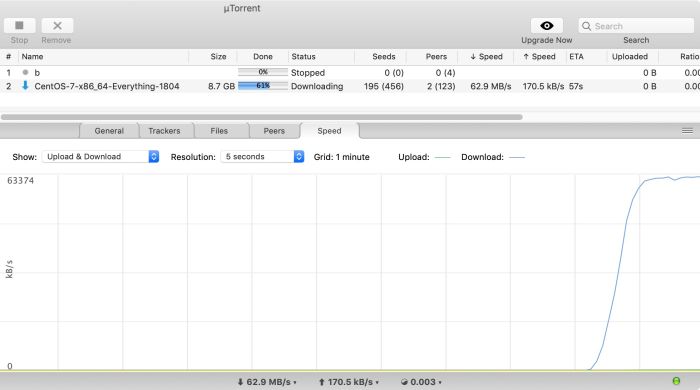
Just testing out a new router, the Mikrotik hAP AC2.

user posted image
Full speed on Turbo500 for Centos torrent. My previous router Rb750Gr3 could only manage 42MBps but it's not a fair comparison since the new router just has a basic default config.


This post has been edited by soonwai: Oct 14 2018, 06:19 AM
soonwai
post Oct 14 2018, 02:06 PM


********
All Stars
11,458 posts

Joined: Oct 2007
From: KL


QUOTE(nyunyu @ Oct 14 2018, 06:57 AM)
Gr3 can't reach full 800Mbps?
*
Dunno yet. I'm only on Turbo500. Still haven't got my 800. For normal HTTP/FTP, no problem. Torrent not sure. hAP AC2 can go full 500 for Speedtest with Fasttrack off!
soonwai
post Oct 14 2018, 02:19 PM


********
All Stars
11,458 posts

Joined: Oct 2007
From: KL


QUOTE(garbanicus @ Oct 14 2018, 09:46 AM)
Non-torrent. Haven't been able to achieve good speeds on torrent. iMac is retina 5k (2015) i7 16gb. Router is rt-ac68u.

Have tried a number of VPNs too. Unfortunately all tested given slower speed than without VPN.  sweat.gif
If you have any VPN recommendations that can support turbo on torrents, pls let me know I'll try.
Is my rt-ac68u the bottleneck? What's the minimum requirements to be able to handle torrents at turbo speed.
To avoid all these speed issues on torrents like ours, hence I'm suggesting using seedboxes.
*
Nice! For sure your iMac is not the bottleneck. I'm testing on my old MBPR 15" 2013 i7 16GB 10.14 and noname USB3 GbE adaptor. Even older than yours.

Not familiar with Asus router but I would look there first.

btw, what torrent client? I'm using uTorrent 1.8.7.
soonwai
post Oct 14 2018, 02:49 PM


********
All Stars
11,458 posts

Joined: Oct 2007
From: KL


QUOTE(garbanicus @ Oct 14 2018, 01:25 PM)
Can you guys do this test?
Basically download large Youtube videos using IDM to see if the speed is throttled.
...
For me:
* The DL always starts at full speed. Goes upto >60MB/s (maxes out 500Mbps).
* Will quickly drop to around 20MB/s.
* Each time pausing and resuming it will burst to >60MB/s and then for sure drop to 20MB/s again.
...
*
Same here. It throttles down to 20MBps for me too. It would make sense for Youtube to throttle since you don't need such high throughput after the buffer has been filled. You only need enough speed to maintain the buffer.

That 4K video is 50GB for a 10hr video. That's only an average bitrate of 11Mbps.
soonwai
post Oct 14 2018, 04:26 PM


********
All Stars
11,458 posts

Joined: Oct 2007
From: KL


QUOTE(garbanicus @ Oct 14 2018, 03:21 PM)
Bro soonwai, you haven't got your 800Mbps. Is it on a separate UniFi account? Or you mean your 500 is getting upgraded to 800?
*
Still waiting for 100-800. Meantime I swap BTU with my neighbour. smile.gif They got turbo-ed last week, 50-500.
soonwai
post Oct 14 2018, 05:57 PM


********
All Stars
11,458 posts

Joined: Oct 2007
From: KL


QUOTE(dragna @ Oct 14 2018, 05:34 PM)
What is the purpose of you swapping their BTU with yours?
*
Cos their BTU is set to 500Mbps. The speed is set in 2 places, PPPoE & BTU.

This post has been edited by soonwai: Oct 14 2018, 06:10 PM
soonwai
post Oct 14 2018, 08:44 PM


********
All Stars
11,458 posts

Joined: Oct 2007
From: KL


QUOTE(dragna @ Oct 14 2018, 06:39 PM)
Does this mean if I took my BTU to my friends house he would enjoy my speed cap even if he hasn’t gotten upgraded?
*
Yes, if he's close by, must be the same OLT for the BTU to connect to and he uses your PPPoE credentials. If OLT in different area then the BTU may not authenticate.

This post has been edited by soonwai: Oct 14 2018, 08:48 PM
soonwai
post Oct 15 2018, 12:08 AM


********
All Stars
11,458 posts

Joined: Oct 2007
From: KL


QUOTE(YoungMan @ Oct 14 2018, 09:19 PM)
So by switching BTU means you switch the phoneline with your neighbour as well? do you use your own login or your neighbour's PPPoE?
*
Yes, phone number follows the BTU. I use my neighbour's PPPoE for 500. I can also use mine but it'll be 100.
soonwai
post Oct 19 2018, 02:26 PM


********
All Stars
11,458 posts

Joined: Oct 2007
From: KL


QUOTE(TheDeadlySins420 @ Oct 19 2018, 12:26 PM)
hi guys, i dont live in KL anymore so can i ask TM to suspend or pause my account?
*
Last year can, now dunno since TM is always shape-shifting.

Anyway last year, my whole family was away 2 months so I requested for TM to temp suspend my Unifi ie: no need to pay.
1. Max suspend 3 months.
2. Must show proof of travel. I showed return flight ticket. I think itinerary also can. Easy to fake.
3. Must be out of contract.
4. Go TMPoint apply.

Maybe got more conditions but that's all I remember.

This post has been edited by soonwai: Oct 19 2018, 02:29 PM
soonwai
post Oct 19 2018, 11:58 PM


********
All Stars
11,458 posts

Joined: Oct 2007
From: KL


QUOTE(pokchik @ Oct 19 2018, 11:31 PM)
i'd like to ask if anyone ever faced similar issue as what i'm facing right now:

ONU AN5506-04-BG intermittently disconnected from internet with power light LED blinking.
i've only faced this issue today after 5mths' usage of this ONU with 10Mbps Lite package
and ~1mth upgrade/re-contract with 100Mbps Lite Best package.
...
*
First thing I'll try is to change the PSU with another one and see if that helps. Usually DC 12V 1A but double check to be sure.

7 Pages « < 5 6 7Top
Topic ClosedOptions
 

Change to:
| Lo-Fi Version
0.2546sec    0.75    7 queries    GZIP Disabled
Time is now: 11th December 2025 - 02:30 PM