Welcome Guest ( Log In | Register )

Bump Topic Topic Closed RSS Feed
7 Pages « < 3 4 5 6 7 >Bottom

Outline · [ Standard ] · Linear+

Unifi Official TM UniFi High Speed Broadband Thread V35, READ 1ST PAGE FOR TURBO SPEED INFO!

views
     
soonwai
post Oct 5 2018, 01:43 PM


********
All Stars
11,458 posts

Joined: Oct 2007
From: KL


QUOTE(kennychan12 @ Oct 5 2018, 12:55 PM)
My 800 mbps package getting around 30 mb/s only , why ah ? Using ssd wor lol
*
Dunno le. Know nothing about your setup. You downloading on LAN? If Windows, get the microcode update to make sure your CPU not stressing too much during heavy network activity. This one need to ask johnlai

How's your TM speedtest? Can get 800?
soonwai
post Oct 5 2018, 06:30 PM


********
All Stars
11,458 posts

Joined: Oct 2007
From: KL


QUOTE(kennychan12 @ Oct 5 2018, 03:33 PM)
Yes im using lan , cpu is i5 8400 ... and speedtest can get 800 ...
*
Wow! 8400, definitely should be fast enough. Mine is an old 2013 MacBook Pro 15” with an i7 4850HQ. LAN is a Realtek USB3 GbE adaptor.

What SSD or HD? Maybe it’s getting full. Something else is the bottleneck.
soonwai
post Oct 5 2018, 08:22 PM


********
All Stars
11,458 posts

Joined: Oct 2007
From: KL


QUOTE(woeikang @ Oct 5 2018, 06:05 PM)
Guys, just to check with those users who got turbo. did you check with your neighbour who use Unifi. do they got turbo as well?
*
My immediate neighbour got Turbo 500. I haven't, still waiting for my 800. That was 2 days. Now I have Turbo 500 and she hasn't. devil.gif Long story... tl;dr: swapped BTU.
soonwai
post Oct 5 2018, 08:33 PM


********
All Stars
11,458 posts

Joined: Oct 2007
From: KL


QUOTE(ben_ang @ Oct 5 2018, 04:49 PM)
have this question, should a unifi subscriber have no STB or STB spoiled, although still can use app to watch unifi playTV, but the data required will share speed and quota with your main account right?
coz STB uses diff tunnel (dunno wat the tech calls,vlan?), so that the internet and STB data is seperated, it won't affect ur speed and quota of your internet or vise versa rite?
*
STB uses its own VLAN, vlan600.
PlayTV uses the internet VLAN, vlan500.
So yes, STB is separate and doesn't affect your internet.
PlayTV is using the same bandwidth as your internet, just like AstroGo, Netflix, iFlix, Youtube, etc...
soonwai
post Oct 5 2018, 10:21 PM


********
All Stars
11,458 posts

Joined: Oct 2007
From: KL


QUOTE(sukhoi35mk @ Oct 5 2018, 07:52 PM)
putra heights... turboed to 500Mbps but using the LAN Cat5e only managed to get 150Mbps DL and UL is 101Mbps  vmad.gif .... router is TP-link C7....

tested with 5Ghz using my laptop come with intel AC 8265 wifi adapter and the speed also the same....  vmad.gif
i had checked the hardware properties.... Ethernet speed between laptop and router is 1Gbps.... wifi and router is 500Mbps.... from router to the fiber termination box is 1000 Mbps full duplex... 

logged a complaint with TM and they will send technical team to my house to investigate... i need to pay for it RM50+  vmad.gif  vmad.gif
*
Try different cable. Ensure C7 NAT Boost is enabled and not hampered by any QoS/traffic monitoring features.
soonwai
post Oct 5 2018, 10:33 PM


********
All Stars
11,458 posts

Joined: Oct 2007
From: KL


QUOTE(fruitie @ Oct 5 2018, 10:23 PM)
Only getting 100Mbps upload and download. doh.gif
*
Check your BTU port speed. Could be that or maybe TM set wrongly. At least they got the upload speed correct. For 500Mbps anyway not your actual 800Mbps.

Does your speedtest have the little spike in speed at the beginning of more than 100? If got then probably not the BTU port speed.

This post has been edited by soonwai: Oct 5 2018, 10:35 PM
soonwai
post Oct 5 2018, 10:38 PM


********
All Stars
11,458 posts

Joined: Oct 2007
From: KL


QUOTE(sukhoi35mk @ Oct 5 2018, 10:33 PM)
thanks bro... will try that

my lappie is running on i5-7300U CPU, 8 GB DDR4-2400,  256 GB SSD.... if really my laptop issue then high bandwidth comes with deep pocket need for latest hardware  biggrin.gif
*
No lah how can 150Mbps bring a 7300U to its knees. My 4850HQ no probs with 500Mbps.
soonwai
post Oct 5 2018, 11:11 PM


********
All Stars
11,458 posts

Joined: Oct 2007
From: KL


QUOTE(fruitie @ Oct 5 2018, 10:50 PM)
How to check this BTU speed? blush.gif I actually suspected this as well and I have talked to 3 CS, only first CS successfully ended my conversation. He reset my port but doesn't help obviously.
Then second and third all ended abruptly. doh.gif

Nope, it never goes beyond 100Mbps.
*
Connect a laptop with a gigabit port straight to BTU lan 1 and check the status for the link speed.

I think it’s in the first post. Lol. I haven’t actually read the first post in its entirety.

Where is quietvampire and his copypasta green text?

Also try a different cable. Cat5e or even short Cat5 should link at 1Gbps if the BTU port is set correctly.

This post has been edited by soonwai: Oct 5 2018, 11:38 PM
soonwai
post Oct 5 2018, 11:36 PM


********
All Stars
11,458 posts

Joined: Oct 2007
From: KL


QUOTE(ldragon @ Oct 5 2018, 11:24 PM)
This is what i encountered, wired with CAT6 cables.
Unifi 800Mbps Turbo + Mikrotik RB1100AHx2
i5-2520m= 336Mbps (CPU utilisation at 100%)
i7-930 = 628Mbps
i7-720QM = 833Mbps
i7-4710HQ = 803Mbps
*
All Windows? Did the Microsoft/Intel microcode updates help with the CPU%?

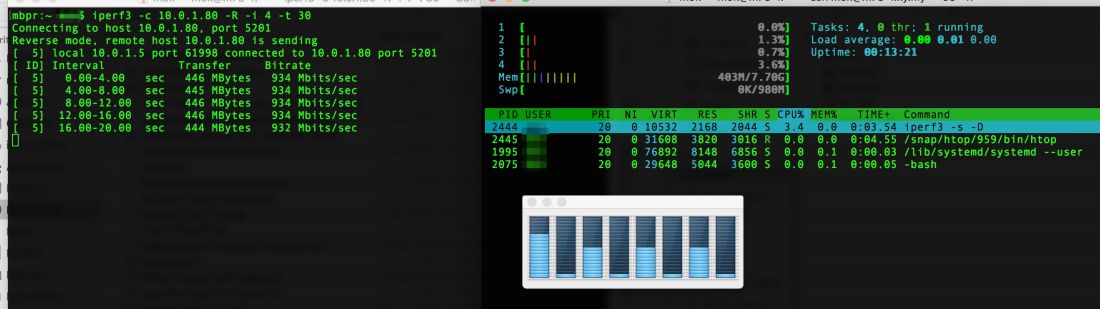
Mine from a few weeks ago.

user posted image

This is what I get during an iperf3 test. MacBook receiving.

MacBook is a Core i7-4850HQ, MacOS 10.13.6. Gigabit USB if that makes a difference. Microcode 0x25. (0x1a is the latest.)
Server is a Core i5-4570T. Ubuntu 18.0.4 LTS. All patches up to L1TF.

The MacBook is now on the latest 0x1a microcode but I've not retested it yet.
soonwai
post Oct 5 2018, 11:42 PM


********
All Stars
11,458 posts

Joined: Oct 2007
From: KL


QUOTE(SilentVampire @ Oct 5 2018, 11:38 PM)
Taking a break from the newbies  whistling.gif
*
fruitie fruitie SilentVampire just called you a newbie! blink.gif
soonwai
post Oct 6 2018, 01:27 AM


********
All Stars
11,458 posts

Joined: Oct 2007
From: KL


QUOTE(anzen600 @ Oct 6 2018, 12:26 AM)
How about Tenda AC1900? Anyone tried that? Seen from lazada review seems not bad. On the other hand, can I know where can I get the unifi password? Apparently the technician does not pasa to me the password. I dont recall receiving sms nor email as well on the pwd. Thank you!
*
Which router? Easiest way is to right-click, Inspect HTML or Source and change the PPPoE "password" field to "text".

That'll work on C1200. 850L doesn't hide the password. Not sure about 842L.
soonwai
post Oct 6 2018, 07:41 PM


********
All Stars
11,458 posts

Joined: Oct 2007
From: KL


QUOTE(stephantsen @ Oct 6 2018, 05:32 PM)
tm offer asymmetrical broadband while time offer symmetrical speed.
*
Not for the 1Gbps plan though which is 1000/500.

Even then that is 2 and a half times faster than TM’s 800Mbps Turd-o package.

This post has been edited by soonwai: Oct 6 2018, 07:44 PM
soonwai
post Oct 7 2018, 12:38 AM


********
All Stars
11,458 posts

Joined: Oct 2007
From: KL


QUOTE(damned_dude @ Oct 6 2018, 10:09 PM)
Hi bro,
Yes you already got 800mbps upgrade.
cat 6e? not cat5e? you need cat6. ALL of your lan cable must be replaced with cat6. cat5e only support 100mbps. U need buy new one with cat6 so you get 1gbps.
make sure both cable is cat6:
1. the lan cable between your pc and main router
2. the lan cable between your main router and modem device (modem is the one connected to your fiber optic cable)

also see if your router support gigabit connection (see first post in this thread or google router specs)

maybe you mistaken cat 6e and cat5e because i looked up cat6e dont exist https://superuser.com/questions/886402/what...thernet-cabling
*
While Cat6 doesn't hurt. You don't need it. Cat5e will do for 1Gbps. I even have short Cat5 running at 1Gbps. Lazy to change.

But if you have no cables then by all means go for the better one.
soonwai
post Oct 7 2018, 02:51 PM


********
All Stars
11,458 posts

Joined: Oct 2007
From: KL


QUOTE(colins @ Oct 7 2018, 09:40 AM)
Hi all, I recently submitted the 30-day termination notice to unifi and received an email reply from them.

It the email it says "However, for the termination to take place, customer is required to visit TM Point between day 31 to day 35 from termination notice date."

I think this is a dirty tactic unifi is trying to make people's life difficult, preventing them an easy way to terminate the service.

What if I miss the 31-35 days window, do I need to resubmit a new 30-day notice??
*
I submitted mine also, total 3 so far, but have not received any email confirmation. Was told about the 5-day window over the phone. What I do now is every 5 days I submit another termination notice. I should be covered for a 15 day window now.
soonwai
post Oct 7 2018, 07:12 PM


********
All Stars
11,458 posts

Joined: Oct 2007
From: KL


QUOTE(Ben Ling @ Oct 7 2018, 06:53 PM)
So TIME is providing DIR-882 AC2600 router for their 1Gbps package while TM still C1200/DIR-842 for 800Mbps...
*
I thought DIR-878L?
soonwai
post Oct 7 2018, 07:48 PM


********
All Stars
11,458 posts

Joined: Oct 2007
From: KL


QUOTE(Ben Ling @ Oct 7 2018, 07:14 PM)
[attachmentid=10058212]
*
Wow, that's nice. Very generous of TIME.
soonwai
post Oct 8 2018, 05:48 PM


********
All Stars
11,458 posts

Joined: Oct 2007
From: KL


QUOTE(PowerRanger69 @ Oct 8 2018, 11:45 AM)
Hi guys, recently changed to 100mbps unifi, agent gave me D-link AC1200 router.

Wanted to test my speed and went to speedtest.net and checked can comfortably get 90+/- speed and upload 50 +/-

but when i go download torrent, my download speed will somehow magically cap at 1mbps even though i never limit the download speed.

anyone knows the solution to this? thanks.
*
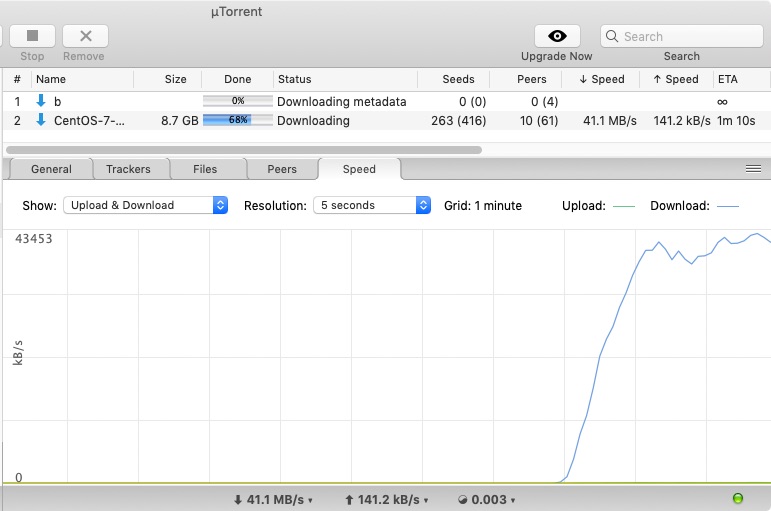
OK here, Turbo 500. Tested with Centos everything. Router is Mikrotik RB750Gr3. uTorrent 1.8.7.

Average 400Mbps speed.
user posted image

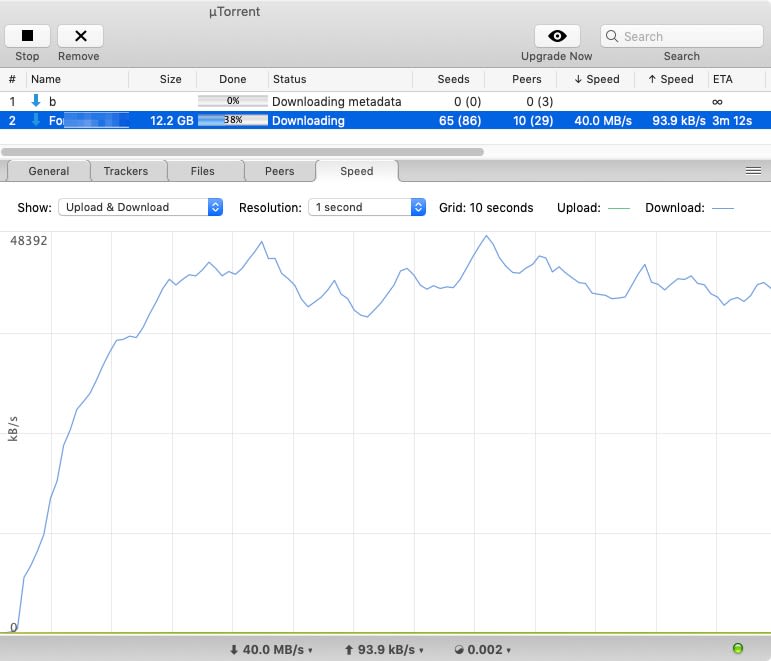
Another one. A well seeded private torrent.

user posted image

About 30secs to ramp up to full speed. 400Mbps average. Peaked at 480Mbps. Could be limitation of the Mikrotik RB750Gr3.

I think some throttling is going on but not specifically on torrents. Needs more tests but it looks like a rate limit on new connections. Or it could be total number of connections but I think the former is more likely.

This post has been edited by soonwai: Oct 8 2018, 05:48 PM
soonwai
post Oct 8 2018, 06:01 PM


********
All Stars
11,458 posts

Joined: Oct 2007
From: KL


QUOTE(d3sm8nd @ Oct 8 2018, 04:35 PM)
Hi im currently on UniFi Advance 30Mbps - Bonanza Campaign, does that mean i can get turbo upgrade to 300Mbps anytime soon? smile.gif
*
Slow, slow, wait. I'm still waiting for my 800Mbps. If you haven't got it by now, probably won't get it anytime soon. Unless you take action!

This post has been edited by soonwai: Oct 8 2018, 06:02 PM
soonwai
post Oct 8 2018, 08:09 PM


********
All Stars
11,458 posts

Joined: Oct 2007
From: KL


QUOTE(PowerRanger69 @ Oct 8 2018, 06:41 PM)
bro, i just try to test my 100mbps speed, go download some movie.. but my download will cap at 1mb/s? supposedly at least go till 5-10mbs ma right?

you know why?
*
No idea without knowing more about your setup or the torrent. I was on 100Mbps previously. Also no problem. Lately I noticed magnet links take longer than usual to pickup the peers. But even then once it starts going, I get 7-10MBps on 100mbps.
soonwai
post Oct 8 2018, 08:15 PM


********
All Stars
11,458 posts

Joined: Oct 2007
From: KL


QUOTE(cannavaro @ Oct 8 2018, 06:52 PM)
...
wahh.. still taking care of your neighbor's BTU I see?  laugh.gif
*
Oh yes, will be hanging onto it till she gets her new router. She has an Asus RT-N12 so won’t be missing much. smile.gif

7 Pages « < 3 4 5 6 7 >Top
Topic ClosedOptions
 

Change to:
| Lo-Fi Version
0.2452sec    0.90    7 queries    GZIP Disabled
Time is now: 12th December 2025 - 09:01 PM