Welcome Guest ( Log In | Register )

22 Pages « < 2 3 4 5 6 > » Bottom

Outline · [ Standard ] · Linear+

Home Networking WiFi Router Discussion Thread, Updated for 2023

views
     
FusionXY
post May 2 2019, 07:08 PM

LAZZIE ON VACATION
*******
Senior Member
3,836 posts

Joined: Aug 2016

QUOTE(nabilishes @ May 2 2019, 06:52 PM)
Is setting up c2300 plug and play. Do we need to input our unifi username and password?

I just got the router today and I can't seem to connect to the Internet. In the router page it says Internet status is connecting.
In Windows network adapter options under ipv4 connectivity : no internet access
*
Hi, you need to setup by keying PPPoE Login Credentials.
ID, For e.g. XXXX@unifi

Thanks.

FusionXY
post May 2 2019, 07:35 PM

LAZZIE ON VACATION
*******
Senior Member
3,836 posts

Joined: Aug 2016

QUOTE(nabilishes @ May 2 2019, 07:20 PM)
I found it!
When using the "Quick Setup", it detected the internet connection type as Dynamic IP. I have changed it to PPPoE and now im able to input username and pw
*
Hi, did you manage to connect to the Internet?

Thanks.

FusionXY
post May 2 2019, 08:20 PM

LAZZIE ON VACATION
*******
Senior Member
3,836 posts

Joined: Aug 2016

QUOTE(nabilishes @ May 2 2019, 07:59 PM)
Yes!
*
Glad to hear that.

Have a nice day.

Thanks.
FusionXY
post May 12 2019, 02:44 PM

LAZZIE ON VACATION
*******
Senior Member
3,836 posts

Joined: Aug 2016

QUOTE(kenary820 @ May 12 2019, 01:54 PM)
By default like its Celcom 3g, not sure if unify using Celcom 3g line for the unifi mobile. This is what i did:
1) create APN "unify" like when using phone in order internet to work. Then try set 3g, 4g and 4g prefered. no luck. refer to pic.
2) the I try to create new Celcom3g and use IP & DNS as in pic. Try set 3g, 4g, 4g prefered. no luck as well.
note: there are default 3g when I cannot change the setting as well.

*
Hi, due to privacy concern. Please cover up IP Address and DNS Address.

Do not post this in public.

Thanks.

This post has been edited by FusionXY: May 12 2019, 03:47 PM
FusionXY
post May 27 2019, 07:55 PM

LAZZIE ON VACATION
*******
Senior Member
3,836 posts

Joined: Aug 2016

QUOTE(andrew9292 @ May 27 2019, 07:44 PM)
Hi all! Need recommendation or advise for 100Mbps (Maxis) @ 2-story home about 2000sq-ft. Current router stock TP-Link C5v, installed at ground floor living hall - wired LAN connection no problem

Problem:
- Not enough wireless bandwidth and stability

A. Current router 2.4Ghz band can only max 40Mbps despite standing right in front of router
B. 5Ghz band max 90Mbps on ground floor, 60Mbps at 1st floor common hall, 25Mbps in bedrooms. Also, 5Ghz frequent dc anywhere on first floor

Looking for:
1. Advise on 5Ghz range & speed: Is it technically possible full 100Mbps be achieved at 1st floor on our setup? So far, heard from many friends to forget about 5Ghz unless somewhat line-of-sight or door-less rooms
2. Budget about 500 - 800, should I: Get a router or try a wireless mesh setup?
3. Good router / wifi mesh recommendation within budget? Also, recommendations to consider (out of budget)?
*
Hi, I would like to recommend you TP-Link Deco M5 ( 3 pack ) to suit your case.
Or you can get TP-Link C2300.
Since you're using Maxis. Are you using VOIP?
If yes, need to use back existing router for VOIP and set new router as an Access Point ( AP ).
You can get from OOKAS in Laada.

Thanks.
FusionXY
post May 27 2019, 08:48 PM

LAZZIE ON VACATION
*******
Senior Member
3,836 posts

Joined: Aug 2016

QUOTE(andrew9292 @ May 27 2019, 08:24 PM)
Thanks for recommending, i've read a bit about this and considering. Do you know if:

1. My understanding, for some devices that do not have '2.4G only' or '5G only' setting, those devices cannot force band and will depend entirely on the M5 Mesh band steering, is that correct? And is this due to only single SSID visible?

2. If i set a device that can setting to either 'only 2.4G' or 'only 5G', the Mesh will still be visible and Mesh will accept the band required by client, is that it? Or will it be invinsible if it thinks that the particular device shouldnt be on that band?
*
Hi, Deco Mesh Wi-Fi systems have a single SSID.

If device supports 5GHz will connect to 5GHz band automatically if it is near the Deco node.
If further away will connect to 2.4GHz. Receiving will connect to the best band on the Deco node.

Thanks.
FusionXY
post May 27 2019, 11:12 PM

LAZZIE ON VACATION
*******
Senior Member
3,836 posts

Joined: Aug 2016

QUOTE(andrew9292 @ May 27 2019, 10:53 PM)
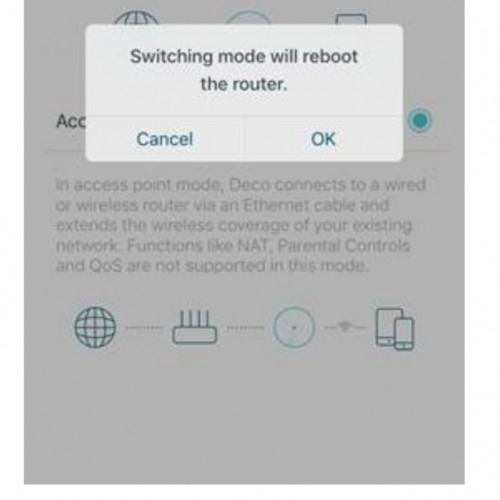
Thanks! Also want to ask, in AP mode, there must be first M5 connect to Maxis router with Lan cable?

What about the other two M5? In 3 pack, do all three M5 need to be connect with Lan cable or only the first M5?

user posted image
*
Hi, only the first M5 connect with LAN Cable.

The rest need to pair with Bluetooth Connection.
The other two can use LAN Cable connection to get full speed due to Wi-Fi interference.

Thanks.
FusionXY
post Jun 2 2019, 11:35 AM

LAZZIE ON VACATION
*******
Senior Member
3,836 posts

Joined: Aug 2016

QUOTE(Hou_JaI @ Jun 2 2019, 10:32 AM)
just managed to install Archer c9 and from my phone can reach 500 mbps. but on my desktop which is using a wifi dongle, tplink t4uh, it only can reach 250/300 mbps ...

do i need to upgrade the dongle to t9uh which is ac1900?

archer c9 is ac1900...
*
Hi, you may switch to T9UH.

Someone changed from T4UH to T9UH and the result was impressive.
Does your desktop has an USB 3.0 Port?

Thanks.
FusionXY
post Jun 2 2019, 12:59 PM

LAZZIE ON VACATION
*******
Senior Member
3,836 posts

Joined: Aug 2016

QUOTE(Hou_JaI @ Jun 2 2019, 12:01 PM)
Yes. Its USB 3. Alright. Getting a t9uh. Fingers cross it would get better
*
You will notice a difference after installed.
Give it a try.

QUOTE(getalong6165 @ Jun 2 2019, 12:14 PM)
Is Archer A9 a good purchase for under rm300 for unifi 100mbps ? Using Mikrotik RB952Ui-5ac2nD now but only getting 30 mbps on the 1st floor with wifi usb from tp link TL-WN722N
*
Hi, may I know what's your current router model?

And your Wi-Fi USB Adapter is very old. Using old technology. I suggested you to get T4UH.

Thanks.
FusionXY
post Jun 11 2019, 05:12 PM

LAZZIE ON VACATION
*******
Senior Member
3,836 posts

Joined: Aug 2016

QUOTE(nescafe86 @ Jun 11 2019, 10:36 AM)
I plan to subscribe Unifi 100 MBps at my house.
1. Is Archer C60 is the best?
2. If that so, should I buy in advance and let the Unifi technician help to install?

Sorry I'm not good at this area since never buy a router before. I appreciate you guys idea.
*
Hi, Archer C60 is suitable for you.
Suitable for 100Mbps plan. Not suitable when want to upgrade later. I suggested you to get Archer A6 instead.

Thanks.

FusionXY
post Jun 11 2019, 08:12 PM

LAZZIE ON VACATION
*******
Senior Member
3,836 posts

Joined: Aug 2016

QUOTE(se800i @ Jun 11 2019, 05:15 PM)
Archer C60 is similar to the modem given by tm itself rite?
*
Hi, TM/TIME provide Archer C1200 to customers.
It is the same as A6 but A6 performs better than C1200.
TM/TIME provide the C1200 which is the old type maybe V1.

Thanks.
FusionXY
post Jun 16 2019, 02:53 PM

LAZZIE ON VACATION
*******
Senior Member
3,836 posts

Joined: Aug 2016

QUOTE(Jason @ Jun 16 2019, 02:36 AM)
Have experience using TP Link Archer C7 with Unifi 100mbps. Good performance, lousy range, stable.

Today installed Maxis 30 mbps fiber and they gave TP Link Archer C5v... biggest problem is it’s unstable. Will disconnect after a while. Want to upgrade.

What’s a good WiFi router with good range. Budget around RM600~700

Asus RT-AC86U good choice?
Or the TP Link AC2300?

Which has better range and stability.
*
Hi, C2300 is definitely the best choice for your case.
Are you using both Maxis and Unifi?
Or which?

If Maxis, need to reuse old router for VOIP.
Just disable Wi-Fi connection on the main router.
If not using, then use C2300 as main router.

Thanks.
FusionXY
post Jun 16 2019, 02:58 PM

LAZZIE ON VACATION
*******
Senior Member
3,836 posts

Joined: Aug 2016

QUOTE(blacktubi @ Jun 16 2019, 02:54 PM)
RT-AC86U is one of the consumer routers with the best range in the market right now. Ranked top 5 on SNB.

But make sure you buy local unit. China version are cheaper for a reason. Their transmit power is limited.
Please correct your post.

All TP-Link routers do not support Maxis VOIP on router mode.

Only ASUS routers offer full Maxis VOIP for now.
*
Oh thanks.

I'm talking about C2300 not ASUS.

Can share out which ASUS support VOIP.
I don't research a lot about ASUS Router.

Thanks.

This post has been edited by FusionXY: Jun 16 2019, 02:59 PM
FusionXY
post Jun 16 2019, 03:03 PM

LAZZIE ON VACATION
*******
Senior Member
3,836 posts

Joined: Aug 2016

QUOTE(blacktubi @ Jun 16 2019, 03:00 PM)
All ASUS router support Maxis VOIP with the Maxis profile by connecting back to original router and disable WiFi.

All TP-Link router DO NOT support VOIP even when using Maxis profile. Something to do with VLAN configuration.
*
OK. Thanks for the clarification.

Actually, I'm talking about use back the old router and set an access. Am I right?

So, you mean TP-Link Router cannot use VOIP at all?

Thanks.
FusionXY
post Jun 27 2019, 12:00 AM

LAZZIE ON VACATION
*******
Senior Member
3,836 posts

Joined: Aug 2016

QUOTE(Gaza @ Jun 26 2019, 11:51 PM)
After reading up on it and checking the dimensions, the router is not gonna fit my shelf cause without antenna is already 6” height and my shelf can only fit router 7” height. 😅 So need to find a router with more conventional shape. Or should i use it without antenna? Unfortunately can’t really place it anywhere else...

So i should get the Asus AC68 instead? Any other model worth considering since the AC68 sounds like it’s already a few years old or it’s still a good router at this stage?
*
Hi, since your budget is below RM 1K.

You may get D-Link AC5300 Router.

If you don't mind the speed. Then can get deco M5.
M9 Plus need to top up.

Thanks.
FusionXY
post Jul 9 2019, 06:57 PM

LAZZIE ON VACATION
*******
Senior Member
3,836 posts

Joined: Aug 2016

QUOTE(Sitting Duck @ Jul 9 2019, 06:51 PM)
Hi Guys,

Need some help choosing a router. Appreciate some expert advice.

Currently using Unifi 500Mbps package. Having issue with d-link router that TM supplied.

I have narrow down to a couple of TP-LINK router that I would like to purchase :

Archer A9 (RM 259)
Archer A7 (RM 312)
Archer C7 (RM 379)
Archer A10 (RM 459)
Archer C9 (RM469)

I am leaning towards A9 due to the good review seen on some websites and the price. I wonder why A9 would be cheaper than A7.

Any advice given is much appreciated.

Thank you.
*
Hi, Archer C7 and C9 are using the old chipset.

Get the A9 or A10.
Archer A9 have a better processor and ram than C9.
Archer C9 is very old and outdated. You may get the C2300 which is the most recommended router as of now.
Archer A10 doesn't have an USB Port.

Thanks.

FusionXY
post Jul 15 2019, 07:45 PM

LAZZIE ON VACATION
*******
Senior Member
3,836 posts

Joined: Aug 2016

QUOTE(labtec @ Jul 15 2019, 07:13 PM)
If I want to use my old Dlink modem in bridge mode(thru LAN cable) as another wifi access point in my house, do I select ISP as Streamyx(PPPoE) or Others during the setup?
[attachmentid=10284353]

i used to setup it successfully before but after reset it, it keep having this error saying "string too long"  doh.gif

i also have following LAN setup already
[attachmentid=10284354]

[attachmentid=10284355]
*
Hi, you mean that you wanna make this router as an access point?

You don't need to setup PPPoE.
Just disable DHCP on the router which function as Access Point.
Plug to LAN 1 Port on the old router.

Thanks.
FusionXY
post Jul 20 2019, 01:09 AM

LAZZIE ON VACATION
*******
Senior Member
3,836 posts

Joined: Aug 2016

QUOTE(davidw89 @ Jul 20 2019, 12:01 AM)
I have the D-Link DIR-842 C2 by Unifi. I want to plug a cable into the device and run it downstairs and have another Wifi router extend the wifi. What device can do this? Also, should I change the firmware on the D-LINK DIR-842 C2 to a non-Unifi version?
*
Hi, if you wish to use D-Link as a secondary router through LAN Cable.

Just reset the reset and disable DHCP.
Connect to LAN Port 1.

Thanks.
FusionXY
post Jul 28 2019, 01:09 AM

LAZZIE ON VACATION
*******
Senior Member
3,836 posts

Joined: Aug 2016

QUOTE(Nairdamil @ Jul 28 2019, 12:33 AM)
Hi, i purchased a tplink wifi extender for my 2nd floor...however when i connect to the wifi extender, the speedtest show slower result compared to i connect directly to ac1200 tplink router...can u guys recommend me whether should i upgrade the router to a better 1 or just stick to using the current router...unifi speed is only 300mbps
*
Hi, would like to advise you to sell off the TP-Link Wi-Fi Extender.

Purchase TP-Link C2300 instead to cover whole house.

Thanks.
FusionXY
post Jul 29 2019, 10:51 PM

LAZZIE ON VACATION
*******
Senior Member
3,836 posts

Joined: Aug 2016

QUOTE(noname2188 @ Jul 29 2019, 02:00 PM)
House type: Landed (terrace)
Size of house: 2000sqf and 3 floors
Features required: Stable Coverage
Number of devices connected to WiFi: 5
Internet Speed: 300Mbps
Budget: <RM2000
Current Situation: Unifi is setup in ground floor but third floor couldn't get any internet coverage

There are some recommendations on mesh wifi. What about your input? If mesh wifi is recommended, any recommended shop that assist to provide installation or setup?
*
Hi, for your case.

You may get the ASUS RT-AC86U 2-pack here

Or you can get the AC5300 here

22 Pages « < 2 3 4 5 6 > » Top
 

Change to:
| Lo-Fi Version
0.2007sec    0.33    7 queries    GZIP Disabled
Time is now: 24th December 2025 - 03:01 AM