Welcome Guest ( Log In | Register )

Outline · [ Standard ] · Linear+

Home Networking WiFi Router Discussion Thread, Updated for 2023

views
     
nokia6280
post Jul 23 2021, 10:47 AM

Look at all my stars!!
*******
Senior Member
5,705 posts

Joined: Sep 2011


QUOTE(KronenZerg @ Jul 22 2021, 01:26 PM)
Hello ..
any idea why my tv box (EVPAD) cannot work using LAN line when i plug into either UNIFI modem or their router? It can detect WIFI and run but not LAN line.
My previous TPLINK works well with LAN on the tvbox.
*
This is EVPAD support question to be precious....
nokia6280
post Jul 30 2021, 11:43 AM

Look at all my stars!!
*******
Senior Member
5,705 posts

Joined: Sep 2011


QUOTE(Alan Yee @ Jul 29 2021, 10:11 PM)
It is the client device issue, got a lot of device of different model and each perform differently. It is a give and take for mesh system at this price point.
Don't has other system to test, so can't comment if really AX73 will solve my issue.
*
One thing for sure when comparing with my original Maxis Wifi router with AX73 that i placed at the same location AX73 really extend my wifi coverage to place where weak signal from 1 to 1.5/2 bars to full bars...

Standard setup is without OFDMA and TWT, now i have activated both, will observe on whether will the signal unstable.. so far 12 hours without any problem.
nokia6280
post Aug 3 2021, 11:29 AM

Look at all my stars!!
*******
Senior Member
5,705 posts

Joined: Sep 2011


QUOTE(Alan Yee @ Aug 2 2021, 12:06 PM)
Found out the D-Link DIR-3060 mesh router + DRA-2060 mesh enabled extender able to separate 2.4Ghz and 5Ghz + 5Ghz into 3 separate SSID.
Need to add the extender into the mesh network with smart connect 1st, then only disable the smart connect. Won't work if not enabling the smart connect for the 1st time.
Still under monitoring. Feel frustrated with these consumer grade mesh WiFi that is not flexible in setup.
*
Being used for few days now and so far connection is stabled, Mesh at this moment is not in may purchase list were AX73 enough to cover my entire house tongue.gif Maybe next year where i planned to move to somewhere that double of my current stay... brows.gif
nokia6280
post Aug 3 2021, 05:02 PM

Look at all my stars!!
*******
Senior Member
5,705 posts

Joined: Sep 2011


QUOTE(Alan Yee @ Aug 3 2021, 01:22 PM)
After monitor a few day, this mesh system too often to auto disconnect and connect many of my devices with different reception strength, and the worst being the one that has very bad reception.
Due to the mesh roaming, the router very likely to reassign new connection even I didn't move my location.
I don't know if this is the nature of mesh system or this D-Link model combo being too busy or the router itself also is not stable in providing the connection.
The router and the mesh node unit already in the latest firmware. Even the the system can separate all the 2..4Ghz and 5GHz SSID, the disconnection still happen.
Will try to disable the mesh function, going back to the normal mode.

Well, maybe the AX73 is the final solution for all the mess.
*
I don't have much knowledge on mesh but before buying AX73 i bought cheap mercusys halo s12 that hoping to be able to extend my wifi coverage to areas that is weak wifi. End up i have to give up.

Problems that i am facing were;

1. The mesh connection is not stable, to many packet drop when doing ping. bangwall.gif
2. Round trip ping time most of the time is high 100 to few thousand. shocking.gif
3. Internet speed not stable.

I have friends using deco M9 and according to them connection is very stable but what i understand the distance in between mesh node cannot be too far otherwise you will no get optimize performance.

nokia6280
post Aug 16 2021, 10:42 AM

Look at all my stars!!
*******
Senior Member
5,705 posts

Joined: Sep 2011


QUOTE(claudetan @ Aug 14 2021, 06:34 PM)
how your ax73? do you think can it cover double story house?

currently using the stock unifi wifi, so far on second floor i can get 30 to 40 mbps, but some time it totally lost connection, saw some cashback deal in shopee, thinking to change it.
*
So far so good... my kids at level 2 with full bars of 5Ghz connections.. previously during their classes they always complained either connection slow, dropped or no connection, since i replaced with AX73 never heard they complaining.

I have checked with them few times and they gave me .. thumbsup.gif
nokia6280
post Aug 16 2021, 10:49 AM

Look at all my stars!!
*******
Senior Member
5,705 posts

Joined: Sep 2011


QUOTE(hoaxer @ Aug 15 2021, 07:21 PM)
Hi Guys,
      please help to recommend :

House type: apartment
Size of house: 3 room 900 sq ft
Features required: stable wifi
Number of devices connected to WiFi: 6 - 7
Internet Speed: Time 100mbps
Budget: 300-500

Currently using the original Huawei and D-link DIR-850L given by TIME.
1) Both modem and router placed at living room
2) Used TP-link power line extender to 1 of the room for Lan connection with a desktop pc
3) Poor wifi connection when using laptop wifi at the farthest room.

Would like to upgrade to have a better wifi connection. Do i need to change both modem and router ? Planing to move to a double story landed house also.

Thanks in advance.
*
I am using AX73 for my double story around 1300 sqf, so far my kitchen (toward the end of my house) and 3 bed rooms upstairs receiving strong wifi signal. For your 900 sqf not sure is AX73 over killed but my philosophy is buying for future...

As for your PC you may consider buying dual band wireless usb adapter, which i did it to my PC, by doing so you don't need to pull any cable. I placed my pc at level 2 and so far 5G connection is perfect...
nokia6280
post Aug 16 2021, 10:52 AM

Look at all my stars!!
*******
Senior Member
5,705 posts

Joined: Sep 2011


QUOTE(tarvalslain87 @ Aug 16 2021, 10:33 AM)
House type: Landed
Size of house: 1k sqft per floor / 3 floors
Features required: Long range and stable
Number of devices connected to WiFi: 8-10 devices
Internet Speed: Unifi 100 Mbps
Budget: ~RM500?

Currently my Ground floor is installed with the stock modem/router by TM (silver), first floor Asus  RT-N14UHP setup as AP (connected with Ethernet cable) and 2nd floor Asus RT-AC66U setup as AP (connected with Ethernet cable)

Grd floor modem/router is situated at my back alley so the signal is very bad with the stock modem/router. So basically my grd and 1st floor are sharing the same AP router.

Now im only getting about 30 Mbps with wifi. Most of the time ill be having at least 3-4 devices connecting to it simultaneously.

Current setup is already 5 years old. So im thinking of changing the 1st floor AP router.

Hope to get some suggestions smile.gif
*
Considering investing on a wifi 6 router and pair with 2 mesh wifi 6 extender? but definitely over your budget. Sometimes you need to invest a little more for some desire needs.
nokia6280
post Aug 16 2021, 06:19 PM

Look at all my stars!!
*******
Senior Member
5,705 posts

Joined: Sep 2011


QUOTE(tarvalslain87 @ Aug 16 2021, 11:20 AM)
So you mean that I should replace the stock TM modem/router with a wifi 6 router? Then adding 2 mesh extender for 1st and 2nd floor?

Will it make a difference if I change the stock modem/router? As I’m connecting it through Ethernet cable to my 2 AP. So if I just change to a better AP router, will it suffice?
As my Fibre connection is at the back end of my house, I didn’t use it for wifi but just as a main modem/router to connect to my other AP routers through Ethernet cable.
So as per above, can I just replace the AP to see an improvement? Or you would still recommend to change the stock modem/router?
Oh just did a speed test through my phone wifi, I can get close to 60 Mbps if I’m close to my AP routers. My desktop could get up to 80 Mbps. So I’m not sure if it’s the AP routers functionality has degraded since it’s 5 years old
*
If you have no signal issue at your ground floor than changing your 2 APs with stronger wifi signal may solve your problem, such as TP-Link Deco M4?
nokia6280
post Aug 20 2021, 02:44 PM

Look at all my stars!!
*******
Senior Member
5,705 posts

Joined: Sep 2011


new AX70 firmware update, anyone done it? any issue after applied? notworthy.gif
nokia6280
post Aug 26 2021, 10:34 AM

Look at all my stars!!
*******
Senior Member
5,705 posts

Joined: Sep 2011


QUOTE(sicklad77 @ Aug 26 2021, 09:06 AM)
Hi, need advice and do bear with me. I’m still noob and trying to figure out the lingos as well.

isp : unifi 300mbps
Router : ac66u (4 years old)
AP : deco m4 (free from unifi)
House : 3200sqft
Devices connected : 15x (tv,phones,pc,ipcamera etc)

so my asus router is connected on my ground floor and my M4 is on the second floor connected via lan cable and settings change to AP mode.

before this I’m able to get 300mbps on downstairs but now I’m only getting less than 30mbps downstairs even standing next to the router.
It’s only after I disconnect the 2.4ghz then reconnect then I’m getting the full speed.
I’m suspecting that since I’m using same settings and name for the wifi, if I’m at the ground floor it is still connected to the upstairs M4 and does not auto-connect to the router.
How to fix this? Should I buy a wifi6 router to fix this??
*
Use different name for wifi router and Deco M4?
nokia6280
post Aug 27 2021, 12:13 PM

Look at all my stars!!
*******
Senior Member
5,705 posts

Joined: Sep 2011


QUOTE(CY THAM @ Aug 26 2021, 03:59 PM)
Hi All, want to ask when input Unifi mobile prepaid simcard into Huawei modem model B316-855, it is not work, no wifi signal, but when insert simcard into phone and share wifi signal it is work.
Is it mean that unifi mobile prepaid simcard unable to use in modem?
But, I have checked the band for the modem is enough for unifi mobile simcard.

Anyone can advise?
*
https://www.youtube.com/watch?v=TrvK-NAD7zU
nokia6280
post Sep 6 2021, 02:23 PM

Look at all my stars!!
*******
Senior Member
5,705 posts

Joined: Sep 2011


QUOTE(claudetan @ Sep 6 2021, 01:42 PM)
yup, btw, the drop to 1 mbps is upload speed, while the download speed from 100 to 220 mbps, some time can reach 200, some time only 100
*
This was happening after firmware update?
nokia6280
post Sep 14 2021, 10:01 AM

Look at all my stars!!
*******
Senior Member
5,705 posts

Joined: Sep 2011


QUOTE(GNR @ Sep 13 2021, 02:39 PM)
You're recommending ax 73 is because its coverage area is big enough and capable of penetrating several walls?

I'm just curious as I'm wondering if the ax 20 would be good enough considering my Internet package is just 100mbps.
*
For your information.... I go for ax73 because signal strengths is much more better comparing with ax20.

My personal opinion is go for ax70 so you have less worried of coverage concerns and also for future expansion.

https://www.blacktubi.com/review/tp-link-archer-ax73/
nokia6280
post Sep 24 2021, 09:41 AM

Look at all my stars!!
*******
Senior Member
5,705 posts

Joined: Sep 2011


QUOTE(adix4 @ Sep 23 2021, 12:03 PM)
House type: Landed
Size of house: 2000sqf / 2 storey
Features required: Just reccoemend me the best one
Number of devices connected to WiFi: plus minus 11-12 devices
Internet Speed: 100mbps
Budget:RM500-1000

I just want something that can last long because right now every year got upgrade internet speed
*
Maybe you share your current setup before someone could share their thought should be the test... nod.gif
nokia6280
post Jan 24 2022, 05:40 PM

Look at all my stars!!
*******
Senior Member
5,705 posts

Joined: Sep 2011


QUOTE(lansi_raju @ Jan 21 2022, 11:33 AM)
hi folks,
since this thread more about home networking, I do need some sifu advise for my home current setup.
user posted image

My Unifi is 500mbps, and about 6-8 devices connect to Wifi.
current painpoint is that mobile devices on ground & 2nd floor [priority] has full signal strength but most of the time when streaming youtube/FB, needs buffer, and sometimes in the end not running in the end got fed up using mobile data instead.

Hardware side:
1. Can I change the Switch to Wireless Router will solve the issue?

Configuration side:
1. Without changing any hardware, is it able to resolve by performing some configuration?
*
Just a proposal, buy AX72/ AX73 to replace your current router and buy 2 RE605X/ RE505X to place at your G and Level 1.
nokia6280
post May 12 2022, 12:09 PM

Look at all my stars!!
*******
Senior Member
5,705 posts

Joined: Sep 2011


QUOTE(GigaNano @ May 5 2022, 06:57 PM)
Hello all Sifus, I have to let you guys know that I have 0 knowledge in wifi, modem and routers. I need help in getting a better modem/router for my parents.
First of all, I am using Time (stay condo), its super fast and stable nothing much to complain, but my parents house currently using Maxis (landed property), always got internet disconnecting issues, unstable speed, sometimes fast, sometimes slow even when the plan is 100Mbps.

I attached a picture below, hope you can see the maxis setup.
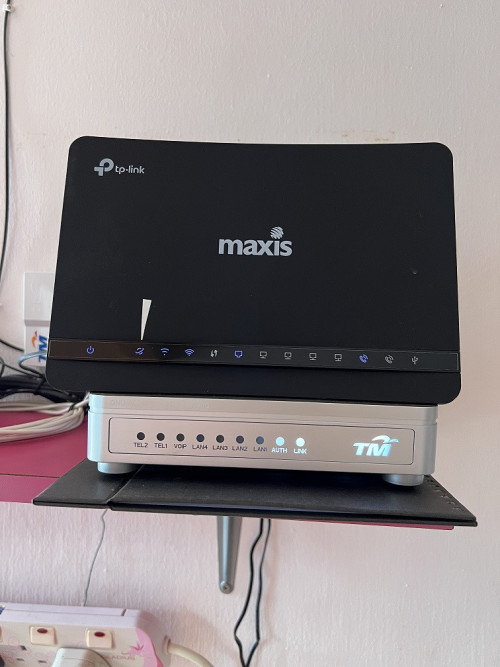
user posted image

I want to change this setup, would like you guys to kindly recommended me a modem/router (one unit/ or I need to get separate devices, im not too sure).
The property in which this new setup will operate is a double story terrace house (size roughly 900 sqft first floor and 1000 sqft ground floor).

House type: Landed
Size of house: 900 sqft first floor and 1000 sqft ground floor
Features required: No need special features
Number of devices connected to WiFi: 4 devices
Internet Speed: Maxis 100Mbps
Budget: 300-400

Just to add on a bit, is that silver box thing the modem? and do i need to change it? The other piece should be the router which will need replacement.
*
First of all, you need to know it is due to the black box faulty or line not stable, if line not stable even changing modem wouldn't help....

use https://www.speedtest.net/ to find out.

This post has been edited by nokia6280: May 12 2022, 12:10 PM


Change to:
| Lo-Fi Version
0.0350sec    0.86    7 queries    GZIP Disabled
Time is now: 11th December 2025 - 08:54 AM
