Welcome Guest ( Log In | Register )

Outline · [ Standard ] · Linear+

Home Networking WiFi Router Discussion Thread, Updated for 2023

views
     
Zot
post Jun 17 2021, 12:30 PM

Look at all my stars!!
*******
Senior Member
7,934 posts

Joined: Mar 2014
QUOTE(ben3003 @ Jun 17 2021, 12:01 PM)
I see.. iphone cannot see the established speed lol. Let me try some app. Because even not busy, but dunno why if stream from pc to shieldtv sometimes will hang hang especially high bitrate file. Eventho my pc showing like 600mbps speed and the file like bluray remux mkv bitrate is around 30MB/s. Thats y i wan to see wat is the local wifi network speed. I wont care if i not using local streaming but then i guess tis is important to me.

but those proper mesh unit like deco will have dedicated band for backhaul right? I believe only like onemesh which is dualband only.
*
If streaming gives problem I guess it is not about bandwidth but the processing power of the device or perhaps faulty unit. Cheap unit tend to have slower processor thus hung up if buffer gets overloaded I think.

The difference between Deco Mesh and OneMesh has nothing to do with dedicated backhaul. When Asus came up with AiMesh, you just need to upgrade a bunch up listed models with AiMesh firmware and you can have mixed Asus model to perform like mesh network. Other players at that time you need to buy a mesh units set. If you already have one model, you have to ditch that one and replace with mesh set.

To simulate what Asus did, then TP came out with OneMesh. The Deco Mesh comes as a set of AP decicated for mesh. Therefore the OneMesh is cheaper solution. The difference is here:
https://community.tp-link.com/us/home/stories/detail/536

I do not have mesh routers but if I need to setup one, I will opt for LAN connection between mesh. The reason is simple. The connection speed between two unit related to distance and also obstructions. So, the further the distance, the backhaul speed will also suffer. You will have improved coverage but you will lose speed and not utilizing full router potential if you use wireless backhaul. You do not want to put your mesh unit near to each other right? laugh.gif

I bought an Asus since it was the only brand that enable you to build mesh network stage by stage since can mix model. However, my Asus GT-AC5300 can get at least 200Mbps anywhere inside my two storey house when I run speed test. Maybe not much thing in my house laugh.gif
Zot
post Jun 17 2021, 01:07 PM

Look at all my stars!!
*******
Senior Member
7,934 posts

Joined: Mar 2014
QUOTE(ben3003 @ Jun 17 2021, 12:58 PM)
Thanks for the explanation. Problem with LAN is need proper wiring and very time consuming in the process and also the routing from downstairs to upstairs need tembus ceiling lol. Actually my house only 5ppl use and is mostly my parents and uncle family. I might not need mesh solution but perhaps more powerful single router.
*
My Unifi fiber goes under porch roof and through the wall behind TV cabinet and to BTU in TV cabinet. All hidden. I drill the hole and made preparation a day before the contractor came. So, it done very fast.

If I want to have a mesh router on 1st floor. I will route the cable the same way. Put short trunk outside the house and drill a hole in master bedroom where I can place a cabinet or shelf to put the unit. Will be nice without messy wiring inside the house. smile.gif

Yes, single router is easier. Since now everyone gone AX crazy, the AC price much cheaper. Actually the old top tier router has some feature of the AX already. The modulation even go to QPSK 1024.
Zot
post Mar 22 2022, 08:52 AM

Look at all my stars!!
*******
Senior Member
7,934 posts

Joined: Mar 2014
QUOTE(ayams02 @ Feb 28 2022, 01:50 PM)
House type: Landed
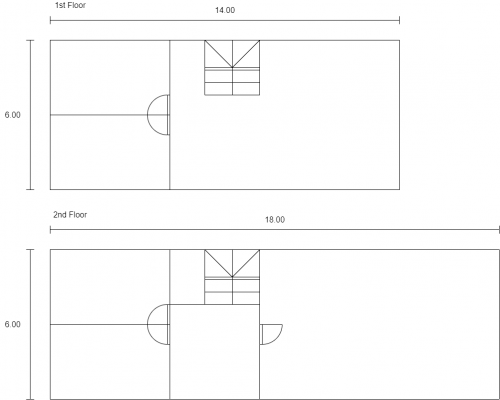
Size of house: Meter: refer attachment
Number of floor : 2
Features required: Speed, WiFi 5, low packet loss, coverage (one router/AC preferred)
Number of devices connected to WiFi: Up to 15
Internet Speed: Unifi 100 Mbps, next month upgrade to Maxis 300 Mbps
Budget: RM500 max

Hello Lowyat. I want to upgrade my networking hardware. Currently I have AC-86U. I found a listing in Carousell: Asus AC5300 for RM350. Description said condition ok, just weak 2.4 GHz signal. Maybe can fix with wrtmerlin? Need your opinion. Thank you~

user posted image
*
I'm using GT-AC5300 which is the same as RT-AC5300 (except for gaming feature I guess). My house is same two floor around 3000sqrt. My router is located in hall next to TV against wall facing car porch. I could still get around 200Mbps in closed room on upper floor leaning against the back wall of the house, tested using my cellphone @5GHz. My line is 500Mbps.
Zot
post May 10 2022, 08:44 AM

Look at all my stars!!
*******
Senior Member
7,934 posts

Joined: Mar 2014
QUOTE(GigaNano @ May 5 2022, 06:57 PM)
Hello all Sifus, I have to let you guys know that I have 0 knowledge in wifi, modem and routers. I need help in getting a better modem/router for my parents.
First of all, I am using Time (stay condo), its super fast and stable nothing much to complain, but my parents house currently using Maxis (landed property), always got internet disconnecting issues, unstable speed, sometimes fast, sometimes slow even when the plan is 100Mbps.

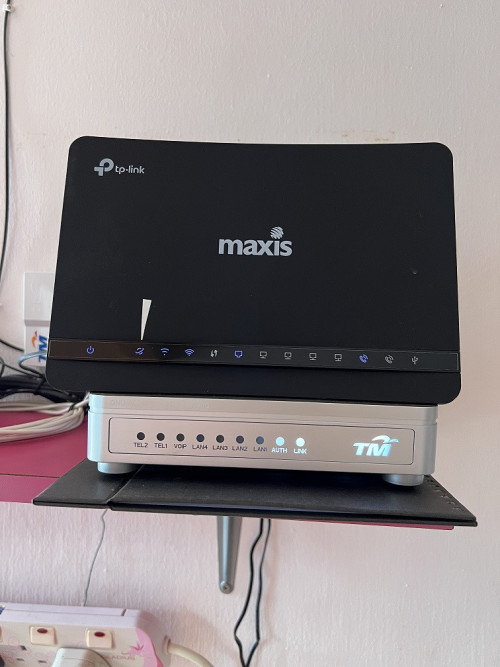
I attached a picture below, hope you can see the maxis setup.

user posted image

I want to change this setup, would like you guys to kindly recommended me a modem/router (one unit/ or I need to get separate devices, im not too sure).
The property in which this new setup will operate is a double story terrace house (size roughly 900 sqft first floor and 1000 sqft ground floor).

House type: Landed
Size of house: 900 sqft first floor and 1000 sqft ground floor
Features required: No need special features
Number of devices connected to WiFi: 4 devices
Internet Speed: Maxis 100Mbps
Budget: 300-400

Just to add on a bit, is that silver box thing the modem? and do i need to change it? The other piece should be the router which will need replacement.
*
That silver box is the BTU (Broadband Termination Unit) which convert to and fro between optical and electrical signal. That device belong to service provider and under their responsibility if faulty whatever.

Consumer side starts from router.

Zot
post Jun 5 2025, 08:33 AM

Look at all my stars!!
*******
Senior Member
7,934 posts

Joined: Mar 2014
QUOTE(contagiouseddie @ May 20 2025, 07:43 PM)
Currently using bundled WiFi router from CelcomDigi. Staying in a semi-d, the corners all have signal dropping. Using a TP-Link repeater and it is a hit and miss. I'm thinking of Archer A73 or Asus AX4200 to replace the current WiFi router. Only 3-4 devices with no gaming requirement, mostly work and YouTube.
*
I live in two storey semi-D house too. I bought Asus last time because during that time Asus was able to do mesh with different Asus router model, no need to buy one set of Mesh router at once, offered by other brand. That way I can add router later when needed.

I bought the Asus GT-AC5300 and place it in living hall. I tested the speed that my phone can established in far corner of a room with door closed and I still get 200Mbps. So, still using it until now and never need another router for mesh setup laugh.gif


Change to:
| Lo-Fi Version
0.0250sec    0.63    7 queries    GZIP Disabled
Time is now: 1st December 2025 - 03:42 PM