Welcome Guest ( Log In | Register )

Outline · [ Standard ] · Linear+

 TM Hijacking DNS and injecting ads!

views
     
tungfunglaw
post Sep 15 2018, 12:27 PM

Getting Started
**
Junior Member
258 posts

Joined: Aug 2008


QUOTE(Drewkk @ Sep 13 2018, 02:47 AM)
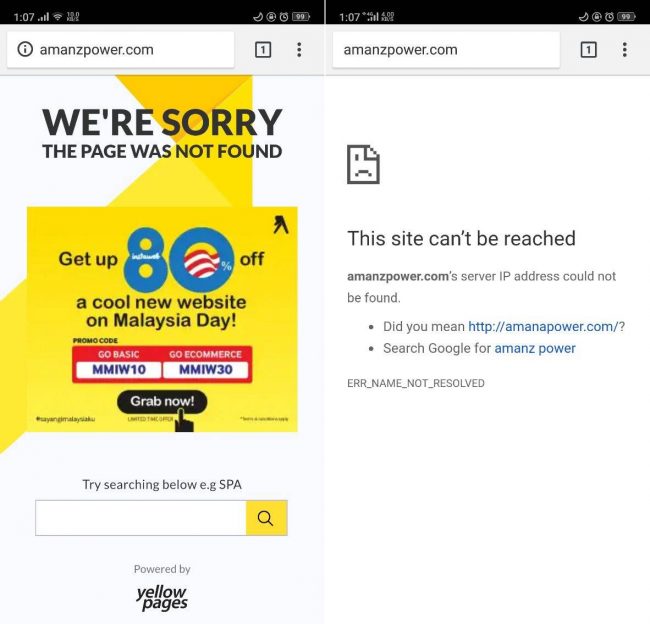
I noticed today that unresolved domains and 404 errors on websites without SSL/TLS are getting hijacked by ads!!!!

https://imgur.com/a/6FDuBgc

WTH?

The site behind the ads is http://www.zygy.com which boasts TM as a customer.
*
TM is a business entity and i dont see it's an adware or so.

What's the point of this complaint? They are just advertising on a non-exist webpage, didnt re-route your request.

Or are you saying TM cannot do any advertising at all?


Moogle Stiltzkin
post Sep 15 2018, 11:27 PM

Look at all my stars!!
*******
Senior Member
4,456 posts

Joined: Jan 2003
bruce.gif

This post has been edited by Moogle Stiltzkin: Jun 13 2021, 06:54 AM
JohnLai
post Sep 16 2018, 12:39 AM

Skeptical Cat
*******
Senior Member
3,669 posts

Joined: Apr 2006
QUOTE(Moogle Stiltzkin @ Sep 15 2018, 11:27 PM)
because paying subscription fee is not enough.... wtf? already paying customer so this is overboard.
*
Tell that to ASTRO........ lol.gif
young_97
post Sep 17 2018, 11:58 PM

Enthusiast
*****
Senior Member
828 posts

Joined: Dec 2010
QUOTE(tungfunglaw @ Sep 15 2018, 12:27 PM)
TM is a business entity and i dont see it's an adware or so.

What's the point of this complaint? They are just advertising on a non-exist webpage, didnt re-route your request.

Or are you saying TM cannot do any advertising at all?
*
Because the TM DNS server is violating the IETF RFC DNS standard on NXDOMAIN response
System Error Message
post Sep 19 2018, 12:18 AM

Regular
******
Senior Member
1,781 posts

Joined: Jul 2010
I never get this, i set the DNS on my router and use the router to hijack the entries and force it to use the router's set DNS. For those of you who set it on your PC and still get the ads, did you also set up your router or is it the one given by TM? Because i dont see TM doing interceptions on the WAN side of things like what BT does in the UK with their network that irregardless their network does intercept DNS and possibly http (its how they block websites).
rd0038
post Sep 19 2018, 12:43 AM

New Member
*
Junior Member
25 posts

Joined: Sep 2009
QUOTE(System Error Message @ Sep 19 2018, 12:18 AM)
I never get this, i set the DNS on my router and use the router to hijack the entries and force it to use the router's set DNS. For those of you who set it on your PC and still get the ads, did you also set up your router or is it the one given by TM? Because i dont see TM doing interceptions on the WAN side of things like what BT does in the UK with their network that irregardless their network does intercept DNS and possibly http (its how they block websites).
*
i set opendns in ipv4, still can get ads, then i disable ipv6, it back to normal show server not found, no more redirect to TM site.
System Error Message
post Sep 19 2018, 05:45 AM

Regular
******
Senior Member
1,781 posts

Joined: Jul 2010
QUOTE(rd0038 @ Sep 19 2018, 12:43 AM)
i set opendns in ipv4, still can get ads, then i disable ipv6,  it back to normal show server not found, no more redirect to TM site.
*
https://developers.google.com/speed/public-dns/docs/using
Give this a try. theres both ipv4 and ipv6 DNS servers.
Doraku
post Sep 19 2018, 11:21 AM

Old threads digger
******
Senior Member
1,155 posts

Joined: Apr 2016


TM is using DNS spoofing for advertising???? devil.gif devil.gif
https://amanz.my/2018179417/

https://telekom-malaysia-dns-spoofing-attack.blogspot.com/

(Telekom Malaysia is replacing the page not found error message with malicious spam using Nervesis Midas malware.)

» Click to show Spoiler - click again to hide... «


soonwai
post Sep 30 2018, 09:05 PM


********
All Stars
11,456 posts

Joined: Oct 2007
From: KL


I made a report of this to Unifi via live chat and email. Ticket is still open. Let's see what happens.

Basically I reported TM's DNS 1.9.1.9 is returning an IP address instead of NXDOMAIN for a non-existent domain. The examples that I used to illustrate the problem to TM are:

For a domain that exists with 1.9.1.9.
CODE
mbpr:~ $ dig @1.9.1.9 fuckyou.com
; <<>> DiG 9.12.2-P2 <<>> @1.9.1.9 fuckyou.com
;; Got answer:
;; ->>HEADER<<- opcode: QUERY, status: NOERROR, id: 11643
;; flags: qr rd ra; QUERY: 1, ANSWER: 1, AUTHORITY: 0, ADDITIONAL: 1

;; OPT PSEUDOSECTION:
; EDNS: version: 0, flags:; udp: 512
;; QUESTION SECTION:
;fuckyou.com.   IN A

;; ANSWER SECTION:
fuckyou.com.  62485 IN A 208.236.11.179


For a domain that doesn't exist with 1.9.1.9.
CODE
mbpr:~$ dig @1.9.1.9 wheresmymotherfuckingturboupgrade.com

; <<>> DiG 9.12.2-P2 <<>> @1.9.1.9 wheresmymotherfuckingturboupgrade.com
; (1 server found)
;; global options: +cmd
;; Got answer:
;; ->>HEADER<<- opcode: QUERY, status: NOERROR, id: 64110
;; flags: qr rd ra; QUERY: 1, ANSWER: 1, AUTHORITY: 0, ADDITIONAL: 1

;; OPT PSEUDOSECTION:
; EDNS: version: 0, flags:; udp: 512
;; QUESTION SECTION:
;wheresmymotherfuckingturboupgrade.com. IN A

;; ANSWER SECTION:
wheresmymotherfuckingturboupgrade.com. 0 IN A 202.71.99.195


For a domain that doesn't exist with 1.1.1.1.
CODE
mbpr:~$ dig @1.1.1.1 wheresmymotherfuckingturboupgrade.com


; <<>> DiG 9.12.2-P2 <<>> @1.1.1.1 wheresmymotherfuckingturboupgrade.com
; (1 server found)
;; global options: +cmd
;; Got answer:
;; ->>HEADER<<- opcode: QUERY, status: NXDOMAIN, id: 53011
;; flags: qr rd ra; QUERY: 1, ANSWER: 0, AUTHORITY: 1, ADDITIONAL: 1

;; OPT PSEUDOSECTION:
; EDNS: version: 0, flags:; udp: 1452
;; QUESTION SECTION:
;wheresmymotherfuckingturboupgrade.com. IN A

;; AUTHORITY SECTION:
com.   900 IN SOA a.gtld-servers.net. nstld.verisign-grs.com. 1538312681 1800 900 604800 86400


Update: 1/10
TM technician called. Want to come over to check because I have problem browsing to website. Told him that my problem is I am able to browse to website when, by right, I shouldn't be able to. Confusion arises after this. Told him that he can check this wherever he is as long as he's using TM's DNS eg: 1.9.1.9. Just don't come here and charge me RM53.

This post has been edited by soonwai: Oct 1 2018, 04:52 PM
filage
post Oct 9 2019, 08:04 AM

Regular
******
Senior Member
1,205 posts

Joined: Aug 2014
I find it strange that my on my ADSL router, my phones can set Static IP and setup whatever DNS I want and upon DNSLeak test, it shows the DNS server I set.

However on another Unifi TM router, no matter what DNS is set on the phone, it will will never be used, instead defaults to TM DNS. Strangely with laptops and PC, it obeys the DNS that is set on these machines, just Mobile devices do not obey.

What's the reasons for this? Does router have DNS priority eg. the phone disobey the static DNS set inti it but chooses to use router's DNS because router says its DNS is superior?! Any such thing?
junclj
post Oct 9 2019, 08:23 AM

Look at all my stars!!
*******
Senior Member
2,347 posts

Joined: Apr 2008


Why I get this? I'm using Unifi too.

Attached Image
soonwai
post Oct 9 2019, 11:42 AM


********
All Stars
11,456 posts

Joined: Oct 2007
From: KL


QUOTE(junclj @ Oct 9 2019, 08:23 AM)
Why I get this? I'm using Unifi too.

Attached Image
*
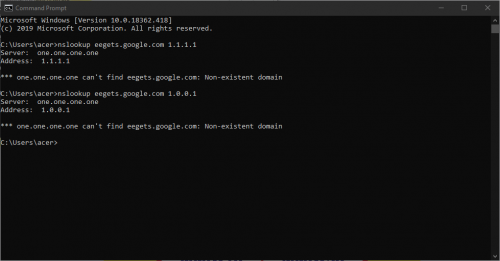
No such domain. I'm getting the same here with Google's DNS and 1.1.1.1.
mamakap
post Oct 23 2019, 08:05 AM

Casual
***
Junior Member
403 posts

Joined: Jan 2005
Today I turn on my DNSSEC on my Asus AC86 router with Merlin firmware for testing and start browsing, I too can't access any website but suddenly there are TM Unifi ads poping up. Strange.... dry.gif mad.gif rclxub.gif

This post has been edited by mamakap: Oct 23 2019, 08:07 AM
AV_2018
post Oct 23 2019, 10:59 AM

Casual
***
Junior Member
451 posts

Joined: Apr 2018
QUOTE(Drewkk @ Sep 13 2018, 02:47 AM)
I noticed today that unresolved domains and 404 errors on websites without SSL/TLS are getting hijacked by ads!!!!

https://imgur.com/a/6FDuBgc

WTH?

The site behind the ads is http://www.zygy.com which boasts TM as a customer.
*
Nothing new... They've been doing this for ages. It's even advertised in yellow pages if I remember correctly. Encountered it back in Streamyx days when using the default DNS server.

Edit: Here it is... https://www.tm.com.my/nxd/Pages/default.aspx


QUOTE(mamakap @ Oct 23 2019, 08:05 AM)
Today I turn on my DNSSEC on my Asus AC86 router with Merlin firmware for testing and start browsing, I too can't access any website but suddenly there are TM Unifi ads poping up. Strange....  dry.gif  mad.gif  rclxub.gif
*
What DNS server are you using? TM default server doesn't seem to support DNSSEC. Google and Cloudflare should work.

QUOTE(SilentVampire @ Sep 13 2018, 02:27 PM)
True, forgot about that  bangwall.gif DNSSEC is still the way to go, for ‘secure’ DNS queries.
*
From my understanding, DNSSEC only protects domains that have DNSSEC properly set up. Even then, it doesn't protect DNS queries from being intercepted. For full protection, DNS over HTTPS or TLS is needed. These are supported by Android 9 and Firefox as well as Google and Cloudflare servers but requires manual set up to enable. In addition, Cloudflare servers do DNSSEC validation by default.

QUOTE(Anime4000 @ Sep 13 2018, 03:09 AM)
on my test, TM do Hijack DNS query.

[attachmentid=10018887]

but... on Windows 10, dont have, maybe DNSSEC ?

it is allowed to Hijack customer traffic ? like replace HTTPS to HTTP ?
*
Can't reproduce this issue here.
user posted image

It should be impossible to downgrade HTTPS to HTTP if your browser is working properly and you entered https:// in the URL. It'll just say fail to establish connection.

Edit: Can't reproduce using TM's DNS server too. Maybe they only show ads to some requests or customers?

Edit2: TM doesn't seem to be hijacking DNS requests to Cloudflare for blocked domains:
» Click to show Spoiler - click again to hide... «


This post has been edited by AV_2018: Oct 23 2019, 01:51 PM
taqu
post Oct 23 2019, 03:24 PM

Enthusiast
*****
Junior Member
864 posts

Joined: May 2005
QUOTE(SilentVampire @ Sep 13 2018, 02:27 PM)
True, forgot about that  bangwall.gif DNSSEC is still the way to go, for ‘secure’ DNS queries.
*
From my limited knowledge, DNSSEC & DNS-over-HTTPS/TLS (DoH / DoT) are 2 different technologies. Ideally both should be used.

Quoting from Reddit:

"DNSSEC and DoT/DoH are not substitutions for each other. The former verifies that the dns answer is valid, the latter encrypts the dns request between the requesting (client)/server and responding server (no listening). They can both be used separately or together."

Original link:
https://www.reddit.com/r/pihole/comments/ai...ps_with_dnssec/

I think most major public DNS servers support DoH/DoS. If you router support it, then great news for you.

Not all domains support DNSSEC. Browsing through my router's dnsmasq syslog entries, less than 10% domains we visited support DNSSEC. I guess most are not, if based on my home usage. Please correct me if I'm wrong.

This post has been edited by taqu: Oct 23 2019, 03:26 PM
taqu
post Oct 23 2019, 04:12 PM

Enthusiast
*****
Junior Member
864 posts

Joined: May 2005
Off-topic but still DNS-related rolleyes.gif

1. I'm using Clean Browsing DNS to block p0rn & malware sites.
2. Since Clean Browsing DNS doesn't block ads sites, I've enabled Adblock in my router to block most ads sites, on top of Clean Browsing DNS.
3. DNSSEC enabled. DoT not yet tried.
4. I've forced all DNS requests to go through Clean Browsing DNS. Even if hard-coded, they still get redirected.
5. Previously using Pi-Hole, but since moving to Clean Browsing DNS, I missed Pi-Hole's dashboard. Therefore I've made my own DNS dashboard using: a) syslog b) syslog-ng c) MariaDB d) Java e) Grafana. So far so good. Will add more features in future.

Attached Image

This post has been edited by taqu: Oct 23 2019, 05:33 PM


Change to:
| Lo-Fi Version
0.0203sec    0.26    6 queries    GZIP Disabled
Time is now: 3rd December 2025 - 11:45 PM