Outline ·
[ Standard ] ·
Linear+
TM Hijacking DNS and injecting ads!
|
TSDrewkk
|
 Sep 13 2018, 02:47 AM, updated 8y ago Sep 13 2018, 02:47 AM, updated 8y ago
|
New Member


|
I noticed today that unresolved domains and 404 errors on websites without SSL/TLS are getting hijacked by ads!!!! https://imgur.com/a/6FDuBgcWTH? The site behind the ads is http://www.zygy.com which boasts TM as a customer. This post has been edited by Drewkk: Sep 13 2018, 02:55 AM |
|
|
|
|
|
SilentVampire
|
Sep 13 2018, 02:56 AM
|
|
|
Change DNS to Google DNS, Cloudflare DNS, or OpenDNS. Everyone who knows how TM works have not used TM DNS for a long time.
They have been doing this shit for a long time.
This post has been edited by SilentVampire: Sep 13 2018, 02:57 AM
|
|
|
|
|
|
TSDrewkk
|
Sep 13 2018, 02:57 AM
|
New Member
|
QUOTE(SilentVampire @ Sep 13 2018, 02:56 AM) Change DNS to Google DNS, Cloudflare DNS, or OpenDNS. No one who knows TM uses TM DNS anymore. They have been doing this shit for a long time. Doesn't work. I already use CloudFlare 1.1.1.1 also tried Google 8.8.8.8 and 8.8.4.4 This post has been edited by Drewkk: Sep 13 2018, 02:58 AM |
|
|
|
|
|
SilentVampire
|
Sep 13 2018, 02:58 AM
|
|
|
QUOTE(Drewkk @ Sep 13 2018, 02:57 AM) Doesn't work. I already use CloudFlare 1.1.1.1 also tried Google 8.8.8.8 and 8.8.4.4 You sure? Changed both on WAN page and DHCP page? What router are you using? |
|
|
|
|
|
TSDrewkk
|
Sep 13 2018, 02:59 AM
|
New Member
|
QUOTE(SilentVampire @ Sep 13 2018, 02:58 AM) You sure? Changed both on WAN page and DHCP page? What router are you using? Ubiquiti USG Only thing that bypassed it is using a VPN either to Australia, America or KL office which is TIME. |
|
|
|
|
|
soonwai
|
Sep 13 2018, 03:04 AM
|
|
|
QUOTE(Drewkk @ Sep 13 2018, 02:47 AM) I noticed today that unresolved domains and 404 errors on websites without SSL/TLS are getting hijacked by ads!!!! https://imgur.com/a/6FDuBgcWTH? The site behind the ads is http://www.zygy.com which boasts TM as a customer. LOL, you're right. Every DNS query to 1.9.1.9 for a non-existent domain returns 202.71.99.195. Never noticed it as I wasn't using TM's DNS. Good find. |
|
|
|
|
|
Anime4000
|
Sep 13 2018, 03:09 AM
|
|
|
on my test, TM do Hijack DNS query. 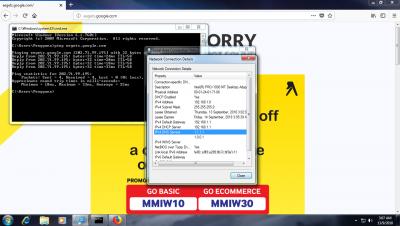
but... on Windows 10, dont have, maybe DNSSEC ? it is allowed to Hijack customer traffic ? like replace HTTPS to HTTP ? This post has been edited by Anime4000: Sep 13 2018, 03:11 AM |
|
|
|
|
|
faizyunus
|
Sep 13 2018, 07:31 AM
|
|
|
QUOTE(Drewkk @ Sep 13 2018, 02:57 AM) Doesn't work. I already use CloudFlare 1.1.1.1 also tried Google 8.8.8.8 and 8.8.4.4 Try run DNS Leak Test to see if your DNS requests are being intercepted/leaked. https://www.dnsleaktest.com/ |
|
|
|
|
|
TSDrewkk
|
Sep 13 2018, 10:47 AM
|
New Member
|
This seems pretty recent too, maybe in the last week or so they started doing this.
What for pay them 300rm each month just to get ads?
|
|
|
|
|
|
jbmsia
|
Sep 13 2018, 11:02 AM
|
New Member
|
QUOTE(Drewkk @ Sep 13 2018, 02:57 AM) Doesn't work. I already use CloudFlare 1.1.1.1 also tried Google 8.8.8.8 and 8.8.4.4 Are you using the router provided by TM? |
|
|
|
|
|
TSDrewkk
|
Sep 13 2018, 11:15 AM
|
New Member
|
QUOTE(jbmsia @ Sep 13 2018, 11:02 AM) Are you using the router provided by TM? No, I'm using a Ubiquiti USG. |
|
|
|
|
|
SilentVampire
|
Sep 13 2018, 12:59 PM
|
|
|
QUOTE(Drewkk @ Sep 13 2018, 11:15 AM) No, I'm using a Ubiquiti USG. My router is not doing that. You are still on TM DNS, otherwise, you won't be affected by it. Check your device and see if they are on TM DNS. I suspect that they are, as I am not getting this message. |
|
|
|
|
|
Anime4000
|
Sep 13 2018, 01:45 PM
|
|
|
QUOTE(SilentVampire @ Sep 13 2018, 12:59 PM) My router is not doing that. You are still on TM DNS, otherwise, you won't be affected by it. Check your device and see if they are on TM DNS. I suspect that they are, as I am not getting this message. doesn't matter if TM DNS, they still modify Unprotected DNS Query. need DNSSEC compatible router |
|
|
|
|
|
miloaisdino
|
Sep 13 2018, 02:06 PM
|
|
|
Or just flash custom firmware on yr router with dnssec. Or worse case get a spare pc/raspberry pi run private dns relay..
Or maybe the 'parental control' settings, block the ip 202.71.99.195
This post has been edited by miloaisdino: Sep 13 2018, 02:07 PM
|
|
|
|
|
|
SilentVampire
|
Sep 13 2018, 02:27 PM
|
|
|
QUOTE(Anime4000 @ Sep 13 2018, 01:45 PM) doesn't matter if TM DNS, they still modify Unprotected DNS Query. need DNSSEC compatible router True, forgot about that  DNSSEC is still the way to go, for ‘secure’ DNS queries. |
|
|
|
|
|
Anime4000
|
Sep 13 2018, 09:57 PM
|
|
|
QUOTE(SilentVampire @ Sep 13 2018, 02:27 PM) True, forgot about that DNSSEC is still the way to go, for ‘secure’ DNS queries. yeah, OP said only works on VPN, I pretty sure his router dont have DNSSEC, nowadays DNS also work in TCP |
|
|
|
|
|
LeonTan
|
Sep 14 2018, 10:50 AM
|
|
|
no wonder sometimes I thought why recently so many ads  |
|
|
|
|
|
pcbase
|
Sep 15 2018, 10:52 AM
|
|
|
after force to reduce unifi price, TM found a way to make money.
|
|
|
|
|
|
Hezegroth
|
Sep 15 2018, 12:09 PM
|
|
|
Yeah hope they can now reduce streamyx price.
|
|
|
|
|
|
GOPI56
|
Sep 15 2018, 12:13 PM
|
|
|
Use Cloud Flare DNS or Google DNS to solve this problem. TM is earning side money by injecting ads.
|
|
|
|
|



 Quote
Quote


 0.0191sec
 0.49
0.49
 6 queries
 GZIP Disabled