

I looked up the website tencent and found people dissing the model for being too expensive... Maybe that's why they are targeting Malaysia market instead of China?
[THUNDEROBOT] Good?, Come in, Share your experience..
[THUNDEROBOT] Good?, Come in, Share your experience..
|
|
 Aug 28 2018, 02:43 PM Aug 28 2018, 02:43 PM
|
 
Newbie
6 posts Joined: Aug 2018 
|
I looked up the website tencent and found people dissing the model for being too expensive... Maybe that's why they are targeting Malaysia market instead of China?
|
|
|
|
|
|
Aug 28 2018, 02:48 PM
|

Junior Member
394 posts Joined: Jan 2014
|
idk.. the price looks competitive enough in malaysia..
their official chinese website is this one http://www.leishen.cn/ |
|
|
Aug 28 2018, 03:06 PM
|
|
Newbie
6 posts Joined: Aug 2018
|
The reviews on their website are all really good! Thanks for sharing the link
 |
|
|
 Sep 23 2018, 09:48 PM Sep 23 2018, 09:48 PM
|

Newbie
1 posts Joined: Sep 2018 
|
QUOTE(CoralineJones @ Aug 28 2018, 01:45 AM) This thread gave me mini heart attacks because I am set on getting the 911 Air, I must say I feel relieved that the brand has sincere and effective after sales service. Hi! Have you purchased the laptop yet? What's your take on the 911 Air? Any issues?I will be buying at an actual store (Thundermatch most likely), so I can immediately check my set! Anyone who's already owned the 911 Air please do share your experience!  Also, yeah it is from Haier which is weird!  I'm also looking to buy this - it looks gorgeous and decent specs as I'm a casual gamer. I'm deliberating between this and the Lenovo Legion y530 [or Legion y730]. |
|
|
Oct 2 2018, 12:24 PM
Show posts by this member only | IPv6 | Post
#85
|

Junior Member
110 posts Joined: May 2012
|
QUOTE(artfuldodger94 @ Sep 23 2018, 09:48 PM) Hi! Have you purchased the laptop yet? What's your take on the 911 Air? Any issues? I'm curious about it too, do tell us how is it when you free I'm also looking to buy this - it looks gorgeous and decent specs as I'm a casual gamer. I'm deliberating between this and the Lenovo Legion y530 [or Legion y730]. |
|
|
Oct 2 2018, 09:33 PM
|

Senior Member
8,240 posts Joined: Apr 2017
|
QUOTE(artfuldodger94 @ Sep 23 2018, 09:48 PM) What's your take on the 911 Air? Any issues? From the pictures, the cooling is only a single fan with shared heatpipes. Could have even worse temps than the FX504 (where the cooling in this thing is aldy bad) |
|
|
|
|
|
Oct 9 2018, 05:26 PM
|
|
Newbie
8 posts Joined: Apr 2018
|
hi all, I want to ask how to fix my fps issues ingame (60-80 fps in dota2, 60-100 in csgo) and constant microstutters. model is 911SE. the cpu gpu temps hover around 60-70+. Also, my graphic settings are set pretty low so I'm not sure what is the issue here. any help is appreciated. thanks.
|
|
|
Oct 9 2018, 06:05 PM
Show posts by this member only | IPv6 | Post
#88
|
|
Senior Member
8,240 posts Joined: Apr 2017
|
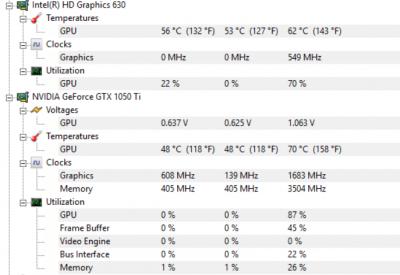
QUOTE(monkaGIGA @ Oct 9 2018, 05:26 PM) hi all, I want to ask how to fix my fps issues ingame (60-80 fps in dota2, 60-100 in csgo) and constant microstutters. model is 911SE. the cpu gpu temps hover around 60-70+. Also, my graphic settings are set pretty low so I'm not sure what is the issue here. any help is appreciated. thanks. Don't just look at temps, look at clock speeds and power consumption too.Can try clean install Windows too if you want |
|
|
Oct 9 2018, 06:29 PM
|
 
Forum Admin
44,415 posts Joined: Jan 2003  
|
Last tested was this one.
Specs OK. Price OK. Appearance OK. Design OK ......... but it's BAD if you intend to game with a mouse. LOL. Burning my hand only, imagine gaming with your mouse getting a blow-dryer on it. This means your right hand gets heated up, and it's only the left side of your right hand. |
|
|
Oct 9 2018, 08:50 PM
|
|
Newbie
8 posts Joined: Apr 2018
|
QUOTE(ZM Fong @ Oct 9 2018, 06:05 PM) Don't just look at temps, look at clock speeds and power consumption too. Here are the temps after a game of dotaCan try clean install Windows too if you want 
|
|
|
Oct 9 2018, 10:04 PM
Show posts by this member only | IPv6 | Post
#91
|
|
Senior Member
8,240 posts Joined: Apr 2017
|
I mean, monitor clock speeds and power consumption while in game. Use Afterburner+Rivatuner
|
|
|
Oct 10 2018, 12:14 PM
|
|
Newbie
8 posts Joined: Apr 2018
|
QUOTE(ZM Fong @ Oct 9 2018, 10:04 PM) I mean, monitor clock speeds and power consumption while in game. Use Afterburner+Rivatuner Is this it? From afterburner, the actual fps is half of the Vulkan FPS on the top left. 
|
|
|
Oct 10 2018, 04:20 PM
Show posts by this member only | IPv6 | Post
#93
|
|
Senior Member
8,240 posts Joined: Apr 2017
|
Have you tried using dx9?
|
|
|
|
|
|
Oct 10 2018, 08:47 PM
|
|
Newbie
8 posts Joined: Apr 2018
|
QUOTE(ZM Fong @ Oct 10 2018, 04:20 PM) Have you tried using dx9? Using vulkan gives me the most fps, dx11 and dx9 put me under 60fps. maybe we should take it to pm to avoid crowding up the thread. |
|
|
Oct 10 2018, 08:51 PM
Show posts by this member only | IPv6 | Post
#95
|
|
Senior Member
8,240 posts Joined: Apr 2017
|
QUOTE(monkaGIGA @ Oct 10 2018, 08:47 PM) maybe we should take it to pm to avoid crowding up the thread. Alright |
|
|
 Oct 23 2018, 09:36 PM Oct 23 2018, 09:36 PM
|
|
Newbie
5 posts Joined: Aug 2018
|
I suggest undervolting CPU by 130mv to lower temperatures by ~10 C
I set mine on 140mv and only got 1 BSOD (After CPU torture test), CPU never went above 90 C ever again, I'll keep mine at 135 mv until i get another BSOD and go lower if that happens. I also suggest undervolting GPU, it won't affect performance but it will lower temperatures by 10 to 5 C, might give a little FPS boost if you perfectly undervolt it using MSI afterburner Ctrl+F |
|
|
Oct 26 2018, 10:46 AM
|
|
Senior Member
8,240 posts Joined: Apr 2017
|
QUOTE(grahamaker123 @ Oct 26 2018, 10:05 AM) local brand? it always looked shady. Thunderobot sells barebones from Clevo and Quanta |
|
|
Jan 15 2019, 12:10 AM
|
|
Junior Member
394 posts Joined: Jan 2014
|
I'm experiencing some weird harddisk usage 100% on local Disk D.. not sure if its harddisk failure or windows / virus or whatever.. bug
but on my SSD (local disk C no such problem..) its effecting my game performance = freezing 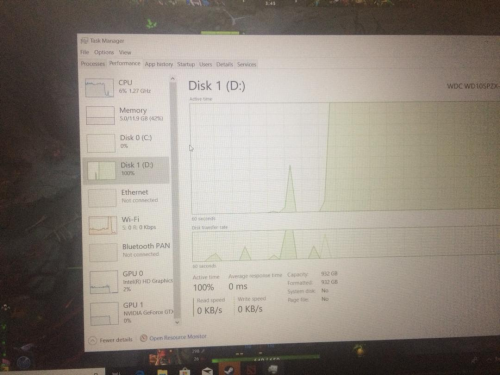 i have already tried resetting my laptop.. after a few days later.. it happen again.. aduhaii .. i have my avast AV always on.. i cant find what program is causing this 100% usage with 0 READ/WRITE SPEED What i tried already: - Check HDD Health Still 100% on HDSentinel - Check Disc Error on D - Defrag D - Reset - Disable Superfetch / etc My suspicion: - HDD Failure?? - Windows 10 bug? Cant play games sometimes it just lagg freeze and .exe stopped working.. This post has been edited by afiq10: Jan 15 2019, 12:14 AM |
|
|
Jan 15 2019, 03:37 AM
|

Junior Member
597 posts Joined: Oct 2018
|
QUOTE(afiq10 @ Jan 15 2019, 12:10 AM) I'm experiencing some weird harddisk usage 100% on local Disk D.. not sure if its harddisk failure or windows / virus or whatever.. bug Copy the game to the ssd and run the game from ssd and test.but on my SSD (local disk C no such problem..) its effecting my game performance = freezing i have already tried resetting my laptop.. after a few days later.. it happen again.. aduhaii .. i have my avast AV always on.. i cant find what program is causing this 100% usage with 0 READ/WRITE SPEED What i tried already: - Check HDD Health Still 100% on HDSentinel - Check Disc Error on D - Defrag D - Reset - Disable Superfetch / etc My suspicion: - HDD Failure?? - Windows 10 bug? Cant play games sometimes it just lagg freeze and .exe stopped working.. |
|
|
Jan 16 2019, 09:14 PM
|

Junior Member
237 posts Joined: Nov 2013
|
Just an update, l have undervolting and repaste my cpu & gpu, and now the temp is just superb!
 Undervolting is simple and highly recommended and repasting is very easy as this laptop is super easy to disassembly (compared to my old laptop Compaq CQ40 which is a nightmare). |
| Change to: |  0.0256sec 0.0256sec
 0.65 0.65
 6 queries 6 queries
 GZIP Disabled GZIP Disabled
Time is now: 5th December 2025 - 05:45 PM |
 Quote
Quote