Welcome Guest ( Log In | Register )

8 Pages « < 5 6 7 8 >Bottom

Outline · [ Standard ] · Linear+

 [THUNDEROBOT] Good?, Come in, Share your experience..

views
     
dylan_chng
post Feb 14 2019, 09:36 PM

On my way
****
Junior Member
693 posts

Joined: Jul 2017
QUOTE(DuitNow @ Feb 14 2019, 07:26 PM)
Atleast problem solved. biggrin.gif

My next laptop, I dont think I want a hdd in it, might as well use sdd instead so less one problem. hmm.gif
*
I don't think a HDD has any place in a laptop because a laptop is bound to be tossed and tumbled and bumped. HDD's can't survive tosses, tumbles and bumps. The only moving parts in laptops should be the cooling fan.
DuitNow
post Feb 14 2019, 09:40 PM

On my way
****
Junior Member
597 posts

Joined: Oct 2018
QUOTE(dylan_chng @ Feb 14 2019, 09:36 PM)
I don't think a HDD has any place in a laptop because a laptop is bound to be tossed and tumbled and bumped. HDD's can't survive tosses, tumbles and bumps. The only moving parts in laptops should be the cooling fan.
*
Agree nod.gif nod.gif nod.gif
yeo1992cc
post Feb 15 2019, 05:00 PM

Casual
***
Junior Member
417 posts

Joined: Mar 2010
From: Chukai


Here to assist!
1. Get CrystalDiskInfo check any warning in HDD.
2. Move paged file, hibernate file, Windows and all programs to drive C (SSD).
3. In task manager, show all, add new column "command" to check any application running on drive D.

*Edited
I also notice WDC WD10SPZX is 5400 RPM only, maybe that's why, suggest get 7200 RPM HDD, and the 5400 RPM HDD turned into external HDD


Hope this help~

This post has been edited by yeo1992cc: Feb 15 2019, 05:27 PM
TSafiq10
post Feb 15 2019, 09:04 PM

Casual
***
Junior Member
394 posts

Joined: Jan 2014
QUOTE(yeo1992cc @ Feb 15 2019, 05:00 PM)
Here to assist!
1. Get CrystalDiskInfo check any warning in HDD.
2. Move paged file, hibernate file, Windows and all programs to drive C (SSD).
3. In task manager, show all, add new column "command" to check any application running on drive D.

*Edited
I also notice WDC WD10SPZX is 5400 RPM only, maybe that's why, suggest get 7200 RPM HDD, and the 5400 RPM HDD turned into external HDD
Hope this help~
*
CrystalDiskInfo did not show any sign of warning..

nevermind bout it.. harddisk replaced..

now working great..
DuitNow
post Feb 15 2019, 09:56 PM

On my way
****
Junior Member
597 posts

Joined: Oct 2018
QUOTE(afiq10 @ Feb 15 2019, 09:04 PM)
CrystalDiskInfo did not show any sign of warning..

nevermind bout it.. harddisk replaced..

now working great..
*
Forgot to ask, they replace same hard disk model or different?
TSafiq10
post Feb 16 2019, 04:04 PM

Casual
***
Junior Member
394 posts

Joined: Jan 2014
QUOTE(DuitNow @ Feb 15 2019, 09:56 PM)
Forgot to ask, they replace same hard disk model or different?
*
same one.
DuitNow
post Feb 16 2019, 04:11 PM

On my way
****
Junior Member
597 posts

Joined: Oct 2018
QUOTE(afiq10 @ Feb 16 2019, 04:04 PM)
same one.
*
Can try errorscan again to confirm it wont took more than 6 hours to complete? hmm.gif
TSafiq10
post Feb 16 2019, 04:35 PM

Casual
***
Junior Member
394 posts

Joined: Jan 2014
QUOTE(DuitNow @ Feb 16 2019, 04:11 PM)
Can try errorscan again to confirm it wont took more than 6 hours to complete? hmm.gif
*
already did it.. completed in 1 hour..
DuitNow
post Feb 16 2019, 04:36 PM

On my way
****
Junior Member
597 posts

Joined: Oct 2018
QUOTE(afiq10 @ Feb 16 2019, 04:35 PM)
already did it.. completed in 1 hour..
*
Can give the 1TB hdd exact model? So fast one hour, I thought might take 3 hours.
TSafiq10
post Feb 16 2019, 05:33 PM

Casual
***
Junior Member
394 posts

Joined: Jan 2014
QUOTE(DuitNow @ Feb 16 2019, 04:36 PM)
Can give the 1TB hdd exact model? So fast one hour, I thought might take 3 hours.
*
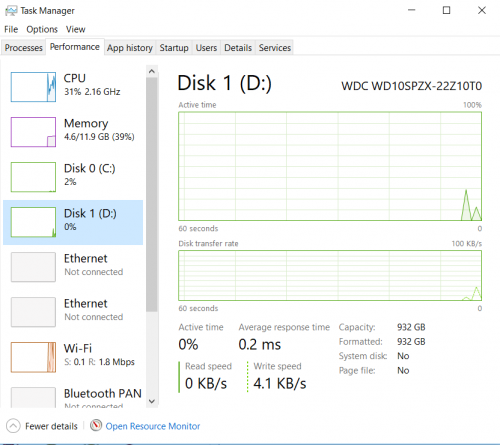
user posted image
DuitNow
post Feb 16 2019, 05:41 PM

On my way
****
Junior Member
597 posts

Joined: Oct 2018
QUOTE(afiq10 @ Feb 16 2019, 05:33 PM)
user posted image
*
From here, its a normal hdd not sshd, so can confirm the previous one took 8 hours to complete 25% is not normal.
TSafiq10
post Feb 16 2019, 06:12 PM

Casual
***
Junior Member
394 posts

Joined: Jan 2014
QUOTE(DuitNow @ Feb 16 2019, 05:41 PM)
From here, its a normal hdd not sshd, so can confirm the previous one took 8 hours to complete 25% is not normal.
*
funny thing is 25% 8 hours.. but still no error report..
DuitNow
post Feb 16 2019, 06:19 PM

On my way
****
Junior Member
597 posts

Joined: Oct 2018
QUOTE(afiq10 @ Feb 16 2019, 06:12 PM)
funny thing is 25% 8 hours.. but still no error report..
*
But the checking speed is ridiculous, and also you never finish it. Maybe the rest of the 75% got bad sectors in it.
TSafiq10
post Feb 16 2019, 07:04 PM

Casual
***
Junior Member
394 posts

Joined: Jan 2014
QUOTE(DuitNow @ Feb 16 2019, 06:19 PM)
But the checking speed is ridiculous, and also you never finish it. Maybe the rest of the 75% got bad sectors in it.
*
idk maybe its not the harddisk that is broken..

SATA Controller problem maybe?
DuitNow
post Feb 17 2019, 09:21 AM

On my way
****
Junior Member
597 posts

Joined: Oct 2018
QUOTE(afiq10 @ Feb 16 2019, 07:04 PM)
idk maybe its not the harddisk that is broken..

SATA Controller problem maybe?
*
But I havent heard sata controller can breakdown before. But mechanical hard disk alot, sometimes depend on luck too.
HarderLife
post Mar 1 2019, 01:34 AM

New Member
*
Newbie
5 posts

Joined: Aug 2018


QUOTE(Buriburi San @ Jan 16 2019, 09:14 PM)
Just an update, l have undervolting and repaste my cpu & gpu, and now the temp is just superb! lust.gif

Undervolting is simple and highly recommended and repasting is very easy as this laptop is super easy to disassembly (compared to my old laptop Compaq CQ40 which is a nightmare).
*
Details please?
Buriburi San
post Mar 3 2019, 10:11 AM

Getting Started
**
Junior Member
237 posts

Joined: Nov 2013
QUOTE(HarderLife @ Mar 1 2019, 01:34 AM)
Details please?
*
Prior undervolting temp during intense gaming:
CPU: up to 80c ++
GPU: up to 90c ++

CPU undervolted -0.100mv via intel XTU software, temp will not exceed 70c

GPU undevolted via MSI Afterburner curve adjustment to 925mv (iinm) temp will not go higher than 75c

Temp with undervolting + cooling pad + vacuum cooling fan on GPU air vent:
CPU: 65-68c
GPU: 70-72c

edit: Forgot to tell that I also repaste the CPU & GPU with Grizzly Cryonaut

This post has been edited by Buriburi San: Mar 3 2019, 10:24 PM
HarderLife
post Mar 3 2019, 02:41 PM

New Member
*
Newbie
5 posts

Joined: Aug 2018


QUOTE(Buriburi San @ Mar 3 2019, 10:11 AM)
Prior undervolting temp during intense gaming:
CPU: up to 80c ++
GPU: up to 90c ++

CPU undervolted -0.100mv via intel XTU software, temp will not exceed 70c

GPU undevolted via MSI Afterburner curve adjustment to 925mv (iinm) temp will not go higher than 75c

Temp with undervolting + cooling pad + vacuum cooling fan on GPU air vent:
CPU: 65-68c
GPU: 70-72c
*
Thanks for posting details!
I was using XTU for 5 months but I stopped after finding out it keeps reseting UV value after PC sleep randomly so I move to ThrottleStop which has much smaller footprint and performance hit

I also overclocked my display from 60Hz to 96Hz (maximum capable) and did not have issues (like frame skipping etc)
user posted image

Can you upload a screenshot of Curve editor in MSI Afterburner, please? (in full-screen size)
Buriburi San
post Mar 3 2019, 11:10 PM

Getting Started
**
Junior Member
237 posts

Joined: Nov 2013
QUOTE(HarderLife @ Mar 3 2019, 02:41 PM)
Thanks for posting details!
I was using XTU for 5 months but I stopped after finding out it keeps reseting UV value after PC sleep randomly so I move to ThrottleStop which has much smaller footprint and performance hit

I also overclocked my display from 60Hz to 96Hz (maximum capable) and did not have issues (like frame skipping etc)
user posted image

Can you upload a screenshot of Curve editor in MSI Afterburner, please? (in full-screen size)
*
Yup, the XTU settings somehow will reset after few reboot.
I'll need to relaunch and apply undervolt profile again once in a while. I'll looking into other better software like yours later if I'm not feeling lazy biggrin.gif

Here's my afterburner curve setting

» Click to show Spoiler - click again to hide... «


My temp after running Heaven benchmark at ultra

» Click to show Spoiler - click again to hide... «

7cantona
post May 13 2019, 11:33 PM

On my way
****
Junior Member
586 posts

Joined: Apr 2019
u cant buy frm their website ? confused.gif need go lazada ? sweat.gif

8 Pages « < 5 6 7 8 >Top
 

Change to:
| Lo-Fi Version
0.0216sec    0.59    6 queries    GZIP Disabled
Time is now: 2nd December 2025 - 08:45 PM