

Got the router today and found it to be good so far. My smart TV is getting maximum speed too

Asus RT-AC1300UHP Router question
|
|
 Jun 26 2018, 12:13 AM Jun 26 2018, 12:13 AM
|
 
Junior Member
101 posts Joined: Jul 2010  
|
Update:
Got the router today and found it to be good so far. My smart TV is getting maximum speed too |
|
|
|
|
|
Jun 26 2018, 12:07 PM
|

Junior Member
216 posts Joined: Jan 2007
|
QUOTE(gailfriz @ Jun 26 2018, 12:13 AM) Update: Where did you buy it? I find that Shopee has the lowest price so far.Got the router today and found it to be good so far. My smart TV is getting maximum speed too  |
|
|
Jun 26 2018, 02:46 PM
|
|
Junior Member
101 posts Joined: Jul 2010
|
QUOTE(fli_guy84 @ Jun 26 2018, 12:07 PM) Where did you buy it? I find that Shopee has the lowest price so far. I got mine from Lazada. Found the one with the most verified reviews haha. |
|
|
Jun 26 2018, 03:08 PM
|

Senior Member
3,669 posts Joined: Apr 2006
|
QUOTE(gailfriz @ Jun 26 2018, 12:13 AM) Update: How many 5Ghz channels available with this model?Got the router today and found it to be good so far. My smart TV is getting maximum speed too Can you list it out? |
|
|
Jul 18 2018, 09:38 AM
|

Junior Member
245 posts Joined: Feb 2010
|
QUOTE(JohnLai @ Jun 26 2018, 04:08 PM) How many 5Ghz channels available with this model? This is dual band router, 2.4Ghz and 5Ghz. So only one 5Ghz available.Can you list it out? I guess you are asking how many SSID can create. All ASUS router it come with 3 guest network (additional 3 SSID) each band. 3 + 1 for 2.4Ghz 3 + 1 for 5Ghz |
|
|
Jul 18 2018, 09:45 AM
|
|
Senior Member
3,669 posts Joined: Apr 2006
|
QUOTE(pl95077 @ Jul 18 2018, 09:38 AM) This is dual band router, 2.4Ghz and 5Ghz. So only one 5Ghz available. No...I was asking how many 5ghz channels available. I guess you are asking how many SSID can create. All ASUS router it come with 3 guest network (additional 3 SSID) each band. 3 + 1 for 2.4Ghz 3 + 1 for 5Ghz  Example: Channel 36, 38, 40, 42, 48, 100, 120, 149, 165. |
|
|
|
|
|
Jul 18 2018, 10:06 AM
|
|
Junior Member
245 posts Joined: Feb 2010
|
QUOTE(JohnLai @ Jul 18 2018, 10:45 AM) No...I was asking how many 5ghz channels available. 36, 40, 44, 48, 149, 153, 157, 161, 165 Example: Channel 36, 38, 40, 42, 48, 100, 120, 149, 165. Attached thumbnail(s) 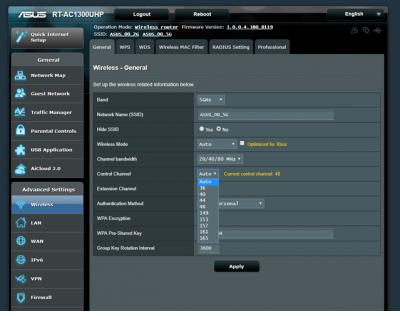
|
|
|
Jul 18 2018, 10:15 AM
|
|
Senior Member
3,669 posts Joined: Apr 2006
|
QUOTE(pl95077 @ Jul 18 2018, 10:06 AM) 36, 40, 44, 48, 149, 153, 157, 161, 165 Thanks for the info.It appear even asus also opts to disable DFS channels.  |
|
|
Jul 18 2018, 10:33 AM
|
|
Junior Member
245 posts Joined: Feb 2010
|
QUOTE(JohnLai @ Jul 18 2018, 11:15 AM) Thanks for the info. I guess it must be some reason ASUS disable DFS channels.It appear even asus also opts to disable DFS channels. Can I learn from you why you want to use DFS required channels? |
|
|
Jul 18 2018, 11:18 AM
|
|
Junior Member
101 posts Joined: Jul 2010
|
QUOTE(pl95077 @ Jul 18 2018, 10:06 AM) 36, 40, 44, 48, 149, 153, 157, 161, 165 QUOTE(JohnLai @ Jul 18 2018, 10:15 AM) Thanks for the info. Have any of you tried changing the wifi channel for Asus router? I understand that it’s best to choose a wifi channel with fewer people on it to increase speed and at the same time reduce the wifi from disconnecting. Also, are the DFS channels really that great? Thanks!It appear even asus also opts to disable DFS channels. |
|
|
Jul 18 2018, 12:14 PM
|
|
Senior Member
3,669 posts Joined: Apr 2006
|
QUOTE(pl95077 @ Jul 18 2018, 10:33 AM) I guess it must be some reason ASUS disable DFS channels. Can I learn from you why you want to use DFS required channels? QUOTE(gailfriz @ Jul 18 2018, 11:18 AM) Have any of you tried changing the wifi channel for Asus router? I understand that it’s best to choose a wifi channel with fewer people on it to increase speed and at the same time reduce the wifi from disconnecting. Also, are the DFS channels really that great? Thanks! If one uses 5ghz band with 80Mhz width, with that 36, 40, 44, 48, 149, 153, 157, 161, 165, there are only two non-overlapping channels. Having access to additional 5ghz channels is preferred. |
|
|
Apr 16 2019, 10:55 AM
Show posts by this member only | IPv6 | Post
#32
|

Senior Member
1,818 posts Joined: Jan 2005 From: Kuala Lumpur
|
Hi all.. i never used dual band router before. So, I have a question. When enabling the wifi, is it possible to just use 1 ssid for all users, and let the rounter select/change automatically between 2.4 & 5GHz?
|
|
|
Apr 16 2019, 11:15 AM
|

Senior Member
5,714 posts Joined: Mar 2007 
|
QUOTE(zeese @ Apr 16 2019, 10:55 AM) Hi all.. i never used dual band router before. So, I have a question. When enabling the wifi, is it possible to just use 1 ssid for all users, and let the rounter select/change automatically between 2.4 & 5GHz? Yes, but the router will need to have a smart connect feature for that. |
|
|
|
|
|
Apr 16 2019, 12:44 PM
|

All Stars
24,456 posts Joined: Nov 2010
|
QUOTE(zeese @ Apr 16 2019, 10:55 AM) Hi all.. i never used dual band router before. So, I have a question. When enabling the wifi, is it possible to just use 1 ssid for all users, and let the rounter select/change automatically between 2.4 & 5GHz? yes.i don't remember doing anything extra.... set ssid, tick 5ghz. it will do the rest... say, ssid abcd for 2.4ghz, the other will appear as abcd_5G, use same PW. yr devices, if dual band, will go for whichever is stronger. this router for its price is pretty good - stable and reliable. for my unifi 800mbps: ethernet is max if yr device is gigiabit - my test 860mbps on one device. wifi... <40ft, 5ghz strong... 200-400mbps; >50ft, likely it will switch to 2.4ghz, get 20-30 mbps, still good enough for most purposes. been using this rtac1300uhp router for 1.5 years now. remember to update to current firmware: 3.0.0.4.380_8457 This post has been edited by AVFAN: Apr 16 2019, 12:54 PM |
|
|
Apr 16 2019, 05:13 PM
Show posts by this member only | IPv6 | Post
#35
|
|
Senior Member
1,818 posts Joined: Jan 2005 From: Kuala Lumpur
|
QUOTE(SilentVampire @ Apr 16 2019, 11:15 AM) Yes, but the router will need to have a smart connect feature for that. QUOTE(AVFAN @ Apr 16 2019, 12:44 PM) yes. tq guys... i just placed an order for rt-ac1300uph as well.. i don't remember doing anything extra.... set ssid, tick 5ghz. it will do the rest... say, ssid abcd for 2.4ghz, the other will appear as abcd_5G, use same PW. yr devices, if dual band, will go for whichever is stronger. this router for its price is pretty good - stable and reliable. for my unifi 800mbps: ethernet is max if yr device is gigiabit - my test 860mbps on one device. wifi... <40ft, 5ghz strong... 200-400mbps; >50ft, likely it will switch to 2.4ghz, get 20-30 mbps, still good enough for most purposes. been using this rtac1300uhp router for 1.5 years now. remember to update to current firmware: 3.0.0.4.380_8457  |
|
|
Apr 16 2019, 06:26 PM
|
|
All Stars
24,456 posts Joined: Nov 2010
|
QUOTE(zeese @ Apr 16 2019, 05:13 PM) tq guys... i just placed an order for rt-ac1300uph as well.. i trust u will enjoy this router.other questions, can read/ask here... all the asus kakis around to help! https://forum.lowyat.net/topic/2651405/+10060 |
|
|
Apr 17 2019, 12:37 PM
|

Newbie
47 posts Joined: Sep 2012 From: South City Plaza
|
QUOTE(zeese @ Apr 16 2019, 10:55 AM) Hi all.. i never used dual band router before. So, I have a question. When enabling the wifi, is it possible to just use 1 ssid for all users, and let the rounter select/change automatically between 2.4 & 5GHz? You will see 2 SSID for dual band router and client, unless your disable one of the band. Another alternative is use mesh wifi, it only will show one SSID. Btw good buy  |
|
|
Oct 18 2019, 03:47 PM
|
|
Junior Member
42 posts Joined: May 2008
|
just updated the firmware of ac1300uhp, seems to make the router unstable. anybody facing the same issue?
|
|
|
Oct 19 2019, 11:53 AM
|
|
Junior Member
245 posts Joined: Feb 2010
|
QUOTE(magpie2000 @ Oct 18 2019, 04:47 PM) just updated the firmware of ac1300uhp, seems to make the router unstable. anybody facing the same issue? You can have to option to go back to previous version FW if you think it is unstable.Manually downgrade the Firmware https://www.asus.com/my/Networking/RT-AC130.../HelpDesk_BIOS/ |
| Change to: |  0.0243sec 0.0243sec
 0.45 0.45
 6 queries 6 queries
 GZIP Disabled GZIP Disabled
Time is now: 13th December 2025 - 04:05 AM |
 Quote
Quote