Welcome Guest ( Log In | Register )

Outline · [ Standard ] · Linear+

 Asus RT-AC1300UHP Router question

views
     
TSgailfriz
post Jun 19 2018, 09:09 PM, updated 8y ago

Getting Started
**
Junior Member
101 posts

Joined: Jul 2010


Hi guys. Just wondering, is there anyone on the forum using Asus RT-AC1300UHP router for Unifi? If yes, is it stable? I will be getting a free replacement of the archer c1200 TPlink router from Unifi but thinking if i should get a better one instead.
nkte5207
post Jun 19 2018, 09:10 PM

Getting Started
**
Junior Member
178 posts

Joined: Aug 2010
stable, for small to medium house (wifi coverage)
enduser
post Jun 19 2018, 09:41 PM

Regular
******
Senior Member
1,280 posts

Joined: Jan 2003
Bro AVFAN is using it

Can read also here https://www.blacktubi.com/review/asus-rt-ac1300uhp/

This post has been edited by enduser: Jun 19 2018, 09:42 PM
TSgailfriz
post Jun 19 2018, 10:01 PM

Getting Started
**
Junior Member
101 posts

Joined: Jul 2010


QUOTE(nkte5207 @ Jun 19 2018, 09:10 PM)
stable, for small to medium house (wifi coverage)
*
Ahh okay. If i purchase the Asus AC1300UHP, do i need to update the firmware (https://www.asus.com/my/Networking/RT-AC130.../HelpDesk_BIOS/) from this link? Current version : 3.0.0.4.380.8228

QUOTE(enduser @ Jun 19 2018, 09:41 PM)
Bro  AVFAN is using it

Can read also here  https://www.blacktubi.com/review/asus-rt-ac1300uhp/
*
Thanks for the link!

This post has been edited by gailfriz: Jun 19 2018, 10:02 PM
sHawTY
post Jun 19 2018, 10:32 PM

Frequent Reporter
********
All Stars
14,909 posts

Joined: Jul 2005

QUOTE(gailfriz @ Jun 19 2018, 10:01 PM)
do i need to update the firmware
It's always a good idea to use the latest firmware
The latest firmwares not only add extra features, they also close any security loophole & vulnerabilities from hacking
AVFAN
post Jun 19 2018, 10:34 PM

20k VIP Club
*********
All Stars
24,456 posts

Joined: Nov 2010
QUOTE(gailfriz @ Jun 19 2018, 10:01 PM)
Ahh okay. If i purchase the Asus AC1300UHP, do i need to update the firmware (https://www.asus.com/my/Networking/RT-AC130.../HelpDesk_BIOS/) from this link? Current version : 3.0.0.4.380.8228
Thanks for the link!
*
acrt1300uhp is a cost effective router.
used it 6 months now.
trouble free.
yes, update to that current firmware.

i hv no comments on how it does for CCTV, remote access, exotic use... never used it for those.

i use it for 2 storey house, 12 devices, mix of 5 and 2.4ghz.
mainly entertainment streaming incl torr, browsing, pc stuff.
very good for worldcup 2018 streaming in 1080p, foc... tongue.gif

wifi 50ft 5ghz for pc windows 10:
user posted image
SilentVampire
post Jun 20 2018, 06:40 AM

Networking Enthusiast
*******
Senior Member
5,714 posts

Joined: Mar 2007


QUOTE(gailfriz @ Jun 19 2018, 10:01 PM)
Ahh okay. If i purchase the Asus AC1300UHP, do i need to update the firmware (https://www.asus.com/my/Networking/RT-AC130.../HelpDesk_BIOS/) from this link? Current version : 3.0.0.4.380.8228
Thanks for the link!
*
Very good and very stable router, would highly recommend this to any new user.
TSgailfriz
post Jun 21 2018, 01:25 PM

Getting Started
**
Junior Member
101 posts

Joined: Jul 2010


QUOTE(sHawTY @ Jun 19 2018, 10:32 PM)
It's always a good idea to use the latest firmware
The latest firmwares not only add extra features, they also close any security loophole & vulnerabilities from hacking
*
Yup, that's true. Heard there's alot of vulnerabilities nowadays regarding routers.

QUOTE(AVFAN @ Jun 19 2018, 10:34 PM)
acrt1300uhp is a cost effective router.
used it 6 months now.
trouble free.
yes, update to that current firmware.

i hv no comments on how it does for CCTV, remote access, exotic use... never used it for those.

i use it for 2 storey house, 12 devices, mix of 5 and 2.4ghz.
mainly entertainment streaming incl torr, browsing, pc stuff.
very good for worldcup 2018 streaming in 1080p, foc... tongue.gif

wifi 50ft 5ghz for pc windows 10:
user posted image
*
How's the download speed for smart TV usage when connected via Wifi using this router (Mbps)? Currently i'm on the 50 Mbps unifi plan and i'm using the default stock TM D-Link router (very old one) and is placed upstairs. When i use wifi in the room upstairs with the router i will get approx 40-50 Mbps which is definitely good enough for me. However, when i use the Wifi downstairs on the smart TV, the download speed is about 5 - 10 Mbps only. Therefore, I bought a TP-Link wifi repeater which is placed downstairs and the Wifi download speed for the smart TV went up to about 20-30 Mbps. Just wondering, if i do purchase this Asus router, will it actually help with the download speed downstairs? Thanks.

QUOTE(SilentVampire @ Jun 20 2018, 06:40 AM)
Very good and very stable router, would highly recommend this to any new user.
*
Thanks for the info!
AVFAN
post Jun 21 2018, 02:04 PM

20k VIP Club
*********
All Stars
24,456 posts

Joined: Nov 2010
QUOTE(gailfriz @ Jun 21 2018, 01:25 PM)
How's the download speed for smart TV usage when connected via Wifi using this router (Mbps)? Currently i'm on the 50 Mbps unifi plan and i'm using the default stock TM D-Link router (very old one) and is placed upstairs. When i use wifi in the room upstairs with the router i will get approx 40-50 Mbps which is definitely good enough for me. However, when i use the Wifi downstairs on the smart TV, the download speed is about 5 - 10 Mbps only. Therefore, I bought a TP-Link wifi repeater which is placed downstairs and the Wifi download speed for the smart TV went up to about 20-30 Mbps. Just wondering, if i do purchase this Asus router, will it actually help with the download speed downstairs? Thanks.
*
wifi is always a tricky one, a lot depends on yr home, the actual posiitons, and what actual devices.

if i hv to estimate, assuming yr smart tv can do 5ghz, u shud get 30-40mbps without the repeater if line of sight is not badly cluttered, like many walls, etc.

if it is on same floor <50ft, can get pretty much full speed

with rtac1300uhp, the use of repeater will not be necessary.


anyway, once u replace the old router with the new, u will find all devices will work better.

This post has been edited by AVFAN: Jun 21 2018, 02:05 PM
spetnaz
post Jun 22 2018, 05:13 PM

Casual
***
Junior Member
484 posts

Joined: Dec 2006
What is the difference between this RT-AC1300UHP & RT-AC58U? Both looks similar with the RT-AC58U slightly cheaper but according to asus msia website, the AC58U is for larger home while the RT-AC1300uhp is for medium size home

https://www.asus.com/my/Product-Compare/?pr...b7yPOvOrbFH&b=0

This post has been edited by spetnaz: Jun 22 2018, 05:18 PM
pl95077
post Jun 22 2018, 05:24 PM

Getting Started
**
Junior Member
245 posts

Joined: Feb 2010
QUOTE(gailfriz @ Jun 21 2018, 02:25 PM)
Yup, that's true. Heard there's alot of vulnerabilities nowadays regarding routers.
How's the download speed for smart TV usage when connected via Wifi using this router (Mbps)? Currently i'm on the 50 Mbps unifi plan and i'm using the default stock TM D-Link router (very old one) and is placed upstairs. When i use wifi in the room upstairs with the router i will get approx 40-50 Mbps which is definitely good enough for me. However, when i use the Wifi downstairs on the smart TV, the download speed is about 5 - 10 Mbps only. Therefore, I bought a TP-Link wifi repeater which is placed downstairs and the Wifi download speed for the smart TV went up to about 20-30 Mbps. Just wondering, if i do purchase this Asus router, will it actually help with the download speed downstairs? Thanks.
Thanks for the info!
*
If affordable you can try on ASUS Lyra.
Using it performance is good, no dead zone in my house
firdausbhari
post Jun 22 2018, 06:06 PM

Look at all my stars!!
*******
Senior Member
2,281 posts

Joined: Feb 2012


QUOTE(spetnaz @ Jun 22 2018, 05:13 PM)
What is the difference between this RT-AC1300UHP & RT-AC58U? Both looks similar with the RT-AC58U slightly cheaper but according to asus msia website, the AC58U is for larger home while the RT-AC1300uhp is for medium size home

https://www.asus.com/my/Product-Compare/?pr...b7yPOvOrbFH&b=0
*
The difference between the 2....
QUOTE(ASUSmy @ Nov 17 2017, 03:56 PM)
The spec are almost the same. The RT-AC1300UHP will have 2 more operation mode, range extender and media bridge mode.

And under average to heavy usage, the RT-AC1300UHP can up to around 30 devices. While the RT-AC58U is around 20 devices(This all depend on the usage and the environment).

Thank you
*
also AC1300UHP have 256MB of RAM while AC58U only have 128MB

This post has been edited by firdausbhari: Jun 22 2018, 06:28 PM
spetnaz
post Jun 22 2018, 06:14 PM

Casual
***
Junior Member
484 posts

Joined: Dec 2006
QUOTE(firdausbhari @ Jun 22 2018, 06:06 PM)
The difference between the 2....

also AC1300UHP has 256MB of RAM while AC58U only has 128MB
*
Wow thanks... seems like the cheaper AC58 is good enough for me
firdausbhari
post Jun 22 2018, 06:30 PM

Look at all my stars!!
*******
Senior Member
2,281 posts

Joined: Feb 2012


QUOTE(spetnaz @ Jun 22 2018, 06:14 PM)
Wow thanks... seems like the cheaper AC58 is good enough for me
*
no worries. my advice is just buy according to your budget. also stay away from TMobile ac1900 hehe

This post has been edited by firdausbhari: Jun 22 2018, 06:31 PM
TSgailfriz
post Jun 22 2018, 06:38 PM

Getting Started
**
Junior Member
101 posts

Joined: Jul 2010


I just purchased the Asus AC1300UHP. Will get the router in a couple of days. Can't wait to test it out! Thanks for all the help guys.
AVFAN
post Jun 22 2018, 06:40 PM

20k VIP Club
*********
All Stars
24,456 posts

Joined: Nov 2010
QUOTE(gailfriz @ Jun 22 2018, 06:38 PM)
I just purchased the Asus AC1300UHP. Will get the router in a couple of days. Can't wait to test it out! Thanks for all the help guys.
*
it' a good router, enjoy. thumbup.gif
SilentVampire
post Jun 22 2018, 09:53 PM

Networking Enthusiast
*******
Senior Member
5,714 posts

Joined: Mar 2007


QUOTE(gailfriz @ Jun 22 2018, 06:38 PM)
I just purchased the Asus AC1300UHP. Will get the router in a couple of days. Can't wait to test it out! Thanks for all the help guys.
*
Great choice. You definitely won’t regret it.
spetnaz
post Jun 23 2018, 11:43 PM

Casual
***
Junior Member
484 posts

Joined: Dec 2006
Update : Got the AC-RT1300UHP today. Very satisfied with the speed. Both 2.4G & 5G managed to clock 51mbps download speed. Before this using the stock TM's tp link, the 2.4G only manage 5-6mbps max
halfdevil
post Jun 25 2018, 08:56 AM

Getting Started
**
Junior Member
100 posts

Joined: Apr 2011
QUOTE(firdausbhari @ Jun 22 2018, 06:30 PM)
no worries. my advice is just buy according to your budget. also stay away from TMobile ac1900 hehe
*
Can explain why advice to stay away from TMobile ac1900?

firdausbhari
post Jun 25 2018, 10:54 AM

Look at all my stars!!
*******
Senior Member
2,281 posts

Joined: Feb 2012


QUOTE(halfdevil @ Jun 25 2018, 08:56 AM)
Can explain why advice to stay away from TMobile ac1900?
*
just my 2 cents. ac1300uhp is a better choice. you will get official support from Asus. or better yet look for used local unit AC68U.
TSgailfriz
post Jun 26 2018, 12:13 AM

Getting Started
**
Junior Member
101 posts

Joined: Jul 2010


Update:

Got the router today and found it to be good so far. My smart TV is getting maximum speed too smile.gif
fli_guy84
post Jun 26 2018, 12:07 PM

Getting Started
**
Junior Member
216 posts

Joined: Jan 2007
QUOTE(gailfriz @ Jun 26 2018, 12:13 AM)
Update:

Got the router today and found it to be good so far. My smart TV is getting maximum speed too smile.gif
*
Where did you buy it? I find that Shopee has the lowest price so far.
TSgailfriz
post Jun 26 2018, 02:46 PM

Getting Started
**
Junior Member
101 posts

Joined: Jul 2010


QUOTE(fli_guy84 @ Jun 26 2018, 12:07 PM)
Where did you buy it? I find that Shopee has the lowest price so far.
*
I got mine from Lazada. Found the one with the most verified reviews haha.
JohnLai
post Jun 26 2018, 03:08 PM

Skeptical Cat
*******
Senior Member
3,669 posts

Joined: Apr 2006
QUOTE(gailfriz @ Jun 26 2018, 12:13 AM)
Update:

Got the router today and found it to be good so far. My smart TV is getting maximum speed too smile.gif
*
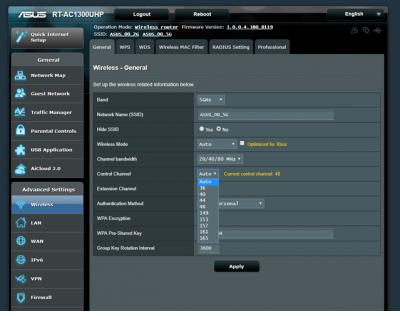
How many 5Ghz channels available with this model?
Can you list it out?
pl95077
post Jul 18 2018, 09:38 AM

Getting Started
**
Junior Member
245 posts

Joined: Feb 2010
QUOTE(JohnLai @ Jun 26 2018, 04:08 PM)
How many 5Ghz channels available with this model?
Can you list it out?
*
This is dual band router, 2.4Ghz and 5Ghz. So only one 5Ghz available.
I guess you are asking how many SSID can create.

All ASUS router it come with 3 guest network (additional 3 SSID) each band.

3 + 1 for 2.4Ghz
3 + 1 for 5Ghz
JohnLai
post Jul 18 2018, 09:45 AM

Skeptical Cat
*******
Senior Member
3,669 posts

Joined: Apr 2006
QUOTE(pl95077 @ Jul 18 2018, 09:38 AM)
This is dual band router, 2.4Ghz and 5Ghz. So only one 5Ghz available.
I guess you are asking how many SSID can create.

All ASUS router it come with 3 guest network (additional 3 SSID) each band.

3 + 1 for 2.4Ghz
3 + 1 for 5Ghz
*
No...I was asking how many 5ghz channels available. sweat.gif
Example: Channel 36, 38, 40, 42, 48, 100, 120, 149, 165.
pl95077
post Jul 18 2018, 10:06 AM

Getting Started
**
Junior Member
245 posts

Joined: Feb 2010
QUOTE(JohnLai @ Jul 18 2018, 10:45 AM)
No...I was asking how many 5ghz channels available. sweat.gif
Example: Channel 36, 38, 40, 42, 48, 100, 120, 149, 165.
*
36, 40, 44, 48, 149, 153, 157, 161, 165


Attached thumbnail(s)
Attached Image
JohnLai
post Jul 18 2018, 10:15 AM

Skeptical Cat
*******
Senior Member
3,669 posts

Joined: Apr 2006
QUOTE(pl95077 @ Jul 18 2018, 10:06 AM)
36, 40, 44, 48, 149, 153, 157, 161, 165
*
Thanks for the info.
It appear even asus also opts to disable DFS channels. sad.gif
pl95077
post Jul 18 2018, 10:33 AM

Getting Started
**
Junior Member
245 posts

Joined: Feb 2010
QUOTE(JohnLai @ Jul 18 2018, 11:15 AM)
Thanks for the info.
It appear even asus also opts to disable DFS channels. sad.gif
*
I guess it must be some reason ASUS disable DFS channels.
Can I learn from you why you want to use DFS required channels?
TSgailfriz
post Jul 18 2018, 11:18 AM

Getting Started
**
Junior Member
101 posts

Joined: Jul 2010


QUOTE(pl95077 @ Jul 18 2018, 10:06 AM)
36, 40, 44, 48, 149, 153, 157, 161, 165
*
QUOTE(JohnLai @ Jul 18 2018, 10:15 AM)
Thanks for the info.
It appear even asus also opts to disable DFS channels. sad.gif
*
Have any of you tried changing the wifi channel for Asus router? I understand that it’s best to choose a wifi channel with fewer people on it to increase speed and at the same time reduce the wifi from disconnecting. Also, are the DFS channels really that great? Thanks!

JohnLai
post Jul 18 2018, 12:14 PM

Skeptical Cat
*******
Senior Member
3,669 posts

Joined: Apr 2006
QUOTE(pl95077 @ Jul 18 2018, 10:33 AM)
I guess it must be some reason ASUS disable DFS channels.
Can I learn from you why you want to use DFS required channels?
*
QUOTE(gailfriz @ Jul 18 2018, 11:18 AM)
Have any of you tried changing the wifi channel for Asus router? I understand that it’s best to choose a wifi channel with fewer people on it to increase speed and at the same time reduce the wifi from disconnecting. Also, are the DFS channels really that great? Thanks!
*
If one uses 5ghz band with 80Mhz width, with that 36, 40, 44, 48, 149, 153, 157, 161, 165, there are only two non-overlapping channels. sad.gif

Having access to additional 5ghz channels is preferred.

zeese
post Apr 16 2019, 10:55 AM

Warning Level
******
Senior Member
1,818 posts

Joined: Jan 2005
From: Kuala Lumpur
Hi all.. i never used dual band router before. So, I have a question. When enabling the wifi, is it possible to just use 1 ssid for all users, and let the rounter select/change automatically between 2.4 & 5GHz?

SilentVampire
post Apr 16 2019, 11:15 AM

Networking Enthusiast
*******
Senior Member
5,714 posts

Joined: Mar 2007


QUOTE(zeese @ Apr 16 2019, 10:55 AM)
Hi all.. i never used dual band router before. So, I have a question. When enabling the wifi, is it possible to just use 1 ssid for all users, and let the rounter select/change automatically between 2.4 & 5GHz?
*
Yes, but the router will need to have a smart connect feature for that.
AVFAN
post Apr 16 2019, 12:44 PM

20k VIP Club
*********
All Stars
24,456 posts

Joined: Nov 2010
QUOTE(zeese @ Apr 16 2019, 10:55 AM)
Hi all.. i never used dual band router before. So, I have a question. When enabling the wifi, is it possible to just use 1 ssid for all users, and let the rounter select/change automatically between 2.4 & 5GHz?
*
yes.

i don't remember doing anything extra.... set ssid, tick 5ghz.

it will do the rest... say, ssid abcd for 2.4ghz, the other will appear as abcd_5G, use same PW.

yr devices, if dual band, will go for whichever is stronger.

this router for its price is pretty good - stable and reliable.

for my unifi 800mbps:

ethernet is max if yr device is gigiabit - my test 860mbps on one device.

wifi... <40ft, 5ghz strong... 200-400mbps; >50ft, likely it will switch to 2.4ghz, get 20-30 mbps, still good enough for most purposes.

been using this rtac1300uhp router for 1.5 years now.


remember to update to current firmware:
3.0.0.4.380_8457

This post has been edited by AVFAN: Apr 16 2019, 12:54 PM
zeese
post Apr 16 2019, 05:13 PM

Warning Level
******
Senior Member
1,818 posts

Joined: Jan 2005
From: Kuala Lumpur
QUOTE(SilentVampire @ Apr 16 2019, 11:15 AM)
Yes, but the router will need to have a smart connect feature for that.
*
QUOTE(AVFAN @ Apr 16 2019, 12:44 PM)
yes.

i don't remember doing anything extra.... set ssid, tick 5ghz.

it will do the rest... say, ssid abcd for 2.4ghz, the other will appear as abcd_5G, use same PW.

yr devices, if dual band, will go for whichever is stronger.

this router for its price is pretty good - stable and reliable.

for my unifi 800mbps:

ethernet is max if yr device is gigiabit - my test 860mbps on one device.

wifi... <40ft, 5ghz strong... 200-400mbps;  >50ft, likely it will switch to 2.4ghz, get 20-30 mbps, still good enough for most purposes.

been using this rtac1300uhp router for 1.5 years now.
remember to update to current firmware:
3.0.0.4.380_8457
*
tq guys... i just placed an order for rt-ac1300uph as well.. biggrin.gif
AVFAN
post Apr 16 2019, 06:26 PM

20k VIP Club
*********
All Stars
24,456 posts

Joined: Nov 2010
QUOTE(zeese @ Apr 16 2019, 05:13 PM)
tq guys... i just placed an order for rt-ac1300uph as well..  biggrin.gif
*
i trust u will enjoy this router.

other questions, can read/ask here... all the asus kakis around to help!
https://forum.lowyat.net/topic/2651405/+10060
OOKAS
post Apr 17 2019, 12:37 PM

New Member
*
Newbie
47 posts

Joined: Sep 2012
From: South City Plaza
QUOTE(zeese @ Apr 16 2019, 10:55 AM)
Hi all.. i never used dual band router before. So, I have a question. When enabling the wifi, is it possible to just use 1 ssid for all users, and let the rounter select/change automatically between 2.4 & 5GHz?
*
You will see 2 SSID for dual band router and client, unless your disable one of the band. Another alternative is use mesh wifi, it only will show one SSID. Btw good buy rclxm9.gif
magpie2000
post Oct 18 2019, 03:47 PM

New Member
*
Junior Member
42 posts

Joined: May 2008


just updated the firmware of ac1300uhp, seems to make the router unstable. anybody facing the same issue?
pl95077
post Oct 19 2019, 11:53 AM

Getting Started
**
Junior Member
245 posts

Joined: Feb 2010
QUOTE(magpie2000 @ Oct 18 2019, 04:47 PM)
just updated the firmware of ac1300uhp, seems to make the router unstable. anybody facing the same issue?
*
You can have to option to go back to previous version FW if you think it is unstable.

Manually downgrade the Firmware
https://www.asus.com/my/Networking/RT-AC130.../HelpDesk_BIOS/


Change to:
| Lo-Fi Version
0.0296sec    0.58    6 queries    GZIP Disabled
Time is now: 14th December 2025 - 12:28 AM