Welcome Guest ( Log In | Register )

224 Pages « < 215 216 217 218 219 > » Bottom

Outline · [ Standard ] · Linear+

 Astro Version 13A, All about Astro Malaysia offerings

views
     
joshhd
post May 7 2025, 09:44 PM

Look at all my stars!!
*******
Senior Member
7,799 posts

Joined: Dec 2014
From: Malaysia


QUOTE(tng55 @ May 7 2025, 05:30 PM)
i already call astro
i did tell downgrade request they transfer line downgrade package department
i say i want downgrade they say don't have starter pack  bangwall.gif

i call again i want terminate astro they give RM25 but value pack 2 stay daam

i want get starter pack
they say choose new astro one package sigh

any tips to get starter pack RM25 discount  cry.gif
*

At first dannychen previously shared on January that he managed to downgrade from Value Pack to Starter Pack:
QUOTE(dannychen @ Jan 18 2025, 07:57 PM)
Called CS for retention offer, contract almost due on 23/1/25.

Current pack: Wah Pack (RM80)
Offer 1: RM30 rebates for 24 months
Offer 2: RM35 rebates for 36 months

Downgraded to Starter Pack (RM61.32)
Offer 1: RM25 rebates for 24 months
Offer 2: RM30 rebates for 36 months

Both options free either Variety or Sports Pack for 1 year.

CS absorbed RM10 downgrade fees.
*
QUOTE(dannychen @ Jan 24 2025, 11:58 PM)
user posted image

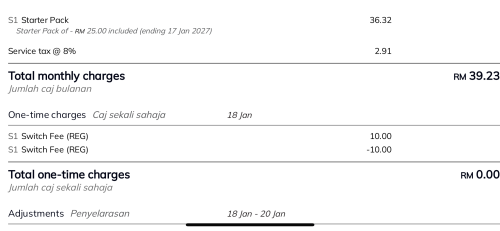
This is how my bill looks like after downgraded from Wah Pack to Starter Pack with discount and waiver on downgrade fees.
*
QUOTE(dannychen @ Jan 30 2025, 07:32 PM)
Confirmed can downgrade between legacy pack. Just downgrade another account from Wah Pack (RM80)+Movies(RM30)+Boo(RM5.99)+Multiroom(RM50), expired RM30/month discount to Starter Pack (RM61.32)+Movies(RM30)+Kids(RM12)+Multiroom(RM50)-RM25 discount. Option of free channels to choose from Sports, News, Varieties, Korean and free switching fees of RM10.80, free ultra box for main and free ulti box for multiroom. Renewal of 24 months contract.
*

And then on February, he said his downgrade request from Value Pack to Starter Pack is being reversed.
QUOTE(dannychen @ Feb 9 2025, 02:11 PM)
This order was cancelled by system for unknown reason.

Called them again to resubmit the order. They have submitted different order.

Maintained Value Pack(Wah Pack) instead of downgrading to Starter Pack.

RM80+kids RM12+Movie RM30+Multi room RM49.99-RM45/month for 24 months. No downgrading fees since maintain package.

Not sure why they offered RM12 for kids instead of RM9.90.

Installed Ultra Box for main. Didn’t changed multi room.

Called them again to submit new order for multi room. Option 1: pay RM150 for Ultra Box for Multi room to installer, they will deduct RM150 in bill.

Option 2: pay RM49 for Ulti Box for Multi room to installer, they will deduct RM49 in bill.

They insist no discount for One Pack. Discounts only available for legacy packs for so called “long term” customers.
*

Back then, I almost thought they might have quietly changed their business rules, but turns out it's not.
Based on what I've known for a long time is, Astro don't allow downgrades from legacy pack to another legacy pack.
I suspect that particular Astro staff is not well versed enough on their business rules, and made a mistake by telling customers (in this case is dannychen) that the agent can do downgrade within different legacy packs.
And once their managers found out, they reverse dannychen's downgrade order in the system.

This is not surprising to me because it is already a known thing to me since forever that some sleeping Astro CS agents tend to give wrong info to customers one.

QUOTE
i call again i want terminate astro they give RM25 but value pack 2 stay daam
As what you previously shared, your current package now is

Value Pack 2 RM80.00 + Kids RM12.00 = RM92.00 + 8% Service tax = Total RM99.36

They offer you RM25 rebate, correct? I'm guessing, that rebate lasts for 24 months?
So it's: Value Pack 2 RM80.00 + Kids RM12.00 - RM25 retention rebate = RM67.00 + 8% Service tax = Total RM72.36

QUOTE
any tips to get starter pack RM25 discount  cry.gif
Astro don't allow downgrades from legacy pack to another legacy pack.
That CS agent made a mistake with dannychen, so I suggest you just forget about the idea of downgrade to Starter Pack because that is not possible.
Let's move forward and focus on what are the options available for you now:

Option 1: Retain your existing subscription, and accept that RM25 monthly retention rebate
Value Pack 2 RM80.00 + Kids RM12.00 - RM25 retention rebate for 24 months = RM67.00 + 8% Service tax = Total RM72.36

Option 2: Move to Astro One: Entertainment Pack, and then add-on Kids RM9.99
Astro One: Entertainment Pack (RM49.99) + Kids RM9.99 = RM59.98 + 8% Service tax = Total RM64.78
If you go for this option, you'd get 24 months contract.
joshhd
post May 7 2025, 09:48 PM

Look at all my stars!!
*******
Senior Member
7,799 posts

Joined: Dec 2014
From: Malaysia


QUOTE(fruitie @ May 7 2025, 09:08 PM)
Hi, I'm on Sports Plus Pack + Netflix Premium and considering ending my Netflix subscription. Is this allowed? Or can I downgrade to Astro One: Sports Pack? laugh.gif

Or nothing I can do now until my contract ends in Oct 2026? sweat.gif
*

Since your Sports Plus Pack has an ongoing 24 months contract, if you attempt to move to other pack and resulted in a lower total monthly fee, you will need to pay prorated penalty fee based on unfinished months.

Or nothing I can do now until my contract ends in Oct 2026? sweat.gif
Short answer is yes.
joshhd
post May 7 2025, 10:25 PM

Look at all my stars!!
*******
Senior Member
7,799 posts

Joined: Dec 2014
From: Malaysia


QUOTE(fruitie @ May 7 2025, 10:03 PM)
Got it. I guess I can at least remove the "Premium" from the Netflix bundled, right?
*

Can.
That one won't affect your contract.
joshhd
post May 8 2025, 08:21 AM

Look at all my stars!!
*******
Senior Member
7,799 posts

Joined: Dec 2014
From: Malaysia


QUOTE(tng55 @ May 8 2025, 01:00 AM)
ohh too bad suspended value pack to started pack already stop stupid astro

hmmm value pack 2 RM80 + kids RM12.00 - RM25 RM67.00 + 8% RM72.36
Astro One: Entertainment Pack (RM49.99) + Kids RM9.99 = RM59.98 + 8% RM64.78 only right

i think batter Option 2 only can't do anything no other more lower right

i was surprised can get Bill below RM50 or RM45

no other tips for reduce bill right

i know 24 month contract i am agree no worry about contract
*

ohh too bad suspended value pack to started pack already stop stupid astro
Hello, not suspended, okay? It's clearly agent's mistake. Don't get it wrong.

no other tips for reduce bill right
No other tips unless you don't add Kids, then save RM9.99
joshhd
post May 8 2025, 12:50 PM

Look at all my stars!!
*******
Senior Member
7,799 posts

Joined: Dec 2014
From: Malaysia


QUOTE(tng55 @ May 8 2025, 12:34 PM)
ok today i will call ask astro to get
Option 2: Move to Astro One: Entertainment Pack, and then add-on Kids RM9.99
Astro One: Entertainment Pack (RM49.99) + Kids RM9.99 = RM59.98 + 8% Service tax = Total RM64.78
If you go for this option, you'd get 24 months contract.

I HAVE ULTI BOX to upgrade ULTRA BOX Possible or not
*

Since you go for a pack that is less than RM99.99, therefore you're not eligible for free upgrade to Ultra Box.

If you insist, you'll need to pay installation fee.
joshhd
post May 8 2025, 01:36 PM

Look at all my stars!!
*******
Senior Member
7,799 posts

Joined: Dec 2014
From: Malaysia


QUOTE(tng55 @ May 8 2025, 01:10 PM)
how much they charge installation fee for ultra box with satellite
*

If i remember correctly is RM150.
You can ask the CS agent to double confirm.

This post has been edited by joshhd: May 8 2025, 01:36 PM
joshhd
post May 8 2025, 09:31 PM

Look at all my stars!!
*******
Senior Member
7,799 posts

Joined: Dec 2014
From: Malaysia


QUOTE(HippyTony @ May 8 2025, 02:11 PM)
Hey Joshhd, if I may join in this discussion. Is the ultra box more stable than the ulti box? Thank you very much.
*

Of course you can join the conversation. biggrin.gif

Short answer is Yes

Ulti Box supports maximum 1080p Full HD output, while Ultra Box supports 2160p 4K Ultra HD output.
From there, you can conclude that Ultra Box has a better hardware specs, and tend to have an overall better performance than Ulti Box.

This post has been edited by joshhd: May 8 2025, 09:32 PM
joshhd
post May 8 2025, 09:47 PM

Look at all my stars!!
*******
Senior Member
7,799 posts

Joined: Dec 2014
From: Malaysia


QUOTE(dannychen @ May 8 2025, 03:13 PM)
Let me clarify this, it is not something as reversal of packages. I have one account with me which was downgraded from Wah Pack to Starter Pack successfully. Another account for my sister (free Ultrabox and free Ultibox) with discounts and another account for my mother in law only discounts no change of decoder. All three accounts have different offers. It is all depending on different agents that I have spoken to and all three accounts have different legacy pack due to different channel requirements.

There is no such thing as I give you my account number and you go to bargain it with Astro kind of things. It is all depending on individual negotiation skills and which agent pick up your call. There have 101 answers to same question I believe. Just like Unifi and other telcos as well. Ultimately, just take it or leave it.
*

I have one account with me which was downgraded from Wah Pack to Starter Pack successfully.
I've double checked with my sources, and I can confirm that as of today, they don't allow downgrades between legacy pack to another legacy pack.
Since yours were somehow managed to successfully downgraded back in Jan 2025, then probably it's either you were the lucky batch ones, or it could be that agent genuinely made a mistake, but the manager just close one eye on it, and then lecture all of their agents to never make such mistake again.
Also, their retention offer mechanism may change from time to time, so... a lot of possibilities there hmm.gif

Another account for my sister (free Ultrabox and free Ultibox) with discounts and another account for my mother in law only discounts no change of decoder. All three accounts have different offers. It is all depending on different agents that I have spoken to and all three accounts have different legacy pack due to different channel requirements.
The amount of their retention offer's monthly rebate varies on pack and/or monthly subscription price, so what you described is true.

There is no such thing as I give you my account number and you go to bargain it with Astro kind of things. It is all depending on individual negotiation skills and which agent pick up your call. There have 101 answers to same question I believe.
Of course.
Generally, if you tell them you want to terminate Astro because you'll be migrating to other country for a long time, then of course they won't propose any retention offer to you. sweat.gif
Therefore, use the "I'm facing financial difficulties" excuse is still the universally accepted one.
joshhd
post May 8 2025, 10:46 PM

Look at all my stars!!
*******
Senior Member
7,799 posts

Joined: Dec 2014
From: Malaysia


QUOTE(NimalKumar @ May 8 2025, 03:24 PM)
Hi @joshhd just an update regarding the Astro Ultra Box's weird LED bug and signal issues. Today the technician came to inspect what actually is wrong. I have to say that the way the technician try to outsmart me is very obvious (mind you I'm not a pro either, but I'm also not that gullible to believe everything he says). He came to check the issue and then proceeded to climb up to check the satellite reception. I think he trimmed the connection up there to see if it fixes the issue, then he came to the box and did the same trimming process. I told him this was done last year when the Astro box was replaced.

Then I kept quiet because I'm not going to bug him to do what he is trained for. Even after the trimming the signal on my Astro was jumping from Low to High. The strength was as usual at 'Medium' while the Quality kept jumping low high. I even showed him the screenshots when it was happening but he doesn't seem to focus on what I'm showing. (I have this habit of recording an issue when its happening so that the technician can see what's wrong). Sadly in this case he seemed to be in a hurry and didn't even see what I'm showing him. More on this later.

He was about to end when I noticed the signal issues were not entirely fixed. Previously I told him that the wire may look dirty because of the flood incidents. He said its still usable at first but then I was not satisfied with the signal issues. I asked him to replace the wire as my family mainly prefers satellite reception. Even after that the signal showed no improvement. Then he climbed for the 3rd time and aligned the dish... Only then, for the first time, in 19 years, I've seen the signal strength is at 80+ (High) and the Quality stuck at High as well. Sadly my 50 ringgit byebye la even though it was an alignment issue.

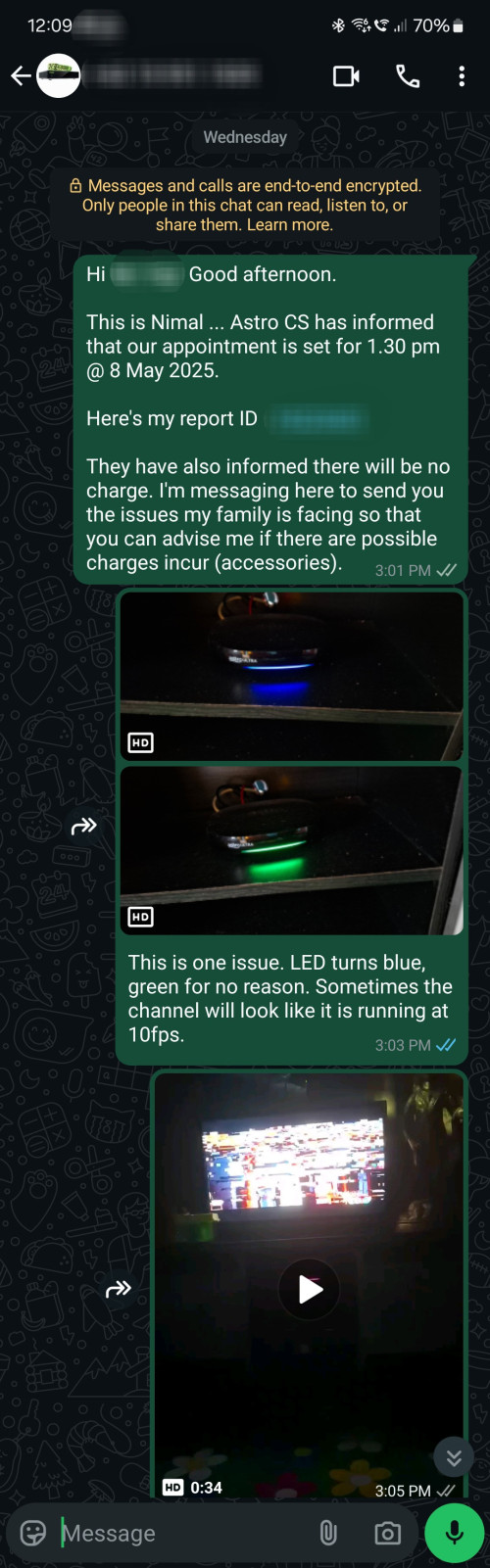
I asked him about the weird issue of Astro showinb Blue and Green LED ... He was ignoring my query and kept saying Green means updating. I showed him the Blue LED incident but then he points saying now it back Pink so no issues. I was speechless for a moment and it clicked in my mind that he isn't gonna care since this visit is FOC. I just nodded to him saying Green means updating (when I know exactly the difference between Green and Cyan) ...

Also, another odd thing I noticed when he was setting the signal again after trimming the old wire, he actually swapped the transponder settings to 'Universal'. I was in shock for a moment but kept quiet thinking he knows what he's doing. Only after I pointed out the signal quality keeps jumping low to high that he consideres other options such as wire replacement.

TLDR : Technician came, trimmed old wire to check signal improvement, replaced cable, still same, alignment, Signal all Back to High, completely ignored the box LED issue, Transponder set to 'Universal', I re-set to 'dCSS'.

Overall I have no say about the issue I face with the box as even with proof I was told off. On the bright side, now my Signal Strength and Quality is High.

Thank you because if it wasn't you I wouldn't have try reporting haha.
*

Thanks for the update biggrin.gif

I even showed him the screenshots when it was happening but he doesn't seem to focus on what I'm showing.
Sadly in this case he seemed to be in a hurry and didn't even see what I'm showing him.

Well, that is how a typical installer who has this kind of mindset look like:
Lesser time in each site visit = able to attend more sites = more income for them = customer no complain means all ok = empathy put aside

I have this habit of recording an issue when its happening so that the technician can see what's wrong
This is a good habit to have. Keep it up thumbsup.gif


Added on
I'd like to clarify with you:

Sadly my 50 ringgit byebye la even though it was an alignment issue.
I was speechless for a moment and it clicked in my mind that he isn't gonna care since this visit is FOC.
You said RM50 is gone, then later you say this visit is FOC? What is that RM50 about?

He came to check the issue and then proceeded to climb up to check the satellite reception.
Then he climbed for the 3rd time and aligned the dish...
So that installer climbed up 3 times? What did he do on the second time?

First time: Re-terminate (retrim) the satellite cable
Second time: ?
Third time: Perform satellite dish realignment

he actually swapped the transponder settings to 'Universal'.
Earlier you mentioned when the installer climbed up the roof to do realignment on the dish, did he replace a new LNB?
If you are able to see your satellite dish, do you see a change in colour of your LNB right now? If yes, what colour was it previously, and what is it now?
Also, you don't have Multiroom (Box) connected to the same satellite dish, right?

He was ignoring my query and kept saying Green means updating.
It is true that green light means updating. The thing is, do you see it on your TV that your Ultra Box is really performing software update when the front panel LED light shows green?
If not, what do you see on your TV screen when the front panel LED light is showing green/blue light? And do you know how to reproduce that issue?
joshhd
post May 8 2025, 10:50 PM

Look at all my stars!!
*******
Senior Member
7,799 posts

Joined: Dec 2014
From: Malaysia


QUOTE(tng55 @ May 8 2025, 06:33 PM)
i already call astro cs
we done Option 2: Move to Astro One: Entertainment Pack, and then add-on Kids RM9.99
Astro One: Entertainment Pack (RM49.99) + Kids RM9.99 = RM59.98 + 8% Service tax = Total RM64.78
If you go for this option, you'd get 24 months contract.

already process

i already ask about ulti box to ultra box satellite RM199 lol
i say i don't need ultra box
ok we stay ulti box
*

i already ask about ulti box to ultra box satellite RM199 lol
Oh, then I think I've mistaken it with some other stuff notworthy.gif

we done Option 2: Move to Astro One: Entertainment Pack, and then add-on Kids RM9.99
All right. Enjoy your new Astro One pack.
At least you'll be paying lesser than the amount you pay previously.
joshhd
post May 9 2025, 12:32 AM

Look at all my stars!!
*******
Senior Member
7,799 posts

Joined: Dec 2014
From: Malaysia


QUOTE(NimalKumar @ May 8 2025, 11:24 PM)
You said RM50 is gone, then later you say this visit is FOC? What is that RM50 about?

Hello. As per the call with Astro CS they said I will not be charged for a technician visit since the issue is within Warranty, however accessories may be charged if needed. Since I request the technician to replace the Satellite cable (coaxial?? Idk the term), it cost me RM3 per meter, but the technician said will be ard 50 so I assume he included the pay for the wall clips and whatnot.

First time: Re-terminate (retrim) the satellite cable
Second time: ?
Third time: Perform satellite dish realignment


Okay for this, the 1st climb was for him to check if something is wrong with the connection. He was trimming the wire from the LNB to the dish I assume. And then he came down to do the same to the Astro box. That was when he set the Transponder on Astro to Universal and he saw the channel was running (this point is where he was basically wrapping up and saying okay the channel is watchable ..

However, I showed him that the signal is still choppy and showed him that the Signal Quality is still jumping Low High. He went back to check if the signal is fine. I assume he wasnt checking as the Astro box was receiving signal so he may have assumed there's no issues on alignment. He was trying to wrap up as long as the signal is there and he hears the channel play. I still told him that he is seeing 2 wires that have seen flood waters for multiple times and asked if that might be the issue. He said the cable is fine for now. Still it bothered me and then I made rhe decision to change the cable.

This is where the 2nd climb comes to play. He wires the new cable from the dish to Astro and was telling me that this should fix the case. Eager, I was waiting for the change. Sadly the issue was still there. The signal strength was marginally better and the quality was still inconsistent (Low High Low High). This time he took the signal reader and plugged to check what went wrong.

And then comes the 3rd climb where he had to climb to realign the dish. Apparently my dish got some alignment issues. Understandable as the 2000s era installers actually installed the dish quite high on the roof. Even he was struggle to reach the dish for repairs. He then aligned the dish and then the magic happens. The Signal and Quality were both strong.

Strength: 80+
Quality: 100 (consistent)

CNR : 16.9 - 17.4
That weird number under Strength (199 - 210)

He then locked it. However I never questioned on why he put the transponder to Universal instead of dCSS. Nvm this because I switched back.

did he replace a new LNB?
If you are able to see your satellite dish, do you see a change in colour of your LNB right now? If yes, what colour was it previously, and what is it now?
Also, you don't have Multiroom (Box) connected to the same satellite dish, right?


The LNB is not replaced as I remember it was replaced I guess two years back. I think I posted here befire. It was on Universal but then replaced to dCSS.

I've never really noticed the colour but I know the old one is black. DCSS should be blue but lemme verify it tmr.

No I have no Multiroom. One Astro only.

It is true that green light means updating. The thing is, do you see it on your TV that your Ultra Box is really performing software update when the front panel LED light shows green?
If not, what do you see on your TV screen when the front panel LED light is showing green/blue light? And do you know how to reproduce that issue?


It is true that Cyan means updating. I told him that this issue I'm facing is when the box is On. He still insisted that the box is updating. I know the difference between Cyan and 'Hijau Traffic Light' . Even if green is updating, why no answer for 'Blue'? He had no answer and said since now it's pink again it should be okay.

As I mentioned before. The viewing is not always impacted when this peculiar bug happen. However I noticed that sometimes the box runs the channels (Live Channels) as if it was ran in 15fps video. Odd because I couldn't capture that well in phone. But still a reboot will always fix that. It happens extremely rarely, just like this blue green LED issue. But then since the technician has nothing to offer and insisted its updating, I became lazy to argue and nodded off.
*

Hmmmm... Next time, tell installer to realign the dish and also the rotate the whole LNB position (LNB skew) first and see if the signal reading improves, rather than replace whole new cable first, then only do the realignment.
Who knows, your old satellite cable might actually still works fine (which I think it's likely still works fine)... sweat.gif

I still told him that he is seeing 2 wires that have seen flood waters for multiple times and asked if that might be the issue.
Anyway, since the installer replaced a new cable for you, then just treat it as if like you pay RM50 to the installer as their "additional wages". sweat.gif

He was trying to wrap up as long as the signal is there and he hears the channel play.
Typical installer lah. They do things the "shortcut" way, want to "finish work fast, and then quickly go to the next customer's house".

By right, the proper way is they got to double check the satellite signal readings using a signal meter device, make sure to make fine tune adjustments on the satellite dish and/or LNB skew until the signal readings shows highest possible.
But for most installers, they just aim for 70-80% reading, rather than 90% and above (which is actually achievable).
FYI, my CNR reading could go between 20-21dB on Measat 3d transponders. It is achievable if you slowly fine tune the dish position and the LNB skew.
But because most installers, especially for existing customers with existing satellite dish, they want "fast" or "troublesome to bring the signal meter device with them", hence most of them skip this step, and all they care about, is "as long got picture appear" (able to view TV channels), then jalan already, which exactly fits the description of what you've experienced with that installer. smile.gif

CNR : 16.9 - 17.4
Ah, this is great already. thumbsup.gif

why no answer for 'Blue'? He had no answer and said since now it's pink again it should be okay.
Of course... Even I myself, never see my Ultra Box showing "blue" colour also, and I have no idea what that means sweat.gif

The cyan/blue light, does it appear during normal TV viewing, or only when the box is on standby mode (press power button on Astro remote control)?

Have you tried clear NVRAM to see if the weird cyan/blue LED light issue resolves?
https://support.astro.com.my/question/refre...-ultra-ulti-box

However I noticed that sometimes the box runs the channels (Live Channels) as if it was ran in 15fps video.
Does it happen whenever you do Live Pause or Play from Start, where it appears poor picture quality for the first 5 seconds, then 5 seconds later it looks okay?
joshhd
post May 9 2025, 10:52 PM

Look at all my stars!!
*******
Senior Member
7,799 posts

Joined: Dec 2014
From: Malaysia


QUOTE(NimalKumar @ May 9 2025, 10:32 PM)
Hello josh ...

You meant the Clear NVRAM right .. yes I have done it. I do it at least once in 3-4 months just to ensure the box runs fresh. The Blue/ Green LED will remain a mystery.

Regarding the weird choppy 15fps viewing, NO it happens in Live TV ... Not recorded or rewind anything. Runs like that in live tv channel. Similarly this issue gets resolved when you force reboot the Ultrabox by switching the main plug on and off (Power Cycle).

Speaking of the antenna right ... Is it a normal thing when the technician drills from the top of the roof 😅 to make the roof enclosure tight? He drilled a screw right on top of the roof and locked the wood side of enclosure to make it tight. Just hoping the didn't 'tebuk' to the point it seeps into my house ... Tacod hahahaha

EDIT: I do have the videos of the mentioned issues (15 FPS bug and Blue LED) ... I'll upload in youtube and give a link here.

EDIT 2 :

L1: https://youtube.com/shorts/hwZ09eLe47g?si=lLwgcK2r8Mf468rl

L2: https://youtu.be/BTEeynK0o54?si=MYQg_Xprnl5rWUK6
*

I'm guessing it's likely your Ultra Box hardware issue.
Contact customer service, tell them issue persists even after you've done clearing NVRAM, then request to replace new Ultra Box for you.
joshhd
post May 11 2025, 09:50 AM

Look at all my stars!!
*******
Senior Member
7,799 posts

Joined: Dec 2014
From: Malaysia


QUOTE(NimalKumar @ May 10 2025, 12:19 AM)
I already indicate this to the technician. No use. And since this issue is fixed usually after reboot, I'm just not gonna ask again. If this happens again then I might contact them again.

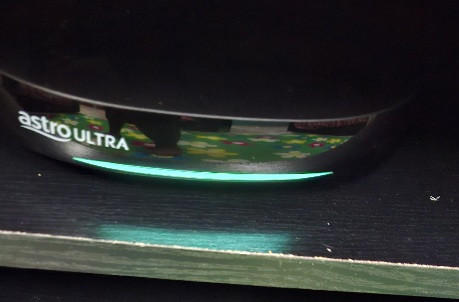
Uploaded is the screenshot. Told, shown everything. Still got downplayed. Nvm atleast the signal is good.

user posted image

This is the Updating LED that he mentioned. Its Cyan.
user posted image
*

No use telling installer directly. Box related issue and satellite reception issue is separate.
You'll need to tell customer service, then they'll assign job to installer, then they'll get paid after completing the job of replacing your Ultra Box.
The installer came and fix your satellite reception issue, and they get paid for that. But they don't get paid for replacing new Ultra Box for you. Get what I mean?

Just contact customer service again.
joshhd
post May 11 2025, 10:06 AM

Look at all my stars!!
*******
Senior Member
7,799 posts

Joined: Dec 2014
From: Malaysia


QUOTE(NimalKumar @ May 10 2025, 05:55 PM)
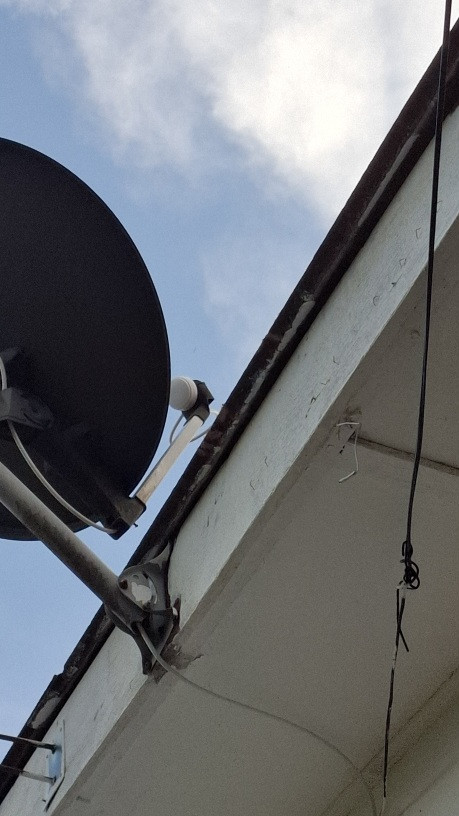
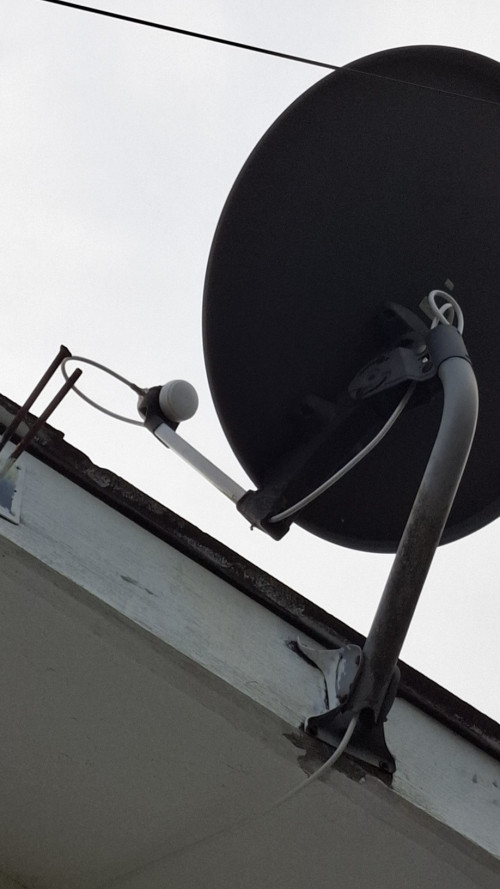
Hey Josh. I'm concerned here. I thought they changed my lnb to dCSS 2 years back ??? Was this why the technician set to Universal?? Am I fooled here? I remembered during 2023 they came to replace the Lnb and set to dCSS ??? damn I'm pissed here.

user posted image

user posted image
*

Based on the pics, it looks like Universal LNB to me.

Unlike those days, Astro don't provide dCSS LNB to every Ultra Box customers anymore.
Universal LNB now works perfectly for Ultra Box as well.
Nowadays, they only provide dCSS LNB to those who have Multiroom (Box) as it is necessary when cable splitter is used to split the signals to multiple Astro boxes that connects to the same satellite dish.
If your satellite dish only connects to 1 Astro box, then Universal LNB already good enough.

Am I fooled here? I remembered during 2023 they came to replace the Lnb and set to dCSS ??? damn I'm pissed here.
You can double check with that technician directly. But there is a possibility that your dCSS LNB was faulty (which is why you faced the signal issue), that's why they replaced it.

In other words, any LNB faulty replacements will be Universal LNB if you don't have Multiroom box.

Generally, there won't be noticeable impact on your viewing whether you're using either Universal LNB or dCSS LNB, so no need to feel pissed about that.
joshhd
post May 12 2025, 12:48 AM

Look at all my stars!!
*******
Senior Member
7,799 posts

Joined: Dec 2014
From: Malaysia


QUOTE(NimalKumar @ May 11 2025, 11:41 PM)
Haihh like that now ... I'll see what I can do to ask them to change the box.

Also regarding the dCSS .. doesn't Astro state that the Ultrabox needs dCSS to be able to receive channels? That's what I remembered at least. This is a shocking news to hear that we are running on Universal LNB too. If that's the case I'll revert the settings to Universal then.

Hopefully no more issues la ...

Just some inconvenience like

1. when the box asking a yes no question when we tune to another channel after clicking the 'Switch Now' button. (Elderly find it extremely annoying not being able to switch channel)

2. Astro not automatically changing to Plug and Play when the weather is not good outside. (Like why must I click 'Switch Now' for this to work...)

3. Astro Ultra UI starting at the Home page where it randomly starts playing the video preview. (If someone has a way to prevent that please teach me) - Why cant it just land at Channel 100 or whatever channel it was playing before.
*

doesn't Astro state that the Ultrabox needs dCSS to be able to receive channels? That's what I remembered at least.
That is true in the past, but no longer true today.
DCSS LNB is no longer mandatory for Ultra Box since end-2022. Read this for more info: https://forum.lowyat.net/index.php?showtopi...#entry106111484

This is a shocking news to hear that we are running on Universal LNB too. If that's the case I'll revert the settings to Universal then.
Yes. On your Satellite Settings, you'll need to make sure the LNB Type setting is set to Universal.
If you use Universal LNB on your satellite dish, but your "LNB Type" setting is in dCSS, you may experience SCNA/Switch to Continuous Viewing message on certain channels.

1. when the box asking a yes no question when we tune to another channel after clicking the 'Switch Now' button.
The "Would you like to stay on this programme?" message with a Yes and No option, will appear when you are not watching the Live broadcast of the TV channel you're currently watching.
Common reasons is because you tried to either "Play from Start", or "Switch to Continuous Viewing" or you pause/rewind the TV channel earlier on.

That message is to remind you before you try to tune to other channel that:
- You are NOT watching the Live broadcast of the channel
- If you select No (means proceed to tune to other channel), it will discard the playback you were watching earlier.

For example:
1) The live programme airs on 8:00pm to 9:00pm.
2) At 8:40pm, you press "Play from Start" or "Pause" on your Astro remote. This means you're no longer watching the live moment — you're now watching from an earlier point.
3) From this point on, if you try to switch to another channel, a message will appear: "Would you like to stay on this programme?"
4) This happens even if the programme hasn't ended yet, because you're watching a delayed version.
5) If you select No, that playback will be discarded, and you won’t be able to continue watching it from where you left off — unless you rewind all over again, or you’ve recorded it and choose to watch it from your recordings.

Remember, the moment you Play from Start or Live Pause, it means the viewing is no longer "live" as what the rest of the people watches the channel anymore.

And it is considered a general practice among pay TV providers that such message would appear when tuning to other channel, because it is to prevent accidental channel switching.

(Elderly find it extremely annoying not being able to switch channel)
You got to guide the elderly that when they see this message, it means whatever they see on the screen now is not the "live" channel, and it is asking you to double confirm whether you really want to tune to other channel or not.
If they're sure that they don't want to watch this channel anymore, just select No.

2. Astro not automatically changing to Plug and Play when the weather is not good outside. (Like why must I click 'Switch Now' for this to work...)
Not exactly sure why. Probably is to get consent from the user that they want to temporarily continue watching the channel via Internet connection instead of satellite.

3. Astro Ultra UI starting at the Home page where it randomly starts playing the video preview.
Likely because Astro want to force encourage people to explore their On Demand content library; create public awareness that viewers can stream more shows via On Demand.
Otherwise, we all would keep complain that the TV channels programming keep repeating non-stop (which is true, especially non-Astro channels which pay TV providers like Astro have little to no control over it).

It is a way to urge you to explore their On Demand content library first; you can pick and watch your shows from there.
Even for those who don't know that they can stream shows through On Demand there, will get to know that they're able to do so.
It's like flash it on your face "Nah ambik kau, watch it On Demand".

As for the preview autoplay feature, it's basically Astro "copying" what Netflix and other streaming apps been doing.
It auto-plays a short clip or trailer from that show, to get your attention, make you interested to watch that show.
Otherwise, we all would keep complain "Astro got nothing to watch, other than sports". sweat.gif

(If someone has a way to prevent that please teach me)
As of today, there is no setting to disable preview autoplay.

Why cant it just land at Channel 100 or whatever channel it was playing before.
Tip: When you're on that On Demand home page, you can just guide the elderly to just straightaway press the channel number that they want to watch, and it'll tune to the channel right away.
No need to purposely press "Back" button to exit to the main TV viewing screen.

This post has been edited by joshhd: May 12 2025, 05:10 PM
joshhd
post May 16 2025, 09:54 PM

Look at all my stars!!
*******
Senior Member
7,799 posts

Joined: Dec 2014
From: Malaysia


QUOTE(doubleM2 @ May 15 2025, 11:26 PM)
BREAKING: Astro will cease 5 channels next month. Stay tuned.
*
QUOTE(NimalKumar @ May 16 2025, 01:00 AM)
Pls don't tell me any Indian channels. 😭🤌🏽
*
QUOTE(GamersFamilia @ May 16 2025, 09:42 AM)
Channel 100 maybe one of it 😅
*
QUOTE(nexona88 @ May 16 2025, 11:25 AM)
Now need to dig deeper which channel is low viewership numbers in astro & also ceases in international market too (because into streaming platform only)
*
QUOTE(doubleM2 @ May 16 2025, 11:57 AM)
Correct.

In fact, these channel brands are also available for on-demand streaming on a specific app. I’ll leave it to you to guess which one 👀

One thing’s for sure, no channel replacements, no bill adjustments, no nothing.
*
QUOTE(NimalKumar @ May 16 2025, 12:26 PM)
Okay 3 guesses.

1.

SUN Network

I know SunNXT allows streaming Live Channel in their app.

If my guess is right ... Sun TV, Sun Music, Adithya, KTV, AND Sun News ??? Sun Life idk if yes too ...

2.

HBO

Since revamped to HBO Max. Probably all their channels might cease (HBO, HBO Fam, etc) OR

3.

Live TV channels that are readily available in Sooka.
*
QUOTE(nexona88 @ May 16 2025, 02:06 PM)
At least give some hints...

Like which package might be effected...
*
QUOTE(smileguy @ May 16 2025, 05:43 PM)
my guess maybe, cos astro has 4 in house tamil recycle bins biggrin.gif as i said the future of tv wl be jus apps hmm.gif  bangwall.gif
*

Yeah, I got the info that there'll be 5 channels that will cease on 1 June as well.

To narrow down your guesses:

- All 5 channels are English language channels
- It is not Astro in-house channels
- It affects Astro, NJOI and sooka.
- One of the channel, is a sports channel

Anyone want to guess what would be the 5 channels...?

This post has been edited by joshhd: May 16 2025, 09:55 PM
joshhd
post May 16 2025, 11:02 PM

Look at all my stars!!
*******
Senior Member
7,799 posts

Joined: Dec 2014
From: Malaysia


QUOTE(Low Li Hao @ May 16 2025, 10:49 PM)
Let me guess:

1) HBO
2) Cinemax
3) HBO Family
4) HBO Hits
5) Eurosport
*

Why do you think it's HBO channels? hmm.gif
joshhd
post May 17 2025, 03:28 PM

Look at all my stars!!
*******
Senior Member
7,799 posts

Joined: Dec 2014
From: Malaysia


QUOTE(NimalKumar @ May 17 2025, 01:47 AM)
user posted image

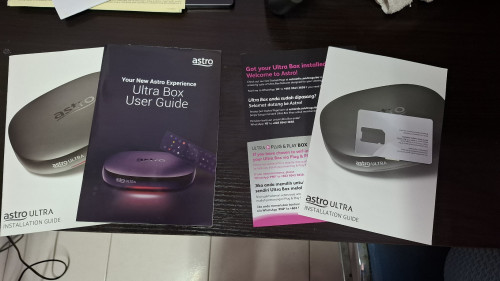
Feeling nostalgic to see that you get more for less back in 2021. Who remembers this 2 whole books about Astro Ultra? Now you only get pamphlet style papers.

Also since I was using the SFH Ultrabox in 2021 (my first), I was comparing the specs and saw the only downgrade being the removal of USB 3.0 and MicroSD slot.

Kinda miss the OG Ultrabox remote (the one that won awards idk..). This new remote is so-so. Still no clue why the remote lights up itself (ik motion sensor but what does it contribute)
*

Who remembers this 2 whole books about Astro Ultra? Now you only get pamphlet style papers.
Since we all don't want to pay so much money to Astro every month, so they save cost. biggrin.gif

I was comparing the specs and saw the only downgrade being the removal of USB 3.0 and MicroSD slot.
It is believed that the USB 3.0 port on Ultra Box v1 (SFH1) was previously meant for external hard disk recording, but that feature never get to launch commercially.
For the microSD slot, no idea what's the purpose of that, and we never get to use it anyway, so no impact for us.

Kinda miss the OG Ultrabox remote (the one that won awards idk..).
To me, that award is more like to acknowledge the designer's efforts of that very first Ultra Box remote control, giving the "overrated" feel.
But practically, it means nothing to most consumers.

Still no clue why the remote lights up itself (ik motion sensor but what does it contribute)
For the current Ultra Box remote control, when it detects movement (like being picked up), it automatically turns on the button backlight, making it easier to see the keys in the dark.
This will benefit for those who watches TV at night with all the room lights off (like a cinema), or for people who are having vision/eyesight problems.

Some modern, higher end TV remote controls tend to have that, so it's not really unique to Astro only.
joshhd
post May 17 2025, 03:38 PM

Look at all my stars!!
*******
Senior Member
7,799 posts

Joined: Dec 2014
From: Malaysia


QUOTE(izwanikhsan @ May 17 2025, 08:32 AM)
user posted image

Is this true?
*
QUOTE(izwanikhsan @ May 17 2025, 11:04 AM)
Perhaps Warner + Discovery is launching their streaming app soon?
*
QUOTE(smileguy @ May 17 2025, 11:08 AM)
i guess the same smile.gif
*

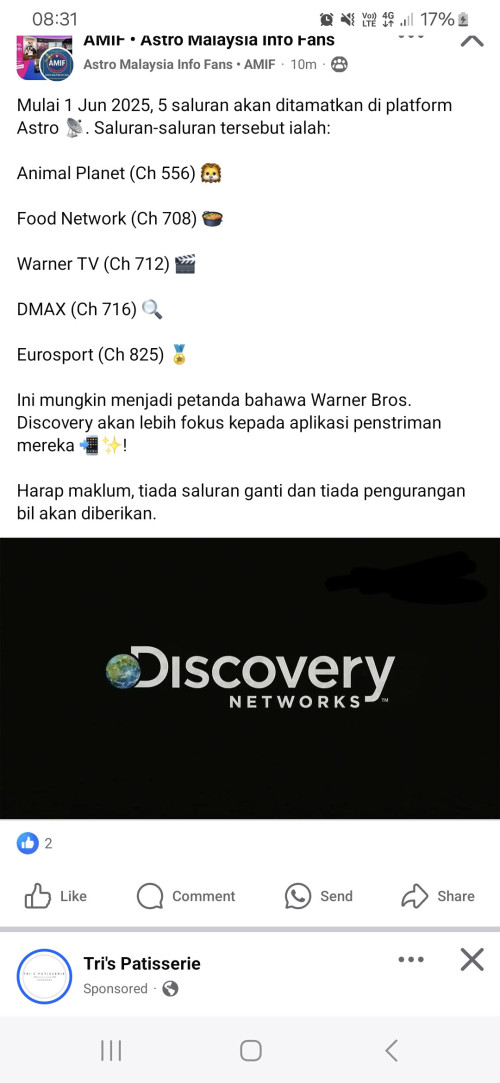
Yes correct. The 5 channels that is ceasing on 1 June are:

- Animal Planet (CH556)
- Food Network (CH708)
- Warner TV (CH712)
- DMAX (CH716)
- Eurosport (CH825)

All of these channels belongs from a company called Warner Brothers Discovery.
It is believed that the cessation are highly influenced by business strategies from Warner Brothers Discovery, to drive more viewers to continue streaming their documentaries using Max app (soon to be called, HBO Max).

As for live sports coverage pertaining to Eurosport, Max (HBO Max) already been offering live sports coverage in Western countries like the US, Europe and Latin America, so it is possible that live sports coverage would come to Max (HBO Max) in Asia Pacific sooner or later.
We see this happening on Netflix already, so I won't be surprised to see this on Max (HBO Max) in the future.

This post has been edited by joshhd: May 17 2025, 03:38 PM
joshhd
post May 20 2025, 11:06 PM

Look at all my stars!!
*******
Senior Member
7,799 posts

Joined: Dec 2014
From: Malaysia


QUOTE(fruitie @ May 20 2025, 01:37 PM)
Hmm. Watching VOD on Multiroom Smart TV has no ad at the beginning or in the mid-show. That's nice. I hate it when I watch VOD on Ultrabox and will have to wait for the ad to finish which cannot be skipped. laugh.gif
*

Not all VOD shows has Addressable Advertising.
Did you compare by watching the same show/episode on both Ultra Box and Multiroom Smart TV platform, to see if ads do appear?

224 Pages « < 215 216 217 218 219 > » Top
 

Change to:
| Lo-Fi Version
0.0463sec    1.02    7 queries    GZIP Disabled
Time is now: 14th December 2025 - 11:53 AM