Welcome Guest ( Log In | Register )

224 Pages « < 17 18 19 20 21 > » Bottom

Outline · [ Standard ] · Linear+

 Astro Version 13A, All about Astro Malaysia offerings

views
     
joshhd
post Dec 20 2019, 12:00 AM

Look at all my stars!!
*******
Senior Member
7,799 posts

Joined: Dec 2014
From: Malaysia


QUOTE(hizad @ Dec 19 2019, 09:54 PM)
Thank you but why cannot view 780 Service Currently Not Available on my 4K TV
*

You use own satellite dish (landed house?) or connected to your condo/apartment/building's centralise antenna?

For now, you must use the dCSS LNB provided by Astro to receive Astro UHD channels on your Ultra Box.
If you use back the same LNB as you used previously (unless it's SatCR type), you won't be able to receive Astro UHD channels.

Don't understand what I'm saying? Then just call Astro for further technical assistance.
joshhd
post Dec 20 2019, 09:03 AM

Look at all my stars!!
*******
Senior Member
7,799 posts

Joined: Dec 2014
From: Malaysia


QUOTE(smileguy @ Dec 20 2019, 08:45 AM)
then your tv is not compliant,if it shows hdcp error,tv should be hdmi 2.0 or abv,but if other errors then call CS
*

For his case, if it shows Services currently not available, then that means the Ultra Box couldn't get satellite signal for UHD channels, and it can be many reasons.

If it's the TV doesn't support HDCP 2.2, it will show "Unable to play video" and it'll mention it is HDCP error.
joshhd
post Dec 20 2019, 09:18 PM

Look at all my stars!!
*******
Senior Member
7,799 posts

Joined: Dec 2014
From: Malaysia


QUOTE(ZaX17 @ Dec 20 2019, 10:01 AM)
Hi, I have this issue also, do you have any solution?

My sound bar sound recovered once I discount the HDMI cable of Astro.
*
QUOTE(ZaX17 @ Dec 20 2019, 02:48 PM)
Yes, I'm Sony Android TV with Bose 700 Soundbar, both ARC HDMI Port.

Previously was totally fine with the Old Astro Box. Once use the new Astro HD box, the Volume is unable to adjust or unmute if selecting System Audio, for Astro or TV's Android sounds.

I will need to disconnect Astro HDMI cable, restart the TV, and plug in Astro HDMI cable then the sound is working. Once turn off and turn on TV WITH Astro HD connected, the soundbar will not have any sound.
*
QUOTE(suffeylp @ Dec 20 2019, 04:06 PM)
I'm using Sony ATV too

As what I've known, most of the Sony ATV users face this issue after update to Oreo earlier this year. But for me, same as your situation, it started after install Ultra box.

Yes... disconnect the cable, unplug, restart the tv is the quick fix. By my permanent solution is chang to optical cable.

I might need to test again when I got time
*
If either one of the devices you connected to soundbar or TV, if it doesn't support HDCP 2.2, even if it's for HDMI ARC, it would cause problems at some point.
Look for a HDMI splitter (at least 2 HDMI outputs) that can strip/remove HDCP 2.2 protection entirely, or downgrade HDCP 2.2 to 1.4 so that it'll work as what you used to have, as well as for those not-so-new to older devices/equipment.

Or, even better and less complicated, if your TV has digital optical output, then connect a digital optical audio cable from your TV to your home theatre system or soundbar's digital optical audio input, so that whatever your TV's audio is outputting, your home theatre system/soundbar will output the same as well, up to Dolby 5.1. It's somehow simpler and no need to bother those HDCP or HDMI ARC problems.

QUOTE(smileguy @ Dec 20 2019, 04:15 PM)
did u guys try setting auto for audio on Ultrabox? All the while I thought Unifi box was a nuisance it always screws up the  HTS
*

Yes I set the HDMI Audio as "Auto".
When the HDMI device from Ultra Box (e.g. TV, soundbar, etc.) as long it supports Dolby audio input, then it'll automatically choose Dolby audio track whenever possible, and output as Dolby audio to the device, or downmix to Stereo PCM if the HDMI device doesn't support Dolby audio.

Why? You experience some issues with setting it to Auto? What is it?

QUOTE(CallMeEpic @ Dec 20 2019, 06:23 PM)
Anyone experience stuttering every few seconds while watching ch780? Just got astru uhd installed couple of days ago :/
*

Nope, it's likely that it's just you. Your satellite dish or the dCSS LNB could be misalignment/not properly adjusted.
Try check the signal strength / quality reading when you're on CH780. If it's kinda low, like less than 60% or equivalent, then yes, it's misaligned.

This post has been edited by joshhd: Dec 20 2019, 09:26 PM
joshhd
post Dec 21 2019, 01:40 AM

Look at all my stars!!
*******
Senior Member
7,799 posts

Joined: Dec 2014
From: Malaysia


QUOTE(zeone @ Dec 20 2019, 11:42 PM)
Hi again, Bro...
Whether on Ch 780 or 332 or 533, our Ultra Diagnostics show Signal Strength as High ie a value of 80+... smile.gif
However, Signal Quality has been Low (from day#1 till today)... ie alwaz below 20..😢

So... Is our Sat Dish misaligned???
Or is it a S/ware bug??

Pls share yr knowledge.
Tqvm.
*

I also experience the same thing as yours, so I believe it's due to a software bug.
After all I didn't experience any signal reception issues since using Ultra Box.
joshhd
post Dec 21 2019, 09:11 AM

Look at all my stars!!
*******
Senior Member
7,799 posts

Joined: Dec 2014
From: Malaysia


QUOTE(CallMeEpic @ Dec 21 2019, 08:50 AM)
Just checked the signal strength on ch780. It keeps fluctuating between 20% - 100%. Software bug or misaligned dish?
*

I believe is software bug.
joshhd
post Dec 21 2019, 01:09 PM

Look at all my stars!!
*******
Senior Member
7,799 posts

Joined: Dec 2014
From: Malaysia


QUOTE(HMMaster @ Dec 21 2019, 12:51 PM)
Astro wont let us upgrade to Ultra is my home dont have internet connection?
*

From what I see, maybe you can assume that they have limited stocks on their Ultra Box, so they wanna prioritise those who has >10Mbps Internet at home, to enjoy all functions on the Ultra Box.
Cuz if the Ultra Box isn't connected to Internet, besides able to enjoy UHD channel like CH780 and new software interface, it's pretty much no major difference compared to using the usual Astro HD box.
No PVR, no recording, no VOD, no Play from Start,....
joshhd
post Dec 22 2019, 11:15 AM

Look at all my stars!!
*******
Senior Member
7,799 posts

Joined: Dec 2014
From: Malaysia


QUOTE(hizad @ Dec 22 2019, 10:56 AM)
Technician came and rectified. Problem was the LNB setting was not set to dCSS
*

Earlier what setting did you set? You set it as SatCR?
joshhd
post Dec 22 2019, 08:32 PM

Look at all my stars!!
*******
Senior Member
7,799 posts

Joined: Dec 2014
From: Malaysia


QUOTE(yongtjunkit @ Dec 22 2019, 05:33 PM)
My grandma house PVR box HDD decided to die by itself

user posted image
user posted image

Is it actually bad to leave the PVR box on 24/7 ?

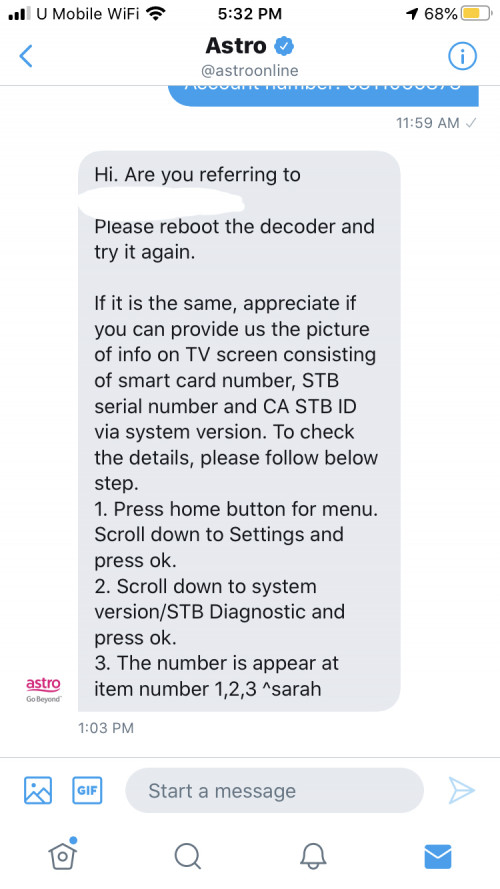
Complained to Astro and they asked for the following information

user posted image

Don’t they actually have the information about the decoder in their record?
*

If you put into standby mode whenever you're not watching, then it shouldn't be a big problem. Cuz if you've been using PVR box for few years, the hard disk fail rate also increases as years goes by. Hard disk failure rate is common, even on hard disks used in computers, external HDD and so on. Especially if your PVR box is powered on 24/7, then it's likely due to hard disk failure lo...

Another reason is the PVR box didn't have proper enough ventilation space, as this can make it hot in the long run, hence making the HDD overheat for quite some time.

They need to get information from the user, to do further diagnosis.
But if the HDD inside the PVR box has died like this, then you got to be mentally prepared that it's very likely that your PVR box needs to be replaced, hence all your previous recordings on your PVR box will not be retrievable.

Also, once replaced, then contract restart 24 months.
joshhd
post Dec 23 2019, 07:39 AM

Look at all my stars!!
*******
Senior Member
7,799 posts

Joined: Dec 2014
From: Malaysia


QUOTE(yongtjunkit @ Dec 23 2019, 07:30 AM)
Was able to get through without providing the picture requested, instead I’ve told them the decoder model DMT5v2

Apparently, they have a special deal, 6 months contract, free replacement decoder* + rm65 waiver for the technician fees(as long as don’t terminate during the contract period)

Is the smart card number necessary to process the replacement?

*as long as it’s not physically damaged
*

"Replacement"? Sounds like refurbished to me. 😂😂😂

Smart card number, yea... They wanna double confirm or verify your Astro box before proceed.

What reason did you tell them? You insist on getting PVR box instead of Ultra Box, or how?
joshhd
post Dec 23 2019, 08:02 AM

Look at all my stars!!
*******
Senior Member
7,799 posts

Joined: Dec 2014
From: Malaysia


QUOTE(yongtjunkit @ Dec 23 2019, 07:54 AM)
I’ve told them that the HDD in the PVR box died/corrupted

I’ve told them that I can’t provide them a picture of the tv screen showing the smart card number,STB serial number, CA STB ID as I won’t be around for the next few days

When they asked for HDD status, I said that it’s connected because I’ve checked it(before contacting Astro) and also reboot the decoder to make sure the HDD is dead ( didn’t provide them screenshot as well)

At the same time, I’ve requested for PVR box because there’s no internet at my grandma’s house
*

I see...

As for the serial number and studd, you can also get it on https://selfservice.astro.com.my
Or look at the packaging of your PVR box.
joshhd
post Dec 23 2019, 04:59 PM

Look at all my stars!!
*******
Senior Member
7,799 posts

Joined: Dec 2014
From: Malaysia


QUOTE(Leong Dei Prince @ Dec 23 2019, 04:53 PM)
Hi guys, how i know whether my condominium centralised satellite infrastructure supported 4K UHD? I call the management office, they seems like dont know anything about 4K UHD. Thanks
*

If your management office aren't sure about it, then u call Astro Ultra department (and also the marketing department) at 03-74908000, tell them your address and they'll check it for you. Bcuz Astro has the list of condominium/apartments where its centralised antenna has upgraded to the dCSS, which supports the Ultra Box.
joshhd
post Dec 23 2019, 05:28 PM

Look at all my stars!!
*******
Senior Member
7,799 posts

Joined: Dec 2014
From: Malaysia


QUOTE(AhJian @ Dec 23 2019, 05:05 PM)
I also wondering the same for my condo, though I can see many satellite dish in here, the management might not really wanted to change to the new satellite. will call soon to ask.
On the other hand. I just wondering beside astro, any other entertainment apps offering Nat Geo channel?
*

If that's the case, then it's likely that your management isn't interested to upgrade its centralise systems (which comes at a cost too), which is why you see many residents there would install/use own satellite dish instead of centralise one.

Yea, you can also watch Nat Geo channel on Unifi TV, under the Ultimate pack.
https://unifi.com.my/tv/packages/ultimate.html
joshhd
post Dec 24 2019, 09:26 AM

Look at all my stars!!
*******
Senior Member
7,799 posts

Joined: Dec 2014
From: Malaysia


QUOTE(19 Degree South @ Dec 24 2019, 09:01 AM)
Astro has refused to change ultra box for my sub line! Knnbccb! This is the result of monopolization! We are at thier mercy!
*

What's the reason they rejected you? There must be a reason....
joshhd
post Dec 24 2019, 01:21 PM

Look at all my stars!!
*******
Senior Member
7,799 posts

Joined: Dec 2014
From: Malaysia


QUOTE(19 Degree South @ Dec 24 2019, 12:15 PM)
To all, they gave me the ultra box for  my main line and told me to sign another two years but under the T&C, the ultra box applied only to the main line! Is this correct?
*

As long you change to Ultra Box, your 24 months contract will restart no matter what.

If you have Multiroom, contract will apply to those Ultra Boxes too.
Didn't they tell you before you proceed to upgrade? They're told to inform customers that 24 months contract applies upon successful upgrade to Ultra Box.
joshhd
post Dec 24 2019, 05:45 PM

Look at all my stars!!
*******
Senior Member
7,799 posts

Joined: Dec 2014
From: Malaysia


QUOTE(yongtjunkit @ Dec 24 2019, 05:12 PM)
Astro go doesn’t let user to project to any TV

user posted image
*

For now, yes.
Tbh to me, Astro faces so many other technical problems. Features like cast to TV isn't their priority for now also. Even offline download feature, suddenly "went missing".

For now the alternative method to watch Astro Go on TV is use laptop/computer, launch either Firefox or Chrome, then login to Astro Go.
Connect HDMI cable from laptop to TV, and then watch from there.
Although it's not as easy as "cast to TV" from phone, but so far this is the very straightforward method you can do now.

Or if you're using a smart TV, you can consider launch your TV's browser app, then login to Astro Go, see if you can watch your shows as usual. Of cos, Astro Go wasn't designed to let viewers watch using this method, so you might experience some glitches here and there.

This post has been edited by joshhd: Dec 24 2019, 05:46 PM
joshhd
post Dec 25 2019, 02:02 AM

Look at all my stars!!
*******
Senior Member
7,799 posts

Joined: Dec 2014
From: Malaysia


QUOTE(pakji @ Dec 25 2019, 01:57 AM)
same problem for me

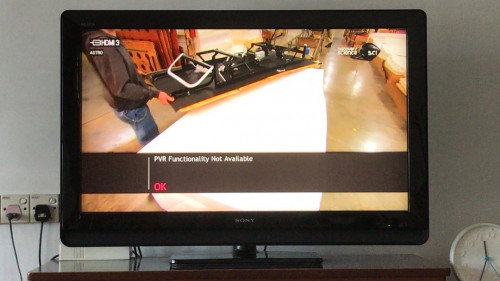
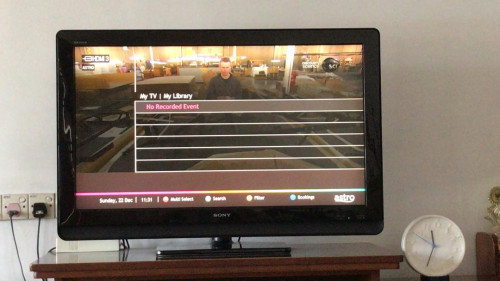
my old PVR got problem yesterday fine today my library lost and say PVR functionality not available  bangwall.gif

i already send fb complaint with screenshot

VOD also cannot access

i think astro trying force upgrade ultra box ???

i don't want ultra box due bad quality HD that i prefer old PVR  cry.gif

checked stb diagnostic HDD Status Connected  rclxub.gif

i already ask astro he said Astro technician to house but i haven't response

because i still scared lah my house we have videocond2h indian channel decoder
*

Like I said earlier, find ways to hide your Videocon d2h then can already. What's stopping you from dismantling the cables? Have you tried it first?

joshhd
post Dec 25 2019, 04:52 PM

Look at all my stars!!
*******
Senior Member
7,799 posts

Joined: Dec 2014
From: Malaysia


Merry Christmas everyone...
How is Astro's journey to 100 HD channels by Jan 2020? Let's see.
Here's the current updated channel list of all HD channels on Astro:
» Click to show Spoiler - click again to hide... «
As of 25 Dec 2019
93 permanent HD channels in total
+3 Astro PPV Movie HD (495, 496, 497)
+1 temporary HD channel (K-Mania)

= Grand total 97 HD channels

On 1 Jan 2020
From 93 permanent HD channels
-2 HD channels (DIVA & E!) that is scheduled to be ceased.
+1 HD channel (Comedy Central) as one and only replacement available

= Total 92 permanent HD channels
+3 Astro PPV Movie HD (495, 496, 497)
+1 temporary HD channel (K-Mania)

= Grand total 96 HD channels

From 2 Jan 2020 onwards
-1 temporary HD channel (K-Mania)

Still 92 permanent HD channels
+3 Astro PPV Movie HD (495, 496, 497)

= Grand total 95 HD channels

----------

So no matter how Astro is playing with numbers-of-HD-channels game, also still "struggling" to reach 100 HD channels mark by Jan 2020 regardless? hmm.gif

Q: Does Astro has the satellite capacity to add about another 5-6 HD channels now? Maybe their satellite bandwidth on Measat 3, 3a and 3b already full?
A: They actually reserve some amount of SD and HD channels in case of any temporary events/channels. But how many "spares" they need actually? You click/tap and see more.
» Click to show Spoiler - click again to hide... «
Q: What are the SD channels that Astro can consider offer in HD?
A: Here are the list of channels that is originally available in HD by channel provider, but Astro offer to its customers in SD only (except local FTA stations like RTM and Media Prima):
» Click to show Spoiler - click again to hide... «
Q: How about Astro's in-house SD channels that they can consider upgrade to HD (except PPV movie channels)?
A: Here you go:
» Click to show Spoiler - click again to hide... «
Q: Which channels that is only in SD from channel provider, so Astro are out of luck to provide that channel in HD to customers?
A: Here you go:
» Click to show Spoiler - click again to hide... «
Q: How about Astro Go exclusive channels?
A: Here you go:
» Click to show Spoiler - click again to hide... «

Q: Eh, like that not so correct. How about the 3 UHD channels? CH780, CH498 and CH499. Those are also considered "high definition" channels, but it's "ultra" 😑
A: If you want to count that way, then...

92 HD + 3 PPV HD movies = 95 HD channels now + 1 Astro UHD (CH780) + 2 Astro Best UHD CH498 & CH499

= 98 channels including all HD and UHD channels, literally.

In conclusion? It still didn't reach that exact, but barely near 100 channels even if they want to "cheat" the numbers game to include those PPV movie channels (Astro First/Best).
In fact, to me, it is considered as cheating to include PPV channels as part of Astro channel lineup, and then Astro brag to everyone (including and especially its stakeholders) that they has "100" HD channels. How could those be part of usual TV channels offering? It's a pay per view channel/content. dry.gif dry.gif

So does that mean, Astro has 92 HD channels at the end of the day?
Few days left before 2020. Let's see how. smile.gif
joshhd
post Dec 25 2019, 09:42 PM

Look at all my stars!!
*******
Senior Member
7,799 posts

Joined: Dec 2014
From: Malaysia


Earlier on Astro Tutor TV SPM...
user posted image
Oh, so now Astro Tutor TV SPM join the Go Shop bandwagon? Target those SPM students also? tongue.gif thumbup.gif
joshhd
post Dec 26 2019, 02:26 PM

Look at all my stars!!
*******
Senior Member
7,799 posts

Joined: Dec 2014
From: Malaysia


QUOTE(Matchy @ Dec 26 2019, 02:08 PM)
Just curious, can Astro detect our location? Because recently I bring my decoder back to my kampung, but can't get any signal. But no problem when viewing in kl.
*

No they can't detect your location. What's your Astro box type? HD box or PVR box?

You need to make sure the LNB type either your satellite dishes at your home or Kampung is the same, and the Input Source setting matches the setting

You go to Settings>Installation Settings>Satellite Settings
What's the Input Source option you've chosen? Universal, SatCR or DCSS?
joshhd
post Dec 26 2019, 03:12 PM

Look at all my stars!!
*******
Senior Member
7,799 posts

Joined: Dec 2014
From: Malaysia


QUOTE(Matchy @ Dec 26 2019, 03:07 PM)
Pvr type... Maybe the cable loose or something. Before this, no problem. Only few months back got this problem. I thought .after the UI update they blocked multi location access.
*

If that's the case, make sure the cable is terminated properly. Or else, you terminate the cable again (along with the F connector).

224 Pages « < 17 18 19 20 21 > » Top
 

Change to:
| Lo-Fi Version
0.0455sec    1.12    7 queries    GZIP Disabled
Time is now: 18th December 2025 - 02:22 PM