Welcome Guest ( Log In | Register )

224 Pages « < 80 81 82 83 84 > » Bottom

Outline · [ Standard ] · Linear+

 Astro Version 13A, All about Astro Malaysia offerings

views
     
joshhd
post Jan 23 2021, 11:14 PM

Look at all my stars!!
*******
Senior Member
7,799 posts

Joined: Dec 2014
From: Malaysia


QUOTE(schoe @ Jan 23 2021, 06:03 PM)
wow.. the information is very good.

actually last time when I applied for the multiroom to install in Perak. I thought we need to pay some money to the installer, end up nothing to pay. that installer settling everything, dish and decoder.

Then few years later, I relocate to different condo in KL, brought along my main Astro to this new place, no dish needed, astro people came and do the installation .they called this as "centralised signal" which i not so understand what is this. But got problem with the signal which cant solve on and off , the service provide sometimes lagging, end up I mad at that time and canceled it. And my only left astro is in Perak.

Now I plan to have this multiroom in my condo again (haha, coz bought a new 4k TV, hope to fully utilize it). Since this place no need to use the dish, isn't it it should be plugged and played? But anyway, if really cant do so, I think I will look for the installer u mentioned. Not sure RM200 can settle or not....

Sorry for so many question .
*

What if centralised Astro dish is not used in building?
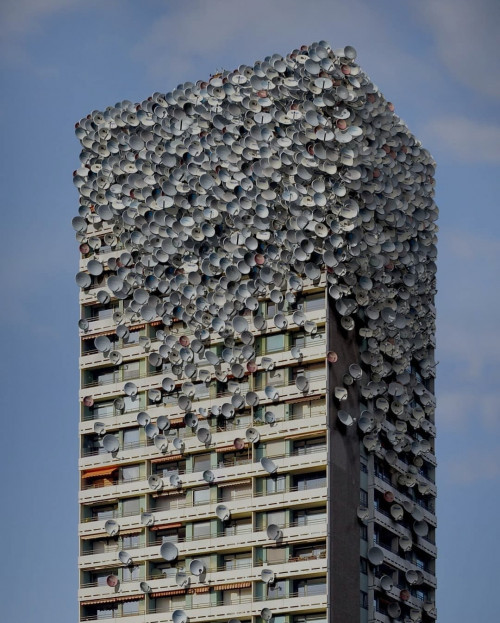
Imagine almost everyone in the building subscribes to Astro satellite TV service, then your condo will look like this:
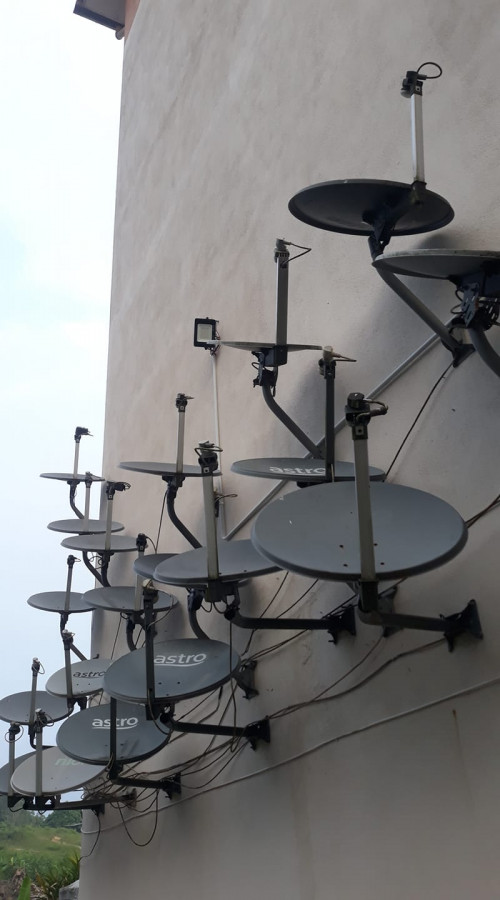
user posted image
or even like this:
user posted image
*illustrative purposes only
That's why some building management don't allow its residents to install own satellite dish around their unit (e.g. balcony) because it will make the building look ugly.

"Centralised signal", centralised dish, centralised antenna, SMATV system (Satellite Master Antenna TeleVision), all these meant the same similar thing, which is:
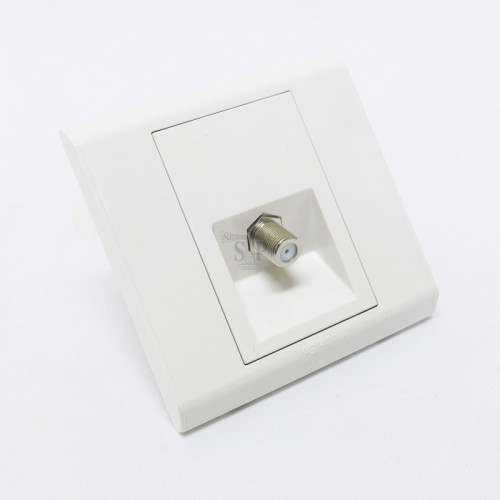
One (or few) satellite dish or antenna is installed at the rooftop of the building, and then the signal will split and distributed through tens to hundreds of units of houses within the same building unit,
...so that you can straightaway get your Astro satellite signal by connecting to the wall socket that looks like this:
user posted image
Therefore, no need to install your own satellite dish. smile.gif So I believe now you know what is centralised dish, right? biggrin.gif

OK, moving on.... Earlier you mentioned:
"But got problem with the signal which cant solve on and off , the service provide sometimes lagging, end up I mad at that time and canceled it."
What box did you used back then? Is it Astro PVR box, or Astro HD box? When you faced that issue, you should've come here to Lowyat Forum and ask for answers, not straightaway cancel Astro 🀣🀣🀣

If you faced such signal issues, you should report this to your building management about it, then they can hire some contractor to deal with it. If you're not sure, let the technician settle for you.
As long your condo's centralise antenna system works fine, yes, you can bring Astro box from elsewhere to your condo, connect a RG6 coaxial cable (simply known as "Astro cable") from the Astro box to the wall socket, and you can enjoy watching your Astro's TV channels right away.
Contacting Astro customer service is pretty much useless at this point, because Astro aren't responsible for centralised antenna systems used in buildings. Respective building management are the ones that responsible for it.
---

If you plan to get an Ultra Box, please make sure your condo's centralise antenna system uses the newer DCSS system.
In order not to confuse the general public, DCSS simply means "a technology that can receive/support Astro 4K UHD satellite signals". smile.gif
If your building doesn't support DCSS (still uses the old legacy type), then you will see "Services currently not available (SCNA)" when you tune to Astro UHD CH780. Yes, as if it is raining outside, no signal.
But don't worry, you can still watch all SD and HD channels without issues as usual, regardless whether you use Astro HD box, PVR box, or Ultra Box....

To identify whether your condo's centralise antenna system supports DCSS or not, the best way is to ask your building management.
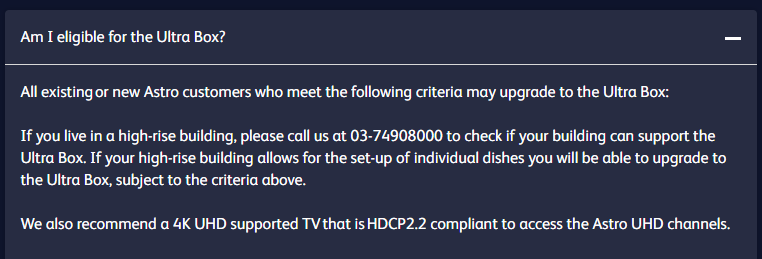
But some building management really clueless about this one.... So the alternative way is, refer to this official answer from Astro:
user posted image
Call Astro using this number 03-74908000, tell them your condo name, they'll help you check whether your condo uses DCSS or not.

This post has been edited by joshhd: Jan 23 2021, 11:20 PM
joshhd
post Jan 23 2021, 11:26 PM

Look at all my stars!!
*******
Senior Member
7,799 posts

Joined: Dec 2014
From: Malaysia


QUOTE(hazim96 @ Jan 23 2021, 10:44 PM)
Dont know when Star Vijay Malaysia and India will change the logo. Even Star Plus channel has been renamed tu Utsav Plus. What happen to "Star" word?

Star Vijay on Yupp TV⬇️
user posted image

Utsav Plus (Previously Star Plus)⬇️
user posted image

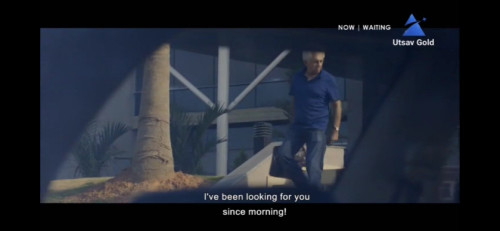
Utsav Gold (Previously Star Gold)⬇️
user posted image
*

Must be something got to do with India's dealing with Disney and Star and all those stuff one laaa...
When a channel rebrands into some new name, it is likely means something has changed internally among them.

Sooner or later I think Malaysia's and India one will be affected also... whistling.gif
joshhd
post Jan 24 2021, 04:29 PM

Look at all my stars!!
*******
Senior Member
7,799 posts

Joined: Dec 2014
From: Malaysia


QUOTE(schoe @ Jan 24 2021, 12:14 AM)
In my house there is the same port like what your pictured shows, ok. this one is use to connect to the decoder.

last time it was 2015 when i moved to this condo. should be the PVR box that can record 300 hours of programme. The installer told me that building lack of something that caused my astro unable to view HD and record (if not mistaken), then i forgot who told me this, if need to fix it, user (me) need to pay the fees (something like that). If not mistaken, astro installer did explain to me that for my PVR box, i need to have two cable to connect to the device, but the centralised setting only able to do one cable, thats y I unable to view HD and do recording (something like this)
Yup, like what you said building management are the ones that responsible for it, I think they throw the ball to me lah. That time i bodoh bodoh, if know forum lowyat had this kind of advices, must come here.

So the conclusion is I will call to Astro and asked about the DCSS. If yes, multiroom in hometown house, then bring the ultrabox and the cable to KL and plug and play. right ?
*

The one highlighted as bold, yes I know what you meant. You are referring to the SD/HD signal conflict with dual tuners on the Astro PVR box, which occurs prior the year of 2018.
Long story short, in simple words, you won't be facing this signal conflict issues today anymore (after around end-2018) as Astro have carried out "optimisation works and somewhat replanning" on their satellite transponder frequencies, to allow legacy centralised dish systems to be able to receive all SD/HD channels without signal conflicts anymore.

Today, as long the satellite cable inputs of your PVR box is:
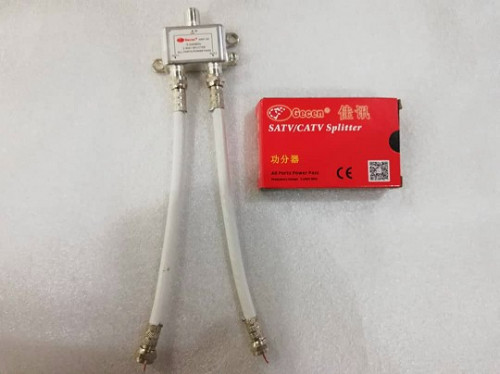
- Both inputs (SAT IN 1 and SAT IN 2) is connected; it could be from a cable splitter like this: https://shopee.com.my/2-Way-Splitter-Coaxia...8079.2637264266
user posted image
Use that one satellite cable from the wall socket, then make a 2 short cables (as shown on picture) like this, and then connects both of the cables into your PVR box's both SAT IN 1 and SAT IN 2 ports.
then you can rest assured that you won't be facing the exact same issue as what you described as quoted above. Just plug and play, and enjoy.

Do note that if you insist on connecting only either one SAT IN inputs of the PVR box (example Tuner 1 has signal, while Tuner 2 has no signal because it is left unconnected), then you may see "Services currently not available (SCNA)" message appears especially when you trigger/schedule record any other channels in the background, or after you reboot the Astro PVR box.
Long story short, just make sure both SAT IN 1 and SAT IN 2 ports of your PVR box is connected, then you won't experience such signal conflicts anymore.

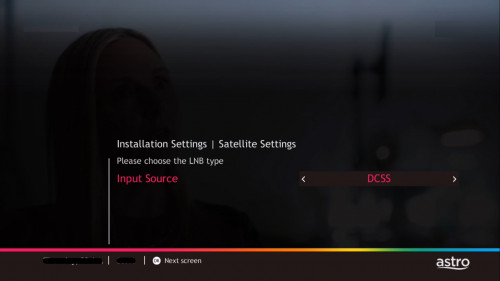
If your condo centralise antenna system supports DCSS, then you don't need to split the cable like what I said earlier, just connect that one cable from the wall socket into SAT IN 1 port of your PVR box, and then go to the satellite settings of your PVR box, change the Input Source from "LNB" to "DCSS" like this, then press OK again and again, then done.
user posted image

...that's why laaa... You should've come to Lowyat Forum many years ago. sweat.gif
QUOTE(schoe @ Jan 24 2021, 11:17 AM)
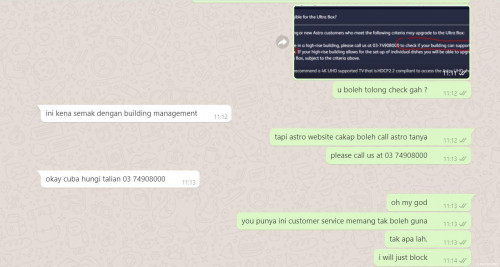
haha.. tried to ask via whatapps. the CS all blur blur... yesterday i did ask other thing in whatapps too.. same blurblur
user posted image
*
Why didn't you just call that dedicated hotline and ask?
They have different teams in charge on certain particular things, and there's no such thing as one-agent knows-it-all in Astro customer service.
Otherwise, you contact your building management and ask sweat.gif

There's so much more I can share with you. But I don't wanna overload you too much information yet.
So the question now is, which one do you want? biggrin.gif
Right now, if you want to add new Multiroom subscription, you can only choose either the Astro HD box or Astro Ultra Box only.
Due to limited stocks and other reasons, Astro now "reserves" refurbished PVR boxes to existing PVR box users as well as new Astro IPTV users ONLY.
joshhd
post Jan 24 2021, 04:40 PM

Look at all my stars!!
*******
Senior Member
7,799 posts

Joined: Dec 2014
From: Malaysia


QUOTE(yongtjunkit @ Jan 24 2021, 02:02 PM)
joshHD if I were to enable Dolby digital audio on the ultra box how do I do it?

LG soundbar with 2.1 audio connected via HDMI ARC
*

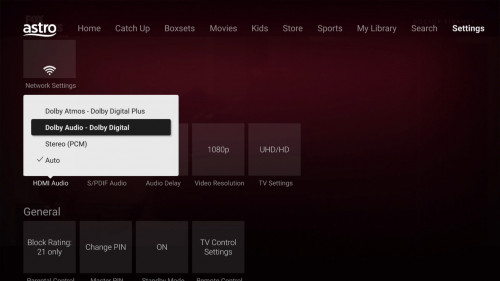
By default, the HDMI Audio setting is set to "Auto".
Dolby Digital audio will be used automatically whenever the channel/content has Dolby audio, and your TV or whatever audio devices supports Dolby audio.
user posted image
Not every content on Astro has Dolby 5.1 audio, so don't be surprised when you see your favourite shows is only in Stereo ya...
» Click to show Spoiler - click again to hide... «

joshhd
post Jan 24 2021, 04:41 PM

Look at all my stars!!
*******
Senior Member
7,799 posts

Joined: Dec 2014
From: Malaysia


QUOTE(fandom96 @ Jan 24 2021, 03:49 PM)
List of platform where TV Al-Hijrah is available. SiriusTV where you at? πŸ˜‚
[attachmentid=10764982]
*

Coming soon.
Just wait till they launch la... biggrin.gif
joshhd
post Jan 24 2021, 05:35 PM

Look at all my stars!!
*******
Senior Member
7,799 posts

Joined: Dec 2014
From: Malaysia


QUOTE(schoe @ Jan 24 2021, 04:53 PM)
your information really solved all my queries. so nice . appreciated.

actually i am like this, my hometown in Perak, was using the unifi 300mbps. (RM139 which applied on year 2018 ). recently i noticed the bill charges has changed to RM209 (since oct20 i totally no idea and did not notice it), therefore I did some survey, and came to conclusion that I want to pasang the maxis + astro bundled.
my Perak house is subscribing the superpack 3. monthly Rm17X, I never go and look into it whether has cheaper plan with almost the same subscription channel or not. Then after the survey yesterday, I plan to get the maxis 30mpbs + astro super pack bundle which cost RM225 per month.

But due to the maxis port (people say will have full port being utilized issue),  so I had drop a message to Astro to ask Astro to find a chinese speaker to call me to talk about this bundle. At the same time, I will ask for the multiroom after this bundle has been signed up .

check from astro website, this bundle able to offer Ultra box.

So tomorrow I will call the number to ask about the DSCC thing in this KL building. But anyway, even if does not have, I still able to watch HD/SD without any interruption, right ? of coz can support is a bonus lah.

hopefully the multiroom device is the astro ultrabox lah
*

Which Astro box you are using now, at your Perak hometown one? HD box or PVR box?

If Super Pack is too costly for you, you may opt for Super Pack Lite packages instead, which costs RM115/month excl SST.
Refer to this Subscription Rate Card, to better understand on the complete Astro packages offered:
https://imgur.com/a/DNr63Ei
Brief explanation here:
https://forum.lowyat.net/index.php?showtopi...post&p=98458199
joshhd
post Jan 24 2021, 05:57 PM

Look at all my stars!!
*******
Senior Member
7,799 posts

Joined: Dec 2014
From: Malaysia


QUOTE(yongtjunkit @ Jan 24 2021, 04:59 PM)
hmm.gif somehow it was preconfigured to stereo(PCM)
What about the top option, Dolby digital plus(for
Additional knowledge, my soundbar doesn’t support it)?
*

By right, Dolby Digital Plus is backward compatible with Dolby Digital.
So if your soundbar doesn't support Dolby Digital Plus (also known as DD+) but only supports Dolby Digital, then it'll automatically down-convert into Dolby Digital audio.
In simple words, pretty much nothing happens, and you'll still be able listen to the audio as usual.

Unless if one day, the particular content has Dolby Atmos audio, and you want to make sure your home theatre system plays the audio as Dolby Atmos format, then you may select Dolby Atmos - Dolby Digital Plus option.
Right now there is no Dolby Atmos content from Astro, so you can ignore this point for now.
joshhd
post Jan 24 2021, 06:47 PM

Look at all my stars!!
*******
Senior Member
7,799 posts

Joined: Dec 2014
From: Malaysia


QUOTE(schoe @ Jan 24 2021, 06:01 PM)
wah now superpack 3 already become Rm146. if add 6% = 154.76
my payment for superpack 3 is RM172.80 after sst. Astro so gan chou, didnt lower down my price . haha

the main user now is my father who likes to watch football or sports channel. so when i opt to maxis + astro bundle. i think i will choose the 30 mpbs + super pack which cost RM225. if go for superpark sport lite.. different RM30. without additional 2 sport channel , without HBO all that.
as when I do the multiroom, i can watch HBO and other english movie channel...
so should be RM225 lah..

somemore currently my unifi subscription (Rm144 ---> RM224) + current astro subscription (RM172.80) , equal almost RM320 ---> RM400

this Rm225 + 6%, should be ok . 30mpbs is enough for father to watch youtube lah..

haha
*

Yes of course. Astro aren't dumb to "automatically" tell all its existing SP3 @ RM172/month subscribers to "downgrade" and pay less on the newer Super Pack 3 at RM154.80/month incl SST.
For those who aware of this difference, like you right now, can contact customer service 03-95433838 and tell them to downgrade to that Super Pack 3. Do note that a one time RM10 switching fee applies.

The biggest difference with the old and new Super Pack 3 is, you won't get Golf Channel (822) and Astro Cricket (824) channels when you're on the newer Super Pack 3 at RM154.80 incl SST
Astro "secretly" includes this 2 expensive premium sport channel (which you may not realise that you can actually watch this channels now), to justify the reason for existing SP3 customers like you, to continue paying RM172.80/month.
If you or your parents don't watch this 2 channels, I suggest you to "downgrade" to the newer RM154.80/month version of Super Pack 3 instead. Read this to know more:
https://forum.lowyat.net/index.php?showtopi...&#entry96647553

So this is how the calculation formula look like:
RM89 for 30Mbps
RM146 for Super Pack 3
Total: RM235

RM235 - rebates RM_____ x 24 months*** = Your final price for Astro & Broadband or Astro IPTV
***depending on the particular promo during sign up, as amount may varies depending on their campaign promos
Also, if you pay Astro bill via auto debit, you may entitle to enjoy additional monthly rebate of RM5 x 24 months too.
And, don't forget to add RM50/month per Multiroom subscription on top of the total price... tongue.gif

The rebate amount usually varies from RM20 to RM30. As you approach Astro sales agent, they may offer you something else (e.g. different rebate value) compared to the one I mentioned above.
And sometimes, Astro sales agent's campaign promo may be more attractive than what you see on Astro website.
Like example, what you saw on Astro website is RM225/month (RM10 difference compared to original price), but the rebate may be higher if you approach an Astro sales agent directly.
Feel free to look up for Astro sales agent online, and ask them to advise the packages for you further. Cuz I'm not Astro sales agent lollll 🀣🀣🀣

But I can advise you on the technicality stuff though, which sales agent usually wouldn't know.
joshhd
post Jan 24 2021, 06:53 PM

Look at all my stars!!
*******
Senior Member
7,799 posts

Joined: Dec 2014
From: Malaysia


QUOTE(schoe @ Jan 24 2021, 06:27 PM)
actually i remember last time when 2013,the subscription fees is Rm155. I duno why it increase already....haha
*

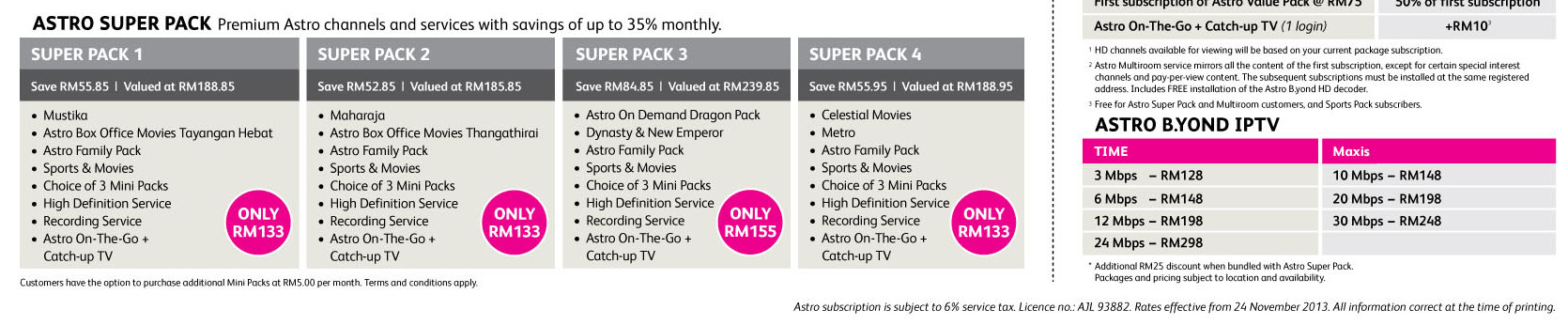
Yes, you are right. This is how the super old version of Super Pack look like back in the year of 2013:
user posted image
A cropped version of Astro Subscription Rate Card - November 2013 version

Cuz back in around 2014, when Astro increases the price for Sports pack as high as RM13 per month with the excuse of Premier League broadcast rights getting more and more expensive, hence it also affects all Super Pack customers.
That is how Super Pack 3 ended up becoming from RM155 into RM163 per month, excl SST.
joshhd
post Jan 25 2021, 01:09 AM

Look at all my stars!!
*******
Senior Member
7,799 posts

Joined: Dec 2014
From: Malaysia


Main features differences between PVR box vs Ultra Box READ THIS especially if you are an existing Astro PVR box user

EDIT: The original post contains outdated information. Refer to the updated version of this post here: https://forum.lowyat.net/index.php?showtopi...ost&p=100498320
Original post:
» Click to show Spoiler - click again to hide... «


This post has been edited by joshhd: Apr 3 2021, 12:55 AM
joshhd
post Jan 25 2021, 02:54 PM

Look at all my stars!!
*******
Senior Member
7,799 posts

Joined: Dec 2014
From: Malaysia


QUOTE(yongtjunkit @ Jan 25 2021, 01:16 PM)
joshHD after upgrading from a 1080P tv to a 4K tv, I’ve noticed that the UI seems a bit pixelated as well as the HD content, is this normal

At least was able to pair a LG remote to the ultra box but not the ultra box remote to the TV ( already tried resetting the remote by pressing and holding the 7 and 9 key )
*

Go to your TV's Picture Settings, and change the Sharpness setting to all the way down to zero (0).
Note: Some TV models have a zero setting in the centre of the control, so lowering it beyond that point might actually soften the image.
If you feel like the picture quality looks too "blurry" to you, as if it looks like you have short sighted eye vision, then try change the Sharpness setting to not more than 50/100 or 5/10 (depending on TV model).

And also, try look deeper at your TV's "Advanced Picture settings" or "Expert Settings", and look for options that mentions the following, or similar (depending on your TV brand and model):
- Digital Clean View (for Samsung TVs)
- Noise Reduction
- MPEG Noise Reduction (also known as MPEG NR for some Panasonic TVs)
- Super Resolution (for LG TV)
- Dot Noise Reduction
- Detail Enhancer
- Edge Enhancer
- Edge Enhancement


Make sure all these picture settings listed above (or similar names) is set to "None" or "Off". Once done, check if the picture quality now looks more "natural looking" to you.

This post has been edited by joshhd: Jan 25 2021, 03:15 PM
joshhd
post Jan 25 2021, 06:15 PM

Look at all my stars!!
*******
Senior Member
7,799 posts

Joined: Dec 2014
From: Malaysia


QUOTE(yongtjunkit @ Jan 25 2021, 05:55 PM)
It seems like the ultra box UI was designed for 1080P screen instead of 4K(not sure though) doh.gif

Not sure if it's the ultrabox not upscalling the content properly, don't think it's the TV since ch780 looks sharp as how it should be
*

Hmmm... Nice discovery. This one u should ask the software engineer guys at Astro already... πŸ˜…

I guess is because in order not to create too much unnecessary burden to the Ultra Box hardware, the software guys decides to make its UI to render as up to 1080p resolution, even when the Ultra Box output resolution is in 2160p.
After all, most importantly is the picture quality/sharpness from the 2160p UHD content, and user may not bother much to think whether the UI resolution is in 2160p resolution or not, cuz as long user can use/interact with the software without issues is more important?
Perhaps by rendering the UI as 1080p, it could also make Ultra Box to easily achieve exact or almost 50fps on the visual animations of the UI too, meanwhile if the UI is in 2160p, it could cause drop/skip frames on the visual animations, which gives an negative impression to users like us by thinking the Ultra Box is sluggish and lag?

Wah. I feel like I can work as a technical advisor for Astro's UI/UX designer already HAHAHA... πŸ˜‚πŸ˜‚

This post has been edited by joshhd: Jan 25 2021, 06:20 PM
joshhd
post Jan 25 2021, 10:44 PM

Look at all my stars!!
*******
Senior Member
7,799 posts

Joined: Dec 2014
From: Malaysia


QUOTE(jackytan.tt @ Jan 25 2021, 10:22 PM)
https://www.lowyat.net/2021/230978/disney-p...-ig-page-alive/

Looks like the FB page for Disney+Hotstar went live, before they took it down.
*

Well it's kinda predicted anyway...
joshhd
post Jan 25 2021, 11:31 PM

Look at all my stars!!
*******
Senior Member
7,799 posts

Joined: Dec 2014
From: Malaysia


QUOTE(yongtjunkit @ Jan 25 2021, 10:44 PM)
That’s a possibility, setting it to 2160P makes everything look bad except UHD content on Astro

Maybe this is a message from Astro that β€œour ultra box is have half baked 4K UHD capabilities, please select 1080i/1080P and let your 4K UHD TV do the upscaling” πŸ˜‚πŸ˜‚

It even makes their HD content look better hmm.gif
*

Is it really that bad? hmm.gif hmm.gif hmm.gif hmm.gif
I don't see any visible difference when watching Full HD content on these resolutions: 1080i/1080p/2160p

But if watching 4K UHD content on Ultra Box, and if I compare the quality by switching between 1080i/1080p/2160p, then yes, I can see the difference.
The one at 2160p provides much more picture detail than 1080p.

Btw I'm using Samsung UHD TV.
joshhd
post Jan 26 2021, 01:44 PM

Look at all my stars!!
*******
Senior Member
7,799 posts

Joined: Dec 2014
From: Malaysia


Complimentary viewing of Kids pack and news channels is extended to 4 Feb 2021.

joshhd
post Jan 28 2021, 12:02 PM

Look at all my stars!!
*******
Senior Member
7,799 posts

Joined: Dec 2014
From: Malaysia


QUOTE(pandikar @ Jan 28 2021, 08:41 AM)
Hello.

Software update never succeed:

TV display: stuck at 0%.

Decoder display: auto update - update error - boot. Repeat.

How to solve this issue?

Call Astro.
Sent technician to replace decoder 3 times already.
Problem still not solved.

Please help.
Thank you.
*

You can assume that you're in bad luck, where so happen they gave you a poorly/faulty manufactured Astro box... sad.gif
I mean like, let's say out of all hundreds of thousands of Astro boxes, there are a "few" boxes that are poorly manufactured and may have issue ones, and unluckily you were given the poorly manufactured ones, and the people in Astro didn't realise. It could be overlooked or something.

My advice is, don't forgive them.
Just go ahead and replace as many times of Astro boxes as possible, until the problem is solved. If it needs to replace 10 times, then let them replace 10 times.
Count from the date you start experiencing these nightmare until the day where the issue is solved, and then call Astro and ask for prorated bill rebate.
At least you get some form of "compensation" from that. sweat.gif

QUOTE(pandikar @ Jan 28 2021, 09:13 AM)
Astro said got 6 months warranty from 1st replacement.

Not the zapper one.
DMT 5 PVR box.

Any special setting for centralized dish that I can try?

Ask building management, they said dont have any.
*

Assuming your building's Astro centralised dish system doesn't support DCSS, then you'll just have to make sure the installer "find ways" to make sure Both inputs (SAT IN 1 and SAT IN 2) is connected; it could be from a cable splitter like this: https://shopee.com.my/2-Way-Splitter-Coaxia...8079.2637264266
user posted image
Use that one satellite cable from the wall socket, then make a 2 short cables (as shown on picture) like this, and then connects both of the cables into your PVR box's both SAT IN 1 and SAT IN 2 ports.
And that's it.

Do note that if you insist on connecting only either one SAT IN inputs of the PVR box (example Tuner 1 has signal, while Tuner 2 has no signal because it is left unconnected), then you may see "Services currently not available (SCNA)" message appears especially when you trigger/schedule record any other channels in the background, or after you reboot the Astro PVR box.
Long story short, just make sure both SAT IN 1 and SAT IN 2 ports of your PVR box is connected, then you won't experience whatever signal conflicts anymore.

If your building's Astro centralise dish system has upgraded to DCSS, then you don't need to split the cable like what I said above, just connect that one cable from the wall socket into SAT IN 1 port of your PVR box, and then go to the satellite settings of your PVR box, change the Input Source from "LNB" to "DCSS" like this, then press OK again and again, then done.
user posted image
Info source: https://forum.lowyat.net/index.php?showtopi...post&p=99741779

If you don't understand or confused on what I just said, then just let the technician do their job biggrin.gif

This post has been edited by joshhd: Jan 28 2021, 12:03 PM
joshhd
post Jan 28 2021, 01:35 PM

Look at all my stars!!
*******
Senior Member
7,799 posts

Joined: Dec 2014
From: Malaysia


QUOTE(pandikar @ Jan 28 2021, 12:59 PM)
Joshhd,

Already used the splitter, as per your advice back in 2017😁
Thank you for the guidanceπŸ‘πŸ»

Had no such problem with the first decoder, let's call it #1.
Been using it since September 2017.

Only in October 2020 it had problem: intermittently unable to record.

Request for a change.
#2: suspected not a new decoder, because it already has one recorded programme.

Problem not solved.

Request for a change again.
#3.

Repeat and now with #4πŸ˜“

Scenario 1:
If I turned the decoder off, but let the electric power remains, after 80-90 minutes, it will auto update.

If during auto update, I turn the electric power off, the process will continue when I turn ON the decoder.

Scenario 2:
Turn decoder OFF, immediately turn electric power OFF.
When I turn ON the decoder, no auto update.

But this method will only last 3-4 days, where auto update will happen again.

What does it takes for auto update to complete?
Only electric power right?
*

Astro no longer manufactures brand new PVR boxes. Now they only offer refurbished PVR boxes (also known as RDMT5).
If the PVR box want to auto update, then let it auto update la. What's the issue with that?

By pressing power button on remote control while the electric power remains on as you mentioned, that process is called putting it into standby mode.
You can just leave your PVR box into standby mode overnight 24/7 or whenever you're not watching. Not necessarily have to power off the electric supply everyday before you go to bed.
It consumes very very little electricity only, so don't worry too much about that.

To let the auto update complete (which it could take quite some time), just leave your PVR box into standby mode, and don't power off the electric supply, as it could possibly corrupt the software of the PVR box (same concept like when you auto update your computer or phone, you can't just forcefully power off the electric supply).

I think is, sometimes when Astro box itself is kept in Astro's warehouse for too long (e.g. many years), the software version might still remains the same initial version of manufacture year (e.g. year of 2018 version)
So by the time you started using the Astro box in the year of 2021, you might realise that your Astro box carries out auto update several times and it takes long time, because the Astro box has been "left out" too many versions of software updates throughout the years in the warehouse. Get what I mean, right?
The concept is like, you buy a Windows 10 laptop back in 2018, so the laptop's Windows 10 version will be Version 1803. But you keep in the store room, didn't even turn it on, until today, the year of 2021.
As you start to use it today, because your laptop still remains the same Version 1803, so for it to get updated to today's latest Windows 10 version of Version 20H2, it will take a much longer to keep installing updates.
That is just an example la, just in case for those who can't understand what I'm saying earlier...

So when you see auto update, just let it update, don't interrupt the update process.
Better is, put your Astro box into standby mode before you go to bed at night. And then see how is it on the next day.
joshhd
post Jan 28 2021, 06:48 PM

Look at all my stars!!
*******
Senior Member
7,799 posts

Joined: Dec 2014
From: Malaysia


QUOTE(pandikar @ Jan 28 2021, 01:55 PM)
The problem is, 'auto update' will be followed by 'update error', then 'boot'.

And repeat. Every single time.

I've tried several times not shutting off power supply overnight, the outcome is still the same in the morning: it still try to auto update.
*
QUOTE(cdspins @ Jan 28 2021, 02:17 PM)
Possible to skip the auto update? I think just continue to call customer service... maybe they will give the the 4k UHD ultra box
*

Either way, just tell them to arrange a technician to your house and replace/swap to another PVR box.
Keep swapping until the issue is solved.

Otherwise, you may opt for Ultra Box.
Please do research on the differences between PVR box and Ultra Box here, before you make a decision:
https://forum.lowyat.net/index.php?showtopi...&#entry99746858
QUOTE(JuneResources @ Jan 28 2021, 02:54 PM)
I think the PVR box is no longer to use anymore.
Mostly been force to change ultra box.

You should request give you ALL New decoder, don't give you recycle PVR box one..

Recycle is good, but sudah rosak.. Jgn bagi org pakai rosak punya.. Ppl pay the monthly subscriptions...
*

Refurbished doesn't mean it is originally rosak.
It could be 100% working PVR box. It's just that it is being returned by customer during box upgrades or whatsoever.
For example like me, previously I am a PVR box DMT5 user, and as I upgrade to Ultra Box, I must surrender my PVR box back to the technician.
Of course, when the PVR boxes is back to Astro's hand, they will do all the quality checks, repairs, parts replacements on the box...
They'll make sure it is working fine and look like new, before the box being distributed to those who in need again, and one of them, it's like pandikar.
That is how refurbished PVR boxes is being offered to customers right now. And that is why it only has 6 months warranty πŸ˜‚πŸ˜‚

But sometimes, the scenario of "overlooked" among Astro, is not something new also.
And unfortunately that's probably why pandikar getting PVR boxes that refuse to install software updates properly. rclxub.gif
QUOTE(pandikar @ Jan 28 2021, 04:42 PM)
Been asking the same question to Astro on how to stop auto update, their reply:

We will refer to the relevant/technical department.πŸ€¦πŸ»β€β™‚οΈ
*

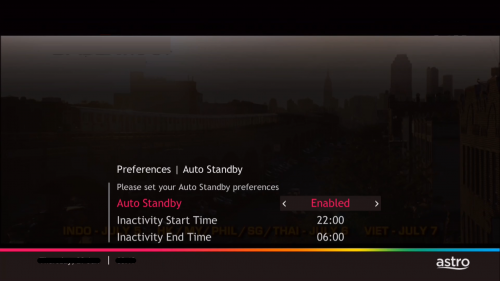
If you don't want auto update to carry out, the easiest workaround is don't put your Astro box into standby mode, and just leave your Astro box powered on 24/7 even when you're not watching.
Let's say your PVR box is on HBO CH 411. Now perhaps you want to go to bed already. So what you do is, you just switch off your TV, leave the PVR box leave it powered on. Don't put it into standby mode.

And also, remember to change from "Enabled" to "Disabled" for the Auto Standby setting in home>Preferences>Auto Standby
user posted image

If you really have to power off the electric supply to the PVR box (e.g. away from home for many days to weeks), then make sure as you power on the PVR box later on, don't let the PVR box stayed in standby mode for too long, or else it might trigger auto update.
Let's say as you power on the electric supply to your PVR box, as you see --:-- or the clock appears on the front panel of the PVR box, you quickly press power button on your remote control to wake up your Astro box.
It doesn't matter whether you want to watch TV or not. Just make sure the Astro box is not in standby mode will do.
As a gentle reminder, do make sure your PVR box is placed in a well ventilated area, instead of confined spaces or poor ventilated areas. In worst case scenario, it can cause overheating problem on the PVR box in the long run, which can cause hard disk failure too.
----
As the PVR box might be left power on for 24/7, the hard disk inside PVR box will continue to temporary record the TV channel due to the timeshift function (pause/rewind live TV) even when you're not watching at midnight.
This could cause a little further wear and tear on the Write cycles of the hard disk inside PVR box (well, that's if you concern about the lifespan of the hard disk laaa sweat.gif).
As a workaround, you can tune to any radio channels first (e.g. CH 852 - 882) before you switch off your TV and go to bed or whenever you're not watching.
That's because PVR timeshift functions (e.g. record/pause/rewind) doesn't work for radio channels, so your hard disk won't be in "Write" mode when you're on radio channels biggrin.gif
If the lifespan of the hard disk isn't your primary concern, then just ignore this point.
QUOTE(pandikar @ Jan 28 2021, 04:43 PM)
Per recommendations, requested for a rebate due to gangguan siaran almost everyday.
*

Yes. You have to voice out and request for bill rebate. If you don't, they will just say sorry to you, and that's it.
Unfortunately, big companies like Astro, aren't sincere to give out bill rebates.
Even they say they will give you bill rebate, and they will record it down into their system, but eventually your bill rebates might take many months later only can get it, instead of immediately reflect on next bill.
In other words, they expect you to forget about it la. biggrin.gif
In a business point of view, the reason they delay the bill rebates might because they want to "wait and hold" the payments longer, or to make the money figures in their quarterly financial reports to "look nicer" first.

That is the reason why I said, don't forgive them especially when it comes to money. If you would to forgive them, make sure you don't forget about it.
joshhd
post Jan 28 2021, 07:10 PM

Look at all my stars!!
*******
Senior Member
7,799 posts

Joined: Dec 2014
From: Malaysia


QUOTE(JuneResources @ Jan 28 2021, 06:48 PM)
You ask astro to give rebate? Dun think too much.
Unless u bring ur whole set decoder go to service center throw to staff face. And insert your smart card to staff mouth, then can watch TV already.. hahaha..
*

Can....

You can request for bill rebates due to technical issues faced. The best example is during MCO 1.0 last year, where technical visits can't be carried out for quite sometime, so what Astro can do is to offer bill rebates for the number of days that you face the issue. Of course, the reason of the rebate has to be justifiable (e.g. totally cannot watch Astro at all, or couldn't access to certain primary functions of the PVR box).

And of course, please, don't expect Astro will immediately reflect that bill rebate right on the next bill. You might have to wait many months later to actually get the rebate. Who knows you'll have to wait until end of this year to get the rebate.

They say they can offer you bill rebate, because that's what we customers want to hear from them.
It is obvious that the reason they delay the bill rebates, is because they aren't sincere to give out bill rebate, as it will definitely hurts them financially and profits. They have to do some sort of financial damage control, since they want their quarter financial report to look nice and convincing to the stakeholders.

If it's just a few people asking for bill rebate, they'll probably can reimburse you on the next bill. But imagine if there's thousands to hundreds of thousands of people asking for bill rebate, would you want to reimburse it fast?

Can delay how long, then delay how long.

Yeah, the irony is, Astro reimburses bill rebates very late to customers, yet nothing happens. But if you pay Astro bill late, they will suspend your service pretty instantly.
joshhd
post Jan 28 2021, 09:24 PM

Look at all my stars!!
*******
Senior Member
7,799 posts

Joined: Dec 2014
From: Malaysia


QUOTE(hazim96 @ Jan 28 2021, 09:15 PM)
Revamped HD packages on offer
» Click to show Spoiler - click again to hide... «
LINK
*

Thanks for highlighting this to us about the Brunei version of Astro, Kristal Astro. πŸ‘πŸ‘πŸ‘

224 Pages « < 80 81 82 83 84 > » Top
 

Change to:
| Lo-Fi Version
0.0535sec    0.54    7 queries    GZIP Disabled
Time is now: 17th December 2025 - 11:48 PM