Welcome Guest ( Log In | Register )

10 Pages « < 4 5 6 7 8 > » Bottom

Outline · [ Standard ] · Linear+

 Samsung Pay Unofficial Discussion Thread V2

views
     
Lingohal
post Nov 3 2018, 05:39 PM

Regular
******
Senior Member
1,354 posts

Joined: Mar 2018
QUOTE(cassian948 @ Nov 3 2018, 02:29 PM)
My point for the transactions made in November isn't being credited, anyone having the same issue?

Last October made 26 transactions, point credited just fine. Start November 1st, no pop-up screen for award points after making payment.

user posted image
*
I had one transaction earlier, no problem. Points awarded too.
Lingohal
post Nov 6 2018, 06:40 PM

Regular
******
Senior Member
1,354 posts

Joined: Mar 2018
QUOTE(StormZ @ Nov 6 2018, 05:51 PM)
Just got my PBB statement, don't see the cashback for every 2nd rm50 transaction. You guys received?
*
Don't think it's out yet.

This post has been edited by Lingohal: Nov 6 2018, 06:58 PM
Lingohal
post Nov 28 2018, 08:00 PM

Regular
******
Senior Member
1,354 posts

Joined: Mar 2018
QUOTE(#Victor @ Nov 28 2018, 06:31 PM)
Magnetic Secure Transmission (MST) sends a magnetic signal from a compatible device to the payment terminal’s card reader (to emulate swiping a physical payment card). Therefore, Samsung Pay is available for use at nearly all payment terminals with a card reader. No prompt for PIN, straight got transaction cancelled error.
Last time before PIN & PAY was using Maybank card all time without issue with MST, maybe I should add back Maybank card to try. So conclude that most like it is card / bank issue more than terminal issue?
*
I have a feeling that MST is disabled on some terminal. There is a shop I frequent, sometimes I think I accidentally tap too near the mst, but it never goes through.
Lingohal
post Dec 27 2018, 09:50 PM

Regular
******
Senior Member
1,354 posts

Joined: Mar 2018
I had no idea that we have to remove BCard from SPAY before setting up a new device. I did remove all the payment cards from old device, and successfully added into the new device. However, I could not add BCard as a popped up message says that it's already registered onto a device. The thing is, I've already done a factory reset on the old device.
Lingohal
post Dec 31 2018, 01:43 AM

Regular
******
Senior Member
1,354 posts

Joined: Mar 2018
QUOTE(dh13 @ Dec 30 2018, 11:08 PM)
Yup. In case you need to add the same card again, drop an email to enquiry@binfinite.com.my and ask for reset soft token. I got my token reset and able to re-add the same card.
*
Thanks for the tips. I wasn't sure who to write to. Dropped an enquiry with Samsung, but no reply yet so far. Just wrote an email to BInfinite. Thanks again.
Lingohal
post Jan 16 2019, 06:20 PM

Regular
******
Senior Member
1,354 posts

Joined: Mar 2018
QUOTE(iamshf @ Jan 15 2019, 07:55 PM)
I got full RM150 CB
*
Me too. I've got RM150 and a Note 9. tongue.gif
Lingohal
post Jan 17 2019, 09:26 AM

Regular
******
Senior Member
1,354 posts

Joined: Mar 2018
QUOTE(NightFelix @ Jan 16 2019, 11:01 PM)
Wait what. From which promo?
*
Spend with Public Bank card on Samsung Pay the last 3 months.
Lingohal
post Jan 17 2019, 01:25 PM

Regular
******
Senior Member
1,354 posts

Joined: Mar 2018
QUOTE(confuzan @ Jan 17 2019, 01:07 PM)
congrats!

mind to share how much u actually spent? rough figure should be ok.
*
Thanks.

I tapped around 5800. I did it for the first month.
Lingohal
post Jan 24 2019, 07:21 PM

Regular
******
Senior Member
1,354 posts

Joined: Mar 2018
QUOTE(singgung @ Jan 24 2019, 05:02 PM)
Ok thanks guys. I'll give rhb another call. I also think it has to be done by rhb but after the cs checked a while and asked me to call samsung to reset i malas to deal with her already.
Btw i also didn't unlink my cimb lazada prepaid card from spay for gear before formatting but I have no issue adding it back.
*
Yes you should call again.

I also formatted my device and forgot to unlink my rhb card. So I called rhb and they just went and reset it for me. Few days later, rhb staff did a follow up call to ask if I can link to Samsung pay already. Very good service.
Lingohal
post Jan 30 2019, 05:10 PM

Regular
******
Senior Member
1,354 posts

Joined: Mar 2018
QUOTE(Theoutspokenguy @ Jan 30 2019, 04:12 PM)
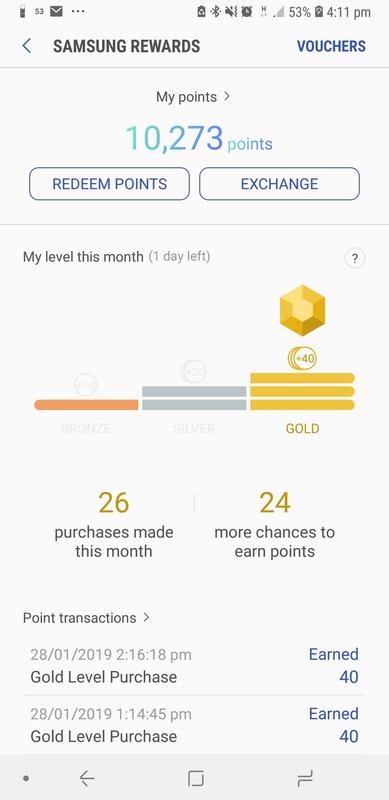
Now lazy to collect spay points.

user posted imageupload picture
*
I can hardly reach 20. As of this morning, I still needed 5 more taps to reach target. Just now tried to tap 4 times. 1 more to go. I think next month I won't be trying to hit 20 already. There are too many options and promo from ewallet nowadays.
Lingohal
post Mar 18 2019, 05:21 PM

Regular
******
Senior Member
1,354 posts

Joined: Mar 2018
QUOTE(PJng @ Mar 17 2019, 05:55 PM)
Erm, just now done 2 trans but no notification pop up, also no points, i will wait 3 days before report
*
QUOTE(David83 @ Mar 17 2019, 05:59 PM)
I didn't recieve for this morning transaction but after few hours, it came in.
*
I had two transactions last night that weren't recorded in samsung pay, and points were also not rewarded. Just now did one transaction, and it wasn't recorded too. When I checked the list of transactions, I noticed the two transactions from yesterday are now listed and points were also awarded but date of points remain at today's date. So I guess I just have to wait for another day for the points for today's transaction to be awarded.
Lingohal
post Mar 20 2019, 01:39 AM

Regular
******
Senior Member
1,354 posts

Joined: Mar 2018
QUOTE(PJng @ Mar 19 2019, 06:02 PM)
Suddenly all missing trans show up
All pts awarded
*
My last transaction still didn't show up. But since I sent in my receipts and screenshots, Samsung has already awarded me the points manually.

This post has been edited by Lingohal: Mar 20 2019, 01:40 AM
Lingohal
post Mar 20 2019, 10:59 AM

Regular
******
Senior Member
1,354 posts

Joined: Mar 2018
QUOTE(PJng @ Mar 19 2019, 06:02 PM)
Suddenly all missing trans show up
All pts awarded
*
My transaction from 2 days ago showed up the same time when I did a transaction just now. Points are awarded at the same time too.
Lingohal
post Apr 4 2019, 08:16 PM

Regular
******
Senior Member
1,354 posts

Joined: Mar 2018
We can now use contactless mastercard to tap in and out Singapore MRT station to pay for the ride fare. It is launched today and I have tried out by adding my samsung pay card into the SimplyGo app and used phone to tap in and out. So there is no need to get the Ez-link card when we travel to Singapore. Fare charged is the same discounted rate as ez-link card rate.

This post has been edited by Lingohal: Apr 4 2019, 08:18 PM
Lingohal
post Apr 4 2019, 08:16 PM

Regular
******
Senior Member
1,354 posts

Joined: Mar 2018
Double post

This post has been edited by Lingohal: Apr 4 2019, 08:17 PM
Lingohal
post Apr 5 2019, 02:15 AM

Regular
******
Senior Member
1,354 posts

Joined: Mar 2018
QUOTE(joshhd @ Apr 5 2019, 01:31 AM)
Sounds like you're referring to YouTrip card, am I correct?
You need Singapore IC, or some Singapore government-issued documents like permanent resident, working permit, etc. to sign up that.
Ordinary Malaysians, still can't la...
*
No idea what YouTrip card is, but I was referring to SimplyGo app, which can be downloaded on Google Play or App Store. You just need to create an account with your email address and mobile phone number, and add your mastercard. That's all. And foreign cards are accepted.

You can read the news here to have a better understanding:
https://www.straitstimes.com/singapore/tran...ublic-transport

Below is the authorisation fee from my first tap. Subsequent usage has no record in Samsung Pay and no deduction from my card yet. No idea when will the charges be deducted. However, the transaction history is all listed in the app, with the route and fare stated.

Attached Image

Besides trying Samsung Pay, I did try out BigPay card too. Both worked seamlessly. No top up needed, no queuing up to purchase train tickets. You could add more than a card in the app, so you can choose to use whichever card you want to use to pay for the fare.

Lingohal
post May 21 2019, 06:20 PM

Regular
******
Senior Member
1,354 posts

Joined: Mar 2018
QUOTE(cosh84 @ May 21 2019, 10:38 AM)
Thanks, how to increase payware limit? i called CS, they said not limit just RM 250 max per payware.
*
You can still use Samsung Pay for amount more than RM250, only that pin will be triggered and you will have to insert pin.

There is a limit in terms of number of taps. After every 9 taps, you have to reset it with pin with physical card.
Lingohal
post May 24 2019, 03:54 PM

Regular
******
Senior Member
1,354 posts

Joined: Mar 2018
QUOTE(cassian948 @ May 24 2019, 11:49 AM)
Island terminal or cashier counter?
*
QUOTE(iamshf @ May 24 2019, 12:28 PM)
Island terminal
*
I usually just insert card, enter pin, and then after bank approves, I cancel it. And card is reset. 😜 No holding of RM200.
Lingohal
post May 26 2019, 11:15 PM

Regular
******
Senior Member
1,354 posts

Joined: Mar 2018
QUOTE(jutamind @ May 26 2019, 11:04 PM)
Seems like 9 times Paywave/Samsung Pay swipes then 1 time slot in & pin, then next cycle starts counting again.

Yah seems to have issue with PBB card only
*
Yes, every 9 times you have to reset with pin. I have been using PBB card on Samsung Pay since the time when PBB cards are accepted on Samsung Pay. I usually reset it at the petrol kiosk, most of the times before it reaches the limit, so that I can continue using Samsung Pay without having to use my physical card with pin.

So far the highest amount I have used on Samsung Pay with PBB card is around RM1200.

This post has been edited by Lingohal: May 26 2019, 11:17 PM
Lingohal
post Jun 21 2019, 04:46 PM

Regular
******
Senior Member
1,354 posts

Joined: Mar 2018
QUOTE(55665566 @ Jun 21 2019, 04:13 PM)
[attachmentid=10267939]

interesting.. maybe my phone problem
*
Your phone is Singapore version?

10 Pages « < 4 5 6 7 8 > » Top
 

Change to:
| Lo-Fi Version
0.6027sec    0.47    7 queries    GZIP Disabled
Time is now: 15th December 2025 - 05:01 AM