

never 100% trust your LCD. Use histogram
D40 underexposed?!, need help from sifus!!!
D40 underexposed?!, need help from sifus!!!
|
|
 May 12 2007, 03:47 AM May 12 2007, 03:47 AM
|
 
Senior Member
1,631 posts Joined: Jan 2003 
|
never 100% trust your LCD. Use histogram
|
|
|
|
|
|
May 12 2007, 06:32 AM
|

Senior Member
7,214 posts Joined: Oct 2006 From: Kamino 
|
g88...
now i know... now i check the lcd to see the composition only... then histogram for the exposure...=) |
|
|
May 12 2007, 09:01 AM
|

Senior Member
2,502 posts Joined: Apr 2005 From: Kuching,Kuala Lumpur, Gifu,Japan
|
QUOTE(ac98 @ May 12 2007, 02:07 AM) I dun remember the last time I use Av or Tv, haha! But at Av or Tv the values will change as you go up or down the Ev bar, they should change to correspond with the final exposure setting. hehe.. then its all the same la. |
|
|
May 12 2007, 11:53 AM
|

Senior Member
3,544 posts Joined: Jan 2003 From: Puchong/Singapore
|
QUOTE(g88 @ May 12 2007, 03:47 AM) never 100% trust your LCD. Use histogram Yup, I now review all of my shots with histogram.Even though your pics may look darkish or overly-bright in the LCD (LCD also has its own brightness and contrast, BTW), as long as most of your histogram(s) is between the upper and lower limits you still have a lot of leeway later to adjust the photo via Photoshop or your RAW converter. In high-contrast scenes, you must make the choice between either sacrificing the bright areas or the dark areas as you cannot fit the entire histogram within limits for any one exposure. If a still pic, you can take multiple shots of different exposures and assemble as a High Dynamic Range photo later. |
|
|
May 12 2007, 01:23 PM
|
|
Senior Member
2,502 posts Joined: Apr 2005 From: Kuching,Kuala Lumpur, Gifu,Japan
|
QUOTE(cjtune @ May 12 2007, 11:53 AM) Yup, I now review all of my shots with histogram. histograms in old cameras arent rgb... so not perfect as well.Even though your pics may look darkish or overly-bright in the LCD (LCD also has its own brightness and contrast, BTW), as long as most of your histogram(s) is between the upper and lower limits you still have a lot of leeway later to adjust the photo via Photoshop or your RAW converter. In high-contrast scenes, you must make the choice between either sacrificing the bright areas or the dark areas as you cannot fit the entire histogram within limits for any one exposure. If a still pic, you can take multiple shots of different exposures and assemble as a High Dynamic Range photo later. |
|
|
May 12 2007, 01:24 PM
|

Senior Member
3,758 posts Joined: Apr 2006 From: Selayang
|
So in the end, it's what YOU want, not what your camera tells you
 |
|
|
|
|
|
May 12 2007, 01:39 PM
|
|
Senior Member
3,544 posts Joined: Jan 2003 From: Puchong/Singapore
|
QUOTE(clemong_888 @ May 12 2007, 01:23 PM) histograms in old cameras arent rgb... so not perfect as well. Even with the ability to review all 3 colour channels' histograms, you may not have the time to retake and retake until all 3 colours' exposure is acceptable. Normally, all 3 colours' distribution will follow one another very similarly. A cursory glance at just one colours' or the 'overall' histogram should suffice and better than none... |
|
|
May 12 2007, 01:43 PM
|
|
Senior Member
2,502 posts Joined: Apr 2005 From: Kuching,Kuala Lumpur, Gifu,Japan
|
QUOTE(cjtune @ May 12 2007, 01:39 PM) Even with the ability to review all 3 colour channels' histograms, you may not have the time to retake and retake until all 3 colours' exposure is acceptable. Normally, all 3 colours' distribution will follow one another very similarly. A cursory glance at just one colours' or the 'overall' histogram should suffice and better than none... the histogram in my d70s only shows green. so its almost useless when i shoot red. |
|
|
May 12 2007, 02:07 PM
|
|
Senior Member
3,544 posts Joined: Jan 2003 From: Puchong/Singapore
|
QUOTE(clemong_888 @ May 12 2007, 01:43 PM) the histogram in my d70s only shows green. so its almost useless when i shoot red. Ouch, never knew that...Yeah, it could be very inaccurate when shooting a scene that's predominantly of one colour. But the DCResource review about the D70s (http://www.dcresource.com/reviews/nikon/d70s-review/) doesn't mention about the green-only histogram. Looks to me like it's an 'overall' or 'average' histogram. |
|
|
May 13 2007, 08:37 PM
|

Senior Member
1,353 posts Joined: Jan 2003 From: inside my cozy room...
|
QUOTE(aichiban @ May 11 2007, 11:11 PM) kinda defeat the purpose of +-EV adjustment in the cam if it adjust the other values when we can adjust the other values ourselves GAH...HAHAHAHA... unless its meant for manual mode users  sorry...i just had to laugh at such noob statement... aichiban: EV adjustment is use to adjust or override what is being meter by ur camera in A/S mode. camera metering is just a device to measure. it does not "know" what exact exposure u really wan. so wif EV adjustment aka EV Compensation, u override the camera metering and snap the photo u wan wif the exposure u wan to achieve. get it?  Added on May 13, 2007, 8:41 pm QUOTE(cjtune @ May 12 2007, 11:53 AM) In high-contrast scenes, you must make the choice between either sacrificing the bright areas or the dark areas as you cannot fit the entire histogram within limits for any one exposure. If a still pic, you can take multiple shots of different exposures and assemble as a High Dynamic Range photo later. depends...but it can be done wif ur flash... external flash preferably... look at this pic say for example.  *ken: borrow ur photo for awhile ok...will remove it after few days later..  no HDR. the sky is brigther than the model and if u were to expose the sky, the model will be in total darkness...if u expose the model, the sky will be in pure white color. but this photo shows both the foreground and background detail clearly. why? Flash. Added on May 13, 2007, 8:48 pm QUOTE(g88 @ May 12 2007, 03:47 AM) never 100% trust your LCD. Use histogram at least someone here knows something about his camera...  This post has been edited by karwaidotnet: May 13 2007, 08:54 PM |
|
|
May 13 2007, 09:35 PM
|
|
Senior Member
3,544 posts Joined: Jan 2003 From: Puchong/Singapore
|
QUOTE(karwaidotnet @ May 13 2007, 08:37 PM) depends... Yes, this is a very good example of when fill-flash will solve this sort of problem.but it can be done wif ur flash... external flash preferably... look at this pic say for example. *ken: borrow ur photo for awhile ok...will remove it after few days later.. no HDR. the sky is brigther than the model and if u were to expose the sky, the model will be in total darkness...if u expose the model, the sky will be in pure white color. but this photo shows both the foreground and background detail clearly. why? Flash. But, what if your subject is over 20m away? What if you have several subjects are they are at different distances away from you? Or, you're in a large interior with the only source of light the sunlight coming through its windows? I find that most cases of high-contrast scenes I get require some sacrifice on the exposure. One example I can show (inclusive of some strange sensor smearing effect): 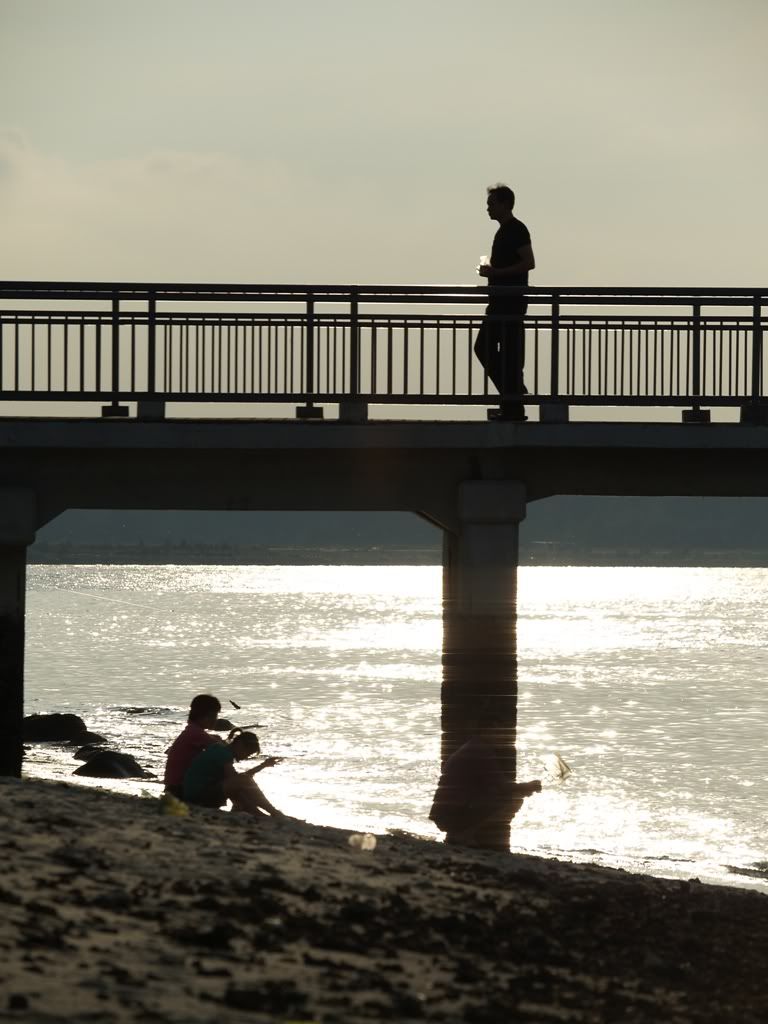 Here, I preferred the nice dark silhouette of the subjects against the setting sun. When the subject is in range of the flash, then fill-flash can be used to very good effect: 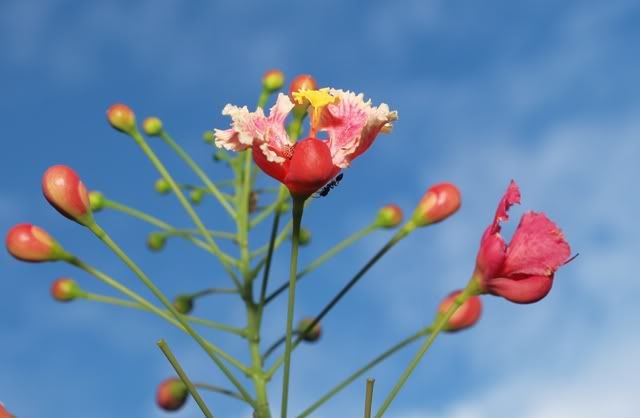 But watch out for harsh shadows cast by the flash, as can be seen on the girl's neck, upper shoulder, and dress (was your friend using off-axis flash with sync cord? Recommended). The above photo is still believable as the shadow from the foremost flower with the ant is quite diffused. As for HDR, it is still one option I've seen others use to great effect on still compositions. I am not a HDR person as I don't really bother to carry tripods most of the time nowadays... This post has been edited by cjtune: May 13 2007, 09:39 PM |
|
|
May 13 2007, 09:37 PM
|

Senior Member
1,994 posts Joined: Apr 2006 From: Sien Ga Lin 
|
QUOTE(karwaidotnet @ May 13 2007, 08:37 PM) GAH...HAHAHAHA... oic sorry...i just had to laugh at such noob statement... aichiban: EV adjustment is use to adjust or override what is being meter by ur camera in A/S mode. camera metering is just a device to measure. it does not "know" what exact exposure u really wan. so wif EV adjustment aka EV Compensation, u override the camera metering and snap the photo u wan wif the exposure u wan to achieve. get it? thanks for pointing it out too used to M mode  edit - thanks for the photo + explanations too This post has been edited by aichiban: May 13 2007, 09:42 PM |
|
|
May 13 2007, 09:47 PM
|
|
Senior Member
3,544 posts Joined: Jan 2003 From: Puchong/Singapore
|
QUOTE(karwaidotnet @ May 13 2007, 08:37 PM) GAH...HAHAHAHA... To add on: the EV adjustment is relative to whatever is 'anchored' by your camera's metering (via either spot, centre-weighed, or matrix metering). sorry...i just had to laugh at such noob statement... aichiban: EV adjustment is use to adjust or override what is being meter by ur camera in A/S mode. camera metering is just a device to measure. it does not "know" what exact exposure u really wan. so wif EV adjustment aka EV Compensation, u override the camera metering and snap the photo u wan wif the exposure u wan to achieve. get it? So you set the initial 'base' or 'anchored' value of EV first, and then and +/- so-&-so EV value to suit your taste. EV values are based on the power of two. So you can visualise in your head before making any EV adjustments with the knowledge that one EV increment is double the brightness of the metered area. Similarly, 1 EV decrement is half the brightness. You can read the Wikipedia article on Exposure Value -it's interesting but it's pretty involved... |
|
|
|
|
|
May 13 2007, 10:28 PM
|
|
Senior Member
1,353 posts Joined: Jan 2003 From: inside my cozy room...
|
QUOTE(aichiban @ May 13 2007, 09:37 PM) oic thanks for pointing it out too used to M mode edit - thanks for the photo + explanations too  glad that u understand... glad that u understand...sorry i hope i didnt offend u... didnt mean too...  cjtune: as i mentioned earlier on..."DEPENDS". however, at reasonable range, it can be resolve. for the photo i took as an example, i believe wif couple of reflectors, few more flashs, preferably softbox...perhaps, should solve those harsh shadows problem... *IMHO, i can already see the flower is shot wif some use of external light as there's highlight at few spots of the flower, the shadow is at the wrong place and the light looks kinda...doesn't seems like from the sun. the use of a reflector is a better alternative here...as it would be more diffuse and the light bounce back to the flower is still from the sun itself. thus making it more natural. This post has been edited by karwaidotnet: May 13 2007, 10:35 PM |
|
|
May 13 2007, 11:02 PM
|
|
Senior Member
7,214 posts Joined: Oct 2006 From: Kamino
|
guys...
from all of ur discussion... i think i understand a bit about exposure... but what i m still confused is... how to use the different type of metering... matrix, center weighted and spot... and also...i tried reading up on metering.... i juz couldnt understand the concept... can u all help me to understanding this topic? thx thx thx!!!! |
|
|
May 13 2007, 11:33 PM
|
|
Senior Member
3,544 posts Joined: Jan 2003 From: Puchong/Singapore
|
QUOTE(karwaidotnet @ May 13 2007, 10:28 PM) cjtune: as i mentioned earlier on..."DEPENDS". Well, it was good that you mentioned about fill flash. But I had to digress a bit more about "it depends" and limitations of fill flash when it comes to high contrast scenes.however, at reasonable range, it can be resolve. for the photo i took as an example, i believe wif couple of reflectors, few more flashs, preferably softbox...perhaps, should solve those harsh shadows problem... *IMHO, i can already see the flower is shot wif some use of external light as there's highlight at few spots of the flower, the shadow is at the wrong place and the light looks kinda...doesn't seems like from the sun. the use of a reflector is a better alternative here...as it would be more diffuse and the light bounce back to the flower is still from the sun itself. thus making it more natural. Your eye is a trained eye! Pretty good you can tell the lighting direction, especially when there is no other clue in the picture. In fact, I can't really remember where was the sun! The light was from a bounce card, not direct flash. The flower cluster was about 6ft from the ground, and it was actually being shaded by trees. If you're going to use reflectors, you can't rely on sunlight alone with all that shade. I've been thinking about carrying a foldable reflector, but have put it off for quite some time as I usually don't do macros (I do street shots), and with one free hand and no tripod, I'd rather use an off-camera flash with sync cord to change the direction of lighting to counter harsh shadows. Added on May 13, 2007, 11:49 pm QUOTE(xandman @ May 13 2007, 11:02 PM) guys... Well, spot and centre-weighted is about the same except that spot meters from a very small, almost dot-like area for brightness, while centre-weighted covers a larger area -a bit larger than your centre focus target zone and then averages whatever is inside that zone. from all of ur discussion... i think i understand a bit about exposure... but what i m still confused is... how to use the different type of metering... matrix, center weighted and spot... and also...i tried reading up on metering.... i juz couldnt understand the concept... can u all help me to understanding this topic? thx thx thx!!!! You can use spot/centre-weighted to meter the brightness off some surface you think is most representative of what you want, press Auto-Exposure Lock (AEL), and then move the viewfinder to cover your actual scene and then snap. It's just like focus-lock but for exposure. Very rarely the centre of your current view also has the best exposure so you've got to use AEL. Matrix or evaluative metering takes readings from your entire view. This sort of metering segments your current view into some NxN number of evaluation zones. 7x7=49 zones is quite normal. This is then compared against a database of possible shooting scenarios pre-programmed in your camera's logic board. But in using it, I find that it largely is just an average of the entire scene. So if you're shooting against a bright or largely whitish background, it will 'drag' down your reference exposure and then whatever minority area (most likely your subject!) will be shot severely underexposed. Similarly, if your background is largely dark, any minority area will be severely overexposed (but most likely you will suffer from slow shutter speed blur first). This post has been edited by cjtune: May 13 2007, 11:54 PM |
|
|
May 14 2007, 06:09 AM
|
|
Senior Member
7,214 posts Joined: Oct 2006 From: Kamino
|
cjtune....
thanks for the explanation.. juz one more thing for me to clear up my confusion... lets take a scenario for example... i m shooting a subject with a bright backgroud...therefore the subject will be dark rite? so in this condition...if i want the subject to be visible...where shud i meter? subject or background? thanks thanks thanks... i really appreciate it for those who r willing to help me! =) |
|
|
May 14 2007, 07:48 AM
|
|
Senior Member
1,353 posts Joined: Jan 2003 From: inside my cozy room...
|
QUOTE(xandman @ May 14 2007, 06:09 AM) cjtune.... from this statement i think u still not fully understand what cjtune has explanined...thanks for the explanation.. juz one more thing for me to clear up my confusion... lets take a scenario for example... i m shooting a subject with a bright backgroud...therefore the subject will be dark rite? so in this condition...if i want the subject to be visible...where shud i meter? subject or background? thanks thanks thanks... i really appreciate it for those who r willing to help me! =) if u cant understand the word metering, let's make it to become another word - MEASUREMENT. if u wan to measure the whole frame then let the camera average out the exposure - u use matrix. if u wan to measure just the center of the frame, u use center-weighted. if u wan to measure a specific dot on the frame, u use spot / partial. so if u wan to measure a subject against a bright background, first determine what u wan to measure? if u wan the subject to be fully expose, ignoring the background, the use 'something' to measure that subject. what is this something? can u answer this now? This post has been edited by karwaidotnet: May 14 2007, 07:48 AM |
|
|
May 14 2007, 08:34 AM
|
 
Staff
7,529 posts Joined: Jan 2003
|
QUOTE(cjtune @ May 13 2007, 11:33 PM) Well, spot and centre-weighted is about the same except that spot meters from a very small, almost dot-like area for brightness, while centre-weighted covers a larger area -a bit larger than your centre focus target zone and then averages whatever is inside that zone. Centre Weighted measures from the centre and averages out to the whole frame. It is not "whatever inside that zone"edit: typo This post has been edited by nairud: May 14 2007, 08:34 AM |
|
|
May 14 2007, 10:37 AM
|
|
Senior Member
7,214 posts Joined: Oct 2006 From: Kamino
|
QUOTE(karwaidotnet @ May 14 2007, 07:48 AM) from this statement i think u still not fully understand what cjtune has explanined... 'something' is to spot meter on the subject...is this true?if u cant understand the word metering, let's make it to become another word - MEASUREMENT. if u wan to measure the whole frame then let the camera average out the exposure - u use matrix. if u wan to measure just the center of the frame, u use center-weighted. if u wan to measure a specific dot on the frame, u use spot / partial. so if u wan to measure a subject against a bright background, first determine what u wan to measure? if u wan the subject to be fully expose, ignoring the background, the use 'something' to measure that subject. what is this something? can u answer this now? =)... *i have a tutor...thank u nairud* This post has been edited by xandman: May 14 2007, 10:37 AM |
| Change to: |  0.0198sec 0.0198sec
 1.06 1.06
 5 queries 5 queries
 GZIP Disabled GZIP Disabled
Time is now: 21st December 2025 - 09:55 PM |
 Quote
Quote