

shiity msi zotac etc
ASUS GAVE ME TWO CODES!!!!
NVIDIA GeForce Community V19, RTX 5000 unveiled
NVIDIA GeForce Community V19, RTX 5000 unveiled
|
|
 Nov 23 2018, 07:57 PM Nov 23 2018, 07:57 PM
Return to original view | Post
#141
|
 
Elite
6,799 posts Joined: Jan 2003  
|
shiity msi zotac etc
ASUS GAVE ME TWO CODES!!!! |
|
|
|
|
|
Nov 24 2018, 01:06 AM
Return to original view | Post
#142
|
|
Elite
6,799 posts Joined: Jan 2003
|
QUOTE(craxors @ Nov 23 2018, 10:23 PM) kasi 1 la....    QUOTE(owikh84 @ Nov 24 2018, 12:44 AM) lai WTB sorry dude .. gave it my buddy.  ok if msi got i give u.. still going to slam them. |
|
|
Nov 25 2018, 09:46 AM
Return to original view | Post
#143
|
|
Elite
6,799 posts Joined: Jan 2003
|
16733 GPU score for 2100mhz/8000mhz spent some time with this.. HT off 5Ghz stable. Uncore bumped to 34. Took some time cause started from scratch especially da ram. Same 2100/8000mhz. Stable cpu clocks do pay off compare to a 4.9ghz HT thats not stable. ( for stresstest but stable for benchmarks) This post has been edited by cstkl1: Nov 25 2018, 09:47 AM |
|
|
Nov 25 2018, 11:41 PM
Return to original view | Post
#144
|
|
Elite
6,799 posts Joined: Jan 2003
|
QUOTE(hihihehe @ Nov 25 2018, 10:39 PM) do you guys turn on vsync in nvidia control panel with gsync monitor? nope.on multiplayer game i cap da fps in game. on single player game normally cap it at 60 via rivatuner prefer capping it nowadays to a fps example any single player games by uplay ac ody, origin, fc5 et cap @60.. overwatch prefer 240. vulkan games prefer at 120fps football manager 2019.. 1000fps.. j/k lol. dont see da point of gpu/cpu doing up down utilization. This post has been edited by cstkl1: Nov 25 2018, 11:42 PM |
|
|
Dec 2 2018, 12:23 AM
Return to original view | Post
#145
|
|
Elite
6,799 posts Joined: Jan 2003
|
QUOTE(goldfries @ Dec 1 2018, 02:46 AM) Ugly reflections when DXR not enabled. quote " I have never seen a graphical effect this bad" screenspace reflection .. frostbite has issues with it .. a inherited issue from BF1 Unreal and unity engines have way better SSR implementation. |
|
|
Dec 3 2018, 11:35 PM
Return to original view | Post
#146
|
|
Elite
6,799 posts Joined: Jan 2003
|
QUOTE(goldfries @ Dec 3 2018, 01:14 AM) So far I heard it's January, don't know how true. |
|
|
|
|
|
Dec 5 2018, 04:44 PM
Return to original view | Post
#147
|
|
Elite
6,799 posts Joined: Jan 2003
|
QUOTE(K1d0 @ Dec 5 2018, 09:10 AM) Hi Guys, I just built a new PC 2 weeks+ ago with MSI Armor RTX 2070 8GB (Non-OC). bring to me.. i test. Previously, it's working kinda fine except some occasional crash on overwatch and insurgency which I thought is due to the slight OC at MSI Afterburner, +160 core clock. When i first OC, i run a few test using 3dmark time spy & firestrike, unigine heaven, cinebench with no crash, and most my game is not crashing such as BF V, monster hunter world and etc. Last night when I'm back from work, trying to play monster hunter world it crash right after i load into the game with error "Graphic device crash", i did not suspect anything at first I thought is driver related so I use DDU to clean remove and reinstall the driver but it's the same, then I went to try all my other game and all crash once it reach main menu. So, is my graphic card dead? I try to run overwatch on low setting on my iGPU and it works without crashing. nah dont sound like a hardware issue list down the spec of your rig. |
|
|
Dec 5 2018, 08:49 PM
Return to original view | Post
#148
|
|
Elite
6,799 posts Joined: Jan 2003
|
QUOTE(K1d0 @ Dec 5 2018, 04:52 PM) Will try again tonight, I try to update latest driver and same but have not try older yet. all new stuff. Not so convenient..haha, I am working at Singapore now. My spec as below:- CPU: i7-8700k cooler: NH-D15S Mobo: Gigabyte Z390 Aorus Pro WiFi Ram: 8gb Corsair Vengeance Pro RGB x2 SSD: 256GB 970 evo + 1 TB 860 Evo GPU: MSI RTX 2070 Armor 8GB (Non OC version) Case: Fractal Design Meshify C PSU: Seasonic Focus+ Gold 650W So far never OC my CPU yet and my ram set to XMP profile 1. if any issue here other than driver its gaygaybyte mobo ( my hate runs deeper than ocean).. |
|
|
Dec 6 2018, 11:18 AM
Return to original view | Post
#149
|
|
Elite
6,799 posts Joined: Jan 2003
|
QUOTE(K1d0 @ Dec 5 2018, 10:52 PM) hmm, i dont really think so. Cause I try with onboard gpu, i able to run game without any crashes but once I use back the GC, straight away crash. since da gpu new.. but then u now in sg.. so .. u could have just gone to MSI rma hq in pantai ( might have shifted to jaya one already) do a 1 to 1... |
|
|
Dec 9 2018, 02:06 PM
Return to original view | Post
#150
|
|
Elite
6,799 posts Joined: Jan 2003
|
QUOTE(Steve Lum @ Dec 8 2018, 11:53 PM) Well, that would make more sense, considering it shows nearly 40% bottlenecks from thebottlenecker site. Cheers for that info mate. It's great to know ☺ your 9900k cpu score is missing like 3-4k dude |
|
|
Dec 15 2018, 09:36 PM
Return to original view | Post
#151
|
|
Elite
6,799 posts Joined: Jan 2003
|
QUOTE(S4PH @ Dec 15 2018, 02:47 PM) oc ur gpu his gpu fine.. ocing it to 2.1ghz.. u dont get much like only 3-4% real gain in real world..whats suprising about his rig is his CPU score.. it should be in da 11-12k range. cause 9900k all core is at 4.6ghz. |
|
|
Dec 16 2018, 10:41 PM
Return to original view | Post
#152
|
|
Elite
6,799 posts Joined: Jan 2003
|
QUOTE(S4PH @ Dec 16 2018, 01:32 AM) maybe hes not using z390 chipset ? z390 vs z370( and z270 and x299)difference is just native support for usb 3.1 on the pch. thats about it afaik. oc etc shouldnt matter as long the vrm on the mobo can hane it. stock should be no issue.. so his score of 9k.. err thats about the same as 8700k@5ghz This post has been edited by cstkl1: Dec 16 2018, 10:42 PM |
|
|
Dec 17 2018, 11:39 PM
Return to original view | Post
#153
|
|
Elite
6,799 posts Joined: Jan 2003
|
QUOTE(Steve Lum @ Dec 17 2018, 11:11 PM) Yeah I'm using Maximus XI Formula and 16GB vengeance pro RAM too. I didn't OC it and it's watercooled with min temp at 31, max temp 65. Not sure what's the problem with it then even on stock it should be 4.6ghz on all cored dude.. at thats like min 11-12k oh timespy... BIOS settings?try running cinebench.. u should get atleast 204x-206x |
|
|
|
|
|
Dec 20 2018, 09:02 AM
Return to original view | Post
#154
|
|
Elite
6,799 posts Joined: Jan 2003
|
QUOTE(Steve Lum @ Dec 20 2018, 03:21 AM) You were right! I've decided to play around with the BIOS and enabled XMP and Multi-Core Enhancement, and manage to get it to 11k in timespy. Cheers! hmm something seriously off.  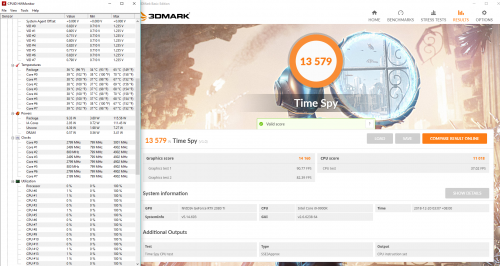 9900k default has a all core speed of 4.6ghz no need MCE ( 5ghz all core unstable and hot) 4.6ghz is 12k.. 5ghz is arnd 12.8-13k btw thats a good cpu vid owikh84 This post has been edited by cstkl1: Dec 20 2018, 09:03 AM |
|
|
Dec 22 2018, 04:19 PM
Return to original view | IPv6 | Post
#155
|
|
Elite
6,799 posts Joined: Jan 2003
|
QUOTE(hezda @ Dec 22 2018, 02:28 PM) I placed ordered on Galax RTX 2080 OC for the price of RM2799... should I proceed...? or cancel...? should be fine. ref cardThere's literally 0 review on this card. |
|
|
Dec 29 2018, 09:27 PM
Return to original view | Post
#156
|
|
Elite
6,799 posts Joined: Jan 2003
|
QUOTE(TristanX @ Dec 29 2018, 02:19 PM) Hands very itchy. Might get G-Sync monitor. Looking at Acer XB271HU. i would advice u to waitHDR400.. da lowest one with quantum panels all crazy refresh rate incoming soon |
|
|
Dec 29 2018, 10:23 PM
Return to original view | Post
#157
|
|
Elite
6,799 posts Joined: Jan 2003
|
QUOTE(TristanX @ Dec 29 2018, 10:09 PM) Price too steep. I already bought XB271HU and happy with it. thats da thing.. they aint dude...hdr400 144hz 4k/240hz 1440p... VA/TN with quantum dot havent come out yet...just wait but up to ya This post has been edited by cstkl1: Dec 29 2018, 10:23 PM |
|
|
Dec 29 2018, 10:36 PM
Return to original view | Post
#158
|
|
Elite
6,799 posts Joined: Jan 2003
|
QUOTE(TristanX @ Dec 29 2018, 10:29 PM) Hehe ok. Thanks for the suggestion though. hdr useless for 144hz cause it forces 4:2:2 subsamplingGot HDR 4k monitor at RM3kish. Dont wanna go 4k, yet. so 120hz 4k or 200-240hz 1440p etc with the lowest hdr 400 instead of hdr 1000 (dat asus 10k monitor) it will be way cheaper. cause u want a monitor to last for 3-5 years atleast. |
|
|
Dec 30 2018, 05:30 PM
Return to original view | Post
#159
|
|
Elite
6,799 posts Joined: Jan 2003
|
QUOTE(TristanX @ Dec 30 2018, 12:07 AM) Ok thanks. Maybe in the next 3 years, i'll buy one. theres a major shift dude in monitors... so far they havent released all the HDR 400 with TN/VA/IPS panels with quantum. Maybe RTX 4080 + HDR 4k. Its like a replacement price of the previous monitors pricing at double the refreshrate. So thats y telling ya wait cause you are at the end of a lot of product ... |
|
|
Dec 30 2018, 10:22 PM
Return to original view | Post
#160
|
|
Elite
6,799 posts Joined: Jan 2003
|
QUOTE(SSJBen @ Dec 30 2018, 07:22 PM) HDR400 is pointless... The monitors that are doing 400 nits are just peak measurements - even then, 400 nits itself isn't even enough. You want HDR, do it properly. dude its da lowest spec of hdr for quatum panels with gsync. It's like trying to get a setup suitable for Atmos/DTSX and you go buy a soundbar to do it.  as it is hdr on 4k 144hz results in 4:2:2 so da idea is turn off HDR lar at set 120hz for 4k.. for example doi..da hdr 1k not worth it with current dp limitation. This post has been edited by cstkl1: Dec 30 2018, 10:23 PM |
| Change to: |  0.4307sec 0.4307sec
 1.16 1.16
 7 queries 7 queries
 GZIP Disabled GZIP Disabled
Time is now: 23rd December 2025 - 08:02 AM |
 Quote
Quote
