Welcome Guest ( Log In | Register )

Outline · [ Standard ] · Linear+

 tenda ac18, who got firmware

views
     
calvin_gsc
post Oct 11 2018, 08:15 PM

10k Club
********
All Stars
10,261 posts

Joined: Jan 2003


QUOTE(voltan @ Oct 3 2018, 10:44 PM)
Hi guys, any idea? I got AC15 and with unifi speed 800MB but I only managed to get roughly 340MB if connect with cable Cat5e.
*
Same situation here, UNIFI Turbo 800 package as well. I get better speed when using Stock TP-Link AC1200

TP-Link AC1200 via LAN
Attached Image

Tenda AC18 via LAN
Attached Image

user posted image
This ends up making my internet speeds via homeplug powerline even slower.

Both using the same ethernet cat5e cable.

WIFI 5G on Tenda AC18
user posted image

QUOTE(neuromancerx @ Oct 4 2018, 10:51 AM)
try enabling the NAT acceleration? 2nd, try using different/newer cable
*
Where to enable NAT acceleration within stock Tenda firmware?

This post has been edited by calvin_gsc: Oct 11 2018, 08:37 PM
calvin_gsc
post Oct 12 2018, 08:30 PM

10k Club
********
All Stars
10,261 posts

Joined: Jan 2003


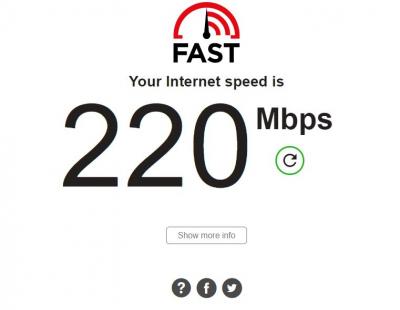
Speedtest seems to be consistent but not on Fast.com

user posted image

Attached Image

FAST.COM results much slower.

Attached Image


This post has been edited by calvin_gsc: Oct 12 2018, 08:33 PM
calvin_gsc
post Oct 14 2018, 09:10 PM

10k Club
********
All Stars
10,261 posts

Joined: Jan 2003


QUOTE(prokiller1199 @ Oct 12 2018, 11:16 PM)
fast usually like that. and I don't use it since Netflix 200+ Mbps bandwidth is more than enough.
*
Oddly, when I used stock Unifi TP-Link AC1200, I get the following result from Fast.com via LAN. Tested using same laptop and Cat5e cable.

user posted image
calvin_gsc
post Dec 22 2018, 06:08 PM

10k Club
********
All Stars
10,261 posts

Joined: Jan 2003


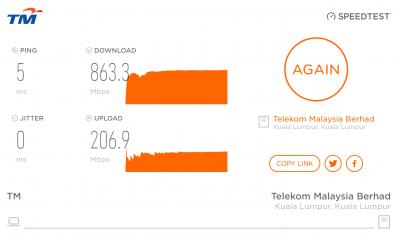
Finally flashed the AC18 to RT-AC68U_380.70_0-X7.9.

Speed test via LAN good can achieve UNIFI 800Mbps

user posted image

But this is speedtest via 5G (My laptop using Intel® Dual Band Wireless-AC 3165) Laptop directly near router

user posted image

speedtest via 2.4G
user posted image

It's horribly lower than stock TPlink AC1200 wifi performance.

Any tips to improve my wifi speeds? Thank you.

This post has been edited by calvin_gsc: Dec 22 2018, 06:35 PM
calvin_gsc
post Dec 22 2018, 06:11 PM

10k Club
********
All Stars
10,261 posts

Joined: Jan 2003


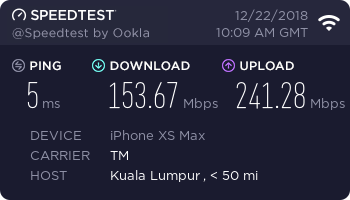
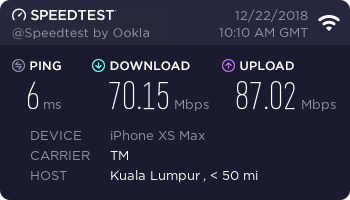
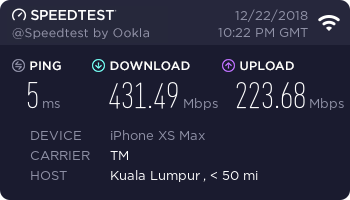
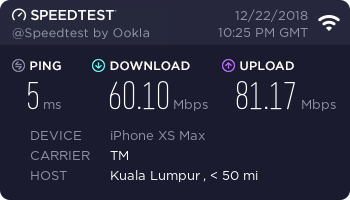
Speed test via iPhone XS. Device directly near router

Connected via 5G
user posted image

Connected via 2.4G
user posted image

This post has been edited by calvin_gsc: Dec 22 2018, 06:12 PM
calvin_gsc
post Dec 23 2018, 12:25 AM

10k Club
********
All Stars
10,261 posts

Joined: Jan 2003


QUOTE(prokiller1199 @ Dec 22 2018, 10:21 PM)
changed region? 80mhz also.
*
Just searched the topic. Change to "all area" for region right? Will give it a try. notworthy.gif

calvin_gsc
post Dec 23 2018, 06:26 AM

10k Club
********
All Stars
10,261 posts

Joined: Jan 2003


Changed router Wi-Fi region to all area and enabled 5G @ 80mhz


Connected to 5G
user posted image

Connected to 2.4G
user posted image
calvin_gsc
post Dec 24 2018, 10:49 AM

10k Club
********
All Stars
10,261 posts

Joined: Jan 2003


QUOTE(prokiller1199 @ Dec 23 2018, 09:39 AM)
hmmm much improved. and also i also used 3165 last time but i changed to 9260 already 2 months ago.
*
You changed your laptop internal wifi-card?

QUOTE(peguin78 @ Dec 24 2018, 09:01 AM)
Which method did you use to flash the merlin FW?
*
I followed this video


and followed the following tip as well

QUOTE(fli_guy84 @ Jul 22 2018, 11:22 PM)
It's good that you can read Chinese, it took me a few rounds of reading the translated page to fully understand the guide. biggrin.gif

I started with firmware RT-AC68U_378.56_beta2-X5.7-20151017 as in the guide. Then, I upgraded to RT-AC68U_380.59_X6.6.1 by using the Merlin's firmware upgrade page under Administration. Lastly, I upgraded to RT-AC68U_380.70_0-X7.9.

I guess you can skip 380.59_X6.6.1 and go directly to 380.70_0-X7.9, but you gotta add the Webshell app manually under 'Koolshare Merlin software center'. I think it's important that you start with 378.56 as the base firmware though, so don't skip this firmware.

Reason: https://github.com/RMerl/asuswrt-merlin/wiki/Installation
Edit: Added more info.
*
But i upgraded to 380.70_0-X7.9 straight from RT-AC68U_378.56_beta2-X5.7-20151017 without adding the Webshell app manually under 'Koolshare Merlin software center'. I missed this, but dont seem to have any issue wiht my router.

Is the merlin software center only in Chinese? @fli_guy84. And is the RT-AC68U_380.70_0-X7.9 most stable now?
Attached Image

This post has been edited by calvin_gsc: Dec 24 2018, 10:58 AM
calvin_gsc
post Dec 26 2018, 01:54 PM

10k Club
********
All Stars
10,261 posts

Joined: Jan 2003


Ok.... not as tech savvy as you guys... Don't think I need Webshell.
calvin_gsc
post Dec 31 2018, 10:42 AM

10k Club
********
All Stars
10,261 posts

Joined: Jan 2003


QUOTE(sitescope @ Dec 27 2018, 08:53 AM)
At 3:00 he said u need to redo the step
Redo what step ? Coz suddenly show reboot
*
After I managed to see the Merlin firmware installed I just proceed with setting up the router for UNIFI use.
calvin_gsc
post Jan 5 2019, 08:43 AM

10k Club
********
All Stars
10,261 posts

Joined: Jan 2003


Hi guys, my Merlin AC18 been running for a week now, one issue that has pop up for me is using VPN service on my mobile devices. When connected to VPN apps (I’ve tested with NordVPN and ExpresssVPN) the download speed is unbelievably slow like 2-3 Mbps only. Upload speed is ok.

Then I tried to change back to stock UNIFI Tplink C1200, internet speed when connected to VPN service was fast.

May I know any settings within Merlin firmware that I need to tweak to solve this slow VPN issue?

calvin_gsc
post Jan 7 2019, 10:59 AM

10k Club
********
All Stars
10,261 posts

Joined: Jan 2003


QUOTE(prokiller1199 @ Jan 7 2019, 10:10 AM)
hi, i think VPN is slower anyway. the speed is depends on ur VPN company.
*
I agree, I have both NordVPN and ExpressVPN. Express VPN much faster. Stock TM C1200 TP-Link router can go up to 30Mbps but on Tenda AC18 it becomes 2-3Mbps speed.

calvin_gsc
post Jan 7 2019, 03:00 PM

10k Club
********
All Stars
10,261 posts

Joined: Jan 2003


QUOTE(prokiller1199 @ Jan 7 2019, 11:00 AM)
u mean put the config file in the router? if that I never tried I only tried the desktop app quite fast.
*
VPN connected via iOS app on smartphone. Not within router.


Change to:
| Lo-Fi Version
0.0482sec    0.60    7 queries    GZIP Disabled
Time is now: 4th December 2025 - 03:39 PM