Welcome Guest ( Log In | Register )

11 Pages « < 8 9 10 11 >Bottom

Outline · [ Standard ] · Linear+

 Official TP-Link C1200 V1(EU) Firmware is out, Hidden WDS functionality works!, Page 29

views
     
TSJohnLai
post Jul 29 2019, 07:47 PM

Skeptical Cat
*******
Senior Member
3,669 posts

Joined: Apr 2006
QUOTE(Jjuggler @ Jul 29 2019, 01:14 PM)
You can either opt to use the TIME version of the firmware or, you can use EU firmware. The differences in between TIME firmware and EU firmware is, the bugs present were fixed for V1 while for the EU version was left, just like that and they focused on releasing new hardware revision instead.

Do note that, by upgrading to the TIME firmware will cause your firmware upgrade page to be inaccessible (hidden) from the web UI panel.
*
? confused.gif
Wasn't it supposed to be the other way around?
EU firmware has more bugs fixed and features while TIME/MY/TM firmware is mostly left alone with minimal fix.
TSJohnLai
post Oct 12 2019, 05:27 PM

Skeptical Cat
*******
Senior Member
3,669 posts

Joined: Apr 2006
QUOTE(erictia @ Oct 12 2019, 04:01 PM)
hi, i followed the instruction to flash my ac1200 to us version, but it don't have wireless wds function, and now i can't flash back to eu version nor malaysia version, what should i do?
*
Read Page 29?
TSJohnLai
post Oct 12 2019, 06:42 PM

Skeptical Cat
*******
Senior Member
3,669 posts

Joined: Apr 2006
QUOTE(PointOfSale @ Oct 12 2019, 06:28 PM)
tried every ways..even with tftp.dont waste time fixing it

once eu to us firmware.no way back to eu and my firmware
*
He is asking about WDS.......US firmware has WDS hidden as well after all. blink.gif

EDIT :

Sigh...let me provide the US V1 Beta firmware and see if users can "reflash" back to EU firmware......

Attached File  C1200v1_us_up_1.1.0_Build_20171230_rel.62364_Beta_.bin.zip ( 14.2mb ) Number of downloads: 147


Summoning xjoshualaw29, Aspick and MrSpeedy.........you guys asked for the US V1 Beta firmware too....so here it is....

This post has been edited by JohnLai: Oct 12 2019, 06:54 PM
TSJohnLai
post Oct 12 2019, 06:57 PM

Skeptical Cat
*******
Senior Member
3,669 posts

Joined: Apr 2006
QUOTE(PointOfSale @ Oct 12 2019, 06:54 PM)
tried it before..i also wanna know how to revert back to eu firmware because us firmware only has 4  5ghz channel.... eu has 8..and eu channel 161 and 165 is strongest n fastest
*
Hmm?
You mean after tftping the US Beta firmware, then still can't tfpting back to EU beta firmware? hmm.gif

In that case, for you to regain those eight 5ghz channels back = you gotta go through the hard way, gain root access (terminal stuff) and modify the country region. I think I posted about it before.
TSJohnLai
post Oct 12 2019, 08:02 PM

Skeptical Cat
*******
Senior Member
3,669 posts

Joined: Apr 2006
QUOTE(PointOfSale @ Oct 12 2019, 07:54 PM)
cant fix la...tried... actually did u really try it?

  flash to  us firmware...then back to eu firmware? did u suceed doin it?
*
Nope. I don't try it.

I was using root method to change 5ghz wifi region to US (with 36-48,149-165 channels, US tx power is higher) and 2.4ghz wifi region to MY (channel 1 - 13) on EU firmware.

edit: WAIT A MINUTE HERE.......what do you mean by 4 5ghz channel on US firmware? confused.gif Only EU firmware has lowest amount of 5Ghz channel [36-48].

This post has been edited by JohnLai: Oct 12 2019, 08:08 PM
TSJohnLai
post Dec 22 2019, 09:04 PM

Skeptical Cat
*******
Senior Member
3,669 posts

Joined: Apr 2006
QUOTE(fkinmeng @ Dec 22 2019, 04:58 AM)
I changed the dns to cloudflare dns in the router, but when i check at 1.1.1.1/help it says I'm not connected to 1.1.1.1, means it fails?
*
Two places :

Advanced --> Network --> Internet --> Advanced --> DNS Address

Advanced --> Network --> DHCP Server --> Primary & Secondary DNS
TSJohnLai
post Dec 22 2019, 11:24 PM

Skeptical Cat
*******
Senior Member
3,669 posts

Joined: Apr 2006
QUOTE(fkinmeng @ Dec 22 2019, 11:14 PM)
Unfortunately still same. sad.gif
*
hmm.gif Now that is strange.
Perhaps you have setup static DNS at your device?

Or ipconfig /flushdns is required?

Is the Connectivity to Resolver IP Addresses section displaying 'yes' on 1.1.1.1 and 1.0.01?

EDIT:
Are you using any form of proxy server on your web browsers? Which browser? Chrome or Firefox?

This post has been edited by JohnLai: Dec 22 2019, 11:28 PM
TSJohnLai
post Dec 27 2019, 07:40 PM

Skeptical Cat
*******
Senior Member
3,669 posts

Joined: Apr 2006
QUOTE(ZeDeedIsDone @ Dec 24 2019, 12:33 PM)
How do I enable 5GHz TXBF again?
I'm on TIME btw, 1.0.0 Build 20180502 rel.45702 (EU)
I thought its the EU version since it says so, but I can't find the TXBF option
Should I install https://www87.zippyshare.com/v/FkAyTZ7j/file.html from your EDIT 7 OP?

*
Only EU firmware has TxBF......

QUOTE(fkinmeng @ Dec 27 2019, 04:36 PM)
connectivity to resolver IP addresses displaying yes for both 1.1.1.1 and 1.0.0.1

using firefox.

definitely did not setup static DNS, don't even know how.  blush.gif
*
Then I have no idea what is causing your DNS issue..... rclxub.gif
TSJohnLai
post Oct 15 2020, 07:41 PM

Skeptical Cat
*******
Senior Member
3,669 posts

Joined: Apr 2006
QUOTE(wayne @ Oct 14 2020, 08:38 AM)
last night was trying to update the TIME supplied C1200 using on UNIFI100m to C1200v1_eu_time-up-boot-1.0.0 Build 20180502 rel.45702

but....i think it might be bricked, because after it uploaded the FW and showing rebooting, left it for like 30 minutes but still not booting up and only showing only 1 light..which is that 2 arrow icon.

tried to reset it, no response as well.

Any ideas to recover it? or better to just buy a new router.
*
Time to use TFTP method to recover the router.

Search about it online.
TSJohnLai
post Nov 22 2020, 07:13 PM

Skeptical Cat
*******
Senior Member
3,669 posts

Joined: Apr 2006
QUOTE(potatobanana @ Nov 22 2020, 07:04 PM)
Hi guys,
Not sure if anyone faces the same situation as below.

I am currently using TP-Link AC1200, the problem is, the router was sluggish/limited.
Example: My broadband speed is 300mbps, but the max speed I can get is ~150mbps, also the ping was higher.

TM personnel had performed the checking and the root cause was pinpointed to the router, we did try firmware upgrade as well but still same situation.

They did recommend us to change the router, just wondering anyone faces this similar situation before?
Thank you
*
-.-? Incomplete info.

~150Mbps = via wifi or LAN cable?
TSJohnLai
post Nov 22 2020, 07:52 PM

Skeptical Cat
*******
Senior Member
3,669 posts

Joined: Apr 2006
QUOTE(yongtjunkit @ Nov 22 2020, 07:43 PM)
Hi guys, I’m having issue with this firmware where my iPhone wouldn’t connect to the tplink c1200 running US firmware

Any idea how to resolve this?
*
Select WPA2 - AES only. Don't select auto.

*Make sure the password match*
TSJohnLai
post Nov 22 2020, 08:34 PM

Skeptical Cat
*******
Senior Member
3,669 posts

Joined: Apr 2006
QUOTE(yongtjunkit @ Nov 22 2020, 08:17 PM)
Yup, already set to Wpa 2 AES and still the same issue,, verified that the password is correct. The error message I got is "unable to join network"
*
Did you just update your IOS to version 14?
Suspect it might be IOS issue rather than the router itself.


TSJohnLai
post Nov 22 2020, 08:45 PM

Skeptical Cat
*******
Senior Member
3,669 posts

Joined: Apr 2006
QUOTE(potatobanana @ Nov 22 2020, 08:43 PM)
Using LAN cable

Broadband package is 300mbps, but maximum we only manage to get 150mbps (tested by TM technician)
*
The target PC/laptop specification and web browser used?
TSJohnLai
post Nov 22 2020, 08:49 PM

Skeptical Cat
*******
Senior Member
3,669 posts

Joined: Apr 2006
QUOTE(potatobanana @ Nov 22 2020, 08:48 PM)
Windows / Chrome / Edge - Tested in multiple laptop & desktop with same result
*
Since you don't want to tell the specification of your multiple laptop/PC........ dry.gif

Moving to router setting ;
Did you enable QOS?
NAT Boost enabled or not?
TSJohnLai
post Nov 22 2020, 08:59 PM

Skeptical Cat
*******
Senior Member
3,669 posts

Joined: Apr 2006
QUOTE(yongtjunkit @ Nov 22 2020, 08:48 PM)
and yup, did verify that random mac address is off before connecting
*
Hmm.....maybe you want to try to turn off "Wifi Assist"?

The nuclear option is IOS 'Reset Network Setting'..... sad.gif
TSJohnLai
post Nov 22 2020, 09:15 PM

Skeptical Cat
*******
Senior Member
3,669 posts

Joined: Apr 2006
QUOTE(potatobanana @ Nov 22 2020, 09:08 PM)
Previously we are able to obtain full 300mbps, only few months back things starting to behave weirdly by obtaining ~150mbps and game ping was higher than usual.

For PC specification, we had tested with different cable and devices, hence we are phasing out the specification as cause.
But for the main laptop, it is using Intel 7260 N WiFi card, the TM technician use a different router to test with and it able to achieve 300mbps.


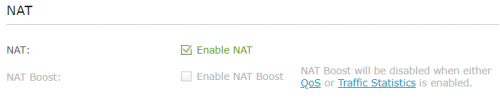
NAT Boost Disabled
user posted image
*
Found the problem.
Please disable Traffic Statistics and enable NAT Boost.
TSJohnLai
post Nov 22 2020, 09:41 PM

Skeptical Cat
*******
Senior Member
3,669 posts

Joined: Apr 2006
QUOTE(potatobanana @ Nov 22 2020, 09:35 PM)
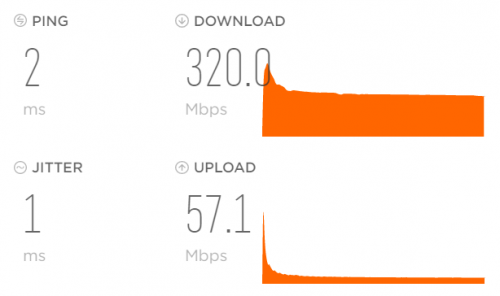
Manage to obtain back the full 300mbps bandwidth  thumbup.gif

I just saved 100 bucks, almost thought of spending for another set of router
Jom treats on me biggrin.gif
user posted image

Downside is, since it is happening for a few months already, just a few days back I had requested TM to downgrade my plan, they are still processing the application

However the ping issue still around.
Game is diep.io (Singapore server)
*
=.=
Well, congratulation on getting your speed back. dry.gif
Now, here is some reading on NAT Boost https://routerguide.net/nat-acceleration-on-or-off/
Baca, jangan tak baca.

As for your ping issue to diep.io = it is diep.io problem. Not routing to SG issue. console.gif

EDIT: Better cancel your downgrade application as soon as possible. sweat.gif

This post has been edited by JohnLai: Nov 22 2020, 09:42 PM
TSJohnLai
post Apr 8 2021, 08:28 PM

Skeptical Cat
*******
Senior Member
3,669 posts

Joined: Apr 2006
QUOTE(Zenobia @ Apr 8 2021, 06:58 PM)
Hi,

Need to get some advices,

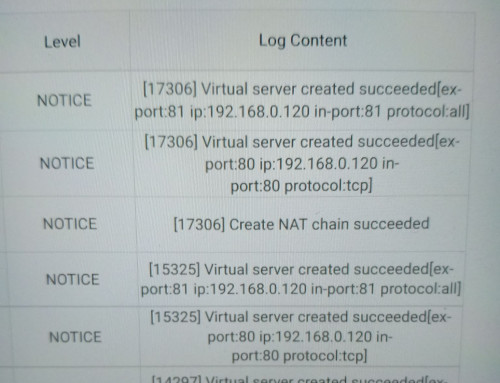
I don't recall I set any server, but recently I noticed in the log, whenever I restarted the modem, it will automatically create virtual server which point to one of my phone ip.

It is normal?

user posted image
*
Port 80 and 81? Err......you better disable UPNP.......and check the Virtual Server section at your router. sweat.gif
This can't be good.
TSJohnLai
post Apr 8 2021, 09:32 PM

Skeptical Cat
*******
Senior Member
3,669 posts

Joined: Apr 2006
QUOTE(Zenobia @ Apr 8 2021, 08:41 PM)
I have little knowledge about virtual server. What is all about? It is mean if hacker manage to access the router and set virtual server ip (which is my phone), he can basically suft the internet and isp detect its from my phone and not from his pc?

Pls advise.
*
Since you mention that IP 192.168.0.120 is your phone, you have to ask yourself if the phone is running any web server or not.

Port 80 and 81 = HTTP port

It had been a long time since I use TP-Link product, go to Advanced--->Nat Forwarding-->Virtual Servers. Check here.

Do you add those ports previously? If there is no entry there. Please check UPNP section.

Between convenience and security, it is your choice to enable/disable UPNP.
TSJohnLai
post Apr 19 2021, 10:49 AM

Skeptical Cat
*******
Senior Member
3,669 posts

Joined: Apr 2006
QUOTE(HariszKilz @ Apr 19 2021, 01:55 AM)
Mine was rebooting everyday with the previous firmware that is 20200306. If you said the newer firmware still cause the problem, then my decision to invest in a new router is not entirely bad at all. I hope it's not going to reboot again after this.
*
QUOTE(HariszKilz @ Apr 19 2021, 01:47 AM)
Thanks for your reply. Apparently, I think the router has already upgraded to latest EU firmware from TM themselves. Don't know if this is true but this is what the firmware is now.

EDIT: I saw the thread you mentioned before and there is a new 11/20 firmware but I've read the DC issue is still there but will happen in several days after the upgrade.
*
From your screenshot, I believe your current "20200306" is based on older 1.0.0 firmware branch which doesn't include certain fixes.

The version I mentioned = 1.1.3 branch at page 1 EDIT7.

Sometime I wonder if the MDNS flooding "fix" is included in the "20200306". hmm.gif

11 Pages « < 8 9 10 11 >Top
 

Change to:
| Lo-Fi Version
0.0608sec    0.27    7 queries    GZIP Disabled
Time is now: 2nd December 2025 - 06:17 AM