

To alll who are using DiGi Infinite 150, could anyone tell how many devices could connect at one time?
Which device is use as wifi hotspot?
Digi Infinite Fan Club [V3], Infinite 150, 100, 80
Digi Infinite Fan Club [V3], Infinite 150, 100, 80
|
|
 Mar 9 2018, 10:28 PM Mar 9 2018, 10:28 PM
Return to original view | IPv6 | Post
#1
|
 
Senior Member
1,132 posts Joined: Jun 2011 From: Perak.  
|
To alll who are using DiGi Infinite 150, could anyone tell how many devices could connect at one time?
Which device is use as wifi hotspot? |
|
|
|
|
|
Apr 26 2018, 03:04 PM
Return to original view | Post
#2
|
|
Senior Member
1,132 posts Joined: Jun 2011 From: Perak.
|
Why so many ppl here like to show speed using "ookla speedtest"?
This speed test app (ookla) getting fake speed - much more faster than the actual speed one could get. You could still get a very fast speed even during congested time with this "ookla". Wonder if anyone could show off using 'www.fast.com'. This post has been edited by ckimsem: Apr 26 2018, 03:05 PM |
|
|
Apr 27 2018, 07:54 PM
Return to original view | Post
#3
|
|
Senior Member
1,132 posts Joined: Jun 2011 From: Perak.
|
According to this webpage https://www.soyacincau.com/2018/04/26/homed...less-broadband/ , it’s written there celcom Huawei B618 is “SIM-locked to Celcom”.
Not sure if it’s true, anyone here could confirm, please? |
|
|
May 3 2018, 03:06 PM
Return to original view | IPv6 | Post
#4
|
|
Senior Member
1,132 posts Joined: Jun 2011 From: Perak.
|
I really don't understand the different in band 3 or band 7. Currently, I'm using Huawei e5186s-22a for this DiGi Infinite 150.
What I would like to ask sifus here are if I use the Huawei e5186 toolbox to locked band 3 or band 7 only, will I be able to get 4G+ connection? Hope anyone could explained way of getting 4G+ signal, and my area is just upgraded, now receiving 4G+ signal on my phone. Thank you. |
|
|
May 3 2018, 04:11 PM
Return to original view | IPv6 | Post
#5
|
|
Senior Member
1,132 posts Joined: Jun 2011 From: Perak.
|
QUOTE(alexchew_2020 @ May 3 2018, 04:23 PM) since u are using e5186, just lock b3+b7(LTE-A) = 4G+/ consider as CA or dual band running together. Thank you for your explanation.lock single band b3 and b7 just to know the speed and which is more stable incase your 4G+ speed is not good. lock single band = 4G connection only.  I have tried lock b3+b7 as well, but the modem webpages (192.168.8.1) still show 4G signal with 3/4 bars. Just want to ask whether this Huawei e5186s-22a will show 4G only even if it is connected as 4G+. BTW, if I put the band to "auto", I could still receive 4G+ connection, right? Thanks again. |
|
|
May 3 2018, 06:33 PM
Return to original view | Post
#6
|
|
Senior Member
1,132 posts Joined: Jun 2011 From: Perak.
|
QUOTE(alexchew_2020 @ May 3 2018, 05:59 PM) which firmware u are using... LMT one does shown 4G+ on stats on the modem. Device name: E5186s-22aelse u can test it anyway b3 speedtest b7 speedtest b3+b7 speedtest. if u put auto it will run based on which signal receive more strong. My number: Unknown Hardware version: CL1E5175HM Software version: 21.302.01.01.07 auto speedtest = 23.3 DL / 13.9 UL b3 speedtest = 17.3 DL / 13.0 UL b7 speedtest = 16.8 DL / 0.7 UL b3 + b7 speed = 20.1 DL / 13.4 UL None of the above show 4G+ signal in the modem webpage (192.168.8.1) BTW, I'm using this speedtest http://www.speedtest.com.sg/ Anyway to put in the phone number. Why the number shown unknown? I got the Huawei B618s-65d as well. My question is how to lock band with this modem? I can’t find HManager app in English. Any help, please and thanks. This post has been edited by ckimsem: May 3 2018, 07:00 PM |
|
|
|
|
|
May 3 2018, 08:21 PM
Return to original view | IPv6 | Post
#7
|
|
Senior Member
1,132 posts Joined: Jun 2011 From: Perak.
|
QUOTE(alexchew_2020 @ May 3 2018, 08:52 PM) how, b618 also no improvement? what the reading anyway? rsrp n etc in dBm Speedwise, it is almost the same even B618 shows constant 4G+ at 4bars signal.Using B618, everything seems smoother. It’s able to play games like pubg, lol, and others more stable without configuration. This Huawei B618s-65d could make Volte calls, 4G+ connection no dropping to 3G during call like the e5186s. I just got this B618 for two days only, still need some time to figure if it’s good like many ppl said here. Actually, I wouldn’t mind if the e5186 not showing 4G+ signal since the speed in my area is more or less the same with B618. But, I just wish to know why it isn’t showing 4G+ signal  , wonder if it has any problem. , wonder if it has any problem.Rsrq = -6db Rsrp = -102dBm Sinr = 5db Is it because of my firmware of the e5186s that it doesn’t show 4G+ signal? BTW, my Samsung Galaxy A9 Pro seems to get faster speed (30+mbps) than Huawei modem can get.  This post has been edited by ckimsem: May 3 2018, 08:29 PM |
|
|
May 4 2018, 06:52 PM
Return to original view | IPv6 | Post
#8
|
|
Senior Member
1,132 posts Joined: Jun 2011 From: Perak.
|
I'm testing with Huawei e5186s-22a at my work place. :
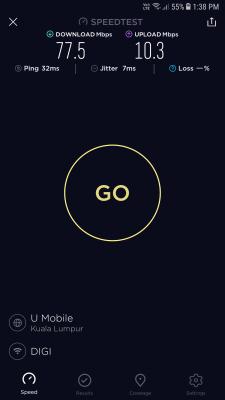
RSRP = -86dMb SINR = 20db The modem webpage (192.168.8.1) show only 4G signal. Is 77mbps considered as 4G+ speed? Too bad for my area, couldn't get half of it even with Huawei B618 at 4G+ signal. Try checking my area with opensignal app, it shows my area only has one cell tower. I know this question is out of topic, when I put unifi mobile SIM into Huawei B618s-65d ~ RSRP : -80dMb / SINR : 22db. Does that mean unifi cell tower is nearer than DiGi cell tower ~ RSRP : -99dMb / SINR : 10db? And will adding outdoor antenna (yagi) make the RSRP better? This post has been edited by ckimsem: May 4 2018, 08:00 PM |
|
|
May 6 2018, 07:40 AM
Return to original view | IPv6 | Post
#9
|
|
Senior Member
1,132 posts Joined: Jun 2011 From: Perak.
|
Huawei B618s-65d speed test result in my house area :
B3 only = 43m dl/12m ul B7 only = 20m dl/1m ul B3+B7 = 29m dl/4m ul Auto = 32m dl/2.5m ul Should I just lock to band 3 with just 4G connection only since it gets better speed? |
|
|
May 6 2018, 08:57 AM
Return to original view | Post
#10
|
|
Senior Member
1,132 posts Joined: Jun 2011 From: Perak.
|
QUOTE(Xaser_3 @ May 6 2018, 08:56 AM) That seems like the best choice for now. 👍👍✌ Thanks for all that’s solved my questions.Should I turn off the “auto update”, “online update settings”, and “critical update settings” on the Huawei B618 system settings? I’m afraid the update would brick my modem. |
|
|
May 13 2018, 05:52 PM
Return to original view | IPv6 | Post
#11
|
|
Senior Member
1,132 posts Joined: Jun 2011 From: Perak.
|
Unifi mobile 15-25mbps most of the time (any speedtest)
Digi infinite 1-7mbps most of the time - ookla speedtest desktop but (ookla speedtest app could get 20+mbps )All sifus here, please help : Unifi mobile. RSRP = -78dBm RSRQ = -10db. SINR = 20db. Digi infinite m RSRP = -102dBm RSRQ = -15db SINR = 12db I would like to ask sifus here if Digi infinite is getting same spec like the unifi mobile, will Digi infinite also be getting stable connection (faster speed most of the time) and like less congested-connection? This post has been edited by ckimsem: May 13 2018, 06:13 PM |
|
|
May 15 2018, 06:51 PM
Return to original view | Post
#12
|
|
Senior Member
1,132 posts Joined: Jun 2011 From: Perak.
|
QUOTE(alexchew_2020 @ May 15 2018, 01:40 AM) unifi mobile RSRP very goood. Band 3 only (4G with 4bars):digi ok la can go.... buat which band u are connected for digi? have u tried b3, b7 or b3+b7? or b8? RSRP : -95dBm RSRQ : -8dB SINR : 9dB Band 7 only (4G with 2bars): RSRP : -104dBm RSRQ : -7dB SINR : 6dB Band 8 (900mhz) - no internet Band 20 (800mhz) - 3G only: RSRP : - 87dBm SINR : 0 Testing with Huawei e5186s-22a. As I don't see any different on RSRP compared to Huawei B618s-65d. just B618 get a little bit more speed (+/-5mpbs) with stronger signal. But with Digi, internet speed is going up n down (1-7mbps) when doing download (regardless of modem used) whereas unifi mobile remain on constant speed (like 13mbps). What I need to know is if Digi is getting (RSRP: -78dBm). will the internet speed going up n down? or it will get constant speed even on peak time? |
|
|
May 23 2018, 09:51 PM
Return to original view | IPv6 | Post
#13
|
|
Senior Member
1,132 posts Joined: Jun 2011 From: Perak.
|
QUOTE(cs17 @ May 23 2018, 05:35 PM) lol got it . thx Do not trust “speedtest app”. My Digi with “speedtest app” on my phone is ALWAYS getting 20+mbps download  got a D-Link DWR-921 from friend, speed test with normal simpack Speedtest as photo attached *highlighted is  streamyx speed. streamyx speed.My question is shld i continue v this modem first or go for B618? connection for 1 pc & 1 PS4 and family's hp. will using the B618 help alot in the speed?  ,but the actual speed MOSTLY is fluctuate +/-5mbps ,but the actual speed MOSTLY is fluctuate +/-5mbps  . .Huawei B618 could get greater signal and a bit more speed  , but won’t solved problem for congested network like some people said here . Might give it a try, but don’t put too much hope coz it’s not cheap. , but won’t solved problem for congested network like some people said here . Might give it a try, but don’t put too much hope coz it’s not cheap. |
|
|
|
|
|
May 26 2018, 03:45 PM
Return to original view | Post
#14
|
|
Senior Member
1,132 posts Joined: Jun 2011 From: Perak.
|
QUOTE(Xaser_3 @ May 26 2018, 10:31 AM) Lately, many areas seems where DiGi network is facing congestion. Wonder if they would do something to increase the bandwidth in the area to overcome this problem. "DiGi network is facing congestion" - when we call in to report that the internet is slow 0.8mbps DL/1mbps UL  , Digi CS helpline said "there is an outage/disturbance in your area and it would be restored on '--- date'. Then, you might be obedient to wait without complaint. , Digi CS helpline said "there is an outage/disturbance in your area and it would be restored on '--- date'. Then, you might be obedient to wait without complaint.  Then, after the '?? date' the slow connection is still there , call in to ask again and the answer is "there is another outage/disturbance or maybe maintenance in your area". So, Digi CS would say "we have prioritized your area for network enhancement"."The End" wonder when will happen. (slow slow wait)This post has been edited by ckimsem: May 26 2018, 04:23 PM |
|
|
May 27 2018, 07:18 AM
Return to original view | IPv6 | Post
#15
|
|
Senior Member
1,132 posts Joined: Jun 2011 From: Perak.
|
QUOTE(afizudin @ May 26 2018, 11:52 PM) I just realized few week ago, at least im not alone.. I already mentioned that "ookla speedtest APP" cannot be trusted, while you can trust "ookla speedtest for desktop" for PC.For my area, the "APP" would get 30~60mbps all-time even with network-congested time. In my opinion, those speedtest for desktop can be trusted only. Try this http://www.speedtest.com.sg |
|
|
May 27 2018, 09:17 AM
Return to original view | IPv6 | Post
#16
|
|
Senior Member
1,132 posts Joined: Jun 2011 From: Perak.
|
QUOTE(fruitie @ May 27 2018, 08:55 AM) Earlier you said Speedtest cannot trust, use fast.com. Oh now, said different thing pulak, Speedtest desktop can be trusted already la? I meant Ookla Speedtest "App" for phone/ipad shows fake speed. But, doing "ookla speedtest" using PC browser shows true speed.  At the same time running Ookla Speedtest: On phone : 30+mbps DL / 7mpbs UL On PC (chrome) : 3mbps DL / 1mbps UL  As for http://www.speedtest.com.sg/ , I'm just suggesting another speedtest for testing. And, "www.fast.com" is also good  , just that it doesn't show UL speed and latency. , just that it doesn't show UL speed and latency.This post has been edited by ckimsem: May 27 2018, 09:26 AM |
|
|
May 29 2018, 04:02 PM
Return to original view | Post
#17
|
|
Senior Member
1,132 posts Joined: Jun 2011 From: Perak.
|
QUOTE(fruitie @ May 29 2018, 03:34 PM) Good good. I have 5 Digi no. too, wish I could MNP more but new rule only limited to 5 no. for each IC. Actually, one could have more than 5 no. for each IC.However, only two no. are actively used at the moment. By the way, for other's information as well each IC can have 5 no., so no issue to have more than one Infinite plan. Limited to 5 no. as Main-line, and each main-line can have 4/5 no. as sub-line (I couldn't remember 4 or 5no) Cause I have '1 x i150', '1 x v98', '1 x 150 family (with 3nos.)', n '1 x new digi50' = a total of 6nos. This post has been edited by ckimsem: May 29 2018, 04:06 PM |
|
|
May 30 2018, 03:45 PM
Return to original view | Post
#18
|
|
Senior Member
1,132 posts Joined: Jun 2011 From: Perak.
|
QUOTE(DoomHammer @ May 30 2018, 10:53 AM) I live chat with digi yesterday. They informed me got maintenance in my area. Don't believe what those CS helpline or live chat. OUTAGE/DISTURBANCE or MAINTENANCE or UPGRADE is just their practice to tell customers. Maintenance for 1 month? Waiting n waiting for weeks/months, the end result is that your location is far from the cell tower. NOT SURE, there is really any maintenance or outage. This Digi Infinite plan is ONLY BEST for those who live near the Digi Cell Tower. Even living in the same "Taman". e.g. = your friend live a few block away from your house : he could get 80mpbs DL/15mpbs UL (not congested) - feel less congested, whereas you only get 30mbps DL/10mbps UL (not congested) - you will notice the congestion very badly. This post has been edited by ckimsem: Jun 1 2018, 08:21 AM |
|
|
May 30 2018, 09:04 PM
Return to original view | IPv6 | Post
#19
|
|
Senior Member
1,132 posts Joined: Jun 2011 From: Perak.
|
QUOTE(kaiserreich @ May 30 2018, 09:23 PM) 30mbps download is congestion? Sorry, I should have been more detailed.Your standards a bit too high lah As I said it’s just an example: 30mbps DL (not congested) could be achieve in the early morning (6-8am only or maybe midnight) then fluctuates around 3mbps, less than 5m most of the time. For my Digi infinite, it’s worst than my example but I need internet for home usage since no unifi fiber n shitmix only 2mbps supported with intermittent DC. I’m a bit lazy to type more, u won’t know till u test it that all I could say. This post has been edited by ckimsem: May 30 2018, 09:25 PM |
|
|
May 31 2018, 07:54 AM
Return to original view | IPv6 | Post
#20
|
|
Senior Member
1,132 posts Joined: Jun 2011 From: Perak.
|
QUOTE(budi1413 @ May 30 2018, 11:28 PM) how much data usage per month? celcom also got wireless broadband. the 150gb one. I knew Celcom also got wireless broadband, like u said it's just 150gb + 1tb video walla. I could also get the modem for free after 2years contract  . But, my average usage is around 200-350gb per month . But, my average usage is around 200-350gb per month  for the family. for the family.And, I'm actually using unifi mobile (Weekly Bebas unlimited data capped at 10mpbs - quite stable all-day). However, the add-on last till JULY only. Unless the add-on is permanent, I would terminate this Digi Infinite 150. Unifi Mobile half-priced cheaper .QUOTE(Xaser_3 @ May 31 2018, 01:21 AM) He better test first with a prepaid before making the switch in order not to fall into same situation as with DiGi Infinite atm. It is pointless to test with a prepaid, as I was told by the Celcom guy that this broadband is NOT sharing the same Cell Tower with their Celcom Mobile Users. Hence, there is a 30-days returns policy. What's more is that this broadband has a 2-years contract, since our new minister has spoken "double the speed, half the price" , within 2-years time frame, there may be many more worthy plan coming out . QUOTE(kernel123 @ May 31 2018, 01:30 AM) digi and their BS maintainance reason.im not surprise at all. Digi CS are ordered to tell customers (us) like that. It's not their fault, they are just doing the their job. |
|
Topic ClosedOptions
|
| Change to: |  0.1510sec 0.1510sec
 0.35 0.35
 7 queries 7 queries
 GZIP Disabled GZIP Disabled
Time is now: 3rd December 2025 - 08:44 PM |
 Quote
Quote