

 Jul 4 2008, 10:22 PM


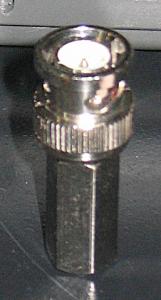
For multichannel DVR + IR cams with online viewing features one must have certain level of computing knowledge in order to set up yourself. Installation of hardware is pretty simple. IR CCTV cams run on 12v DC adapter and all come with wall mounted stands. To extend the length from control room to the place in BH which we install the cam just use 2 core wire. Those white colour with blur stripe on 1 wire. As for signal wire I would personally recommend real CCTV wire (RG59 75ohm coaxial cable) instead of cheap TV wire. Price for a roll of RG59 cable is RM70. For signal connector just get the screw in type. Just strip the front of wire a bit and screw in the connector. No soldering needed. 1 cam will need 2 BNC connectors 1 at cam and 1 at DVR. Price around RM2-3 each. Once connected power and signal you'll be able to view video on the TV.
For online viewing you'll need a modem router connected to a streamyx line with activated account. Please note that the modem router must support dynamic DNS and port forwarding. We must apply for a dynamic DNS account and hostname at www.dyndns.org . Most DVR only support hostname with dyndns.org extension so when choosing hostname choose this one. As for DVR side there should be a setting up manual to help you configure it. When purchasing DVR and router modem you can request the shop to apply for you the dynamic DNS a/c and pre-configure the system. Of course you must provide the DVR manual your activated Streamyx username and password to be configure into the router modem. If purchasing both DVR and router modem from the same shop even easier for them to pre-configure. Once configured we just plug in everything and ready to go.
Attached thumbnail(s)
 Quote
Quote how about building swiftlets nest on top of chicken kandang??

 It's the readers' mindset that matters. These bloggers spent hours writing the articles without getting any pay. When you see some inaccurate info straight away shoot people. What have you done when you learned something useful from the blog? Did you credit the blogger??
 we also can say anything possible right. That is why i agreed with you, think and get more info 1st will be better


 0.0769sec
 0.43
0.43
 7 queries
 GZIP Disabled