Outline ·
[ Standard ] ·
Linear+
TP-LINK Malaysia Official Thread, Technical Enquiries and Support
|
shahie
|
 Dec 9 2020, 05:34 PM Dec 9 2020, 05:34 PM
|

|
QUOTE(zephon83 @ Dec 9 2020, 12:24 PM) Installed Deco M9 Plus, original router is by Maxis IP is 192.168.1.254. Deco IP is 192.168.0.1. LAN device not able to ping to Deco IP. Any idea? since you have a deco m9+, why not configure it as an main router with PPPOE account for the unit 1, and connect to unit 2 either via wifi backhaul or ethernet backhaul? don't use maxis router since it will bottleneck your home networking. tw |
|
|
|
|
|
shahie
|
Dec 12 2020, 08:07 PM
|
|
|
QUOTE(Skylinestar @ Dec 12 2020, 07:57 PM) I've watched a few reviews about TP-Link mesh. Many people says the speed reduces a lot in AP mode compare to Router mode. Why? i have 2 units of each deco mesh X60 and mesh M9 plus, all of them connected directly from my main router via 4 lengths of LAN cable and 4 of them is on AP mode. i have more than 500mbps (unifi 500Mbps plan) of speed on wifi within 18 to 20 ft from my nearest AP. 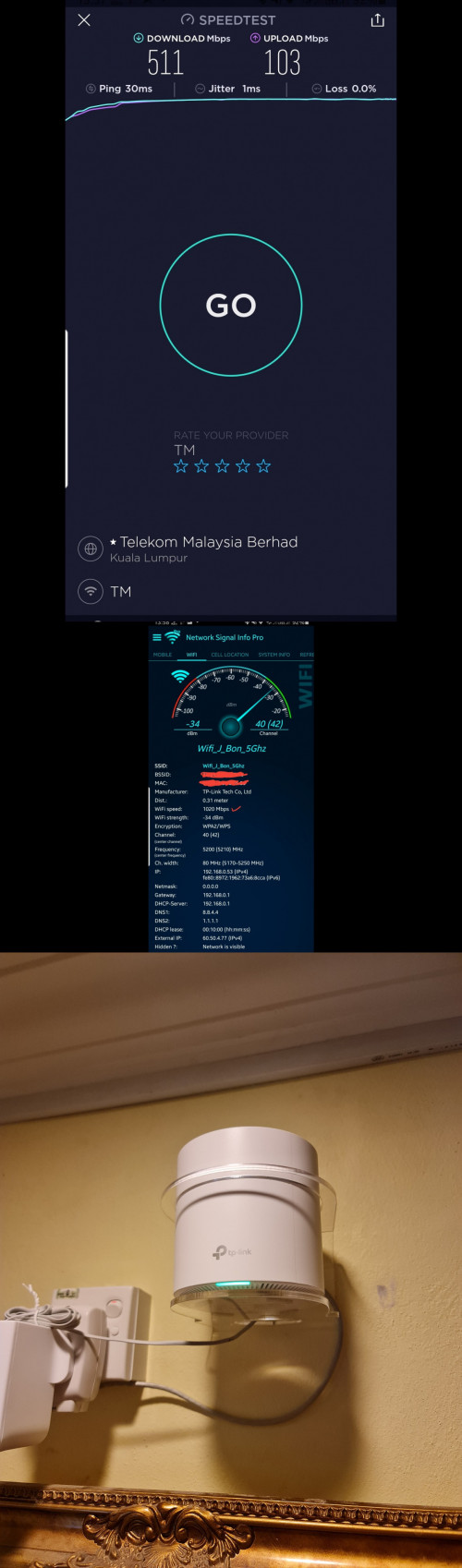 This post has been edited by shahie: Dec 12 2020, 08:09 PM This post has been edited by shahie: Dec 12 2020, 08:09 PM |
|
|
|
|
|
shahie
|
Dec 13 2020, 12:25 PM
|
|
|
QUOTE(gahkin @ Dec 13 2020, 10:49 AM) M4 not possible to reach 800mbps on plan? how about AX20 possible to reach 800mbps speed on wifi? than check what is the wifi speed coming to your device? you need a bigger tunnel a.k.a wifi speed to carry that 800mbps, typically 900mbps and above, like a pipe, small pipe less water. lol |
|
|
|
|
|
shahie
|
Dec 13 2020, 07:31 PM
|
|
|
Me too.... satisfied with my X60 and M9 plus (free from TM). lol
|
|
|
|
|
|
shahie
|
Dec 14 2020, 12:02 PM
|
|
|
QUOTE(ck77 @ Dec 14 2020, 10:24 AM) I am using M4 and having a 500Mbps connection. When I plug the ethernet cable that feeds my main M4 node directly to a laptop I can get 499Mbps. But wifi connection with the laptop near the main M4 node I can't get more than 400Mbps, is this normal? The firmware is the latest and I have cleared the Qos. Maxis technician said it is due to product limitation? I thought M4 spec is up to 867Mbps? check what is the wifi link connection speed on your laptop. like mine Asus swift 3 only 866/866 (download/upload) thus i have no problem reaching that 500mbps on my laptop. |
|
|
|
|
|
shahie
|
Dec 14 2020, 01:05 PM
|
|
|
QUOTE(ck77 @ Dec 14 2020, 12:14 PM) Same connection speed even with my iPhone. means the unit only with 128MiB of RAM, M4 is not powerful enough for the 500mbps on wifi?. since i have M9 plus with 256MiB RAM with no problem getting close to 500Mbps on wifi. This post has been edited by shahie: Dec 14 2020, 01:06 PM |
|
|
|
|
|
shahie
|
Dec 14 2020, 01:59 PM
|
|
|
QUOTE(ck77 @ Dec 14 2020, 01:19 PM) M4 spec stating can reached 867mpbs 😔 that's true, to what i understand, it's guarantee only to provide a link wifi speed to your device. actual carrying capability, depend on many factor such as processing speed of the device, RAM, interference... etc... |
|
|
|
|
|
shahie
|
Dec 17 2020, 05:36 AM
|
|
|
QUOTE(arkana @ Dec 16 2020, 10:37 PM) Hi.. I just bought 2 pcs set Deco M5 to connect to my MR200 wireless router. May I know which is the best option to set.. Should I set my main Deco M5 as router or Access Point(AP). Which is the best option. Thanks in advance for your reply. M5 have the higher spec as compare to MR200 thus can works better as a main router with PPPOE setup, not an AP |
|
|
|
|
|
shahie
|
Dec 17 2020, 05:36 PM
|
|
|
QUOTE(taqu @ Dec 17 2020, 01:03 PM) If the main router is capable of 800 mbps, no reason Deco's on AP mode can't reach 800 mbps on cable. If Wifi it's due to Wifi 5/6/AC/AX limit on Decos/devices. Unless they're firmware issues. On my 500 mbps Unifi, if I connect my laptop & PC, both on cables, on 2 separated Decos, running iperf3 between them gets near Gigabit speed. For me, I (almost) won't use my Deco as router as I don't need those fancy features eg parental control / antivirus. My existing router already has that and more. LoL.... this is why i choose Mikrotik RB4011igs+Rm as my main, coz i have a full control of my home networking even i'm in the offshore now. just leave my X60 and M9+ in wired AP. |
|
|
|
|
|
shahie
|
Dec 30 2020, 11:46 AM
|
|
|
QUOTE(arkana @ Dec 30 2020, 11:01 AM) Hi ... I'm planning to change my current router to TPLINK AX20 wireless router. I'm currently using Deco M5 mesh to get better connection at my 2 level house. May I know will I be able to fully utilize AX20 Wifi6 if I connect the AX20 router with Deco M5 mesh? Will I be able to connect to Wifi6 speed (device wifi6 compatible) if using the above connection (AX20 + Deco M5 mesh). Thanks in advance for your reply. it's depend on the wifi coverage and where your device roaming. if you more close to the AX20, than your link speed will be 1200mbps while only 866mbps if you approaching M5 coverage. it's similar to my case where i has 2 X60 and 2 M9+, all direct connected via dedicated 4 lengths of Cat5e /CAT6 cable from the main router. This post has been edited by shahie: Dec 30 2020, 11:47 AM |
|
|
|
|





 Quote
Quote
 0.1145sec
 0.56
0.56
 7 queries
 GZIP Disabled