Outline ·
[ Standard ] ·
Linear+
TP-LINK Malaysia Official Thread, Technical Enquiries and Support
|
jacktiew
|
 Jun 9 2021, 11:35 PM Jun 9 2021, 11:35 PM
|
Getting Started


|
QUOTE(spreeeee @ Jun 9 2021, 11:10 PM) Thanks, but could not find the Isolate option/function in M4. Try update your firmware to the latest version. If you still don't get it after firmware update, then you might have to wait future release. FYI, I'm using M4 is v1. Yours might be newer. 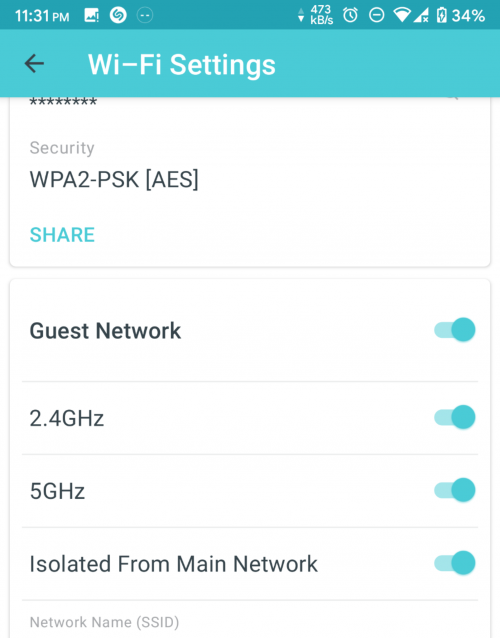 |
|
|
|
|
|
jacktiew
|
Jun 10 2021, 01:39 PM
|
Getting Started
|
QUOTE(spreeeee @ Jun 10 2021, 09:34 AM) Mine v1.4.3, how about yours? Check for firmware upgrade no update at the moment. Same as yours. |
|
|
|
|
|
jacktiew
|
Jan 14 2022, 09:28 PM
|
Getting Started
|
QUOTE(jack2 @ Jan 14 2022, 09:19 PM) Anyone knows why my TPlink Mesh Deco AC1200 E4R, the connections either by wire or wireless ix 5X slower than the router/modem provided by the TIME? TIME BB package: 500Mbps, connections via wired or wireless to their router = max 500 But wired or wireless to TPlink Deco AC1200 E4R max 100mbps only.. why ya? Cause the lan port on E4R is only 100Mbps. So the speed will capped at 100Mbps no matter what. You need to upgrade to better router to get rid of speed cap |
|
|
|
|
|
jacktiew
|
Jan 14 2022, 11:47 PM
|
Getting Started
|
QUOTE(joeblow @ Jan 14 2022, 11:32 PM) Quick question. I am using x20 deco mesh, and using ethernet backhaul. Either at main deco or child deco with wifi 6 s21 ultra near distance, ping is 3 to 8ms,speed only high 80 to below 95mbps for a 100mbps plan. Is this normal? I asked is because last time even with unifi crap given router using 5ghz I also can get 95 to 100mbps using the same phone. X20 deco mesh wifi6 performance not that good? Reason why I am asking is I plan to upgrade to 300mbps, but if wifi performance not that good I might reconsider. 1. Ensure your Ethernet cable can is cat5e and above. (And also not defective.) 2. Make sure you're on 5Ghz band. 3. Try scan interference using wifi analyzer app. Below is my wifi 5 phone using Deco X20 as well. (Mine is 300Mbps.) 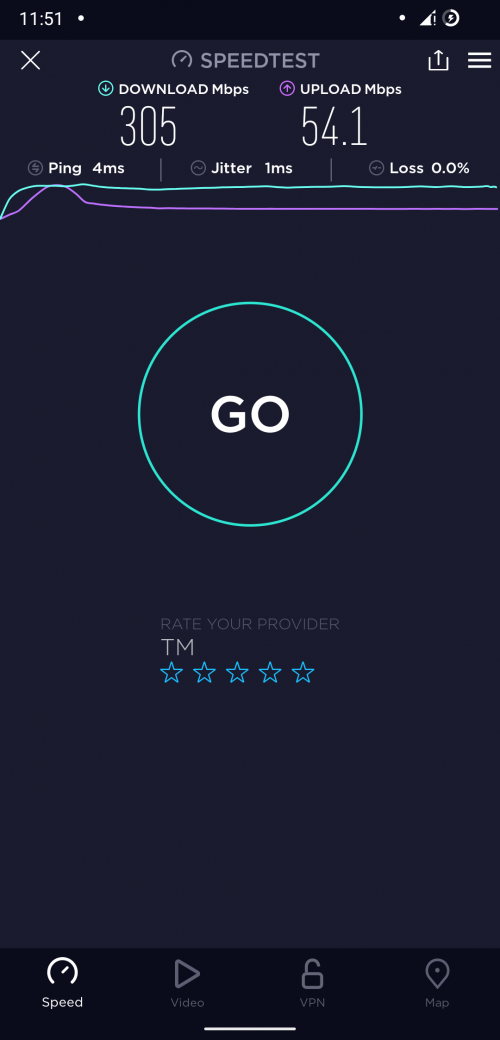 Edit: Updated the picture. This post has been edited by jacktiew: Jan 14 2022, 11:52 PM |
|
|
|
|
|
jacktiew
|
Jan 15 2022, 06:38 PM
|
Getting Started
|
QUOTE(joeblow @ Jan 15 2022, 02:27 AM) Thanks for your reply, I am on wifi 6, don't know how to change to 5ghz, not given option. My phone shows the wifi icon with a 6, I will l Google later. This is how I set up to keep my devices always on 5Ghz. I don't want them to drop to 2.4Ghz. Then guest network is basically for IoT and guests' devices which will auto choose the band for them. You can choose your way to do it. 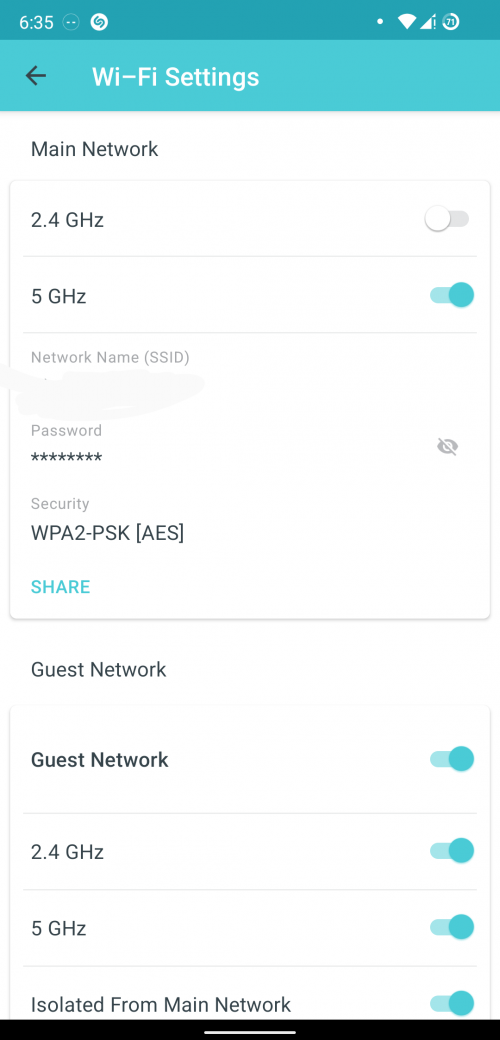 |
|
|
|
|
|
jacktiew
|
Feb 26 2022, 05:38 PM
|
Getting Started
|
QUOTE(QuantumEdge @ Feb 25 2022, 08:01 PM) Hi guys, how to set up Maxis Fibre Ipv6 connection on Deco M4? Tried PPPoe, doesn't seems to work For unifi, I choose PPPoE, Same As IPV4, AUTO, SLATELESS + SLAAC DHCP |
|
|
|
|
|
jacktiew
|
May 16 2022, 10:34 PM
|
Getting Started
|
QUOTE(sijun @ May 16 2022, 10:26 PM) Hey guys. Im only on 30mbps plan and looking to cover my house (3000sqft) with main purpose for wifi cctvs. All devices should add up to about 10+ Which should i consider Deco x20 or single ax72/with maybe a onemesh extender. Also, cam ax72 mesh with ax72? Thanks Deco X20 for me.Two is better than one as it will help you to offload the burden of the router. Plus your house is 3000sqft which might be hard for the wifi to penetrate if multiple walls and deco use true roaming standard which allow seamless roaming. You can always add more units afterwards if you need. This post has been edited by jacktiew: May 16 2022, 10:36 PM |
|
|
|
|
|
jacktiew
|
May 16 2022, 11:27 PM
|
Getting Started
|
QUOTE(sijun @ May 16 2022, 10:40 PM) What about m9 vs x20. Since both are priced in same range anyway. If such case, I would grab M9 plus since you have only 10+ devices although wi-fi 6 might offer slightly greater range plus better mu-mimo technology. Plus tri-band feature to avoid loss of internet speed 30Mbps which is precious to you haha. This is purely my perception. Maybe blacktubi can help a bit. This post has been edited by jacktiew: May 16 2022, 11:27 PM |
|
|
|
|
|
jacktiew
|
Jan 2 2023, 12:45 PM
|
Getting Started
|
QUOTE(kevchinyl @ Jan 1 2023, 11:14 PM) Hi, need some advice/recommendations. Am running unifi 300 mbps with a deco m5 as my main router with 2 units of m4r for wifi coverage. However I now need more then 2 Ethernet ports which the m5 provides. What TP link router is compatible with the deco mesh network that has the standard 4 Ethernet ports which is optimal for 300mbps?Thank you Buy a gigabit network switch instead. |
|
|
|
|
|
jacktiew
|
Jan 12 2023, 06:53 PM
|
Getting Started
|
QUOTE(kevyeoh @ Jan 11 2023, 08:34 PM) Got recommendation which model to get? Thanks! Any brand will do. If economic one, just get tp link. |
|
|
|
|
|
jacktiew
|
Aug 31 2024, 04:15 PM
|
Getting Started
|
What voltage and ampere does the Deco BE65 power adapter used?
|
|
|
|
|
|
jacktiew
|
Nov 2 2024, 11:15 PM
|
Getting Started
|
Hi, just wanna ask the Deco BE65 doesn't support 2.4GHz MLO? I only see the option for "5GHz, 6GHz" but not the 2.4GHz.
|
|
|
|
|
|
jacktiew
|
Nov 5 2024, 09:45 PM
|
Getting Started
|
QUOTE(Omochao @ Nov 5 2024, 05:21 PM) Confirmed by the staff in the forum 2.4GHz is not supported for MLO. |
|
|
|
|
|
jacktiew
|
Nov 6 2024, 08:29 PM
|
Getting Started
|
QUOTE(blacktubi @ Nov 5 2024, 11:31 PM) In case you wonder why The 2.4GHz band on Deco BE65 and Archer BE550 do not support Wi-Fi 7, it's only up to 802.11ax This means you can't get MLO on with most of the Wi-Fi 7 products out there Thanks for the heads-up. Overlooked the 2.4GhHz is still on AX. |
|
|
|
|
|
jacktiew
|
Oct 5 2025, 01:22 PM
|
Getting Started
|
QUOTE(blacktubi @ Oct 5 2025, 10:20 AM) Only their selected few mainstream models receive more firmware updates Yup, that's why I only use BE65 as AP. Currently using Openwrt as main router with AdguardHome for DOH & AdBlock. |
|
|
|
|



 Quote
Quote
 0.1390sec
 0.72
0.72
 7 queries
 GZIP Disabled