

QUOTE(idoblu @ Oct 18 2018, 12:15 PM)
Ok thank you 🙏🏻

how the wifi performance and coverage ?TP-LINK Malaysia Official Thread, Technical Enquiries and Support
|
|
 Oct 18 2018, 02:07 PM Oct 18 2018, 02:07 PM
Return to original view | IPv6 | Post
#1
|
 
Senior Member
1,138 posts Joined: May 2010 
|
QUOTE(idoblu @ Oct 18 2018, 12:15 PM) Ok thank you 🙏🏻 how the wifi performance and coverage ? |
|
|
|
|
|
Oct 30 2018, 10:11 AM
Return to original view | IPv6 | Post
#2
|
|
Senior Member
1,138 posts Joined: May 2010
|
QUOTE(idoblu @ Oct 30 2018, 08:50 AM) What is the difference between the upcoming Archer A10 compare to Archer C2300? Thanks https://www.tp-link.com/my/products/details...Archer-A10.html https://www.tp-link.com/my/products/details...cher-C2300.html A 10 direct compete with dlink dir 878/882 |
|
|
Oct 30 2018, 10:26 AM
Return to original view | IPv6 | Post
#3
|
|
Senior Member
1,138 posts Joined: May 2010
|
QUOTE(idoblu @ Oct 30 2018, 10:12 AM) any idea what are the differences between AC2300 and A10? https://wikidevi.com/wiki/TP-LINK_Archer_A10https://wikidevi.com/wiki/D-Link_DIR-882_rev_A1 |
|
|
Nov 15 2018, 11:52 AM
Return to original view | IPv6 | Post
#4
|
|
Senior Member
1,138 posts Joined: May 2010
|
QUOTE(abahwafi @ Nov 15 2018, 07:55 AM) Oh my...any recommendation for a good router for 500mbps connection ? My budget is around RM500 only c2300 Tq in advance bro. |
|
|
Nov 16 2018, 04:07 PM
Return to original view | IPv6 | Post
#5
|
|
Senior Member
1,138 posts Joined: May 2010
|
tp link
how to setup unifi business |
|
|
Nov 16 2018, 07:07 PM
Return to original view | Post
#6
|
|
Senior Member
1,138 posts Joined: May 2010
|
QUOTE(SilentVampire @ Nov 16 2018, 04:29 PM) Unifi business? You mean using all ports for Internet? Just manually tag all port with VLAN500. Done. mode : malaysia unifi - cannot edit vlanAttached thumbnail(s) 
|
|
|
|
|
|
Nov 18 2018, 07:40 PM
Return to original view | Post
#7
|
|
Senior Member
1,138 posts Joined: May 2010
|
------------------TP link C3150------ Huawei WS880 (merlin)
macbook air------ 470-------------------- 250 Iphone 6s plus----280--------------------150 unifi turbo 500 This post has been edited by Khalid21: Nov 18 2018, 07:42 PM |
|
|
Nov 30 2018, 02:26 PM
Return to original view | Post
#8
|
|
Senior Member
1,138 posts Joined: May 2010
|
QUOTE(SilentVampire @ Nov 16 2018, 09:50 PM) Click on the downward arrow on the Mode tab, scroll down to the bottom, and click 'Custom'. Input 500 for Internet VLAN ID and leave the rest blank, and make sure LAN1, LAN2, LAN3, and LAN4, are all selected as Internet. Done. error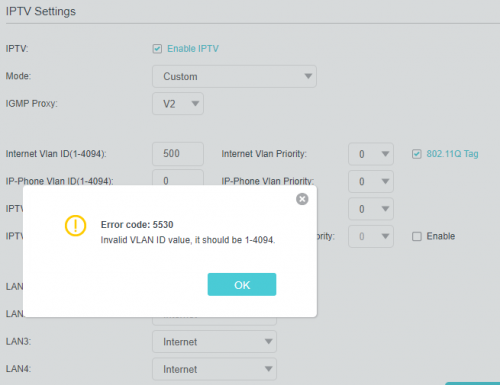 |
|
|
Nov 30 2018, 06:29 PM
Return to original view | Post
#9
|
|
Senior Member
1,138 posts Joined: May 2010
|
QUOTE(SilentVampire @ Nov 30 2018, 05:22 PM) Should work well. Try IGMP Proxy V3. now working..... i just put any no.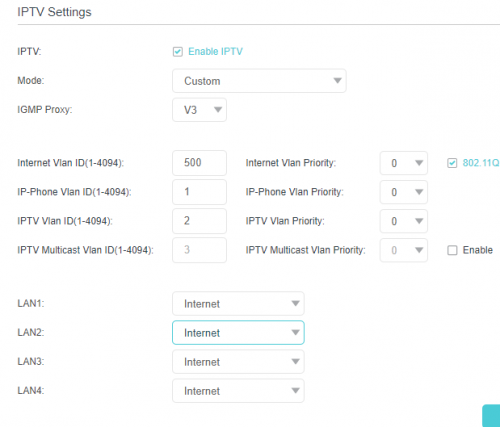 |
|
|
Dec 1 2018, 10:57 AM
Return to original view | IPv6 | Post
#10
|
|
Senior Member
1,138 posts Joined: May 2010
|
QUOTE(aaz2082 @ Nov 30 2018, 11:30 PM) Appreciate some guidance on this... modem to router cable?I've just installed the Archer C7 v5.0 router, as I recently got my Unifi speed upgraded to 500Mbps. I've used UGreen Cat6 cables for my LAN connections to: a) my laptop (LAN 3), b) HyppTv unit (Lan 1) c) my PS4 console (LAN 2) Everything works fine. Just that I have the following queries: 1. My Laptop Ethernet is able to support Gigabit Ethernet (i.e. 1000mbps). My only issue is that when I run a Speedtest (using the LAN Cable) to verify the sactual peed of my Internet connections, over several times I noted that both my download and upload speed seems to be capped at 100Mbps only, and not the full 500 MBps or at least close to that speed. Appreciate your kind reply as to the possible causes and solutions on this matter. Thank you. 2. My PS4 was purchased in December 2015. It is currently connected via LAN Cable (Cat6 Cable) to the Archer C7 router. When I tested the speed of the connection (both the upload/download), it seems to be capped to 100Mbps, and not the full 500 Mbps option. Appreciate your kind reply as to the possible causes and solutions on this matter. Thank you. |
|
|
Dec 10 2018, 10:23 AM
Return to original view | IPv6 | Post
#11
|
|
Senior Member
1,138 posts Joined: May 2010
|
Hi TP link
how to enable ipv6 and setting |
|
|
Dec 10 2018, 01:49 PM
Return to original view | IPv6 | Post
#12
|
|
Senior Member
1,138 posts Joined: May 2010
|
QUOTE(FusionXY @ Dec 10 2018, 01:21 PM) What's your router model? c3150 v2Thanks. |
|
|
Dec 10 2018, 07:46 PM
Return to original view | Post
#13
|
|
Senior Member
1,138 posts Joined: May 2010
|
QUOTE(FusionXY @ Dec 10 2018, 02:13 PM) Login to your router. not workGo to Advance section. Go to IPv6 and enable it. Select share with IPv4 PPPOE. Check Prefix Delegation is enabled. Thanks. 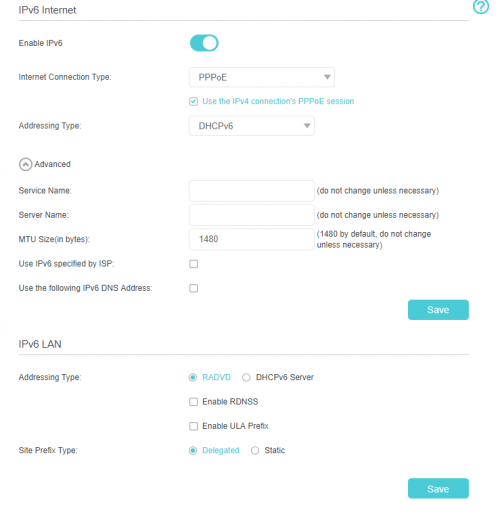 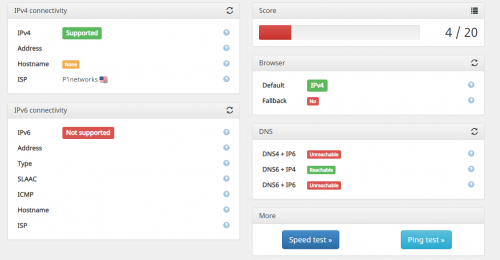 This post has been edited by Khalid21: Dec 10 2018, 07:48 PM |
|
|
|
|
|
Dec 10 2018, 07:49 PM
Return to original view | Post
#14
|
|
Senior Member
1,138 posts Joined: May 2010
|
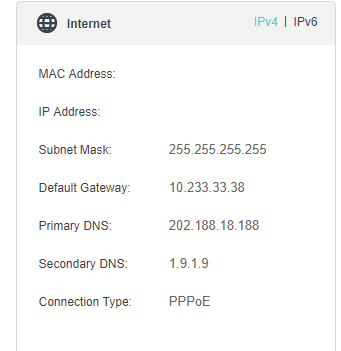 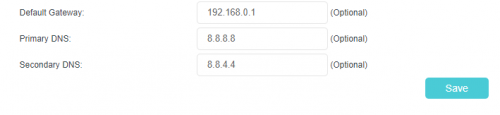 dns not update on status |
|
|
Dec 10 2018, 08:23 PM
Return to original view | Post
#15
|
|
Senior Member
1,138 posts Joined: May 2010
|
QUOTE(FusionXY @ Dec 10 2018, 08:01 PM) Hi. Try the Addressing type to DHCPv6 and the Site Prefix type to Static. can pm screenshot your settingIf still not work, need to guide via PM. Thanks. |
|
|
Dec 11 2018, 08:12 PM
Return to original view | Post
#16
|
|
Senior Member
1,138 posts Joined: May 2010
|
QUOTE(FusionXY @ Dec 10 2018, 08:41 PM) Wait I go back first. still not work...Thanks. tplink forum also complain about ipv6 not work on c3150....  |
|
|
Dec 12 2018, 10:17 AM
Return to original view | IPv6 | Post
#17
|
|
Senior Member
1,138 posts Joined: May 2010
|
QUOTE(FusionXY @ Dec 11 2018, 09:37 PM) Which version is it? Already latest...Try to update to the latest firmware. Thanks. |
|
|
Dec 14 2018, 10:09 AM
Return to original view | IPv6 | Post
#18
|
|
Senior Member
1,138 posts Joined: May 2010
|
QUOTE(calvin_gsc @ Dec 14 2018, 10:02 AM) FusionXY Does the firmware for C5400 show the device version as V2.1 if the sticker on the box is V2.1? I noticed new units of C5400 now is with V2.1 hardware sticker. then try enable ipv6...I have been offered a used C5400 that was purchased in Dec2017, seller showed me the firmware is below. 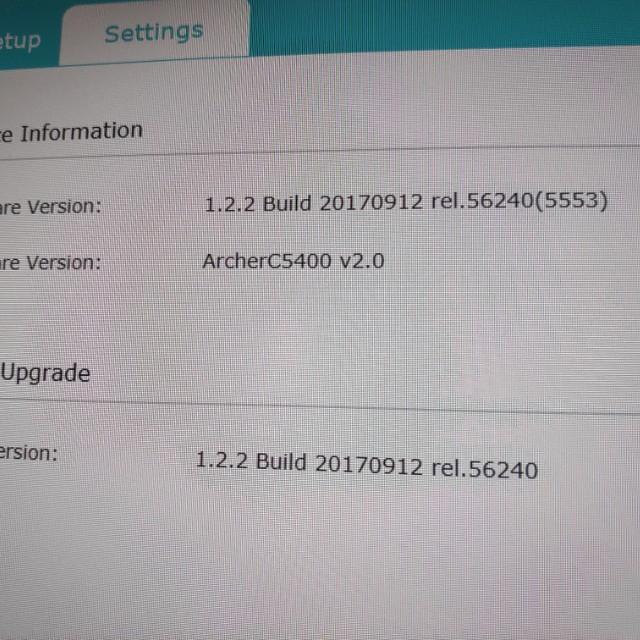 Does this mean the Hardware version for this C5400 is V2.0 and not V2.1? Thank you. |
|
|
Dec 14 2018, 11:23 AM
Return to original view | IPv6 | Post
#19
|
|
Senior Member
1,138 posts Joined: May 2010
|
QUOTE(calvin_gsc @ Dec 14 2018, 10:58 AM) Thanks, but i dont think ipv6 relates to my question? same case as mine box shown v2.1.. c3150I just want to know if current V2.1 H/W sticker on C5400 box/packaging mean the firmware will also indicate V2.1 H/W? Or will it show V2.0? I dont want to buy C5400 with older hardware. firmware using v2.0 |
|
|
Dec 14 2018, 02:18 PM
Return to original view | Post
#20
|
|
Senior Member
1,138 posts Joined: May 2010
|
QUOTE(calvin_gsc @ Dec 14 2018, 01:16 PM) Hi, thanks for your update. Just want to reconfirm. Your box v2.1 but router firmware still shows hardware version v2.0 like below? 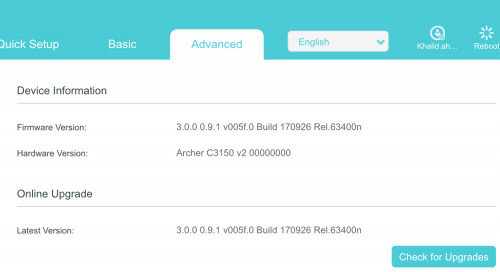 |
| Change to: |  0.1120sec 0.1120sec
 0.40 0.40
 7 queries 7 queries
 GZIP Disabled GZIP Disabled
Time is now: 6th December 2025 - 10:58 PM |
 Quote
Quote